Smart Access Gateway (SAG) application acceleration plans provide fast, reliable access to applications outside the Chinese mainland from your on-premises network connected to Alibaba Cloud.
Limitations
-
Currently, application acceleration plans can only be used by users in the Chinese mainland to accelerate access to applications in regions outside the Chinese mainland.
-
SAG virtual CPE (vCPE) instances do not support application acceleration plans.
-
For an SAG CPE instance, the associated SAG device must be version 2.4.0 or later.
If your SAG device is earlier than version 2.4.0, you must upgrade it. For instructions, see Update the version.
-
For an SAG app instance, the client software must be version 2.4.0 or later.
If your client software is earlier than version 2.4.0, you must upgrade it. For information about the latest client version, see Install the client.
Use cases
Application acceleration plans leverage the Alibaba Cloud premium network to reduce latency, jitter, and packet loss. When you associate a plan with an SAG instance, traffic from your on-premises network is automatically routed through Alibaba Cloud access points, enabling accelerated access to applications outside the Chinese mainland.
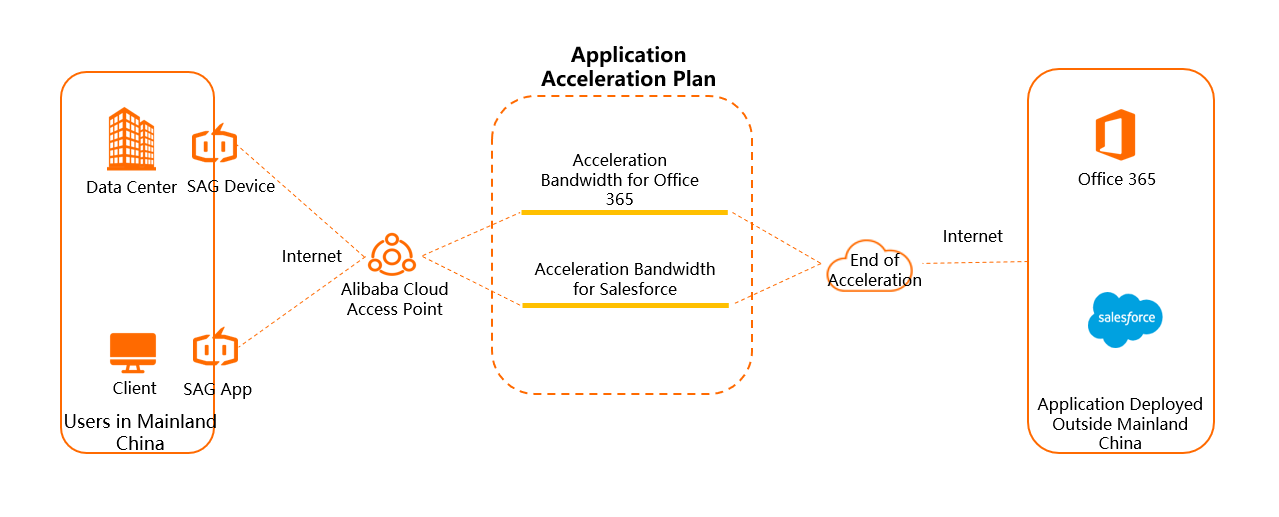
Procedure
-
Connect your on-premises network to Alibaba Cloud by using Smart Access Gateway. For more information, see the following tutorials:
-
Purchase an application acceleration plan. For instructions, see Purchase an application acceleration plan.
-
Associate the application acceleration plan with an SAG instance. For instructions, see Associate an application acceleration plan with an SAG instance.
Once associated, the on-premises network connected to the SAG instance can use the acceleration bandwidth.
-
Add an application acceleration rule. For instructions, see Add an application acceleration rule.
Application acceleration rules allocate bandwidth to different applications, enabling your on-premises network to access specific applications outside the Chinese mainland with reduced latency.
Instance and application bandwidth limits
The Maximum Bandwidth for Application Acceleration you specify for an SAG instance sets the maximum acceleration bandwidth for its connected on-premises network. This limit cannot exceed the total bandwidth of the associated application acceleration plan.
The Peak Bandwidth you specify for an application acceleration rule sets the peak acceleration bandwidth for a specific application across all associated SAG instances. The sum of the maximum bandwidths for all rules in a plan cannot exceed the plan's total bandwidth.
For more information, see Throttle application acceleration bandwidth from multiple dimensions.