When multiple on-premises networks share a single application acceleration plan across different Smart Access Gateway (SAG) instances, one instance can consume a disproportionate share of the plan's bandwidth. To prevent this, throttle bandwidth at three independent levels: application, SAG instance, and client account.
How throttling works
Each level applies a maximum bandwidth cap to a specific scope. Limits at each level are enforced independently, and the most restrictive limit applies when traffic passes through multiple levels simultaneously.
| Level | Scope | Constraint |
|---|---|---|
| Application | Traffic to a specific application | — |
| SAG instance | All on-premises networks associated with the instance | Cannot exceed the application acceleration plan's maximum bandwidth |
| Client account | A single client account of an SAG app instance | Cannot exceed the SAG app instance's maximum bandwidth |
Example configuration
The following figure illustrates how maximum bandwidth values relate across throttling levels.
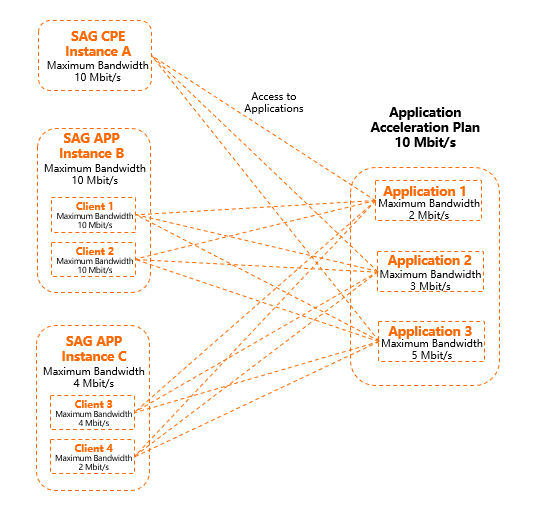
To accelerate access to Application 1, Application 2, and Application 3, a 10 Mbit/s application acceleration plan is associated with Instance A, Instance B, and Instance C, with the following maximum bandwidth values:
Application 1: 2 Mbit/s, Application 2: 3 Mbit/s, Application 3: 5 Mbit/s
Instance A: 10 Mbit/s, Instance B: 10 Mbit/s, Instance C: 4 Mbit/s
Client 1: 10 Mbit/s, Client 2: 10 Mbit/s, Client 3: 4 Mbit/s, Client 4: 4 Mbit/s
The following scenarios illustrate how limits interact:
Scenario 1: Only on-premises networks associated with Instance A access Application 1. The maximum available bandwidth is 2 Mbit/s — capped by Application 1's limit.
Scenario 2: On-premises networks associated with Instance A and Client 2 access Application 1 simultaneously. The combined bandwidth used by both does not exceed 2 Mbit/s — capped by Application 1's limit.
Scenario 3: Only Client 3 accesses Application 3. The maximum available bandwidth is 4 Mbit/s — capped by Client 3's limit.
Configure throttling at each level
Set maximum bandwidth values at each level using the following operations:
Application level — Set a maximum bandwidth value per application by managing acceleration rules. For details, see Manage an application acceleration rule.
SAG instance level — Set a maximum bandwidth value when associating an application acceleration plan with an SAG instance. For details, see Associate an application acceleration plan with an SAG instance.
Client account level — Set a maximum bandwidth value for individual client accounts of an SAG app instance. For details, see Throttle bandwidth resources for a client account.