Learn how to plan, implement, and maintain resource groups for permission isolation, cost allocation, and streamlined operations.
Overview
As cloud adoption grows, managing resources in a single account becomes increasingly complex. Use resource groups to organize resources by department, project, or environment for fine-grained authorization, cost allocation, and group-based monitoring.
Procedure
Phase 1: Plan and design resource groups
-
Check Alibaba Cloud services that support resource groups to confirm your resource types are supported.
-
Choose a grouping dimension such as project, environment, or department. Each resource should map to exactly one group, and the dimension should accommodate future growth. Changing dimensions later is costly.
-
Define a consistent naming convention. Names should be short, meaningful, and easy to identify.
-
Plan permissions using the principle of least privilege.
For more information, see Best practices for designing resource groups.
Phase 2: Implement resource grouping
Group newly created resources
Assign a resource group when you create each resource. This avoids later reclassification. If you skip this step, the resource goes to the default resource group.
Assign new resources to groups using either method:
-
In the Alibaba Cloud console, select a resource group during resource creation. Each service's documentation covers the specific steps.
The following figure shows selecting a resource group when purchasing an ECS instance.

-
Specify a resource group when creating a resource through an API operation. Each service's API documentation covers the details.
For example, when you call CreateInstance to create an ECS instance, you can specify a resource group for the instance by using the
ResourceGroupIdrequest parameter.
Group existing resources
Automatic transfer
Use Automatic Resource Transfer to move resources that meet specific conditions to target resource groups, reducing manual effort and O&M costs. Two types of transfer rules are supported:
-
Custom transfer rule: automatically transfers resources based on conditions such as names and tags.
-
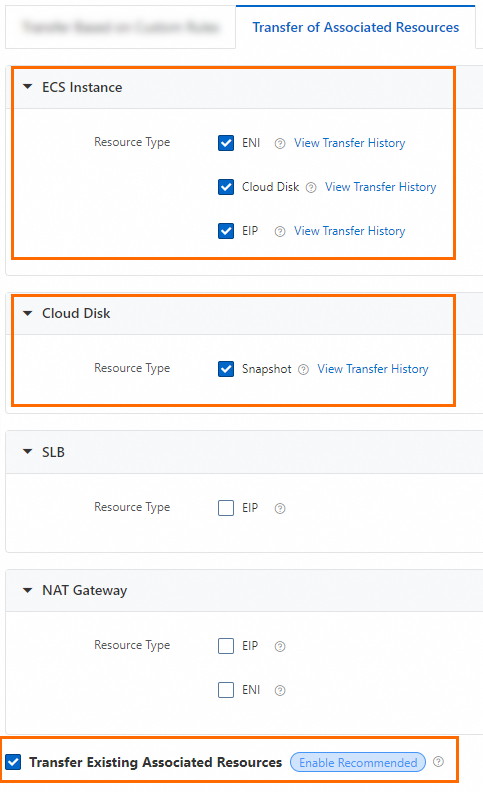
Transfer rule for associated resources: automatically moves associated resources to the same group as their primary resource.
You can combine both rule types. For example, use custom rules to transfer qualifying ECS instances, then enable associated resource transfer to move their disks, NICs, and other dependent resources together.
-
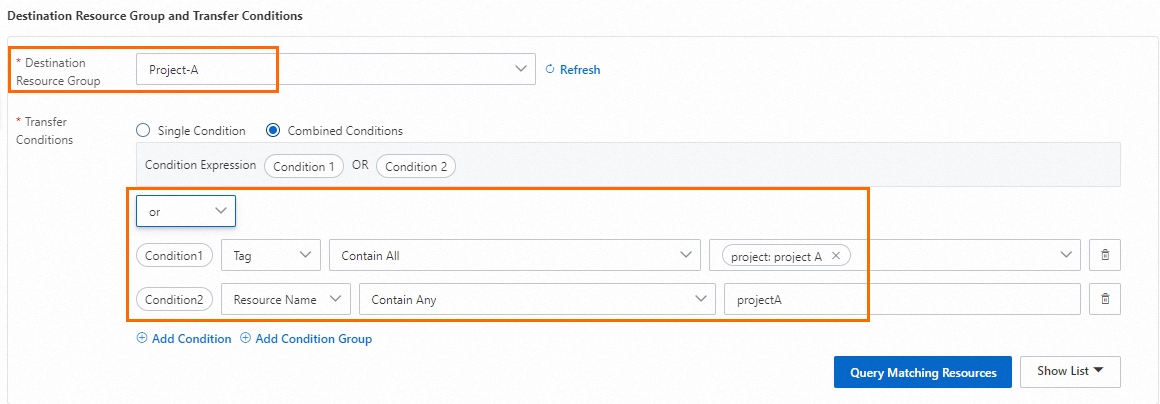
Set up a rule to transfer ECS instances tagged
project:project Aor namedprojectAto the resource group Project-A.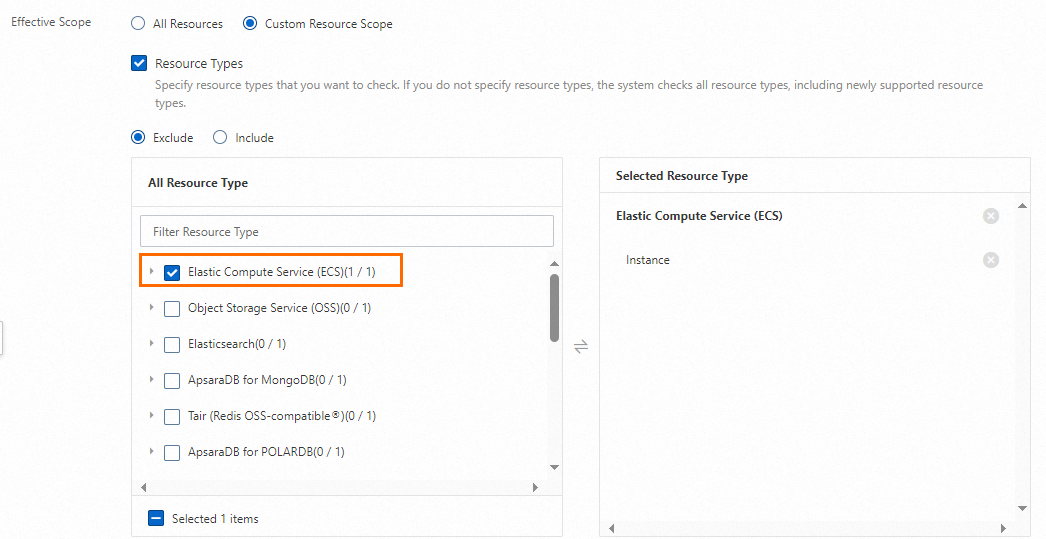
-
Enable Transfer Associated Resources and configure rules so that disks, ENIs, EIPs, and snapshots move to the same resource group as their ECS instances.
Manual transfer
For resources that do not support Automatic Resource Transfer, use one of the following methods:
-
Transfer resources in the Resource Center console or Resource Group console. Both provide a cross-service, cross-region view for searching and transferring resources. For more information, see Transfer resources between resource groups manually.
-
Use the API operation that is used to move multiple resources to a resource group at a time to batch-transfer resources across regions and services. This API operation is provided by Resource Group.
-
Call the resource transfer API of the specific Alibaba Cloud service. For more information, see the References column in Services that work with Resource Group.
Impact of resource transfer
Transferring resources across resource groups does not affect the resources themselves. The system does not restart the resource, and the network configurations and owner remain unchanged.
However, if you have an authorization policy based on a resource group, transferring a resource to another group may change RAM identity permissions. For example, if you grant operation permissions on resources in Resource Group A to members for Project A, those members can access the resources. If a resource is transferred from Resource Group A to Resource Group B, the members can no longer access that resource.
Before transferring resources, review the permission impact on RAM identities. Adjust RAM permissions promptly if needed.
Phase 3: Apply resource groups
After grouping is complete, use resource groups with other Alibaba Cloud services for access control, cost allocation, and automated O&M.
|
Service name |
Scenario |
Category |
References |
|
RAM |
Grant different RAM users permissions on specific resource groups to isolate resource access. |
Fine-grained access control |
|
|
Billing Management |
Create cost centers and query bills by resource group. |
Resource cost allocation |
|
|
Cloud Config |
Audit resource compliance in specific resource groups against multiple compliance standards. |
Compliance audit |
Use resource groups and Cloud Config to audit compliance of resources based on multiple standards |
|
Tag |
Automatically inherit resource group tags for resources added to or created in the group. |
Resource management |
|
|
CloudMonitor |
Create CloudMonitor application groups from resource groups for centralized monitoring. |
O&M management |
|
|
Resource Orchestration Service (ROS) |
Identify O&M resources by resource group, then use ROS for orchestrated management. |
O&M management |
Use resource groups and ROS to implement efficient O&M and management of resources |
|
CloudOps Orchestration Service (OOS) |
Identify O&M resources by resource group, then use OOS for orchestrated management. |
O&M management |
Streamline O&M with resource groups and CloudOps Orchestration Service |
Phase 4: Perform continuous governance
-
Adjust inappropriate resource groups
If your grouping dimensions no longer fit business needs, adjust them early. Delaying increases cost and risk. For example, a company grouped by department may later need per-system isolation. Switching to business-system groups requires updating all RAM permissions.
-
Clean up unused resource groups
Delete unused resource groups promptly to reduce management overhead. For example, if Project A ends, transfer or release its resources, then delete the group.