Create custom transfer rules based on resource name, tag, VPC, or vSwitch to automatically move matching resources to a specified resource group. The system scans existing resources and continuously monitors new or modified resources to enforce correct group assignments.
Prerequisites
The automatic resource transfer feature is enabled. Enable the Automatic Resource Transfer feature.
Create a custom transfer rule
-
Log on to the Resource Management console.
-
In the navigation pane on the left, choose .
-
On the Transfer Based on Custom Rules tab, click Create Rule.

-
Configure the custom transfer rule.
Parameter
Description
Rule Name
The rule name.
Up to 128 characters. Supports letters, digits, hyphens (
-), and underscores (_).Rule Description
The rule description.
Up to 512 characters.
Effective Scope
-
All Resources: The rule applies to all resources in your account that support custom rule-based automatic transfers. Resource types that support automatic transfers based on custom rules.
NoteIf you select All Resources, the rule automatically includes newly supported resource types by default.
-
Custom Resource Scope: Specify the rule scope by resource type, resource group, region, or specific resources.
Destination Resource Group
The resource group to transfer matching resources into.
Transfer Conditions
Resources that meet the transfer conditions are automatically moved to the destination resource group.
A transfer condition consists of:
-
Resource property: the condition key. Supported keys: name, tag, VPC, or vSwitch.
NoteTag-, VPC-, or vSwitch-based transfers only apply to resource types that have these properties. Verify your target resources in Resource Center before configuring rules.
-
Operator: the comparison logic. Supported operators: StringEqualsAny, NotStringEqualsAll, and StringMatch.
-
Expected value: the value to compare against resource properties. Format varies by operator.
Two methods are available:
-
Single Condition: suitable for simple resource filtering.
-
Combined Conditions: connect sub-conditions using
andororlogical operators with nesting support. Suitable for complex resource filtering.
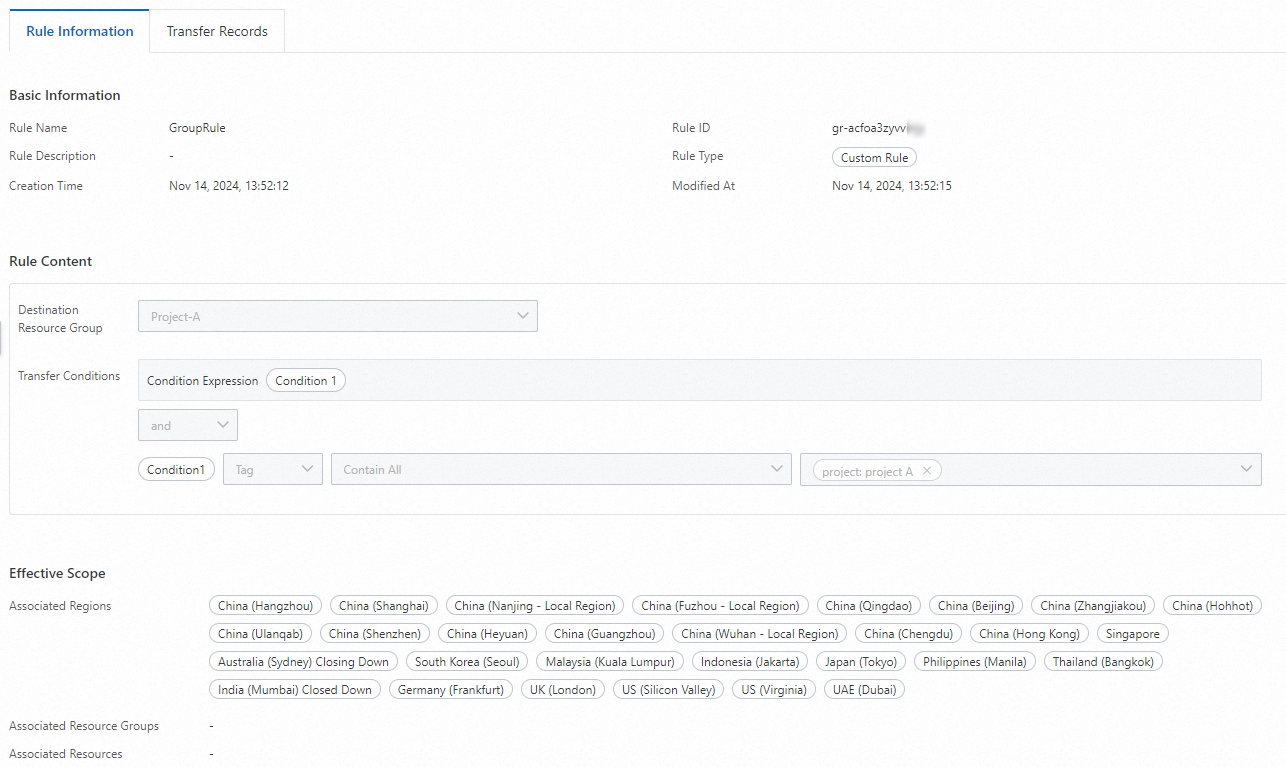
Example 1: Automatically transfer all resources tagged
project:project Ato the Project-A resource group.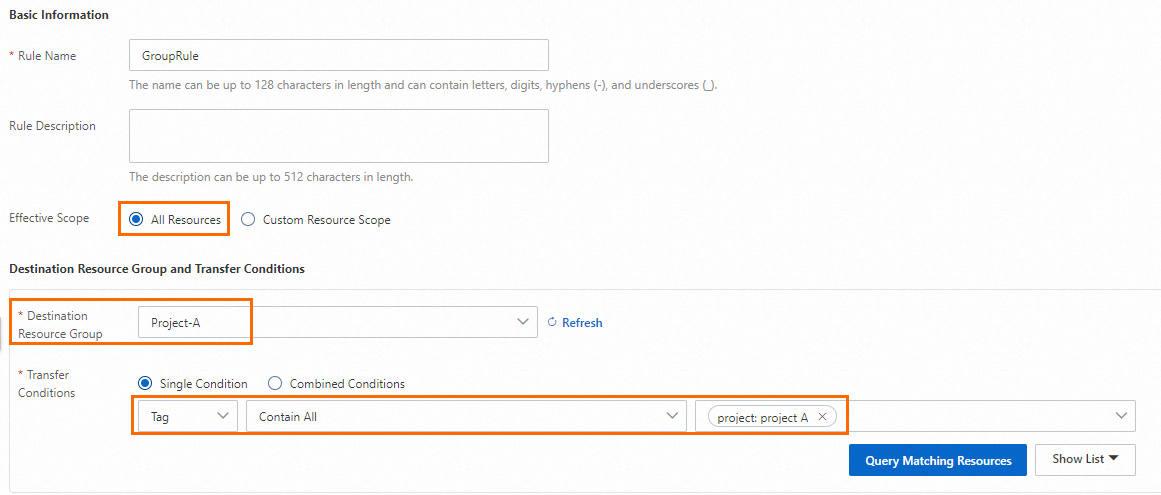
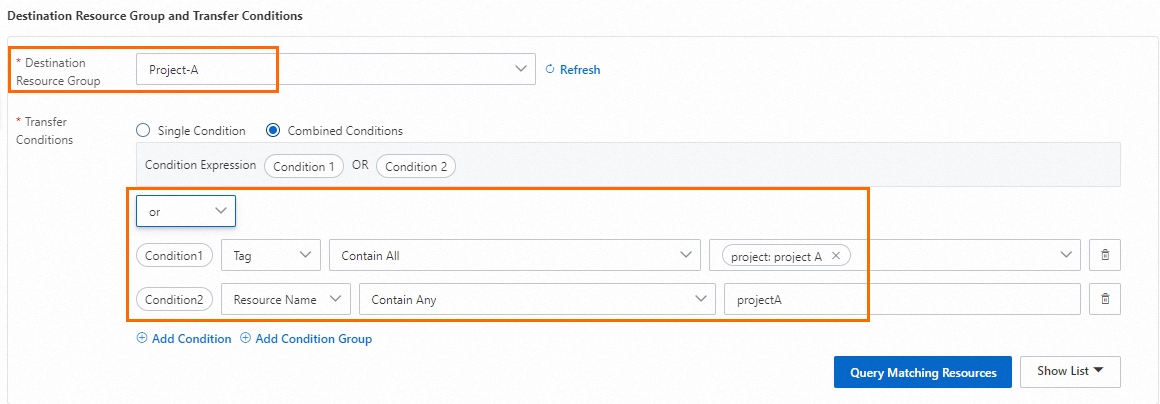
Example 2: Automatically transfer ECS instances tagged
project:project Aor whose names containprojectAto the Project-A resource group.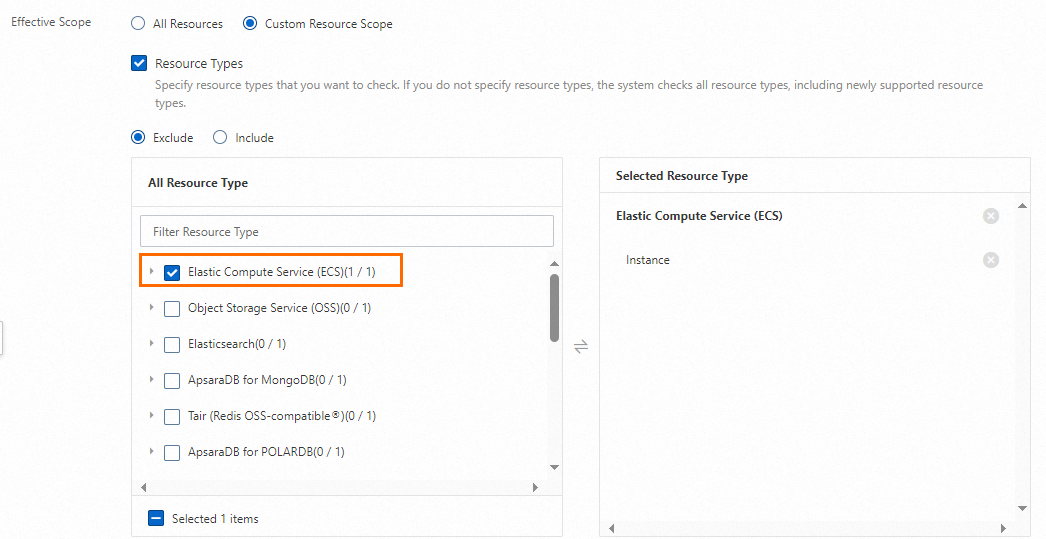
-
-
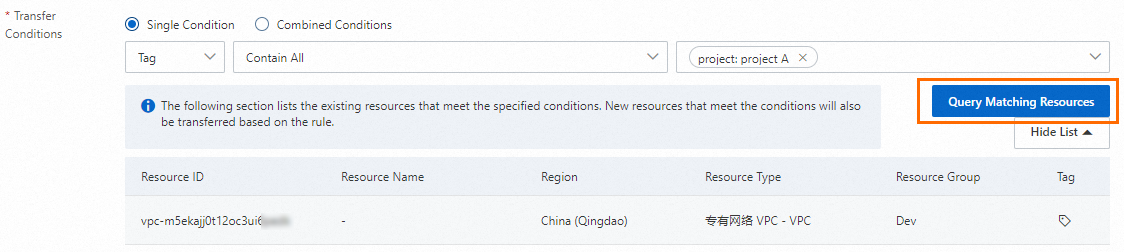
Click Query Matching Resources to preview matching resources and verify the results.
-
Click Confirm.
View a custom transfer rule and transfer records
-
Log on to the Resource Management console.
-
In the navigation pane on the left, choose .
-
On the Transfer Based on Custom Rules tab, find the target rule and click its name, or click View in the Actions column.
-
View rule details and transfer records.
-
On the Rule Information tab, view rule details, including basic information, rule content, and the effective scope.
-
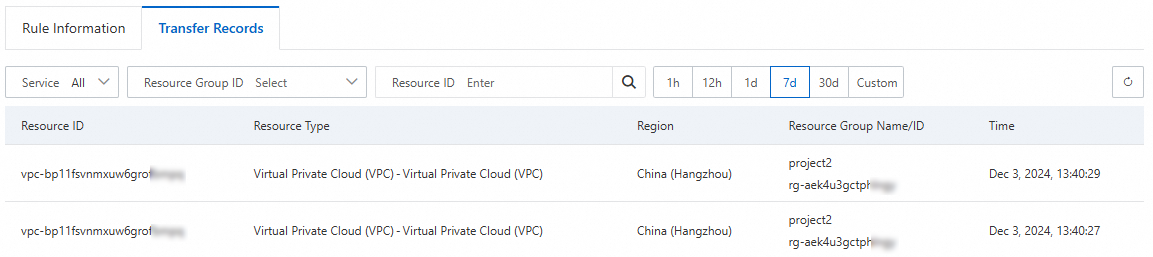
On the Transfer Records tab, view the history of successful resource transfers.
-
Modify or delete a custom transfer rule
-
Log on to the Resource Management console.
-
In the navigation pane on the left, choose .
-
On the Transfer Based on Custom Rules tab, find the target rule and click Modify or Delete in the Actions column.

After a rule is modified or deleted, automatic transfers based on that rule stop. Resources already transferred remain in their current resource groups.
Resource types that support custom rule-based automatic transfer
|
Cloud service |
Resource type name |
Resource type code |
|
ECS |
Instance |
ACS::ECS::Instance |
|
Dedicated host |
ACS::ECS::DedicatedHost |
|
|
Image |
ACS::ECS::Image |
|
|
AccessKey pair |
ACS::ECS::KeyPair |
|
|
Launch template |
ACS::ECS::LaunchTemplate |
|
|
Security group |
ACS::ECS::SecurityGroup |
|
|
Snapshot policy |
ACS::ECS::AutoSnapshotPolicy |
|
|
Object Storage Service (OSS) |
Bucket |
ACS::OSS::Bucket |
|
Elasticsearch |
Cluster |
ACS::Elasticsearch::Instance |
|
Logstash |
ACS::Elasticsearch::Logstash |
|
|
ApsaraDB for MongoDB |
Instance |
ACS::MongoDB::DBInstance |
|
Tair (Redis® OSS-Compatible) |
Instance |
ACS::Redis::DBInstance |
|
PolarDB |
Cluster |
ACS::PolarDB::DBCluster |
|
Application Load Balancer (ALB) |
Instance |
ACS::ALB::LoadBalancer |
|
ACL |
ACS::ALB::Acl |
|
|
Security policy |
ACS::ALB::SecurityPolicy |
|
|
Server group |
ACS::ALB::ServerGroup |
|
|
Classic Load Balancer (CLB) |
Instance |
ACS::SLB::LoadBalancer |
|
ACL |
ACS::SLB::AccessControlList |
|
|
Server certificate |
ACS::SLB::ServerCertificate |
|
|
Certificate authority (CA) certificate |
ACS::SLB::CACertificate |
|
|
ApsaraMQ for RocketMQ 5.0 |
Instance |
ACS::RocketMQ::Instance |
|
PolarDB for Xscale (PolarDB-X) 2.0 |
Cluster |
ACS::DRDS::PolarDBXInstance |
|
Container Service for Kubernetes (ACK) |
Cluster |
ACS::ACK::Cluster |
|
ApsaraDB RDS |
Instance |
ACS::RDS::DBInstance |
|
PolarDB-X 1.0 |
Cluster |
ACS::DRDS::DBInstance |
|
Bastionhost |
Instance |
ACS::Bastionhost::Instance |
|
Microservices Engine (MSE) |
Instance |
ACS::MSE::Cluster |
|
Gateway |
ACS::MSE::Gateway |
|
|
Network Load Balancer (NLB) |
Instance |
ACS::NLB::LoadBalancer |
|
Security policy |
ACS::NLB::SecurityPolicy |
|
|
Server group |
ACS::NLB::ServerGroup |
|
|
VPC |
VPC |
ACS::VPC::VPC |
|
DHCP options set |
ACS::VPC::DhcpOptionsSet |
|
|
Flow log |
ACS::VPC::FlowLog |
|
|
Gateway endpoint |
ACS::VPC::GatewayEndpoint |
|
|
High-availability virtual IP address (HAVIP) |
ACS::VPC::HaVip |
|
|
Prefix list |
ACS::VPC::PrefixList |
|
|
Filter for traffic mirroring |
ACS::VPC::TrafficMirrorFilter |
|
|
Traffic mirroring session |
ACS::VPC::TrafficMirrorSession |
|
|
VPN gateway |
ACS::VPN::VpnGateway |
|
|
AnalyticDB |
Cluster |
ACS::ADB::DBClusterLakeVersion |
|
Alibaba Cloud DNS (DNS) |
DNS record |
ACS::Alidns::Domain |
|
ApsaraMQ for Kafka |
Instance |
ACS::AliKafka::Instance |
|
Application Real-Time Monitoring Service (ARMS) |
Application monitoring |
ACS::ARMS::TraceApp |
|
Internet Shared Bandwidth |
Instance |
ACS::CBWP::CommonBandwidthPackage |
|
Cloud Enterprise Network (CEN) |
Bandwidth plan |
ACS::CEN::CenBandwidthPackage |
|
Instance |
ACS::CEN::CenInstance |
|
|
ApsaraDB for ClickHouse |
Cluster |
ACS::ClickHouse::DBCluster |
|
Container Registry |
Instance |
ACS::CR::Instance |
|
Edge Security Acceleration (ESA) |
Domain name |
ACS::DCDN::Domain |
|
DataWorks |
Workspace |
ACS::DataWorks::Project |
|
Data Transmission Service (DTS) |
Instance |
ACS::DTS::Instance |
|
Elastic Container Instance |
Container group |
ACS::ECI::ContainerGroup |
|
Enterprise Distributed Application Service (EDAS) |
Application |
ACS::EDAS::Application |
|
Cluster |
ACS::EDAS::Cluster |
|
|
Intelligent Computing LINGJUN |
Cluster |
ACS::Eflo::Cluster |
|
E-MapReduce |
Cluster |
ACS::EMR::Cluster |
|
Auto Scaling |
Scaling group |
ACS::ESS::ScalingGroup |
|
Realtime Compute for Apache Flink |
Workspace |
ACS::RealtimeCompute::VvpInstance |
|
Global Accelerator (GA) |
ACL |
ACS::Ga::Acl |
|
Bandwidth plan |
ACS::Ga::BandwidthPackage |
|
|
Basic instance |
ACS::Ga::BasicAccelerator |
|
|
AnalyticDB for PostgreSQL |
Cluster |
ACS::GPDB::DBInstance |
|
Cloud Backup |
SAP HANA instance |
ACS::HBR::HanaInstance |
|
Vault |
ACS::HBR::Vault |
|
|
Lindorm |
Instance |
ACS::Lindorm::Instance |
|
Hologres |
Instance |
ACS::Hologram::Instance |
|
Simple Log Service (SLS) |
Project |
ACS::SLS::Project |
|
ApsaraDB for HBase |
Cluster |
ACS::HBase::Cluster |
|
File Storage NAS (NAS) |
File system |
ACS::NAS::FileSystem |
|
CloudOps Orchestration Service (OOS) |
Common parameter |
ACS::OOS::Parameter |
|
Encrypted parameter |
ACS::OOS::SecretParameter |
|
|
Template |
ACS::OOS::Template |
|
|
Tablestore |
Instance |
ACS::OTS::Instance |
|
PrivateLink |
Endpoint |
ACS::PrivateLink::VpcEndpoint |
|
Endpoint service |
ACS::PrivateLink::VpcEndpointService |
|
|
Private Zone |
Private Zone |
ACS::PrivateZone::Zone |
|
Resource Orchestration Service (ROS) |
Stack |
ACS::ROS::Stack |