Learn the principles and best practices for designing resource groups to improve management efficiency and reduce operational risks.
Why use resource groups
As your cloud resources grow, categorize them early to improve management efficiency, reduce O&M risks, and cut unnecessary costs.
Resource groups categorize cloud resources within an Alibaba Cloud account. Each resource must belong to exactly one resource group. Benefits include:
-
Improved management efficiency: Deploy, monitor, and authorize resources by group. For example, create a resource group for a project, transfer its resources, and grant group-level permissions to team members. Members access only the resources in that group, not all resources of the account. When group resources change, you do not need to modify permission configurations for the members.
-
Reduced O&M risks: Each resource belongs to exactly one group, which eliminates conflicts from overlapping group operations. For example, batch-renaming resources by group carries no risk of conflicting with another group's operations on the same resource.
Design principles
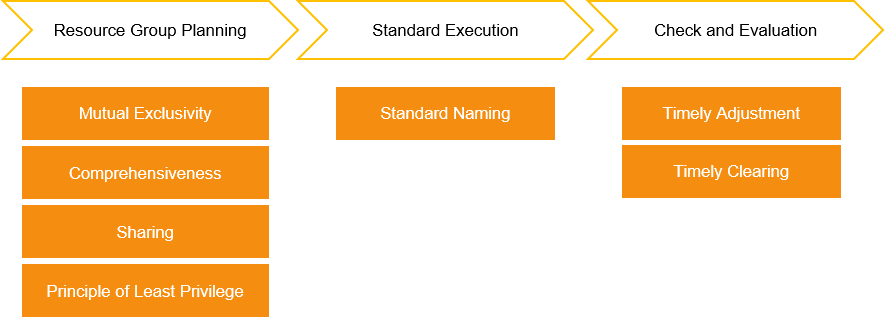
Design resource groups in three phases: resource group planning, standard execution, and check and evaluation. Follow these principles throughout:
-
Mutual exclusivity: Classification dimensions must not overlap. For example, classify by department, project, function, or environment — but not both "Project A" and "Project A in Production", since these overlap. For shared resources, apply the sharing principle.
-
Comprehensiveness: Ensure all resources fit into an appropriate group, and account for future business growth. Avoid using the default resource group — it is system-generated and cannot be deleted. Unclassified resources are automatically added to the default resource group. Use custom resource groups instead.
-
Sharing: Place resources shared across projects in a dedicated resource group with a distinct name. For example, if two business systems share a VPC, create a dedicated "Shared Resources" group for the VPC alongside per-project groups.
-
Least privilege: Grant only the minimum required permissions per resource group. For example, if an enterprise groups by business system but not by environment, development users may gain production access — a security and stability risk.
-
Standard naming: Use simple, consistent, and business-relevant names. For example, "Project A - Production" clearly identifies both the project and environment, while "Production" alone lacks business context.
-
Timely adjustment: Reclassify resource groups when business needs change. For example, grouping by department may suffice initially, but as each department develops multiple business systems, regroup by business system for proper permission isolation.
-
Timely clearing: Delete unused resource groups promptly. For example, if Project A is decommissioned, transfer or release its resources and delete the resource group to reduce management overhead.
Best practices
An Internet enterprise runs two business systems, each deployed in testing and production environments with various cloud resources. Beyond the business department, the finance, O&M, and compliance audit departments each have distinct resource management needs:
-
Business department: Restrict resource access to each business system's members. Quickly identify, monitor, and manage resources per business system.
-
Finance department: Track resource costs enterprise-wide and per business system.
-
O&M department: Perform differentiated O&M per business system. For example, run nightly exception inspections on Business System A resources at 02:00.
-
Compliance audit department: Audit all resources for compliance with laws and regulations, industry standards, and internal policies. Apply different compliance standards per business system.
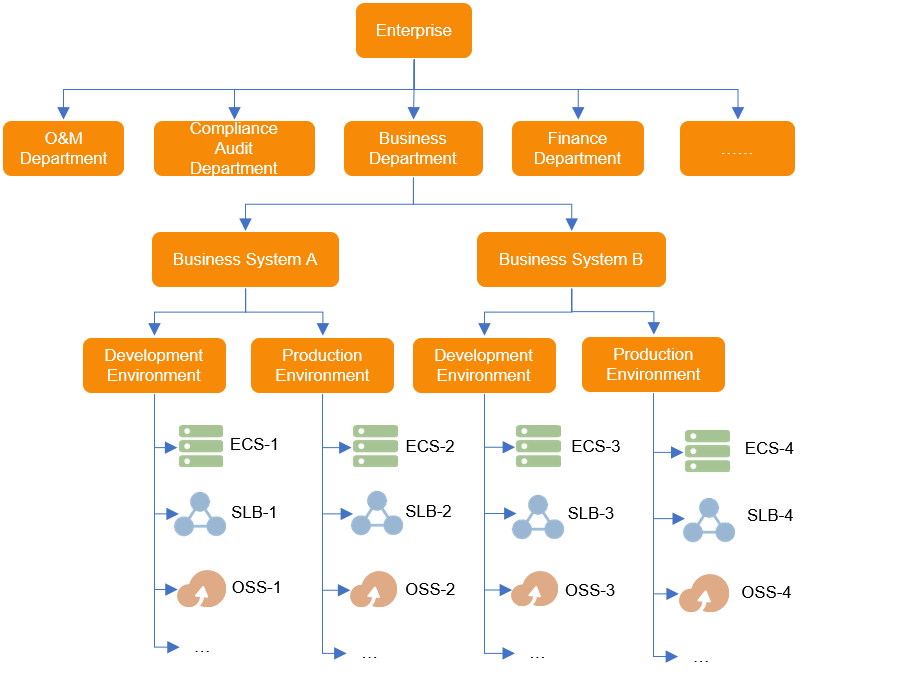
To meet these requirements, the enterprise creates resource groups along two dimensions — business system and environment: Business System A in Development Environment, Business System A in Production Environment, Business System B in Development Environment, and Business System B in Production Environment. Permissions are granted per group to the relevant personnel.
After all resources are classified into groups, each department's management needs are addressed as follows:
|
Department/Personnel |
Requirement |
Implementation |
References |
|
Permission administrator |
Fine-grained access control |
Grant different resource group permissions to different personnel through RAM for fine-grained access control. |
|
|
Business department |
Resource search and management |
Search for resources by resource group in Resource Center to identify resources for each business system. |
|
|
Differentiated resource monitoring |
Create application groups from resource groups in CloudMonitor and configure per-business-system monitoring settings. |
||
|
Finance department |
Cost management and allocation |
Allocate costs by resource group through cost centers to track fees per business system. |
|
|
O&M department |
Differentiated resource O&M |
Identify resources by group and use CloudOps Orchestration Service (OOS) and Resource Orchestration Service (ROS) for differentiated O&M per group. |
|
|
Compliance audit department |
Differentiated compliance audit |
Create per-group audit rules with different standards in Cloud Config for differentiated compliance auditing. |
Use resource groups and Cloud Config to audit compliance of resources based on multiple standards |