Learn how to build a streaming data lakehouse using Realtime Compute for Apache Flink, Apache Paimon, and StarRocks.
Background
As businesses become more digitized, the demand for timely data is increasing. The traditional method of building an offline data warehouse involves scheduling offline jobs to periodically merge new data into layered structures, such as ODS, DWD, DWS, and ADS. However, this approach suffers from two significant issues: high latency and high cost. Offline jobs are typically scheduled hourly or even daily, so downstream consumers can only see data that is at least an hour or a day old. In addition, updates often require overwriting entire partitions. This inefficient process re-reads all original data in a partition to merge new changes.
Building a streaming data lakehouse with Realtime Compute for Apache Flink and Apache Paimon solves the latency and cost problems of traditional offline data warehouses. Flink's real-time processing capabilities enable data to flow continuously between warehouse layers. Meanwhile, Paimon's efficient update capabilities deliver data changes to downstream consumers with only minute-level latency. As a result, the streaming data lakehouse offers significant advantages in both low latency and cost-effectiveness.
For more information about Apache Paimon, see its Features and the official Apache Paimon website.
Architecture and benefits
Architecture
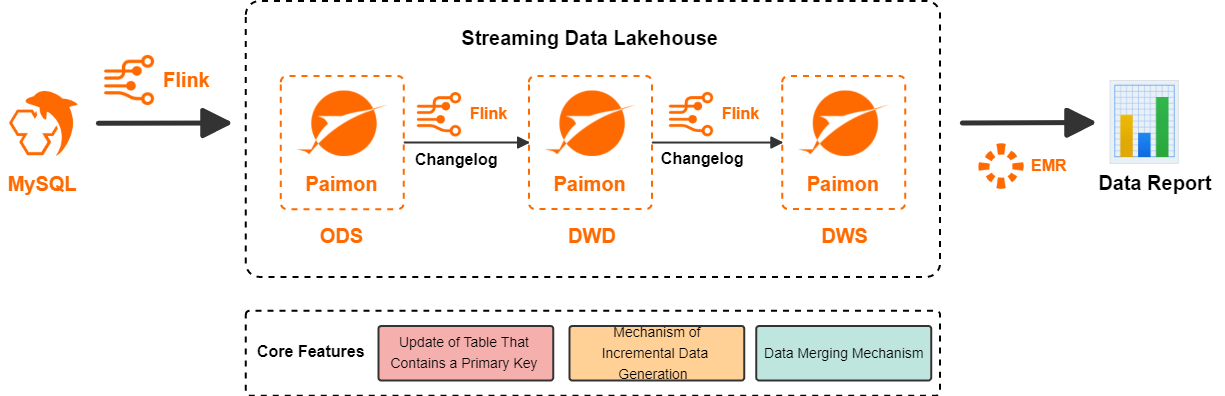
Realtime Compute for Apache Flink is a powerful stream processing engine that efficiently processes massive volumes of real-time data. Paimon is a unified lake storage format for both streaming and batch processing that supports high-throughput updates and low-latency queries. Paimon is deeply integrated with Flink to provide an all-in-one streaming lakehouse solution. The following shows the architecture for building a streaming lakehouse by using Flink and Paimon.
-
Flink writes data from data sources to Paimon, creating the ODS layer.
-
Flink subscribes to the changelog from the ODS layer, transforms the data, and writes the data back to Paimon as the DWD layer.
-
Flink subscribes to the changelog from the DWD layer, transforms the data, and writes the data back to Paimon as the DWS layer.
-
Finally, StarRocks in E-MapReduce reads the Paimon external table to serve application queries.
Benefits
This solution offers the following benefits:
-
Each data layer in Paimon propagates changes to downstream systems within minutes. This reduces the latency of a traditional offline data warehouse from hours or even days to minutes.
-
Each data layer in Paimon directly ingests change data without overwriting partitions. This significantly reduces the costs of data updates and corrections in a traditional offline data warehouse and resolves the challenges of querying, updating, and correcting data in intermediate layers.
-
The solution features a unified model and a simplified architecture. The logic of the ETL pipeline is implemented using Flink SQL. Data in the ODS, DWD, and DWS layers is stored in Paimon. This reduces architectural complexity and improves data processing efficiency.
This solution relies on three core capabilities of Paimon, as detailed in the following table.
|
Core capability |
Description |
|
Primary key table updates |
Paimon internally uses an LSM tree data structure to enable efficient data updates. For more information about Paimon primary key tables and its underlying data structures, see Primary Key Table and File Layouts. |
|
Changelog Producer |
Paimon can generate complete incremental data for any input data stream, where each |
|
Merge Engine |
When a Paimon primary key table receives multiple records that have the same primary key, the Merge Engine merges these records into a single record to maintain key uniqueness. Paimon supports a wide range of merge behaviors, such as |
Use cases
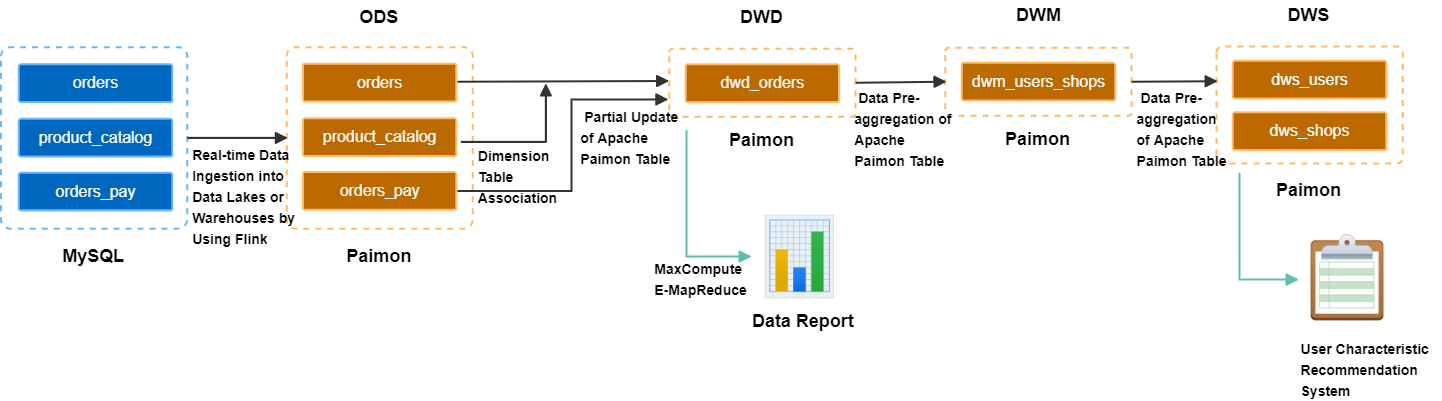
This article uses an e-commerce platform as an example to demonstrate how to build a streaming data lakehouse. This solution processes and cleans data to support queries from upstream applications. By using data layering, this solution enables data reuse across multiple business scenarios, such as transaction dashboards, behavioral data analysis, user profile tags, and personalized recommendations.
-
Build the ODS layer: Real-time ingestion from the business database
Flink ingests three business tables from MySQL,orders,orders_pay, andproduct_catalog, into OSS in real time. This data, stored in the Paimon format, constitutes the ODS layer. -
Build the DWD layer: Themed wide table
Theorders,product_catalog, andorders_paytables are joined using Paimon's partial-update merge mechanism, creating a themed wide table for the DWD layer and a changelog with minute-level latency. -
Build the DWS layer: Metric calculation
Flink consumes the changelog from the wide table in real time. It uses Paimon's pre-aggregation merge mechanism to create an intermediate aggregation table,dwm_users_shops. This process ultimately generates two tables for the DWS layer:dws_usersfor user aggregation metrics anddws_shopsfor shop aggregation metrics.
Prerequisites
-
Activate Data Lake Formation (DLF). We recommend using DLF 2.5 as the storage service. For more information, see Get started with DLF.
-
Create a Realtime Compute for Apache Flink workspace. For more information, see Create a workspace.
-
Create a Serverless StarRocks instance. For more information, see Get started with a Serverless StarRocks instance.
Your StarRocks instance, DLF, and Flink workspace must be in the same region.
Limits
This streaming lakehouse solution requires Ververica Runtime (VVR) 11.1.0 or later.
Build a streaming data lakehouse
Prepare the MySQL CDC data source
This tutorial uses ApsaraDB RDS for MySQL as an example. You create a database named order_dw and three tables with sample data.
-
(Deprecated. Redirects to Step 1.) Create an ApsaraDB RDS for MySQL instance.
ImportantEnsure the ApsaraDB RDS for MySQL instance and your Realtime Compute for Apache Flink workspace are in the same VPC. If they are in different VPCs, see How do I access other services across VPCs?
-
(Deprecated. Redirects to Step 1.) Create a database and an account.
Create a database named order_dw. Then, create a privileged account or a standard account with read and write permissions for the order_dw database.
Create three tables and insert data into them.
CREATE TABLE `orders` (
  order_id bigint not null primary key,
  user_id varchar(50) not null,
  shop_id bigint not null,
  product_id bigint not null,
  buy_fee bigint not null,
  create_time timestamp not null,
  update_time timestamp not null default now(),
  state int not null
);
CREATE TABLE `orders_pay` (
  pay_id bigint not null primary key,
  order_id bigint not null,
  pay_platform int not null,
  create_time timestamp not null
);
CREATE TABLE `product_catalog` (
  product_id bigint not null primary key,
  catalog_name varchar(50) not null
);
-- Prepare data
INSERT INTO product_catalog VALUES(1, 'phone_aaa'),(2, 'phone_bbb'),(3, 'phone_ccc'),(4, 'phone_ddd'),(5, 'phone_eee');
INSERT INTO orders VALUES
(100001, 'user_001', 12345, 1, 5000, '2023-02-15 16:40:56', '2023-02-15 18:42:56', 1),
(100002, 'user_002', 12346, 2, 4000, '2023-02-15 15:40:56', '2023-02-15 18:42:56', 1),
(100003, 'user_003', 12347, 3, 3000, '2023-02-15 14:40:56', '2023-02-15 18:42:56', 1),
(100004, 'user_001', 12347, 4, 2000, '2023-02-15 13:40:56', '2023-02-15 18:42:56', 1),
(100005, 'user_002', 12348, 5, 1000, '2023-02-15 12:40:56', '2023-02-15 18:42:56', 1),
(100006, 'user_001', 12348, 1, 1000, '2023-02-15 11:40:56', '2023-02-15 18:42:56', 1),
(100007, 'user_003', 12347, 4, 2000, '2023-02-15 10:40:56', '2023-02-15 18:42:56', 1);
INSERT INTO orders_pay VALUES
(2001, 100001, 1, '2023-02-15 17:40:56'),
(2002, 100002, 1, '2023-02-15 17:40:56'),
(2003, 100003, 0, '2023-02-15 17:40:56'),
(2004, 100004, 0, '2023-02-15 17:40:56'),
(2005, 100005, 0, '2023-02-15 18:40:56'),
(2006, 100006, 0, '2023-02-15 18:40:56'),
(2007, 100007, 0, '2023-02-15 18:40:56');
Manage metadata
Create a Paimon catalog
-
Log on to the Realtime Compute for Apache Flink console.
-
In the left navigation pane, go to Metadata Management and click Create Catalog.
-
On the Built-in Catalog tab, click Apache Paimon, and then click Next.
-
Configure the following parameters, select DLF as the storage type, and click OK.
Parameter
Description
Required
Notes
metastore
The metastore type.
Yes
In this example, select DLF.
catalog name
The name of the DLF data catalog.
ImportantIf you use a RAM user or a RAM role, ensure that the RAM user or RAM role has the required permissions to read data from and write data to DLF. For more information, see Manage data permissions.
Yes
We recommend that you use DLF 2.5. This version eliminates the need to enter information such as an AccessKey pair and allows you to quickly select an existing DLF data catalog. For information about how to create a data catalog, see Data catalog.
After you create a data catalog named paimoncatalog, select it from the list.
-
In the data catalog, create a database named order_dw to synchronize all tables from the MySQL order_dw database.
In the left navigation pane, choose , and click New to open a temporary query window.
-- Use the paimoncatalog data source
USE CATALOG paimoncatalog;
-- Create the order_dw database
CREATE DATABASE order_dw;
The returned message
The following statement has been executed successfully!indicates that the database was created successfully.
For more information about how to use Paimon catalogs, see Manage Paimon catalogs.
Create a MySQL catalog
-
On the Metadata Management page, click Create Catalog.
-
On the Built-in Catalog tab, click MySQL, and then click Next.
-
Configure the following parameters and click OK to create a MySQL catalog named mysqlcatalog.
Parameter
Description
Required
Notes
catalog name
The catalog name.
Yes
Enter a custom name. This tutorial uses mysqlcatalog.
hostname
The IP address or hostname of the MySQL database.
Yes
For more information, see View and manage instance connection endpoints and ports. Because the ApsaraDB RDS for MySQL instance and the Realtime Compute for Apache Flink workspace are in the same VPC, enter the internal endpoint.
port
The port number of the MySQL database service. The default value is 3306.
No
For more information, see View and manage instance connection endpoints and ports.
default-database
The name of the default MySQL database.
Yes
Enter the name of the database to synchronize, which is order_dw in this tutorial.
username
The username for the MySQL database service.
Yes
Use the account created in Prepare the MySQL CDC data source.
password
The password for the MySQL database service.
Yes
Use the password for the account created in Prepare the MySQL CDC data source.
Build the ODS layer: Real-time ingestion
Build the ODS layer in a single step by using a Flink CDC data ingestion job in YAML format to synchronize data from MySQL to Paimon.
-
Create and start the YAML data ingestion job.
-
In the Realtime Compute for Apache Flink console, go to the page and create a blank YAML draft job named ods.
-
Copy the following code into the editor and update parameters such as the username and password.
source:
  type: mysql
  name: MySQL Source
  hostname: rm-bp1e********566g.mysql.rds.aliyuncs.com
  port: 3306
  username: ${secret_values.username}
  password: ${secret_values.password}
  tables: order_dw.\.*  # Use a regular expression to read all tables in the order_dw database.
  # (Optional) Synchronize data from newly created tables during the incremental phase.
  scan.binlog.newly-added-table.enabled: true
  # (Optional) Synchronize table and field comments.
  include-comments.enabled: true
  # (Optional) Prioritize the distribution of unbounded chunks to prevent potential TaskManager OutOfMemory issues.
  scan.incremental.snapshot.unbounded-chunk-first.enabled: true
  # (Optional) Enable parsing filters to accelerate reads.
  scan.only.deserialize.captured.tables.changelog.enabled: true
sink:
  type: paimon
  name: Paimon Sink
  catalog.properties.metastore: rest
  catalog.properties.uri: http://cn-beijing-vpc.dlf.aliyuncs.com
  catalog.properties.warehouse: paimoncatalog
  catalog.properties.token.provider: dlf
pipeline:
  name: MySQL to Paimon Pipeline
Parameter
Description
Required
Example
catalog.properties.metastoreThe metastore type. Set this to rest.
Yes
rest
catalog.properties.token.providerThe token provider. Set this to DLF.
Yes
DLF
catalog.properties.uriThe access URI for the DLF Rest Catalog Server is
http://[region-id]-vpc.dlf.aliyuncs.com. For more information about the Region ID, see Service Endpoints.Yes
http://cn-beijing-vpc.dlf.aliyuncs.com
catalog.properties.warehouseThe name of the DLF catalog.
Yes
paimoncatalog
hostnameThe IP address or hostname of the MySQL database. For more information, see View and manage instance connection endpoints and ports. Because the ApsaraDB RDS for MySQL instance and the Realtime Compute for Apache Flink workspace are in the same VPC, enter the internal endpoint.
Yes
rm-bp1e********566g.mysql.rds.aliyuncs.com
usernameThe username for the MySQL database. We recommend that you use secrets management. For more information, see Manage variables.
Yes
${secret_values.username}
passwordThe password for the MySQL database. We recommend that you use secrets management. For more information, see Manage variables.
Yes
${secret_values.password}
To optimize Paimon's write performance, see Paimon performance tuning.
-
In the upper-right corner, click Deploy.
-
In the , click Start in the Actions column of the newly deployed ODS job, and select stateless start to start the job. For more information about job startup configurations, see Job Startup.
-
-
View the data in the three tables that were synchronized from MySQL to Paimon.
In the Realtime Compute for Apache Flink console, go to the page. On the Query Editor tab, copy the following code into the editor, select the statement, and then click Run in the upper-right corner.
SELECT * FROM paimoncatalog.order_dw.orders ORDER BY order_id;After the query is executed, it returns seven order records from the orders table. The result includes the order_id (100001 to 100007), user_id, shop_id, product_id, buy_fee (1000 to 5000), create_time, update_time, and state columns. The value for state is 1 for all records.
Build the DWD layer: themed wide table
-
Create the dwd_orders wide table
In the Realtime Compute for Apache Flink console, go to the page. On the Query Editor tab, copy the following code into the editor, select the statement, and then click Run in the upper-right corner.
CREATE TABLE paimoncatalog.order_dw.dwd_orders (
    order_id BIGINT,
    order_user_id STRING,
    order_shop_id BIGINT,
    order_product_id BIGINT,
    order_product_catalog_name STRING,
    order_fee BIGINT,
    order_create_time TIMESTAMP,
    order_update_time TIMESTAMP,
    order_state INT,
    pay_id BIGINT,
    pay_platform INT COMMENT 'platform 0: phone, 1: pc',
    pay_create_time TIMESTAMP,
    PRIMARY KEY (order_id) NOT ENFORCED
) WITH (
    'merge-engine' = 'partial-update', -- Use the partial-update merge engine to generate the wide table
    'changelog-producer' = 'lookup' -- Use the lookup changelog producer to generate changelogs with low latency
);
The message
The following statement has been executed successfully!indicates a successful creation. -
Consume ODS change data
In the Realtime Compute for Apache Flink console, go to the page. Create a new SQL streaming job named dwd, copy the following code into the SQL editor, click Deploy, and then start the job using Stateless Start.
This SQL job joins the orders table with the product_catalog table in a dimension table join. It then writes the result to the dwd_orders table along with data from the orders_pay table. Paimon's partial-update merge mechanism joins records from the orders and orders_pay tables that have the same order_id.
SET 'execution.checkpointing.max-concurrent-checkpoints' = '3'; SET 'table.exec.sink.upsert-materialize' = 'NONE'; SET 'execution.checkpointing.interval' = '10s'; SET 'execution.checkpointing.min-pause' = '10s'; -- Paimon does not currently support multiple INSERT statements into the same table within a single job. Therefore, UNION ALL is used here. INSERT INTO paimoncatalog.order_dw.dwd_orders SELECT o.order_id, o.user_id, o.shop_id, o.product_id, dim.catalog_name, o.buy_fee, o.create_time, o.update_time, o.state, NULL, NULL, NULL FROM paimoncatalog.order_dw.orders o LEFT JOIN paimoncatalog.order_dw.product_catalog FOR SYSTEM_TIME AS OF proctime() AS dim ON o.product_id = dim.product_id UNION ALL SELECT order_id, NULL, NULL, NULL, NULL, NULL, NULL, NULL, NULL, pay_id, pay_platform, create_time FROM paimoncatalog.order_dw.orders_pay; -
View data in dwd_orders
In the Realtime Compute for Apache Flink console, go to the page. On the Query Editor tab, copy the following code into the editor, select the statement, and then click Run in the upper-right corner.
SELECT * FROM paimoncatalog.order_dw.dwd_orders ORDER BY order_id;After the query is executed successfully, it returns seven order records from the
dwd_orderswide table. The result includes eight fields:order_id,order_user_id,order_shop_id,order_product_id,order_product_catalog_name,order_fee,order_create_time, andorder_update_time. Theorder_idranges from 100001 to 100007, order fees range from 1000 to 5000, and all creation times are on 2023-02-15.
Build the DWS layer: metric calculation
-
Create the DWS layer aggregate tables dws_users and dws_shops.
In the Realtime Compute for Apache Flink console, go to the page. On the Query Editor tab, copy the following code into the editor, select the statement, and then click Run in the upper-right corner.
-- User dimension aggregate table.
CREATE TABLE paimoncatalog.order_dw.dws_users (
    user_id STRING,
    ds STRING,
    paid_buy_fee_sum BIGINT COMMENT 'Total amount paid on the current day',
    PRIMARY KEY (user_id, ds) NOT ENFORCED
) WITH (
    'merge-engine' = 'aggregation', -- Use the aggregation merge engine to generate the aggregate table.
    'fields.paid_buy_fee_sum.aggregate-function' = 'sum' -- Aggregate the result by summing the data in paid_buy_fee_sum.
    -- Because the dws_users table is not consumed by downstream streaming jobs, you do not need to specify a changelog producer.
);
-- Shop dimension aggregate table.
CREATE TABLE paimoncatalog.order_dw.dws_shops (
    shop_id BIGINT,
    ds STRING,
    paid_buy_fee_sum BIGINT COMMENT 'Total amount paid on the current day',
    uv BIGINT COMMENT 'Total number of distinct purchasing users on the current day',
    pv BIGINT COMMENT 'Total number of purchases by users on the current day',
    PRIMARY KEY (shop_id, ds) NOT ENFORCED
) WITH (
    'merge-engine' = 'aggregation', -- Use the aggregation merge engine to generate the aggregate table.
    'fields.paid_buy_fee_sum.aggregate-function' = 'sum', -- Aggregate the result by summing the data in paid_buy_fee_sum.
    'fields.uv.aggregate-function' = 'sum', -- Aggregate the result by summing the data in uv.
    'fields.pv.aggregate-function' = 'sum' -- Aggregate the result by summing the data in pv.
    -- Because the dws_shops table is not consumed by downstream streaming jobs, you do not need to specify a changelog producer.
);
-- To calculate both user- and shop-dimension aggregate tables simultaneously, create an intermediate table with a primary key of user and shop.
CREATE TABLE paimoncatalog.order_dw.dwm_users_shops (
    user_id STRING,
    shop_id BIGINT,
    ds STRING,
    paid_buy_fee_sum BIGINT COMMENT 'Total amount a user paid in a shop on the current day',
    pv BIGINT COMMENT 'Number of times a user purchased from a shop on the current day',
    PRIMARY KEY (user_id, shop_id, ds) NOT ENFORCED
) WITH (
    'merge-engine' = 'aggregation', -- Use the aggregation merge engine to generate the aggregate table.
    'fields.paid_buy_fee_sum.aggregate-function' = 'sum', -- Aggregate the result by summing the data in paid_buy_fee_sum.
    'fields.pv.aggregate-function' = 'sum', -- Aggregate the result by summing the data in pv.
    'changelog-producer' = 'lookup', -- Use the lookup changelog producer to generate changelogs with low latency.
    -- Intermediate tables in the DWM layer are not typically queried directly by upstream applications, so they can be optimized for write performance.
    'file.format' = 'avro', -- Using the Avro row-based storage format provides more efficient write performance.
    'metadata.stats-mode' = 'none' -- Omitting statistics increases the cost of OLAP queries (with no impact on continuous stream processing) but improves write performance.
);
The message
The following statement has been executed successfully!indicates that the creation was successful. -
Consume change data from the DWD layer table dwd_orders.
In the Realtime Compute for Apache Flink console, go to the page, create a new SQL streaming job named dwm. Copy the following code into the SQL editor, click Deploy, and then start the job using Stateless Start.
This SQL job writes data from the dwd_orders table to the dwm_users_shops table. Paimon's pre-aggregation data merge mechanism automatically sums the order_fee to calculate the total amount spent by a user in a shop. It also sums the value 1 to calculate the number of times a user has made a purchase in that shop.
SET 'execution.checkpointing.max-concurrent-checkpoints' = '3'; SET 'table.exec.sink.upsert-materialize' = 'NONE'; SET 'execution.checkpointing.interval' = '10s'; SET 'execution.checkpointing.min-pause' = '10s'; INSERT INTO paimoncatalog.order_dw.dwm_users_shops SELECT order_user_id, order_shop_id, DATE_FORMAT (pay_create_time, 'yyyyMMdd') as ds, order_fee, 1 -- One input record represents one purchase FROM paimoncatalog.order_dw.dwd_orders WHERE pay_id IS NOT NULL AND order_fee IS NOT NULL; -
Consume change data from the DWM layer table dwm_users_shops in real time.
In the Realtime Compute for Apache Flink console, go to the page. Create a new SQL streaming job named dws. Copy the following code into the SQL editor, click Deploy, and then start the job using Stateless Start.
This SQL job writes data from the dwm_users_shops table to the dws_users and dws_shops tables. Paimon's pre-aggregation data merge mechanism is used to calculate the total spending for each user (paid_buy_fee_sum) in the dws_users table. In the dws_shops table, it calculates the shop's total sales (paid_buy_fee_sum), the number of purchasing users (by summing 1), and the total number of purchases (pv).
SET 'execution.checkpointing.max-concurrent-checkpoints' = '3'; SET 'table.exec.sink.upsert-materialize' = 'NONE'; SET 'execution.checkpointing.interval' = '10s'; SET 'execution.checkpointing.min-pause' = '10s'; -- Unlike the DWD job, each INSERT statement here writes to a different Paimon table, so they can be included in the same job. BEGIN STATEMENT SET; INSERT INTO paimoncatalog.order_dw.dws_users SELECT user_id, ds, paid_buy_fee_sum FROM paimoncatalog.order_dw.dwm_users_shops; -- The primary key is the shop ID. Data for popular shops might be much larger than for others. -- Therefore, use local merge to pre-aggregate data in memory before writing to Paimon to mitigate data skew. INSERT INTO paimoncatalog.order_dw.dws_shops /*+ OPTIONS('local-merge-buffer-size' = '64mb') */ SELECT shop_id, ds, paid_buy_fee_sum, 1, -- One input record represents all of a user's purchases at this shop pv FROM paimoncatalog.order_dw.dwm_users_shops; END; -
View the data in the dws_users and dws_shops tables.
In the Realtime Compute for Apache Flink console, go to the page. On the Query Editor tab, copy the following code into the editor, select the statement, and then click Run in the upper-right corner.
--View the data in the dws_users table
SELECT * FROM paimoncatalog.order_dw.dws_users ORDER BY user_id;
After the query is executed, the dws_users table returns three records with the following columns:
user_id,ds, andpaid_buy_fee_sum. The records are:user_001/ 20230215 / 8000,user_002/ 20230215 / 5000, anduser_003/ 20230215 / 5000.--View the data in the dws_shops table SELECT * FROM paimoncatalog.order_dw.dws_shops ORDER BY shop_id;After you query the dws_shops table, the result contains four rows and five columns:
shop_id,ds,paid_buy_fee_sum,uv, andpv. The shop_ids are 12345 to 12348, ds is 20230215 for all records, paid_buy_fee_sum values are 5000, 4000, 7000, and 2000, uv values are 1, 1, 2, and 2, and pv values are 1, 1, 3, and 2, respectively.
Capture changes from the business database
After building the streaming data lakehouse, test its ability to capture changes from the business database.
-
Insert the following data into the order_dw database in MySQL.
INSERT INTO orders VALUES (100008, 'user_001', 12345, 3, 3000, '2023-02-15 17:40:56', '2023-02-15 18:42:56', 1), (100009, 'user_002', 12348, 4, 1000, '2023-02-15 18:40:56', '2023-02-15 19:42:56', 1), (100010, 'user_003', 12348, 2, 2000, '2023-02-15 19:40:56', '2023-02-15 20:42:56', 1); INSERT INTO orders_pay VALUES (2008, 100008, 1, '2023-02-15 18:40:56'), (2009, 100009, 1, '2023-02-15 19:40:56'), (2010, 100010, 0, '2023-02-15 20:40:56'); -
View the data in the dws_users and dws_shops tables. In the Realtime Compute for Apache Flink console, go to the page. On the Query Editor tab, copy the following code into the editor, select the statement, and then click Run in the upper-right corner.
-
dws_users table
SELECT * FROM paimoncatalog.order_dw.dws_users ORDER BY user_id;The query returns three rows with the following columns:
user_id,ds, andpaid_buy_fee_sum. The records are:user_001/ 20230215 / 11000,user_002/ 20230215 / 6000, anduser_003/ 20230215 / 7000. -
dws_shops table
SELECT * FROM paimoncatalog.order_dw.dws_shops ORDER BY shop_id;The query returns four rows with five columns:
shop_id,ds,paid_buy_fee_sum,uv, andpv. The shop_ids are 12345, 12346, 12347, and 12348, ds is 20230215 for all records, paid_buy_fee_sum values are 8000, 4000, 7000, and 5000, uv values are 1, 1, 2, and 3, and pv values are 2, 1, 3, and 4, respectively.
-
Use the streaming data lakehouse
The previous section demonstrated how to create a Paimon catalog and write to Paimon tables in Flink. This section shows some simple use cases of data analysis using StarRocks after you set up the streaming data lakehouse.
Connect StarRocks to DLF
For more information, see Access DLF from Serverless StarRocks.
Ranking query
The following StarRocks query analyzes the aggregate table in the DWS layer to retrieve the top three shops by transaction amount on February 15, 2023.
SELECT ROW_NUMBER() OVER (ORDER BY paid_buy_fee_sum DESC) AS rn, shop_id, paid_buy_fee_sum
FROM paimoncatalog.order_dw.dws_shops
WHERE ds = '20230215'
ORDER BY rn LIMIT 3;
The query returns three rows: rn=1 corresponds to shop_id=12345 and paid_buy_fee_sum=8000.00; rn=2 corresponds to shop_id=12347 and paid_buy_fee_sum=7000.00; and rn=3 corresponds to shop_id=12348 and paid_buy_fee_sum=5000.00.
Detail query
The following StarRocks query analyzes the wide table in the DWD layer to retrieve the order details for a specific customer who used a particular payment platform in February 2023.
SELECT * FROM paimoncatalog.order_dw.dwd_orders
WHERE order_create_time >= '2023-02-01 00:00:00' AND order_create_time < '2023-03-01 00:00:00'
AND order_user_id = 'user_001'
AND pay_platform = 0
ORDER BY order_create_time;;
The query returns the following result.
   order_id  order_user_id  order_shop_id  order_product_id  order_product_catalog_name  order_fee
0  100006    user_001       12348          1                 phone_aaa                   1000
1  100004    user_001       12347          4                 phone_ddd                   2000
Data report
The following StarRocks query analyzes the wide table in the DWD layer to generate a report on the total number of orders and the total order amount for each date and product category in February 2023.
SELECT
  order_create_time AS order_create_date,
  order_product_catalog_name,
  COUNT(*),
  SUM(order_fee)
FROM
  paimoncatalog.order_dw.dwd_orders
WHERE
  order_create_time >= '2023-02-01 00:00:00'  and order_create_time < '2023-03-01 00:00:00'
GROUP BY
  order_create_date, order_product_catalog_name
ORDER BY
  order_create_date, order_product_catalog_name;
The query returns nine records, showing hourly order data from 10:40:56 to 18:40:56 on February 15, 2023. The product categories include phone_ddd, phone_aaa, phone_eee, phone_ccc, and phone_bbb. Each record has a count(*) of 1, and the sum(order_fee) values are 2000, 1000, 1000, 2000, 3000, 4000, 5000, 3000, and 1000, respectively.
References
-
To build a Paimon offline lakehouse using Flink batch processing, see Flink batch processing.