Overview
Introduction
Learn how to use Express Connect circuits and Alibaba Cloud networking services to build a secure, stable, and elastic hybrid or multicloud network that connects on-premises environments to the cloud or interconnects multiple clouds.
Intended for CTOs, architects, developers, and operations teams. Use this guide to plan and design hybrid or multicloud networks with Express Connect circuits.
Key terms
-
Express Connect circuit: An Express Connect circuit is a physical connection that uses cables or optical fibers to connect data centers. Carriers typically provide and maintain these connections. Express Connect circuits that connect to Alibaba Cloud access points are available as dedicated or hosted connections:
-
Dedicated Express Connect circuit: You can use a dedicated circuit to connect your on-premises data center to an Alibaba Cloud access point. This method provides exclusive use of a physical port. You can request a dedicated Express Connect circuit in the Express Connect console. This solution is suitable for medium-to-large enterprises that require high bandwidth, security, and reliability.
-
Hosted connection over Express Connect circuit: An Alibaba Cloud partner has already connected their access point to an Alibaba Cloud access point. You only need to contact the partner, who is responsible for deploying the physical circuit from your on-premises data center to their access point. This solution uses a multi-tenant shared model for the connection between the partner and Alibaba Cloud. It is suitable for small and medium-sized enterprises (SMEs) that have lower bandwidth needs and standard security and reliability requirements.
-
-
Express Connect: Express Connect is a network service that connects your data center to Alibaba Cloud by establishing a high-speed, stable, and secure private communication channel. Data transmission over Express Connect is reliable and controllable, which improves the quality and security of your network communication.
-
VBR: Alibaba Cloud uses a Software Defined Network (SDN) architecture with Layer 3 overlay and switch virtualization technologies to isolate physical connection ports. These ports are abstracted as virtual border routers (VBRs). A VBR is a router between your customer premises equipment (CPE) and your virtual private cloud (VPC). It acts as a bridge for data forwarding from the VPC to your on-premises data center.
-
Express Connect Router (ECR): An Express Connect Router (ECR) is a key forwarding component for global hybrid cloud networking over Express Connect circuits. It provides global network connectivity, fully dynamic routing, and unified route management. For example, you can add a VBR to an ECR and attach the ECR to a transit router (TR) instance to enable communication between your on-premises data center and cloud resources.
-
Cloud Enterprise Network (CEN): Cloud Enterprise Network (CEN) is a highly available network built on Alibaba Cloud's private global network. CEN uses a transit router (TR) to build private communication channels between cross-region VPCs and between VPCs and on-premises data centers. This creates a flexible, reliable, and large-scale enterprise cloud network.
-
Virtual Private Cloud (VPC): A virtual private cloud (VPC) is a custom private network that you create on Alibaba Cloud. Different VPCs are isolated from each other at Layer 2. You can create and manage cloud product instances, such as ECS, Server Load Balancer (SLB), and ApsaraDB RDS (RDS), within your VPC.
Design principles
Express Connect circuits, Express Connect (ECR and VBR), and Cloud Enterprise Network (CEN) together provide high-bandwidth, low-latency, secure private connections for hybrid and multicloud networks.
Express Connect provides physical ports at 1, 10, 40, and 100 Gbps. Partners offer shared ports from 50 Mbps to 100 Gbps through pre-established connections to over 100 access points worldwide. For high reliability, connect your data center to multiple access points for data-center-level disaster recovery. Plan sufficient bandwidth to prevent saturation during failover.
Recommended network architecture for hybrid and multicloud connectivity:

This architecture is based on the following design principles:
-
Stability: Express Connect circuits carry internal business traffic. A link interruption breaks on-premises-to-cloud or inter-cloud communication and can cause core service outages. Stability is the primary consideration in network architecture design.
-
Elasticity: Bandwidth requirements vary by business scale and cloud adoption stage. The architecture must scale with changing needs, enabling smooth cloud transitions and cost optimization through on-demand resource use.
-
Security: Hybrid and multicloud architectures span multiple network domains with varying security levels. Apply least-privilege access control to critical services to prevent data breaches and meet internal security requirements.
Key design points
Stability
Reliable bandwidth design
Express Connect provides a single instance with bandwidth from 50 Mbps to 100 Gbps. If you need more bandwidth, you can use link aggregation to scale out. Ensure sufficient bandwidth for failover traffic. Use Cloud Monitor alerts to track quota and prevent packet loss from over-limit traffic. Configure monitoring and alerts.
Reliable link design
Before shutting down connections for maintenance, Select a high-availability mode at the physical link layer that meets your business needs.
Use dual circuits with dual access points. Use BGP dynamic routing instead of static routing between the VBR and your data center for automatic failover. Available redundancy solutions:
-
Active/standby redundancy using BGP and BFD. Connect an on-premises data center to the cloud over active/standby Express Connect circuits using an ECR.
-
Load-balanced redundancy using BGP and BFD. Connect an on-premises data center to the cloud over load-balanced Express Connect circuits using an ECR.
You can also combine an Express Connect circuit with a VPN connection for high availability. Use an Express Connect circuit and a VPN connection to create an active/standby link. For limited budgets, use a VPN (IPsec tunnel) as backup, prioritizing critical services. Enable BGP dynamic routing in the IPsec tunnel for availability monitoring and automatic route convergence.
Failover drills
The Failover drills feature simulates link failures in a redundant Express Connect setup to verify that traffic switches to other links automatically.
Performance and elasticity
Connection specifications
-
Dedicated Express Connect circuit: 1 Gbps and below, 10 Gbps, 40 Gbps, 100 Gbps.
-
Hosted connection over Express Connect circuit: 50 Mbps, 100 Mbps, 200 Mbps, 300 Mbps, 400 Mbps, 500 Mbps, 1 Gbps, 2 Gbps, 5 Gbps, 8 Gbps, 10 Gbps, 20 Gbps, 40 Gbps, 50 Gbps, 60 Gbps, 80 Gbps, 100 Gbps.
Note-
The maximum specification for a dedicated Express Connect circuit that you can request directly in the Express Connect console is 10 Gbps. To request a dedicated connection with a bandwidth greater than 10 Gbps, submit a ticket.
-
The maximum specification for a hosted connection that you can request directly in the Express Connect console is 1 Gbps. To request a hosted connection with a bandwidth greater than 1 Gbps, submit a ticket.
-
Scaling connection specifications
-
Upgrade or downgrade a dedicated Express Connect circuit: If the required bandwidth exceeds the specification of a single port, use Layer 3 equal-cost multi-path (ECMP) aggregation across multiple ports by connecting multiple physical circuits to the same access point device and attaching them to the same VBR. Connect to the cloud using ECMP link aggregation.
-
Upgrade or downgrade a hosted connection: You can adjust the specification of a hosted connection as needed. Upgrade or downgrade a hosted connection instance.
Specifications for connecting an ECR to a TR
The maximum bandwidth supported by each network instance that connects an ECR to a TR is 50 Gbps in the China (Hangzhou), China (Shanghai), China (Beijing), China (Shenzhen), and Singapore regions. In other regions, the maximum bandwidth is 10 Gbps. If you need more bandwidth, you can contact your account manager for a separate bandwidth assessment.
Latency
A single region provides multiple access points at different physical locations. The network latency between each access point and different zones within the same region is less than 5 ms. If your business has strict requirements for low latency between your on-premises environment and the cloud, you can submit a ticket to inquire about the access point closest to the zone where your ECS instances are located.
Failover performance
Express Connect provides several fast failover methods using a combination of BGP, BFD, and failover groups.
-
Automatic BGP route convergence provides failover in seconds.
-
BGP with BFD provides failure detection in milliseconds and failover in seconds.
-
BGP with BFD and a failover group provides failover in milliseconds.
For the BGP routing protocol, we recommend that you enable BFD and failover groups to speed up route convergence and reduce failover time.
Security
Layered network security
Use security groups, network ACLs, and multiple TR route tables for multi-layered protection at the hybrid cloud network border.
-
Security group: A virtual firewall that controls inbound and outbound traffic for ECS instances. Security group application guide and examples.
-
Network ACL: A network ACL controls access at the vSwitch level. Define custom rules and associate them with a vSwitch to control access to its ECS instances. To restrict on-premises access to a VPC, Restrict communication between an on-premises data center and the cloud.
-
Multiple route tables for a TR: Multiple route tables enable flexible communication, isolation, and secure traffic steering between VPCs and on-premises data centers. Use an Enterprise Edition transit router to implement secure traffic access.
-
Multiple route tables for a TR and Cloud Firewall: Create separate route tables for trusted and untrusted traffic, then use Cloud Firewall for anomaly detection and traffic protection.
Data encryption:
Express Connect circuit traffic is private but not encrypted. For high-security scenarios, combine it with an IPsec-VPN connection to encrypt traffic. Use BGP routing to encrypt private network traffic.
Observability
Express Connect circuit observability covers the following areas:
-
Observe connection status: Monitor the active/inactive status of an Express Connect circuit using Cloud Monitor alerts. Monitor and create alerts for physical ports.
-
Observe traffic usage: View outbound traffic usage of a physical port in the Express Connect console. Outbound traffic fees.
-
Observe bandwidth utilization: VBR monitoring in Express Connect, combined with Cloud Monitor, detects real-time VBR status and inbound/outbound rates. Sum VBR rates on the same circuit to assess overall bandwidth utilization. Monitor and create alerts for a virtual border router.
-
Observe Top N traffic: In a CEN-based architecture, the hybrid cloud traffic analysis feature of Network Intelligence Service (NIS) displays inbound and outbound traffic between ECS instances and on-premises data centers through a TR, broken down by IP, port, and protocol. Use hybrid cloud traffic analysis.
Self-service
Promptly detect anomalies
-
Enable Cloud Monitor alerts with custom thresholds for physical ports and VBRs. Configure monitoring and alerts for Express Connect.
-
Subscribe to NIS Event Center proactive alerts to stay informed about threats and affected resources. See the Express Connect section in NIS Event Center.
-
NIS provides default diagnostics covering stability, security, performance, cost, and operational excellence. Use Network inspection to check for threats in your hybrid or multicloud network.
Unreachable hybrid or multicloud network
If a hybrid or multicloud link becomes unreachable, use one of the following methods to identify the cause.
-
Method 1: Use the path analysis feature of NIS to self-diagnose network anomalies. The system generates hop-by-hop virtual network path information between the VPC and data center. If the destination is unreachable, it identifies the blockage location and cause. If path analysis does not resolve the issue, submit a ticket to Alibaba Cloud.
-
Method 2: From your on-premises gateway device, ping the Alibaba Cloud-side IP address of the Express Connect circuit. If the ping fails, report the failure to the carrier. You can also submit a ticket to Alibaba Cloud to check the connection status. The demarcation point is the port on the Alibaba Cloud switch. If the access device is normal but the port is down, this indicates a carrier line interruption.
Design best practices
Scenario: Hybrid or multicloud connectivity for core services
Core architecture for this best practice:
-
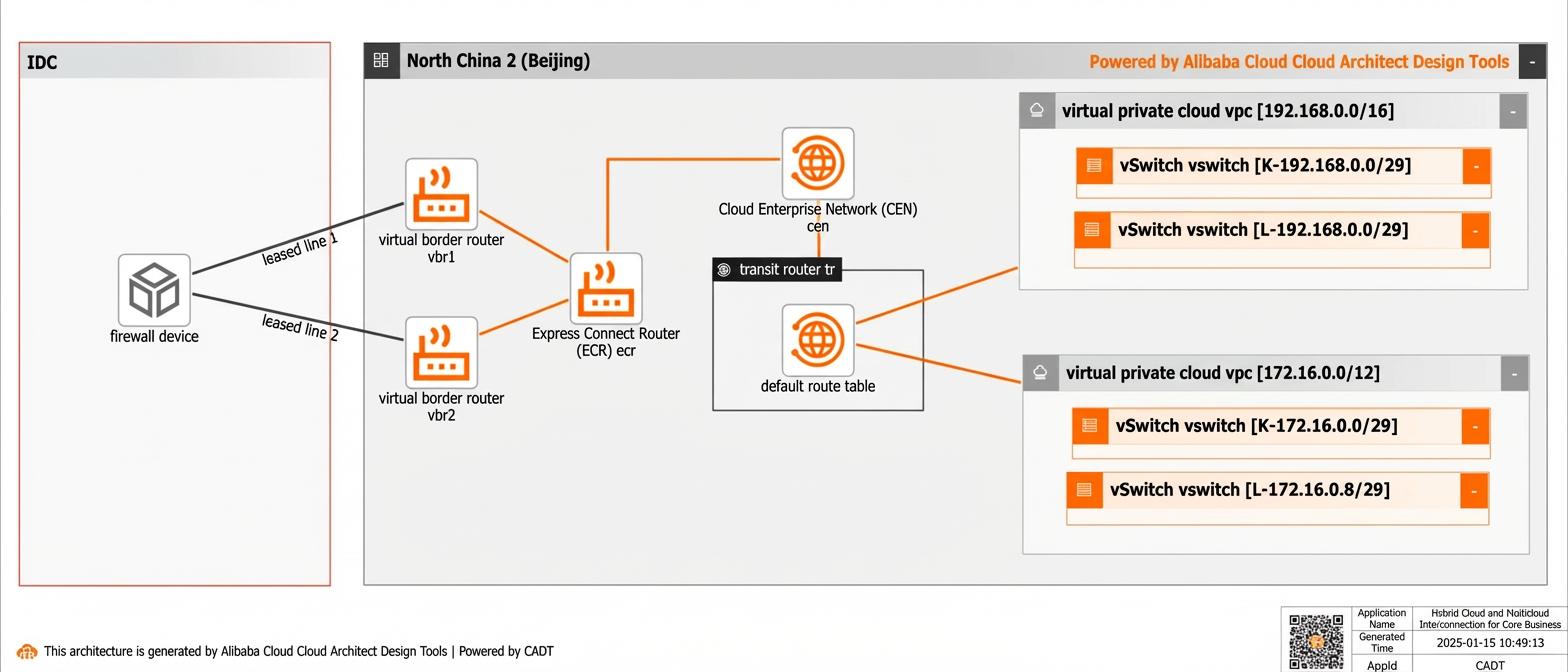
Dual circuits and dual access points: Request resources at two access points and establish two dedicated connections. The connections can be load-balanced (ECMP) and configured for active/standby failover to ensure high availability and good performance.
-
ECR gateway with fully dynamic routing and a distributed underlying design: This improves the efficiency of route configuration and management, reduces latency from the Express Connect circuit to the zone, and increases the overall bandwidth capacity for TR connections in a region.
-
The TR provides effective isolation and on-demand communication between the ECR and VPCs.
-
The on-premises data center, third-party cloud, and Alibaba Cloud are interconnected using BGP and BFD.

Scenario: Hybrid or multicloud connectivity for non-core services
Core architecture for this best practice:
-
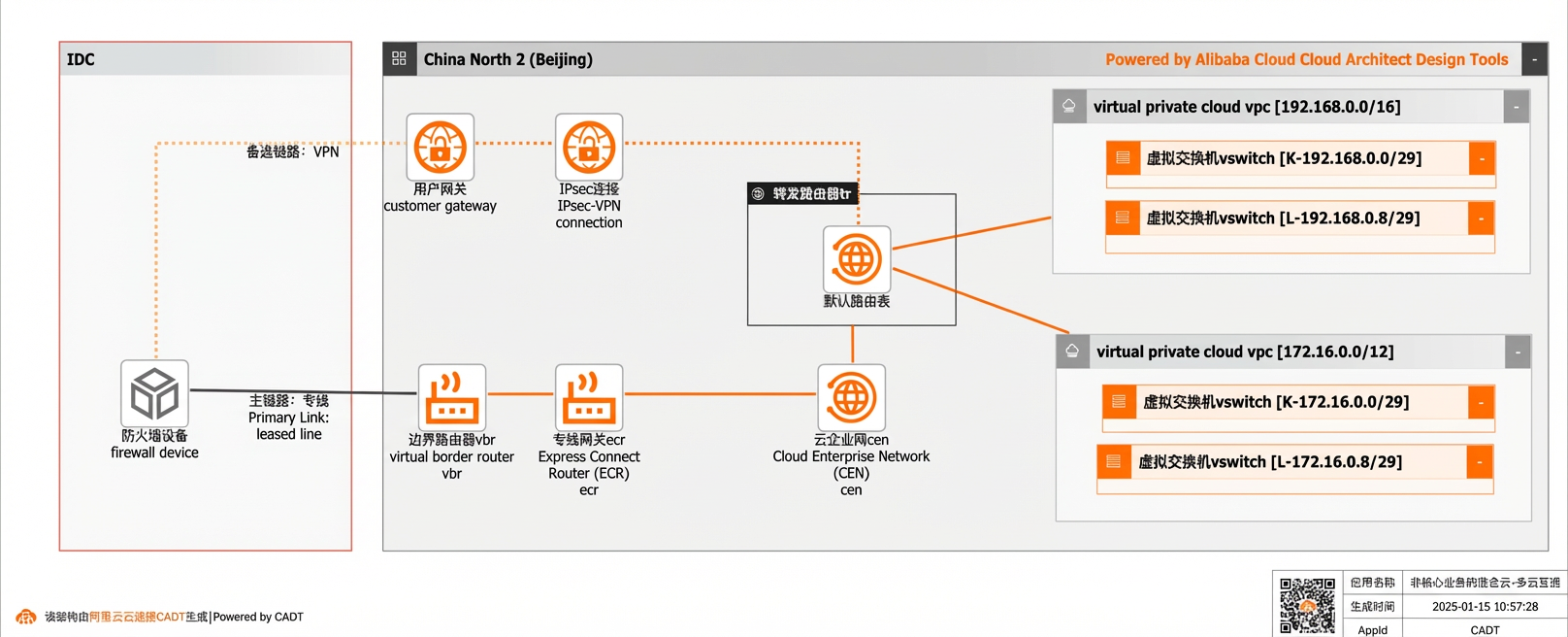
Express Connect circuit and VPN for active/standby failover: Use the Express Connect circuit as the primary link. If the circuit fails, traffic automatically switches to the backup VPN connection. This method effectively reduces the cost of hybrid and multicloud connectivity.
-
ECR gateway with fully dynamic routing and a distributed underlying design: This improves routing management efficiency, reduces latency from the Express Connect circuit to the zone, and increases the total bandwidth capacity for TR connections in a region.
-
The TR provides effective isolation and on-demand communication between the ECR and VPCs.
-
The data center/third-party cloud and Alibaba Cloud are interconnected using BGP and BFD.

Scenarios
-
Flexible and unlimited infrastructure provisioning: Traditional data centers face large upfront investments, low utilization, and long expansion cycles. By building a hybrid cloud with Express Connect circuits, enterprises retain existing data center resources while using cloud resources flexibly and on-demand to support rapid growth.
-
Rich ecosystem of cloud products: A hybrid cloud network built with Express Connect circuits enables businesses to leverage cloud services such as big data, GPUs, Large Language Models (LLMs), and SaaS applications to accelerate digital and AI transformation.
-
Disaster recovery: Build a secure, stable private multicloud interconnection network with Express Connect circuits to support multicloud disaster recovery deployments and enhance business stability.
Terraform reference
Scenario: Hybrid or multicloud connectivity for core services
|
Project |
Description |
|
Terraform Module URL |
Scenario: Hybrid or multicloud connectivity for core services |
|
GitHub URL |
Scenario: Hybrid or multicloud connectivity for core services |
|
Example Address |
Code flow:
-
Dual Express Connect circuits and dual access points: Request resources at two access points and establish two physical connections. The connections can be configured for ECMP load balancing and active/standby failover to ensure high availability and performance.
-
ECR gateway with fully dynamic routing and a distributed underlying design: This improves the efficiency of route configuration and management, reduces latency from the Express Connect circuit to the zone, and increases the total bandwidth capacity for TR connections in a region.
-
The TR provides effective isolation and on-demand communication between the ECR and VPCs.
-
The data center/third-party cloud and Alibaba Cloud are interconnected using BGP and BFD.
The following instances will be created:
-
2 VPCs
-
4 vSwitches
-
1 CEN
-
1 TR
-
1 ECR
-
2 VBRs
Scenario: Hybrid or multicloud connectivity for non-core services
|
Project |
Description |
|
Terraform Module URL |
Scenario: Hybrid or multicloud connectivity for non-core services |
|
GitHub URL |
Scenario: Hybrid or multicloud connectivity for non-core services |
|
Example Address |
Code flow:
-
Express Connect circuit and VPN for active/standby failover: The Express Connect circuit is the primary link. If the circuit fails, traffic switches to the backup VPN connection. This saves costs on hybrid and multicloud connectivity.
-
ECR gateway: Based on fully dynamic routing and a distributed underlying design, it improves routing management efficiency, reduces latency from the Express Connect circuit to the zone, and increases the total bandwidth capacity for TR connections in a region.
-
The TR provides effective isolation and on-demand communication between the ECR/VPN and VPCs.
-
The data center/third-party cloud and Alibaba Cloud are interconnected using BGP and BFD.
The following instances are created:
-
2 VPCs
-
4 vSwitches
-
1 CEN
-
1 TR
-
1 ECR
-
1 VBR
CADT visual architecture reference
Scenario: Hybrid or multicloud connectivity for core services
|
Scenario |
Item |
Description |
|
Scenario: Hybrid or multicloud connectivity for core services |
Template ID |
6JLDHV0802FD3N5S |
|
Visual deployment template |
||
|
CADT API call example |
Hybrid/multicloud connectivity architecture for core services |
Visual deployment architecture diagram:
Usage flow
Visual method
-
Batch create related cloud services, including two VPCs, four vSwitches, one CEN, one TR, and one ECR.
-
Create a new application based on the template. The default region is China (Beijing), and all cloud products are newly created.
-
Save the application, validate it, and then check the price. All cloud products in this example use the pay-as-you-go billing method.
-
After verification, confirm the agreement and start the batch deployment.
-
-
Create VBRs, associate the ECR with the VBRs, configure the corresponding routing policies, and configure BGP and BFD to build a high-availability Express Connect network.
Integrated API call method
-
You can use a set of API operations to quickly complete the deployment through API integration.
-
Initialize the command line interface as described in the documentation.
-
You can refer to the model YAML file to directly deploy and view the output.
-
To change the region, replace the `area_id` field. For example, change `cn-hangzhou` for China (Hangzhou) to `cn-shanghai` for China (Shanghai).
-
To use existing instances in the template, such as existing VPCs or vSwitches, you can replace the corresponding instance ID in the `instances` field.
Scenario: Hybrid or multicloud connectivity for non-core services
|
Scenario |
Item |
Description |
|
Scenario: Hybrid or multicloud connectivity for non-core services |
Template ID |
XAFVMO4TJUG97R63 |
|
Visual deployment template |
||
|
CADT API call example |
Hybrid/multicloud connectivity architecture for non-core services |
Visual deployment architecture diagram for the scenario of hybrid or multicloud connectivity for non-core services:
Usage flow
Visual method
-
Batch create related cloud services, including two VPCs, four vSwitches, one CEN, one TR, and one ECR.
-
Create a new application based on the template. The default region is China (Beijing), and all cloud products are newly created.
-
Save the application, validate it, and then check the price. All cloud products in this example use the pay-as-you-go billing method.
-
After verification, confirm the agreement and start the batch deployment.
-
-
Create a VBR, associate the ECR with the VBR, configure the corresponding routing policies, and configure BGP and BFD combined with IPsec-VPN to build a high-availability network with an active Express Connect circuit and a standby VPN connection.
Integrated API call method
-
You can integrate a set of OpenAPI operations to get started quickly.
-
Initialize the command line interface as described in the reference document.
-
You can refer to the model YAML file to directly deploy and view the output.
-
To change the region, replace the `area_id` field. For example, change `cn-hangzhou` for China (Hangzhou) to `cn-shanghai` for China (Shanghai).
-
To use existing instances in the template, such as existing VPCs or vSwitches, you can replace the corresponding instance ID in the `instances` field.