Use Express Connect to create a dedicated, secure, and high-performance connection. The deployment period typically takes one to three months. We recommend planning your budget and Express Connect deployment in advance.
Workflow
Establishing a dedicated circuit requires coordination among you (the customer), Alibaba Cloud, your circuit provider, and the data center operator. The following diagram shows the workflow:

After applying for a physical connection, you can track its progress in the Construction Procedure column in the Express Connect console.
Step 1: Select an access point
An access point is a physical location where Alibaba Cloud provides dedicated circuit access services. Each access point is equipped with redundant access devices to connect your on-premises data center to the Alibaba Cloud network over a dedicated circuit. Each region has one or more access points. For a list of access points, see Access point.
Considerations | Description |
Proximity | Select the access point that is geographically closest to your on-premises data center to minimize latency. Data center operators and supported bandwidth capacities vary by region and access point. |
Circuit provider | Select a circuit provider that is supported in your region. Supported providers include China Unicom, China Telecom, China Mobile, and some local providers. China Unicom, China Telecom, and China Mobile require that you use their own circuits. Connections from other circuit providers and dark fiber connections are not supported. |
Port requirements | Only optical ports are supported. The following port types are available: 400GE single-mode optical port, 100GE single-mode optical port, 40GE single-mode optical port, GE single-mode optical port, and 10GE single-mode optical port. For dedicated line access requirements above 10 Gbps, please contact your business manager to apply.
You can check port availability when you apply for a physical connection in the next step. For example, if you apply in classic mode, after you select a Region, Express Connect Circuit Provider, and Access Point, the console displays the port resources available for different port types. |
Step 2: Apply for a physical connection
A physical connection is a physical network interface that Alibaba Cloud provides at an access point. The circuit provider extends the dedicated circuit to the Alibaba Cloud data center and connects it to this port with a fiber pigtail to establish the physical link. Before you apply for your first physical connection, you must Enable billing for outbound data transfer as prompted in the console.
Multiple application modes are available:
High-reliability mode: Apply for multiple physical ports. In the event of a line failure, traffic can be automatically switched over through redundant lines.
Classic mode: Apply for a single physical port, suitable for users with specific requirements for access points.
Map mode: Select Alibaba Cloud Express Connect access points through the map interface. This mode is suitable for scenarios where access points are selected based on geographic location.
Recommended mode: The system calculates the latency based on the availability zone where your cloud resources reside and recommends the optimal access point. This mode is suitable for latency-sensitive business scenarios.
The operation steps for the different modes are as follows:
High Reliability Mode
The high reliability mode supports automatic traffic failover to a redundant link when a link fails. For more information, see the Express Connect Service Level Agreement.
CloudBox scenarios do not support the high reliability mode.
Go to the Physical Connection page on the Express Connect console. Click Create Physical Connection, set Select Access Point Mode to High Reliability Mode, and then select a Combination Type.
Combination type
Description
Diagram
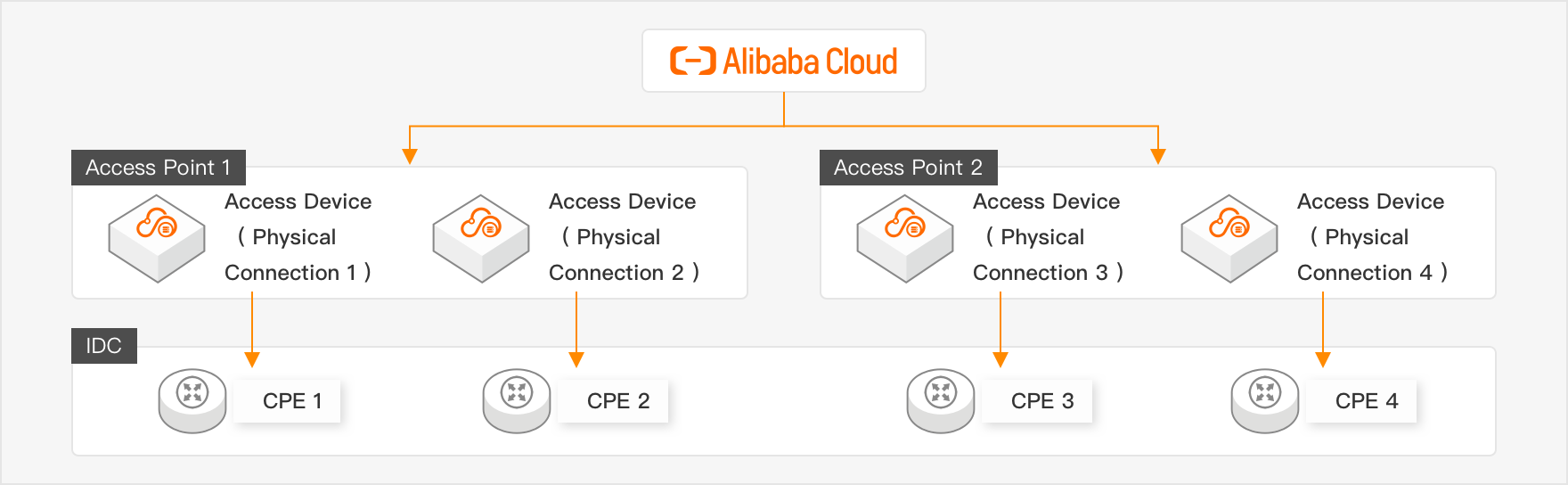
Optimal Disaster Recovery
Connects four dedicated circuits to two Alibaba Cloud access points, with two circuits at each access point. This configuration provides maximum protection against single-device and single-site failures.
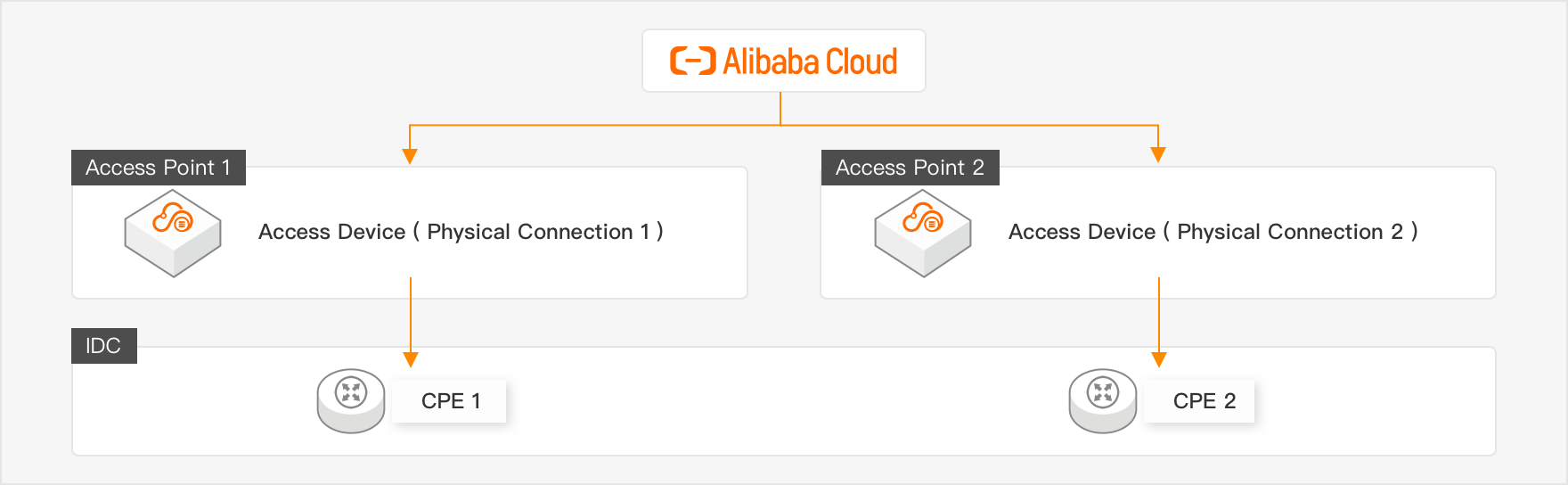
Powerful Disaster Recovery
Connects two dedicated circuits to two Alibaba Cloud access points, with one circuit at each access point. This configuration provides strong protection against single-device and single-site failures.
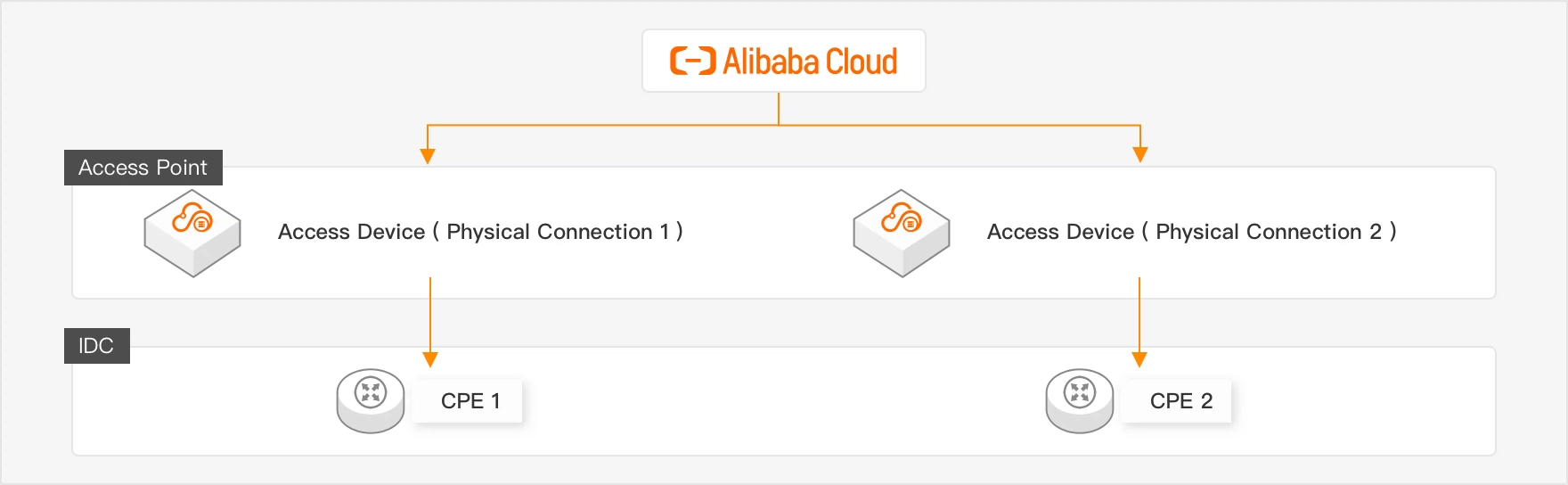
Development and Testing
Connects two dedicated circuits to a single Alibaba Cloud access point. This configuration provides device-level failover but no site-level redundancy.
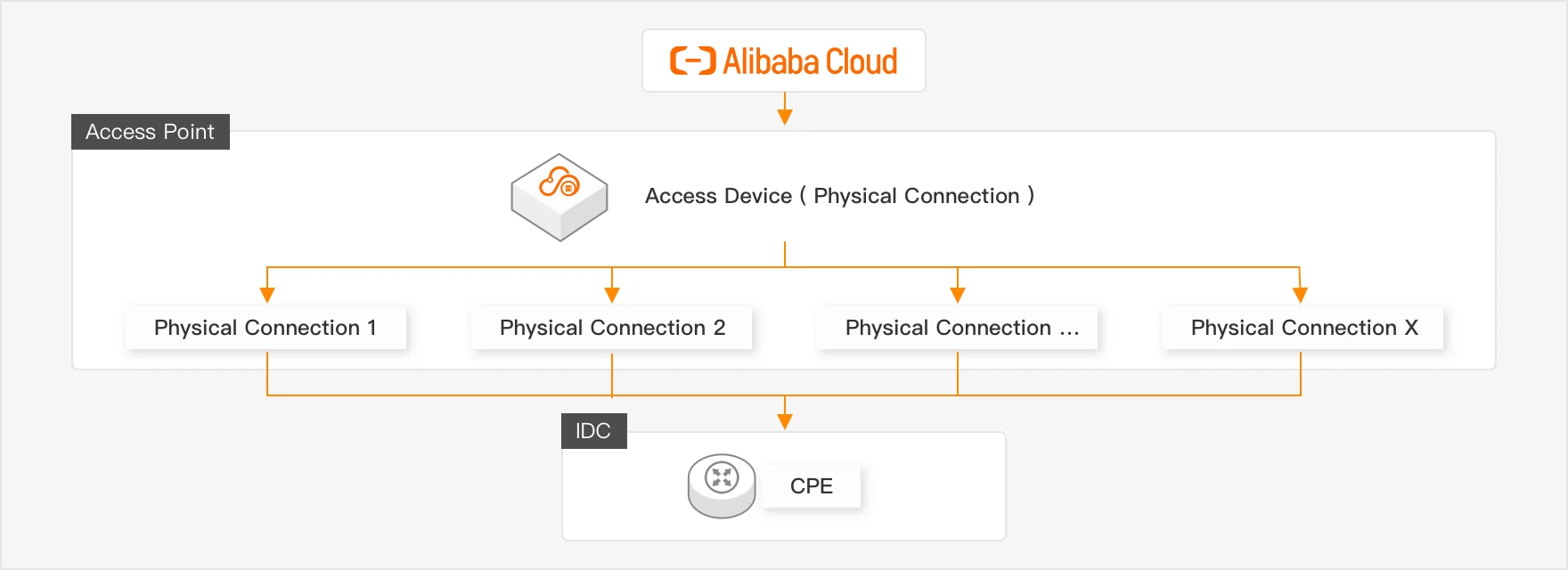
Load Balancing for Large Bandwidth
Connects multiple dedicated circuits to a single Alibaba Cloud access point. These circuits are load-balanced to increase aggregate throughput.
To use the Load Balancing for Large Bandwidth feature, contact your business manager to request permissions.
 Important
By default, you can connect up to two dedicated circuits to a single access point (quota name: ec_quota_pconn_count_per_ap). You can request a quota increase.
If you purchase multiple ports in a single order and any port fails to be created, the entire order fails.
Configure Connection:
Port Type: You can select GE single-mode optical port or 10GE single-mode optical port.
Configure Advanced Features of Ports: You can select the VBR Bandwidth Limits, IPv6, BFD, MPBGP, MPBGP-v6, QOS, VBR-HA, Failover Group, and MACsec Encryption capabilities. If the advanced capability you selected is out of stock in the system, Current Inventory:Sold Out will be displayed.
Select Access Point: Select your target Region, ISP, and Access Point. For a list of all access points, see Access point.
Review Configuration: Verify the configuration, select I have read and understand the billing rules, and then click Submit.
Classic Mode
Select access point resources from a drop-down list. This mode is suitable for users who have specific requirements for access points.
Go to the Physical Connection page on the Express Connect console. Click Create Physical Connection, and then set Select Access Point Mode to Classic Mode.
Parameter
Description
Region
The region where your Alibaba Cloud resources are located.
Express Connect Circuit Provider
The circuit provider that provides the dedicated circuit. Available access points vary based on the circuit provider.
NoteChina Unicom, China Telecom, and China Mobile require that you use their own circuits. Connections from other circuit providers and dark fiber connections are not supported.
Access Point
Select the access point closest to your on-premises data center. For more information about how to select the nearest access point, see Alibaba Cloud access points.
CloudBox Device Cluster Name
Select a CloudBox device cluster.
To purchase a port for a CloudBox dedicated circuit, contact your business manager to request permissions.
Port Type
You can select 400GE single-mode optical port, 100GE single-mode optical port, 40GE single-mode optical port, GE single-mode optical port, or 10GE single-mode optical port.
Configure Advanced Features of Ports
You can select the VBR Bandwidth Limits, IPv6, BFD, MPBGP, MPBGP-v6, QOS, VBR-HA, Failover Group, and MACsec Encryption capabilities. If the advanced capability you selected is out of stock in the system, Current Inventory:Sold Out will be displayed.
Select the checkbox to accept the billing rules, and click OK.
NoteAfter the dedicated circuit is installed and the payment is complete, the Port Status of the physical connection changes to Up. Before the payment is complete, the Port Status is Down.
Recommend Mode
This mode recommends the optimal access point based on latency calculated from your cloud resource's zone. This mode is suitable for latency-sensitive business scenarios.
Latency data is for reference only. Actual performance may vary and should be verified with your own business tests.
Log on to the Express Connect console, click the Create Physical Connection port, and select recommended mode to apply for a port.
NoteThe latency data in this section is for reference only. Actual performance may vary and should be verified with your own business tests.
Parameter
Description
Selection method
Select an access point in one of the following ways.
System Recommended: The system calculates the latency from each access point in a region to a specific zone within that region and recommends the access point with the lowest latency.
Manual Selection: After you select a region for the access point, the system calculates the average latency from each access point in that region to each zone within the same region and presents the data on a dashboard.
Region
Select the region where your Alibaba Cloud resources are located.
NoteThis parameter takes effect only when you set Access point selection method to System Recommended.
Zone
Select the zone where your Alibaba Cloud resources are located.
NoteThis parameter takes effect only when you set Access point selection method to System Recommended.
Access point
Based on the specified resource region and zone, the system calculates the latency from each access point in the region to the specified zone. The access points are sorted by latency in ascending order, and the one with the lowest latency is selected by default. You can select an access point that meets your business requirements.
NoteThis parameter takes effect only when you set Access point selection method to System Recommended.
In the Trend column of the access point latency list, click the icon to view historical latency data for a specified or custom time range.
Latency dashboard
After selecting a region for the access point, the system calculates the average latency from each access point in that region to each zone within the same region.
In the right-side pane, you can turn on Show Latency, select a suitable access point, and view the Information about the selected access point.
NoteThis parameter takes effect only when you set Access point selection method to Manual Selection.
In the Trend column of the access point latency list, click the icon to view historical latency data for a specified or custom time range.
Port type
You can select 400GE single-mode optical port, 100GE single-mode optical port, 40GE single-mode optical port, GE single-mode optical port, or 10GE single-mode optical port.
Configure Advanced Features of Ports
You can select the VBR Bandwidth Limits, IPv6, BFD, MPBGP, MPBGP-v6, QOS, VBR-HA, Failover Group, and MACsec Encryption capabilities. If the advanced capability you selected is out of stock in the system, Current Inventory:Sold Out will be displayed.
Resource group
Resource group: Select an existing resource group to manage physical ports by group.
Tag key
Tag key and value: Select existing tag keys and tag values, or enter new tag keys and tag values. You can bind specific tags to physical port instances for categorized management.
Tag value
Select the checkbox to accept the billing rules, and click OK.
After the dedicated circuit is installed and the payment is complete, the Port Status of the physical connection changes to Up. Before the payment is complete, the Port Status is Down.
Step 3: Apply for and download the LOA
Construction personnel must present a Letter of Authorization (LOA) to enter the Alibaba Cloud access point facility and install the dedicated circuit. After a physical connection is created, you must apply for an LOA for each connection.
Apply for the LOA: After you submit the LOA application, Alibaba Cloud reviews it within 2 business days. Expedited review is not supported, so plan your installation schedule in advance. After the application is approved, Alibaba Cloud matches and installs the optical module in preparation for on-site installation.
NoteIf circuit adjustments or other changes require re-entry into the data center, you can apply for another LOA.
LOA processing, data center access, and installation timelines may be affected by holidays and network freeze policies. For example, when you apply for an LOA, any unavailable dates are grayed out and cannot be selected.
On the Physical Connection page, find the port and click Apply for LOA.
In the Apply For LOA panel, enter the following information and click OK.
Parameter
Description
Company Name
For a corporate account, enter the company name specified when the Alibaba Cloud account was created.
For an individual account, enter the name of the Alibaba Cloud account owner.
Construction Company That Enters Data Centers of Alibaba Cloud
The name of the construction company, typically the connectivity provider or IDC operator.
Leased Line Type
You can select MSTP, MPLSVPN, Fiber Connection, or Others.
Construction Schedule
The time when the construction company will enter the data center.
Customer Data Center Location
The location of the data center.
Leased Line Bandwidth
Enter the bandwidth value specified in your Express Connect circuit contract.
NoteThe bandwidth value here is only used as a reference for Alibaba Cloud service configuration. Your actual fees and bandwidth limit are based on the contract you signed with the carrier. Please fill in the actual contract bandwidth.
Add Field Engineer
Click Add Field Engineer to add information about the personnel who need to enter the Alibaba Cloud data center for construction. You can specify one or more field engineers.
ImportantThe field engineer information is required.
After you apply for an LOA, the LOA Status of the instance becomes LOA Being Applied. After the Alibaba Cloud reviewer approves the application within two business days, the LOA Status changes to LOA Approved.
Receive a text message notification and perform the following steps:
NoteYou can skip this step if your access point is a third-party data center access point, or an access point in China (Hong Kong) or an international data center.
Obtain an entry credential: Click the entry credential link in the text message and log on to the entry application platform. Select the data center information and Confirm Visit, then click Entry Credential to obtain the entry QR code.
Complete your personal information:
Copy the text message link to a computer browser and access the link. Read and agree to the privacy protection statement and the Alibaba Cloud data center entry agreement.
Fill in your personal information and click Submit Information. When the page displays Submitted Successfully, you can close the browser window.
Download the LOA: After the application is approved, you can download the LOA and obtain detailed information about the access point and data center. Alibaba Cloud then determines whether it is a third-party data center:
Yes: The circuit provider brings the LOA and contacts the on-site engineer to enter the data center for a site survey.
No: Alibaba Cloud sends a text message. The circuit provider obtains a QR code for entry and scans it to enter the data center for a site survey or on-site installation.
Step 4: Circuit installation
The installation process for a dedicated circuit varies depending on the network topology. The following sections show the installation process for two common network topologies. For your specific scenario, consult your circuit provider.
The process depends on whether your on-premises data center and the Alibaba Cloud access point are in the same facility.
Different facilities

Same facility

Installation steps:
Circuit provider site survey: Alibaba Cloud assists the survey personnel in completing the on-site inspection within 2 business days. Contact your circuit provider to confirm end-to-end costs. For more information about pricing, see Billing overview.
NoteThe Chinese mainland: You must apply to enter the Alibaba Cloud cage within the data center for the survey.
Outside the Chinese mainland: The installation team needs to request access only to the circuit provider's Meet-Me Room from the data center operator. Access to the Alibaba Cloud cage is not required.
Key items to verify during the site survey:
Verify equipment specifications
Confirm optical module specifications, including transmission rate, wavelength, and distance.
Determine cable type and connector specifications, including single-mode fiber (SMF), multi-mode fiber (MMF), and connector type, such as LC-LC.
Plan physical cabling
Identify the exact rack and position for cable termination.
Confirm cable routing paths.
Verify actual cable distances and related parameters.
Check safety measures: Confirm whether the data center requires anti-static measures, such as ESD wrist straps.
Confirm procedural standards: Confirm any facility-specific operational procedures.
On-site installation: The circuit provider's installation personnel connect the dedicated circuit to the equipment outside the data center cage according to the survey plan.
Procure in-building cross-connects: The data center operator procures the in-building cross-connects. You need to pay the in-building cable rental fee to the data center operator.
In-building installation at the circuit provider's data center:
In-building installation includes equipment deployment and configuration, fiber optic cable laying, cross-connection and optical power testing, and network connectivity, bandwidth, and SLA testing. This comprehensive process ensures the reliability of the dedicated circuit.
After the installation is complete, obtain the circuit test report from the installation team, and get the circuit provider's circuit ID, in-building cable labels, or patch panel port information from them.
Confirm Delivery: You click Confirm Delivery in the console. An Alibaba Cloud on-site engineer inserts the dedicated circuit into the specified port in the Alibaba Cloud data center, completing the pigtail installation.
Pigtail installation takes up to 2 business days for data centers in the Chinese mainland and up to 3 business days for data centers outside the Chinese mainland.
Pay the port resource usage fee: After the pigtail installation is complete, you pay the port resource usage fee in the Express Connect console. When the instance status changes to Available, the dedicated circuit is activated.
Step 5: Connect to your VPC
After the physical connection is activated, you can create a Virtual Border Router (VBR) based on the physical connection, and then use an Express Connect Router (ECR) and a Transit Router (TR) to connect your on-premises data center to your VPC. For detailed steps, see Connect a data center to the cloud over active/standby circuits.
Manage physical connections
Modify line O&M information
Log on to the Express Connect console and select the region of the target instance.
In the Actions column for the target instance, click
 > Line O&M. Modify the following parameters and click OK.
Parameter
Description
Provider
The provider's name.
Leased line ID/Cable ID
Contact your circuit provider to obtain this information.
ODF port information
O&M contact information
Contact information for the provider's O&M personnel.
Upgrade a physical port specification
Upgrading the port specification requires data migration and correction. This process deletes the VBR instance associated with the original physical connection and causes service interruptions. Back up your workloads in advance.
Apply for a new physical port with a higher specification.
Migrate the existing physical connection instance and its configurations to the new physical port.
Create VBR, ECR, and TR instances for the new physical connection, and then configure BGP. For detailed steps, see Connect a data center to the cloud over active/standby circuits.
Delete a physical port instance
Before you delete a physical port instance, delete its associated Delete a VBR instance and Delete a shared port.
You can delete physical port instances that are in one of the following states: Rejected, Port Allocated, Pending Payment, Canceled, Terminated, or Allocation Failed. You can view the status of an instance in the Port Status column.
ImportantIf a dedicated physical port instance has not been terminated, you can click
 > Terminate in the Actions column of the target instance. Billing continues after the instance is terminated. For more information, see Port resource usage fee and Renewal management. If you determine that the instance is no longer required, you can unsubscribe from it to release its resources.
Log on to the Express Connect console, select the region of the target instance.
Find the target physical port instance, click Actions in the Delete column, and then click OK.
Related APIs
CreateHighReliablePhysicalConnection: Creates a physical connection in high-reliability mode.
CreatePhysicalConnection: Creates a physical connection.
ApplyPhysicalConnectionLOA: Applies for an LOA.
CompletePhysicalConnectionLOA: Confirms installation completion.
CreatePhysicalConnectionOccupancyOrder: Creates an order for the resource usage fee.
ConfirmPhysicalConnection: Confirms that the physical connection is in the Available state.
EnablePhysicalConnection: Enables a physical connection.
ModifyPhysicalConnectionAttribute: Modifies the attributes of a physical connection.
DescribePhysicalConnections: Queries physical connections in a specified region.
CancelPhysicalConnection: Cancels a physical connection before it is enabled.
TerminatePhysicalConnection: Terminates a physical connection.
DeletePhysicalConnection: Deletes a physical connection.
AssociateMacSecKey: Associates a MACsec key with a physical connection.
DisassociateMacSecKey: Disassociates the MACsec key from a physical connection.
FAQ
If an on-premises IDC cannot connect to a VPC, see Troubleshooting.
For FAQs about dedicated circuit construction, see FAQ about installing an Express Connect circuit.
For FAQs about dedicated connections, see FAQ about connections.
For instructions on testing connection performance, see Test the performance of an Express Connect circuit.
Is the interconnection of the physical connection port IP routing or a direct interface? Alibaba Cloud Express Connect physical connections use Layer 3 IP routing peering rather than pure Layer 2 direct connection. You need to configure peering IP addresses on both the Alibaba Cloud side and the customer side, and communicate through a routing protocol. Although the physical layer provides a dedicated port (similar to a Layer 2 dedicated line), the network-layer interaction is based on IP routing.