Core business hybrid cloud/multicloud connectivity architecture
Template ID: L19PR5WANAARCPN1 Address: https://bpstudio.console.alibabacloud.com/bpStudio/topo?TemplateId=L19PR5WANAARCPN1
Supported regions: China (Hangzhou), China (Beijing), China (Shanghai), China (Shenzhen), China (Guangzhou), China (Hohhot), China (Ulanqab), China (Qingdao), and China (Zhangjiakou).
Template architecture: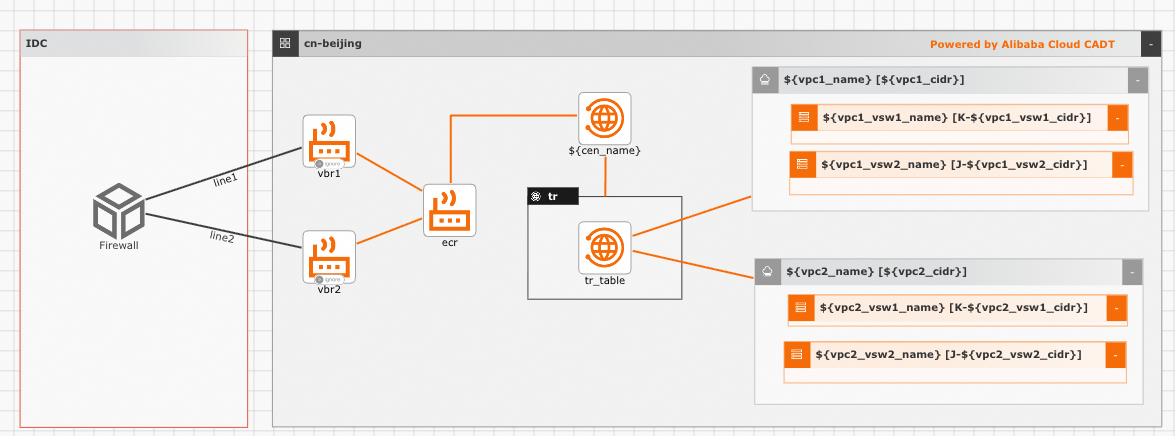
Parameter variables: Parameter types include String, Integer, Boolean, and Map. Pass parameter values through variables. If not specified, default values are used. To modify template variable configuration, see Configure template variables.
No. | Parameter | Type | Default | Description |
1 |
| String | CEN | CEN instance name |
2 |
| String | vpc | First VPC name |
3 |
| String | 192.168.0.0/16 | First VPC CIDR |
4 |
| String | vswitch | VPC1 vSwitch 1 name |
5 |
| String | 192.168.0.0/29 | VPC1 vSwitch 1 CIDR |
6 |
| String | vswitch | VPC1 vSwitch 2 name |
7 |
| String | 192.168.0.8/29 | VPC1 vSwitch 2 CIDR |
8 |
| String | vpc | Second VPC name |
9 |
| String | 172.16.0.0/12 | Second VPC CIDR |
10 |
| String | vswitch | VPC2 vSwitch 1 name |
11 |
| String | 172.16.0.0/29 | VPC2 vSwitch 1 CIDR |
12 |
| String | vswitch | VPC2 vSwitch 2 name |
13 |
| String | 172.16.0.8/29 | VPC2 vSwitch 2 CIDR |
Command line debugging: Example YAML configuration (creates new VPC, vSwitch, and bandwidth by default):
template_id: L19PR5WANAARCPN1
area_id: "cn-beijing"
instances:

variables:
  ${cen_name}: "CEN"
  ${vpc1_name}: "vpc1"
  ${vpc1_cidr}: "192.168.0.0/16"
  ${vpc1_vsw1_name}: "vsw1"
  ${vpc1_vsw1_cidr}: "192.168.0.0/29"
  ${vpc1_vsw2_name}: "vsw2"
  ${vpc1_vsw2_cidr}: "192.168.0.8/29"
  ${vpc2_name}: "vpc2"
  ${vpc2_cidr}: "172.16.0.0/12"
  ${vpc2_vsw1_name}: "vsw1"
  ${vpc2_vsw1_cidr}: "172.16.0.0/19"
  ${vpc2_vsw2_name}: "vsw2"
  ${vpc2_vsw2_cidr}: "172.16.0.8/29"


configuration:
  enableMonitor: "0"
  enableReport: "0"

output:
  ecs:
    - Private_ip
  eip:
    - IpAddress
Notes:
1. To change regions, update area_id. For example, replace cn-beijing with ap-southeast-1 for Singapore. For region IDs, see Regions and zones.
2. To use existing resources (VPC, vSwitch, security group, or bandwidth), update the id field for that resource:
instances:
 - node_type: vpc
  node_name: vpc-01
  id: vpc-2zeb0q38i10******* (replace with existing instance ID)
Non-core business hybrid cloud/multicloud connectivity architecture
Template ID: 7DL3Q76RI8M0FL6Q Address: https://bpstudio.console.alibabacloud.com/bpStudio/topo?TemplateId=7DL3Q76RI8M0FL6Q
Supported regions: China (Hangzhou), China (Beijing), China (Shanghai), China (Shenzhen), China (Guangzhou), China (Hohhot), China (Ulanqab), China (Qingdao), and China (Zhangjiakou).
Template architecture: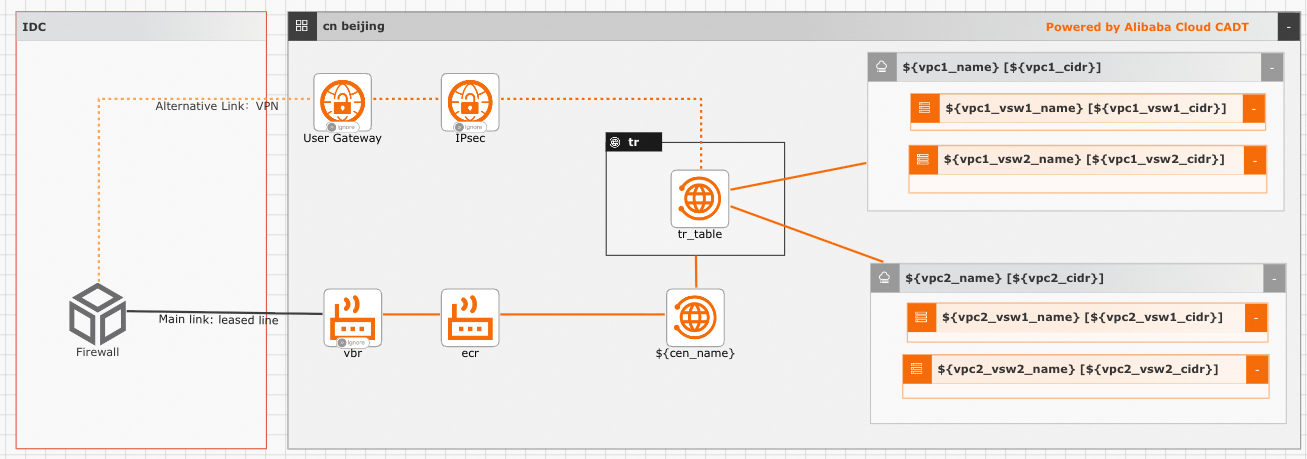
Parameter variables: Parameter types include String, Integer, Boolean, and Map. Pass parameter values through variables. If not specified, default values are used. To modify template variable configuration, see Configure template variables.
No. | Parameter | Type | Default | Description |
1 |
| String | CEN | CEN instance name |
2 |
| String | vpc | First VPC name |
3 |
| String | 192.168.0.0/16 | First VPC CIDR |
4 |
| String | vswitch | VPC1 vSwitch 1 name |
5 |
| String | 192.168.0.0/29 | VPC1 vSwitch 1 CIDR |
6 |
| String | vswitch | VPC1 vSwitch 2 name |
7 |
| String | 192.168.0.8/29 | VPC1 vSwitch 2 CIDR |
8 |
| String | vpc | Second VPC name |
9 |
| String | 172.16.0.0/12 | Second VPC CIDR |
10 |
| String | vswitch | VPC2 vSwitch 1 name |
11 |
| String | 172.16.0.0/29 | VPC2 vSwitch 1 CIDR |
12 |
| String | vswitch | VPC2 vSwitch 2 name |
13 |
| String | 172.16.0.8/29 | VPC2 vSwitch 2 CIDR |
Command line debugging: Example YAML configuration (creates new VPC, vSwitch, and bandwidth by default):
template_id: L19PR5WANAARCPN1
area_id: "cn-beijing"
instances:

variables:
  ${cen_name}: "CEN"
  ${vpc1_name}: "vpc1"
  ${vpc1_cidr}: "192.168.0.0/16"
  ${vpc1_vsw1_name}: "vsw1"
  ${vpc1_vsw1_cidr}: "192.168.0.0/29"
  ${vpc1_vsw2_name}: "vsw2"
  ${vpc1_vsw2_cidr}: "192.168.0.8/29"
  ${vpc2_name}: "vpc2"
  ${vpc2_cidr}: "172.16.0.0/12"
  ${vpc2_vsw1_name}: "vsw1"
  ${vpc2_vsw1_cidr}: "172.16.0.0/19"
  ${vpc2_vsw2_name}: "vsw2"
  ${vpc2_vsw2_cidr}: "172.16.0.8/29"


configuration:
  enableMonitor: "0"
  enableReport: "0"

output:
  ecs:
    - Private_ip
  eip:
    - IpAddress
Notes:
1. To change regions, update area_id. For example, replace cn-beijing with "ap-southeast-1" for Singapore. For region IDs, see Regions and zones.
2. To use existing resources (VPC, vSwitch, security group, or bandwidth), update the id field for that resource:
instances:
 - node_type: vpc
  node_name: vpc-01
  id: vpc-2zeb0q38i10******* (replace with existing instance ID)