What it really takes to run Qwen3.8-27B at home: 24 GB of VRAM, about $1,300, an evening of setup — or a $6/month plan if you'd rather skip the machine.
Qwen3.8-27B, the next 27-billion-parameter open-weight model in the Qwen family, is on its way — and the local model community is visibly excited. The anticipation has a very specific shape: people are already planning which machine will run it.
If you already have capable hardware, running open weights locally is a genuinely good choice — open weights are meant to be run, and what follows doubles as your build guide. If you don't, the same numbers show what the machine really costs, and what it takes to skip it.
Before any money changes hands, the math is worth doing — with the two tools that don't require guessing: measured data from Qwen3.6-27B, the previous 27B release, and the arithmetic that governs any dense model of this size. Same class, same physics. Plan around the picture below and you won't be far off.
To run a 27B Qwen at the quant most people actually use, you want a machine with about 24 GB of VRAM — roughly $1,300–1,800 all-in for a solid used build at mid-2026 prices, plus an evening of setup. Full precision is out of reach for any single consumer GPU, 8-bit needs 32 GB of VRAM, and 16 GB — the most tempting number — is exactly where this model doesn't fit. And if buying hardware isn't on your table, the second half of this piece covers a $6-a-month plan that gets you into the Qwen lineup.
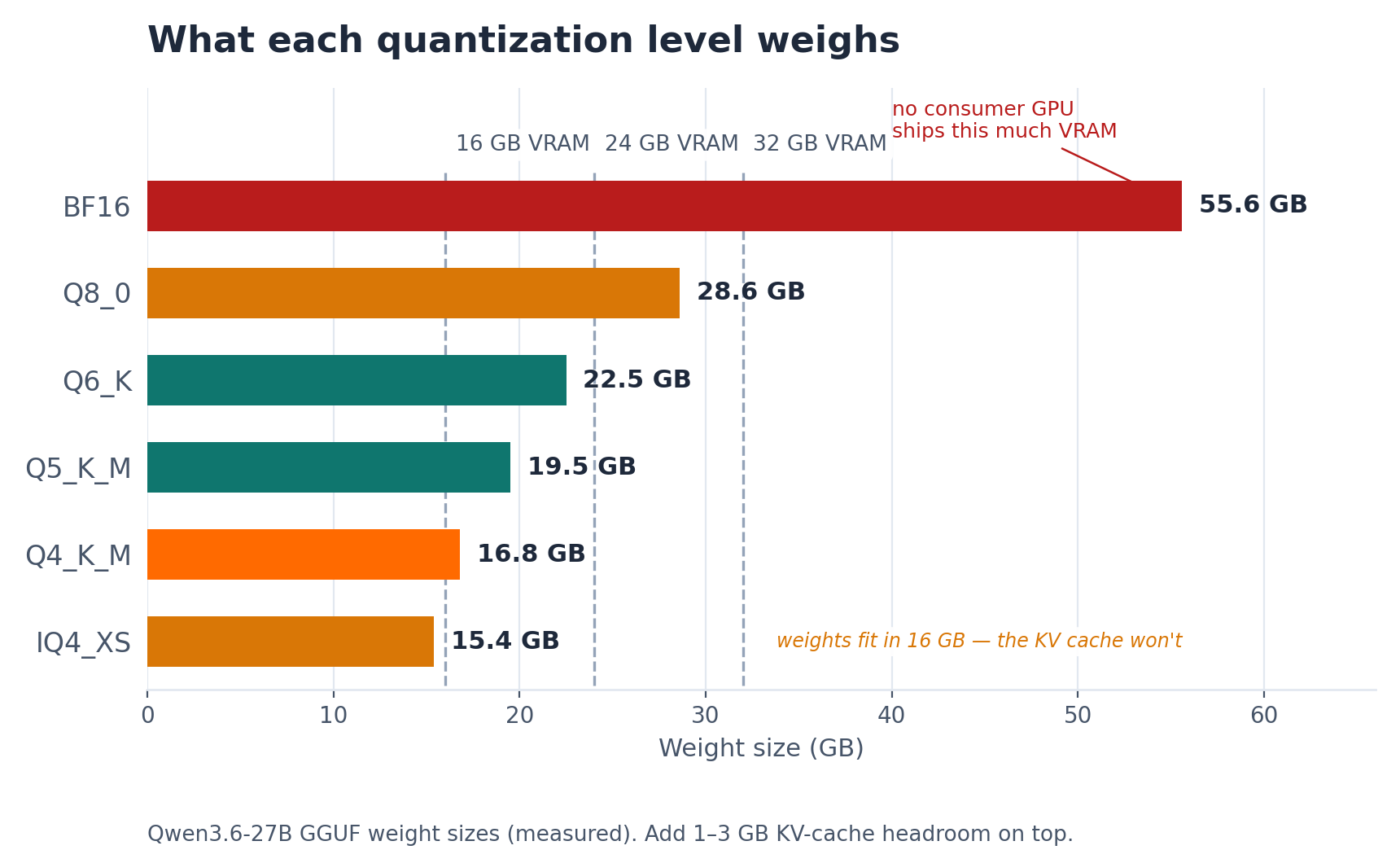
A dense 27B model stores about two bytes per parameter at BF16 — roughly 54 GB of weights before anything else — and Qwen3.6-27B's published GGUF sizes confirm the math in practice: 55.6 GB at BF16, 28.6 GB at 8-bit (Q8_0), 16.8 GB at the mainstream 4-bit quant (Q4_K_M). The rest is addition. 4-bit fits comfortably in 24 GB of VRAM, but not in 16 GB: Q4_K_M's 16.8 GB of weights simply exceeds what a 16 GB machine holds, and even IQ4_XS at 15.4 GB — the only 4-bit whose weights fit in 16 GB of VRAM — leaves just 0.6 GB of headroom, less than the KV cache alone at everyday context lengths. So on a 16 GB machine, even the smallest 4-bit spills into system RAM.
And weight size is only the start of the bill. The KV cache needs headroom too — typically 1–3 GB at everyday context lengths, and it scales with context — as does the runtime itself, and the operating system if you're on unified memory. Measured on Qwen3.6-27B, the realistic picture looks like this:
| Precision | Weights (Qwen3.6-27B, measured) | Realistic VRAM need | Where it fits |
|---|---|---|---|
| BF16 | 55.6 GB | 64–80 GB | Two consumer flagships, or professional hardware |
| Q8_0 | 28.6 GB | 32 GB | An RTX 5090-class machine |
| Q6_K | 22.5 GB | 24 GB (context-limited) | RTX 3090 / 4090 |
| Q5_K_M | 19.5 GB | 24 GB | RTX 3090 / 4090 |
| Q4_K_M | 16.8 GB | 20–24 GB | Comfortable with 24 GB of VRAM; doesn't fit in 16 GB |
| IQ4_XS | 15.4 GB | 16 GB+ (KV cache pushes it past 16 GB) | Only 4-bit whose weights fit 16 GB — still needs offload or short context |
There is no consumer path to full precision — BF16 needs more memory than any single consumer GPU ships with. Which means the model most people run at home is a lossy compression of the model behind the benchmarks. The question is what that compression costs.
Quantization isn't free. Q4_K_M is the mainstream sweet spot for good reason — it preserves most capability — but "most" is not "all." Expect some degradation on hard reasoning, long-horizon agentic tasks, and low-resource languages, plus more variability between runs of the same prompt. Published benchmark numbers are measured at full precision; a local 4-bit build will not reproduce them.
Context length is the second quiet tax. Qwen3.6-27B supports a 262K native context, but long contexts balloon the KV cache. With 24 GB of VRAM, the context you can actually use is whatever fits after the weights are loaded — often far less than the headline number.
The GPU is only the headline. A balanced build around 24 GB of VRAM also needs 32 GB of system RAM, a modern multi-core CPU (prompt processing leans on it), a 750W+ power supply, and fast storage for 17–56 GB model files. Rough street pricing as of mid-2026:
| Build | Typical all-in cost | What it runs |
|---|---|---|
| Used RTX 3090 24 GB system | ~$1,300–1,800 | Q4–Q5 comfortably |
| RTX 4090 24 GB system | ~$3,000–3,500 | Q4–Q6, faster inference |
| RTX 5090 32 GB system | ~$3,800–4,500 | Q8 + longer-context headroom |
| Apple silicon (36–64 GB unified) | ~$2,000–4,000 | Q4–Q8, quieter but slower |
How fast does that hardware actually feel? Community-reported generation speeds on Qwen3.6-27B land around 26–30 tok/s at 4-bit on an RTX 3090, and roughly 45 tok/s at Q5 on an RTX 5090 — both with llama.cpp and moderate contexts. The cautionary tale is the 16 GB RTX 4080. The model doesn't fit in VRAM, layers spill into system RAM, and first-hand reports put generation at around 12 tok/s. Faster serving engines — vLLM with multi-token prediction, FP8 or NVFP4 quants — can multiply these numbers. But the figures above are the realistic baseline for a straightforward local setup. Fast enough to feel good; noticeably slower than a hosted endpoint.
And that's the number before 2026's hardware market gets a vote. Memory, storage, and GPU prices have all been climbing through the year on the back of AI demand, as industry trackers have widely reported — so the whole bill rises together, not just the GPU line. If you're building, it's an argument for pricing the rig sooner rather than later — and for counting depreciation as part of the cost from day one.
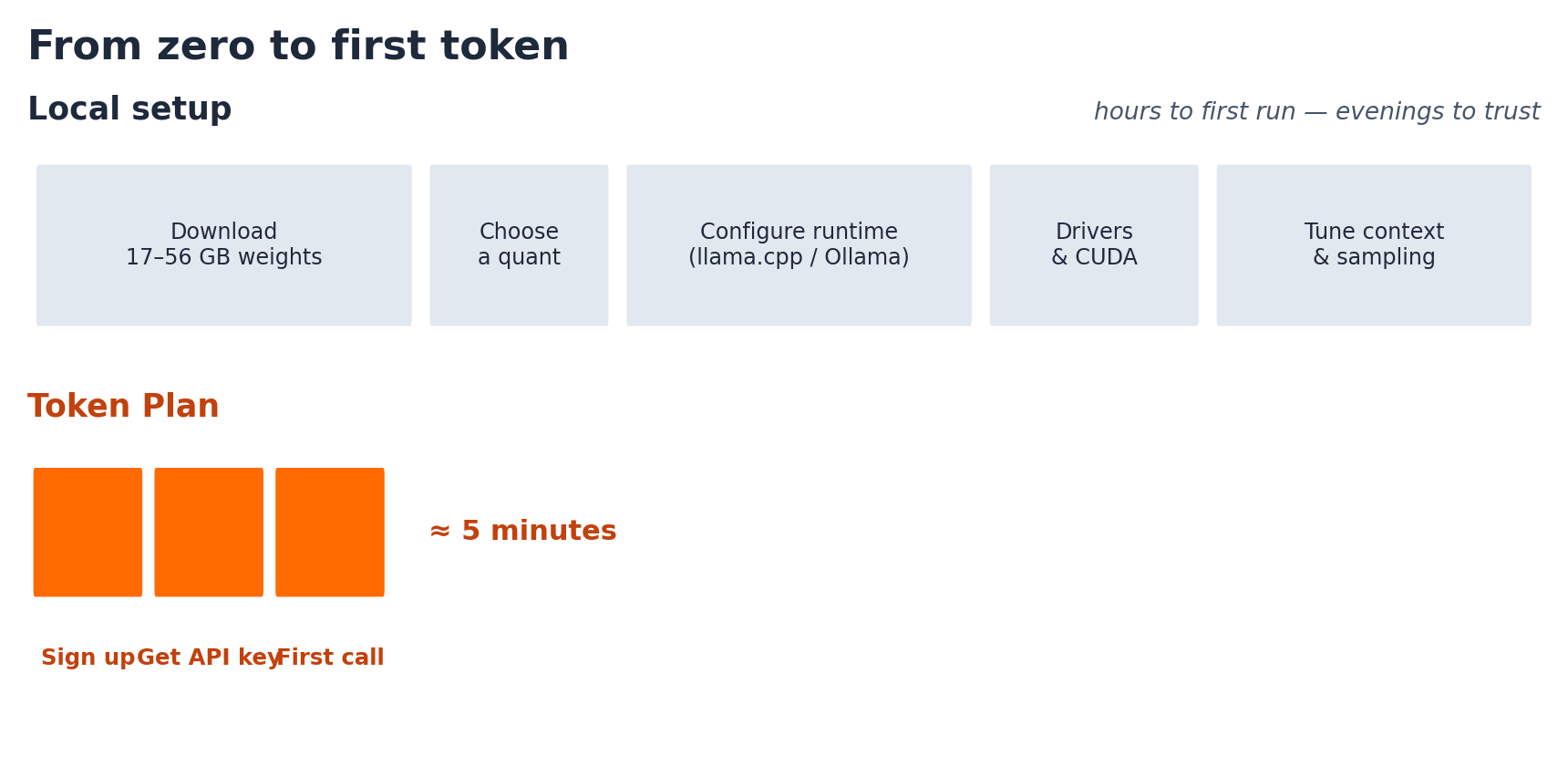
Then there's the time cost: downloading weights, choosing a quant, configuring a runtime (llama.cpp, Ollama, or similar), wrestling drivers, tuning context and sampling. Budget a few hours to a first decent run, and a few evenings to a setup you actually trust.
Let me be plain about this: if you already have the hardware, run the model. Open weights are meant to be run, and everything above is your build guide.
Local is also simply the right call for some work. Weights on your own machine mean privacy — your prompts and outputs never leave the box, which is decisive for sensitive code, documents, and regulated data. They mean offline operation, no rate limits, and no dependency on anyone's uptime. And they mean ownership: fine-tuning, exotic runtimes, and the particular satisfaction of hardware that answers to you.
If that's your camp, build the machine and enjoy it. For everyone else, there's another way in.
Here's the arithmetic that's easy to miss while comparing GPUs: you don't have to buy the machine to run these models.
Token Plan, Alibaba Cloud's subscription plan, gives you API access to the Qwen lineup — served at full precision, with none of the local setup. Qwen3.8-Max is already on the plan, and the roster of Qwen models you can reach through it keeps growing:
| Plan | Price | Credits / month | For whom |
|---|---|---|---|
| Lite | $6/month (annual $65) | ~10,000 | Getting started |
| Standard | $18/month | ~40,000 | Daily use |
| Pro | $68/month | ~160,000 | Heavy, agentic workloads |
New users can apply an additional $2 off their first order.
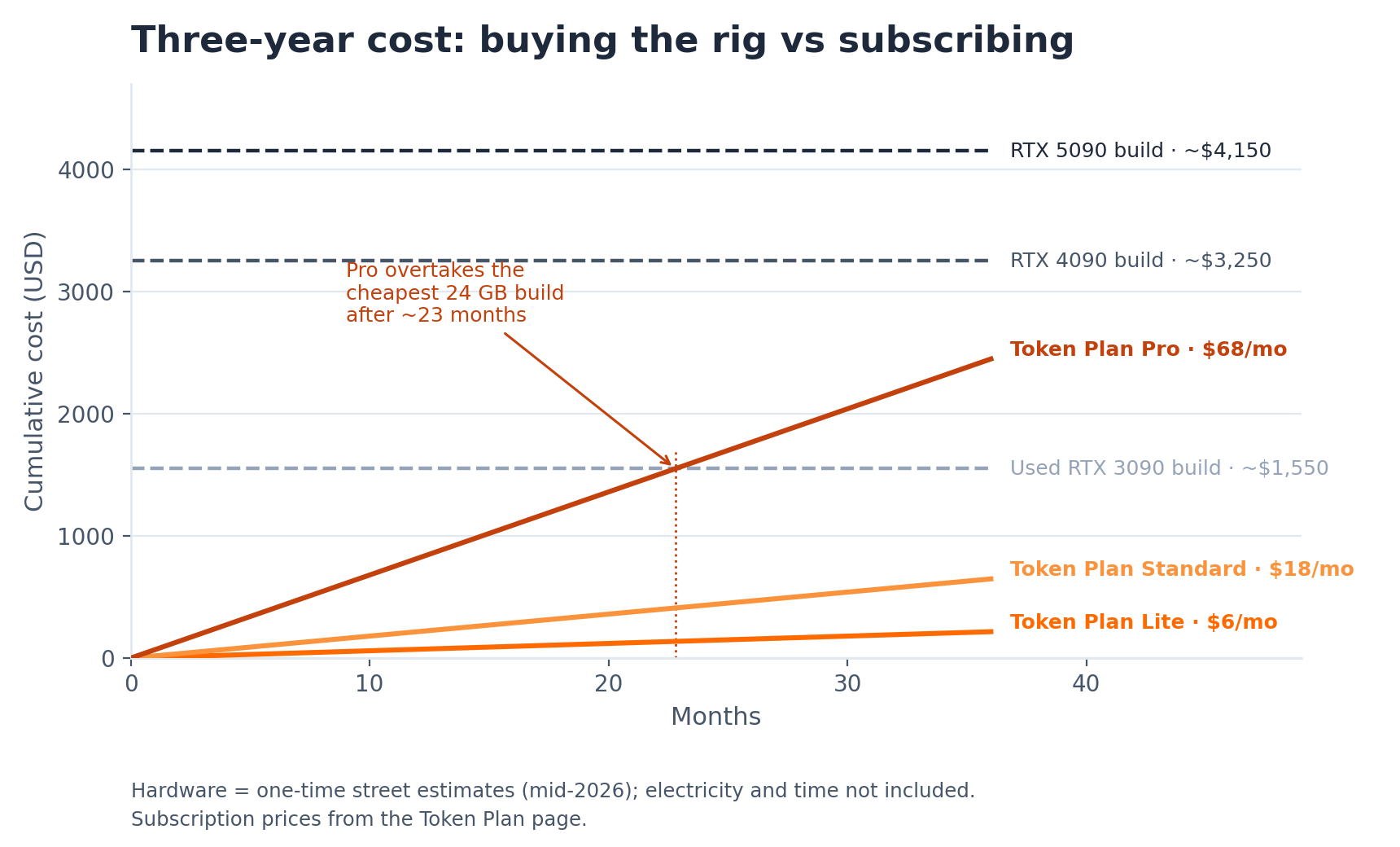
Set the two options side by side. A year of the Lite plan ($65) costs less than the price movement on a mid-range GPU in a volatile month; even the Pro plan's annual cost is less than the GPU alone in most 24 GB builds. A subscription doesn't depreciate, doesn't draw hundreds of watts at the wall, and doesn't age out at the next model generation. The API serves full-precision weights, so there's no quantization loss and no context squeezed by whatever VRAM you could afford. You get an API key and a first successful call in about five minutes, against one fixed monthly number instead of a hardware quote that can climb between deciding and buying.
Running a 27B Qwen locally is very doable — a machine with 24 GB of VRAM, about $1,300+, and an evening of setup. If you have the hardware, or want it, go for it.
If you don't, and the point is simply using frontier Qwen models, the faster on-ramp is Token Plan: $6 a month, full precision, Qwen3.8-Max today, and a roster that keeps growing. Either way, you're running Qwen — on your own metal or through an API key. And if you later decide you want weights on your own hardware after all, the hardware will still be on sale. Whether it will still be at today's price is another question.
Model Studio Token Plan for Individual One Subscription for Every AI Model, Up to 3x More Value

1,596 posts | 525 followers
FollowJohnny Mai - October 7, 2026
Alibaba Cloud Community - August 28, 2026
Johnny Mai - October 7, 2026
Alibaba Cloud Community - August 17, 2026
Johnny Mai - September 10, 2026
Alibaba Cloud Community - August 28, 2026
1,596 posts | 525 followers
Follow Token Plan
Build more, spend less. One plan, every modality.
Learn More
Alibaba Cloud Model Studio
A one-stop generative AI platform to build intelligent applications that understand your business, based on Qwen model series such as Qwen-Max and other popular models
Learn More Qwen
Qwen
Full-range, open-source, multimodal, and multi-functional
Learn More QwenWork
QwenWork is dedicated to helping employees strengthen their professional competitiveness in the AI era and to enabling enterprises to improve organizational effectiveness.
Learn MoreMore Posts by Alibaba Cloud Community

