Using an Agent to help with work is becoming increasingly common. Developers use Coding Agents to write code, add tests, and troubleshoot issues, while business teams use Work Agents to organize information, analyze spreadsheets, and create presentations. Many tasks that once required people to work through every step themselves can now be handed to an Agent for assistance.
A month-end business review is one example: check how sales in East China performed this month, identify what changed compared with last month, and put the findings into a few PPT slides. This is the kind of task an Agent is well suited to help with.
Before the Agent can get to work, however, employees often still have considerable preparation to do themselves.
Suppose the Agent is not yet connected to the company's sales system. You first need to contact the data team, specify which two months of East China data you want and which metrics you need, and ask them to export an Excel or CSV file. Once you receive the file, you still need to confirm what the fields mean and check for missing data before handing it to the Agent.
Having the data is not enough; you also need to explain how to analyze it. Should sales be calculated from orders placed or payments received? Should refunds be deducted? How should increases and decreases across products be compared? A spreadsheet alone cannot convey these business definitions to the Agent, so you still need to include the calculation rules and caveats in the Prompt.
When it is time to prepare the review, you also need to specify the total number of slides, which metrics to discuss first, the chart formats to use, and which issues to list separately. After several rounds of revision, you may save these requirements as a local template or compile them into a Skill to reuse next month.
If you keep using the same Agent, this may remain manageable for a while. Once you switch computers or Agents, you need to find the files again, copy the Prompt, install the Skill, and verify that you have the version you revised last time.
Collaboration makes things more complicated. You cover East China while a colleague covers North China, and each of you has an Agent generate a review. Only when you combine them do you discover that one calculates sales from payments received while the other uses order amounts; one starts with products while the other starts with channels, and the chart styles and slide counts differ as well. Regions can be analyzed separately, but measurement conventions and reporting formats need to be consistent, or the work will have to be redone.
The standards have always existed; they are simply scattered across people's heads, earlier conversations, and the Prompts, Skills, and template files on individual computers. Which rules are ultimately used often depends on who does the work and which Agent they use.
The team can expose sales data queries through an API or make them available to the Agent through MCP, then package the analysis conventions and review structure into Skills and Prompts for everyone to reuse.
Even after these resources are ready, employees still need to know which services are available, where their endpoints are, which Skill suits the current task, and which version of the standards the team is using. They then have to provide these resources to the Agent one by one.
If the Agent could search the team's resource repository for data APIs, MCPs, Skills, and Prompts based on the request, employees could simply say, "Help me prepare this month's business review for East China, compare it with last month, and organize it into a 5-slide PPT presentation following the team's standards." The Agent could then find suitable resources, retrieve data it is authorized to access, and continue working according to the team's analysis conventions and reporting requirements.
Colleagues covering East China and North China could conduct their analyses separately while reusing the same standards. Even if they switch Agents, they would still share a common entry point to the resources.
Introduced in Nacos 3.3.0, ARD resource discovery provides such an entry point: it lets an Agent search Nacos for Agents, MCPs, Skills, and Prompts relevant to the current task, then proceed using the appropriate method for each resource type (Nacos 3.3.0 Release Overview).
ARD stands for Agentic Resource Discovery, an open specification for describing, searching for, and discovering AI resources. It is published on the ARD website and maintained publicly in the ards-project/ard-spec GitHub repository.
Members of the working group developing the specification come from companies including Microsoft, Google, Hugging Face, and GoDaddy. The specification is still at the proposal stage, and the community can contribute to discussions and improvements through the public repository (Working Group Overview; Specification).
In use, an Agent submits its task requirements to the resource repository, which returns candidates describing each resource's name, capabilities, type, and where to retrieve its content. The resources it can discover include:
| Resource | What It Represents in Everyday Work |
|---|---|
| MCP | Tool services for querying sales data, reading tickets, and accessing business systems |
| Skill | Methods for analyzing changes in sales and rules for generating team documents |
| Prompt | Reusable task instructions and output requirements |
| Agent | A deployed remote assistant capable of handling a category of tasks |
After discovering a resource, the Agent must still use it according to its protocol or content format: connect to an MCP service, read and follow a Skill, or invoke a remote Agent using a protocol it supports (Introduction to the ARD Protocol).
Users first connect to the resource repository, then look for tools and rules relevant to their current work as needed, rather than preparing everything before a task begins. This assumes that the team has already connected its services and organized its standards. ARD helps discover and reuse existing resources; it cannot conjure up capabilities that have not yet been built.
If the team already uses Nacos to manage MCPs or Skills, it can continue creating, updating, and publishing resources through the console and management APIs, keeping their descriptions up to date. There is no need to maintain a separate resource inventory for ARD.
ARD searches the latest published versions and filters them by the caller's identity and resource visibility. Drafts, versions that have been taken offline, and content the caller is not authorized to read do not appear among the candidates. Resources published by maintainers thus become directly searchable by Agents through this entry point (Nacos AI Registry Adapter Specification).
flowchart LR
    A[User submits a task] --> B[Agent searches through ARD]
    B --> C[Nacos returns visible resources]
    C --> D[Retrieve resource content from the returned links]
    D --> E[Invoke MCP or a remote Agent]
    D --> F[Read a Skill or Prompt]
    E --> G[Complete analysis and delivery]
    F --> G
Search uses keywords by default; vector search and a JEV model can also be configured to assist evaluation. You can start with keyword search and, once the number of resources grows and you need to handle more freely phrased queries, configure vector search and a JEV model. The vector model, vector store, and JEV model must be configured separately; enabling ARD does not automatically configure them.
Suppose the data team has already developed a sales data MCP and published it in Nacos. The analysis methods and reporting requirements we repeatedly refined in earlier Agent sessions have also been compiled, respectively, into a Sales Analysis Skill and a Business Review PPT Skill and published in the same resource repository for team members to use.
We now start a brand-new Codex session and connect to this "enterprise resource repository" using the ARD project's AgentFinder Skill. The session is already configured with a discovery entry point and access credentials, and it has general-purpose HTTP and PPT tools. We leave it to Codex to search the repository for the sales MCP and the analysis and reporting standards to use for this task.
We first specify the region to analyze, the months to compare, and the required form of the review:
I need to prepare the September 2026 business review for East China, compare it with August, and ultimately organize it into a 5-slide PPT presentation. First, help me find suitable data services, analysis methods, and reporting standards in the enterprise resource repository.
Codex uses AgentFinder to submit an ARD search to Nacos and finds the team's preconfigured sales MCP, analysis Skill, and reporting Skill.
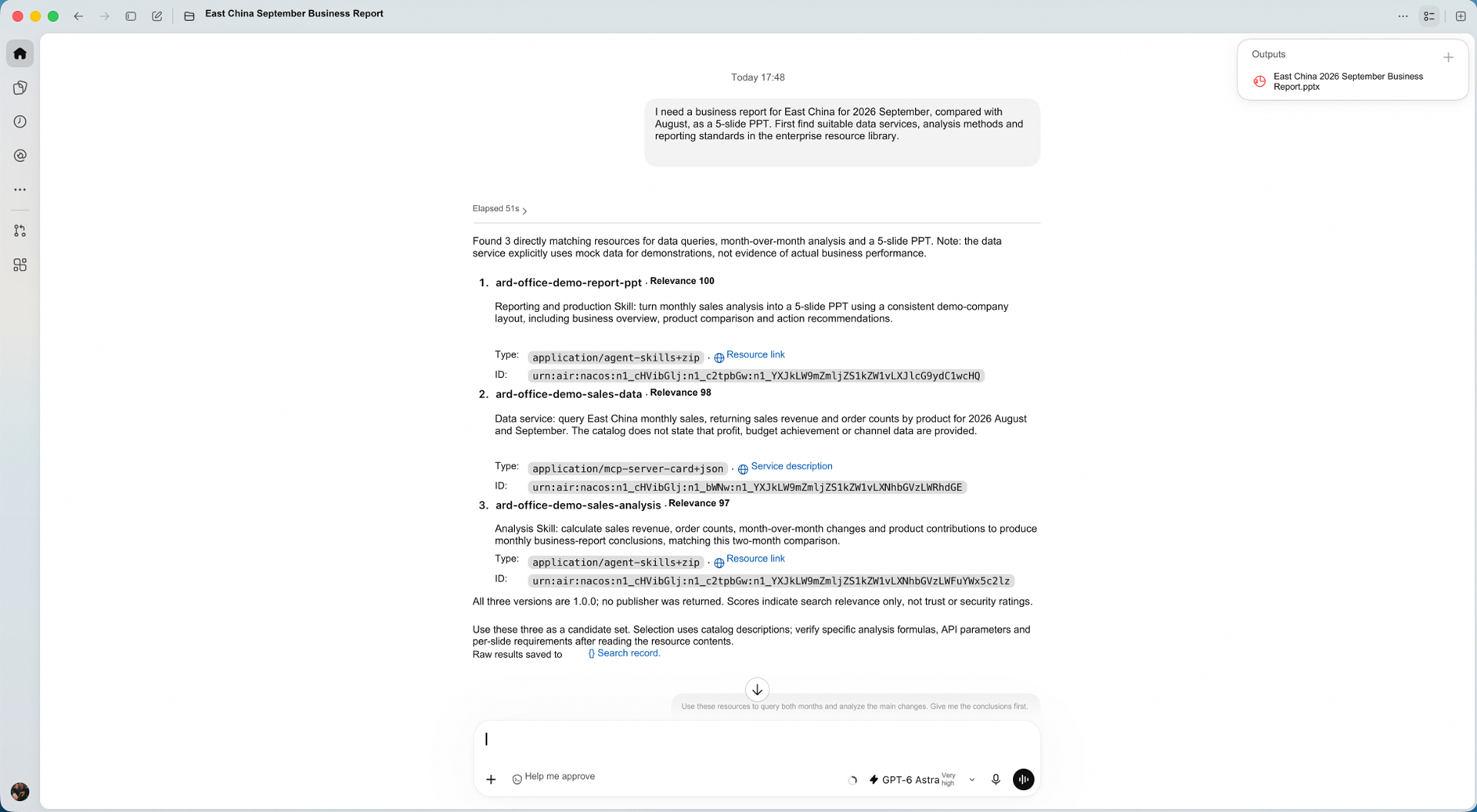
Figure 1: Codex lists the three resources it found, explains what each is for, and provides their entry points.
Each of these three resources serves a different purpose: the sales MCP can query sales amounts and order counts for East China in August and September; the analysis Skill calculates month-over-month changes and product contributions; the reporting Skill specifies the structure and consistent layout of the 5-slide review. Codex lists how each resource relates to the current request.
Resource descriptions also help determine whether the resources are sufficient. The sales MCP's description explicitly states that it does not provide profit, budget attainment rates, or channel data, so this review should focus on the metrics it can provide. If profit analysis is also required, we need to keep looking for a data source.
This step has identified the data retrieval, analysis, and reporting resource entry points we need. The specific calculation rules and production requirements can only be read once the resource content has been retrieved.
After confirming that these three resources can cover the current task, we ask Codex to continue:
Use these resources to query the data for both months and analyze the main changes. Give me the analytical findings first.
Codex follows the returned links to read the two Skills, obtains connection information from the MCP service description, then connects to the sales MCP and calls query_sales_data to query data for both months. This time, we do not need to export a separate Excel file or paste the analysis rules into the conversation again.
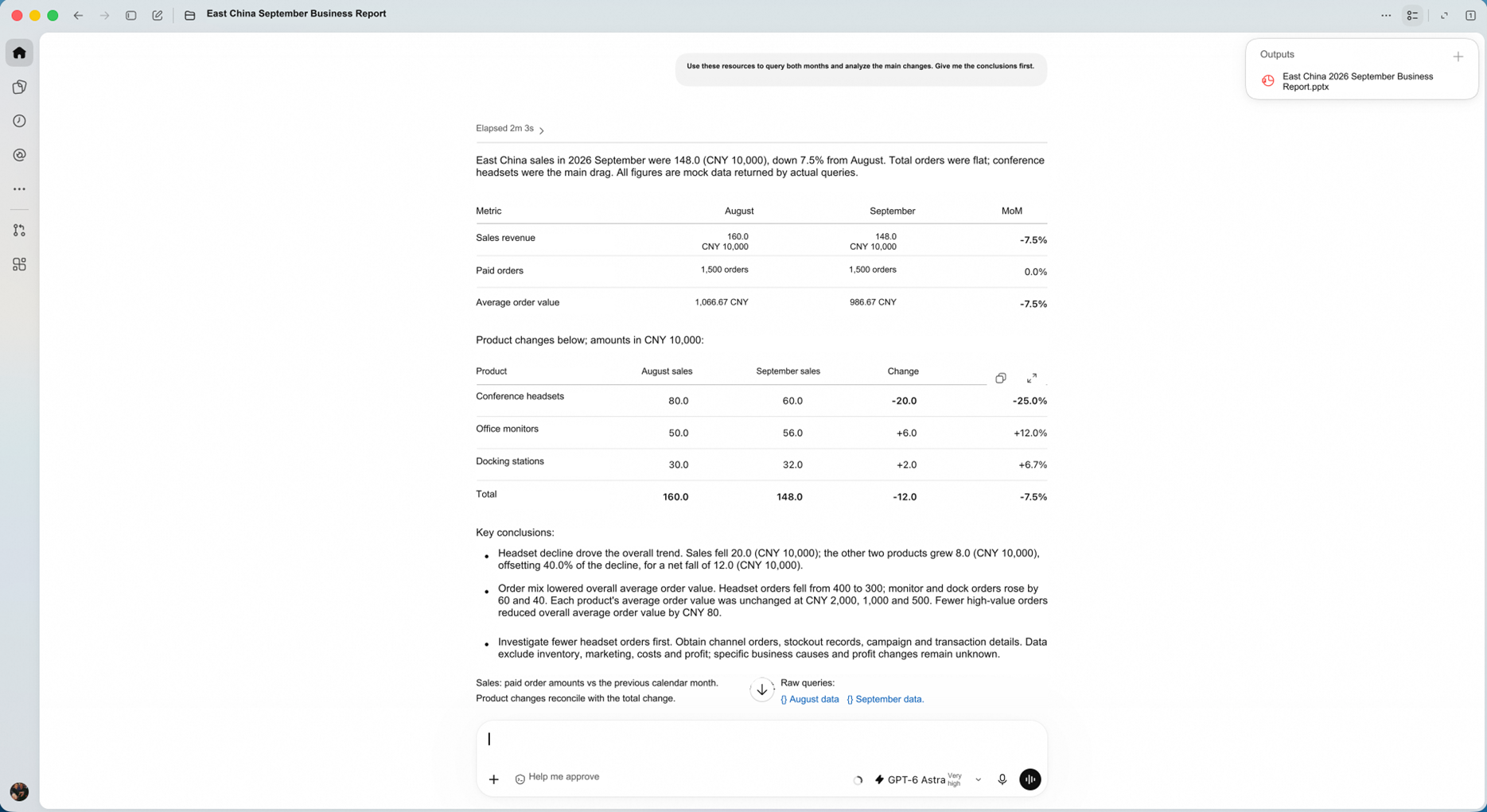
Figure 2: The analysis results list monthly metrics, product-level changes, and follow-up checks together, making it easy to examine the basis for the findings.
The results show that sales in September totaled CNY 1.48 million, down 7.5% from CNY 1.60 million in August. The product breakdown explains this CNY 120,000 difference: sales of conferencing headsets fell by CNY 200,000, while office monitors and docking stations together gained CNY 80,000, offsetting part of the decline.
The bottom of the screenshot states the analysis conventions: sales are calculated from paid order amounts and compared with the previous calendar month, and product-level changes are reconciled with the overall change. These requirements come from the analysis Skill, so the same rules can be read even if a different colleague or Agent performs the task.
What still needs to be established is why orders for conferencing headsets declined. Codex lists areas to investigate, such as channel orders and stockout records. We can check these with business colleagues before deciding whether to include them in the formal review.
After reviewing the analysis results, we ask Codex to organize them into a PPT presentation:
Turn this analysis into an editable, 5-slide business review PPT presentation.
The reporting Skill read earlier already specifies the content and layout for each slide. Codex organizes the content according to these requirements and generates the file using the existing PPT tools, so we do not have to explain everything again from scratch.
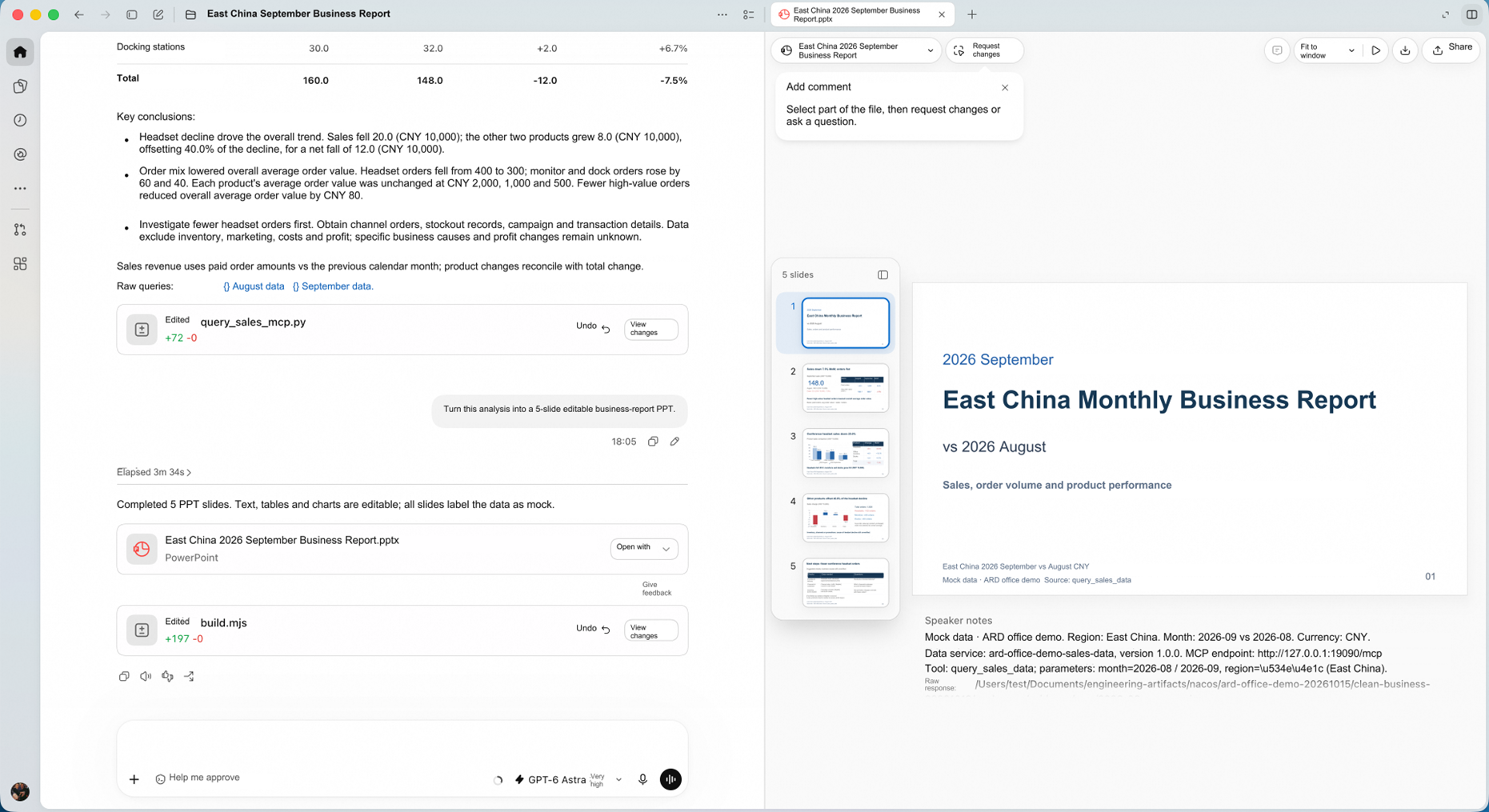
Figure 3: The delivered PPT file is on the left; the cover and thumbnails of the five slides can be viewed on the right.
The review in the preview on the right has 5 slides with a consistent layout, covering a business overview, product comparisons, and follow-up checks. The text, tables, and charts remain editable, making it easy to add business judgments or revise the presentation in response to review feedback.
This new session has made use of the data team's query service, as well as the analysis and reporting experience accumulated in other sessions. If another colleague takes over later, they can also find these resources in Nacos and follow the team's standards.
You can start by preparing a data MCP, an analysis Skill, and a reporting Skill, then work through the process above. The three resources in this example are for demonstration purposes, not built-in Nacos services; to try the example yourself, you need to create or connect them.
Set up a Nacos 3.3.0 installation that starts and allows you to log in normally. Configure the following settings in the server-side conf/application.properties:
# Enable the ARD protocol entry point; disabled by default
nacos.ai.ard.enabled=true
# Dedicated port for the AI Registry adapter; defaults to 9080
nacos.ai.registry.port=9080
# Shared resource search is enabled by default; re-enable it if previously disabled
nacos.ai.resource.search.enabled=true
# Public adapter address used in resource links returned to callers
# This example is for local testing; use an actually reachable address for access from another machine
nacos.ai.ard.catalog.base-url=http://127.0.0.1:9080
After restarting the service, access ARD through the adapter port. With the default direct connection, the search endpoint is:
http://127.0.0.1:9080/v3/ai/ard/searchIf the Agent runs on another machine or in a container, 127.0.0.1 refers to its own environment. Both the search endpoint and catalog.base-url must be changed to a Nacos adapter address the Agent can actually reach. If access goes through a gateway with a configured path prefix, the address must include the full prefix as well.
When using an external database or upgrading from an earlier version, first apply the database script updates for 3.3.0, including the tables required for AI resource search. For configuration settings and API paths, see the 3.3.0 Adapter Specification.
Create or import resources in the Nacos console: configure working service connection information for MCPs, upload content for Skills, and publish the resources to make them available. The account used to invoke them needs read permissions for these resources.
When writing a resource description, consider how someone else might search for it. For example, a sales MCP could be described as follows:
Query sales amounts, order counts, and product details by region and month, for monthly business analysis and month-over-month comparisons.
An analysis Skill could be described as follows:
Apply consistent conventions to monthly sales analysis, calculate month-over-month changes in sales and each product's contribution to increases or decreases, and list issues requiring further investigation.
Descriptions such as "sales tool" or "analysis assistant" alone make it difficult for either people or Agents to judge suitability. Clearly stating the business scope, available query dimensions, and applicable tasks is often more useful than choosing a good name.
After publication, the resource index takes some time to update. If a newly published resource does not yet appear in search results, try again later and also check that the namespace is correct, a published version exists, and the calling account has read permissions.
Place the AgentFinder Skill in a Skill directory supported by your Agent, which can then follow the Skill to discover resources. The Agent must also be able to send HTTP POST requests.
AgentFinder uses ~/.agentfinder/finders.json to store resource discovery services and the currently selected resource repository. For an initial configuration, use the example below. If the file already contains other entries, retain them, append the enterprise resource repository, and update selected:
{
  "selected": "nacos-team",
  "finders": [
    {
      "id": "nacos-team",
      "name": "Enterprise Resource Repository",
      "description": "Data services, analysis methods, and working standards maintained by the team in Nacos",
      "search": "http://127.0.0.1:9080/v3/ai/ard/search?namespaceId=public"
    }
  ]
}
search must contain the full search endpoint. Replace namespaceId with the ID of the namespace containing the resources. This example stores only the discovery entry point; access credentials must be supplied through the Agent's HTTP tool or connection configuration.
Once configuration is complete, you can give the Agent a request:
Use AgentFinder to discover resources in the configured "Enterprise Resource Repository." Access Nacos using the credentials configured in the current environment. I need to prepare the September 2026 business review for East China, compare it with August, and ultimately organize it into a 5-slide PPT presentation. First, find an MCP that can query sales data, a Skill that defines the analysis conventions, and the team's formatting standards for business reviews. List how each can help me.
After finding suitable resources, read the Skills, connect to MCPs, or invoke remote Agents as the task requires. If you need to generate a PPT presentation, you also need the appropriate file-generation tools (AgentFinder Configuration and Discovery Workflow).
Request the search API directly to check whether the server can return resources. The example below uses a Bearer token from Nacos's default authentication plugin and assumes that the local environment variable NACOS_ACCESS_TOKEN already contains a valid token:
curl --fail-with-body --silent --show-error \
  'http://127.0.0.1:9080/v3/ai/ard/search?namespaceId=public' \
  -H 'Content-Type: application/json' \
  -H "Authorization: Bearer ${NACOS_ACCESS_TOKEN:?Please configure a valid Nacos access token first}" \
  --data '{
    "query": {
      "text": "sales"
    },
    "pageSize": 5,
    "federation": "none"
  }'
federation: "none" restricts this query to the current resource repository. Start by searching for keywords already present in resource names or descriptions to check that the entry point, permissions, and index are working correctly. After enabling vector search, try different natural-language phrasings to evaluate the search results.
Candidate resources in the search response are found in results. Start by examining these four fields:
| Field | How to Interpret It |
|---|---|
displayName |
Which resource was found |
description |
Whether it can address the current problem |
type |
Which resource format to use when processing it |
url |
Where to retrieve the resource's description or content |
When retrieving content from url, retain the full link and all parameters. A Skill returned by Nacos is usually a ZIP archive containing SKILL.md and supporting files. For MCP, the returned content is a service description: read the connection information from it, then perform initialization and tool discovery using the MCP protocol. Resource links in search results are not the invocation endpoints for business tools. (3.3.0 ARD Resource Retrieval Contract)
Once the search succeeds, replace query.text with your own task description, then add filters such as resource type as needed to narrow the scope.
| Symptom | What to Check First |
|---|---|
| The search API is unreachable or returns 404 | Whether ARD is enabled and the service has been restarted, whether the request uses the adapter port, and whether the gateway path is correct |
| The response is 401 | Whether valid credentials are included, whether the token has expired, and which authentication method the current deployment uses |
| The request succeeds but returns no results | The namespace, published version, read permissions, index update status, and whether the query terms match the resource description |
| Resources appear in search results, but their links cannot be opened | Whether catalog.base-url is reachable from the Agent's environment, and whether resource retrieval requests also include the required credentials |
| The MCP description can be retrieved, but data queries do not work | Whether the business MCP is running, whether the connection information is correct, and whether all required access permissions for the business service itself are in place |
Nacos resource read permissions and business-system invocation permissions are separate requirements; both must be met. Discovering a sales MCP does not automatically grant access to all the sales data behind it.
For your first integration, start with a monthly business review: prepare the data services, analysis methods, and reporting standards, then let the Agent find them through a single entry point and complete a delivery.
Once the workflow is stable, gradually add the tools and experience commonly used in ticket analysis, weekly project reports, and development reviews to the resource repository.
The data team maintains the services, business colleagues refine the analysis conventions, and the team maintains the reporting standards. Users find and reuse these resources according to their tasks. When they switch to another Agent or a new member joins, the same resources can still be found through the same entry point.
HiRoute New Release: Choose the Best-Fit Model for Your Real-World Work

814 posts | 61 followers
FollowAlibaba Cloud Native Community - July 17, 2026
Alibaba Cloud Native Community - March 13, 2026
Alibaba Cloud Native Community - February 3, 2026
Alibaba Cloud Native Community - April 10, 2026
Alibaba Cloud Native Community - June 5, 2026
Alibaba Cloud Native Community - April 20, 2026
814 posts | 61 followers
Follow Token Plan
Build more, spend less. One plan, every modality.
Learn More QwenWork
 is dedicated to helping employees strengthen their professional competitiveness in the AI era and to enabling enterprises to improve organizational effectiveness.
Learn More Wan3.0
Unleash Your Creativity Try Wan 3.0 now — longer narratives, greater control, endless creativity.
Learn More Qoder
From Assisted to Autonomous — Adapting to Every Programming Need
Learn MoreMore Posts by Alibaba Cloud Native Community

