By Zhuo Guang
With the rapid development of AI Agent technology, a single agent has become insufficient to meet the demands of complex business scenarios. Multi-Agent Collaboration is becoming a mainstream trend in AI applications—allowing multiple agents with different expertise to work together to complete complex tasks.
The A2A (Agent-to-Agent) protocol, released by Google in early 2025, provides an important foundation for standardized communication between multi-agents. The A2A protocol defines standards for discovery, capability description, and task interaction between agents, enabling seamless collaboration among agents from different sources and frameworks.
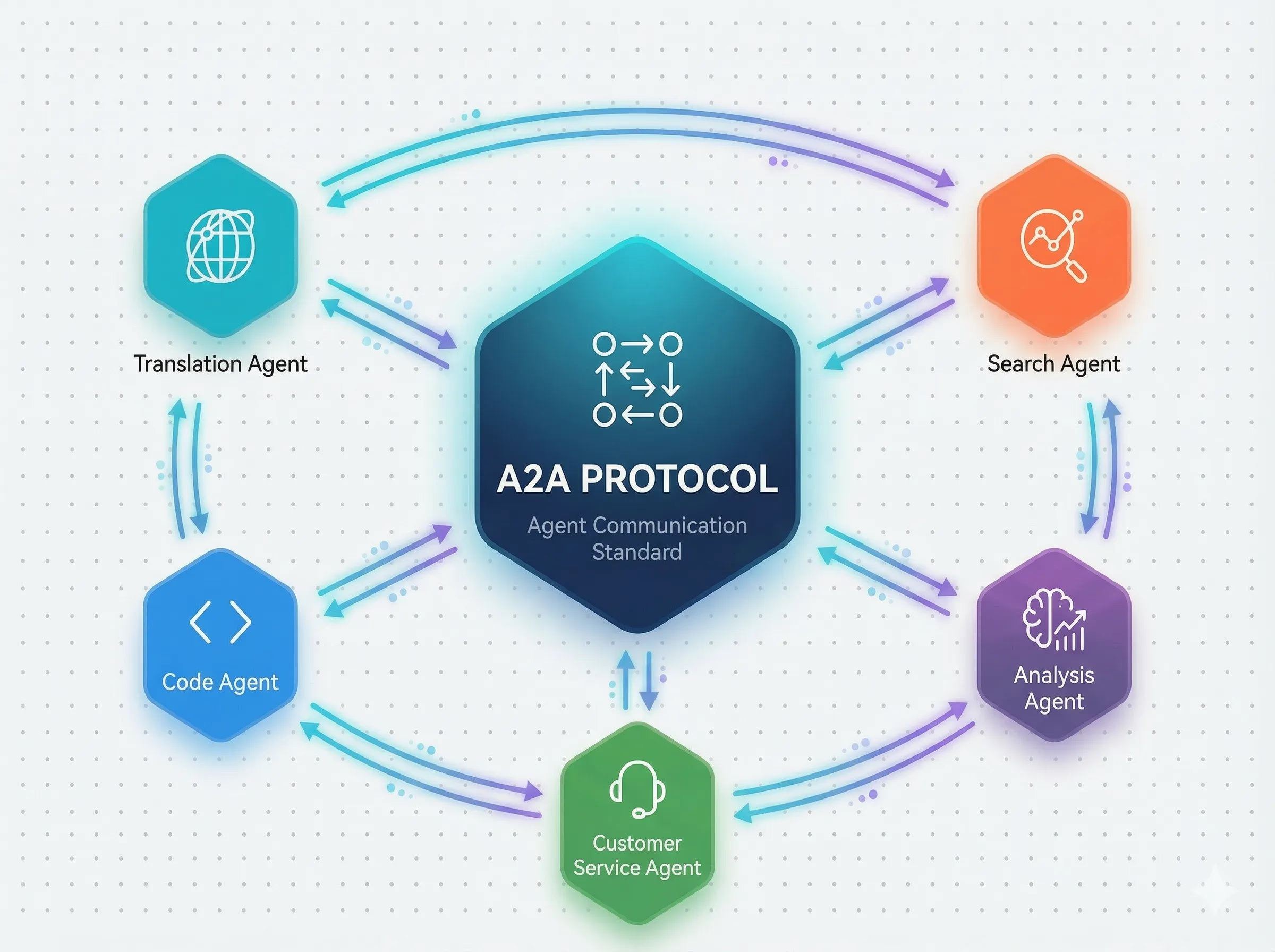
However, the Dify platform currently does not natively support the A2A protocol. This means that developers cannot directly discover and invoke agents that follow the A2A standard within Dify, lacking effective means to integrate with the A2A ecosystem. Specifically, Dify developers face the following challenges:
● Protocol Incompatibility: Dify does not natively support the A2A protocol, cannot directly parse AgentCards, handle A2A message formats, and is completely isolated from the existing A2A Agent ecosystem.
● Difficulty in Agent Discovery: Multiple A2A Agents are deployed in different environments, with no standard way for Dify applications to discover and manage these agents, requiring extensive custom development for each integration.
● Limited Dynamic Selection: In traditional methods, Dify applications can only call a single agent that is hard-coded in advance, unable to dynamically choose the most suitable agent based on actual task requirements.
● Complex Collaboration Orchestration: When business requires multiple agents to collaborate, developers need to conduct extensive conditional judgments and routing logic within workflows, leading to high development and maintenance costs.
● Lack of Unified Registration Center: Without a centralized platform to manage A2A Agents, it is difficult to conduct unified registration, discovery, and governance of agents.
● Inability to Expose Externally: The agent applications built on Dify can only be used within the Dify platform and cannot provide services externally using standard protocols, making it hard for other agents within the A2A ecosystem to discover and invoke them.
These issues result in Dify developers facing the dilemma of protocol incompatibility, high integration costs, poor scalability, low flexibility, and inability to interconnect externally when building multi-agent applications.
To address the above issues, the Nacos team has developed a bidirectional A2A protocol integration solution for the Dify platform, filling the gap in A2A protocol support with two complementary plugins, allowing Dify applications to both invoke external A2A agents and be called as A2A agents by external systems.
Nacos 3.0 has expanded its support for A2A Agents on the basis of the MCP Registry, launching the Nacos Agent Registry—a unified AI agent registration and discovery platform. Combined with the A2A plugin combination, Dify developers can:
● Open Up A2A Protocol: The plugin contains complete A2A protocol support, automatically parsing AgentCards and handling standard message formats, allowing Dify to seamlessly connect with the A2A ecosystem.
● Unified Agent Discovery: Automatically discover all registered A2A Agents from the Nacos Agent Registry without manually configuring the connection information for each agent.
● Dynamic Agent Selection: LLM can intelligently select the most suitable agent for invocation based on task requirements from multiple available agents.
● Flexible Discovery Modes: Supports both Nacos mode and URL mode for discovery, satisfying needs for different deployment scenarios.
● Standard Protocol Exposure: Expose any application (Chatbot/Agent/Chatflow/Workflow) within Dify as an agent compliant with A2A protocol standards.
● Automatic Registration and Discovery: Supports automatically registering Dify applications to the Nacos Agent Registry, allowing other agents to discover and invoke them.
● Support for Multi-Turn Conversations: Maintains session context based on Dify Plugin Storage, supporting continuous conversations across requests.
● Standard Endpoint: Provides a standard /.well-known/agent.json endpoint for agent metadata discovery.
Currently, the official Nacos A2A plugins have been officially launched in the Dify official plugin marketplace:
● A2A Discovery Plugin (A2A Agent Client)
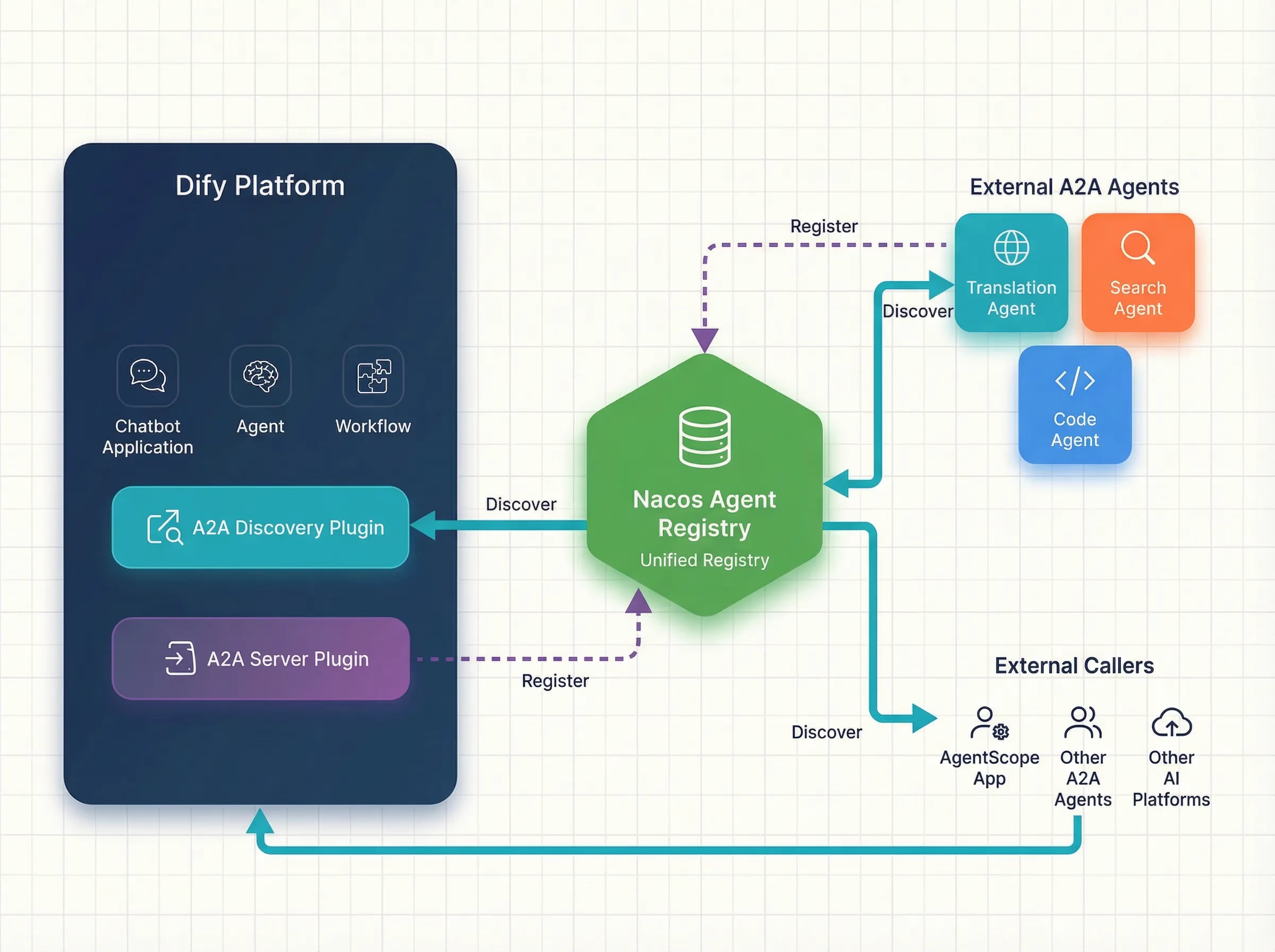
Nacos Mode (Recommended)
Manage and discover agents uniformly through the Nacos Agent Registry. Simply register A2A Agents in Nacos, and Dify applications can automatically discover and invoke them.
Advantages:
● Centralized management, unified maintenance of agent information
● Supports dynamic registration and deregistration without restarting Dify applications
● Seamless integration with the Nacos ecosystem, enjoying enterprise-level governance capabilities
Configuration Example:
discovery_type: nacos
available_agent_names: translator_agent,search_agent,code_agent
namespace_id: public
URL Mode
Discover directly through the standard URL of A2A Agents, suitable for lightweight scenarios that don't require Nacos.
Configuration Example:
discovery_type: url
available_agent_urls: {
  "translator_agent": "http://host1:8080/.well-known/agent.json",
  "search_agent": "http://host2:8080/.well-known/agent.json"
}Get Agent Information (get_a2a_agent_information)
Query detailed information about all configured A2A Agents, including:
● Agent Name (agent_name)
● Function Description (description)
● Skill List (skills)
LLM uses this information to understand each agent's capabilities, providing a basis for subsequent intelligent selection.
Invoke Agent (call_a2a_agent)
According to LLM's selection, sends query messages to the designated A2A Agent and receives responses. Supports:
● Dynamically selecting target agents
● Customizing query messages
● Complete context passing
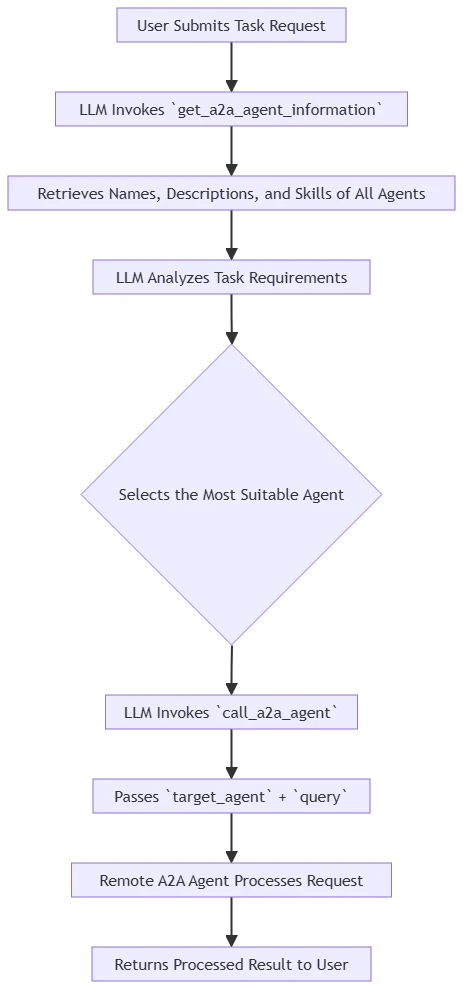
Through the cooperation of the above two tools, Agents within Dify can achieve:
The A2A Server plugin enables Dify applications to provide services externally using the standard A2A protocol, allowing other agents to discover and invoke them.
A2A Server supports exposing the following types of Dify applications as A2A agents:
| Application Type | Description |
|---|---|
| Chatbot | Conversational applications that support multi-turn conversations |
| Agent | Agent applications with tool invocation capabilities |
| Chatflow | Applications based on conversational processes |
| Workflow | Workflow applications |
Agent Metadata Endpoint (GET /.well-known/agent.json)
Returns an AgentCard that complies with the A2A protocol, containing:
● Agent Name (name)
● Function Description (description)
● Access Address (url)
● Version Information (version)
● Capability Declarations (capabilities)
● Skill List (skills)
External callers discover the agent's capabilities and invocation methods through this endpoint.
JSON-RPC Invocation Endpoint (POST /a2a)
Handles JSON-RPC requests adhering to the A2A protocol standards. Supports:
● message/send method: sends a message to the agent and receives a response
● Managing multi-turn conversation contexts
● Complete task state management
Once Nacos registration is enabled, the A2A Server will automatically register the Dify application to the Nacos Agent Registry upon receiving the first AgentCard request. After registration, other A2A agents can discover and invoke this Dify application through Nacos.
The A2A Server implements cross-request session context management based on Dify Plugin Storage:
● Automatically maintain conversation_id mappings
● Support continuous multi-turn dialogues
● Persist session state storage
This chapter will demonstrate the usage of the A2A Discovery and A2A Server plugins through two specific cases.
Let's use a specific example to demonstrate how to build a multi-agent collaborative AI assistant using the A2A Discovery plugin.
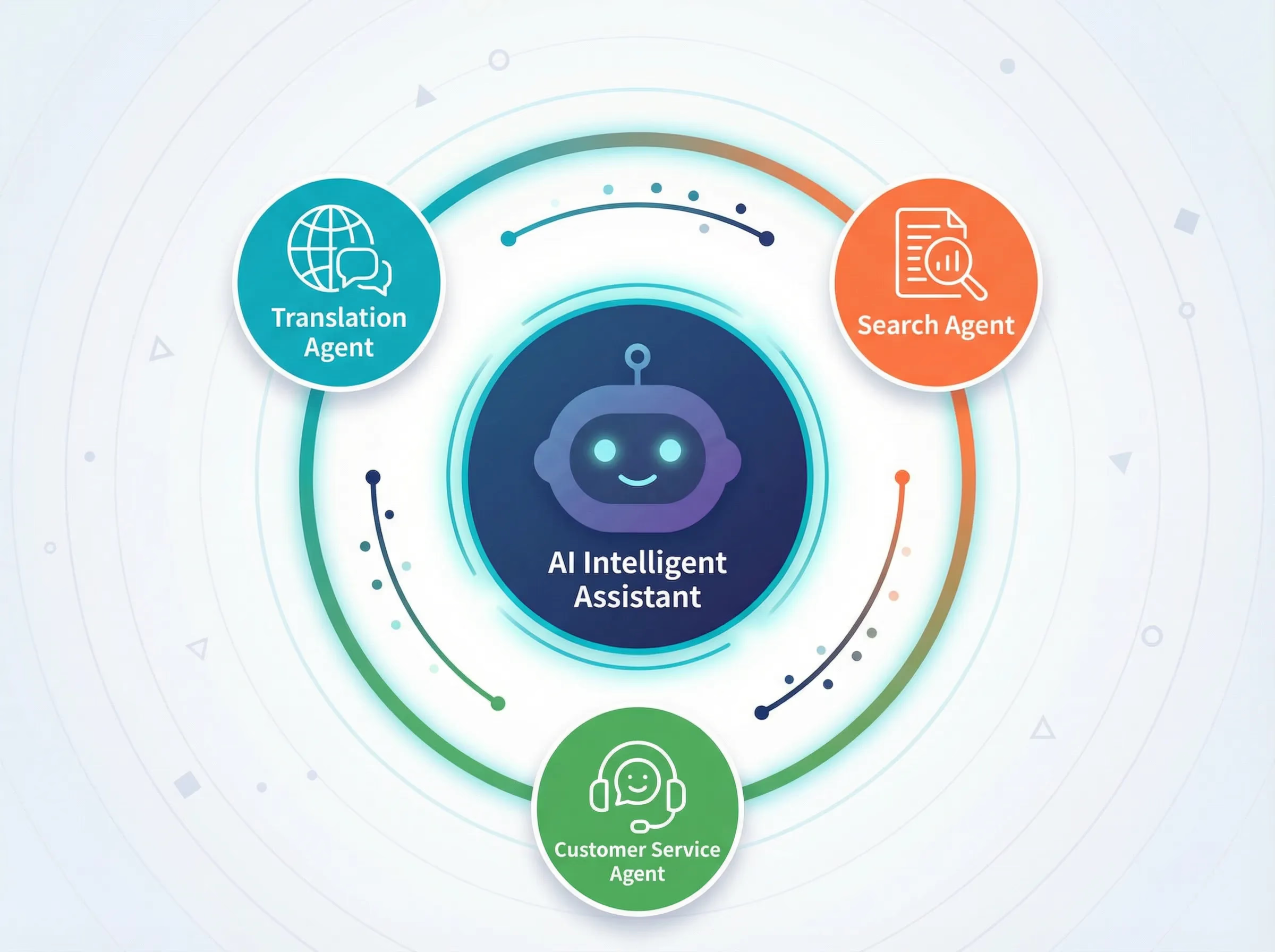
Scenario Description
Assume we need to build an intelligent customer service system that requires invoking the following three specialized agents:
There are two ways to register A2A Agents in the Nacos Agent Registry:
AgentScope is an open-source framework developed by Alibaba, focusing on multi-agent development with developers at its core. Its main goal is to address challenges in the construction, operation, and management of agents, providing a complete production-grade solution covering the entire lifecycle of "development, deployment, monitoring".
The latest version of AgentScope fully supports the A2A protocol and integrates Nacos as the default implementation for A2A Registry, establishing a complete distributed multi-agent collaborative system from development to deployment. A2A Agents built using AgentScope can automatically register with Nacos without manual configuration. Below is reference code:
from agentscope_runtime.engine.app import AgentApp
from agentscope_runtime.engine.deployers.adapter.a2a import (
    AgentCardWithRuntimeConfig,
)
from agentscope_runtime.engine.deployers.adapter.a2a.nacos_a2a_registry import (
    NacosRegistry,
)
from v2.nacos import ClientConfigBuilder

# Create Nacos Registry instance
registry = NacosRegistry(
    nacos_client_config=ClientConfigBuilder()
    .server_address("mse-xxx.nacos.mse.aliyuncs.com:8848")
    # Other optional configuration items
    .build()
)

# Create an AgentApp
app = AgentApp(
    app_name="translator_agent",
    app_description="TestAgent",
    # Configure the registry within a2a_config
    a2a_config=AgentCardWithRuntimeConfig(registry=registry),
)
For more integration methods, please refer to the AgentScope Official Documentation.
| Parameter | Description |
|---|---|
| Nacos Agent Registration Center Address | e.g.: mse-xxx.nacos.mse.aliyuncs.com:8848
|
| Nacos Username | Nacos authentication username (optional) |
| Nacos Password | Nacos authentication password (optional) |
| Alibaba Cloud AccessKey | For MSE Nacos (optional) |
| Alibaba Cloud SecretKey | For MSE Nacos (optional) |
1. Create a new Agent application in Dify
2. Add the two tools from the A2A Discovery plugin:
● get_a2a_agent_information
● call_a2a_agent
3. Configure tool parameters:
discovery_type: nacos
available_agent_names: translator_agent,search_agent,customer_service_agent
namespace_id: public
4. Set system prompt:
"You are an intelligent customer service assistant capable of invoking multiple specialized agents to handle user requests.

Workflow:

First, invoke get_a2a_agent_information to retrieve information about all available agents.
Based on the type of the user's query, select the most suitable agent.
Invoke call_a2a_agent to send the request to the selected agent.
Integrate the response results to provide a comprehensive answer to the user.
Available specialized agents include translation, search, customer service, etc. Please make intelligent selections based on the specific characteristics of the task."After deploying the application, try the following dialogues:
User: Please help me translate "How to return the product?" into Chinese
AI Assistant (Internal Process):
get_a2a_agent_information to get the list of agentstranslator_agent
call_a2a_agent to send the translation requestUser: I want to query the logistics status of order #12345
AI Assistant (Internal Process):
customer_service_agent
Now let's demonstrate how to use the A2A Server plugin to expose Dify applications as A2A agents, enabling other systems to discover and invoke them.
Scenario Description
Assuming we have already built a powerful "Intelligent Customer Service Assistant" application in Dify, we now wish to expose it as an A2A agent, allowing:
● Other AgentScope applications to call it
● Other agents in the A2A ecosystem to discover and collaborate with it
● External AI applications to access it through standard protocols
1. Enter the plugin management page and find the A2A Server plugin
2. Click "Create Endpoint"
3. Configure basic parameters:
| Parameter | Description | Example Value |
|---|---|---|
| Dify App | Select the application to be exposed | Intelligent Customer Service Assistant |
| Agent Name | Agent Name | smart-service-agent |
| Agent Description | Agent Description | Intelligent customer service assistant, supports order inquiries, after-sale services, product consultations |
| Agent Public URL | Public access address (fill in a placeholder first) | https://your-domain.com/a2a |
| Agent Version | Version Number | 1.0.0 |
4. Click save, and Dify will generate an Endpoint ID
After saving, obtain the generated Endpoint ID (e.g., abc123), then:
1. Return to edit the Endpoint
2. Update the Agent Public URL to the correct address:
https://your-domain.com/e/abc123/a2a3. Save the configuration
The final A2A endpoint:
● AgentCard Address: https://your-domain.com/e/{endpoint_id}/a2a/.well-known/agent.json
● JSON-RPC Address: https://your-domain.com/e/{endpoint_id}/a2a
If you wish for agents to be automatically discovered, you can configure Nacos registration:
| Parameter | Description |
|---|---|
| Enable Nacos Registration | On |
| Nacos Address | e.g.: mse-xxx.nacos.mse.aliyuncs.com:8848
|
| Namespace ID | Default public
|
| Username/Password | Nacos authentication information (optional) |
| AccessKey/SecretKey | Specific to Alibaba Cloud MSE Nacos (optional) |
Test AgentCard Retrieval
curl https://your-domain.com/e/{endpoint_id}/a2a/.well-known/agent.jsonSuccessful return example:
{
  "name": "smart-service-agent",
  "description": "Smart customer service assistant, supports order inquiry, after-sales service, and product consultation.",
  "url": "https://your-domain.com/e/abc123/a2a",
  "version": "1.0.0",
  "capabilities": {
    "streaming": false,
    "push_notifications": false
  },
  "skills": [
    {
      "id": "dify_app",
      "name": "smart-service-agent",
      "description": "Smart customer service assistant, supports order inquiry, after-sales service, and product consultation."
    }
  ]
}
Test Message Sending
Use A2A SDK or compatible clients to send messages:
from a2a.client import A2AClient

client = A2AClient("https://your-domain.com/e/{endpoint_id}/a2a")
response = client.send_message("I'd like to check the status of order #12345")
print(response.text)
Integration with AgentScope
After configuring AgentScope, AgentScope applications can automatically discover and invoke this Dify agent through Nacos:
from agentscope.agent import A2AAgent
from agentscope.a2a import NacosAgentCardResolver
from agentscope.message import Msg
from nacos.client import ClientConfig # [Note] The original code is missing the import for this line; you need to add it if using ClientConfig.

# Python AgentScope v1.0.11 or above
# Create Nacos AgentCard Resolver
nacos_resolver = NacosAgentCardResolver(
    remote_agent_name="my-remote-agent",  # The name of the agent registered in Nacos
    nacos_client_config=ClientConfig(
        server_addresses="http://localhost:8848",  # Nacos server address
        # Other optional configurations
    ),
)
# Use the Resolver to create an A2AAgent, discovering the Agent by name from Nacos
agent = A2AAgent(
    agent_card=await nacos_resolver.get_agent_card()
)
For more integration methods, please refer to the AgentScope Official Documentation.
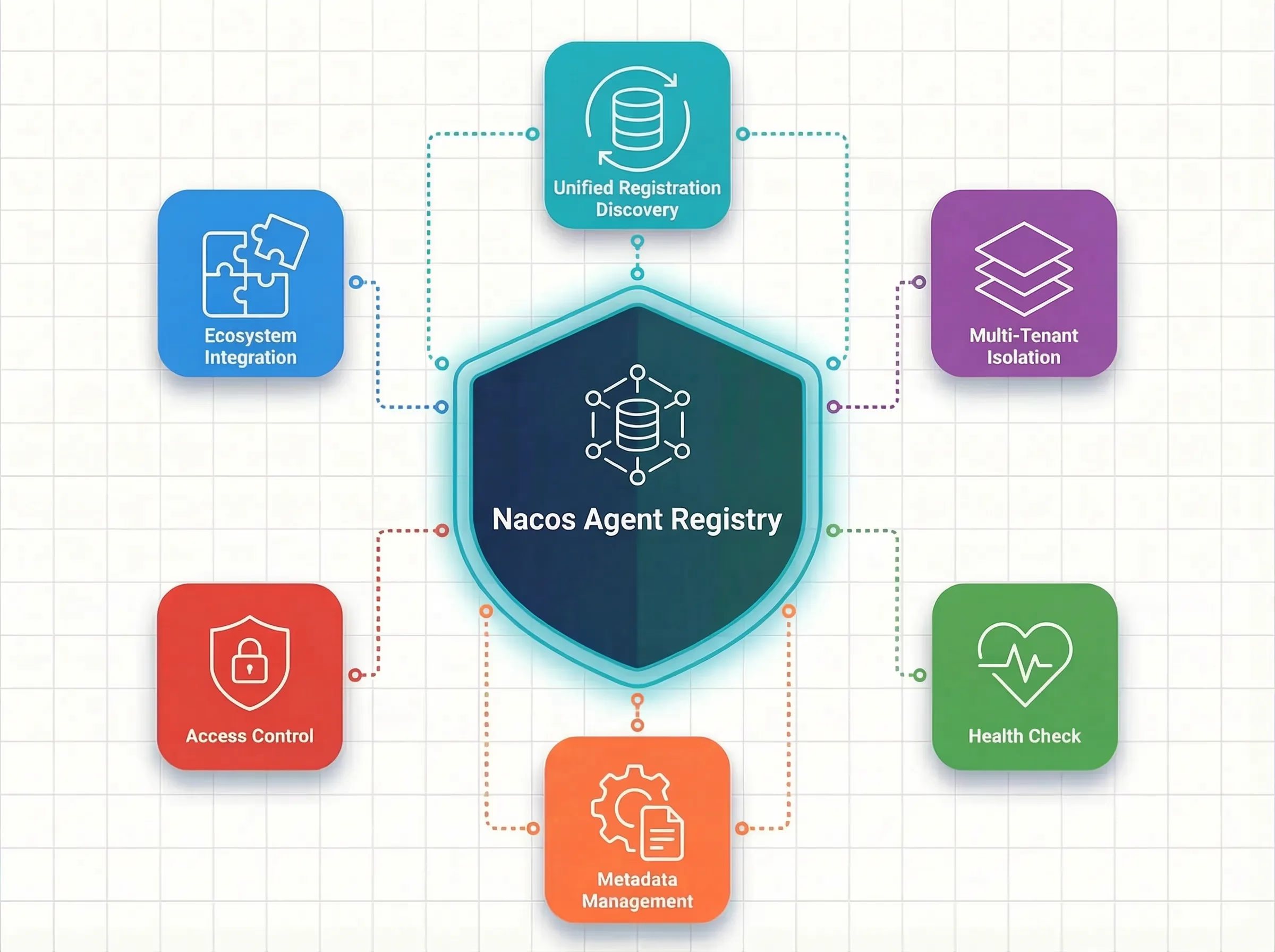
Unified Registration and Discovery
All A2A Agents are centrally registered in Nacos, and developers do not need to worry about the specific deployment locations of agents. When adding new agents, registration in Nacos is all that is required, and Dify applications can automatically discover and invoke them, supporting dynamic online and offline capabilities.
Multi-Tenant Isolation
Based on Nacos' namespace isolation mechanism, agents in different environments (development, testing, production) or different business lines can be completely isolated without affecting each other, meeting enterprise-level multi-tenant scenarios.
Health Checks
Nacos automatically monitors the operating status of each agent. When an Agent is unavailable, it is automatically removed from the service list to avoid invocation failures; when recovered, it automatically comes back online.
Metadata Management
Supports dynamically updating agents' descriptions, skill lists, and other metadata at runtime without requiring service restarts. This is very friendly for agent capability iteration and upgrades.
Access Control
Through Nacos' authentication and authorization mechanism, precise control can be exercised over which applications can access which agents, ensuring the security of enterprise-level applications.
Ecological Integration
Nacos Agent Registry not only supports A2A protocols but also seamlessly interfaces with Alibaba Cloud AI Gateway, AgentScope, and other components to build a comprehensive agent governance ecosystem.
| Capability | Description |
|---|---|
| Unified Registration and Discovery | All A2A Agents are centrally registered, supporting automatic discovery and dynamic updates |
| Multi-Tenant Isolation | Environment isolation of agents based on Namespace |
| Health Checks | Automatically detect agent availability, with automatic removal on failure |
| Metadata Management | Update agent descriptions, skills, and other information at runtime without restarting |
| Access Control | Access to Nacos supports authentication and authorization, ensuring agent invocation security |
| Ecological Integration | Seamless integration with frameworks like AgentScope |
The A2A plugin combination fills the gap in A2A protocol support on the Dify platform, providing Dify developers with bidirectional multi-agent collaboration capabilities:
● Bidirectional Protocol Support: A2A Discovery invokes external agents, A2A Server exposes Dify applications, achieving complete communication within the A2A ecosystem
● Simplified Integration: Through Nacos Agent Registry, a single configuration allows the discovery of all agents and enables Dify applications to be auto-discovered
● Intelligent Selection: LLM dynamically selects the most suitable agent based on task requirements
● Standard Protocols: Fully compliant with the Google A2A protocol, seamlessly compatible with various implementations
● Ecological Interconnectivity: Deep integration with mainstream agent frameworks like AgentScope, allowing Dify applications to be discovered and invoked by other AI platforms
● Enterprise-Level Governance: Relying on the Nacos platform, enjoy complete agent management capabilities
As the AI multi-agent technology continues to evolve, Nacos will continue to deepen its efforts in the AI Agent ecosystem, from MCP Server management to A2A Agent collaboration, deeply integrating with mainstream agent frameworks like AgentScope to provide developers with a more complete agent governance platform. Through the combination of the A2A Discovery and A2A Server plugins, Dify developers can now build truly open and interconnected agent applications—capable of invoking various specialized agents in the ecosystem while also exposing their own agent capabilities to the entire A2A ecosystem. In the future, we will support more agent protocols and richer governance capabilities to assist developers in building more powerful AI applications.
● A2A Discovery Plugin (Dify Market)
● A2A Server Plugin (Dify Market)
Kubernetes Has Officially Announced Again, Emphasizing the Immediate Migration of Ingress NGINX

774 posts | 60 followers
FollowAlibaba Cloud Native Community - January 22, 2026
Alibaba Cloud Native Community - April 10, 2026
Alibaba Cloud Native Community - June 13, 2025
Alibaba Cloud Native Community - September 9, 2025
Alibaba Cloud Native Community - April 15, 2025
Alibaba Cloud Native Community - September 29, 2025
774 posts | 60 followers
Follow QwenWork
QwenWork is dedicated to helping employees strengthen their professional competitiveness in the AI era and to enabling enterprises to improve organizational effectiveness.
Learn More Token Plan
Build more, spend less. One plan, every modality.
Learn More
Alibaba Cloud Model Studio
A one-stop generative AI platform to build intelligent applications that understand your business, based on Qwen model series such as Qwen-Max and other popular models
Learn More Qwen
Qwen
Full-range, open-source, multimodal, and multi-functional
Learn MoreMore Posts by Alibaba Cloud Native Community

