AI Agents are entering daily work. When writing code, conducting reviews, organizing documentation, and troubleshooting, many people codify repetitive workflows into Skills, allowing Agents to execute them according to fixed rules.
Take the document formatting Skill as an example. Technical solutions, API documentation, and post-incident reviews are not just documents for yourself; they usually circulate and are reviewed among R&D, testing, product, and project members. The team wants the heading hierarchy, parameter table fields, security guidelines, and review checklists to remain consistent. So, you first write this set of rules as a Markdown Skill and run it successfully in Codex.
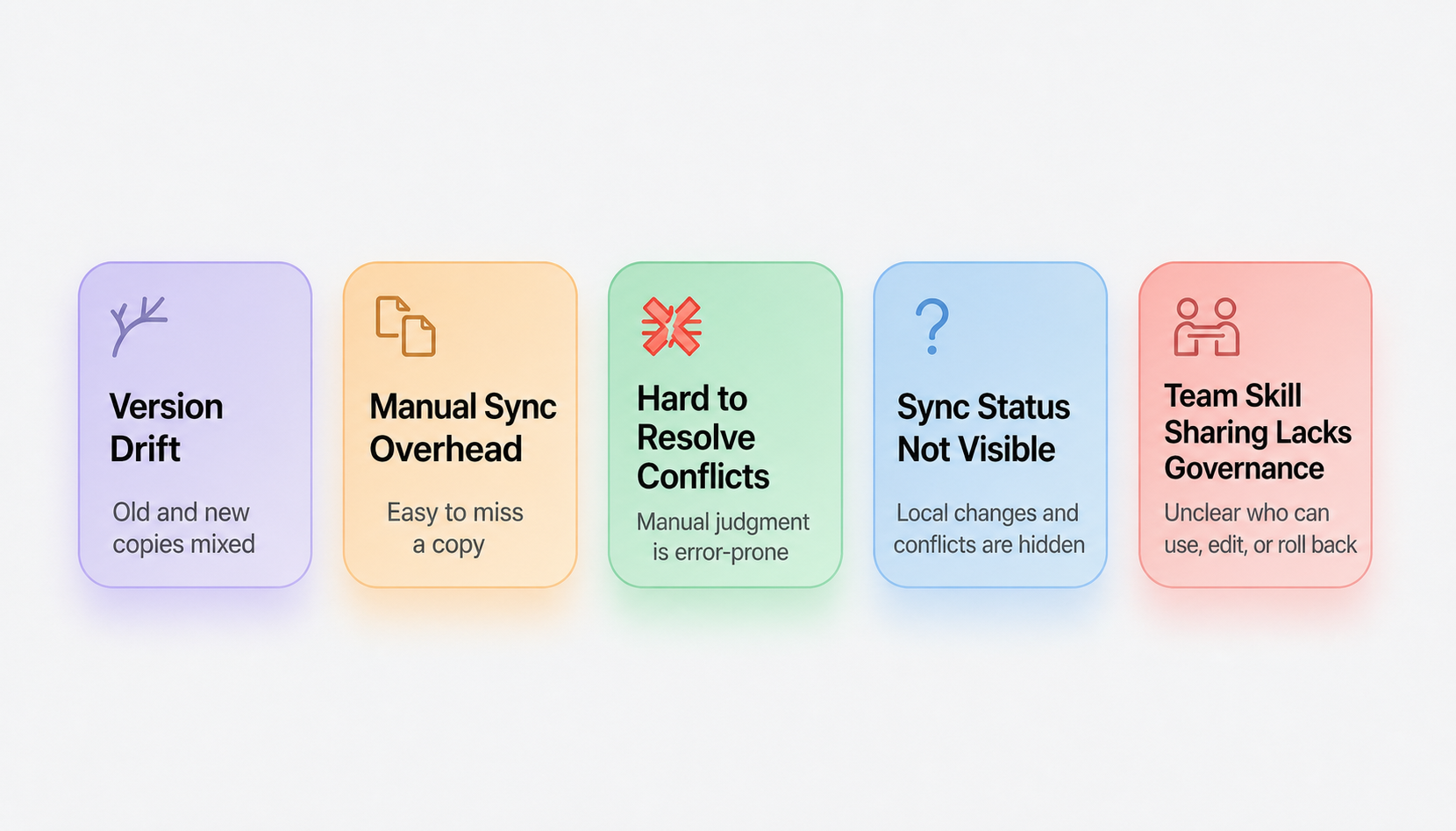
Soon, this Skill serves more than just one person: colleagues want to generate API documents in the same format in Claude Code, and project members want to reuse the same post-mortem specification in Cursor or Qoder. The Skill begins to transform from "one person's local file" into "a team specification shared by multiple people." This is where the real trouble begins:
These problems are not caused by the number of Agents itself, but by the fact that Skills do not have a unified entry point. Without a single source of truth, users can only repeatedly confirm across local directories, group files, and Agent configurations.
To address the issues of version inconsistency, manual synchronization, conflict resolution, and sharing boundaries mentioned above, Nacos AI Registry provides a practical path for Skill management: first, consolidate the Skills of multiple Agents on the local machine into one, and then put the Skills that need cross-device, team sharing, review, and publishing into the Registry to form a remote single source of truth.
The Local mode of Nacos Skill Sync is responsible for local unification. It establishes a central repository on the local machine and associates Agent directories like Codex, Claude Code, Cursor, and Qoder through symlinks or copying. Only one version of a Skill is maintained, and subsequent modifications are synchronized to multiple local Agents, reducing manual copying and conflicts between duplicate copies with the same name. For details on using Local mode, see "Stop Copying Skills Manually: Skill Management Solutions in the Multi-Agent Era".
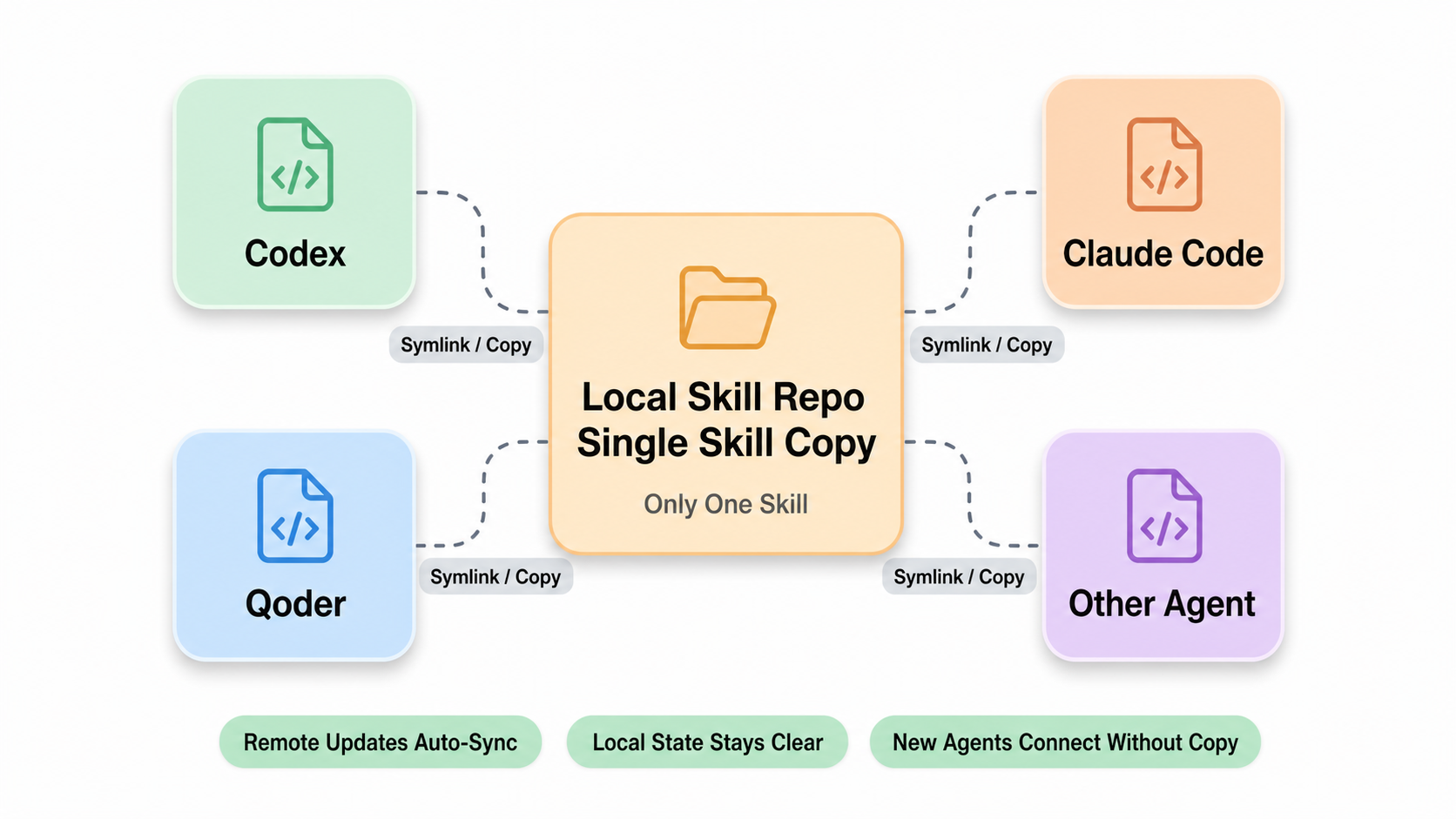
Local mode is scoped to the local machine. As long as cross-device sharing, team sharing, security reviews, version releases, and rollbacks are involved, a remote unified entry point is needed to handle the source, status, and distribution of Skills. This is the problem that Nacos AI Registry aims to solve.
Nacos AI Registry supports various Skill sources: locally accumulated Skills are uploaded via Nacos CLI, new Skills are created within the platform, and Skills from external marketplaces, open-source communities, or existing directories are imported into the Registry. Once inside the Registry, Skills from different sources converge into the same resource entry point, which then proceeds to metadata, lifecycle, security review, and version release processes.
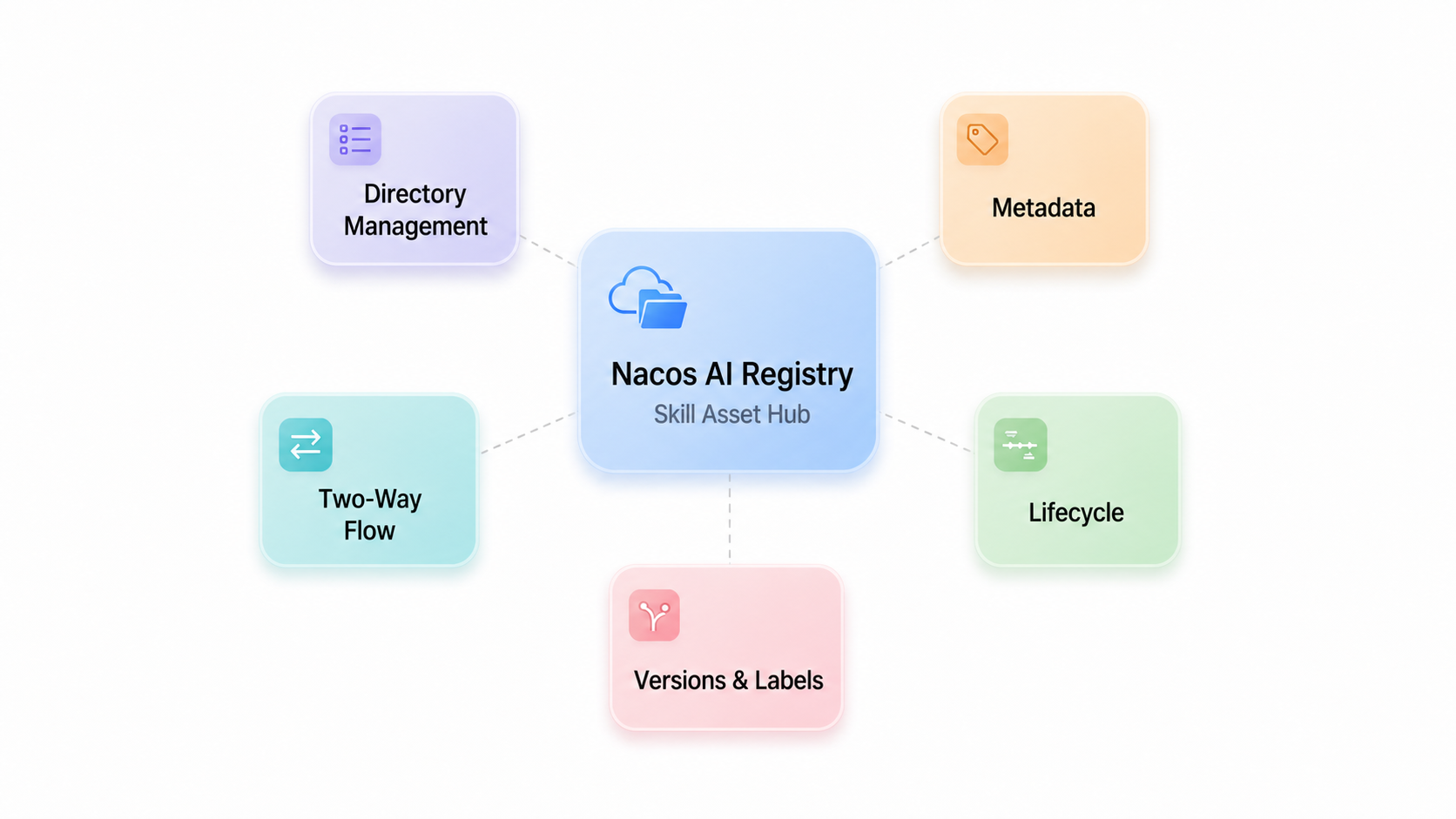
Once in the Registry, a Skill is no longer just a Markdown file. It comes with a name, description, owner, applicable scenarios, tags, version, and lifecycle status.
This information shows what a Skill does, who is responsible for maintaining it, which Agents or scenarios it fits, and whether it is currently in draft, review, or online status. Agents can also pull Skills by version or label, such as latest, stable, or dev, and key workflows can lock onto a specific stable version.
This step solves the question of "which version is trusted." Without metadata and lifecycles, you can only rely on memory; once inside the Registry, Skills begin to possess asset attributes.
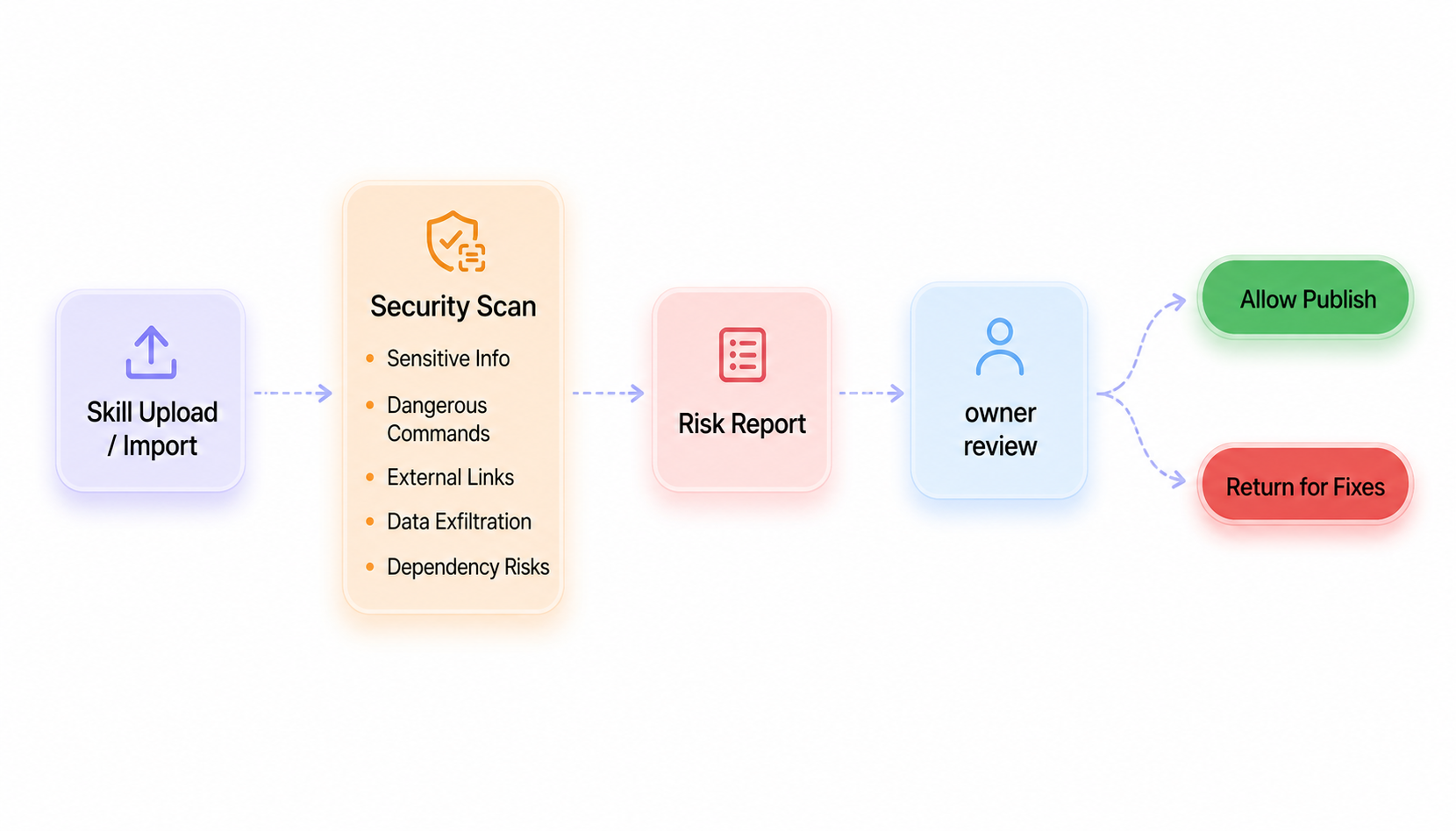
Being able to share only solves efficiency; Only verified Skills can enter can it enter the workflow. Nacos AI Registry hosts security scanning and review processes before a Skill is published.
An external Skill might contain external URLs, dangerous commands, sensitive information, data egress logic, or non-compliant dependencies. Internally developed Skills might also introduce erroneous rules during iterations. The Registry exposes these risks first, then hands them over to the owner to make business-driven decisions.
After scanning detects suspicious tokens, dangerous commands, or external links, the owner rejects it for modification; if it is a false positive or an acceptable risk, the process continues. This allows the use of external ecosystems while retaining your own security boundaries.
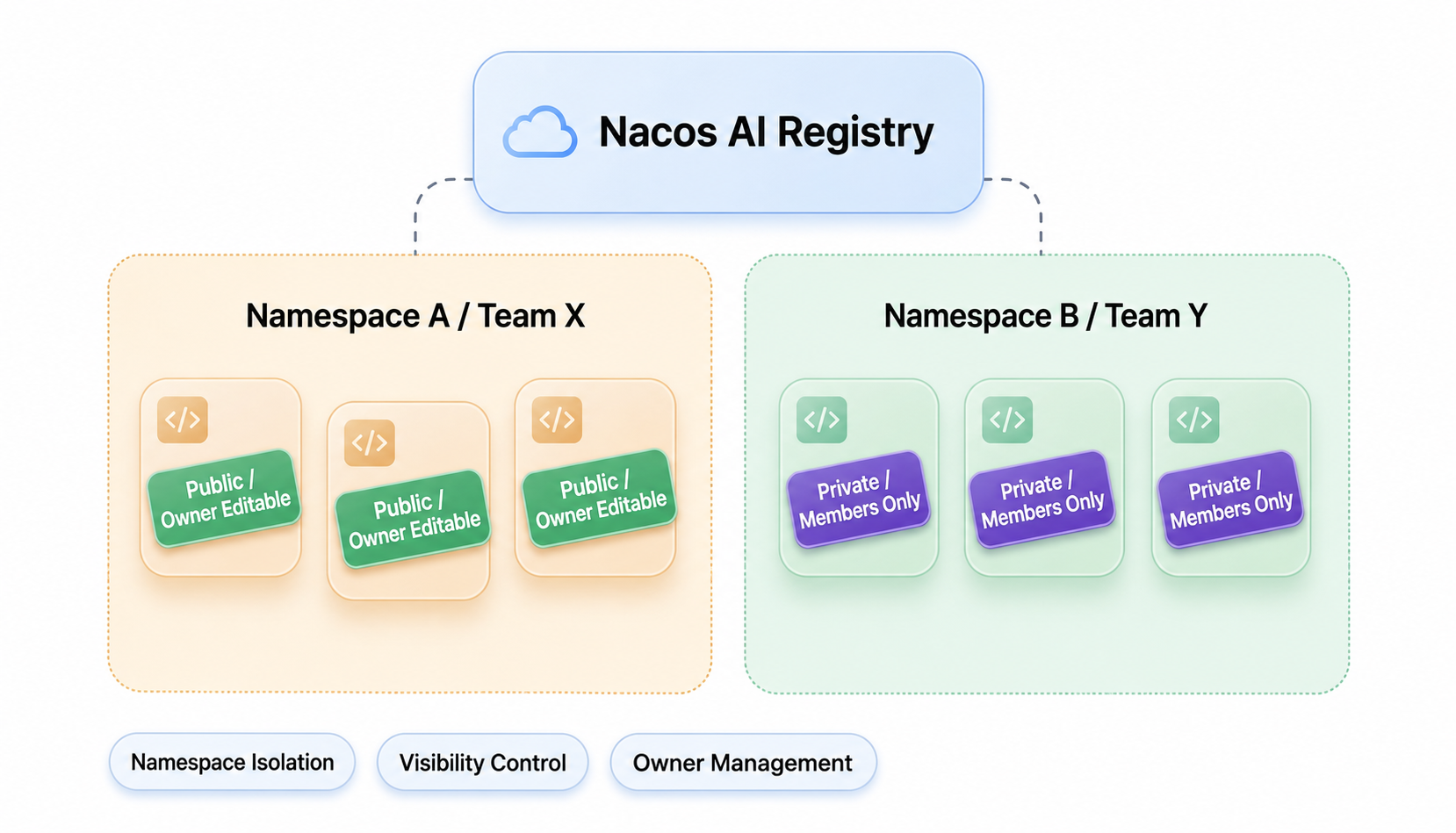
Sharing does not mean anyone can change it. Nacos AI Registry isolates different teams, projects, or environments through namespaces. Team A's Skills will not affect Team B, and Skills accumulated in the test environment will not directly enter the production environment.
There is also visibility control at the Skill level. Skills suitable for public use are set to publicly available, allowing members to discover and pull them; Skills involving sensitive processes, internal systems, or specific projects are restricted to member access only.
The owner is responsible for content maintenance and release pacing. After collaborators participate in modifications, the new version still must go through the review and release process. This shares capabilities while avoiding a chaotic state where "anyone can modify, and modifications take effect immediately."
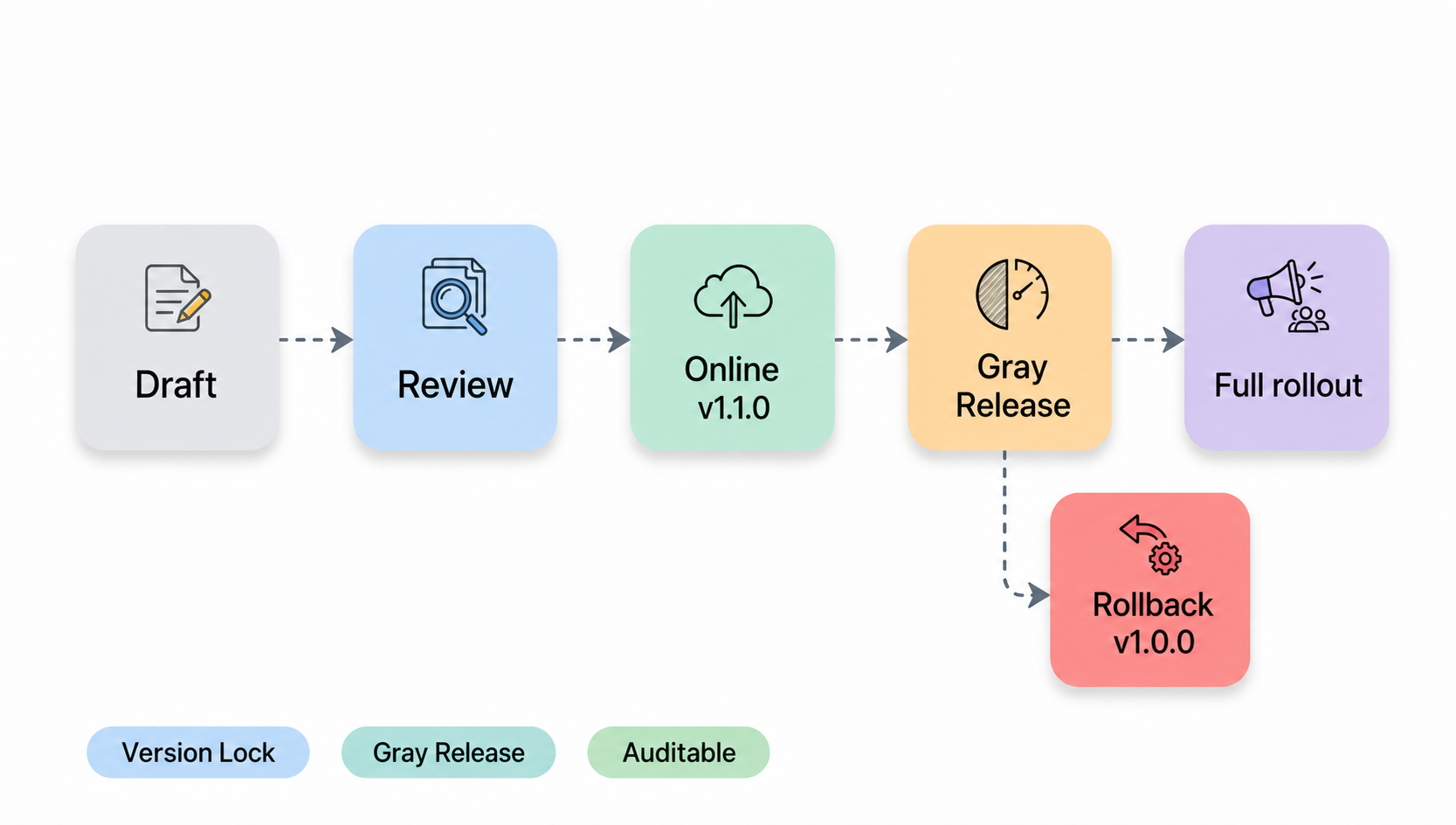
Like code, Skills also require controlled releases. A Skill is first in draft, then enters review, and goes online after approval. Once published, versions remain stable and will not be overwritten at will.
Manage the scope of use through labels. The document formatting Skill uses the stable tag, so the team uses the same rules when generating documents; project access Skills retain the dev tag to validate new processes; and if troubleshooting Skills affect the on-call workflow, validate them in a small scope before expanding to more members.
Skills will iterate continuously, and buggy versions may appear. When problems arise, you can revert to the stable version, switch back to the previous stable version, or point the label back to a verified version. The Registry records who uploaded, who reviewed, who published, and which label was bound, so troubleshooting is no longer based on reactive troubleshooting.
The trusted versions in the Registry must ultimately enter the Agent's daily workflow. Nacos CLI is responsible for connecting to the AI Registry: pulling published Skills, and also uploading locally accumulated Skills to the Registry. Skill Sync is responsible for synchronizing the same Skill to Agent directories like Codex, Claude Code, Cursor, and Qoder.
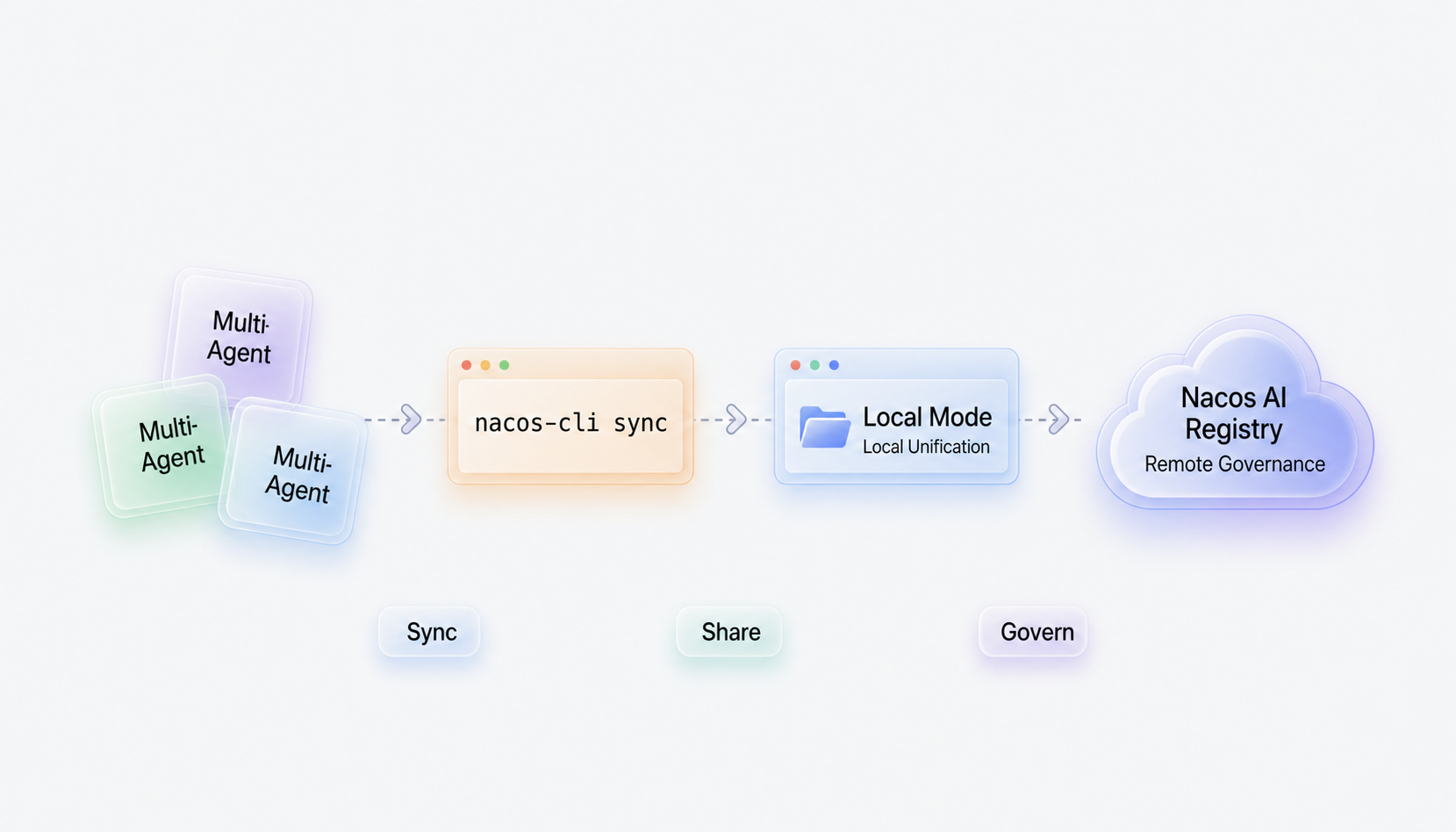
In this part, you only need to understand two things: first complete the review and release in Nacos AI Registry, and then synchronize the corresponding version to the local Agent via Nacos CLI / Skill Sync. For specific details on Local mode, Registry mode, status viewing, and conflict resolution, please refer to "Stop Copying Skills Manually: Skill Management Solutions in the Multi-Agent Era".
Only by completing this step can the Skill become more than just an asset in the platform, but rather the working method that the Agent actually abides by when executing tasks.
From onboarding, metadata, admission, permissions, publishing to usage, this chain transforms Skill management from "saving files" to "governing assets."
AI Registry has two forms of delivery: the publicly accessible, Managed AI Governance Center; and the self-deployed, open-source Nacos AI Registry.
Both forms serve the same goal: bringing Skills and other AI resources into a unified governance entry point. The differences mainly lie in three aspects: deployment cost, network accessibility, and governance capability integration.
Among them, the AI Governance Center is an AI asset management platform under Alibaba Cloud's Microservices Engine (MSE), providing Agent developers with capabilities such as registration, version management, security auditing, and distribution of AI assets like Skills and Prompts. After registering Skills to the AI Governance Center, local Agents can pull them by version or label, eliminating reliance on manually copying files.
| Method | Deployment Cost | Core Capabilities |
|---|---|---|
| Managed AI Governance Center | Managed service, avoiding self-building and maintenance of Registry instances | Public/private network access, security guardrails, workspace/namespace isolation, quickly running through upload, review, publishing, and Agent usage chains |
| Self-Deployed Open-Source Nacos AI Registry | Requires preparation of running environment, storage, network, O&M, and upgrade mechanisms | Private deployment, enterprise authentication/permissions integration, security scanning platform connection, release system, and self-developed Agent platform integration |
Validate the end-to-end workflow of Skill management first, then gradually deepen governance strategies.
Incorporate the Registry into the enterprise's own infrastructure and governance processes.
The two forms are not isolated. You can first use the Managed AI Governance Center to validate the Skill management chain; when privatization, customization, and platform integration become core needs, you can transition to long-term construction based on the open-source Nacos AI Registry.
Instead of designing a complete governance system all at once, a more secure way is to first select a high-frequency Skill and run through the onboarding, review, publishing, and execution flows. Once you start relying on it, you can supplement it with finer permission, version, and rollback strategies.
Below, we use the "document formatting Skill" as an example.
Technical solutions, API documentation, and fault post-mortems often require a unified format. If heading hierarchies, parameter table fields, risk descriptions, and review checklists have no fixed rules, the documents generated by Agents will vary from person to person.
In the past, you might have sent out a template. But templates easily get outdated: some copy last month's version, some copy last year's version; when new members take over a project, they still have to ask where the latest template is.
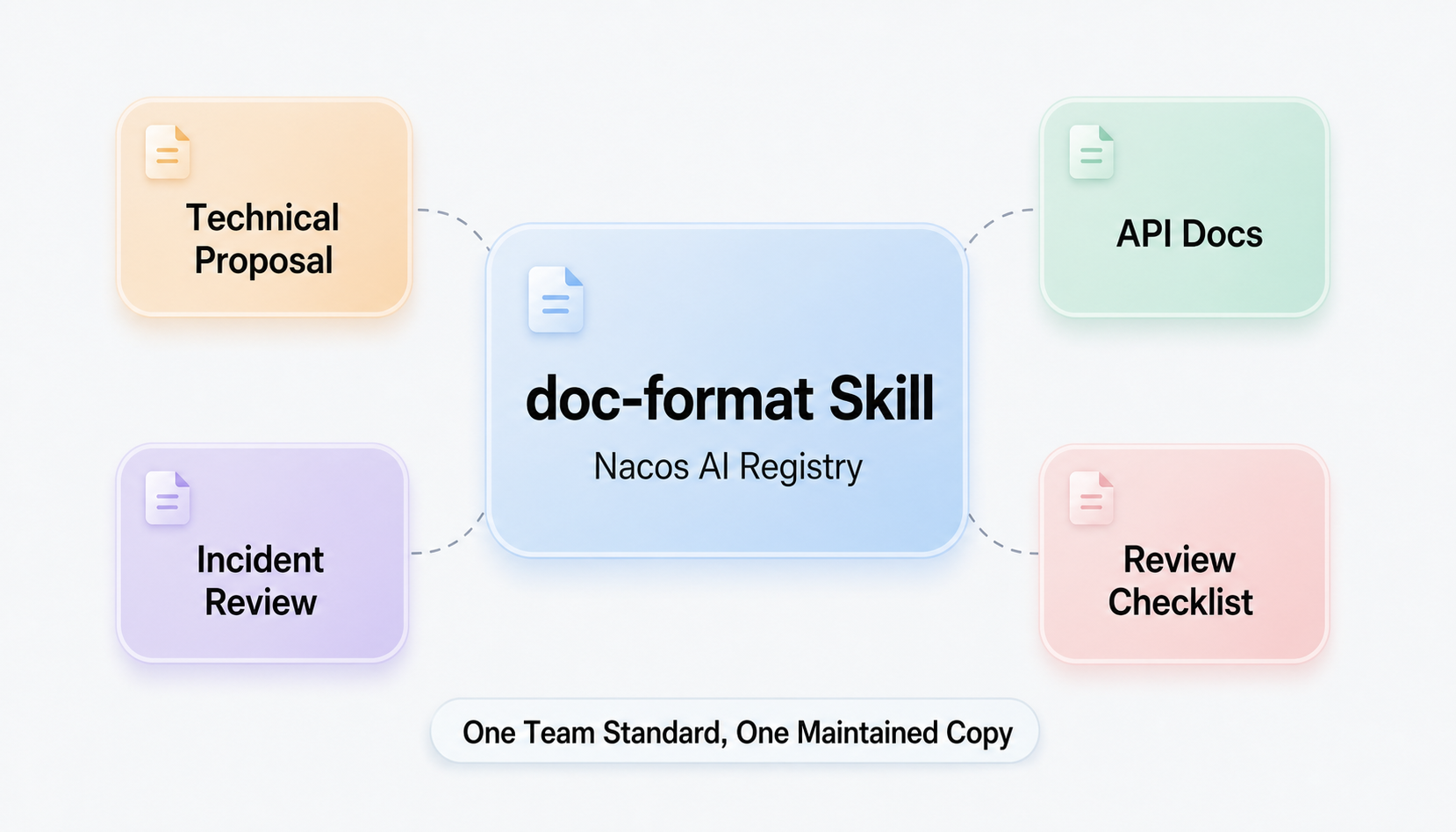
First, write the heading hierarchy, parameter table fields, risk descriptions, and review checklist items into the doc-format Skill, with the owner maintaining the initial version.
There is no need to design all processes all at once during this stage. First, let the Skill enter Nacos AI Registry, add a description, owner, applicable scenarios, and tags, so members can find it in a unified entry point.
Document formatting Skills are relatively low-risk, but they should still go through the admission process. The Registry will check for risk items such as sensitive information, external links, and dangerous commands before publishing. The owner handles false positives or modifies problematic content based on scan results.
If importing a Skill from an external market, follow the same path: first enter Nacos AI Registry, go through security scanning and owner review, and finally publish it for team use.
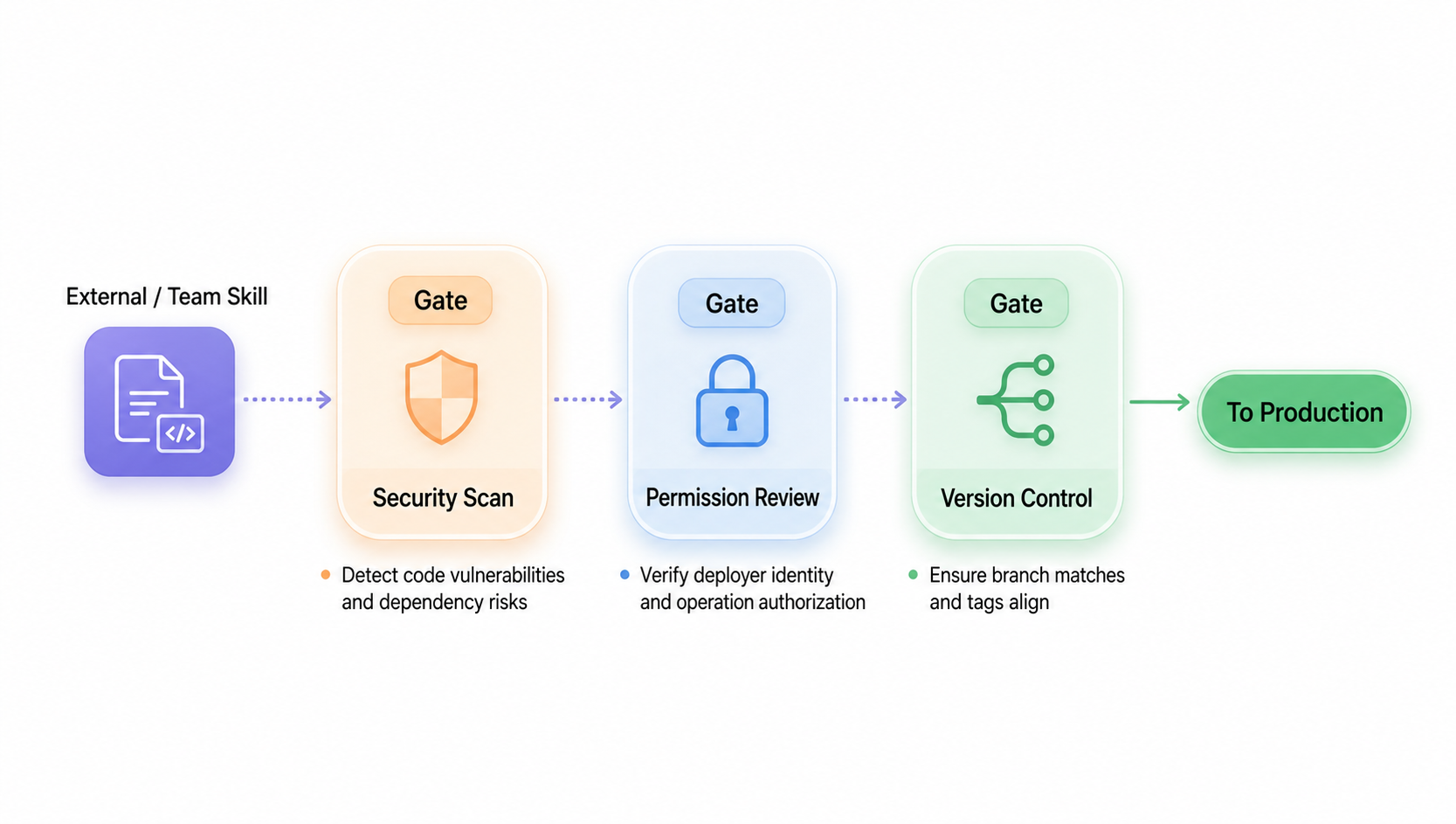
After passing the review, publish the doc-format Skill as a stable version and bind it with the stable tag. Daily document generation uses stable, ensuring every Agent reads the same set of rules.
If you need to adjust parameter table fields or risk descriptions afterward, publish them to the dev tag first, allowing a few members to try them out. After confirming that the effect is stable, point the stable tag to the new version. If problems arise, simply switch the stable tag back to the previous version.
Team members synchronize the published doc-format Skill to local Agents via Nacos CLI or Skill Sync. Codex, Claude Code, Cursor, and Qoder all use the version in the Registry that has been reviewed and published.
By this point, what you reuse is no longer an easily outdated template, but a set of document specifications that continuously enters the Agent workflow. When new members join, switch office devices, or change Agents, they do not need to search for files again, copy directories, or confirm which version is the newest.
Once the document formatting Skill is successfully run through, the same path can be extended to high-frequency scenarios such as PR Reviews, project onboarding, release checks, and online troubleshooting.
Each Skill first has an owner and applicable scenarios, and then enters the review, release, distribution, and rollback workflows. You do not need to make the governance system very heavy from the beginning, but you should start with the first high-frequency Skill to establish a single source of truth.
Skill management is just the first step. Nacos AI Registry will address two more categories of problems in the future: how effective experiences in real tasks enter the Skill governance loop, and how AI resources beyond Skills, such as Prompts, MCPs, and AgentSpecs, are unified, discovered, managed, and used through ARD.
Specifically:
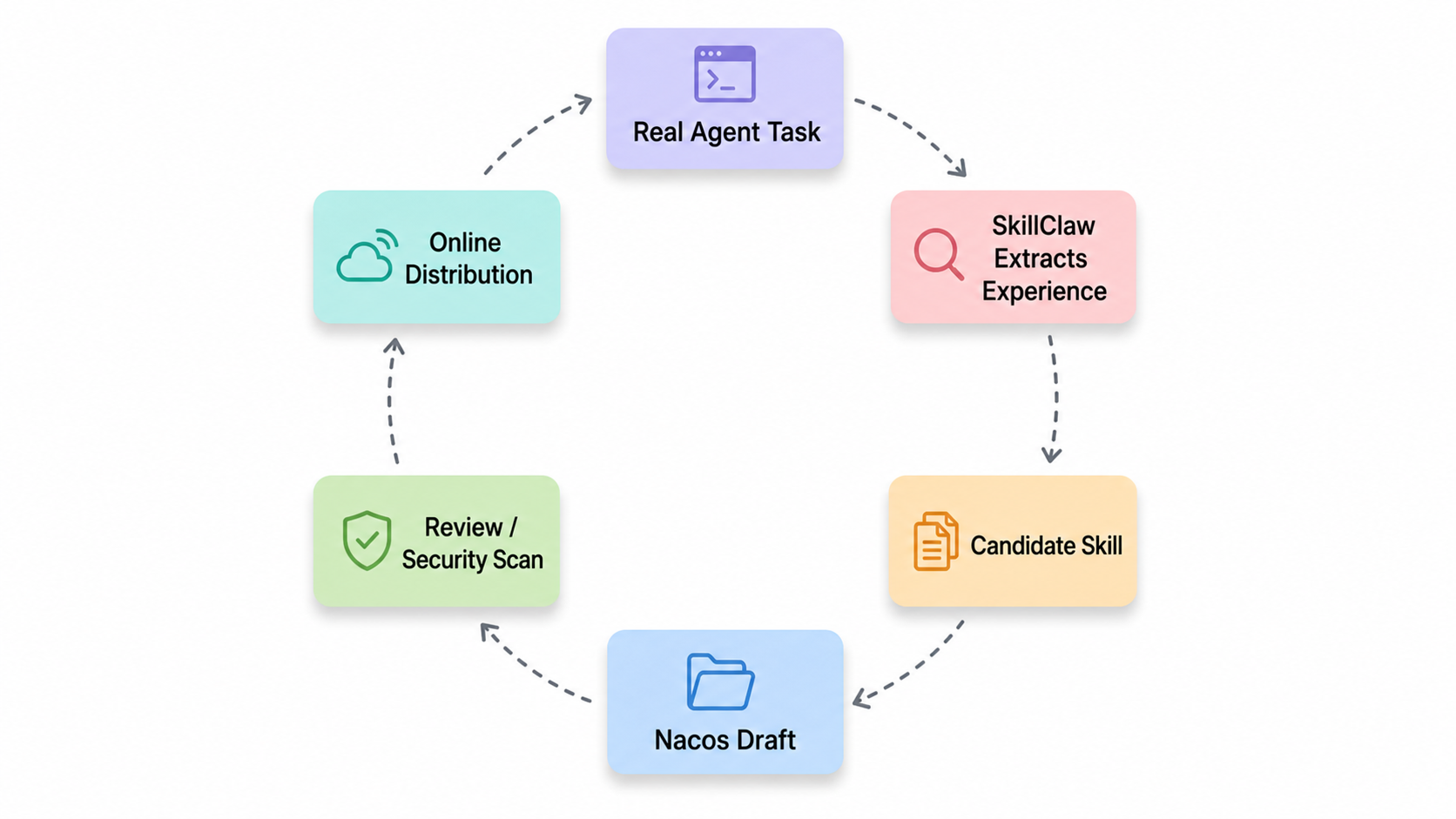
1. Form a Closed Feedback Loop for Skills: Agents generate experiences in real tasks, experiences are crystallized into candidate Skills, and Nacos AI Registry is responsible for review, publishing, and distribution. Agents then use the published Skills and continue to generate feedback in new tasks. The previously introduced SkillClaw is a practical path: it extracts reusable experiences from Agent task execution and feedback, generates candidate Skills, and then passes them to human reviewers before entering the Registry. In the future, other self-evolution architectures will also be integrated, as long as they can crystallize execution trajectories, human corrections, and review opinions into candidate Skills, they can reuse the review, publishing, and distribution chain of Nacos AI Registry.
2. Integrate with ARD, Moving Towards a Unified AI Resource Registry: ARD (Agentic Resource Discovery) is a discovery and search specification for Agentic Resources, describing resources like MCP, A2A Agent, and Skill with a unified ai-catalog, search APIs, and versioned artifacts. The official specification can be found at Agentic Resource Discovery Specification. After integrating with ARD, Nacos AI Registry will provide resource discovery and usage entry points for different Agents through standard protocols, and the governance objects will extend from Skills to AI resources like Prompts, MCP, and AgentSpec. Agents will not need to understand each resource management system separately, but can handle resource sources, trustworthiness, permissions, versions, and emergency stops within the same entry point.
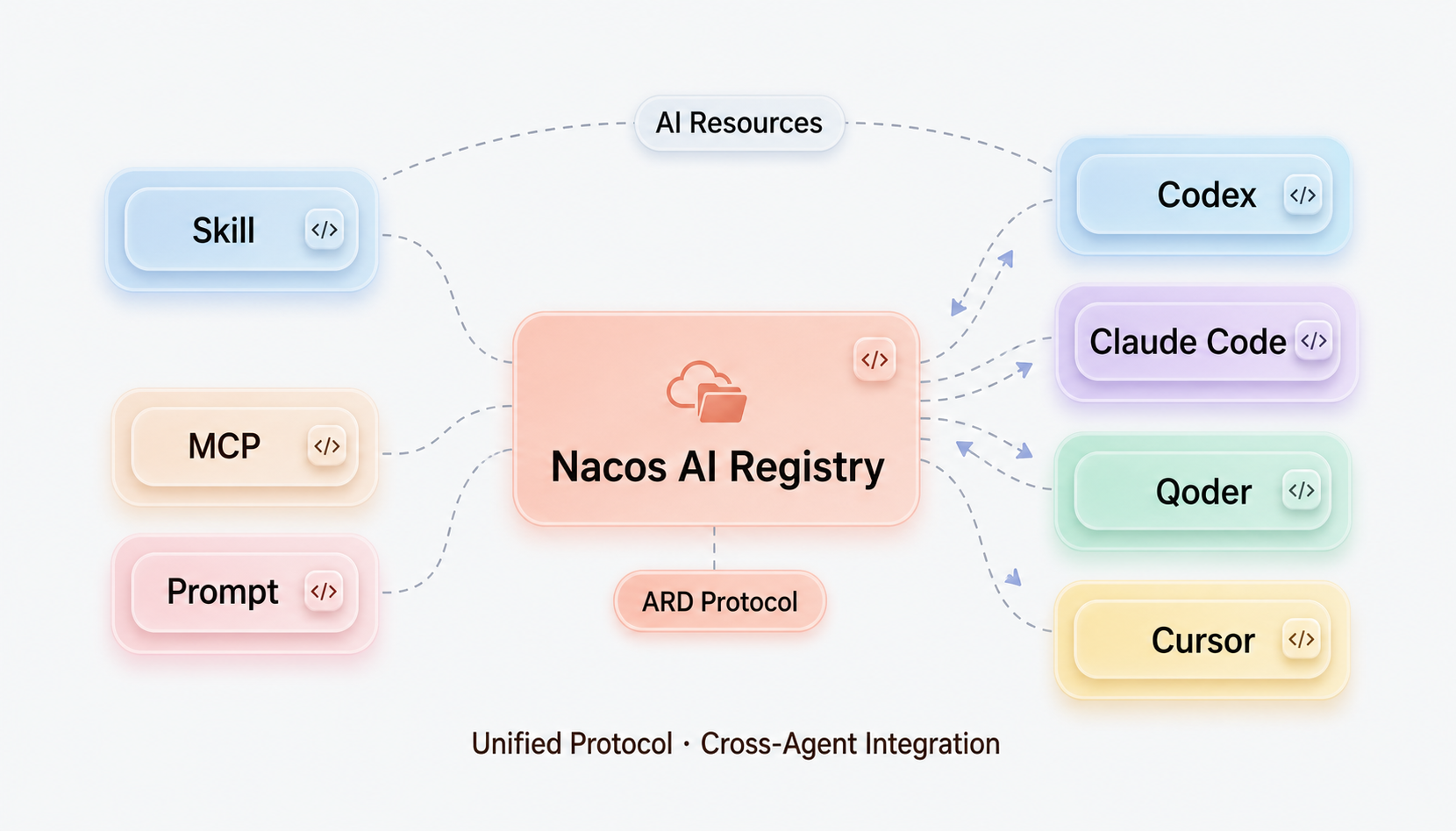
Multi-Agent collaboration will become increasingly common. What truly needs to be managed is not just which Agent to use, but the Skills, Prompts, and other AI resources that these Agents jointly rely on.
When Skills are still scattered across personal computers, group files, and temporary scripts, it is hard to tell which version is trusted, which version is online, and where to switch back if problems occur. Putting Skills into Nacos AI Registry and delivering them through the AI Governance Center or the open-source Nacos AI Registry can turn "usable experiences" into assets that can be audited, distributed, and traced.
Whether starting from the Managed AI Governance Center or from a self-built open-source Nacos AI Registry, the goal is the same: letting Skills have a single source of truth. Agents will continue to evolve, but Skills should not continue to be scattered everywhere.
Everyone is welcome to start using the AI Governance Center or the open-source Nacos AI Registry with a high-frequency Skill. If you find any issues during use, or have better suggestions for Skill management, synchronization, review, and distribution, please feel free to give us feedback at any time.

780 posts | 60 followers
FollowAlibaba Cloud Native Community - July 8, 2026
Alibaba Cloud Community - August 12, 2026
Alibaba Cloud Native Community - August 19, 2026
Alibaba Cloud Native Community - June 5, 2026
Alibaba Cloud Native Community - August 12, 2026
Alibaba Cloud Native Community - April 10, 2026
780 posts | 60 followers
Follow QwenWork
QwenWork is dedicated to helping employees strengthen their professional competitiveness in the AI era and to enabling enterprises to improve organizational effectiveness.
Learn More Token Plan
Build more, spend less. One plan, every modality.
Learn More
Alibaba Cloud Model Studio
A one-stop generative AI platform to build intelligent applications that understand your business, based on Qwen model series such as Qwen-Max and other popular models
Learn More Best Practices
Follow our step-by-step best practices guides to build your own business case.
Learn MoreMore Posts by Alibaba Cloud Native Community

