Whether a work item can support collaboration across software development depends not on how much text it contains, but on how clearly it defines its objectives, scope, rules, and acceptance criteria. AI-powered work item refinement in Alibaba Cloud DevOps uses two capabilities, "AI-powered Requirement Clarification" and "AI-powered Content Refinement", to first identify and confirm missing information, then organize existing facts into a work item ready for review, implementation, and acceptance.
Review meetings often feature work items like this: the title seems clear, but the description consists of a single sentence: "Support coupon stacking; the details depend on the actual situation".
Writing a few fewer sentences when creating a work item may seem to save time, but product managers, developers, and testers must then ask repeated follow-up questions: Which coupons can be stacked? What is the calculation order? How should conflicts or refunds be handled? What conditions must be met for acceptance? Review meetings intended to evaluate solutions and risks end up becoming sessions to fill in missing requirements.
Work items capture requirements and provide the shared context that development, testing, and delivery all depend on. Problems caused by incomplete content do not disappear when a work item enters the workflow; they become downstream costs in communication, rework, and decision-making.
Alibaba Cloud DevOps integrates with STAROps, a comprehensive intelligent operations platform, to continuously advance intelligent capabilities across the software development lifecycle. For work item collaboration, Alibaba Cloud DevOps AI Assistant provides two entry points, "AI-powered Requirement Clarification" and "AI-powered Content Refinement", to address missing information and information organization, respectively.
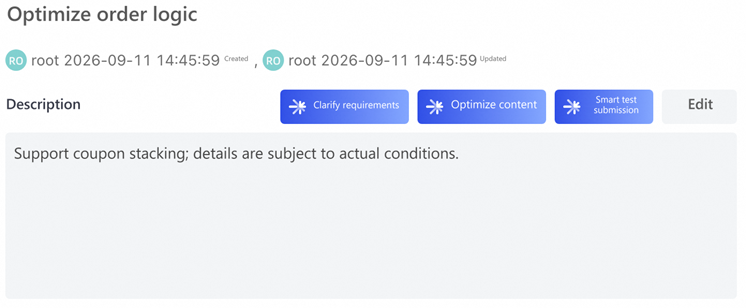
When a work item contains little detail, start by clarifying the requirements; when the information is largely complete, refine the content directly.
An unclear work item does not always reflect a problem with wording. Sometimes the necessary information is already there, but is loosely structured; sometimes key business rules have not yet been determined. These situations call for different approaches.
| Capability | When to Use It | Approach | Outcome |
|---|---|---|---|
| AI-powered Content Refinement | The background, features, and business rules are largely complete, but the wording is vague and the structure is loose | Organize existing information, improve the title and description structure, and clarify how acceptance criteria are expressed | Express existing content more clearly |
| AI-powered Requirement Clarification | Key rules are missing, and the existing content is insufficient to support a reliable assessment | Read the work item, its comments, and key linked work items, identify information gaps, and ask questions in multiple rounds | Ask questions to elicit information that has not yet been clearly articulated |
If relevant topics have already been discussed in the comments, Alibaba Cloud DevOps AI Assistant prioritizes turning that information into confirmation questions to avoid asking the same questions again from scratch. Confirmed conclusions then proceed to content refinement; information that cannot yet be determined remains marked "Pending Confirmation", rather than being filled in with answers that appear complete but have not actually been confirmed.
In practice, users do not need to make a precise assessment in advance. Alibaba Cloud DevOps AI Assistant first analyzes the available context, explains what is already clear and which areas still lack information, and then follows the appropriate workflow.
Consider the coupon-stacking requirement again. The original description says only "Support coupon stacking; the details depend on the actual situation", and the comments and linked work items offer no additional information either. Given this input, a reliable approach is not to generate a complete requirement specification immediately, but to first identify which key information is missing.
Alibaba Cloud DevOps AI Assistant assesses users and scenarios, entry points that trigger the behavior, core rules, exception handling and fallback behavior, acceptance criteria, non-functional requirements, and out-of-scope items to identify missing or ambiguous information.
To avoid presenting too many questions at once, requirement clarification proceeds in topic-based rounds. Each round focuses on a few key decisions and offers clear options wherever possible; if the available options do not match the actual situation, users can provide their own answers.
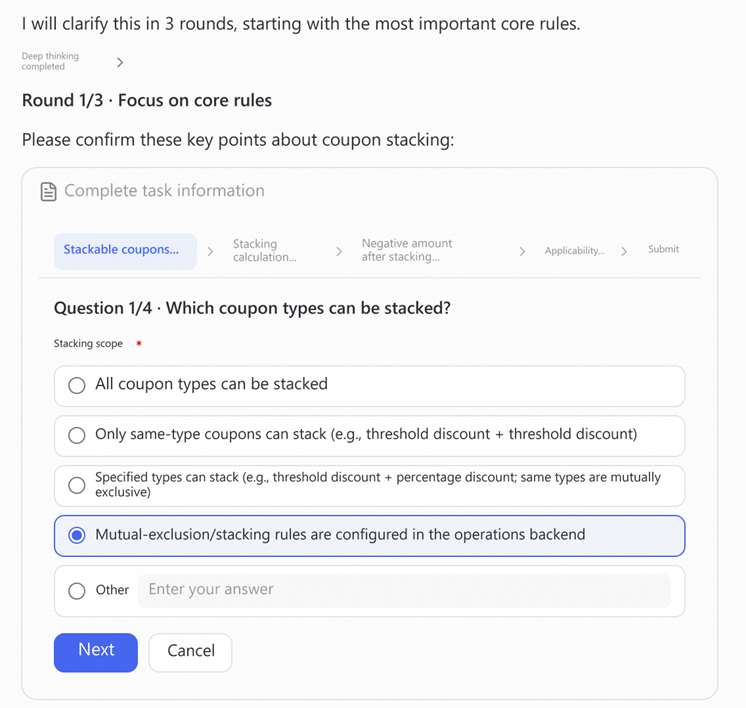
Confirm the most critical core rules first, then address calculation methods, exception scenarios, and applicability.
After multiple rounds of questions and answers, Alibaba Cloud DevOps AI Assistant summarizes the confirmed core rules, exception handling and fallback behavior, and acceptance criteria. Users can review the conclusions before they are written back to ensure they accurately reflect the actual business intent.
At this point, the question shifts from "What information is still missing?" to "How can the confirmed conclusions be organized into the work item?" Content refinement then takes these conclusions and organizes them into content that the team can read and act on directly.
Content refinement is not simply about making the original description longer. It organizes scattered information into shared context that people in different roles can understand and act on.
The page below displays the progressively refined work item content alongside the conclusions from requirement clarification, making it easier for users to check business rules and verify the source of each piece of information.
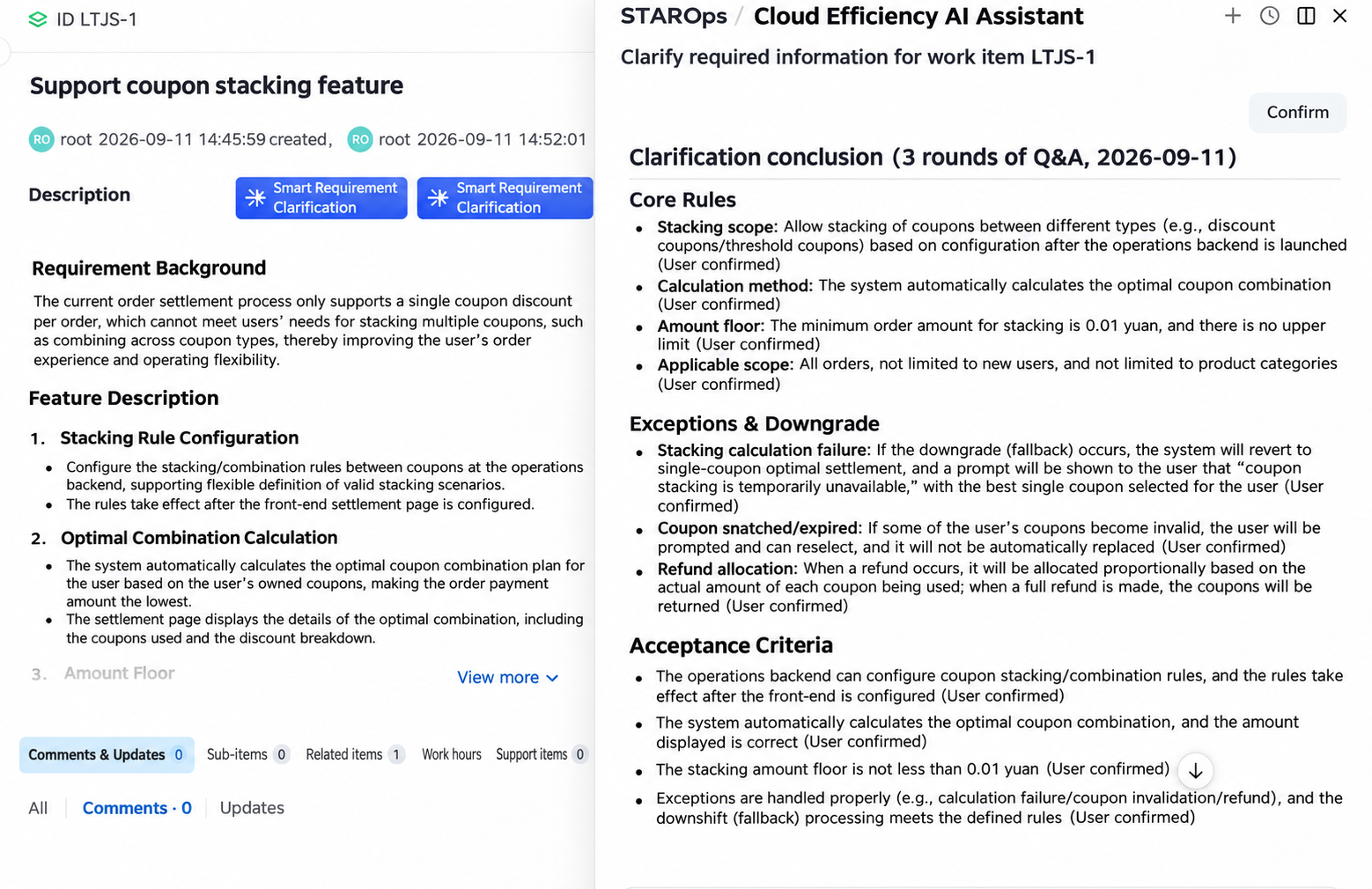
After the conclusions from clarification are passed to content refinement, they are organized into a clearly structured work item description.
For the coupon-stacking requirement, before refinement, the description is limited to "Support coupon stacking; the details depend on the actual situation", leaving the team unable to determine the specific scope. After refinement, the scope of coupon stacking, calculation methods, amount safeguards, applicability, exception handling, and acceptance criteria each appear in the appropriate section, turning rules previously buried in discussions into clearly documented work item content.
The same work item serves different purposes for different roles: reviewers need to quickly assess objectives, scope, and risks; developers need clear core rules and exception handling; testers need to use this information to design test cases and determine whether the results meet expectations. Only after clarification and refinement can a work item serve as a common basis for collaboration across roles.
Requirements, tasks, and defects contain different kinds of information and should not all use the same content structure. Alibaba Cloud DevOps AI Assistant adjusts its focus based on the work item type:
Project administrators can maintain work item refinement prompts under "Project Settings > AI Tool Configuration". They can define rules that apply to all types or configure requirements, tasks, and defects separately. During refinement, Alibaba Cloud DevOps AI Assistant gives priority to the rules for the current work item type, aligning its focus with the team's actual needs.
In addition to refinement prompts, teams can configure description templates for specific work item types. Content refinement follows the section structure in the template and places existing information and confirmed conclusions in the appropriate sections, rather than replacing the team's established practices with a default format. System defaults are used only when the project has no applicable rules or templates configured.
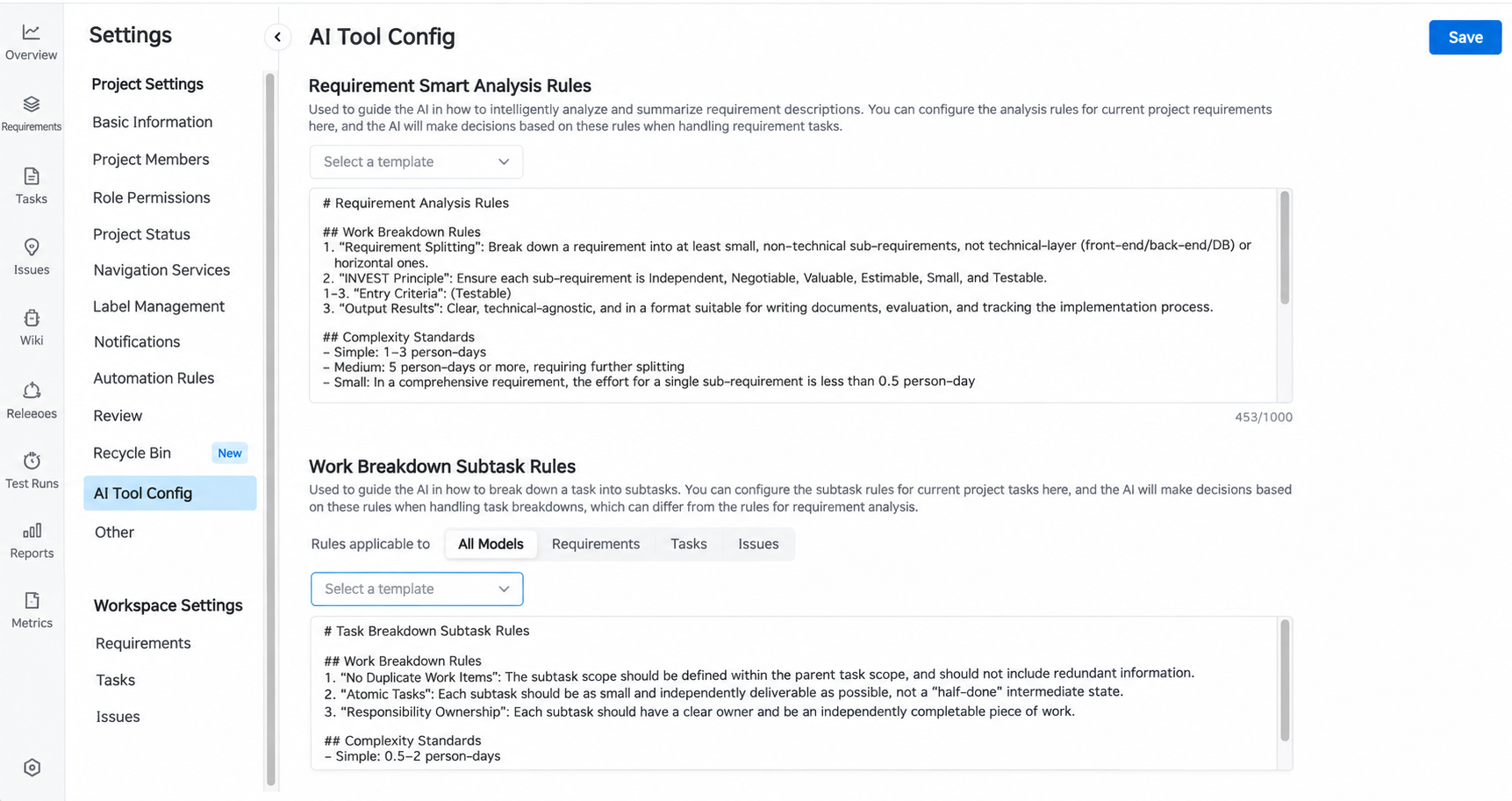
Project administrators can maintain AI rules under "AI Tool Configuration" and description templates in the settings for the corresponding work item types.
Work item content directly affects subsequent review, development, and acceptance. AI-powered refinement must therefore improve content quality while clearly defining the boundaries of the factual information it uses and the changes it writes back.
Alibaba Cloud DevOps AI Assistant only organizes information already present in the original work item and conclusions confirmed by the user. It does not add business rules on its own, nor does it overwrite the original content without user confirmation.
During refinement, any information that is still missing remains explicitly marked "Pending Confirmation", reminding the team to supply it later. Screenshots and images of logs in the original description are also preserved in full. Image URLs and counts are checked before preview and before write-back to prevent the loss of critical context during rewriting.
Once generation is complete, Alibaba Cloud DevOps AI Assistant displays the refinement rules used, the main changes, and before-and-after comparisons of the title and description. For each, users can accept the refined result, retain the original content, or make custom edits. Content is written back to the work item only after confirmation; after write-back, the system reads it again and validates the result.
The entire process handles only one work item at a time. Processing items individually, previewing results, and obtaining user confirmation ensure that AI-powered refinement does not alter the original requirements without review.
Requirement clarification and content refinement address two related but distinct problems: the former identifies and confirms missing information, while the latter organizes existing facts and confirmed conclusions. By linking the two, teams can avoid recording unconfirmed inferences as business facts in the pursuit of a complete document.
The next time you encounter a one-line requirement that says "the details depend on the actual situation", there is no need to wait until the review meeting to ask follow-up questions. If information has not yet been confirmed, start by clarifying business rules, exception scenarios, and applicability; if the information is already complete, proceed directly to refining the title, content structure, and wording of the acceptance criteria.
The clearer a work item's objectives, scope, business rules, and acceptance criteria are, the easier it is for reviews to focus on key decisions and for development and testing to proceed from the same set of confirmed information. Completing clarification and organization at the start of the workflow can reduce repeated follow-up questions later and lower collaboration costs caused by differences in understanding.
No More Manual Index Maintenance: SLS Automatically Indexes New Log Fields for Search and Analysis

808 posts | 61 followers
FollowAlibaba Clouder - May 7, 2020
Alibaba Cloud Community - February 22, 2022
pangdaxing - December 24, 2019
Neel_Shah - May 22, 2026
Kalpesh Parmar - May 11, 2026
plavookac - March 20, 2025
808 posts | 61 followers
Follow DevOps Solution
Accelerate software development and delivery by integrating DevOps with the cloud
Learn More AgentCore
 unifies agent construction, governance, and execution capabilities so enterprises can deploy diverse agents with confidence.
Learn More GoChina ICP Filing Assistant
An ICP filing best practices solution for websites and apps hosted in the Chinese mainland, helping you navigate the requirements to effortlessly obtain an ICP filing.
Learn More Qwen
Full-range, open-source, multimodal, and multi-functional
Learn MoreMore Posts by Alibaba Cloud Native Community

