In the AI era, massive amounts of interactive data drive the rapid development of intelligent applications, but the individual privacy information within this data also brings severe security challenges. Data masking has shifted from an option to a necessity for compliant business operations.
Increasingly strict compliance requirements: With the successive introduction of laws and regulations such as the General Data Protection Regulation (GDPR), the Data Security Law, and the Personal Information Protection Law, if sensitive information such as personal identity information, financial records, or medical data is leaked, enterprises not only face hefty fines but also suffer a crisis of trust.
Urgent need for security assurance: By regularly scanning for sensitive data and performing data masking, you can effectively prevent unauthorized access and data breaches. This improves the level of data governance and the overall security of the system.
Alibaba Cloud Simple Log Service (SLS) has already built a comprehensive data masking system. It provides three flexible collection and data masking pipeline combinations to meet the needs of different use cases:
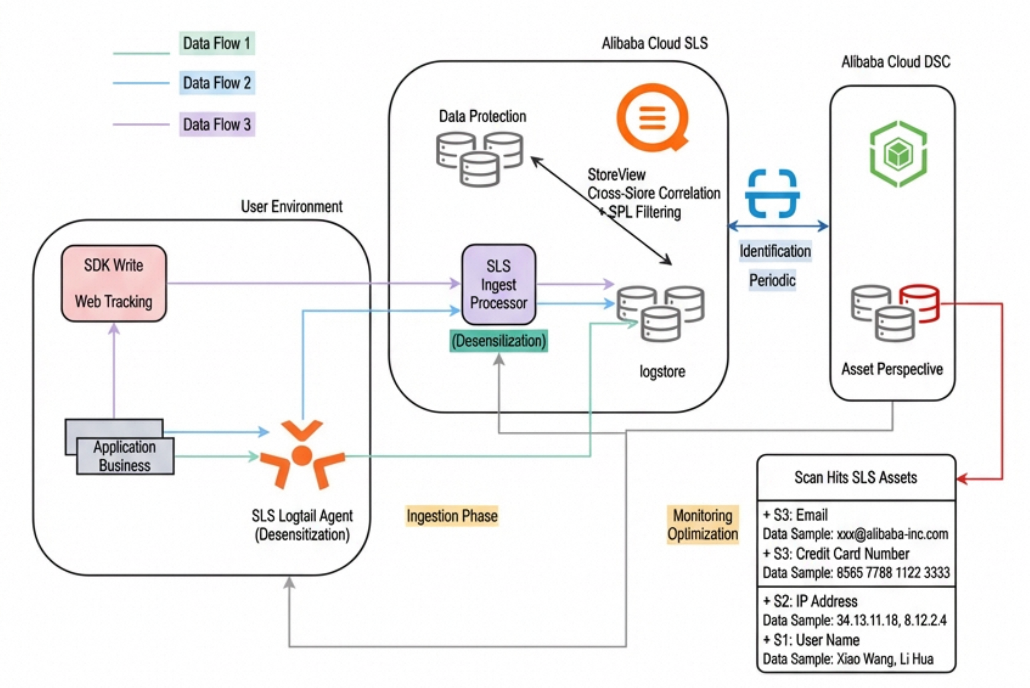
Client-side data masking with Logtail
Combined data masking with Logtail and Ingest Processor
Combined data masking with an SDK and Ingest Processor
The three data masking solutions mentioned above can meet the needs of most use cases. Their core capability is mainly based on regular expression matching. However, although regular expressions are powerful, their inherent limitations become apparent when dealing with increasingly complex use cases:
⚡ Surge in configuration complexity: Processing more than ten types of sensitive information requires writing dozens of complex regular expressions, and the maintenance cost increases exponentially.
⚡ Prominent performance bottlenecks: Multiple nested regular expression operations can severely slow down real-time processing performance.
⚡ Difficulty in adapting to use cases: In mixed log formats containing JSON, URI, and plain text, it is difficult to process them efficiently with a single, unified regular expression configuration.
For this reason, SLS has launched a new data masking function, mask.
The mask function can accurately detect and mask massive amounts of sensitive data in structured and unstructured logs. This function is currently published in the SLS data processor (Ingest Processor). It will be gradually extended to more application use cases, such as LoongCollector, to provide users with a more convenient, efficient, and intelligent data masking experience. The following section describes how to use the mask data masking function in the SLS Ingest Processor.
mask(field, varchar params)● Parameter description:
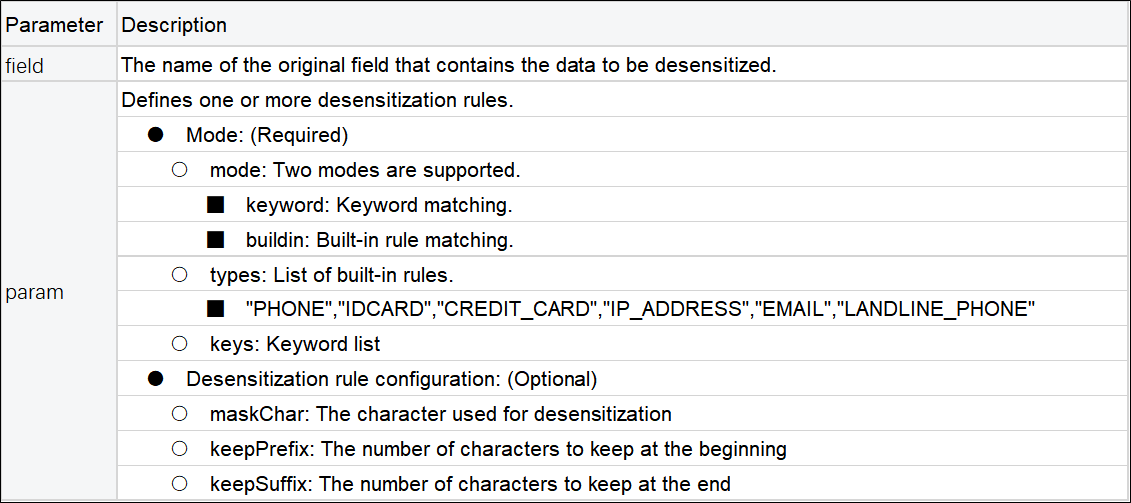
Mode introduction:
keyword mode: Intelligently detects sensitive information in any text that conforms to common key-value pair formats, such as "key":"value", 'key':'value', or key=value.
buildin mode: Supports six built-in rules for mailboxes, mobile phone numbers (China), ID card numbers, landline numbers (China), IP addresses, and credit card numbers.
● SPL usage example
* | extend content =  mask(content,'[
  {"mode":"buildin", "types" : ["EMAIL", "PHONE"]},
  {"mode":"keyword", "keys":["userName"], "maskChar":"*", "keepPrefix":2,"keepSuffix":1},
]')
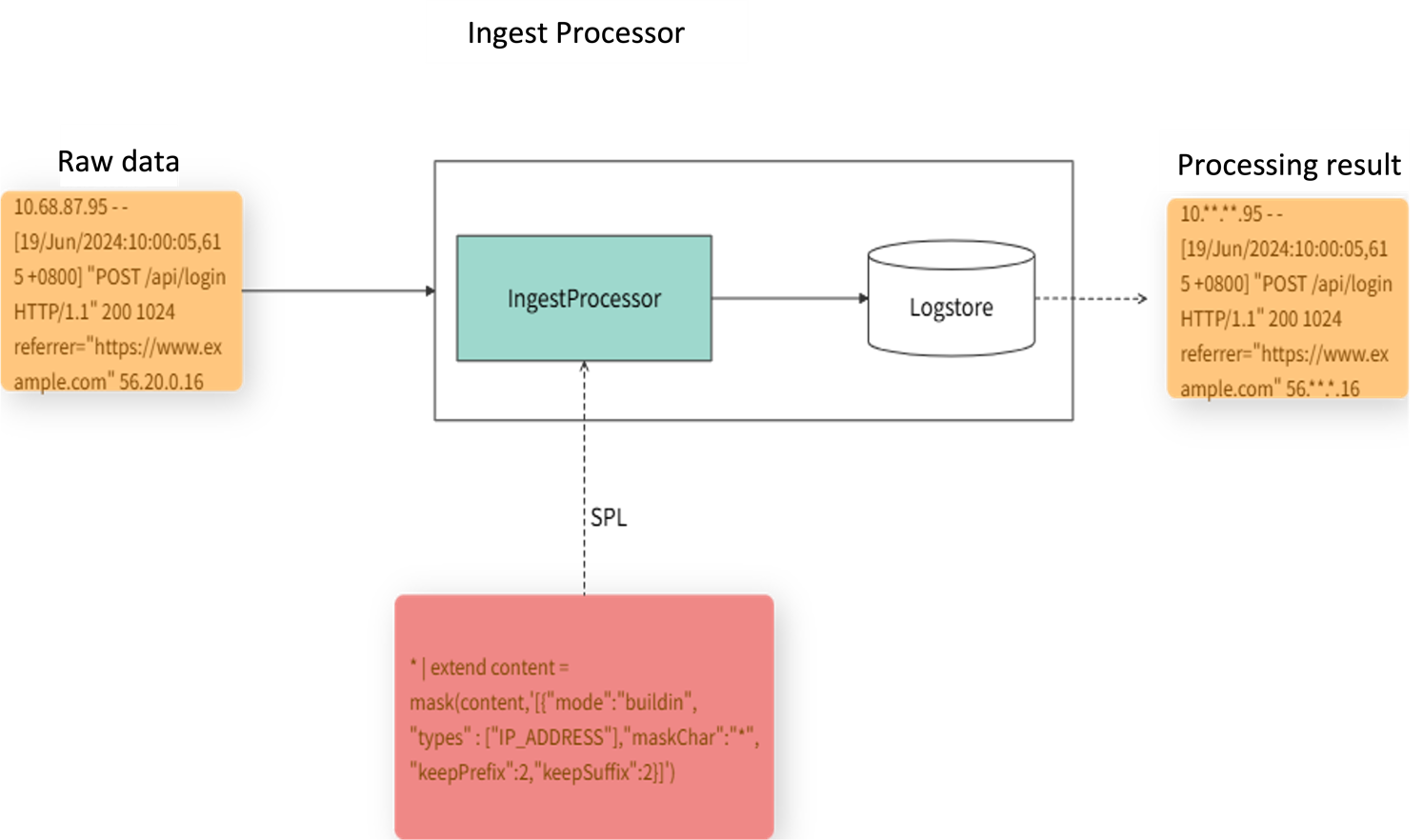
Ingest Processor can pre-process data in use cases such as data filtering, field extraction, field extension, and data masking. The following figure shows an example of using Ingest Processor to mask IP addresses in raw data by configuring data masking function rules with SPL.
We conducted a comparative test with the regular expression-based data masking method in an end-to-end SLS ingestion environment.
● Test data size: Packet sizes range from 70 KB to 7 MB.
● Data masking complexity: Configurations include 1 keyword, 3 keywords, and more than 100 keywords plus 6 buildin rules.
● Performance metrics: Average processing latency (ms).
The test results are as follows:
|
Test case |
Rule configuration that achieves the same desensitization effect |
Test result |
|
Case 1
|
regexp_replace configured with 1 simple regular expression |
The mask performance increased by 25% |
|
mask configured with 1 keyword |
||
|
Case 2
|
regexp_replace configured with 3 layers of nested regular expressions |
The mask performance increased by 50% |
|
mask configured with 3 keywords |
||
|
Case 3
|
regexp_replace configured with 10 layers of nested regular expressions |
The mask performance increased by 2.8 times |
|
mask configured with 100+ keywords and 6 built-in rules |
The mask function has higher processing efficiency compared with the regular expression-based method. It is especially suitable for use cases with large data volumes and complex data masking requirements.
Disclaimer: All raw logs in the following cases are data constructed by AI for simulation purposes.
In use cases such as financial technology and blockchain, transaction logs are often recorded in a complex nested JSON format. These logs contain a large amount of highly sensitive information such as user wallet addresses, IP addresses, and phone numbers. The keyword mode of the mask function can accurately delve into the JSON structure to mask specified fields while maintaining the overall structure and readability of the log.
A DeFi platform processes tens of thousands of on-chain transactions daily. Each transaction generates a verbose log containing sensitive information such as user wallet addresses, transaction hashes, and user personas. To comply with data protection regulations and support business analysis and troubleshooting, sensitive fields in the transaction confirmation logs must be masked. These fields include wallet addresses, address information, source IPs, phone numbers, and transaction hashes. The first three and last three characters of each field must be retained to ensure business traceability.
● Raw log:
2025-08-20 18:04:40,998 INFO blockchain-event-poller-3 [10.0.1.20] [com.service.listener.TransactionStatusListener:65] [TransactionStatusListener#handleSuccessfulTransaction]{"message":"On-chain transaction successfully confirmed","confirmationDetails":{"transactionHash":"0x2baf892e9a164b1979","status":"success","blockNumber":45101239,"gasUsed":189543,"effectiveGasPrice":"58.2 Gwei","userProfileSnapshot":{"wallet":"0x71C7656EC7a5f6d8A7C4","sourceIp":"203.0.113.55","phone":"19901012345","address":"No. 1000, Wenming Road, Pudong New Area, Shanghai","birthday":null}}}● SPL: Use the keyword mode to process multiple sensitive fields at once.
*| extend content =  mask(content,'[
           {"mode":"keyword","keys":["wallet","address","sourceIp","phone","transactionHash","sourceIp"], "maskChar":"*","keepPrefix":3,"keepSuffix":3}
         ]')
● Configure the data processor
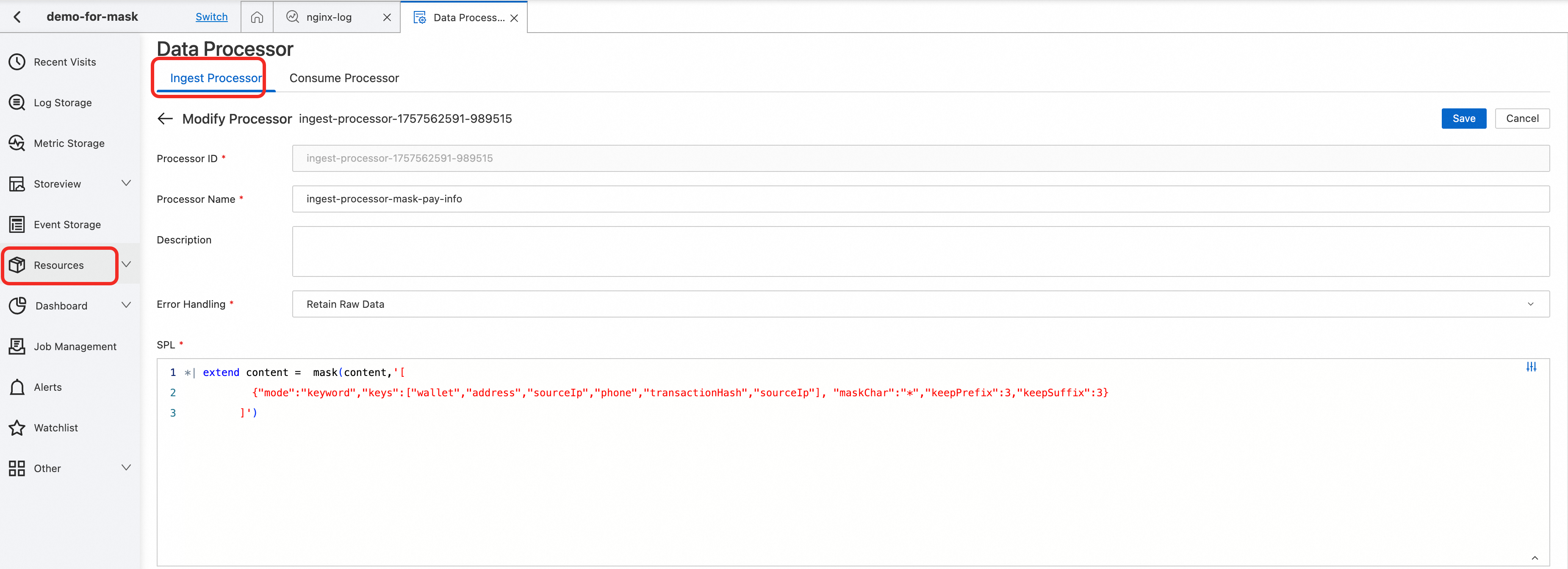
The following shows the log in logstore after data masking. As you can see, a single configuration accurately masks all sensitive fields. This not only protects user privacy and security but also retains complete business logic and traceability.

LLM interaction logs are typical unstructured data. The user input is completely uncontrollable and may contain various types of Personally Identifiable Information (PII). When dealing with such diverse and unstructured text, traditional data masking solutions often require the maintenance of dozens of regular expressions. This not only results in low accuracy but also makes it easy to miss information. This is where the buildin mode of the mask function excels. You only need to configure the data masking types to be enabled in the function, and it will automatically search for and mask various types of sensitive data in the text that conform to the built-in specifications. This provides a powerful security barrier for AI applications.
The intelligent customer service platform handles over 100,000 user inquiries daily. When seeking help, users often unintentionally disclose sensitive information such as phone numbers, ID card numbers, and bank cards. It is necessary to automatically detect and desensitize sensitive information in user input, such as phone numbers, email addresses, IP addresses, ID card numbers, and credit card numbers. This process protects user privacy while preserving semantic integrity to provide secure and usable data for subsequent AI training and analysis.
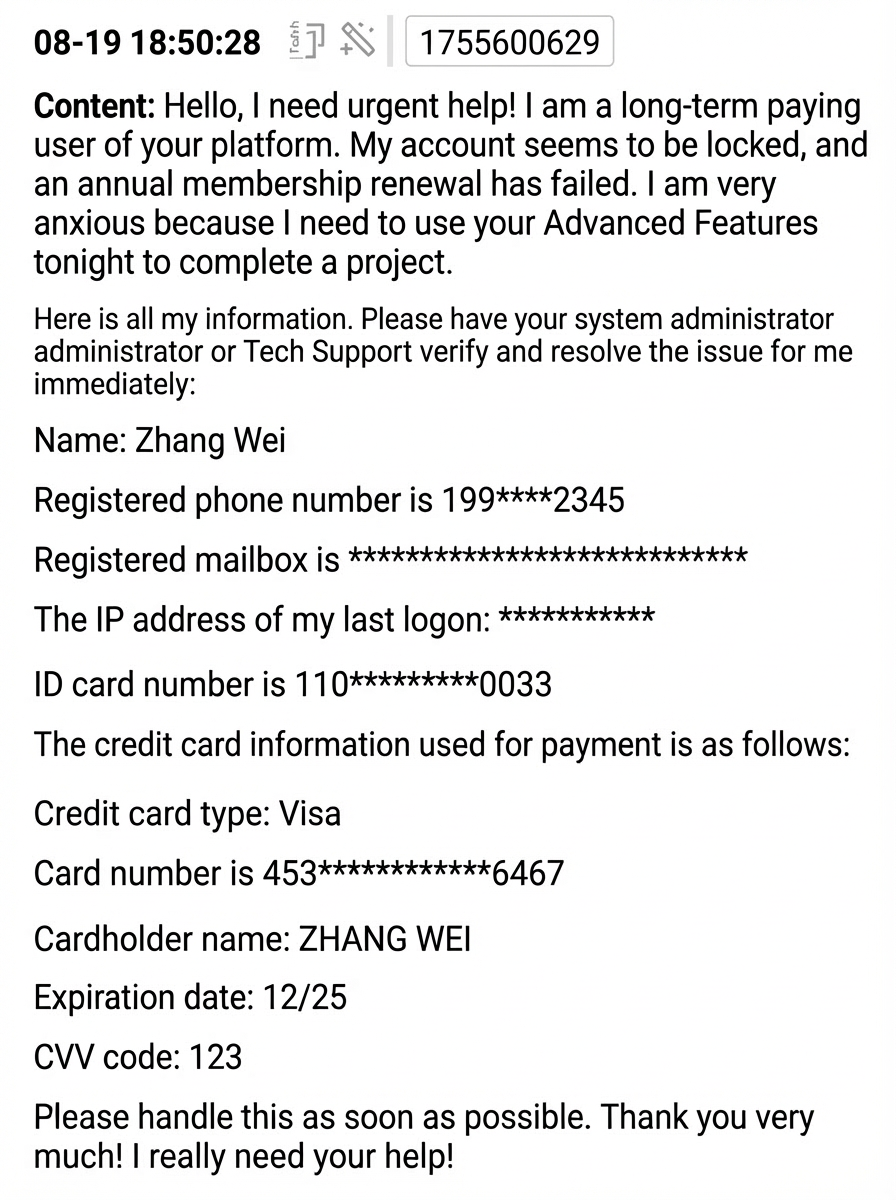
● Raw log: This is a complete conversation record of a user asking an AI customer service agent for help. It contains almost all common types of PII.
Hello, I need urgent help! I am a long-term paying user of your platform. My account seems to be locked, and an annual membership renewal has failed. I am very anxious because I need to use your Advanced Features to complete a project tonight. Here is all my information. Please have your system administrator or Tech Support verify it and resolve the issue for me immediately: Name: Zhang Wei Registered phone number is 19901012345 Registered email address is zhangwei.service@example.com The IP address of my last logon is 203.0.113.55 ID card number is 110105199003070033 The credit card information used for payment is as follows: Credit card type: Visa Card number is 4539-1488-0343-6467 Cardholder name: ZHANG WEI Expiration date: 12/25 CVV code: 123 Please handle this as soon as possible. Thank you very much! I really need your help!● SPL configuration: Use the buildin mode to intelligently detect multiple types of sensitive information.
● Configuration description:
* | extend content =  mask(content,'[
             {"mode":"buildin","types":["IP_ADDRESS","EMAIL","LANDLINE_PHONE"]},
             {"mode":"buildin","types":["PHONE","IDCARD","CREDIT_CARD"], "maskChar":"*","keepPrefix":3,"keepSuffix":4}
]')The built-in desensitization rules intelligently detect and desensitize the sensitive information in the text. This process completely protects user privacy while maintaining the semantic integrity and readability of the conversation content.
Access logs record every user access behavior in detail and are an important basis for troubleshooting, performance optimization, and security audits. However, URI parameters often contain highly sensitive information such as User IDs, session Tokens, and API keys, making them a high-risk area for data breaches. Parameters such as User IDs and session Tokens are often directly exposed in the URL. The keyword mode of the mask feature can accurately detect the key=value format and perform targeted masking on specific parameters in the URI.
The API Gateway of an E-commerce platform processes tens of millions of requests daily. It is now required to desensitize the uid and token parameters in the URI, retaining the first 2 and last 2 characters of each.
● Raw log: This is a typical API access log URI that contains user identity information and session authentication information.
uri: "uid=user12345&token=bf81639a41d604&from=web"Use the keyword mode to locate URI parameters for selective desensitization.
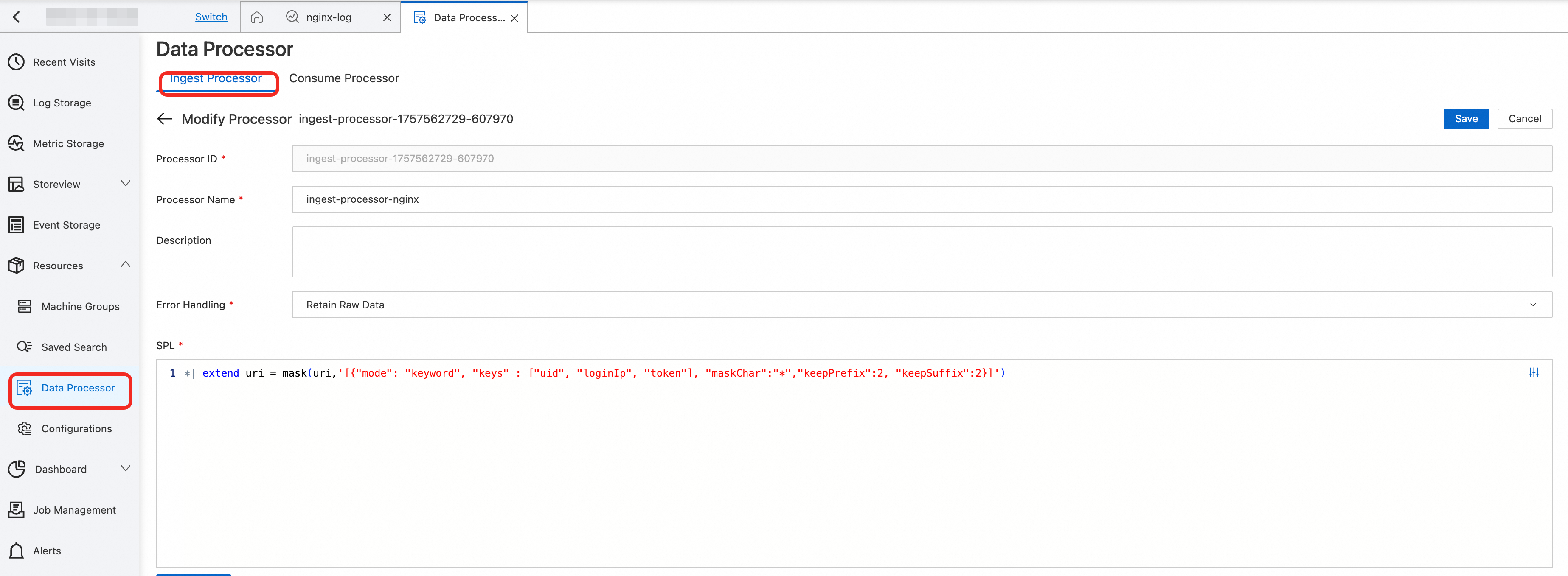

Selective and precise desensitization is achieved. Sensitive parameters are securely hidden, while non-sensitive parameters are fully retained. This approach protects privacy while maximizing the analytical value of the logs.
● uid parameter: Desensitized from user12345 to us*45.
● token parameter: Desensitized from bf81639a41d604 to bf**04 to prevent session hijacking.
● from parameter: Remains as web to maintain its value for business analysis.
Ensuring Reliable Voice Activation: How Gongniu Murora Rebuilt Its Observability System

774 posts | 60 followers
FollowAlibaba Cloud Native Community - January 4, 2026
Alibaba Cloud Native Community - September 10, 2026
CloudSecurity - April 10, 2026
Alibaba Cloud Native Community - November 4, 2024
Alibaba Cloud Native Community - August 14, 2025
Alibaba Cloud Native Community - October 10, 2025
774 posts | 60 followers
Follow Simple Log Service
An all-in-one service for log-type data
Learn More Storage Capacity Unit
Plan and optimize your storage budget with flexible storage services
Learn More Application Real-Time Monitoring Service
Build business monitoring capabilities with real time response based on frontend monitoring, application monitoring, and custom business monitoring capabilities
Learn More CloudMonitor
Automate performance monitoring of all your web resources and applications in real-time
Learn MoreMore Posts by Alibaba Cloud Native Community

