In the second half of 2026, Personal Agents are becoming a new focus for the AI industry. OpenAI launched Dots at DevDay 2026, and Meta introduced Muse. This wave of product launches points in the same direction: giving everyone an AI assistant that can keep working on their behalf.
Following the excitement around OpenClaw early in the year and the accelerating adoption of coding and workplace agents, Personal Agents are taking AI collaboration into its next phase: from answering questions and completing individual tasks to delivering results on an ongoing basis.
This shift can be understood in three statements:
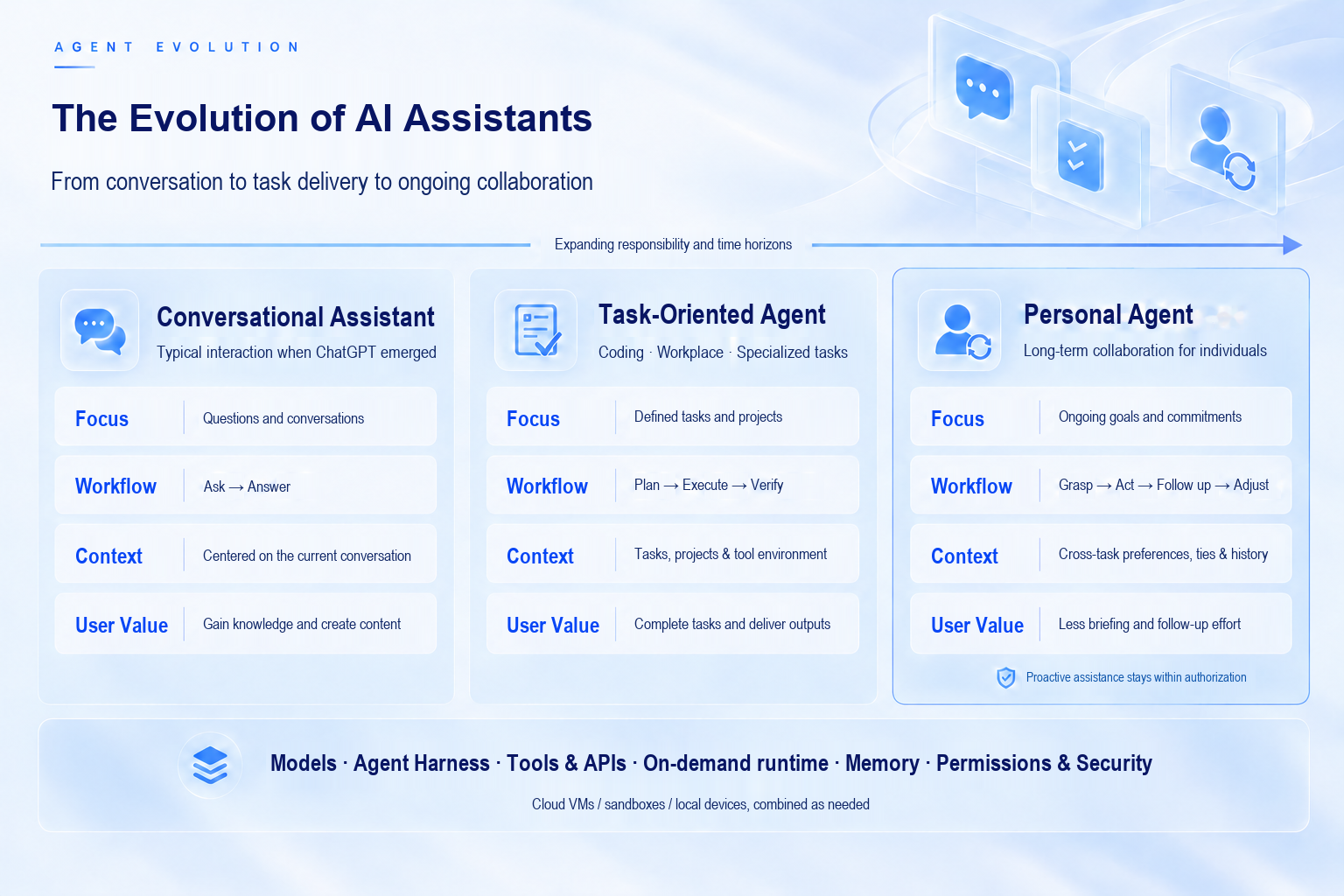
Figure 1 · The Evolution of AI Assistant Paradigms
For example, preparing an industry briefing is a one-off task. Remembering your areas of interest, gathering information every week, generating reports and sending them through instant messaging (IM), and promptly alerting you to important developments is ongoing collaboration. To add a new research topic, you only need to send a message—not restate the entire background.
A Personal Agent is an AI assistant that works on an ongoing basis around an individual's needs. Its work continues after the user leaves the chat window, and the next conversation picks up from the progress made previously.
OpenAI Dots has its own cloud-based computer. It can connect to applications, keep tasks moving forward, and learn user preferences from feedback. Users can communicate with it through ChatGPT, Slack, or Teams, with context carried across these entry points. Meta Muse likewise runs in a dedicated cloud environment. Users can assign tasks through the Muse app or WhatsApp; it continues working even after the app is closed and contacts the user when approval is required. Both aim to integrate assistants into existing communication workflows and keep them acting toward personal goals.
For developers, Personal Agents create many opportunities: turning familiar use cases into assistants that users are willing to entrust with ongoing work. But there is still engineering work between “AI can answer” and “an assistant can keep getting things done.”
Connecting to a model is only part of the work. Before putting an assistant in users' hands, several other questions must be addressed.
Where do tasks run? Searching for information, reading and writing files, and running scripts require tools, dependencies, and an isolated environment. You also need visibility into task progress, the step at which a task failed, and where its output files are stored.
How is knowledge of the user carried forward? A task started in a new week is a new task, but it should still reflect that person's areas of interest. Conversation history, long-term memory, and reference files serve different purposes. Each needs a clear owner and must be connected to the correct execution environment.
How does the assistant fit into the user's daily routine? IM messages must be associated with the right user and assistant, and results returned through the original channel. Recurring tasks require scheduling, authorization, and notifications; they cannot depend on the user manually opening a page each time.
How do you scale to more users? The same assistant capabilities need to be reused, while individual configurations, credentials, and data must be managed separately. As the user base grows, tool permissions, execution logs, and usage tracking also become part of day-to-day operations.
These challenges span both initial development and ongoing maintenance: validating execution behavior after changing a model or tool, preserving user bindings when adjusting channel integrations, and recovering context and artifacts when troubleshooting tasks. The cost of model integration has fallen, but someone still has to do the engineering required to serve an individual on an ongoing basis.
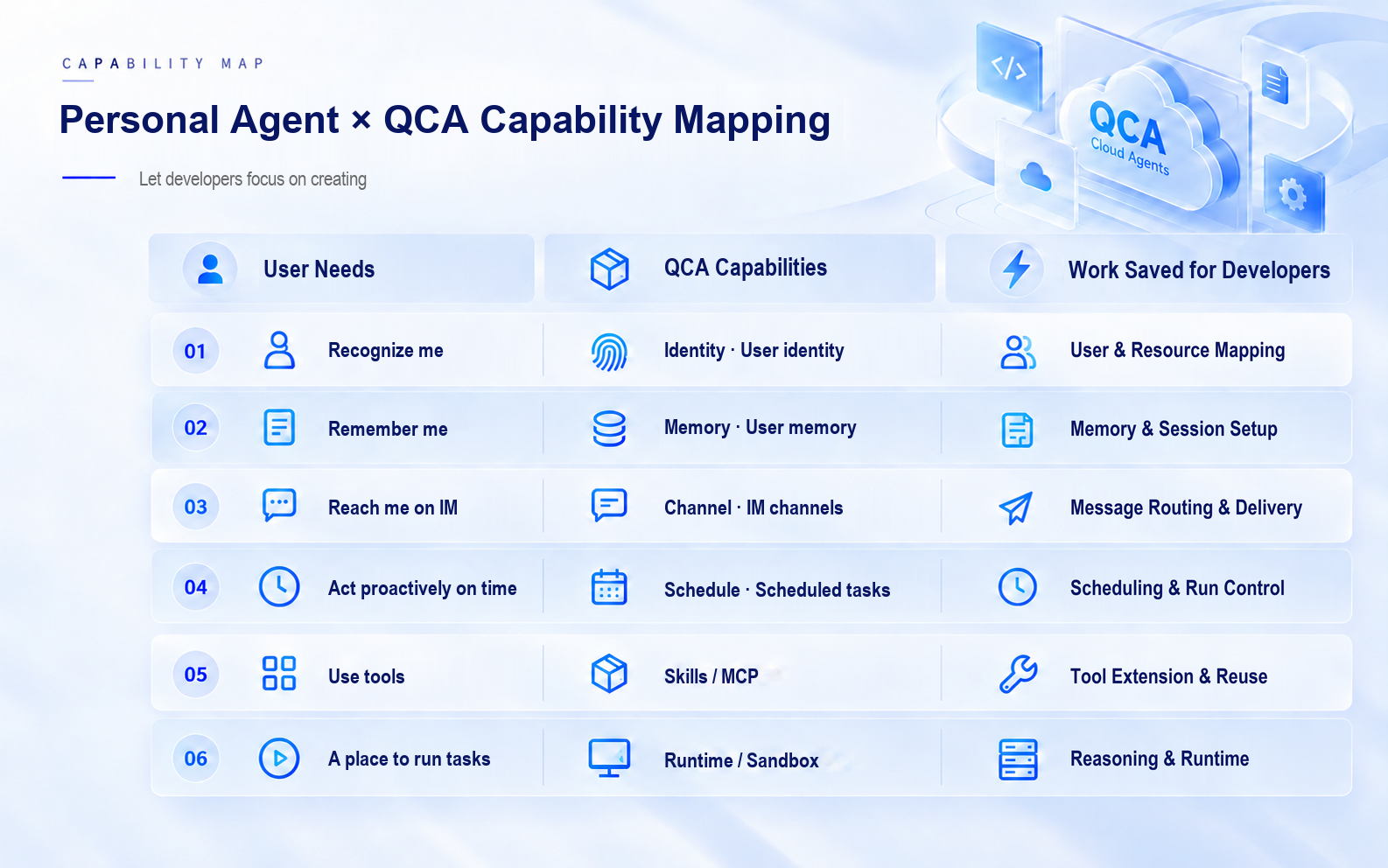
Figure 2 · Personal Agent–QCA Capability Mapping
If every team builds these shared capabilities from scratch, it must first invest in infrastructure development before it can validate its use case. This preparatory work is exactly what Qoder Cloud Agents aims to shorten.
Qoder Cloud Agents (QCA) is a fully managed agent platform from the Qoder team. It runs complex tasks in the cloud and returns progress updates and results in real time. It offers a range of integration options, including open APIs, SDKs for multiple programming languages, a CLI, webhooks, and Skills. QCA provides capabilities in two product layers:
Managed handles the underlying runtime, session state, and task execution through a streamlined set of core APIs.
Forward is QCA's user-service layer, developed in response to industry trends. Built on Managed, it provides the product capabilities needed for Personal Agents and other use cases, including per-user identity, configuration, and memory; IM channels and scheduled tasks; cross-session file storage; connectors; and Realtime calling. By handling the complexity of Agent × User combinations within the platform, Forward provides a unified managed experience. This can substantially reduce integration effort, help ensure overall agent quality, and enable developers to launch a commercial-grade Personal Agent product quickly.
Users can therefore combine these capabilities directly through QCA Forward: QCA manages the common runtime and service mechanisms, while the application defines the assistant's domain expertise, integrates business tools, and shapes the user experience.
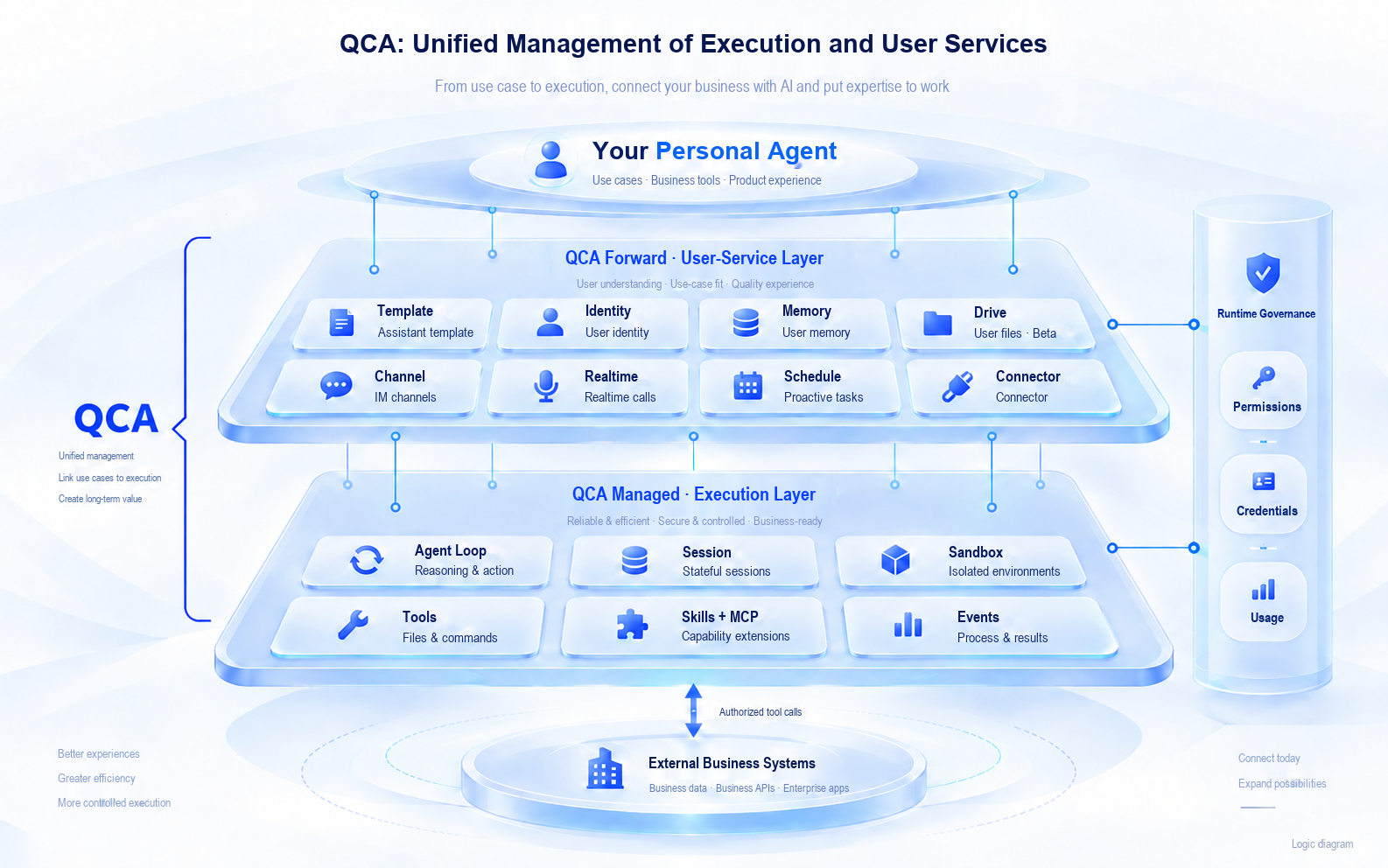
Figure 3 · Qoder Cloud Agents Architecture and Division of Responsibilities
When a session is created with a managed environment, QCA automatically creates or reuses a default Memory Store for the Identity × Template pair and mounts it to the session. Personal preferences recorded by the assistant remain available to subsequent tasks. When shared background information is needed, additional read-only memory stores can be mounted explicitly.
Memory Mechanisms: https://docs.qoder.com/cloud-agents/api/forward/memory-stores/schemas
Memory Mounting: https://docs.qoder.com/cloud-agents/api/forward/memory-stores/mount
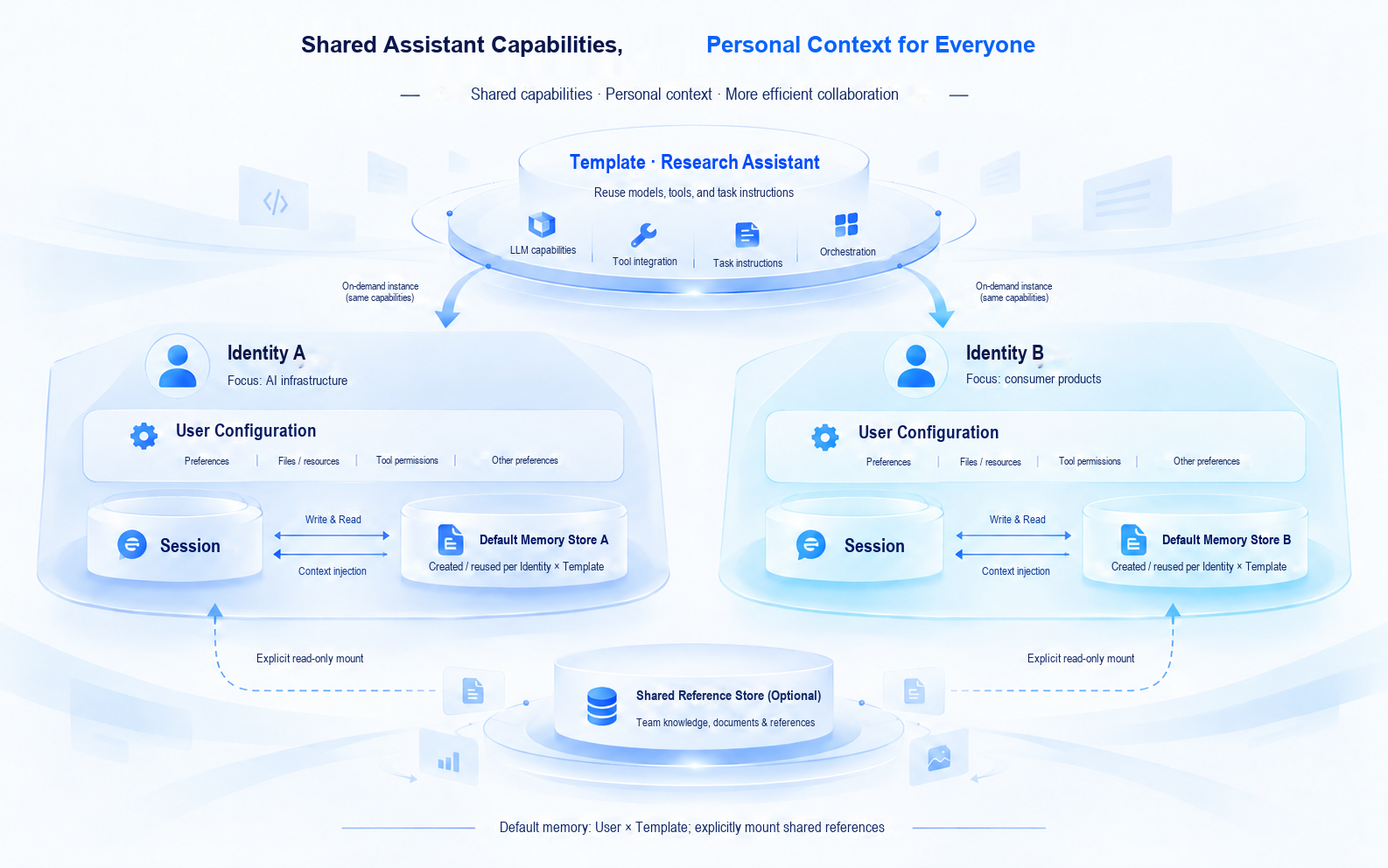
Figure 4 · Shared Assistant Capabilities and Separate User Contexts
Developers no longer need to implement an entire set of integration logic: locating the user's memory store, establishing its binding, and mounting it in the current execution environment. User associations, assistant configurations, and task sessions each have their own lifecycle. By linking them, the platform avoids the need to reconstruct personal context whenever a conversation ends.
With persistent user context, IM messages and recurring tasks can use the same set of assistant capabilities.
The Channel feature in QCA Forward connects the platform to supported messaging services. Once channel authorization and identity binding are complete, the platform associates each message with the appropriate Identity and Template, creates or reuses a session, and sends the results back through the connected messaging service.
Schedule initiates tasks at the specified times. Once the relevant managed capabilities are enabled, users can create scheduled tasks in natural language and configure where results should be delivered. A weekly briefing can therefore run at the agreed time using the same identity, assistant configuration, and memory.
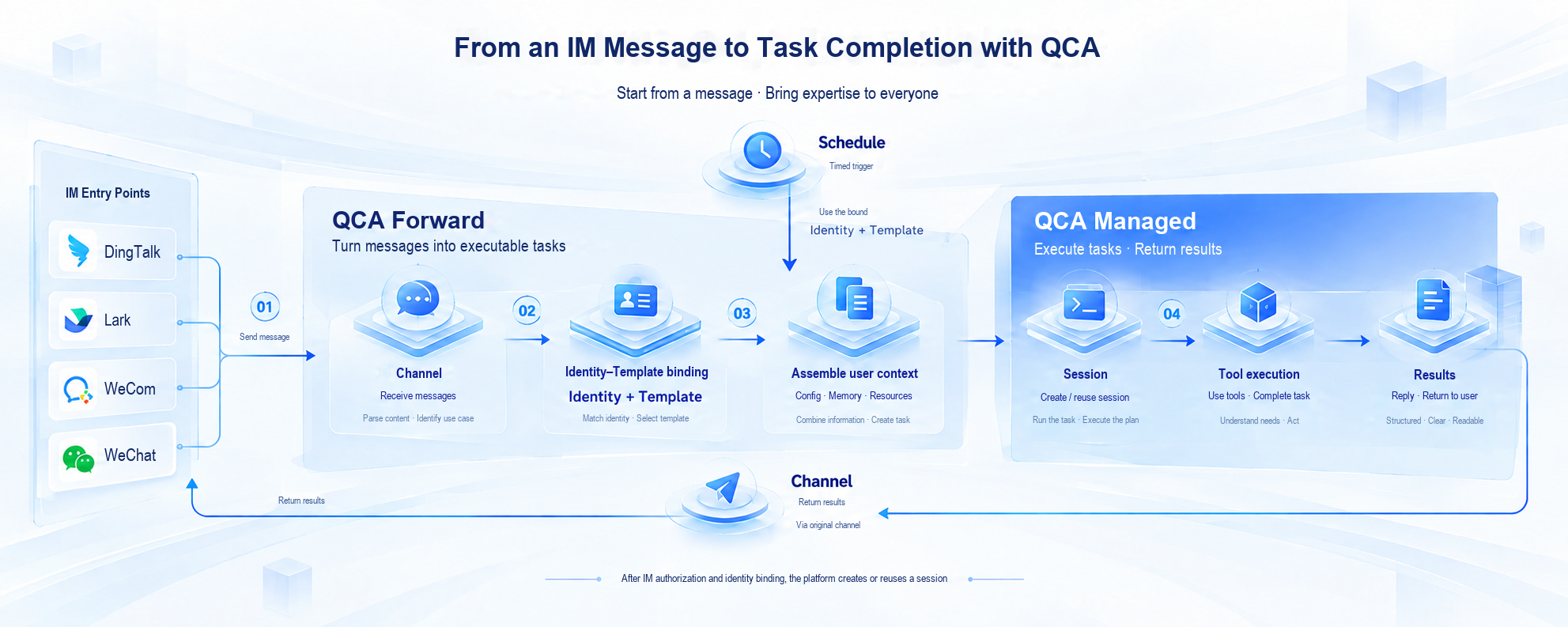
Figure 5 · How QCA Connects IM, Personal Context, and Cloud Execution
To retain reports and reference materials across sessions, you can also use Drive, the Identity-level user cloud drive.
Drive Documentation: https://docs.qoder.com/cloud-agents/api/forward/drives/overview
From receiving messages and accessing personal background information to executing tasks and delivering results, QCA connects the main shared mechanisms along this workflow. The remaining development can then focus on a specific assistant.
To get started, sign in to the QCA console, switch to Forward mode, create a template, and add connectors to it. Then scan the channel's QR code with your messaging app to link your account. QCA Forward supports Slack and other messaging platforms. You can also use the API to launch tasks directly from your own web application.
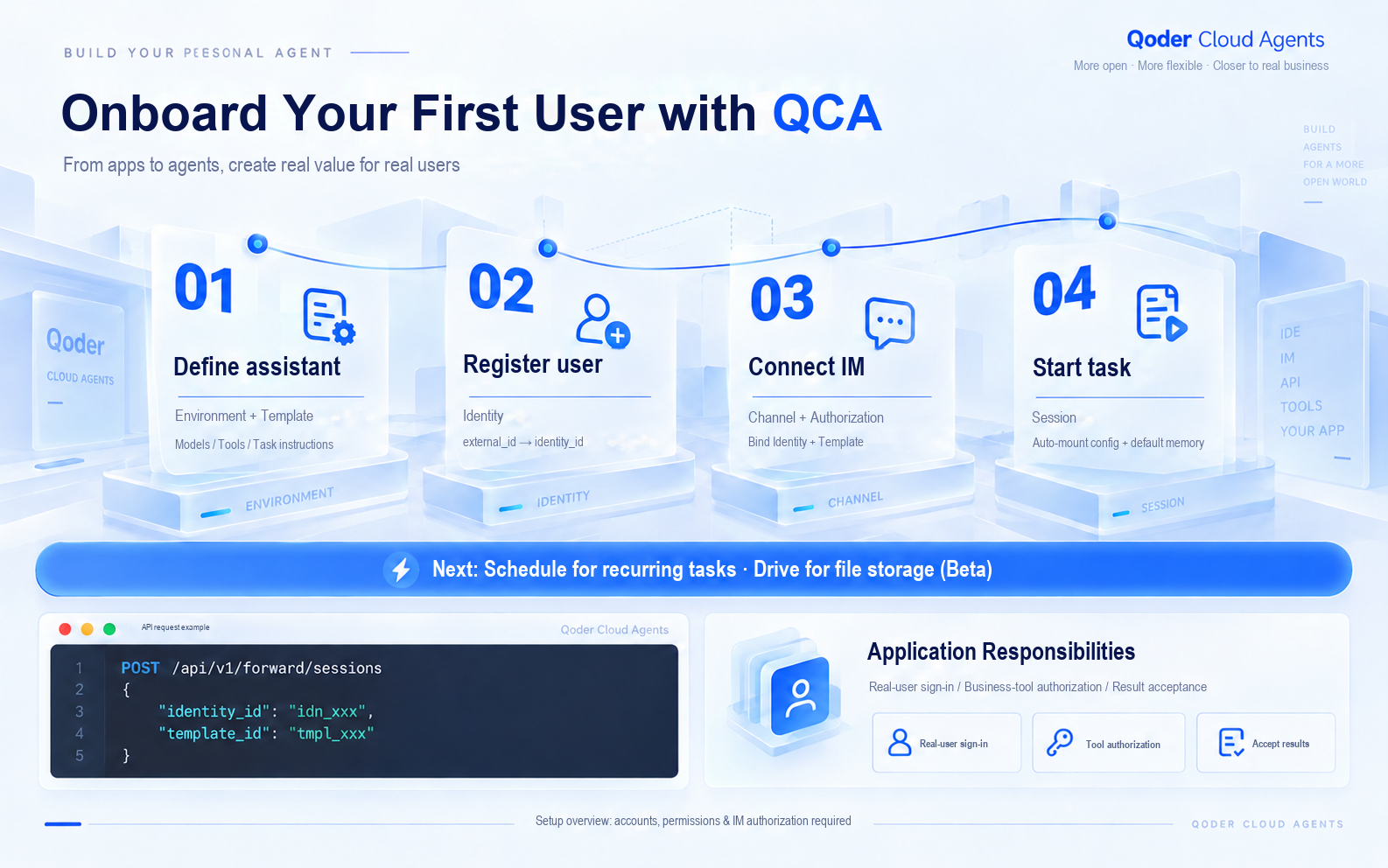
Figure 6 · Four Steps to Onboarding Your First User with QCA
After successfully running the first task, enable Schedule to turn it into a recurring service. Everyday interaction stays in IM, while the web console provides configuration, memory, and execution-log management as needed.
Whether you are building a product-grade personal assistant or trying one for yourself, QCA lets you get started quickly and integrate a Personal Agent in minutes by combining ready-made capabilities instead of developing infrastructure from scratch. Teams can first test whether the assistant offers enough value for users to keep using it, then refine the business tools and experience incrementally—focusing their investment on the value of their own product.
Start with the QCA Platform and the Integration Guide. Use the open-source SDKs available for multiple programming languages or the open APIs, choose a task you perform regularly, and build your first Personal Agent.
Introducing Qoderian: Bring Qoder CLI into Your Obsidian Vault
Every Tenth of a Second Counts — A Technical Deep Dive into Fast Tier Performance Optimization

1,565 posts | 524 followers
FollowAlibaba Cloud Native Community - July 17, 2026
Alibaba Cloud Native Community - July 23, 2026
CloudSecurity - July 24, 2026
Alibaba Cloud Native Community - June 10, 2026
Alibaba Cloud Community - August 31, 2026
Alibaba Cloud Community - July 8, 2026
1,565 posts | 524 followers
Follow Qoder
Qoder
From Assisted to Autonomous — Adapting to Every Programming Need
Learn More QwenWork
QwenWork is dedicated to helping employees strengthen their professional competitiveness in the AI era and to enabling enterprises to improve organizational effectiveness.
Learn More Token Plan
Build more, spend less. One plan, every modality.
Learn More Qwen
Qwen
Full-range, open-source, multimodal, and multi-functional
Learn MoreMore Posts by Alibaba Cloud Community

