Hermes is an autonomous AI agent runtime frame developed by Nous Research. Rather than a one-shot Q&A pair-style model encapsulation, it is an agent runtime that continuously runs, invokes tools, accumulates experience, and grows throughout the usage procedure.
When an AI agent truly starts solving a problem — whether it completes correctly or exhibits bias — the real challenge is often not whether the result is right, but what exactly it did.
A single run of Hermes is not an ordinary model invocation. A seemingly simple interaction may involve multiple rounds of inference, tool calling, result reinjection, context expansion, and new inference loops. The model decides whether a tool is needed for the next step, and tool results in turn affect the subsequent inference path. Cost, latency, and faults often occur in the middle of this procedure.
If the system can only provide a final reply, a few scattered logs, or a usage summary for a single invocation, Hermes remains a black box. You know it completed the job, but you can hardly tell how. You know the request consumed a lot of tokens, but you can hardly tell which step drove up the cost. You know the user experience has slowed down, but you can hardly determine whether model generation slowed, tool execution went abnormal, or ReAct (Reasoning + Acting) loops spiraled out of control.
This is exactly our starting point for building observability into Hermes.
This article introduces a set of observability plugin solutions provided by Alibaba Cloud for Hermes. It can revert the real execution procedure of Hermes into a structured invocation chain: where a session starts, how many rounds of inference it goes through, which tools are invoked, how many tokens are spent, which step is the most time-consuming, and at which edge zone a fault occurs. Which operations are malicious, and how much sensitive data has been leaked.
If you are using Hermes for real-world jobs, you will almost certainly encounter these problems:
● Why is it so expensive this time?
● Why is it so slow this time?
● Did it actually invoke that tool?
● Did the tool it used leak data?
What these problems have in common is that they are not "results" but "procedures". So, if we can only see the last reply, then from an observational point of view, Hermes is still not interpretable.
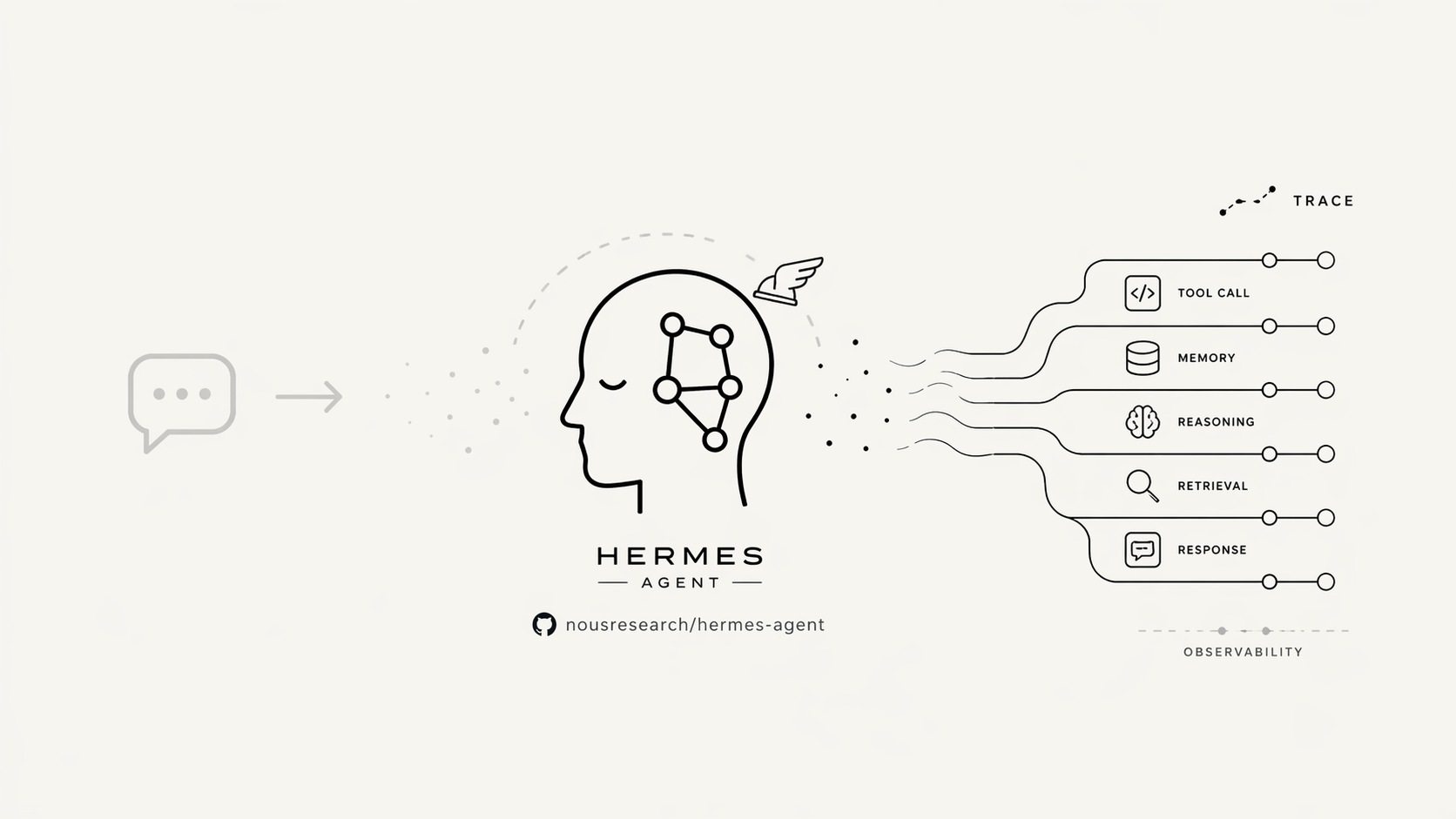
The Alibaba Cloud Hermes observability plugin focuses on solving the following four types of problems.
The first is that the procedure is invisible.
After integrating an LLM, many systems still only show user input, final output, and a usage summary. But the real run of Hermes is far more than that. Behind a single response, there may be multiple rounds of inference, multiple tool executions, continuous context expansion, and new inference loops. Without a call chain, the intermediate procedure is essentially empty. The first thing we did was fill in that gap.
The second is that costs are not attributable.
The token bill itself isn't the hardest problem — the hardest part is not knowing where the money actually goes. A Hermes run can be expensive because the context suddenly explodes in a certain round, a tool returns an oversized result, the final round produces overly long output, or a certain class of jobs naturally triggers more steps. Without visibility into the tokens for each round of model invocation, cost analysis is nothing more than guesswork.
The third category is that performance cannot be broken down.
Users will only tell you "it's getting slower," but "slow" by itself carries no useful info. What you really need to distinguish is: is the first token slow, or is overall generation slow? Is tool execution slow, or is multi-round ReAct inference itself running too long? Only by separating these stages can a "slowdown" become a problem you can actually pinpoint.
The fourth category is that results cannot be reviewed.
Often the hardest issues to deal with are not clear-cut faults, but cases where "it looks like it succeeded, but the result is wrong." This is very common in agent systems: Hermes invokes the wrong tool, the tool returns incomplete results, Hermes continues to infer based on partial info, and ultimately produces an answer that seems reasonable on the surface but has already gone off track. Without traces, post-mortem review is nearly impossible. With traces, the problem shifts from "guessing the cause" to "examining the path."
What we built for Hermes is a set of OpenTelemetry (open telemetry frame)-based Tracing Analysis capabilities.
The core idea is straightforward: install runtime instrumentation in the Python environment where Hermes runs, establish spans around the key execution borders of Hermes, and then report traces and indicators to the observability backend through OTLP (OpenTelemetry Protocol), a standard protocol.
Our focus is not on "what the last row of reply looks like", but on the running procedure of Hermes itself.
It is worth mentioning that this set of plugins is not a temporary instrumentation script thrown together, but is designed along the OpenTelemetry system.
First, it follows the GenAI standard specification as closely as possible at the semantics layer. The currently reported trace data preferentially snaps to the OpenTelemetry GenAI semantic conventions. For structures in the Agent runtime that are closer to the execution procedure, extensions are made in combination with LoongSuite Semantic Conventions. Instead of defining a batch of field names that can only be understood internally, we try to use a set of standard, reusable, and portable semantic expressions. In other words, this is not a makeshift approach, but a well-structured observability design that follows industry best practices.
Second, it provides not only traces but also basic metrics signals. In addition to the call chain of a single request, you can also view trends such as the number of invocations, number of faults, invocation duration, and token usage. This way, you can replay a single request along a trace, or observe cost fluctuations, performance changes, and abnormal trends from a global perspective.
Third, it records time to first token (TTFT) separately for streaming scenarios. In many cases, when users perceive something as "slow", it is not necessarily that the entire generation is slow, but rather that the first token takes too long to return. With TTFT, performance issues can be further broken down from "feels slow" into "slow first token" or "slow overall generation".
Fourth, it is not attached to a single Alibaba Cloud service on the backend. The current solution can be directly connected to Alibaba Cloud ARMS, but it uses the OTLP standard protocol underneath and is not designed to be locked into a private data structure. Connecting to ARMS works today, and if you need to connect to other OTLP-compatible backends in the future, migration space is preserved.
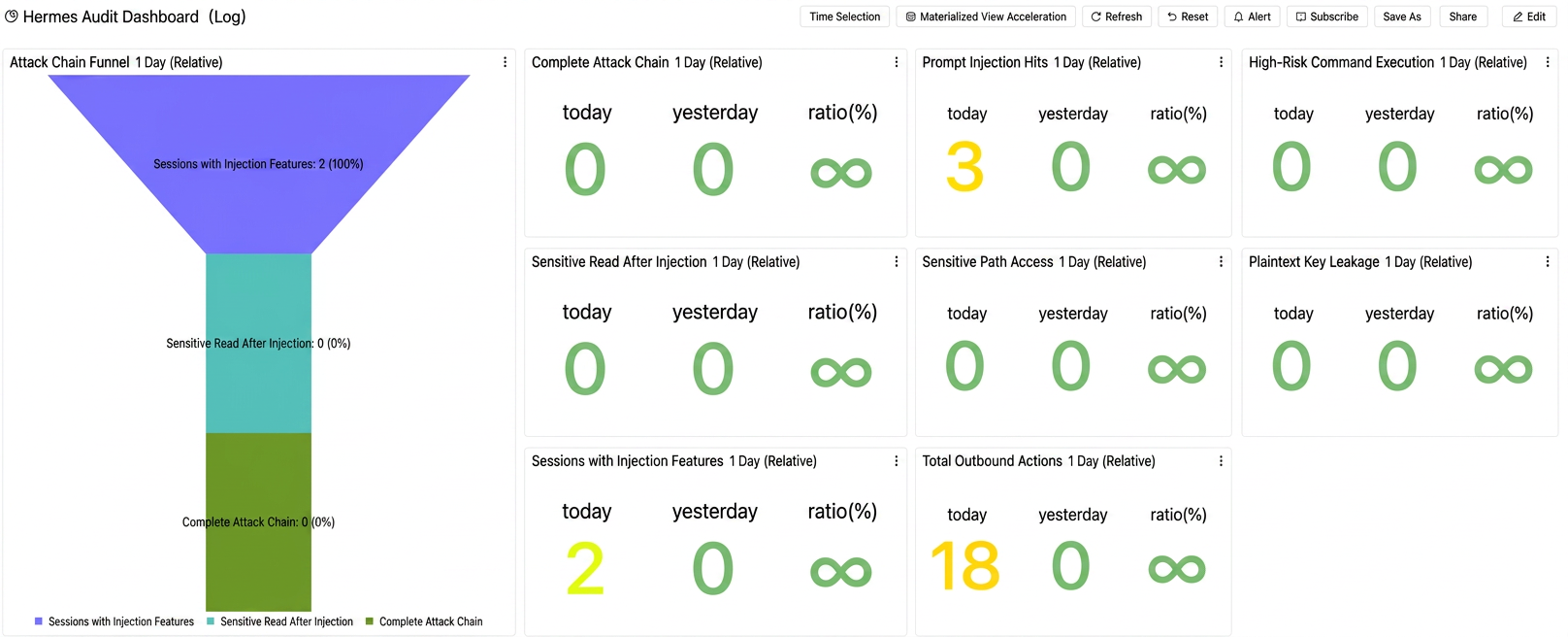
Fifth, it supports security audits of important behaviors in Hermes. By collecting full operation logs, access records, and user behavioral data from the Hermes system, and combining outlier detection algorithms to build a dynamic audit model, it can accurately detect suspicious behaviors such as unauthorized access, abnormal data exporting, and malicious prompt injection.
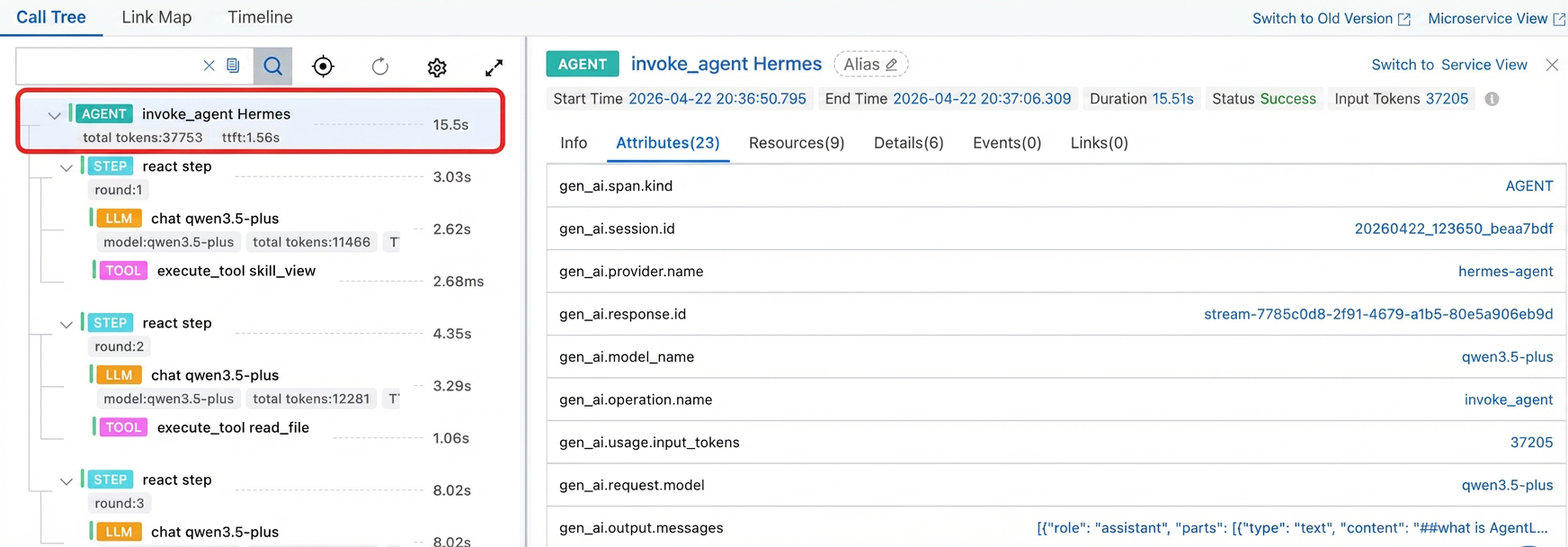
The observability capability of the current version of Hermes can revert a real agent run into a ReAct structured trace.
The core pipeline is as follows:
invoke_agent Hermes
└── react step
    ├── chat
   └── execute_tool <tool_name>
If a job contains multiple rounds of inference and multiple tool calls, the pipeline naturally expands:
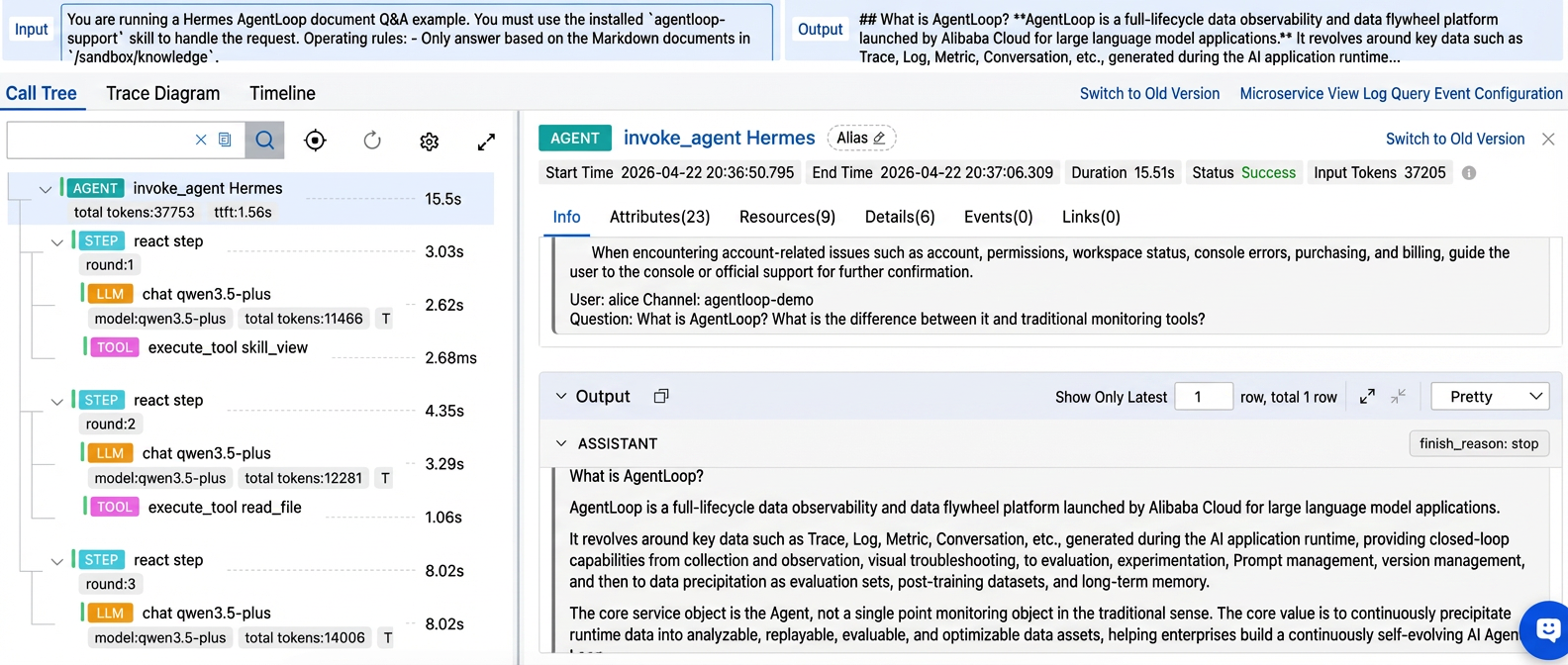
The significance of this pipeline is not that there are more spans, but that the actual execution of Hermes becomes visible for the first time.
How many rounds an execution ran, which round triggered the tool, and how the tool affected subsequent inference — all of this can now be viewed in the same trace.
Each chat span can currently record:
● gen_ai.request.model
● gen_ai.usage.input_tokens
● gen_ai.usage.output_tokens
● gen_ai.usage.total_tokens
● gen_ai.response.time_to_first_token
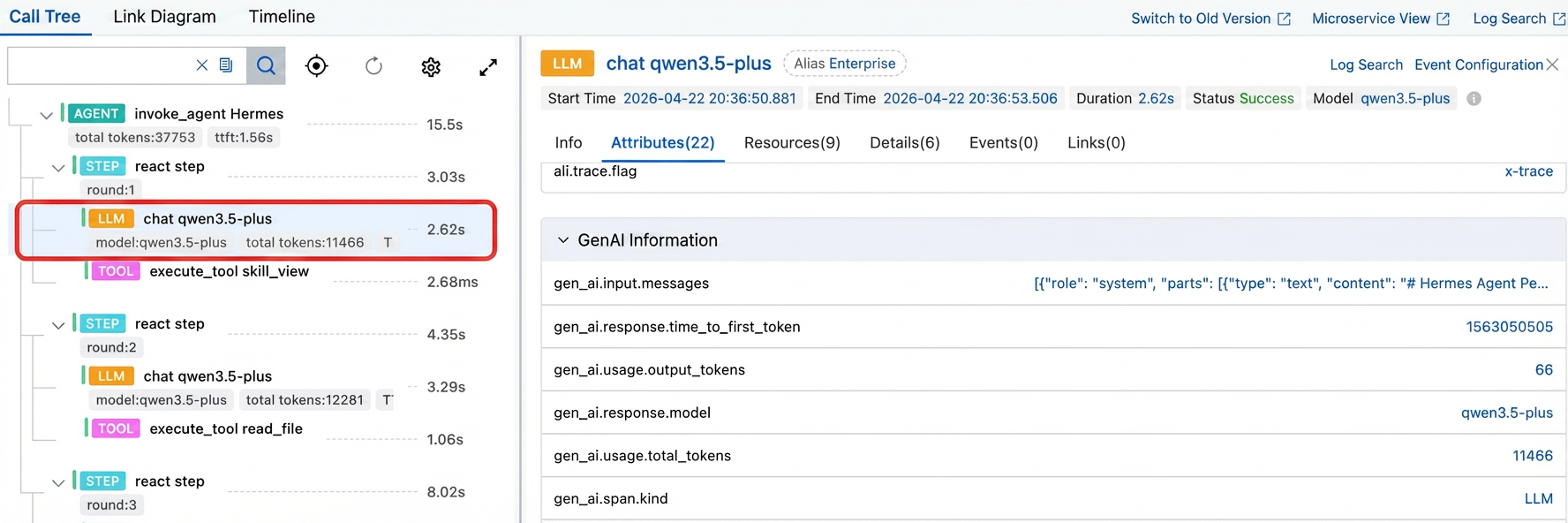
This means we can finally view tokens and latency per "actual model invocation" instead of only looking at the aggregate of an entire session. Especially in streaming scenarios, TTFT (time to first token,first-token latency) can help us further distinguish whether the first token is slow to return or the overall generation procedure is slow.
Each execute_tool span can currently record:
● gen_ai.tool.name
● gen_ai.tool.call.arguments
● gen_ai.tool.call.result
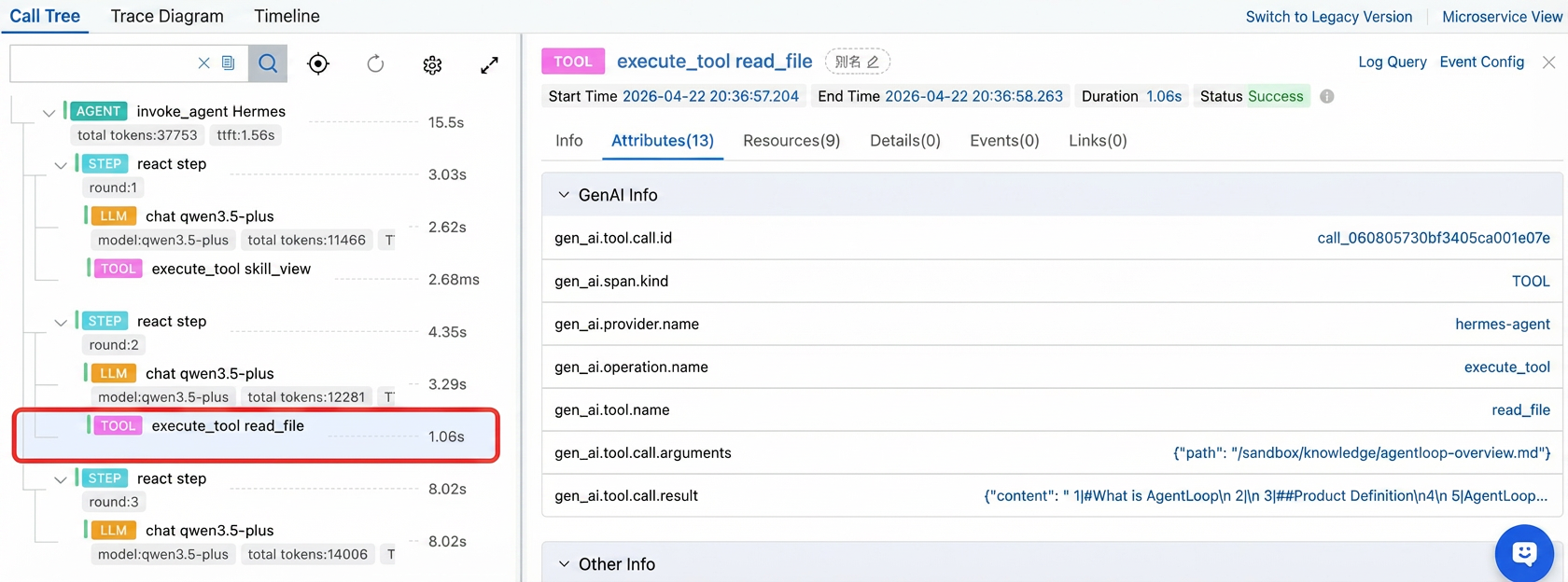
Tools are no longer empty edge zones in the procedure. We can see when Hermes decided to invoke a tool, which tool was invoked, what parameters were passed, and what results were returned.
The root vertex invoke_agent Hermes span can now record the aggregation results of the entire run, including:
● Cumulative Token
● Final output message
● Total time consumption info
Records agent behavior across the full chain, intelligently generates audit views, and exposes high-risk operations.
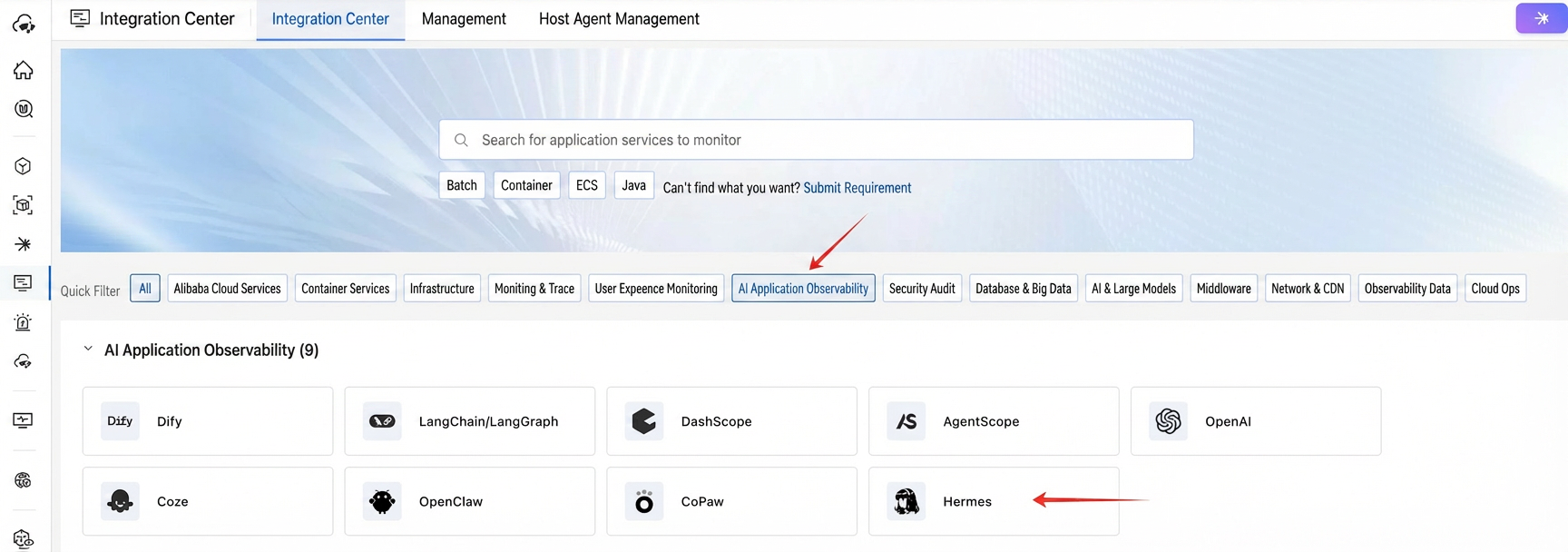
The integration path for Hermes observability is streamlined into a straightforward flow: get the command from the console, copy it to the terminal and execute it, enable the plugin, start Hermes, and begin reporting.
Log on to the CMS 2.0 (Cloud Monitor Service 2.0) console, go to the corresponding application monitoring workspace, choose Integration Center > AI Application Observability, and click Hermes.
In the sidebar, enter the application name and click Get to immediately generate the integration command. Click the icon in the upper-right corner to copy it with one click.
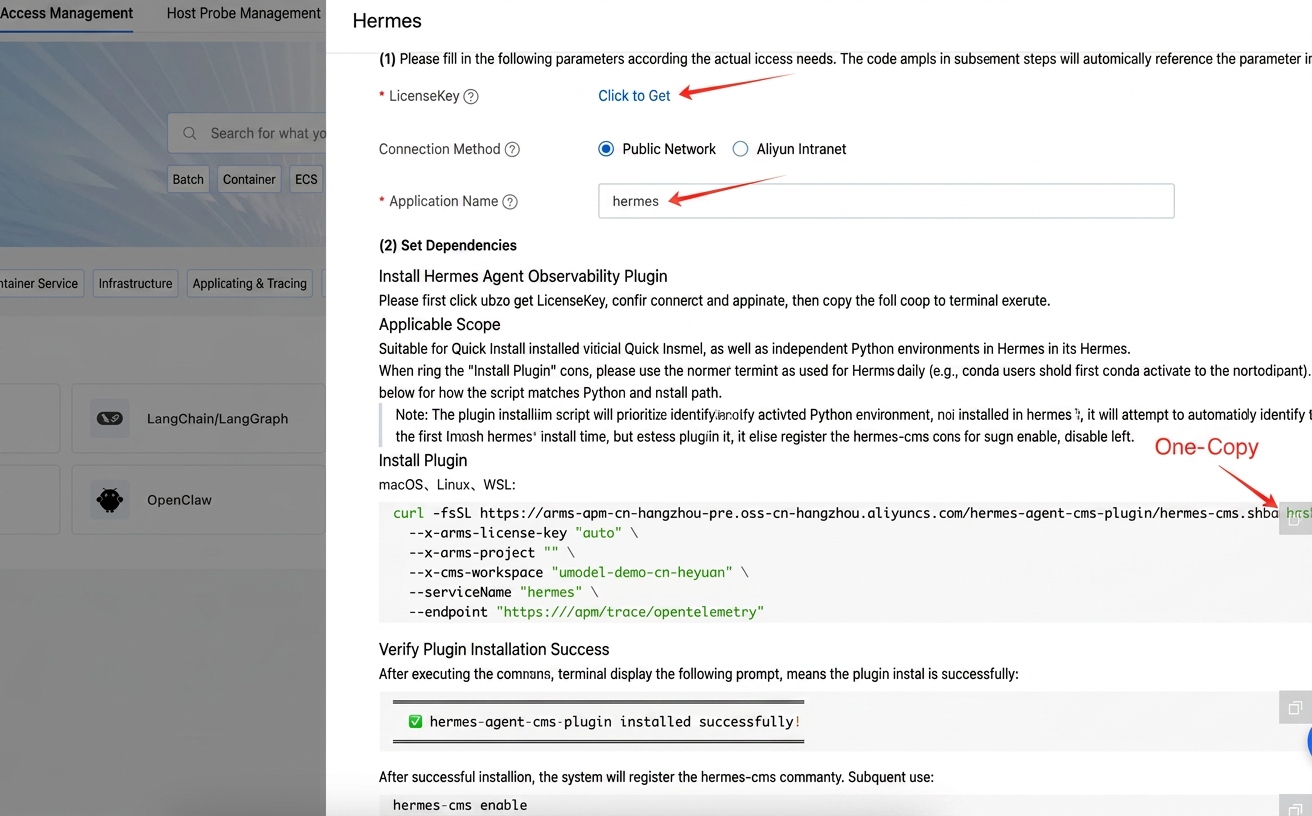
Open the terminal on the machine where Hermes is located, paste the copied command, and execute it:
curl -fsSL https://arms-apm-cn-hangzhou-pre.oss-cn-hangzhou.aliyuncs.com/hermes-agent-cms-plugin/hermes-cms.sh | bash -s -- install \
  --x-arms-license-key "auto" \
  --x-arms-project "Your project" \
  --x-cms-workspace "Your Workspace" \
  --serviceName "hermes" \
  --endpoint "https://Your ARMS-OTLP address/apm/trace/opentelemetry"
When you execute the installation command for the first time, in addition to installing the plugin itself, the system also registers the hermes-cms command on the local machine for subsequent operations such as enable, disable, and uninstall.
If the following message appears in the terminal, the plugin has been installed successfully:
════════════════════════════════════════════════════

✅ hermes-agent-cms-plugin installed successfully!

════════════════════════════════════════════════════
Throughout the procedure, you do not need to manually edit the configuration file. The script will first match the current environment. Only when the current environment does not meet the requirements will it resume trying the official default installation position.
After the installation is complete, don't rush to check the console.
The first step is to turn on the observability switch:
hermes-cms enableThen start Hermes.
To run in the foreground, execute directly:
hermesRun executable in background:
hermes gateway install

hermes gateway startIf the following tooltip appears in the terminal after startup, the observability instrumentation has taken effect:
loongsuite-site-bootstrap: started successfully (OpenTelemetry auto-instrumentation initialized).
After confirming that the instrumentation has taken effect, send a few test requests to Hermes to run a real job that triggers multiple rounds of inference and tool calling. After a minute or two, return to the CMS 2.0 console, and you will see your Hermes application in AI Application Observability.
At this point, Hermes is no longer just a black box responder — it becomes a running system that can be expanded, tracked, and analyzed.

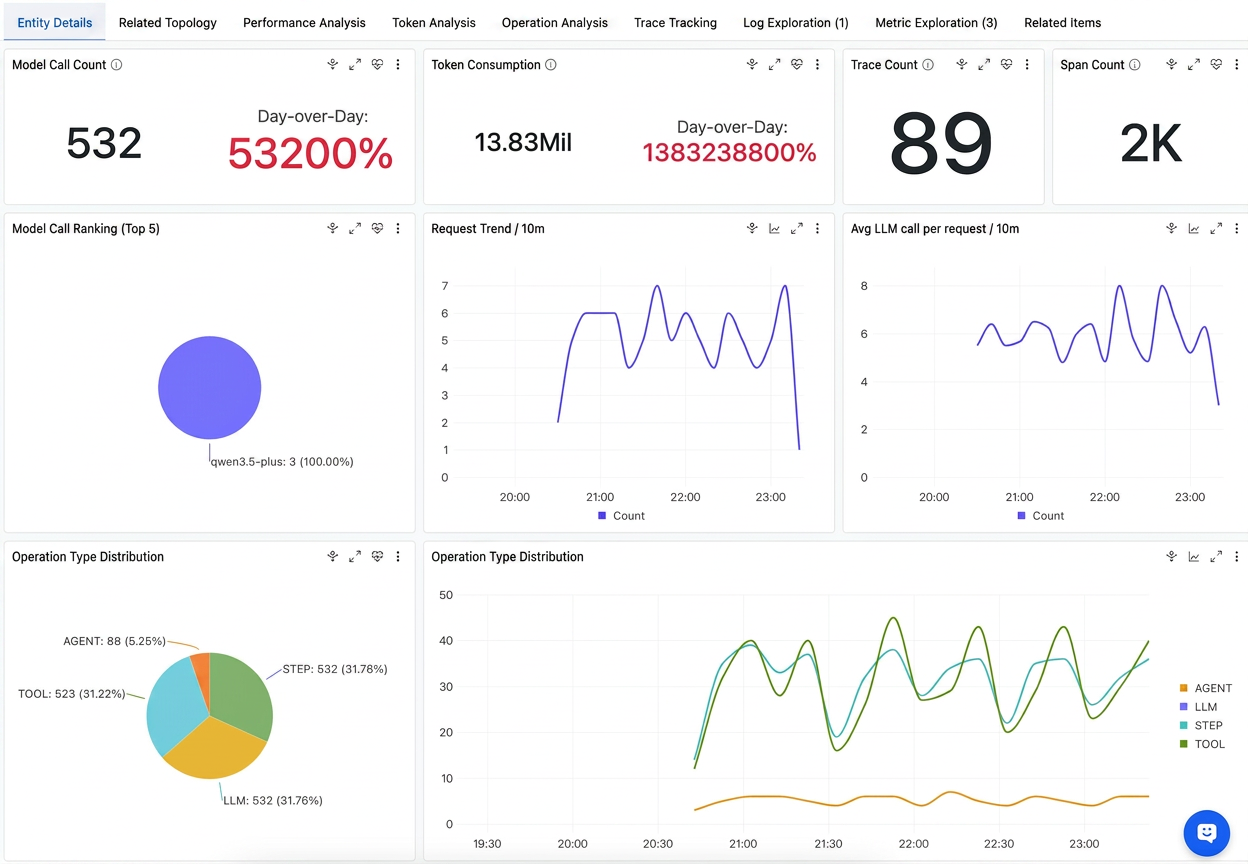
Enter our observability application to view not only the number of Hermes model invocations, token consumption trends, request fluctuations, and the average number of LLM invocation rounds per request, but also the latency and invocation distribution across AGENT, LLM, and TOOL phases. You can also trace a complete Trace to revert the actual execution procedure of Hermes, clearly seeing how many rounds of inference a job went through, which tools were invoked, which step took the longest, and which round consumed the most tokens.
View the demo examples and the hermes_agentloop_support example at https://sls.aliyun.com/doc/en/playground/cmsdemo.html
To temporarily shut down observability, execute:
hermes-cms disableTo completely uninstall the plugin, execute:
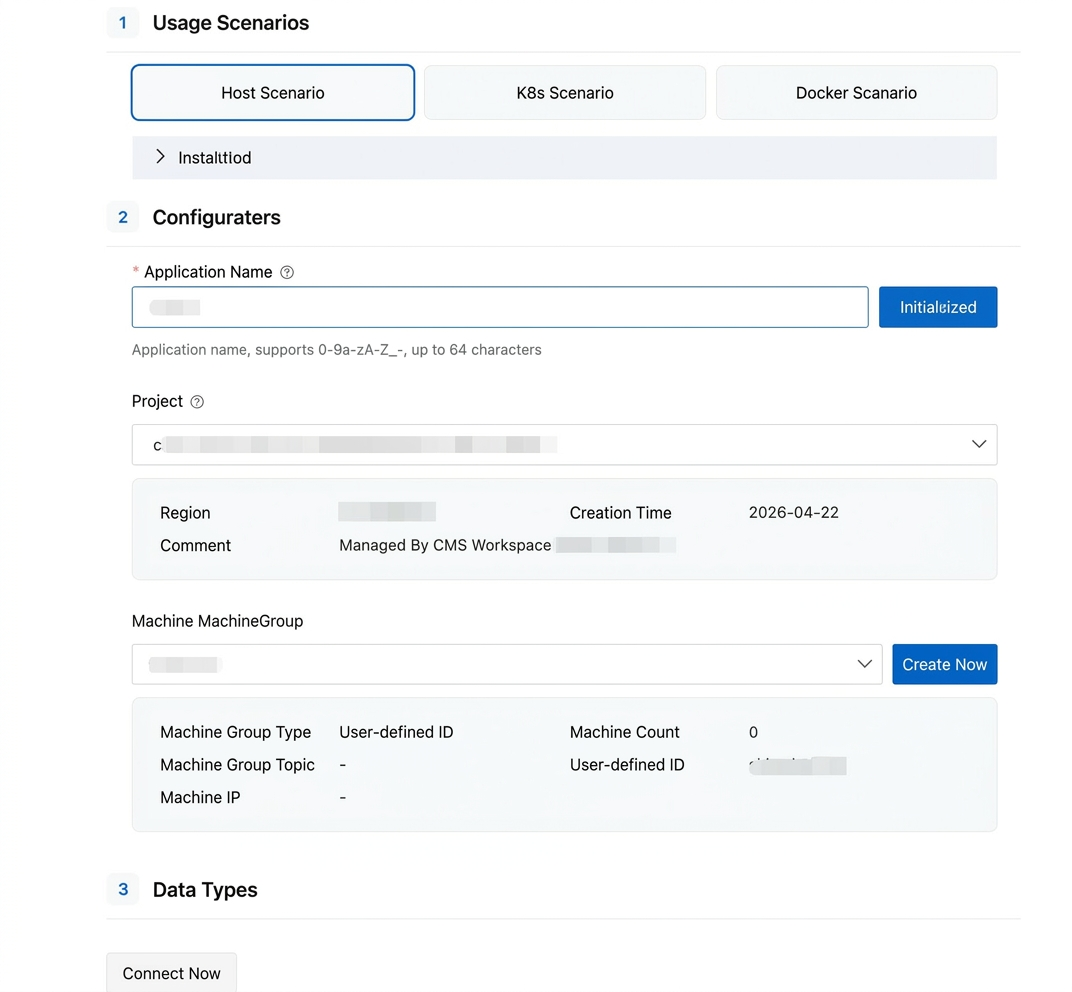
hermes-cms uninstallNext, click the "Log Access" page, set a custom application name, click Initialize Resources, enter the previously configured Project name, and configure the machine group as prompted to complete the Hermes Audit Feature with one click.
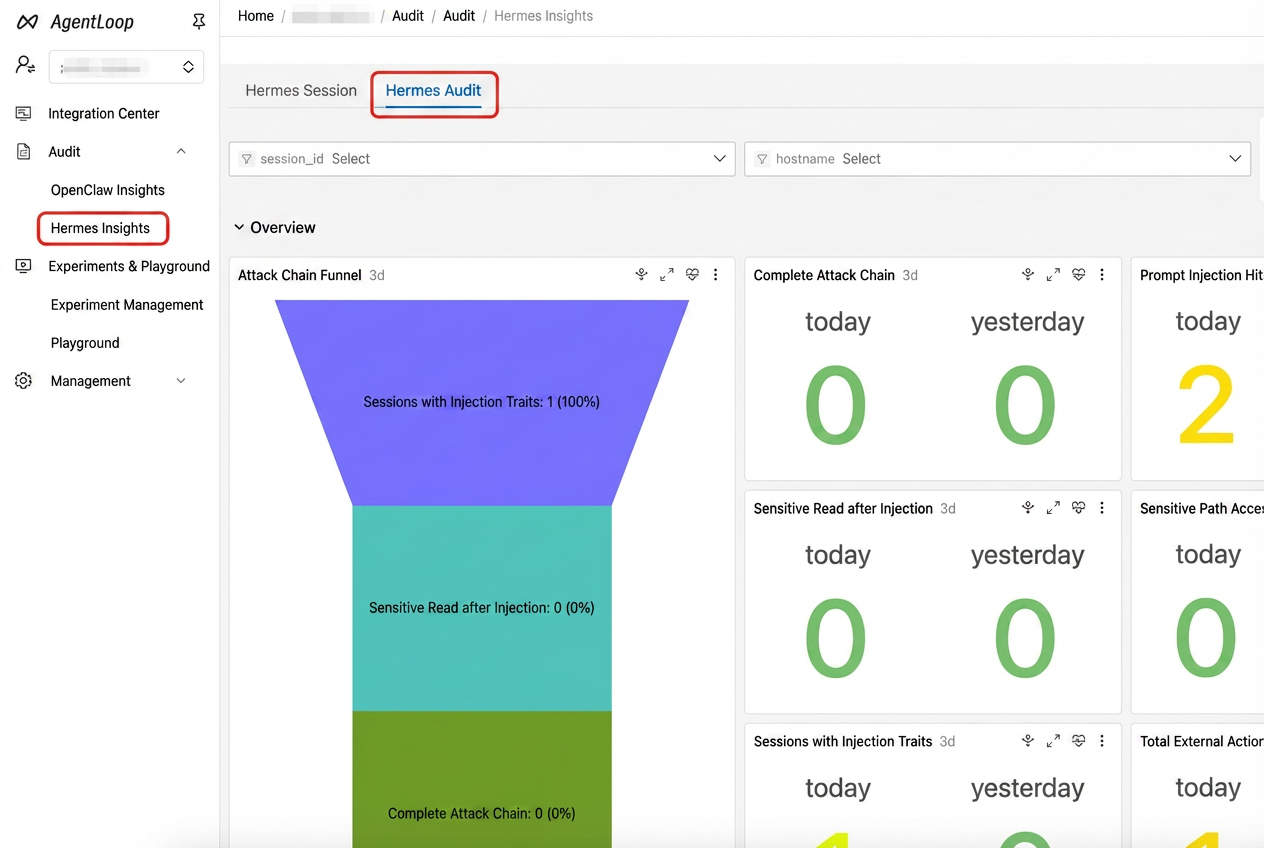
After the access is complete, in the left sidebar, choose Audit > Hermes Insight > Hermes Audit to view the audit dashboard of your Hermes agent.
This solution can reliably address Tracing Analysis, token attribution, and basic performance breakdown, while also providing basic metrics signals for trend analysis. However, this does not mean that all observability work for Hermes is complete.
Next, we will continue to push forward in several directions.
● On the data plane, continue to expand from traces, span properties, and basic indicators to more complete log audit and runtime diagnostics capabilities.
● On the link plane, continue to refine Hermes-specific execution phases beyond agent, step, llm, and tool, such as memory lifecycle, delegation orchestration, and runtime recovery.
● On the governance plane, continue to strengthen content collection control, finer-grained data governance capabilities, and unified desensitization and security policy development.
Today, we already have an active runtime observability infrastructure, and the next goal is to further evolve it into a more complete, more detailed Agent observability system that is better suited for real production environments.

776 posts | 60 followers
FollowAlibaba Cloud Native Community - June 4, 2026
ApsaraDB - June 4, 2026
Alibaba Cloud Native Community - April 30, 2026
Alibaba Cloud Native Community - June 10, 2026
Alibaba Cloud Native Community - May 20, 2026
Alibaba Cloud Native Community - May 18, 2026
776 posts | 60 followers
Follow Token Plan
Build more, spend less. One plan, every modality.
Learn More QwenWork
QwenWork is dedicated to helping employees strengthen their professional competitiveness in the AI era and to enabling enterprises to improve organizational effectiveness.
Learn More
Alibaba Cloud Model Studio
A one-stop generative AI platform to build intelligent applications that understand your business, based on Qwen model series such as Qwen-Max and other popular models
Learn More CloudMonitor
Automate performance monitoring of all your web resources and applications in real-time
Learn MoreMore Posts by Alibaba Cloud Native Community

