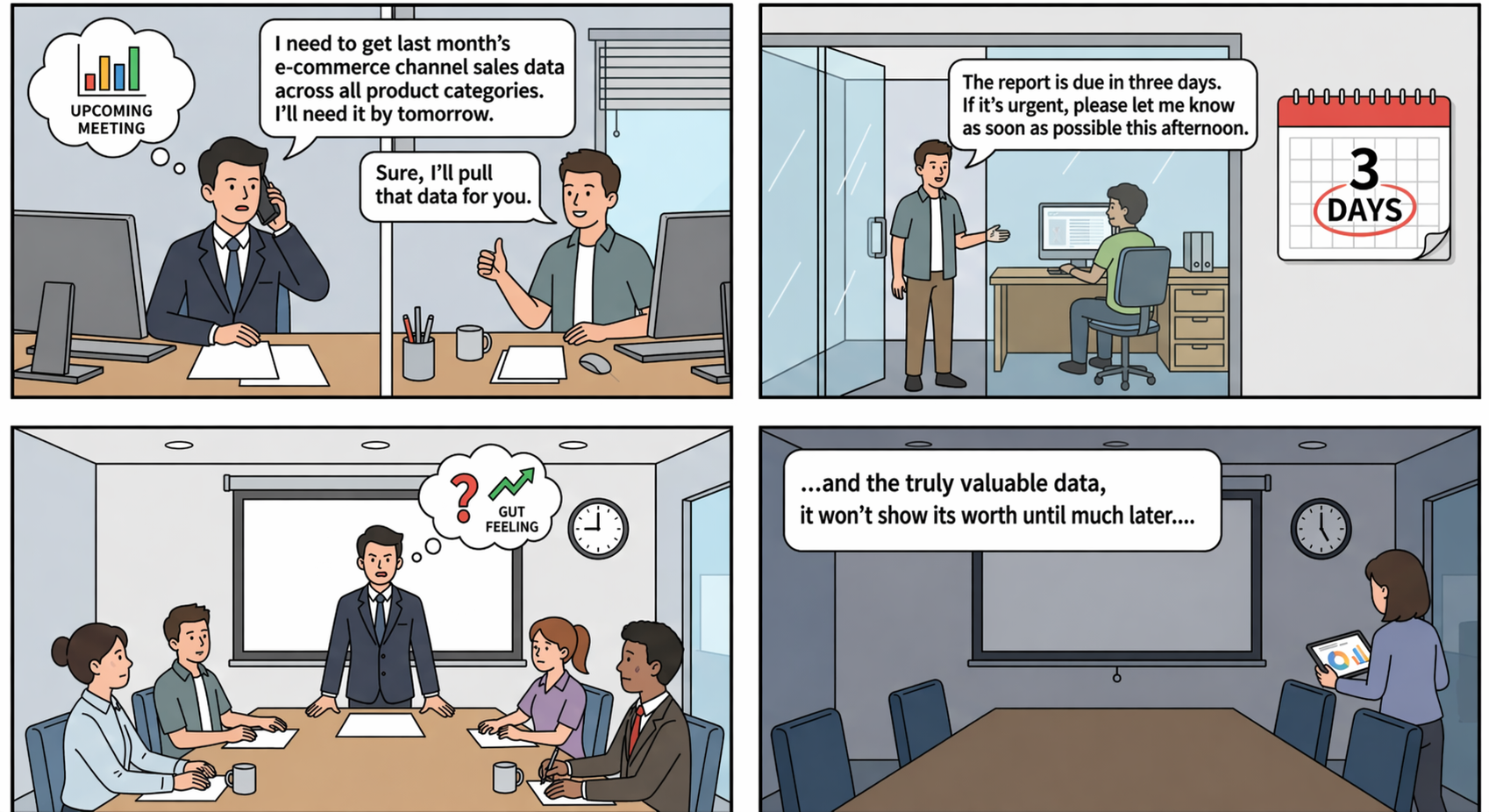
In most companies, a scene like this plays out almost every day:
Sales Director: "I need the sales figures for all product categories across our e-commerce channels for last month. I need them for tomorrow's meeting."
Operations Colleague: "Okay, I'll ask the data team to pull a report."
Data Team: "Scheduling takes three days; if it's urgent, the earliest we can get it done is tomorrow afternoon."
Consequently, the meeting proceeded without any supporting data, with decisions driven solely by "gut feeling" and "experience"—while the truly valuable data arrived belatedly, only after the meeting had already concluded.
This is not an isolated case, but rather a "data dilemma" that countless enterprises are currently facing.
Nowadays, corporate marketing operates in real time, ad campaigns are adjusted by the second, and user behavior is tracked down to the millisecond. Yet, when business stakeholders simply want to take a quick look at "how much we sold last month," they still have to navigate approval workflows, wait for scheduling, and wait for development resources...
The Quick BI self-service data retrieval feature—introduced by our editor today—effortlessly resolves the data-related anxieties that have long plagued business operations!
Enough talk—let's get straight to the good stuff!
This is a highly efficient data retrieval feature tailored specifically for non-technical professionals—such as those in business or operations. It requires no coding, no scheduling dependencies, and no reliance on others; you can master it in just three minutes and effortlessly take full control of your data.
For example: The operations team at a certain e-commerce company wants to conduct a post-mortem analysis of their "Double 11" sales performance.
In the past, business colleagues first had to submit their requirements—specifying which product categories were needed and the relevant timeframes—and then wait. If they were lucky, it took just a day or two; otherwise, a one-week turnaround was a common occurrence. By the time the data finally arrived, the review meetings had long since concluded, leaving decision-making to rely entirely on "gut instinct."
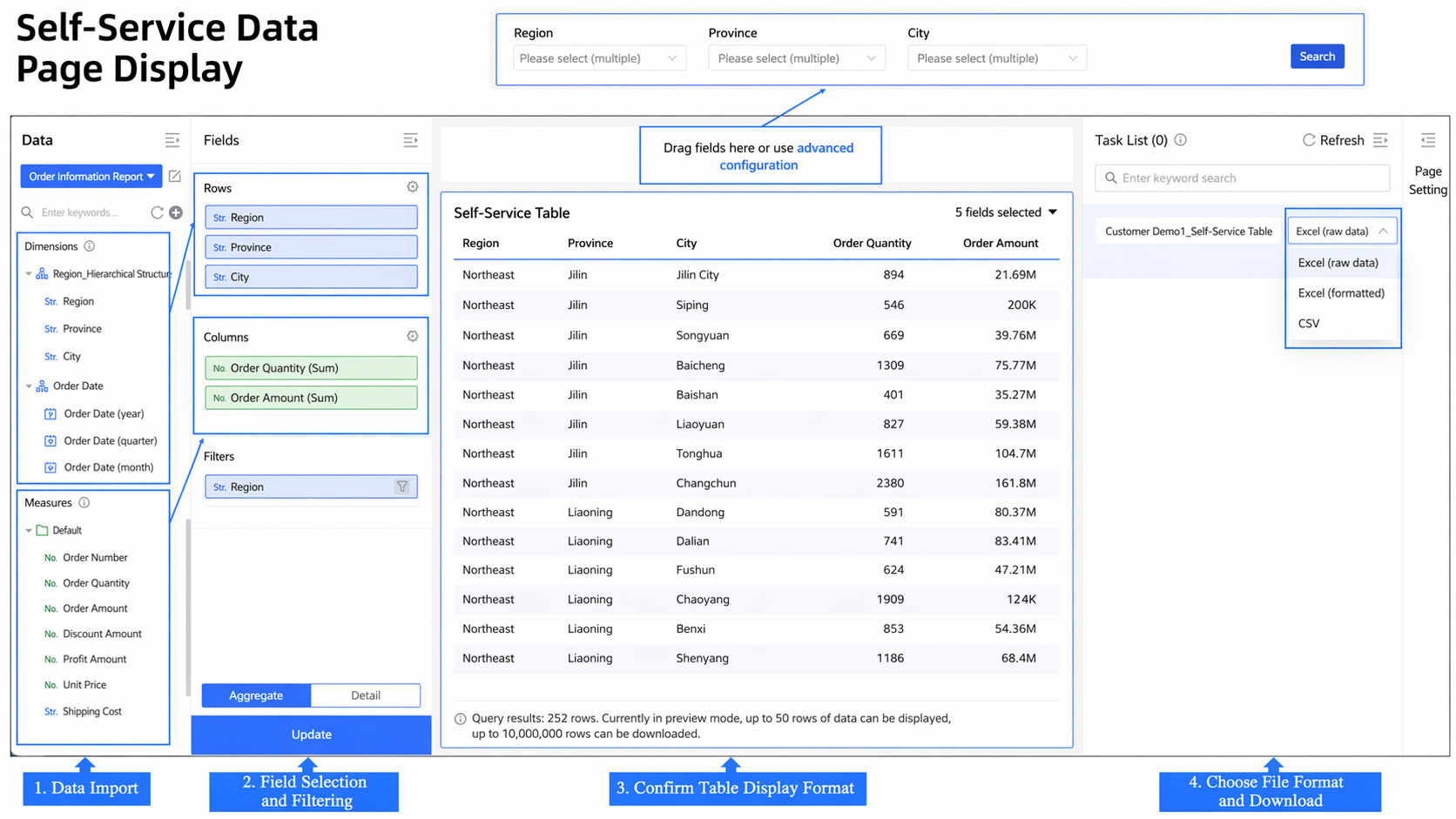
Now, the moment an event concludes, business colleagues can immediately open QuickBI to access data via self-service. With all data laid out clearly, users simply need to select their desired dimensions—such as time, product category, or channel—and a few key metrics—such as sales revenue, order volume, or conversion rate. Then, with a simple "drag-and-drop" interface requiring absolutely no coding, a clear and comprehensive data report is instantly generated. This enables teams to align on conclusions and distill key insights on the very same day, thereby significantly lowering the technical and operational barriers to data retrieval while simultaneously enhancing both flexibility and real-time responsiveness.
This is what "data freedom" truly means for business professionals: the ability to query and view data whenever you wish, ensuring that every review is grounded in real-time, authentic data.
Once again, let’s illustrate this with an e-commerce scenario: a major promotional campaign has just concluded, and a post-mortem analysis is urgently required. You are in a rush to pull hundreds of thousands of order records to conduct sales analysis, verify conversion performance, and break down the contributions of each channel. However, the moment you export the data, a host of problems arise: garbled characters, misaligned fields, missing decimal points, timestamps transformed into strings of numbers—reports that appeared perfectly clear within the system suddenly become "unrecognizable" once imported into Excel.
The frustrating part is that you still have to use this spreadsheet to perform marketing attribution and draft reports for management—yet, in the end, you spend half the day just tweaking the formatting, leaving the actual time for analysis repeatedly squeezed down.

Don't Let "Data Export" Be the End of Efficiency!
Now, with self-service data retrieval tools, a single click after extraction is all it takes to download datasets containing millions of records—complete with full formatting. The dimension hierarchies, metric arrangements, and numerical precision you see on the screen are exported exactly as they appear—nothing is lost, jumbled, or distorted. You no longer have to scramble to manually fix spreadsheets in the middle of a meeting, nor do you have to delay decision-making while waiting for the data to be organized.
It supports downloads in three formats—plain data Excel, formatted Excel, and CSV—and is ready to use right out of the box. From data extraction to final output, the entire process is fully automated; this saves not only time but also the mental energy typically consumed by repetitive verification and rework, allowing data to truly accelerate your business operations.
Self-service data retrieval significantly lowers the barriers to data access and analysis. Users no longer need to fill out tedious export requests, repeatedly chase down approvers or schedule time slots, nor manually piece together multiple scattered data tables. Whether you wish to track the conversion performance of a specific campaign or review sales trends in a particular region, a simple "drag-and-drop" interface allows for instant, on-demand access. You can download datasets containing millions of records—complete with formatting—and view results in real time, enabling non-technical personnel to retrieve data effortlessly and accelerating the transformation of data insights into actionable business strategies.
👉 If you happen to be encountering a similar issue, or still have questions regarding how to effectively utilize self-service data extraction tools, please feel free to scan the QR code to consult with us at any time!

Qwen App Expands Seamless End-to-End Agentic Experience with First External Partnership

1,539 posts | 516 followers
FollowPM - C2C_Yuan - August 1, 2023
Alibaba EMR - May 13, 2022
Farruh - June 23, 2025
Ben - April 28, 2023
Alibaba Clouder - February 2, 2021
Alibaba Cloud Native Community - November 6, 2025
1,539 posts | 516 followers
Follow Quick BI
A new generation of business Intelligence services on the cloud
Learn More Big Data Consulting for Data Technology Solution
Alibaba Cloud provides big data consulting services to help enterprises leverage advanced data technology.
Learn More Big Data Consulting Services for Retail Solution
Alibaba Cloud experts provide retailers with a lightweight and customized big data consulting service to help you assess your big data maturity and plan your big data journey.
Learn More ApsaraDB for HBase
ApsaraDB for HBase is a NoSQL database engine that is highly optimized and 100% compatible with the community edition of HBase.
Learn MoreMore Posts by Alibaba Cloud Community

