By Liu Jun
In AgentScope Java Version 1.1.0 [1], we encapsulated the "workspace is truth + self-evolution" experience of QwenPaw, OpenClaw, and Coding Agent into the engineering infrastructure of HarnessAgent + AbstractFilesystem + built-in compression with dual-layer memory Harness Engineering. At that time, we made a promise: write a single set of Agent logic, switch forms on demand, and scale all the way from a personal local machine to enterprise-level distributed deployment.
After the release of the HarnessAgent version, it received a great deal of attention, and many developers wanted a real-world application scenario. Today, we are releasing both AgentScope Claw and AgentScope Builder. They are not only practical out-of-the-box product examples but also concrete implementation cases of AgentScope Java Harness:
Next, we will explain the AgentScope Claw sample thoroughly first — because Builder did not appear out of thin air; it was born out of the enterprise-level needs to solve the set of problems that Claw could not address.
"MinQwenPaw" can be understood as a lightweight Java-version example of [QwenPaw]: a personal assistant installed on your own computer. In some parts below, we will refer to it directly as "MinQwenPaw" (meaning a simplified Java QwenPaw).
Note: "MinQwenPaw" is only a capability demonstration sample of AgentScope Java Harness. If you need a real, deployable local version, please use our officially released QwenPaw product. The focus of this article is the AgentScope Builder enterprise-level agent platform introduced below.
"MinQwenPaw" works under your identity, in your file system and shell, and will slowly "grow up" with use — the skills it learns, the sub-agents it hatches, and the memories it accumulates are all stored as a bunch of files written by itself in the workspace.
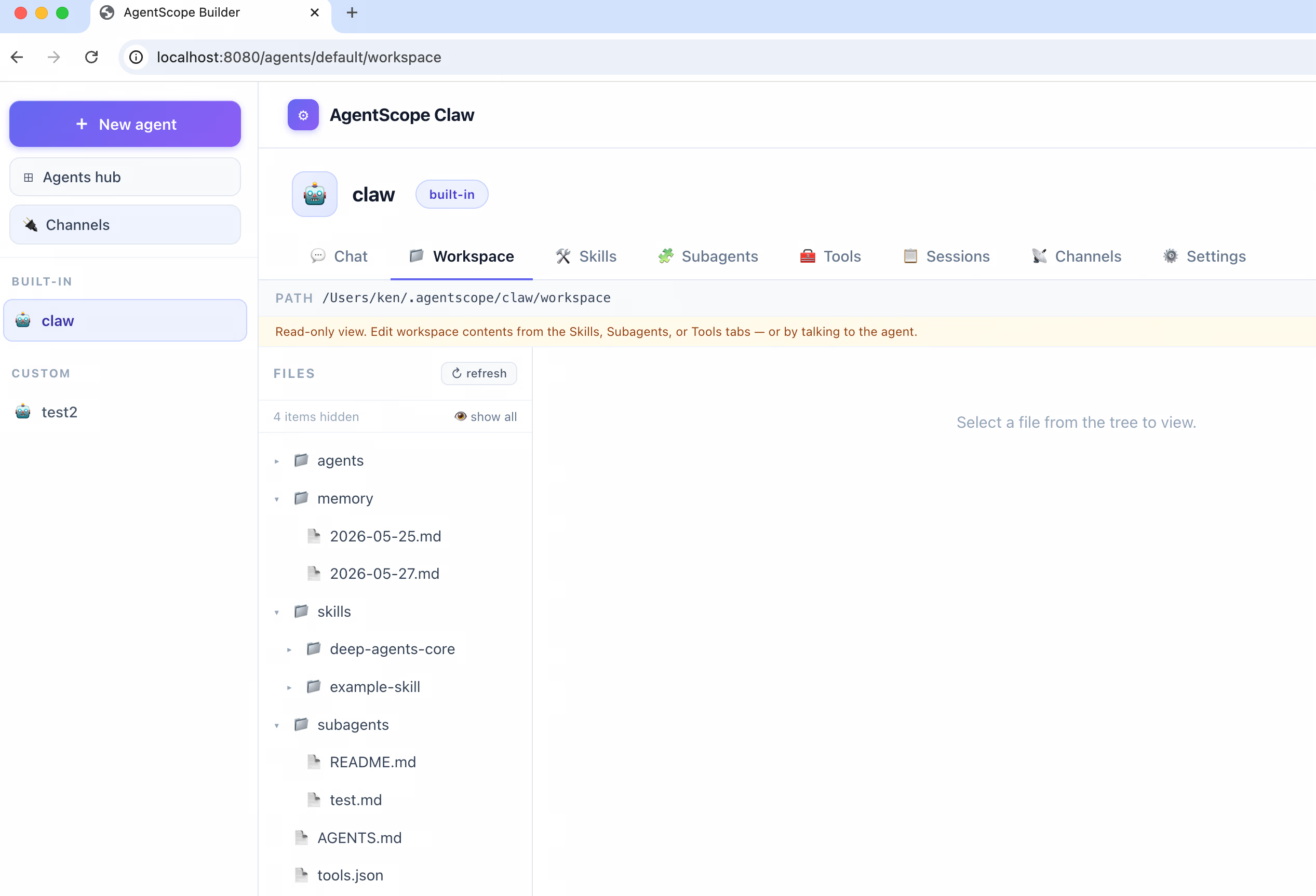
The location of "MinQwenPaw" in the repository:
agentscope-examples/agents/agentscope-claw/It is not just a snippet of illustrative code, but a complete Spring Boot application: JDK 17, one mvn package command, one java -jar command, and you can open your browser to http://localhost:8080 to start using it. All states are stored under the ~/.agentscope/ workspace, which can be overridden using the CLAW_HOME environment variable; the first startup will automatically generate a built-in default agent, allowing you to start chatting without writing a single line of code.
Users who have actually used the official QwenPaw product know that what makes "MinQwenPaw" truly interesting is not just "chatting," but the following three aspects — which also represent the first time the design promise of Harness has been fully reflected in a real product:
1. Workspace-Driven Self-Evolution
All states of "MinQwenPaw" are not in a database, but in the directory ~/.agentscope/claw/workspace/:
AGENTS.md —— The agent's persona and behavior guidelines, automatically injected into the system prompt before each inference.skills/ —— Reusable skills, written and used by the agent itself.subagents/ —— Sub-agent specification declarations, which are automatically discovered and loaded.MEMORY.md + memory/YYYY-MM-DD.md —— Dual-layer memory, automatically maintained by the background LLM.agents/<subId>/sessions/ —— Complete chat logs (JSONL) and compressed context.At the end of every conversation, new facts are extracted and appended to the daily memory log, and the background scheduler periodically merges them into MEMORY.md. You do not need to touch the code to adjust the agent's persona, knowledge, or skills; you only need to edit the files in the workspace — modifying a file is equivalent to upgrading the Agent once. Java can do this now, backed by the AgentScope Harness runtime.
2. Working Directly with Your Identity in Your Local File System and Shell
The file system backend used by "MinQwenPaw" is LocalFilesystemWithShell —— no sandbox, no remote host, all reads, writes, and commands fall directly onto the local operating system. On your own machine, this is not a bug, it is a feature: if you ask it to "help move files from 3 months ago in ~/Downloads to the archive directory," it can really do it because it has access to the Shell.
The Harness toolset is conditionally registered based on "backend capabilities" —— in Claw's local mode, the execute Shell tool automatically appears in the Agent's toolset; if switched to an untrusted environment (such as Builder's remote mode described later), the Shell tool in the same Agent code will automatically disappear. This is the first concrete manifestation of "one Agent logic, different forms."
3. Appearing Directly on the Apps You Use Most
"MinQwenPaw" comes with 6 out-of-the-box channels:
type |
Transport | Description |
|---|---|---|
chatui |
In-process | Local Web UI enabled by default |
dingtalk |
Stream (WebSocket) | DingTalk enterprise internal application, no public port required |
wecom |
HTTP Callback + REST API | Self-built WeChat Work application |
feishu |
HTTP Event Callback + REST API | Feishu self-built application + event subscription |
github |
Webhook + REST API | Listen to issue / PR review comment events |
gitlab |
Webhook + REST API | Listen to Issue / MR Note Hook |
This means you can @claw in a DingTalk DM or a GitHub Issue comment, and it will respond with the full workspace context. Each agent also automatically registers the outbound_send tool at bootstrap, enabling it to proactively send messages to any channel —— after the sub-task finishes, the Channel routing component will automatically reuse the inbound address so that the "completion notification" naturally returns to the DingTalk/WeCom session that originally triggered it.
The channel layer also comes with a set of default reliability mechanisms —— idempotent deduplication, Bot-loop protection, WeCom signature verification, AES-256-CBC decryption, and access-token renewal. These crucial details in enterprise IM integration have already been implemented by the framework.
"MinQwenPaw" is essentially a local assistant application. As soon as you try to deploy this setup for a team, problems arise: How do multiple people share the same process? How do we prevent everyone's self-evolved workspaces from contaminating each other? How is a user's memory shared across nodes in a multi-replica deployment? How do we ensure running user-inputted code doesn't compromise security? How can we share a great Agent with colleagues without letting them break it?
Individually, these five questions aren't huge, but collectively they mean "MinQwenPaw" must be repackaged into an entirely different container. This is the starting point for AgentScope Builder.
Claw assumes "one machine, one user, one workspace." Applying this assumption directly to a team scenario breaks down in five areas —— none of which can be fixed by simply running a few more Claw processes:
MEMORY.md. Agent fine-tuning by Alice should not expose things Bob shouldn't see, let alone have Bob's conversations overwrite Alice's memories. Yet, claw uses a single global workspace.These five problems boil down to one thing: "one user, one machine, one workspace" must be replaced with "multiple users, multiple machines, multiple groups of namespace-isolated workspaces." This cannot be solved with a few patches on "MinQwenPaw" —— it requires rebuilding a multi-tenant, distributed isolation framework on top of the Harness workspace layer.
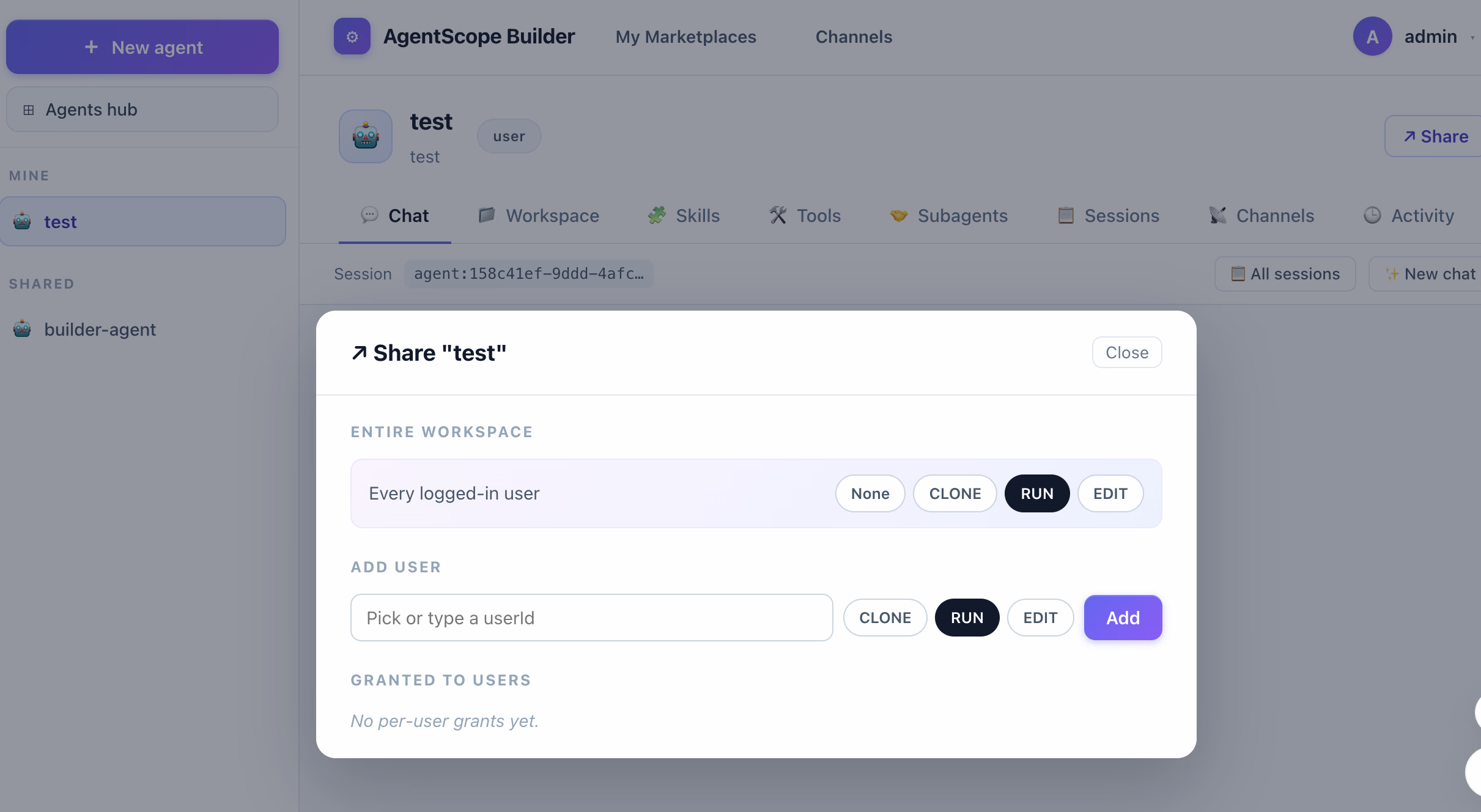
Builder encapsulates the core experience of "MinQwenPaw" into a Web platform designed for teams and enterprises. One-line positioning:
Builder is the distributed version of OpenClaw —— same self-evolution, same workspace-driven architecture, and same Harness runtime; but scaling from "one person" to "an organization," and from "one laptop" to "a cluster of horizontally scaling services."
As a platform product, its core capabilities include the following two points:
The underlying core design of Builder is that the workspace is the asset of the Agent. All isolation, sharing, and multi-tenant capabilities revolve around this single point.
(User, Agent) pair has its own independent workspace namespace. Even if Alice's agent-A and Bob's agent-A start with the exact same configuration, their respective fine-tuning, memories, and skill developments do not permeate into each other.This model comes directly from real team collaboration needs —— "being able to share great work without giving up control." It also means that as long as the workspace abstraction is clean enough, all upper-level platform capabilities (creating, editing, sharing, forking, billing, auditing) can be expressed in the exact same way. This is the product backbone of Builder.
As model capabilities continue to improve, the boundaries of agent creation are expanding. Not just developers, but non-technical users also expect to build functional Agents with a few clicks on a web page. The core user experience of this type of product requires: Choose Template → Configure Parameters → Connect Tools → Publish, lowering the barrier to entry for Agent development.
Builder is also such an agent development platform: users log in through a browser and can build their own Agents without writing code. Simply pick a template on the UI (or start from a blank slate), select a model, write system prompts, check-select skills / sub-agents / tools / MCP services, and save it to begin chatting immediately — featuring low entry-barriers, quick onboarding, and what-you-see-is-what-you-get.
Most zero-code platforms produce a static Agent —— you configure what it can do, and it does those things forever; to make it do something new, you must return to the admin backend to manually modify the configuration. The upper limit of the Agent's capability is equal to what you envisioned when creating it.
Builder is different. Every Agent has a continuously growing workspace behind it:
skills/ directory. Next time it encounters a similar scenario, it can directly call upon this learned skill instead of reasoning from scratch.subagents/) and delegate tasks there directly rather than handling them itself.These three actions do not require the user to return to the admin portal —— the Agent writes files on its own in the workspace, and the workspace continuously evolves during conversations. What you set up is its starting point, not its ceiling.
Of course, "automatic evolution" does not mean a complete loss of control. Everything inside the workspace consists of files that are editable and versionable —— users can edit AGENTS.md (tweak the persona), manage skills/ (add/remove skills), feed files to knowledge/ (supplement domain knowledge), and inspect MEMORY.md (correct memories) on the UI at any time. "Zero-code" does not mean "zero-control," but rather "you don't need code to control the Agent, but you can always control it with files."
If we had to explain Builder's implementation in a single sentence, it would be:
Builder runs every Agent on top of a HarnessAgent + CompositeFilesystem setup — the former is responsible for runtime orchestration of the Agent, while the latter turns the workspace into a namespace-isolated, distributable asset that can be projected into sandboxes.
Let's deconstruct these two components through a specific request workflow.
There is a routing component in Builder whose job is simple: route incoming requests from channels to an independent HarnessAgent instance based on (userId, agentId).
agent-A → lands on Agent(alice, agent-A)
agent-B → lands on Agent(alice, agent-B)
agent-A under the same name → lands on Agent(bob, agent-A) —— completely isolated from Alice'sEach HarnessAgent instance is handed a CompositeFilesystem bound to that user and agent namespace. In other words, the Channel routing component does not care how isolation is implemented; it is only responsible for "handing the right agent instance to the right request"; the heavy lifting of isolation is done in the layer below.
CompositeFilesystem is the key to making all of Builder work. Its name is very literal —— it is a file system composed (composite) of multiple layers:
┌──────────────────────────────────────────────────┐
│  CompositeFilesystem                             │
│                                                  │
│  ┌───────────────────────────────────────────┐   │
│  │  Layer 1: Namespace Dispatching           │  │
│  │    Transparently rewrite all paths to     │  │
│  │    users/{userId}/agents/{agentId}/...    │  │
│  └───────────────────┬───────────────────────┘   │
│                      ▼                           │
│  ┌───────────────────────────────────────────┐   │
│  │  Layer 2: Storage Backend                 │  │
│  │    Local Disk / Docker Container /        │  │
│  │    Remote KV (Choose One of Three)        │  │
│  └───────────────────────────────────────────┘   │
└──────────────────────────────────────────────────┘read("AGENTS.md"), CompositeFilesystem grabs (userId, agentId) from the current RuntimeContext and transparently rewrites the path to users/{userId}/agents/{agentId}/AGENTS.md. The Agent code thinks it is interacting with the "entire file system," when in reality it only sees the subtree sliced by the namespace belonging to itself.LocalFilesystemWithShell, with paths written directly to ~/.agentscope/builder/workspace/users/{userId}/agents/{agentId}/....Key point: The Agent code has absolutely no idea these two layers exist. It still uses Harness's unified read / write / ls / grep APIs, identical to how it functions in claw. Isolation is implemented entirely inside the CompositeFilesystem layer, rather than relying on business code to "meticulously avoid other people's directories."
To make this abstraction concrete —— when Alice asks her agent-A on the UI to learn a new skill (writing to skills/sql-helper/SKILL.md), the cell call chain works like this:
userId=alice, the URL path parses agentId=agent-A, and both are attached to the RuntimeContext.Agent(alice, agent-A) HarnessAgent instance.write_file("skills/sql-helper/SKILL.md", ...) tool.(alice, agent-A) from RuntimeContext, and rewrites the path to users/alice/agents/agent-A/skills/sql-helper/SKILL.md.~/.agentscope/builder/workspace/, eventually writing to the physical disk at ~/.agentscope/builder/workspace/users/alice/agents/agent-A/skills/sql-helper/SKILL.md.WorkspaceContextHook injecting system prompts will similarly go through CompositeFilesystem to read skills/, automatically targeting alice's own agent-A subtree, and the newly learned skill will automatically appear in the toolset.If Bob's agent-A does the exact same thing, the path gets rewritten to users/bob/agents/agent-A/... —— physically in a completely different directory tree from Alice. No "is alice or bob" business logic check is written anywhere in the code; isolation is extracted directly from the system abstraction.
In Claw's local mode, Shell commands are executed directly on the host machine. Builder's default local mode inherits this behavior —— which is suitable for trusted teams and single-node setups. However, as soon as your scenario allows untrusted code to run within the Agent (such as letting the Agent execute user-submitted SQL, Python, or Shell scripts), the host machine cannot afford to bear that risk.
In these scenarios, Builder does not try to "reinvent another sandbox solution," but instead places a projection layer on top of the CompositeFilesystem:
AGENTS.md, skills/, subagents/, and knowledge/ into /workspace inside the container.AGENTS.md and using the same set of skills.Note —— this is not "another filesystem," but the same CompositeFilesystem mapping a "host ↔ container" physical relationship underneath. The Agent code, workspace directory structure, and UI experience remain completely unchanged; the only change is that the shell execution boundaries are restricted to the container environment.
The sandbox isolation granularity —— whether a container maps to a session, a user, an agent, or is globally shared —— is a practical deployment decision that can be configured based on the business scenario; the default USER configuration (one container per user, shared across multiple sessions) represents a sensible starting point for most multi-tenant SaaS products.
Up to this point, Builder is still single-node —— the workspace lands on the local disk of a single machine (or in a Docker container on that machine). Once you need to make Builder multi-replica, and want user requests hitting any node randomly to see a consistent state, the problem circles back to "how do multiple replicas share a workspace" as stated at the beginning.
CompositeFilesystem's solution is straightforward: replace the physical storage backend underneath from "local disk" to "distributed KV." Builder abstracts a BaseStore interface, whose implementation can be Redis, object storage (OSS / S3), or your own custom KV service. Once swapped in:
RemoteFilesystem and land on BaseStore.BaseStore —— ensuring that what the Web sees and what the Agent sees are perfectly consistent.Session (typically implemented as RedisSession), the Builder process itself can be deployed symmetrically in a multi-replica setup.The upper "namespace-dispatching layer" in the entire diagram remains completely untouched —— namespace dispatching is completed in the CompositeFilesystem layer, meaning the backend (whether local disk, Docker container, or Redis) never sees it. This is precisely where the power of AbstractFilesystem introduced in our original Harness article comes to life —— you do not need to change a single line of business code, and migrating from single-machine to distributed is as simple as swapping the configuration Bean.
┌─────────────────────────────────────────────────────────────────────┐
│  AgentScope Builder (Spring Boot, Port 8080)                        │
│                                                                     │
│   React SPA ──▶  REST API (JWT)                                     │
│                  │                                                  │
│                  ▼                                                  │
│   ┌──────────────────────────────────────────────────────────────┐  │
│   │  Channel Routing Component                                   │  │
│   │   ├─ Agent (alice, agent-A) ──┐                              │  │
│   │   ├─ Agent (alice, agent-B)   │ One HarnessAgent per (user,id)│  │
│   │   └─ Agent (bob,   agent-A) ──┘                              │  │
│   └──────────────────────────────────┬───────────────────────────┘  │
│                                      ▼                              │
│   ┌──────────────────────────────────────────────────────────────┐  │
│   │  CompositeFilesystem                                         │  │
│   │   ├─ Upper: Namespace Dispatching (userId, agentId) → Subtree│  │
│   │   └─ Lower: Physical Storage Backend                             │  │
│   │         · Default: Local Disk                                    │  │
│   │         · Sandbox Mode: Host ⇄ Container Projection              │  │
│   │         · Distributed: BaseStore (Redis / OSS / Custom)          │  │
│   └──────────────────────────────────────────────────────────────┘  │
│                                                                     │
│   User & Agent Metadata (Default: H2; Prod can switch to MySQL/PG)  │
└─────────────────────────────────────────────────────────────────────┘
In the entire diagram, the only truly "new" section is the very top layer —— React SPA + JWT REST API + Channel Router. The middle and bottom sections are created entirely by combining Harness's HarnessAgent and AbstractFilesystem components.
This is precisely the design philosophy of Builder: do not reinvent the Agent runtime, instead build only the operational shell needed to scale it for multi-tenant enterprise environments.
# 1. Set model API key (defaults to DashScope)
export DASHSCOPE_API_KEY=sk-xxx

# 2. Clean package and run
mvn -pl agentscope-examples/agents/agentscope-claw -am clean package -DskipTests
java -jar agentscope-examples/agents/agentscope-claw/target/agentscope-claw-*.jar
Open http://localhost:8080; the default workspace is ~/.agentscope. If you need to plug in DingTalk, WeCom, or Feishu channels, simply edit ~/.agentscope/agentscope.json to append the corresponding channel configuration. For details, refer to the Claw README.
export DASHSCOPE_API_KEY=sk-xxx

mvn -pl agentscope-examples/agents/agentscope-builder -am clean package -DskipTests
java -jar agentscope-examples/agents/agentscope-builder/target/agentscope-builder-*.jar
The service starts on port 8080. You can log in using admin/admin, bob/bob, or alice/alice to access the full UI. For production deployment configuration (database migration, sandbox image setup, distributed backend), see the Builder README.
To experience the capabilities of the AgentScope Java Harness framework and start actual hands-on development, which component should I start with?
| "MinQwenPaw" | Builder | |
|---|---|---|
| Target Use Case | Personal assistant on your own laptop / workstation | Collaboratively building and running self-evolving Agents in a team/company |
| User Base | 1 person | Multiple people —— each logged-in user has their own workspace |
| Access Portals | Web UI + DingTalk / WeCom / Feishu / GitHub / GitLab | React SPA + JWT REST API |
| Isolation | None —— runs directly under your own identity |
(userId, agentId) namespace; optional Docker sandbox |
| Sharing | None —— one laptop, one person | Three-tiered permissions: run / edit / fork |
| Distributed | Single process, single node | Supports horizontal scaling by switching to BaseStore backend |
| File System | LocalFilesystemWithShell |
CompositeFilesystem |
These two paths are not mutually exclusive —— Harness's workspace relies entirely on files, meaning the AGENTS.md / skills/ / subagents/ subtree is a versionable, reviewable asset that can be copied directly from claw to Builder. A typical workflow is: a developer tunes an Agent locally using "MinQwenPaw" until satisfied, commits the workspace directory into the repository as a template, and then the admin pushes it to the entire team via Builder.
In the first blog post releasing AgentScope Java Harness, we delivered the capabilities of the "self-evolving Agent runtime" —— HarnessAgent + workspace conventions + pluggable file systems + Hook pipelines.
This article has turned that runtime into two actual, out-of-the-box products while simultaneously showcasing deep implementation examples of AgentScope Harness:
mvn package command.This is exactly what the Java Harness of AgentScope set out to promise: Write one set of Agent logic, switch formats on demand. If your development needs are focused on a personal assistant, start quickly with the Claw README; if you are building a platform for your team/organization, start directly with the Builder README.
Farewell to Ingress Nginx: A Guide to Using Gateway API for Cloud-Native API Gateways
Ontology Is Trending Again. Can It Improve My AI Agent's Performance?

780 posts | 60 followers
FollowAlibaba Cloud Native Community - February 6, 2026
Alibaba Cloud Native Community - May 18, 2026
Alibaba Cloud Native Community - June 23, 2026
Alibaba Cloud Native Community - June 8, 2026
Alibaba Cloud Native Community - January 21, 2026
Alibaba Cloud Native Community - April 3, 2026
780 posts | 60 followers
Follow Alibaba Cloud Model Studio
A one-stop generative AI platform to build intelligent applications that understand your business, based on Qwen model series such as Qwen-Max and other popular models
Learn More QwenWork
QwenWork is dedicated to helping employees strengthen their professional competitiveness in the AI era and to enabling enterprises to improve organizational effectiveness.
Learn More
Token Plan
Build more, spend less. One plan, every modality.
Learn More Alibaba Cloud for Generative AI
Accelerate innovation with generative AI to create new business success
Learn MoreMore Posts by Alibaba Cloud Native Community

