For observability systems built on UModel, accessing observability data requires upper-layer applications to be aware of multiple concepts such as EntitySet, DataSet, Storage, and Filter. This brings high development and maintenance costs to users such as UI, algorithms, and customers.
Assume that an upper-layer application needs to query a specific application performance management (APM) service's request metrics. The developer needs to go through the following steps:
acs_arms_service_id) of the storage corresponds to the service_id of the Entity?rate(arms_app_requests_count_raw{...}[1m])?Step 1: Query UModel metadata.
↓ Find the MetricSet associated with the service EntitySet
If the DataLink contains FilterByEntity, you must also filter data by entity.
Step 2: Parse the MetricSet configuration.
↓ Obtain the underlying Metricstore connection information based on StorageLink.
↓ Obtain the region/project/MetricStore name.
Step 3: View the field mapping.
↓ Get the field mapping table from DataLink.
↓ Confirm service_id → acs_arms_service_id.
Step 4: Construct a PromQL expression.
↓ Define a concatenated query expression based on metrics.
↓ Process aggregation rules and time windows.
Step 5: Concatenate and execute the query.
↓ Use correct labels and MetricStores.
↓ Splice the complete SPL statement and execute it..metricstore with(region='cn-hangzhou', project='cms-xxx', metricstore='metricstore-apm')
|prom-call promql_query_range('sum by (acs_arms_service_id) (rate(arms_app_requests_count_raw{acs_arms_service_id="xxx"}[1m]))','1m')Problem description:
● Developers must deeply understand the UModel architecture, including multiple concepts such as EntitySet, DataSet, DataLink, StorageLink, and Filter.
● They need to understand the association between DataSet and Storage, Filter routing logic, and field mapping rules.
● It is difficult for new users to get started, and experienced users can easily miss details.
Impact: Low development efficiency and high maintenance costs
Problem description:
● Storage routing lookup: It is necessary to understand the selection logic among multiple MetricSets.
● Field mapping processing: The mapping rules from Entity fields to storage fields are complex.
● Filter condition filtering: The matching logic of FilterByEntity rules is difficult to master.
● Multi-query concatenation: It is necessary to query metadata multiple times and then build data queries.
Impact: This increases code complexity and results in a high probability of errors.
Problem description:
● A MetricSet may be implemented by MetricStore or LogStore, and the query methods are completely different (PromQL vs SPL).
● Syntax differs among different storage providers (such as ARMS MetricStore and Managed Service for Prometheus).
● Developers still need to master the underlying query languages.
Impact: The same requirement requires writing different code, which prevents unification.
Problem description:
● First query UModel Meta to retrieve configurations → then query data based on Meta.
● It is necessary to handle data splicing and association manually.
● Each user must implement similar logic, resulting in high code redundancy.
Impact: Integration costs are high, query latency is high, and the probability of errors increases.
Addressing the four major pain points mentioned above, the design objective of the UModel PaaS API is to shield underlying complexity and unify access APIs, enabling upper-layer applications to focus more on the implementation of business logic:
| Pain point | Solution |
|---|---|
| Pain point 1: Complex concepts | Provide unified high-dimension abstraction of SPL to shield underlying details. |
| Pain point 2: Complex scenarios | Automatically handle Ingress, mapping, and filtering. The frame automatically completes complex work. |
| Pain point 3: Underlying storage syntax | Design two patterns (Table + Object) and unify the query language. |
| Pain point 4: Multiple query interactions | Complete all work in a single query to reduce network round trips. |
● Automated processing: automatic routing, field mapping, and query transformation
● Unified SPL syntax: Consistent APIs are used for all data types.
● Object-oriented programming: entity method invocation and relationship navigation
● AI-friendly: Reflection capabilities support autonomous exploration by AI agents.
When UModel Data is accessed, it is necessary to individually access various data such as metrics, logs, and traces through SPL. Each type of data has a different access method, and there is no unified abstraction.
The UModel PaaS API adopts a design approach of two layers of abstraction:
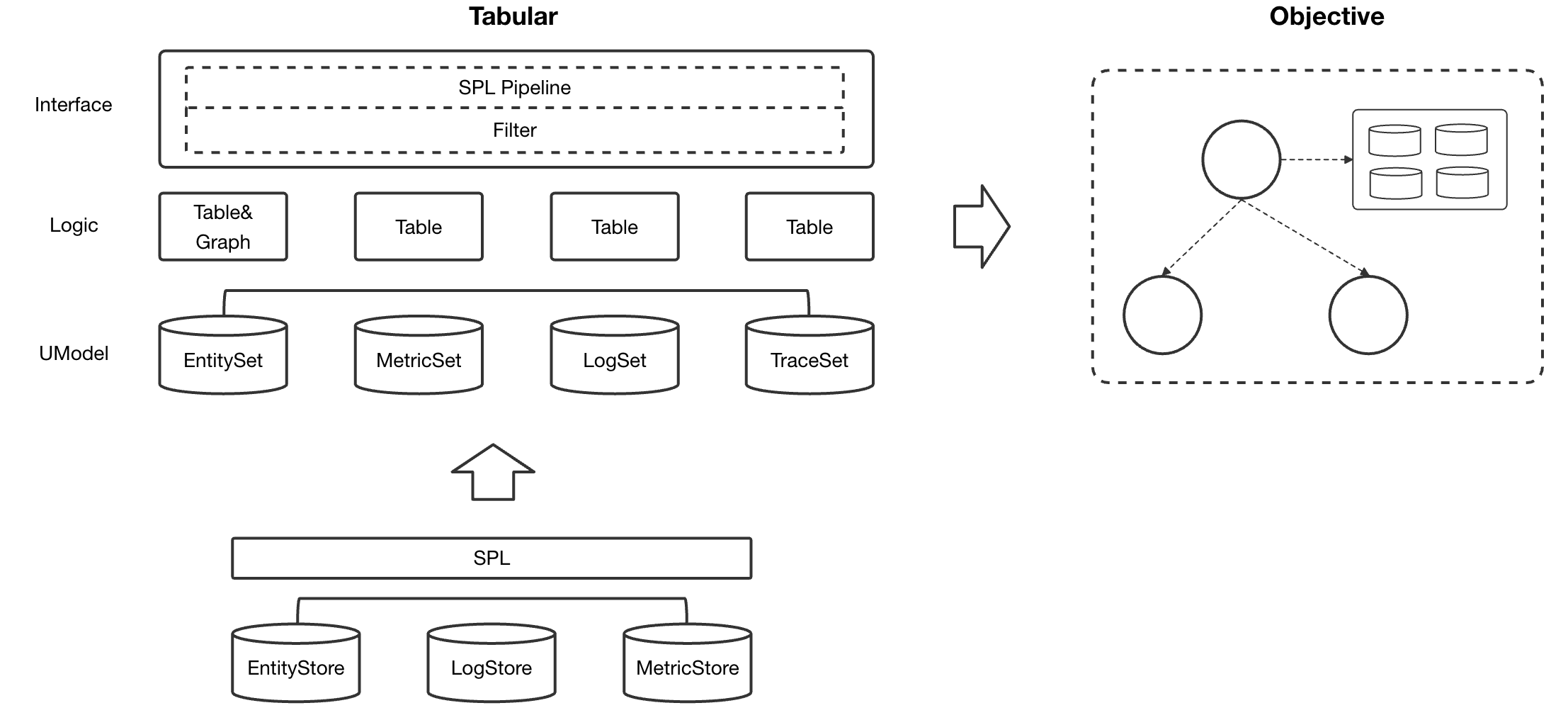
All data—metrics, logs, traces, and performance profiling—is uniformly abstracted into a table structure, and all queries are operations performed on table data.
Value: This unifies the query language. Developers do not need to care whether the underlying layer is PromQL or Simple Log Service (SLS) SPL; they use the same SPL syntax.
The Table pattern solves the uniformity of data access, but it is not enough. We also need an abstraction centered on entities.
Traditional method: To query the metrics of a service, you need to know which MetricSet this service is associated with, how fields are mapped, how to write filter conditions, and so on.
Object pattern: You only need to say "Tell me this service's metrics." Then, the system automatically handles field mapping, filter conditions, and storage routing.
Value: The object-oriented concept treats entities as objects and queries as method invocations: service.get_metric().
This layer provides advanced features such as dynamic capability discovery and configuration verification, allowing the AI agent to explore and make decisions autonomously.
Value: The AI agent can dynamically discover the capability borders of entities through reflection capabilities, achieving true AI for IT operations.
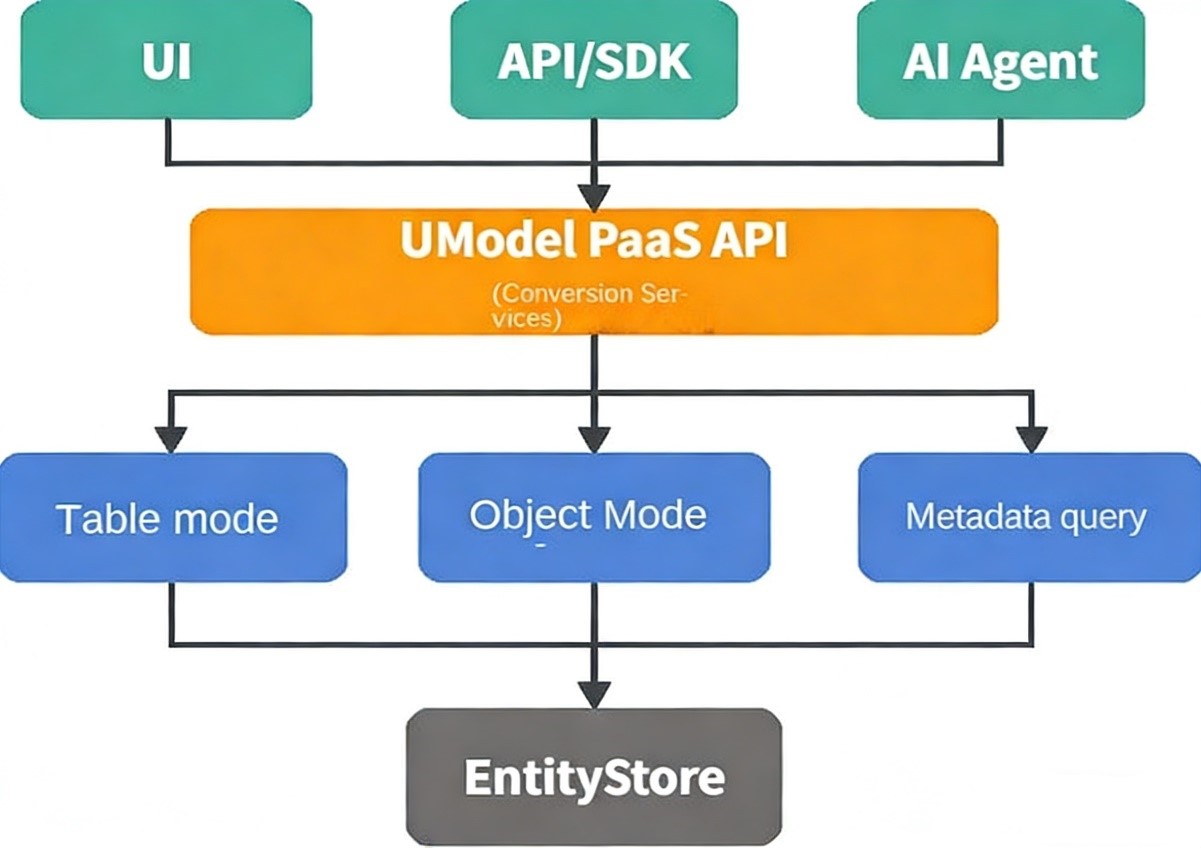
The system automatically performs storage routing, field mapping (service_id → acs_arms_service_id), filtering, and query syntax transformation. Upper-layer applications are unaware of storage switching.
This layer directly accesses the DataSet, uses declarative queries, and supports full SPL Pipelines.
.metric_set with(domain='apm', name='service.request', query=`service_id='xxxx'`) | stats avg(latency)
.log_set with(domain='apm', name='service.error_log' query=`service_id='xxx'`) | where level="ERROR"It is entity-centric and automatically handles low-level details to support dynamic capability discovery and configuration checking.
# Data access
.entity_set with(domain='apm', name='apm.service', ids=['404e5d6be468f6dfaeef37a014322423'])
| entity-call get_metric('apm', 'apm.metric.apm.service', 'avg_request_latency_seconds', 'range', '', false)

# Capability discovery (the key to agent autonomous decision-making)
.entity_set with(domain='apm', name='service') | entity-call __list_method__()

# Configuration check
.entity_set with(domain='apm', name='service') | entity-call __inspect__()The UModel PaaS API provides three core capabilities to meet query requirements in different scenarios:
Table mode (Phase 1) provides the capability to directly access DataSet (MetricSet, LogSet, TraceSet , etc.), and returns tabular observability data. It is suitable for data query scenarios that do not depend on Entity Relationships.
For example, you can directly query metric data in a specific MetricSet or logs in a specific LogSet without needing to associate entity information.
# Read the metric of the avg_request_latency_seconds corresponding to the apm.metric.apm.service MetricSet.
# Perform exception detection on the metric.
.metric_set with(domain='apm', name='apm.metric.apm.service', metric='avg_request_latency_seconds', source='metrics')
| extend r = series_decompose_anomalies(__value__)
| extend anomaly_b =r.anomalies_score_series , anomaly_type = r.anomalies_type_series , __anomaly_msg__ = r.error_msg
| extend x = zip(anomaly_b, __ts__, anomaly_type, __value__)
| extend __anomaly_rst__ = filter(x, x-> x.field0 > 0)
| project __entity_id__, __labels__, __anomaly_rst__, __anomaly_msg__● Direct access: Directly accesses the DataSet without querying entity metadata.
● Simple syntax: SQL-like SPL syntax, which is easy to understand
● Full data: Returns all data in the DataSet that meets the conditions.
Syntax: .<type> with(domain, name, ...) | <SPL Pipeline>. For more parameter descriptions, see Phase 1 Table mode.
| Dataset | Description | Example |
.metric_set |
Retrieve metric data |
* Retrieve the avg_request_latency_seconds metrics in the apm.metric.apm.service MetricSet in the apm domain..metric_set with(domain='apm', name='apm.metric.apm.service', metric='avg_request_latency_seconds', source='metrics')* Retrieve the tags of the apm.metric.apm.service MetricSet in the apm domain..metric_set with(domain='apm', name='apm.metric.apm.service', metric='avg_request_latency_seconds', source='labels')
|
.log_set |
Retrieve log data |
* Retrieve the log data of the apm.log.apm.service LogSet in the apm domain..log_set with(domain='apm', name='apm.log.apm.service') | where trace='ERROR'* Use query conditions to retrieve logs..log_set with(domain='apm', name='apm.log.apm.service', query='service_id="xxx" and level="ERROR"') | where msg like "%OutOfMemory%"
|
.trace_set |
Retrieve trace data |
* Retrieve the trace data of the apm.trace.apm.service TraceSet in the apm domain..trace_set with(domain='apm', name='apm.trace.apm.service') | where duration > 1000* Count the number of trace calls..trace_set with(domain='apm', name='apm.trace.apm.service', query='service_id="xxx"') | stats pv=count(1) by service_name
|
.profile_set |
Retrieve performance profiling data |
* Retrieve the performance data of the apm.profile.apm.service ProfileSet in the apm domain..profile_set with(domain='apm', name='apm.profile.apm.service') | where profile_type='cpu'* Retrieve the top 10 with the highest CPU usage..profile_set with(domain='apm', name='apm.profile.apm.service', query='service_id="xxx"') | stats avg(cpu_usage) by function
|
Object mode (Phase 2) provides entity-centric object-oriented query capabilities. It automatically handles complex logic such as associations between entities and data, field mappings, and relationship queries. It is suitable for business scenarios that require entity context.
For example: querying metrics, logs, and traces of a specific service, or querying other services that have an invocation relationship with the service. The system automatically completes field mapping and data filtering.
# Query the request latency metrics for a specific service, and automatically process field mapping and FilterByEntity.
.entity_set with(domain='apm', name='apm.service', ids=['21d5ed421ae93973d67a04af551b48b8'])
| entity-call get_metric('apm', 'apm.metric.apm.service', 'avg_request_latency_seconds', 'range', '30s', false)
| project __entity_id__, __ts__, __value__, __labels__
Core benefits:
● Zero-configuration filtering: Automatically handles FilterByEntity without manually concatenating filter conditions.
● Transparent field mapping: Automatically transforms mappings such as service_id → acs_arms_service_id.
● Object-oriented semantics: entity.get_metric(), which aligns with developer mindsets
Syntax: .entity_set with(domain, name, id, query) | entity-call <method>(<parameter>) | <SPL pipeline>. For more information about the parameters, see Phase 2 Object mode.
| Method | Description | Example |
get_metric |
Retrieve metric data associated with an entity. This method supports specifying parameters such as metric, step, and aggregation. | ● Retrieve request latency metrics for an entity..entity_set with(domain='apm', name='apm.service', ids=['xxx']) | entity-call get_metric('apm', 'apm.metric.apm.service', 'avg_request_latency_seconds', 'range', '30s', false)● Retrieve the number of requests for an entity and aggregate them. .entity_set with(domain='apm', name='apm.service', ids=['xxx']) | entity-call get_metric('apm', 'apm.metric.apm.service', 'request_count', 'range', '1m', true)
|
get_log |
Retrieve the log data associated with an entity and support subsequent SPL filtering and search. | ● Retrieve the error log of an entity..entity_set with(domain='apm', name='apm.service', ids=['xxx']) | entity-call get_log('apm', 'apm.log.apm.service') | where level='ERROR'● Search logs for specific keywords. .entity_set with(domain='apm', name='apm.service', ids=['xxx']) | entity-call get_log('apm', 'apm.log.apm.service') | where msg like "%OutOfMemory%"
|
get_trace |
Retrieve the tracing analysis data associated with an entity for analyzing the service trace. | ● Retrieve all traces for an entity..entity_set with(domain='apm', name='apm.service', ids=['xxx']) | entity-call get_trace('apm', 'apm.trace.apm.service')● Analyze slow call traces. .entity_set with(domain='apm', name='apm.service', ids=['xxx']) | entity-call get_trace('apm', 'apm.trace.apm.service') | where duration > 1000
|
get_profile |
Retrieve profiling data associated with an entity for CPU, memory, and other performance analysis. | ● Retrieve performance profiling data for an entity..entity_set with(domain='apm', name='apm.service', ids=['xxx']) | entity-call get_profile('apm', 'apm.profile.apm.service')● Analyze CPU hotspots. .entity_set with(domain='apm', name='apm.service', ids=['xxx']) | entity-call get_profile('apm', 'apm.profile.apm.service') | where profile_type='cpu' | top 10
|
Metadata query methods
Metadata query methods provide dynamic discovery and reflection capabilities for querying metadata information such as entity relationships, dataset configurations, and supported methods. This not only helps developers understand entity capabilities but also serves as a key foundation for implementing autonomous decision-making and configuration verification for AI agents.
Such as: querying which methods a service entity supports (__list_method__()), which datasets are associated (list_data_set()), which other services have invocation relationships (list_related_entity_set()), and whether the configuration is correct (__inspect__()).
# Dynamic discovery of all methods supported by the entity (reflective capabilities).
.entity_set with(domain='apm', name='apm.service')
| entity-call __list_method__()

# Return: the method list and parameter definitions.
# [
# {"name": "get_metric", "params": [...], "description": "Obtain metric data"},
# {"name": "list_related_entity_set", "params": [...], "description": "Query associated entities"},
#...
#]
Core values:
● Reflection: __list_method__() allows AI agents to explore the capability boundaries of entities.
● Configuration verification: __inspect__() checks the configuration integrity of DataSet, Link, and field mapping.
● Relationship query: list_related_entity_set() quickly obtains topological relationships without the need to query graph databases.
● Capability discovery: list_data_set() understands all types of observed data associated with an entity.
Syntax: .entity_set with(domain, name, id, query) | entity-call <method>(<parameter>). For more information, see Phase 2 Object mode.
| Method | Description | Example |
list_data_set |
Lists all datasets (MetricSet, LogSet, and so on) associated with an entity, which can be filtered by type. | ● Lists all metric sets for an entity..entity_set with(domain='apm', name='apm.service') | entity-call list_data_set(data_set_types=['metric_set'])● Lists all datasets for an entity. .entity_set with(domain='apm', name='apm.service') | entity-call list_data_set()
|
list_related_entity_set |
Lists additional entities related to the current entity, with support for filtering by relationship type and direction. | ● Lists downstream services called by the service..entity_set with(domain='apm', name='apm.service', ids=['xxx']) | entity-call list_related_entity_set(relations=['calls'], direction='out')●Lists all entities related to the service. .entity_set with(domain='apm', name='apm.service', ids=['xxx']) | entity-call list_related_entity_set()
|
__list_method__ |
Dynamic discovers all methods supported by entities (reflection capability).This is the core of the autonomous decision-making of the agent. | Views the list of methods supported by an entity..entity_set with(domain='apm', name='apm.service') | entity-call __list_method__()Returns the complete definition of the method name, parameters, and return value. |
__inspect__ |
Checks the integrity of entities and associated configurations, including DataSets, Links, and field mapping | ● Fully checks the entity configuration..entity_set with(domain='apm', name='apm.service') | entity-call __inspect__()● Checks only the metric configuration. .entity_set with(domain='apm', name='apm.service') | entity-call __inspect__(check_data_sets=true, data_set_types=['metric_set'])
|
Log in to the Cloud Monitor 2.0 console, choose Entity Explorer > SPL, and enter the SPL, as shown in the following figure.
.entity_set with(domain='apm', name='apm.service', ids=['21d5ed421ae93973d67a04af551b48b8']) | entity-call get_metric('apm', 'apm.metric.apm.service', 'avg_request_latency_seconds', 'range', '', false)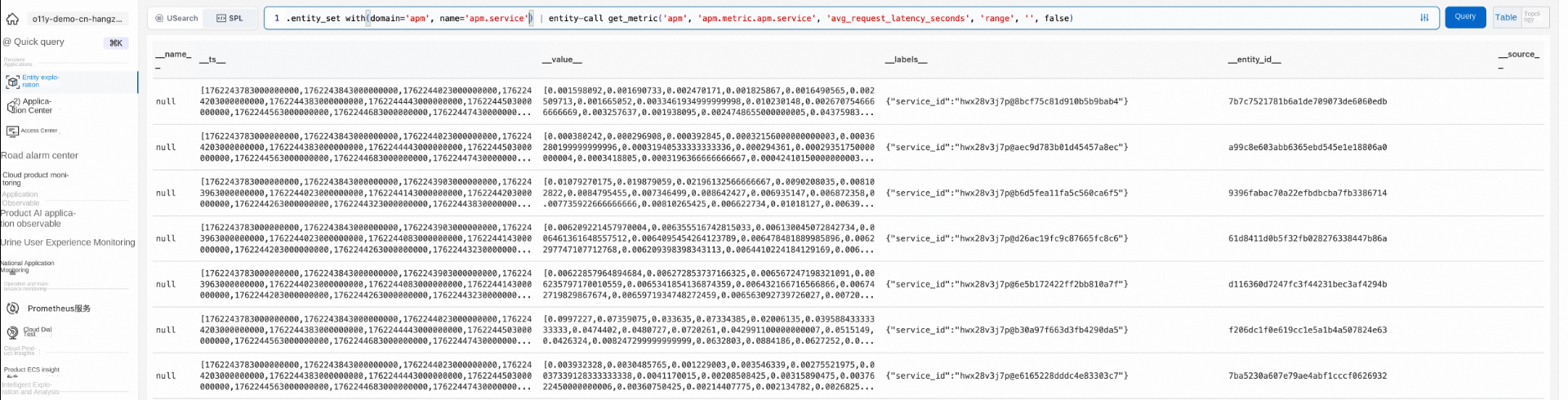
The dry run mode returns the corresponding query without executing the current query. It also supports manually setting the run mode.
# Enable the dry_run mode.
. set umodel_paas_mode='dry_run';
.entity_set with(domain='apm', name='apm.service')
| entity-call get_metric('apm', 'apm.metric.apm.service', 'avg_request_latency_seconds', 'range', '', false)
Enable dry run mode in the UI

Download the SDK by using the Alibaba Cloud OpenAPI. The code is as follows:
package main
import (
"fmt"
  cms20240330 "github.com/alibabacloud-go/cms-20240330/v3/client"
  openapi "github.com/alibabacloud-go/darabonba-openapi/v2/client"
"github.com/alibabacloud-go/tea/tea"
  credential "github.com/aliyun/credentials-go/credentials"
"os"
)
func CreateClient() (_result *cms20240330.Client, _err error) {
  credential, _err := credential.NewCredential(nil)
if _err != nil {
return _result, _err
  }
  config := &openapi.Config{
    Credential: credential,
  }
  config.Endpoint = tea.String("cms.cn-hangzhou.aliyuncs.com")
  _result = &cms20240330.Client{}
  _result, _err = cms20240330.NewClient(config)
return _result, _err
}
func _main(args [ ]*string) (_err error) {
  client, _err := CreateClient()
if _err != nil {
return _err
  }
  getEntityStoreDataRequest := &cms20240330.GetEntityStoreDataRequest{
    Query: tea.String(".entity_set with(domain='apm', name='apm.service', ids=['21d5ed421ae93973d67a04af551b48b8']) | entity-call get_metric('apm', 'apm.metric.apm.service', 'avg_request_latency_seconds', 'range') "),
    From:  tea.Int32(1762244123),
    To:    tea.Int32(1762244724),
  }
if result, err := client.GetEntityStoreData(tea.String("o11y-demo-cn-hangzhou"), getEntityStoreDataRequest); err != nil {
return err
  } else {
    fmt.Printf("length: %d", len(result.Body.Data))
return nil
  }
}
func main() {
  err := _main(tea.StringSlice(os.Args[1:]))
if err != nil {
panic(err)
  }
}
Parameters
| Parameter | Description | Example |
| workspace_name | Cloud Monitor 2.0 workspace name. | o11y-demo-cn-hangzhou |
| spl | Executes SPL statements. |
.entity_set with(domain='apm', name='apm.service', ids=['21d5ed421ae93973d67a04af551b48b8'])| entity-call get_metric('apm', 'apm.metric.apm.service', 'avg_request_latency_seconds')
|
| from | Query start time. | 1762244123 |
| To | Query end time. | 1762244724 |
Program run
go build -o demo .
export ALIBABA_CLOUD_ACCESS_KEY_SECRET=<YOUR_ACCESS_SECRET>
export ALIBABA_CLOUD_ACCESS_KEY_ID=<YOUR_ACCESS_KEY_ID>
./demoBy integrating the SLS timing exception detection operator series_decompose_anomalies, through the UModel high-level API, you can implement intelligent exception detection with a single line of query.
For example, you can monitor the request latency of an APM service and trigger alerts when exceptions (spikes, trend changes, and platform changes) occur.
.entity_set with(domain='apm', name='apm.service', ids=['21d5ed421ae93973d67a04af551b48b8'])
| entity-call get_metric('apm', 'apm.metric.apm.service', 'avg_request_latency_seconds', 'range', '30s', false)
| extend r = series_decompose_anomalies(__value__)
| extend anomaly_b =r.anomalies_score_series , anomaly_type = r.anomalies_type_series , __anomaly_msg__ = r.error_msg
| extend x = zip(anomaly_b, __ts__, anomaly_type, __value__)
| extend __anomaly_rst__ = filter(x, x-> x.field0 > 0)
| project __entity_id__, __labels__, __anomaly_rst__, __anomaly_msg__
Responses
| Field | Description |
__entity_id__ |
The ID of the entity where the exception occurred. |
__labels__ |
Metric label (JSON format). |
__anomaly_rst__ |
Exception array: [[Exception score, timestamp (ns), exception type, metric value], ...]
|
__anomaly_msg__ |
Detection status (empty = success, non-empty = failure reason) |
Supported exception types:
● SPIKE_UP/SPIKE_DOWN - upward/downward spike
● TREND_SHIFT_UP/TREND_SHIFT_DOWN - upward/downward trend
● LEVEL_SHIFT_UP/LEVEL_SHIFT_DOWN - upward/downward level shift
As shown in the following figure:

In the actual production environment, business data is often scattered in multiple stores. For example:
● The UModel stores the topological relationships, metrics, traces, and logs of the APM service.
● Custom log storage of business systems are in separate Logstores, such as order logs, payment logs, and user behavior logs.
You can use the advanced API operations of UModel and SPL to join the UModel entity data and custom business data.
Typical scenarios:
● A latency exception occurs in an APM service → Associate business order logs → Locate the order ID of the specific slow query.
● Error logs of a service surge → Associate behavioral logs → Analyze which user operations triggered the abnormality.
● Analyze service invocation paths → Associate business process logs → Trace the complete business flow path.
Sample:
# Scenario: Associate a custom Logstore log.

# SPL:
#1. Find the failed trace ID and message from the business LogStore.
.let failed_log = .logstore with(project='xxx', logstore='xxxx', query='*')
                     | project trace_id, msg;

#2. Query the trace data of the service.
.let service_traces = .entity_set with(domain='apm', name='apm.service', ids=['xxxx'])
                       | entity-call get_trace('apm', 'apm'); apm.trace.common

$failed_log | join $service_traces on trace_id = $service_traces.traceId | project msgThe UModel PaaS API is encapsulated as MCP tools, and AI agents have the ability to independently explore and make decisions through reflection (__list_method__()) to implement intelligent O&M analysis.
For example, if a user asks "Why does the service respond slowly?", the agent independently completes root cause analysis by dynamically discovering available methods.
# The agent first calls the __list_method__() method to dynamically discover entity support.
.entity_set with(domain='apm', name='apm.service')
| entity-call __list_method__()

# Return example (The agent autonomously decides the next operation based on the returned method list):
# {
# {
#   "methods": [
#     {"name": "get_metric", "params": [...], "description": "Obtain metric data"},
#     {"name": "get_log", "params": [...], "description": "Obtain log data"},
#     {"name": "get_trace", "params": [...], "description": "Obtain link data"},
#     {"name": "list_related_entity_set", "params": [...], "description": "Query associated entities"}
#   ]
# }UModel Data Governance: Practice of Building an O&M World Model

774 posts | 60 followers
FollowAlibaba Cloud Native Community - August 25, 2026
Alibaba Cloud Native Community - May 8, 2026
Alibaba Cloud Native Community - February 12, 2026
Alibaba Cloud Native Community - February 10, 2026
Alibaba Cloud Native Community - June 8, 2026
Alibaba Cloud Native Community - November 24, 2025
774 posts | 60 followers
Follow Best Practices
Follow our step-by-step best practices guides to build your own business case.
Learn More Simple Log Service
An all-in-one service for log-type data
Learn More Cloud-Native Applications Management Solution
Accelerate and secure the development, deployment, and management of containerized applications cost-effectively.
Learn More Managed Service for Prometheus
Multi-source metrics are aggregated to monitor the status of your business and services in real time.
Learn MoreMore Posts by Alibaba Cloud Native Community

