Imagine this: you're trying to open a dashboard in Alibaba Cloud Simple Log Service (SLS), but it takes tens of seconds to load. During peak hours, when multiple users query logs simultaneously, the system lags and becomes unresponsive. What's worse is that sometimes the results are inaccurate. This is because when resource limits are reached, the system can only "estimate" the answer.
These issues highlight a common challenge: the explosive growth of log data. When data volume jumps from GB to TB or even PB, the traditional on-the-fly computation model is no longer sufficient.
● Slow queries: Complex aggregations can take tens of seconds, and dashboard refreshes take longer than making a cup of coffee.
● Lack of scalability: During peak hours, queries compete for resources. A single slow query can cause system-wide slowdowns or even failures.
● Inaccurate results: Service is degraded when resource limits are exceeded, leading to data distortion and a sharp increase in decision-making risks.
These pain points are particularly acute in common scenarios, such as Monitoring Screens, operational dashboards, and real-time reports. These scenarios share common characteristics: fixed query patterns and large time spans, but they require responses in seconds and precise results.
To address these challenges, SLS introduces a powerful new feature: materialized views.
It is like "pre-calculating answers and saving snapshots" for your log data. Through intelligent incremental pre-computation and automatic query rewrite, the system prepares the results of frequent queries in the background. When you initiate a request, the system no longer scans all raw logs. Instead, it directly reads the pre-computed results. This increases query speed by tens or even hundreds of times, significantly reduces resource consumption, and makes the results more stable and accurate.
This approach trades a small amount of extra storage space for near-instant insights, ensuring data visibility and trustworthy results at any scale.
The core idea of a materialized view is to trade extra storage space for a leap in query speed. SLS materialized views mainly support query acceleration in two scenarios.
For example, if you need to calculate the 'user access volume for each region' every day, the materialized view automatically calculates and stores this data at regular intervals. When you perform a query, the system directly retrieves the ready-made results and does not need to sum them up one by one from the raw logs. The data volume can be reduced from hundreds of millions of rows to just hundreds of rows.
Compared with other materialized view solutions in the industry, SLS materialized views have the following advantages:
The creation of a materialized view is completely independent of the data ingestion process. It uses an asynchronous update mechanism, where each refresh only targets newly ingested data. The update job is managed by the backend and is transparent to the user.
It automatically merges recent, non-materialized data with historical, materialized results. This effectively solves key issues found in similar products:
● Pain point of asynchronous refresh: Inability to read the latest data, because even second-level refreshes cannot guarantee real-time data.
● Pain point of synchronous refresh: It severely affects data ingestion performance, causing system throughput to drop significantly.
In addition to common aggregate functions (such as sum, count, avg, min, and max), it also supports the following complex aggregate functions:
● count(distinct): provides a precise count of distinct values
● approx_percentile: calculates approximate percentiles
● approx_distinct: provides an efficient approximate count of distinct values
When the Structured Query Language (SQL) definition of a materialized view is changed, the historical materialized view does not need to be rebuilt, and this does not affect the already materialized historical results. This feature is particularly important for scenarios where columns are frequently added or removed dynamically, because it helps avoid the increased storage and computation costs associated with frequent updates to the materialized view.
In addition to supporting transparent rewrite of SQL, automatic predicate compensation can also be performed for search statements. For example:
The statement a user uses to create a materialized view:
level:error | select latency, host from log where message like '%xxx%'For the following query request:
level:error and latency > 100 | select avg(latency), host from log where message like '%xxx%' group by hostThe optimizer automatically adds latency > 100 as a query condition to query the materialized result, and this process is completely transparent to the user. For filtering acceleration scenarios, multiple SQL statements can maximize the reuse of materialized results. This effectively reduces the storage overhead caused by materialization.
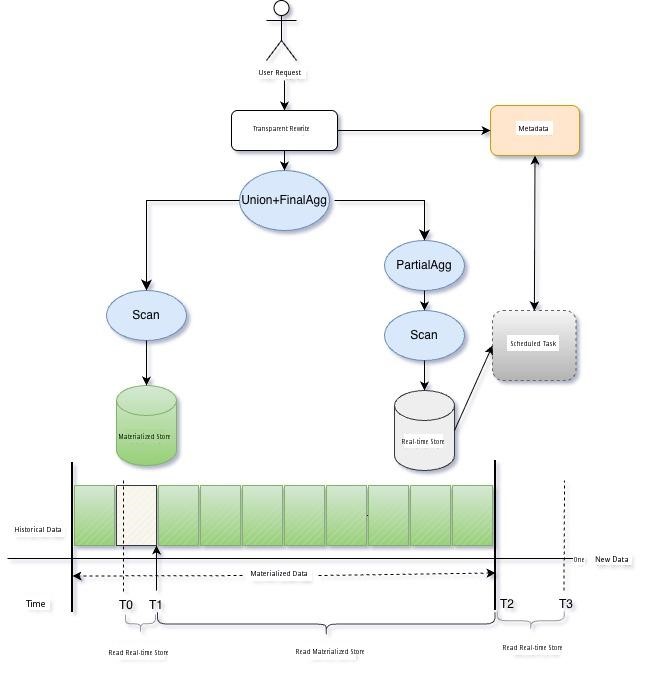
For materialized views created by users, SLS automatically manages the entire computation and maintenance flow in the background. The process runs automatically in the background without requiring user intervention.
Specifically, the system starts an intelligent scheduled task for each materialized view to continuously track newly written log data. At regular intervals, it automatically executes the SQL you defined, processing everything from simple filters to complex aggregations. The results are then stored persistently. After each task is completed, the system also accurately records the time point up to which data has been processed. This provides a basis for subsequent query optimization. All of this is completely transparent to users. You do not need to write scheduling scripts, manage job failures, or worry about data consistency because SLS is fully responsible for these tasks.
When a query is initiated, the Cost-Based Optimizer (CBO) automatically intervenes.
● If a matching materialized view is found, the CBO intelligently selects the optimal one.
● For non-aggregation queries, the optimizer rewrites the execution plan into a lightweight union of raw data and materialized data.
● For aggregation queries, the optimizer aggregates new data in real-time and then merges it with the pre-calculated results.
The entire process is seamlessly integrated. This not only ensures the real-time nature and accuracy of the results but also significantly reduces query latency and resource overhead. The entire architecture is shown in the following figure, using an aggregation scenario as an example.
In dashboard scenarios, users are extremely sensitive to dashboard loading times and typically expect responses within seconds. When multiple users refresh a dashboard at the same time, if a single SQL request consumes a large amount of computing resources, it can lead to contention for computing resources. This causes all users to wait and severely affects the user experience. By pre-calculating key metrics with materialized views, you can optimize complex queries that previously took minutes, enabling them to return results in seconds, which significantly improves the user experience.
Consider a real-world scenario: When system latency suddenly spikes, how can you quickly locate the problem?
Assume there is a high-concurrency online service, and its log data is written to a logstore. The key information in each log record is:
● Request latency
● Request type (RequestType)
● User ID (ProjectId)
● Status code (Status)
● Request data volume (InFlow)
● Response data volume (OutFlow)
At a certain moment, monitoring alerts are triggered because the average system latency suddenly increases. Is this a normal fluctuation? Is it caused by a traffic surge? Or is there a problem with a specific user or API? You need to respond immediately and do not want to wait for tens of seconds or even have the query time out without obtaining a result.
SQL for creating a materialized view:
*| select avg(latency) as avg_latency,date_trunc('hour', __time__) as time from log group by time

*| select sum(InFlow) as in_flow,sum(OutFlow) as out_flow,avg(latency) as latency, ProjectId,RequestType,Status from log group by ProjectId,RequestType,Status
SQL used by the dashboard:
Calculate the hourly change in average latency compared to one day, three days, and one week ago
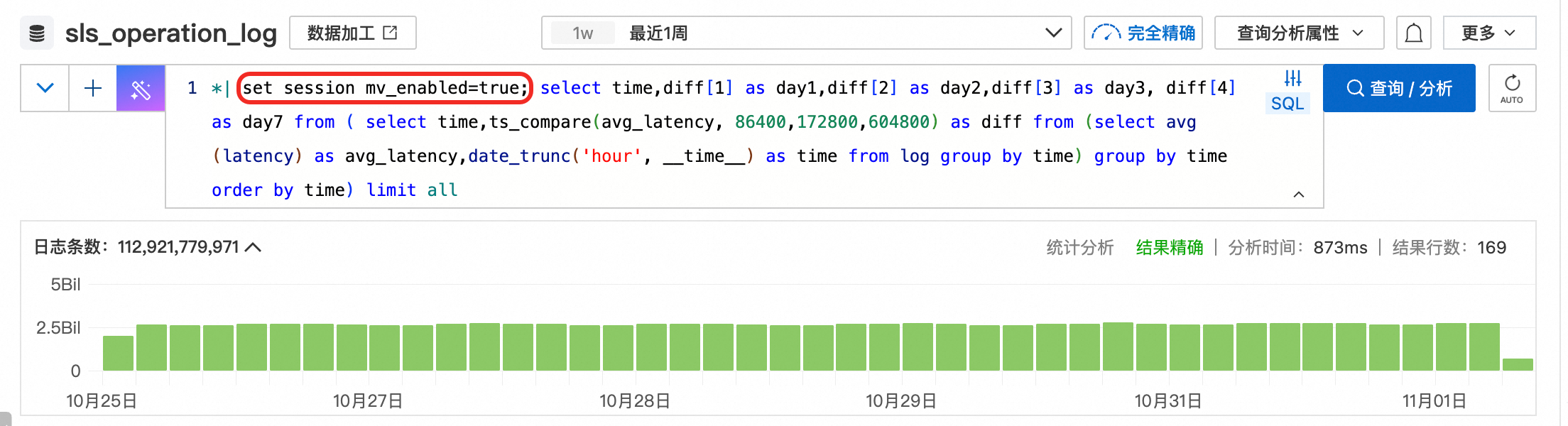
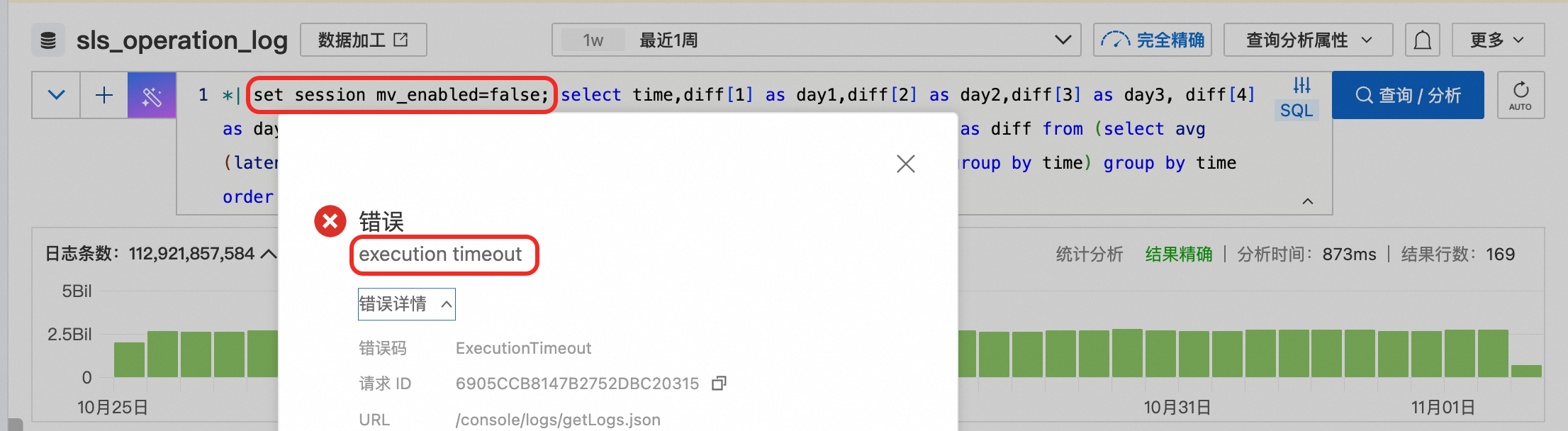
*| select time,diff[1] as day1,diff[2] as day2,diff[3] as day3, diff[4] as day7 from ( select time,ts_compare(avg_latency, 86400,172800,604800) as diff from (select avg(latency) as avg_latency,date_trunc('hour', __time__) as time from log group by time) group by time order by time) limit all

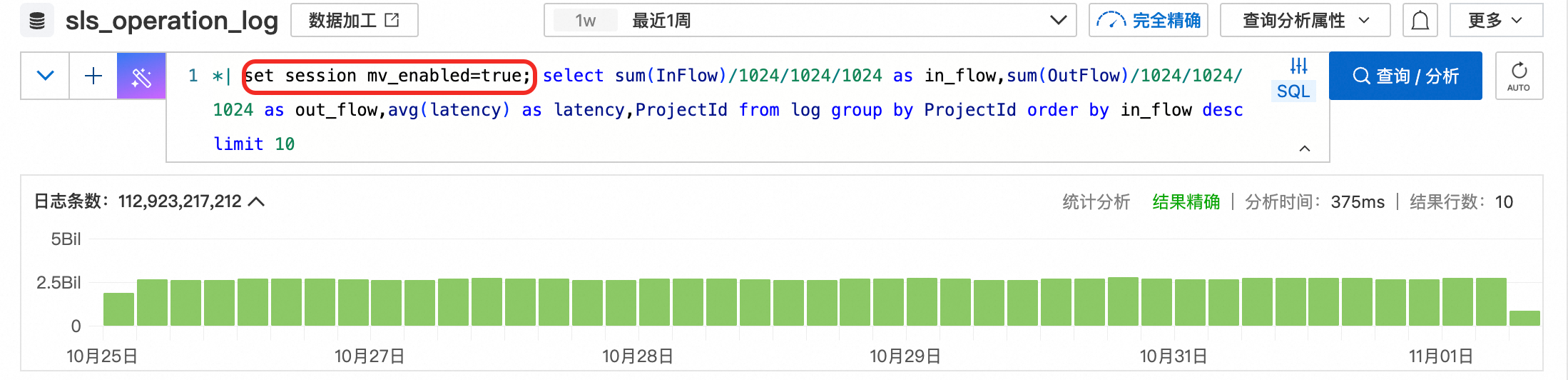
Calculate statistics on read/write traffic and latency by the ProjectId dimension
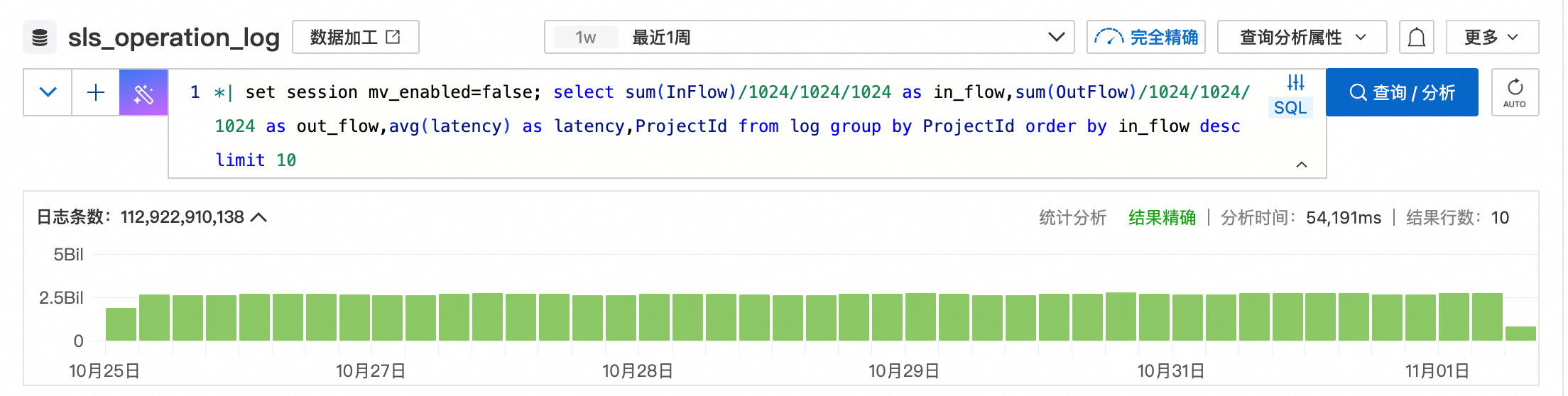
*| select sum(InFlow)/1024/1024/1024 as in_flow,sum(OutFlow)/1024/1024/1024 as out_flow,avg(latency) as latency,ProjectId from log group by ProjectId order by in_flow desc limit 10

Calculate the read/write traffic for requests with an average latency greater than 200, grouped by the Status and ProjectId dimensions
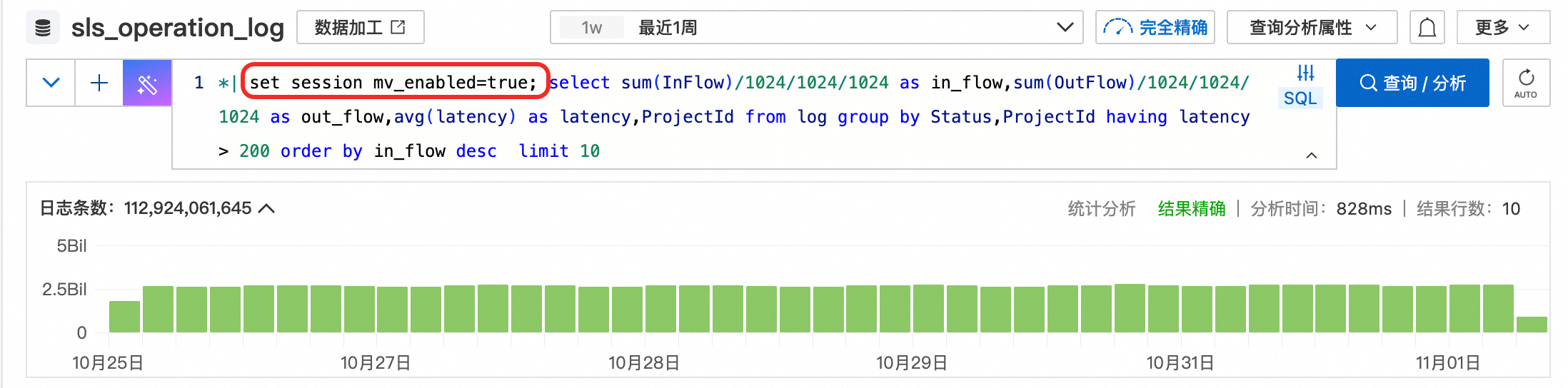
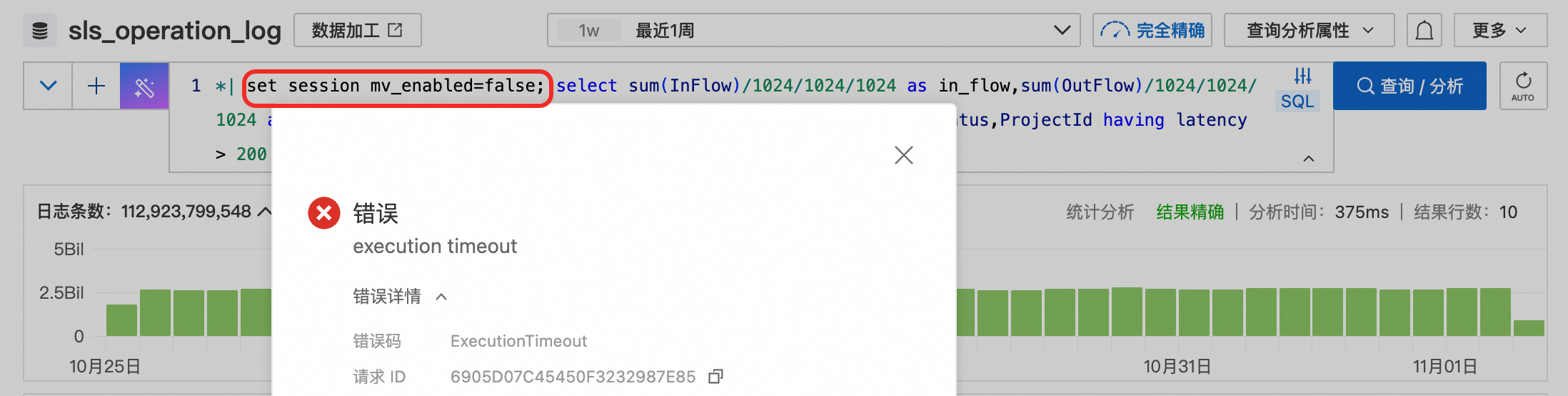
*| select sum(InFlow)/1024/1024/1024 as in_flow,sum(OutFlow)/1024/1024/1024 as out_flow,avg(latency) as latency,ProjectId from log group by Status,ProjectId having latency > 200 order by in_flow desc  limit 10
1. When viewing the week-over-week changes in latency over the past week, requests with materialized views enabled return results for over 100 billion data entries within seconds. Requests without materialized views enabled time out directly.
2. When collecting statistics on the changes in read/write traffic and latency by the ProjectId dimension, requests with materialized views enabled return results for over 100 billion data entries in less than 400 milliseconds. In contrast, requests without materialized views enabled take 54 seconds to return results, which indicates a performance improvement of more than 100 times.
3. When collecting statistics on read/write traffic with an average latency greater than 200 by the Status and ProjectId dimensions, the request that does not use a materialized view eventually times out because more dimensions are included in the statistics. However, after a materialized view is used, the result is returned in just over 800 milliseconds.
Interestingly, the SQL you write to create a view may not be the exact SQL the system executes. This is because the powerful SLS optimizer works behind the scenes. It can automatically identify and rewrite the query logic. This allows users to easily accelerate gauge queries without needing an in-depth understanding of the underlying details.
In actual tests with a data size of 100 billion entries, charts that use materialized views can be opened in seconds. In contrast, the same SQL query without a materialized view takes more than 50 seconds even in the fastest case. More often, it directly times out and fails to return a result. This is not just a performance improvement, but a qualitative leap in user experience. Theoretically, the larger the data size, the better the acceleration effect. In another region with an even larger data size, SQL queries on datasets with over a trillion records can also be completed stably in about 3 seconds. This further proves that as the data volume grows, the performance benefits of materialized views show a more significant acceleration effect.

In the data-driven era, the materialized view feature of SLS uses pre-computation technology to fundamentally solve the performance bottleneck and throughput limitation problems in large-scale log analysis, providing a new technical solution for real-time log analysis. In the future, we will continue to focus on the following directions:
● Artificial Intelligence Recommendation: Automatically identify high-frequency query patterns and generate the optimal materialized view with one click.
● Expanded Usage Scenarios: Support materialized views with the join operator and support data deletion scenarios.
● Enhanced Rewriting: Support rewriting for non-exact matches of expressions.

774 posts | 60 followers
FollowApsaraDB - August 14, 2026
ApsaraDB - May 12, 2026
Alibaba Cloud Native Community - November 4, 2025
Alibaba Cloud Native Community - March 11, 2026
Apache Flink Community - April 30, 2024
Alibaba EMR - August 5, 2024
774 posts | 60 followers
Follow Simple Log Service
An all-in-one service for log-type data
Learn More Cloud-Native Applications Management Solution
Accelerate and secure the development, deployment, and management of containerized applications cost-effectively.
Learn More Log Management for AIOps Solution
Log into an artificial intelligence for IT operations (AIOps) environment with an intelligent, all-in-one, and out-of-the-box log management solution
Learn More EventBridge
EventBridge is a serverless event bus service that connects to Alibaba Cloud services, custom applications, and SaaS applications as a centralized hub.
Learn MoreMore Posts by Alibaba Cloud Native Community

