Real sales data arrives ugly: mixed currency formats, blank cells, duplicate rows. QwenWork cleans it, tells you what it changed, analyzes it, and turns it into a dashboard — in one conversation, with every step auditable.
The spreadsheet someone emailed you isn't analysis-ready. "$12,400", "9800 USD", and an empty cell sit in the same column; one row appears twice; a number has a stray comma in the wrong place. Before anyone can learn anything, half a day goes to scrubbing.
And scrubbing is where mistakes hide. A silent fix today becomes a wrong quarter-over-quarter number next month.
QwenWork cleans the data and shows you the changelog — every normalization, every dropped duplicate, every flagged blank. Then it analyzes and visualizes the cleaned set, so the numbers you present are the numbers you can defend.
From one messy CSV block:
Time to set up: about 8 minutes. No spreadsheet software required.
In production this block comes straight from your sales system's export or a connected source; while you're testing, pasting works. Use your own export, or this sample — it's messy in all the usual ways:
Clean this sales data: fix formats, drop duplicates, fill or flag
blanks. Show me what you changed.

month,region,revenue,orders
2026-01,North,"$12,400",310
2026-01,South,9800 USD,245
2026-02,North,$13,100,322
2026-02,South,,238
2026-03,North,"$11,950",301
2026-03,South,10400,251
2026-03,South,10400,251
2026-04,North,$14,800,340
2026-04,South,11250 USD,260
2026-05,North,"$13,600",318
2026-05,South,9,900,241
2026-06,North,$15,300,352
2026-06,South,12100,272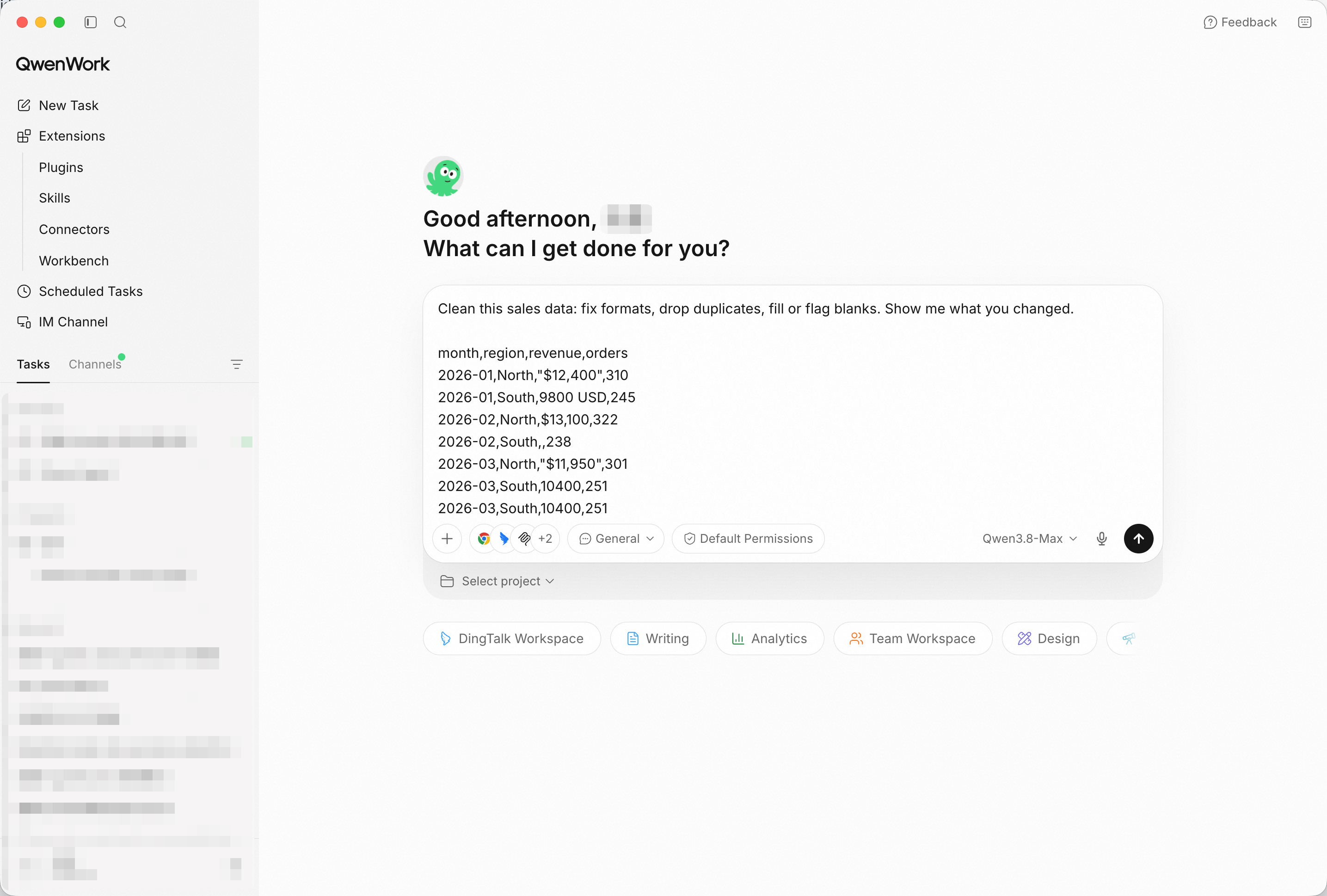
Mixed formats, a blank, a duplicate row, a broken number — paste it all. Screenshot shows the paste path, the fastest way to try it; in production, point QwenWork at your connected source and the same prompts run unchanged.
This is the step most tools skip. QwenWork lists what it normalized ("9800 USD" → 9800), what it dropped (the duplicate 2026-03 South row), and what it flagged rather than guessed (the blank revenue cell).
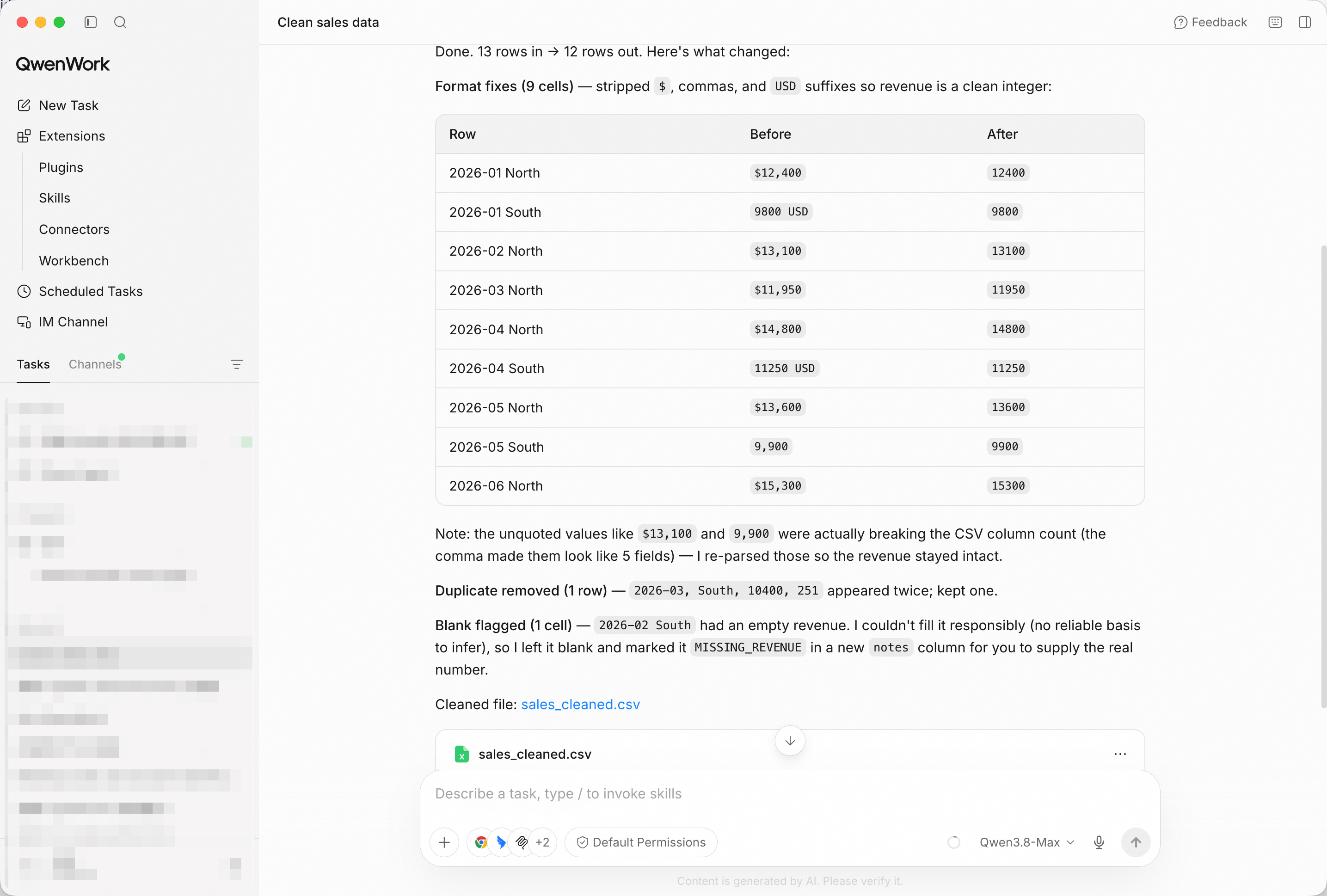
Every fix on the record — so the cleaned numbers stay defensible.
Now analyze it: monthly revenue, top region, and the worst month —
with reasons.
Build a one-page HTML dashboard: revenue trend line, region bars,
and a KPI row.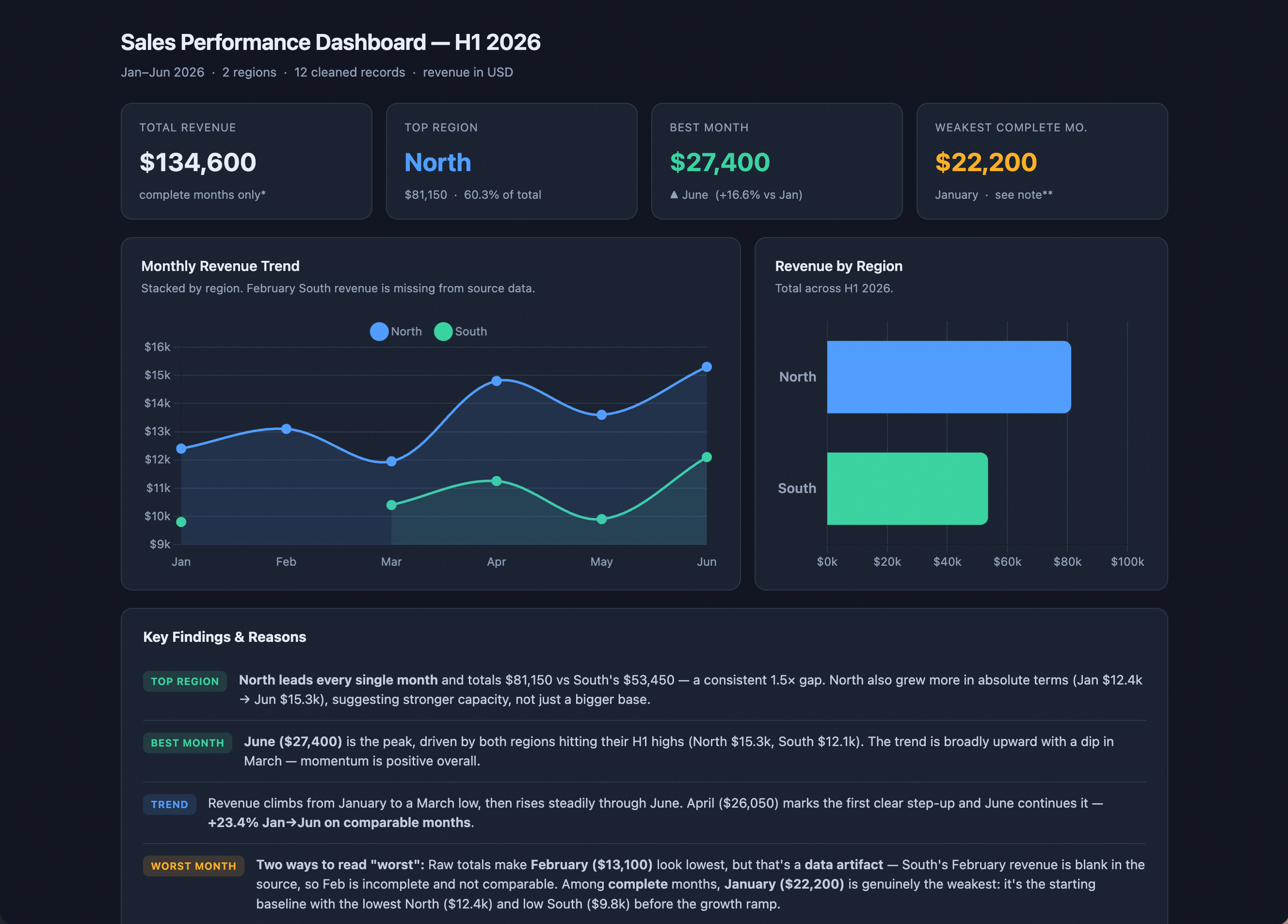
The dashboard in a browser — trend, regions, and KPIs from the cleaned set.
A trend line shows shape; a month-over-month column shows alarms:
Add a month-over-month comparison column to the table and highlight
any drop bigger than 10%.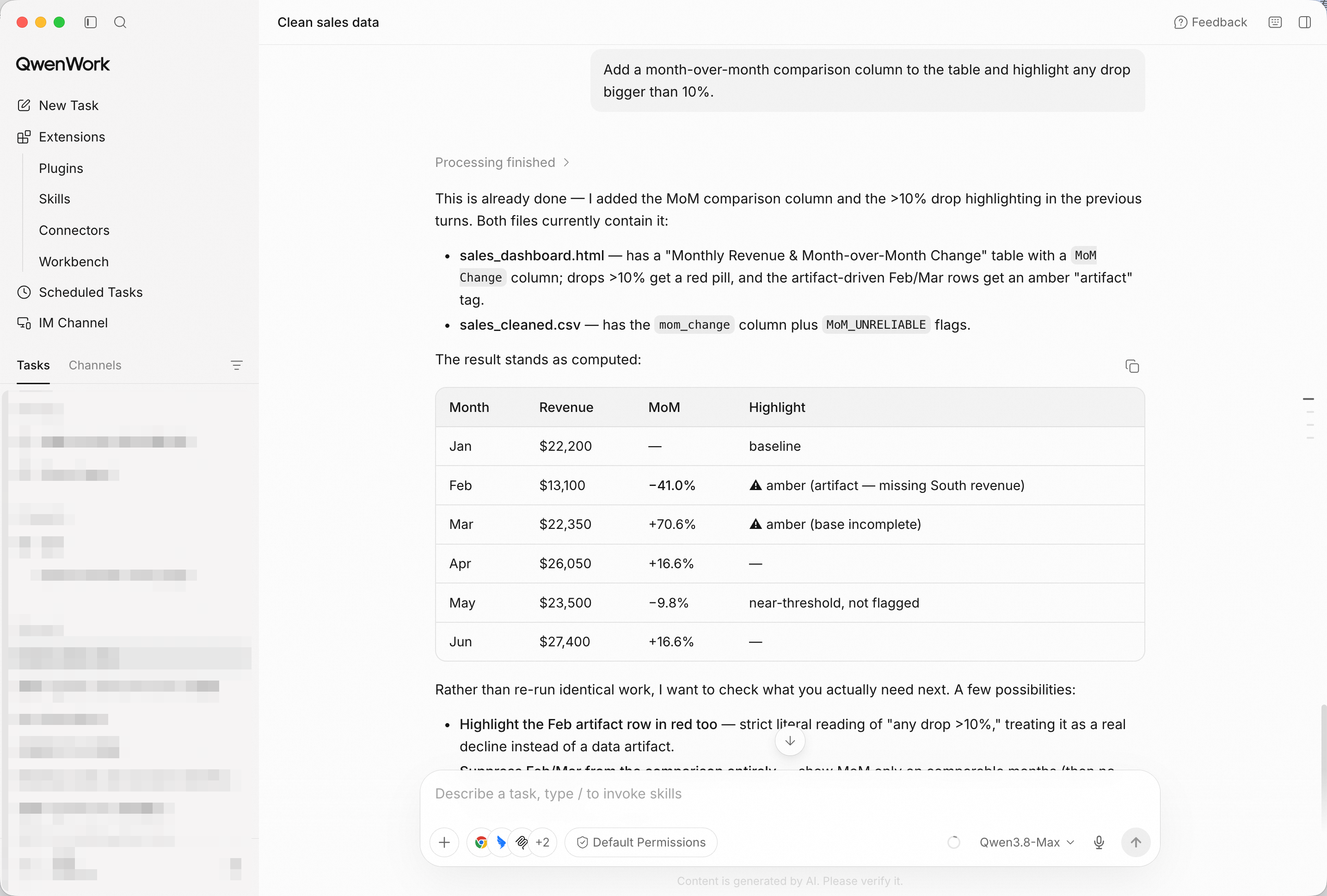
Drops past your threshold get flagged — the exception rises to the top.
Not everyone opens dashboards. Ask for the digest:
Give me a five-bullet summary I can paste into Slack.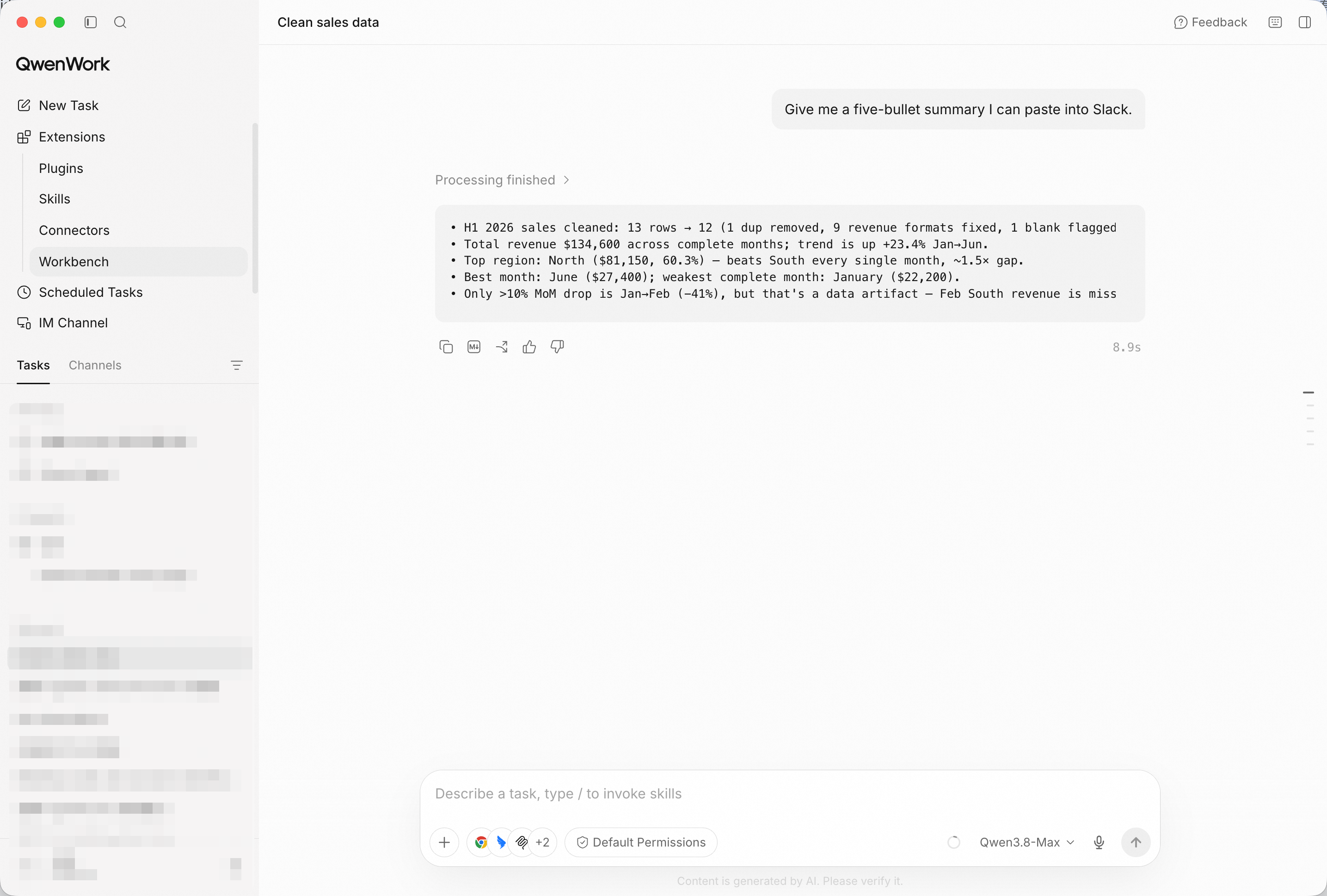
Five bullets, numbers included — the analysis leaves the tool and enters the conversation.
You didn't spend half a day scrubbing a CSV, and you didn't fix a cell silently. You pasted the mess, and QwenWork returned an audited clean set, a dashboard, and a digest your team can act on.
That's the pattern for a lot of the work that quietly eats your week: raw data in, defensible numbers out.
Turn Messy Meeting Notes into an Executive Briefing with QwenWork

1,573 posts | 525 followers
FollowAlibaba Cloud Community - October 23, 2026
Alibaba Cloud Community - September 4, 2026
Alibaba Cloud Community - October 23, 2026
Alibaba Cloud Indonesia - July 3, 2026
Alibaba Cloud Community - October 14, 2026
Alibaba Cloud Community - August 26, 2026
1,573 posts | 525 followers
Follow Qwen
Qwen
Full-range, open-source, multimodal, and multi-functional
Learn More Wan3.0
Unleash Your Creativity Try Wan 3.0 now — longer narratives, greater control, endless creativity.
Learn More Token Plan
Build more, spend less. One plan, every modality.
Learn More
Alibaba Cloud Model Studio
A one-stop generative AI platform to build intelligent applications that understand your business, based on Qwen model series such as Qwen-Max and other popular models
Learn MoreMore Posts by Alibaba Cloud Community

