High Availability and Performance: Best Practices for Deploying Dify based on ACK
By Qianlong Wang
With the continuous advancement of artificial intelligence technology, large language models (LLMs) such as the GPT series have become the core of many AI applications. However, the development, deployment, maintenance, and optimization of LLMs involves a complex set of practices and processes, a process commonly referred to as LLMOps. To help users easily create and manage LLM applications, Dify emerged as an easy-to-use LLMOps platform.
Currently, Dify officially supports Docker Compose and local deployment based on source code. Due to their shortcomings in high availability and scalability, these two methods are not suitable for production environments. Container Service for Kubernetes (ACK), in contrast, provides high-performance container application management, supports lifecycle management of enterprise-level Kubernetes containerized applications, and complies with the standard service-level agreement (SLA) with compensation clauses, which is suitable for large-scale business environments with high requirements for stability and security. In addition, ACK can seamlessly integrate with a rich set of cloud products, significantly enhancing the overall performance of Dify. ACK allows you to easily deploy Dify services that are highly available, scalable, and have high SLAs to meet the requirements of production environments.
This article provides a detailed solution for deploying and managing Dify services that are highly available, scalable, and have high SLAs in ACK clusters.
About Dify
LLMOps is a complete set of practices and processes designed to cover the development, deployment, maintenance, and optimization of large language models. Its core goal is to deal with the complexity of large language models, involving the entire process from the birth of the model to its actual application, such as data collation, architecture design, training, fine-tuning, testing, deployment, and continuous monitoring. In the practice of LLMOps, we will face various challenges such as logic design, context enhancement, and data preparation, which require considerable time and energy. Dify provides us with an easy-to-use platform to help easily cope with these challenges. It is not just a single-purpose and delicate development tool, but an all-in-one large model application development platform.
What Can Dify do?
Start a business and quickly turn your AI application ideas into reality. Both success and failure need to be accelerated. In the real world, dozens of teams have built MVP (Minimum Viable Product) through Dify to secure investment or won customer orders through POC (Proof of Concept).
Integrate LLM into existing services, enhance the capabilities of existing applications by introducing LLM, and connect to RESTful API of Dify to decouple prompt from business code. In Dify's management interface, data, costs, and usage are tracked to continuously improve application effects.
As an enterprise-level LLM infrastructure, Dify is being deployed in some banks and large Internet companies as an LLM gateway within the enterprise to accelerate the promotion of the GenAI technology and achieve centralized supervision.
Explore LLM capabilities. Even if you are a technology enthusiast, you can easily practice prompt engineering and agent technology through Dify. More than 60,000 developers created their first applications on Dify before GPTs were launched.

Dify On ACK Architecture
Currently, Dify officially supports two deployment methods: Docker Compose and local deployment based on source code. However, neither of these two deployment methods has high availability and scalability. They are more used in development and testing environments instead of production environments.
Compared with Docker Compose and local deployment, Dify deployment based on ACK has the advantages of high availability and elasticity. It enables Dify components to be instantly and smoothly scaled out to meet business requirements, thereby effectively promoting business development. You can also use cloud products and services to replace the basic components of Dify, thereby obtaining higher performance and SLA.
In addition, when Dify orchestrates LLM applications, you can either directly call the OpenAPI of the LLM service provider or use ACK to deploy a dedicated model inference service. The flexibility and ease of scalability enable it to meet the needs of diverse production scenarios.

Deploy Dify Based on ACK
The components of Dify applications mainly include business components and basic components. Business components include API, worker, web, and sandbox. Basic components include db, verctor db, Redis, NGINX, and ssrf_proxy.
Currently, the application market in the ACK console provides ack-dify application installation. By default, the basic components use the open-source Redis, postgres, and Weaviate. If you have higher performance, functionality, and SLA requirements for these basic components, or you have operation and management pressure on basic components, you can use our cloud products as follows:
• Tair (Redis® OSS-compatible)
Dify is a highly available and elastic deployment solution that is integrated with cloud services based on ACK. Dify can be deployed in a stable and high-performance manner.

To implement the above deployment, we need to complete the following parameter configuration in the ack-dify parameter configuration interface, mainly including the following aspects:
- Cloud product configuration
- High availability and elasticity configuration
- Service access configuration
1. Cloud Product Configuration
Tair (Redis® OSS-compatible), ApsaraDB RDS for PostgreSQL, and AnalyticDB for PostgreSQL are used in this tutorial. We can prepare the relevant resources in advance according to the following tutorials.
• Tair (Redis® OSS-compatible)
1. After preparing the relevant cloud resources, we first need to disable the default open-source component installation, including redis.enabled, postgresql.enabled, and weaviate.enabled, which are all set to false.
2. Configure Tair (Redis® OSS-compatible)
###################################
# External Redis
# - these configs are only used when `externalRedis.enabled` is true
###################################
externalRedis:
  enabled: true
  host: "r-***********.redis.rds.aliyuncs.com"
  port: 6379
  username: "default"
  password: "Dify123456"
  useSSL: false
3. Configure ApsaraDB RDS for PostgreSQL
###################################
# External postgres
# - these configs are only used when `externalPostgres.enabled` is true
###################################
externalPostgres:
  enabled: true
  username: "postgres"
  password: "Dify123456"
  address: "pgm-*********.pg.rds.aliyuncs.com"
  port: 5432
  dbName: dify
  maxOpenConns: 20
  maxIdleConns: 5
4. Configure ADB
###################################
# External AnalyticDB
# - these configs take effect when `externalAnalyticDB.enabled` is true
###################################
externalAnalyticDB:
  enabled: true
  accessKey: "***"
  secretKey: "***"
  region: "cn-hongkong"
  instanceId: "gp-*************"
  account: "dify_user"
  accountPassword: "********"
  # You can specify an existing namespace. Alternatively, you can fill in a new namespace that will be automatically created.
  namespace: "difyhelm"
  namespacePassword: "difyhelmPassword"
2. High Availability and Elasticity Configuration
When deploying applications based on ACK, most users require high availability and auto scaling to improve disaster recovery and handle peak loads. On ACK, you only need to perform the following simple configuration on the application to achieve the above effects.
1. Multiple replicas: The core business components of Dify, such as API, worker, web, and sandbox, are configured as one replica by default. You can configure the following parameters to achieve the effect of multiple replicas.
api.replicas: 2
...
worker.replicas: 2
...
web.replicas: 2
...
sandbox.replicas: 2
2. Replica spread: To prevent the unavailability of the overall service caused by a single node failure or a single zone failure, we usually need to spread replicas. In the example, anti-affinity between pods is configured to spread pods of the same component to different nodes as much as possible.
  api.affinity:
    podAntiAffinity:
      preferredDuringSchedulingIgnoredDuringExecution:
        - weight: 100
          podAffinityTerm:
            labelSelector:
              matchExpressions:
                - key: component
                  operator: In
                  values:
                    - api
            topologyKey: kubernetes.io/hostname

...
  worker.affinity:
    podAntiAffinity:
      preferredDuringSchedulingIgnoredDuringExecution:
        - weight: 100
          podAffinityTerm:
            labelSelector:
              matchExpressions:
                - key: component
                  operator: In
                  values:
                    - worker
            topologyKey: kubernetes.io/hostname

...
  web.affinity:
    podAntiAffinity:
      preferredDuringSchedulingIgnoredDuringExecution:
        - weight: 100
          podAffinityTerm:
            labelSelector:
              matchExpressions:
                - key: component
                  operator: In
                  values:
                    - web
            topologyKey: kubernetes.io/hostname

...
  sandbox.affinity:
    podAntiAffinity:
      preferredDuringSchedulingIgnoredDuringExecution:
        - weight: 100
          podAffinityTerm:
            labelSelector:
              matchExpressions:
                - key: component
                  operator: In
                  values:
                    - sandbox
            topologyKey: kubernetes.io/hostname
3. Elasticity configuration: To cope with the pressure of peak load, we usually add auto scaling configuration for resource-intensive components. For example, the worker component is prone to incur an increase of CPU/memory when processing a large number of document knowledge bases. The following configuration can be used to realize the auto scaling of the worker.
woker:
  ...
  autoscaling:
    enabled: true
    minReplicas: 1
    maxReplicas: 5
    metrics:
      - type: Resource
        resource:
          name: memory
          target:
            averageUtilization: 80
            type: Utilization
After the configuration, multiple replicas of the same Dify component are distributed on different nodes, and the worker automatically scales based on memory usage. The deployment effect is as follows:
➜  ~ kubectl get po -n dify-system -o wide
NAME                                READY   STATUS    RESTARTS   AGE     IP              NODE                        NOMINATED NODE   READINESS GATES
ack-dify-api-655bbf7468-95sfj       1/1     Running   0          6m42s   192.168.1.186   cn-hangzhou.192.168.1.164   <none>           <none>
ack-dify-api-655bbf7468-zdw7l       1/1     Running   0          6m42s   192.168.0.51    cn-hangzhou.192.168.0.40    <none>           <none>
ack-dify-proxy-5f6c546d87-blx79     1/1     Running   0          6m42s   192.168.1.178   cn-hangzhou.192.168.1.165   <none>           <none>
ack-dify-sandbox-5fd7cd8b7c-9flwh   1/1     Running   0          6m42s   192.168.1.183   cn-hangzhou.192.168.1.164   <none>           <none>
ack-dify-sandbox-5fd7cd8b7c-mhq99   1/1     Running   0          6m42s   192.168.0.53    cn-hangzhou.192.168.0.40    <none>           <none>
ack-dify-web-6fbc4d4b4b-54dkx       1/1     Running   0          6m42s   192.168.1.185   cn-hangzhou.192.168.1.164   <none>           <none>
ack-dify-web-6fbc4d4b4b-6kg8f       1/1     Running   0          6m42s   192.168.0.41    cn-hangzhou.192.168.0.40    <none>           <none>
ack-dify-worker-5dddd9877f-cq6rs    1/1     Running   0          6m42s   192.168.0.44    cn-hangzhou.192.168.0.40    <none>           <none>
ack-dify-worker-5dddd9877f-s6r6z    1/1     Running   0          6m42s   192.168.1.182   cn-hangzhou.192.168.1.164   <none>           <none>

➜  ~ kubectl get hpa -n dify-system
NAME              REFERENCE                    TARGETS           MINPODS   MAXPODS   REPLICAS   AGE
ack-dify-worker   Deployment/ack-dify-worker   memory: 17%/80%   1         5         2          6m43s
3. Service Access Configuration
In ACK, we recommend you configure an Ingress to expose the Dify service. For more information, please refer to Ingress management. Currently, you can configure NGINX Ingress and ALB Ingress. In this example, NGINX Ingress is used. For security reasons, we strongly recommend that you enable the tls setting.
ingress:
  enabled: false
  # Nginx Ingress className can be set ""
  # ALB Ingress className can be set "alb"
  className: ""
  annotations: {}
    # kubernetes.io/ingress.class: nginx
    # kubernetes.io/tls-acme: "true"
    # nginx.ingress.kubernetes.io/backend-protocol: HTTP
    # nginx.ingress.kubernetes.io/proxy-body-size: 15m
    # nginx.ingress.kubernetes.io/ssl-redirect: "true"
  hosts:
    - host: dify-example.local
      paths:
        - path: /
          pathType: Prefix
          backend:
           service:
              name: ack-dify
              port: 80
  tls:
    - secretName: chart-example-tls
      hosts:
        - dify-example.local
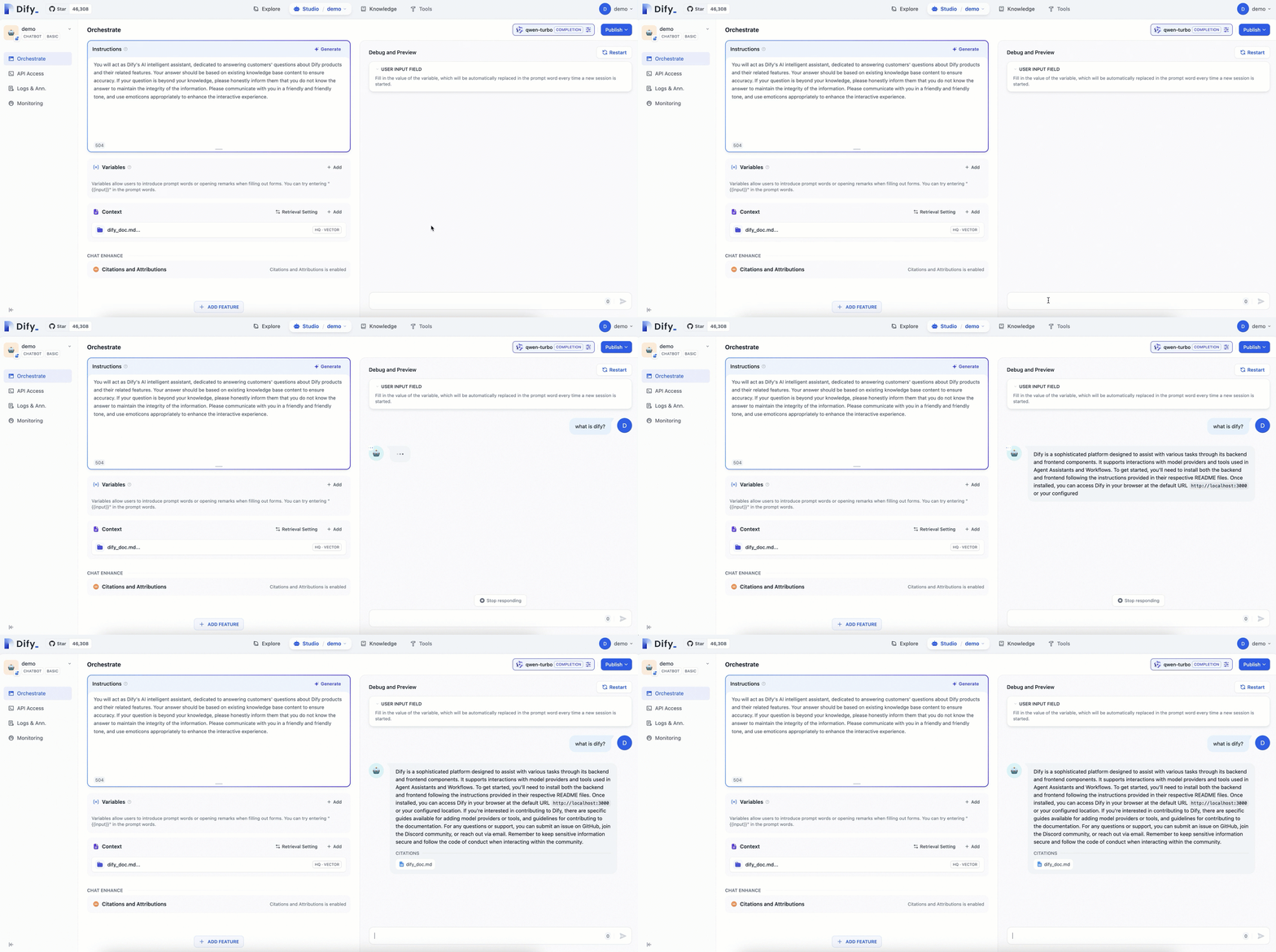
After successful configuration, you can safely and conveniently access the Dify service to orchestrate LLM applications and integrate LLM applications into existing businesses. For an explicit example, please refer to Use Dify to create an AI-powered Q&A assistant.

Summary
The Dify On ACK architecture supports high availability and elasticity, enabling it to quickly scale out based on business needs. This deployment method integrates cloud services to provide higher performance and service-level agreements (SLAs), which greatly improves the stability and availability of Dify. Through ACK, you can use ApsaraDB databases such as Tair (Redis® OSS-compatible), ApsaraDB RDS for PostgreSQL, and AnalyticDB for MySQL to replace the default open-source components, further enhancing functionality and performance.
In addition, with the elasticity configuration of ACK, enterprises can cope with peak loads, implement auto scaling, and improve the disaster recovery capability of the system. This makes Dify not only suitable for launching innovation projects quickly, but also used as an enterprise-level LLM infrastructure to accelerate the promotion of the GenAI technology in enterprises.
In summary, deploying Dify on ACK significantly improves availability and performance, and simplifies management and operation, providing a robust AI application development environment for enterprises. With Dify and its deployment on ACK, users can quickly implement AI applications and continuously optimize their effects.
*Redis is a registered trademark of Redis Ltd. Any rights therein are reserved to Redis Ltd. Any use by Alibaba Cloud is for referential purposes only and does not indicate any sponsorship, endorsement or affiliation between Redis and Alibaba Cloud.
Read previous post:
Argo Workflows 3.6: Key New Features in Cloud-native Orchestration
Read next post:
ACK One GitOps: Simplified Multi-cluster GitOps Application Management with ApplicationSet UI
-

-
Alibaba Container Service
230 posts | 34 followers
Follow
Comments
-
-
Alibaba Container Service
230 posts | 34 followers
Follow
Related Products
-
 QwenWork
 is dedicated to helping employees strengthen their professional competitiveness in the AI era and to enabling enterprises to improve organizational effectiveness.
Learn More -
 Token Plan
Build more, spend less. One plan, every modality.
Learn More -
Alibaba Cloud Model Studio
A one-stop generative AI platform to build intelligent applications that understand your business, based on Qwen model series such as Qwen-Max and other popular models
Learn More -
 Elastic High Performance Computing
A HPCaaS cloud platform providing an all-in-one high-performance public computing service
Learn More
More Posts by Alibaba Container Service
- ACK One Fleet: Scaling Agent Sandboxes from Single-Cluster to Multi-Cluster
- Deep Dive: How Kimi's AI Agent Runs on Alibaba Cloud
- Caching is Efficiency: Achieving Precise LLM Cache Hits with Alibaba Cloud ACK GIE
- ACK One Fleet Multi-Cluster Canary Release: A "Safety Valve" for AI Inference Services
- Intelligent Scheduling for AI Inference: Cluster-Level Priority Elastic Scheduling
- When Agents Meet Workflows—Can Intelligence Become More Controllable?
- Koordinator Column 1: Viewing AI Computing Power's "Rigidity" and "Elasticity" through Gang Scheduling
- Container Technology Evolution for LLMs and AI Agents
- How ASM Ambient Mode Innovates Kubernetes Egress Traffic Management
- Best Practices for Ray on ACK: Secure Deployment of AI Data Processing/Training/Inference Environments