Cloud Config is a resource auditing service that tracks resource configuration changes and continuously evaluates compliance against your desired settings.
Architecture
The following figure shows the Cloud Config architecture.
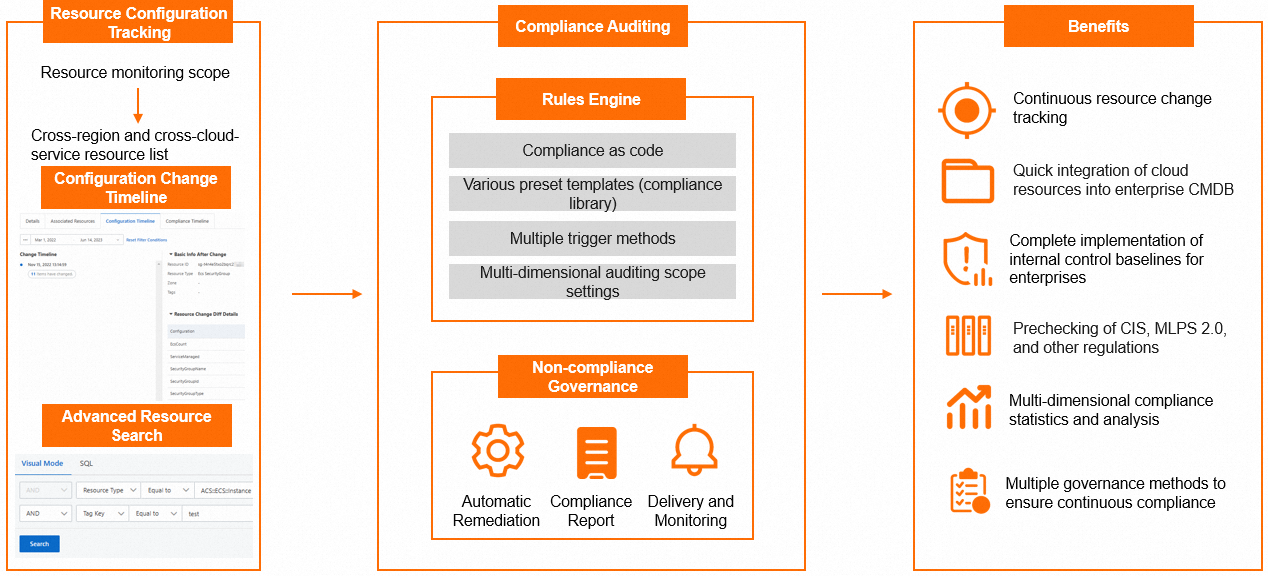
Features
|
Feature |
Description |
|
Manage the monitoring scope |
Cloud Config monitors resource changes, tracks configuration changes, and evaluates compliance in real time. You can configure the monitoring scope in the console. If you select All Supported Resource Types, newly supported types are automatically added. If you select Custom Resource Types, new types are not automatically added. |
|
Manage resources |
View and filter resources across regions to query configuration details. You can also navigate to the corresponding cloud service console to manage a resource. |
|
View the compliance change history of a resource |
Cloud Config records each configuration change of a monitored resource and displays changes over time. You can view configuration changes and related event details. |
|
Evaluate resource compliance |
Create custom rules or use rule templates. After you create rules, view compliance results and check history for each resource. You can re-evaluate non-compliant resources and edit, disable, or delete rules as needed. |
|
Remediate non-compliant resources |
Configure template or custom remediation when you create a rule. If non-compliant resources are detected, execute remediation to correct configurations and maintain continuous compliance. |
|
Resource delivery |
Cloud Config continuously delivers resource data to Simple Log Service Logstores, Object Storage Service (OSS) buckets, or Simple Message Queue (formerly MNS) topics for centralized management. |
|
Compliance packages |
A compliance package contains a set of managed rules for specific compliance scenarios. Compliance packages continuously monitor resource compliance and notify you of non-compliant resources promptly. |
|
Account groups |
Use the management account or delegated administrator account of a resource directory to create an account group. This lets you centrally manage resources, compliance packages, and rules for multiple member accounts. |
|
Compliance library |
The compliance library provides compliance package templates and rule templates. Enable compliance items to continuously detect resources, and use Operation Orchestration Service (OOS) public templates to quickly correct non-compliant resources. |
Benefits
Key benefits of Cloud Config:
-
Cross-region aggregation: Consolidate resources from different regions into a centralized list. Use the resource list and resource detail APIs to integrate cloud resource configurations into your CMDB.
-
Event delivery: Deliver configuration changes, scheduled snapshots, and non-compliance events through multiple channels for global resource analysis.
-
Preset templates: Enable compliance items based on your requirements. Cloud Config continuously checks resources and corrects non-compliant ones using remediation templates.
-
Continuous compliance evaluation: Cloud Config tracks resource configuration changes and evaluates compliance, automating the review process.
Usage notes
Before you use Cloud Config, note the following:
-
Some resources may not appear in the resource list if Cloud Config does not yet support the related Alibaba Cloud service. If you set the monitoring scope to All Supported Resource Types, newly supported types are automatically added. You can manually remove them.
-
Cloud Config detects configuration changes at 10-minute intervals. Changes that occur and revert within the same interval are not detected.
-
During the public preview period, data accuracy is not guaranteed. If you find incorrect data or want to request support for additional resource types,submit a ticket.