Resource Access Management (RAM) is an Alibaba Cloud service that centrally manages user identities and resource access permissions. This topic describes the core concepts, key features, and security guidelines of RAM, and helps you understand how to use RAM for secure access to your cloud resources.
With RAM, you can create and manage multiple types of identities and grant each of them fine-grained permissions for secure access to cloud resources.
Billing and activation
RAM is free of charge.
RAM is enabled by default. RAM cannot be disabled.
Why use RAM
Your Alibaba Cloud account is the account that you registered with. Using or sharing this account for daily operations creates the following management and security challenges:
Excessive permissions and security risks: Your Alibaba Cloud account has the highest permissions on all resources in the account. Sharing the account leads to permission abuse because every user of the account gains full control. If the credentials are leaked, all cloud resources in the account face extremely high security risks.
No accountability: All operation records belong to the Alibaba Cloud account. When a security incident occurs, you cannot identify the actual operator, which makes security auditing and accountability ineffective.
Difficulty in separating duties: You cannot grant finance staff permissions to only view bills, or grant developers permissions to operate only in specific environments. This violates the principle of least privilege in security management.
RAM solves these issues by creating separate identities and granting precise permissions to each of them. RAM is the foundation for securing your cloud resources.
Getting started
You can start using RAM from the following common scenarios:
Core features of RAM
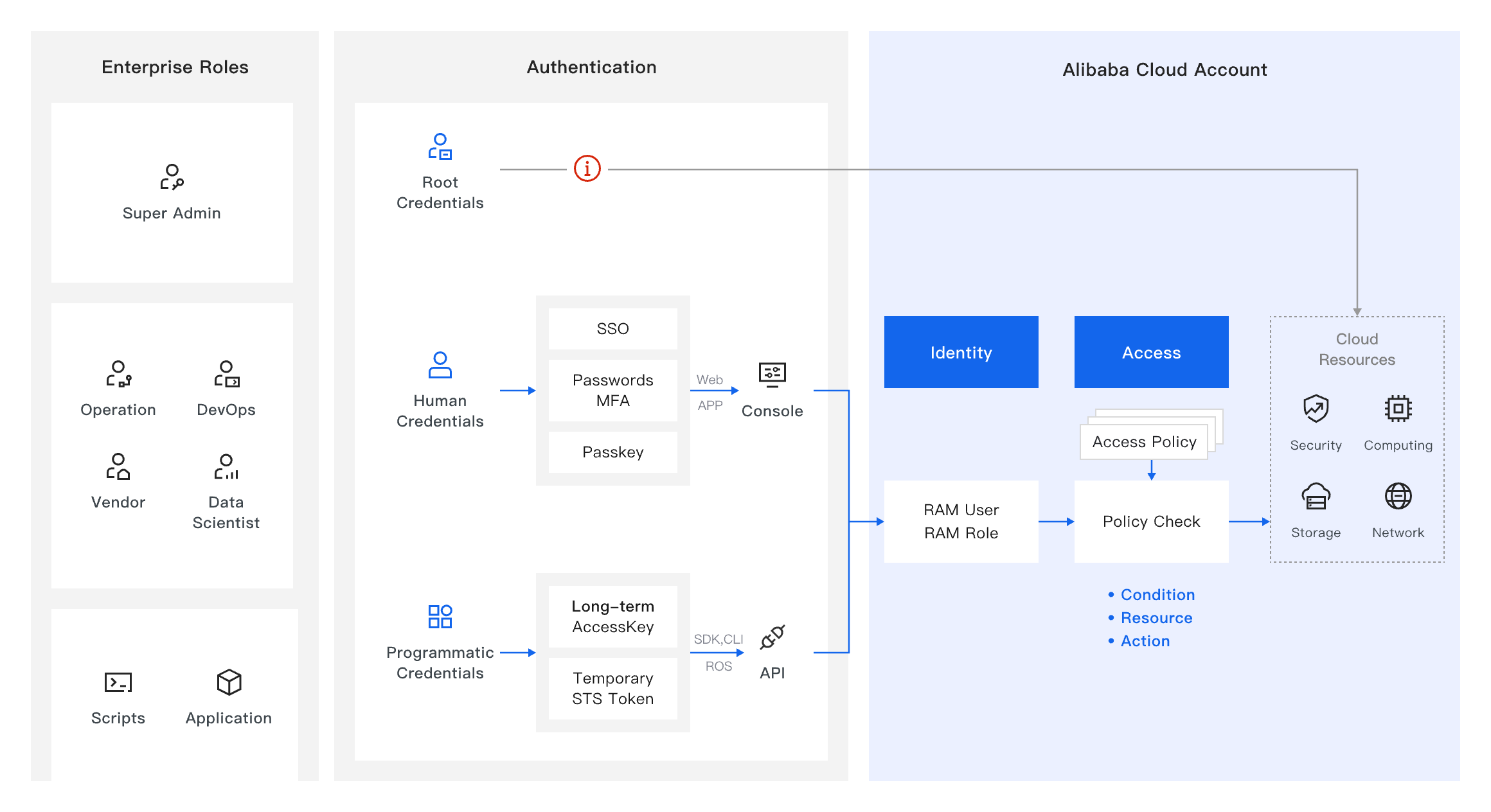
RAM provides the following features. The sections that follow describe each of them in detail.
Identity management: Create and manage multiple types of identities, such as RAM users, RAM user groups, and RAM roles.
Identity authentication: Provides multiple authentication methods, such as passwords, AccessKey pairs, MFA, and SSO.
Authorization management: Applies fine-grained permission control to identities based on permission policies.
Identity federation: Integrates with enterprise identity systems for unified identity management and single sign-on.
Permission auditing: Identifies the permissions that a RAM identity has and records the most recent access time of each permission.
The following figure provides an overview of RAM.
Key concepts
What is an identity
An identity is an entity that accesses resources and performs operations in a cloud environment. An identity is also the subject that carries permissions. A cloud environment has two main types of identities: human identities and program identities.
Human identity: Represents an employee or a member of your organization, such as a security administrator, an O&M engineer, or a developer. Human identities access and operate cloud resources interactively through the console or the CLI.
Program identity: Represents an application or a service that accesses cloud resources and data non-interactively through API operations. Program identities apply to scenarios such as automation scripts, application development, and service integration.
What is authentication
Authentication is the process of verifying the identity of a service requester. A service requester must provide credentials, such as a username and a password, to prove its identity.
Credentials take various forms, such as the familiar username and password, one-time passcodes, or AccessKey pairs that are used by program identities.
To improve security, multi-factor authentication (MFA) requires you to provide at least two different types of credentials to verify your identity, such as a password combined with a one-time passcode. Single sign-on (SSO) lets you access all applications of mutual trust or resources after one successful authentication, without signing in again.
What is authorization
Authorization is the process of confirming whether an authenticated identity has the permissions to access a specific resource.
The core differences between authentication and authorization are as follows:
Authentication answers the question "Who are you?" and proves an identity.
Authorization answers the question "What can you do?" and grants or denies permissions.
Authentication is a prerequisite for authorization. After an identity passes authentication, authorization determines the resources that the identity can access and the operations that it can perform.
Granting different permissions to different types of identities provides fine-grained control over cloud resources and ensures that each identity accesses only the resources within its scope of responsibility and performs only specific operations.
Identity types in RAM
RAM provides three types of identities: RAM users, RAM user groups, and RAM roles. A RAM user group is a collection that classifies and manages RAM users. RAM users and RAM roles can serve as both human identities and program identities.
Alibaba Cloud account vs. RAM user
You obtain an Alibaba Cloud account after you complete Step 1: Create an Alibaba Cloud account. An Alibaba Cloud account is similar to the root user in a Linux system: it has extensive permissions but is not suitable for daily use. Your Alibaba Cloud account can create RAM User in RAM for daily management. The core differences between the two are as follows:
| Item | Alibaba Cloud account | RAM user |
| Identity role | The owner of resources, with full ownership and the highest permissions. | The user of resources and services. Permissions are granted by the Alibaba Cloud account or by a RAM user with administrator permissions. A RAM user usually corresponds to a specific person or application. |
| Owns cloud resources | Yes | No. Resources are owned by the Alibaba Cloud account. |
| Default permissions | All permissions, which cannot be restricted. | No permissions by default. Permissions must be granted by the Alibaba Cloud account or by a RAM user with administrator permissions. |
| Recommended use | Key management operations only, such as authorization, payment, and account management. | Daily development, operations and maintenance (O&M), and deployment. |
For recommendations on protecting your Alibaba Cloud account, see the Security guidelines for RAM section in this topic.
Identity type comparison
Different RAM identities apply to different scenarios. The following table describes the identity types in RAM and their primary use cases:
| Identity type | Definition | Primary use case |
| RAM User | An identity that represents a specific person or application. It has console logon or programmatic access credentials, such as a logon password or an AccessKey pair, and can log on to the console or perform programmatic access. | Corresponds to a specific employee, system, or application in an enterprise. Used in scenarios that require long-term access to cloud resources. |
| {key, select, All {All} User {RAM User} Group {RAM Group} Role {RAM Role} SLR {Service Linked Role} other { {key} } } | A collection that classifies and manages RAM User. After you grant permissions to a user group, all users in the group inherit these permissions. | Grants and revokes permissions in batches for multiple RAM User that have the same job function, such as a development team or a test team. This simplifies permission management. |
| RAM Role | A virtual identity that can be granted permissions but has no logon password or AccessKey pair. A RAM role must be assumed by an entity such as a cloud account, a cloud service, or an identity provider before a temporary security token (STS token) can be obtained for access. | Used in scenarios such as cross-account resource access, authorizing a cloud service to access other resources, and integration with an IdP (IdP) to implement single sign-on (SSO). |
Authentication methods in RAM
Authentication method comparison
RAM supports multiple authentication methods for different use cases:
Console logon scenarios
| Authentication method | Definition | Use case |
| Logon password | A security authentication credential that is used for console logon. | A RAM user logs on to the console for interactive operations. |
| Multi-factor authentication (MFA) | An additional layer of security verification on top of logon password authentication. | Used with a logon password to improve console logon security. |
| Passkey | A FIDO2-based passwordless authentication method that lets users complete secure and convenient identity verification with device biometrics, such as a fingerprint or Face ID, or with a PIN. | Further improves console logon security and prevents password leaks and phishing attacks. Suitable for users with high security requirements or scenarios that require passwordless logon. |
| Single sign-on (SSO) | Users authenticate through the identity provider (IdP) of an enterprise and access multiple cloud services of mutual trust with one logon. | Enterprise users access Alibaba Cloud with an existing identity authentication system, such as Microsoft Entra ID or Okta. |
By default, all RAM users must use multi-factor authentication to log on.
Programmatic access scenarios
| Authentication method | Definition | Use case |
| AccessKey pair | A key pair that consists of an AccessKey ID and an AccessKey secret and belongs to a RAM user. An AccessKey pair is valid long-term. | An application, a CLI, or a service calls cloud services through API operations. This method is relatively less secure. |
| Temporary security token (STS token) | A temporary credential that is obtained after RAM role assumption. It includes a temporary AccessKey pair and a SecurityToken, has a preset validity period, and expires when the period ends. | Also used when an application, a CLI, or a service calls cloud services through API operations. In addition, it is used for cross-account resource access, identity federation (SSO), and temporary authorization of cloud services. This method is relatively more secure. |
Long-term access credentials and temporary access credentials
Long-term access credentials: Credentials that remain valid after they are created, unless they are manually disabled, deleted, or modified. Examples are logon passwords and AccessKey pairs.
Temporary access credentials: Credentials that have a preset validity period, for example, from 15 minutes to several hours, and expire automatically when the period ends. An example is an STS token.
For guidance on choosing between the two credential types, see the Security guidelines for RAM section in this topic.
An STS token is issued by Alibaba Cloud Security Token Service (STS) after the identity, which is a RAM role, is authenticated. For more information about STS, see What is STS?. For more information about how to obtain an STS token, see Obtain the temporary identity credentials of a role that you assume.
Permission policies
After an identity is authenticated, RAM evaluates the attached permission policies to determine whether the identity has the corresponding permissions when it requests access to a resource or performs an operation, for example, whether the identity is permitted to manage an Alibaba Cloud ECS instance. RAM follows the deny-by-default principle: any access request that is not explicitly authorized is denied.
Policy types
Permissions are managed by permission policies, which are sets of rules that describe a group of permissions. RAM supports the following two types of permission policies:
A system policy is a general permission policy that is created and managed by Alibaba Cloud and covers common authorization scenarios. You can attach a system policy to an identity, but you cannot modify the content of the policy.
A custom policy is a permission policy that you create and manage. By writing a policy document in JSON format, you can precisely define the allowed or denied actions (Action), resources, and conditions (Condition) to implement fine-grained permission control.
For more information, see Overview of policies.
Conditional control
RAM uses the attribute-based access control (ABAC) permission model, which lets you set condition attributes in custom permission policies to implement conditional access control. For example, you can limit the source CIDR block of access requests, or require MFA at logon before specific operations can be performed.
Conditions include system-preset attributes such as identity attributes, resource attributes, and request environment attributes. Custom attributes such as tags are also supported.
Conditional control must be configured in a custom policy.
For more information, see Basic elements of a policy.
Enterprise identity federation
RAM supports single sign-on (SSO) based on the SAML 2.0 and OIDC (OpenID Connect) standard protocols, which is also called identity federation logon.
Why identity federation is required
In multi-cloud and enterprise IT environments, employees often need to access multiple internal systems and cloud services. Frequently switching accounts and remembering different passwords reduces operational efficiency and increases security risks. Identity federation integrates the identity authentication system of an enterprise, such as Microsoft Entra, Okta, or ADFS, with Alibaba Cloud for unified management of employee identities. Compared with logging on with a username and a password, identity federation logon provides the following benefits:
Simplified logon: Employees log on to the identity provider (IdP) portal once and then access Alibaba Cloud and other applications that have a trust relationship with the IdP. You do not need to maintain multiple sets of usernames and passwords.
Centralized security policies: Enterprise security policies, such as MFA, password policies, and IP address restrictions, are configured and enforced at the IdP layer.
Centralized management and auditing: You configure and revoke user permissions on the existing identity management platform of your enterprise, and synchronize employee onboarding and offboarding with cloud permissions. This reduces management costs and compliance risks.
Supported SSO methods
Alibaba Cloud RAM supports the following two SSO modes for different business scenarios:
User-based SSO: An enterprise performs user mapping from its identity provider (IdP) system to Alibaba Cloud RAM User, and the users log on to the console with the corresponding RAM user identities.
Role-based SSO: Enterprise users directly assume an Alibaba Cloud RAM Role and obtain an STS token to access resources. This mode supports scenarios such as cross-account authorization, multiple IdPs, and programmatic access.
Role-based SSO is the recommended mode because it better matches the principle of least privilege and security best practices.
For more information, see Overview of SSO.
Security guidelines for RAM
To build a secure, efficient, and maintainable identity and permission system, follow these best practices for identity management and permission management. For more information, see Identity and permission management best practices.
Protect your Alibaba Cloud account
Create a RAM user with administrator permissions that is dedicated to daily management and technical operations.
Use your Alibaba Cloud account only when necessary, and keep its password, MFA device, and other credentials secure.
Perform all daily operations with the RAM administrator user to avoid exposing your Alibaba Cloud account in day-to-day environments.
Choose temporary access credentials
Temporary access credentials are more secure than long-term access credentials. Leaked long-term access credentials can be exploited and cause continuous security threats. Temporary access credentials have a preset validity period, so even if they are leaked, the impact is limited to the validity period and the granted permissions, which reduces security risks. Use temporary access credentials whenever possible. For more information, see Best practices for accessing Alibaba Cloud OpenAPI by using credentials.
RAM security auditing
Use ActionTrail to query operation records: ActionTrail records all operations that are performed with RAM identities, and is used for security auditing, compliance reviews, and issue tracing. For more information, see Use ActionTrail to query events.
Identity and access governance: Continuously detects identity and permission security risks in your Alibaba Cloud account and its RAM users, such as AccessKey pairs that have been inactive for a long time and non-compliant password policies. For more information, see .
Access analysis: Analyzes and identifies access from the Internet and over-privileged identities in your account, and provides governance suggestions.