Use Data Transmission Service (DTS) to synchronize data from a self-managed MySQL database — connected to Alibaba Cloud over Express Connect, VPN Gateway, or Smart Access Gateway — to a PolarDB for MySQL cluster. DTS handles initial schema and full data synchronization, then keeps the destination cluster in sync with ongoing incremental changes.
Prerequisites
Before you begin, make sure you have:
A self-managed MySQL database running version 5.1, 5.5, 5.6, 5.7, or 8.0
The self-managed MySQL database connected to a virtual private cloud (VPC) over Express Connect, VPN Gateway, or Smart Access Gateway. See Connect an on-premises database to Alibaba Cloud.
DTS access to the VPC connected to the self-managed MySQL database. See Connect a data center to DTS by using VPN Gateway.
A PolarDB for MySQL cluster with available storage space larger than the total data size of the source database. See Purchase a pay-as-you-go cluster.
Binary logging enabled on the source MySQL database. For setup steps, see Create an account for a self-managed MySQL database and configure binary logging.
A database account on the source MySQL database with the SELECT, REPLICATION CLIENT, REPLICATION SLAVE, and SHOW VIEW permissions on the objects to be synchronized.
A database account on the destination PolarDB for MySQL cluster with the
ALLprivilege on the objects to be synchronized.
Limitations
Review these limitations before configuring the synchronization task.
No primary key or unique constraint
The source database must have a PRIMARY KEY or UNIQUE constraint on all tables, with no duplicate field values. Without this, duplicate rows may appear in the destination cluster.
Triggers
If the source database contains a trigger that updates a table within the synchronized scope, data inconsistency may occur. See Configure a data synchronization task for a source database that contains a trigger for a resolution.
RENAME TABLE operations
RENAME TABLE may cause data inconsistency. If a table is selected as the synchronization object and then renamed during the task, data from that table stops syncing to the destination. To avoid this, select the entire database (rather than individual tables) as the synchronization object, and make sure all databases involved in the RENAME TABLE operation are included.
Online DDL tools (gh-ost and pt-online-schema-change)
Do not use gh-ost or pt-online-schema-change to run DDL operations during synchronization. These tools generate temporary tables in ways that DTS cannot handle, and the synchronization task may fail.
Tablespace growth after initial sync
Concurrent INSERT operations during initial full data synchronization cause table fragmentation. After the initial sync completes, the tablespace on the destination cluster will be larger than on the source database.
Performance impact during initial sync
DTS reads from and writes to both the source and destination instances during initial full data synchronization, which increases their load. On instances with low specifications or large data volumes, this can affect database availability. Run the synchronization task during off-peak hours — for example, when CPU utilization on both instances is below 30%.
Billing
| Synchronization type | Fee |
|---|---|
| Schema synchronization and full data synchronization | Free |
| Incremental data synchronization | Charged. See Billing overview. |
Supported SQL operations
| Type | Operations |
|---|---|
| DML | INSERT, UPDATE, DELETE, REPLACE |
| DDL | ALTER TABLE, ALTER VIEW, CREATE FUNCTION, CREATE INDEX, CREATE PROCEDURE, CREATE TABLE, CREATE VIEW, DROP INDEX, DROP TABLE, RENAME TABLE, TRUNCATE TABLE |
RENAME TABLE operations may cause data inconsistency between the source and destination. If you select individual tables as synchronization objects, renaming them stops their data from syncing. Select the parent database as the synchronization object instead, and include all databases involved before and after the rename.
Supported synchronization topologies
One-way one-to-one synchronization
One-way one-to-many synchronization
One-way cascade synchronization
One-way many-to-one synchronization
For details, see Synchronization topologies.
Set up the synchronization task
Step 1: Purchase a DTS instance
Purchase a DTS instance. On the buy page, set the following:
Source Instance: MySQL
Destination Instance: PolarDB
Synchronization Topology: One-Way Synchronization
Step 2: Configure source and destination instances
Log on to the DTS console.
If you are redirected to the Data Management (DMS) console, click the
 icon in the
  to return to the previous DTS console.
In the left-side navigation pane, click Data Synchronization.
At the top of the Synchronization Tasks page, select the region where the destination instance resides.
Find the synchronization instance and click Configure Task in the Actions column.
Configure the source and destination instances.
Source Instance Details
Parameter Description Synchronization Task Name Enter a descriptive name. Task names do not need to be unique. Instance Type Select User-Created Database Connected Over Express Connect, VPN Gateway, or Smart Access Gateway. Instance Region The source region selected on the buy page. Read-only. Peer VPC The ID of the VPC connected to the self-managed MySQL database. Database Type Set to MySQL. Read-only. IP Address The server IP address of the self-managed MySQL database. Port Number The service port of the self-managed MySQL database. Database Account The account created on the source database (see Prerequisites). Database Password The password for the database account. Destination Instance Details
Parameter Description Instance Type Set to PolarDB. Read-only. Instance Region The destination region selected on the buy page. Read-only. PolarDB Instance ID The ID of the destination PolarDB for MySQL cluster. Database Account The account on the destination cluster with ALLprivileges on the objects to be synchronized.Database Password The password for the database account. 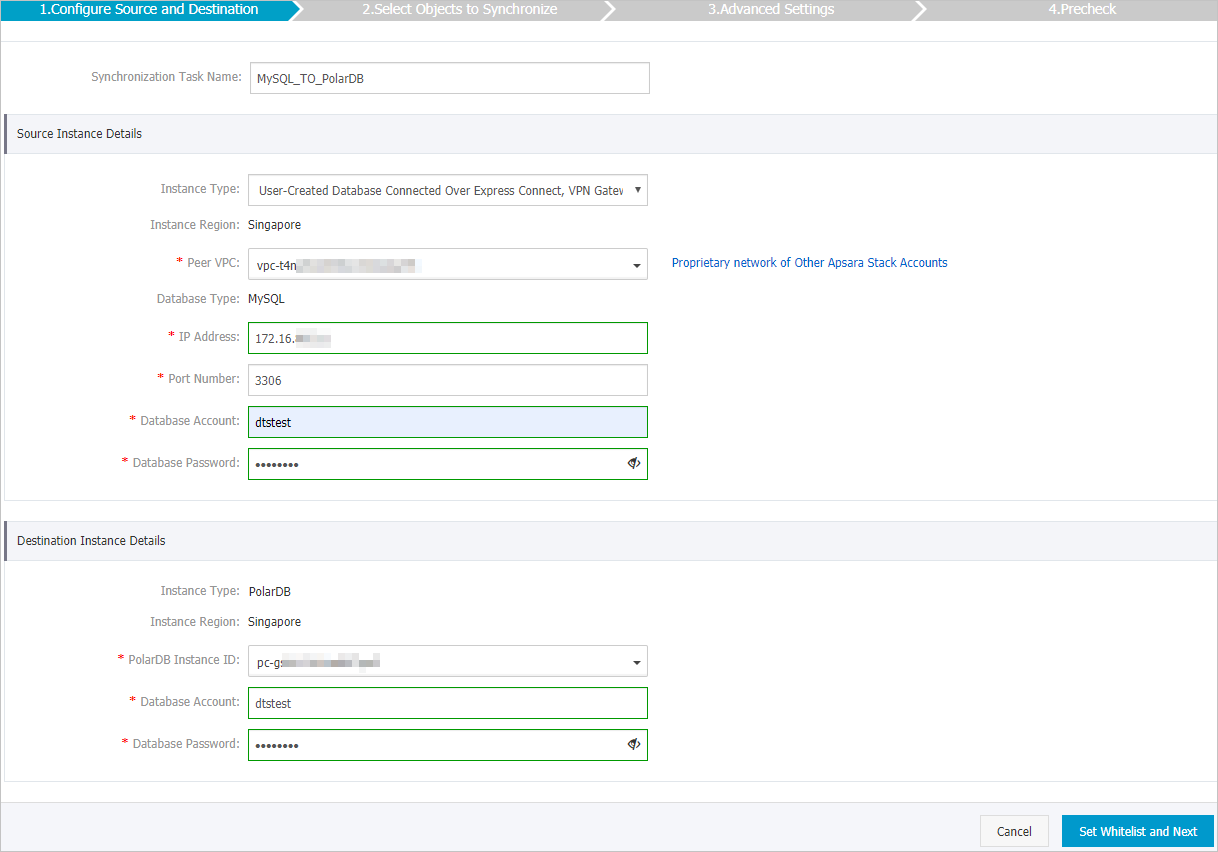
Click Set Whitelist and Next. DTS automatically adds its server CIDR blocks to the IP whitelist of Alibaba Cloud database instances (such as ApsaraDB RDS for MySQL) and to the security group rules of Elastic Compute Service (ECS) instances hosting self-managed databases. For self-managed databases in a data center or hosted by a third-party provider, add the CIDR blocks manually. See Add the CIDR blocks of DTS servers.
WarningAdding DTS server CIDR blocks to your whitelist or security group rules introduces security risks. Before proceeding, take preventive measures such as using strong credentials, limiting exposed ports, auditing API calls, regularly reviewing your whitelist rules, and connecting the database to DTS by using Express Connect, VPN Gateway, or Smart Access Gateway.
Step 3: Select objects and configure conflict handling
Configure the following settings, then click Next.
| Setting | Description |
|---|---|
| Processing mode for existing target tables | Controls how DTS handles tables in the destination cluster that share names with source tables. |
| — Pre-check and Intercept | DTS checks for name conflicts before starting. If the destination cluster already has tables with the same names, the precheck fails and the task cannot start. Use object name mapping to rename destination objects if needed. |
| — Ignore | DTS skips the name-conflict check. During initial sync, records with matching primary keys in the destination are not overwritten — but they are synchronized during incremental sync. If the source and destination schemas differ, initial sync may fail or only partially complete. Data consistency is not guaranteed with this option. |
| Objects to synchronize | In the Available section, select tables or databases and click  to move them to Selected. Selecting a database synchronizes all schema changes within it. Use object name mapping to rename objects in the destination. to move them to Selected. Selecting a database synchronizes all schema changes within it. Use object name mapping to rename objects in the destination. |
| Rename databases and tables | Use object name mapping to rename synchronized objects. See Object name mapping. |
| Sync DMS online DDL temporary tables | Applies if you use DMS for online DDL on the source. Yes syncs temporary tables (may cause task lag on large operations). No syncs only the original DDL, which may lock destination tables. |
| Retry time for failed connections | Default: 720 minutes (12 hours). DTS retries the connection within this window; if reconnected, the task resumes. If not, the task fails. DTS charges continue during the retry period — set this value based on your business needs. |
Step 4: Select initial synchronization types
Select the synchronization types to run before incremental sync begins.

Initial Schema Synchronization: Copies the schema from source to destination before data sync starts.
Initial Full Data Synchronization: Copies all existing data from source to destination.
Selecting both options synchronizes schemas and historical data before incremental synchronization begins.
Step 5: Run the precheck
Click Precheck. DTS validates the configuration before the task can start.
If any precheck item fails, click theicon next to it for details. Fix the issue and run a new precheck, or ignore the item and rerun if it is not critical.
After the Precheck Passed message appears, close the dialog. The synchronization task starts automatically.
Verify synchronization status
After initial synchronization completes, the task enters the Synchronizing state. Monitor task status on the Synchronization Tasks page.
