About mPaaS 10.1.60
The 10.1.60 baseline officially supports the WKWebView interface. For more information, see WKWebView adaptation for 10.1.60. Apple's App Store stopped accepting new apps that use UIWebView in April 2020 and stopped accepting updates for existing apps that use UIWebView in December 2020. For more information, see the official announcement from Apple. Therefore, you must replace UIWebView with WKWebView.
The 10.1.60 baseline is compatible with iOS 13 and Xcode 11. For more information, see mPaaS 10.1.60 adaptation for iOS 13.
The 10.1.60 baseline adds the Mini Program component. The official version of the Mini Program component provides a more comprehensive set of APIs and offers significant improvements in stability and compatibility. For information about Mini Program upgrades, see Mini Program Upgrade Guide. For more information about new features in the Mini Program IDE, such as debugging, previewing, and publishing, see Develop Mini Programs.
The 10.1.60 baseline significantly optimizes the H5 container, providing a simpler integration process and enhanced capabilities. This baseline also offers notable improvements in compatibility and stability. For information about upgrading the H5 container and offline packages, see H5 Container Upgrade Guide.
The 10.1.60 baseline adds the Smart Delivery component. Smart Delivery delivers personalized ads within an application. It supports targeted advertising for specific user groups, which helps app operators reach users accurately and promptly. For more information, see Smart Delivery.
The 10.1.60 baseline provides significant improvements to component compatibility, stability, and features. For the specific release notes, see iOS SDK Release Notes.
The 10.1.60 baseline no longer supports iOS 8.
mPaaS 10.1.60 upgrade guide
Upgrade using CocoaPods
Prerequisites
The CocoaPods mPaaS plugin is installed.
If you have not installed the CocoaPods mPaaS plugin, run the following command in the terminal to install it.
sh <(curl -s http://mpaas-ios.oss-cn-hangzhou.aliyuncs.com/cocoapods/installmPaaSCocoaPodsPlugin.sh)If you have already installed the CocoaPods mPaaS plugin, you can use the upgrade command
pod mpaas update --allto upgrade the plugin. For more information about how to use the CocoaPods mPaaS plugin, see Integrate based on a native framework and CocoaPods.
In the Podfile, change the SDK version setting to 10.1.60.
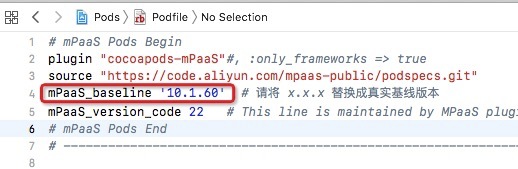
Run
pod mpaas update 10.1.60to install the latest SDK of the 10.1.60 baseline.Run
pod installorpod updateas required to complete the project upgrade to 10.1.60.
What to do next
If an error similar to the following occurs during CocoaPods integration:
Invalid `Podfile` file: [!] No mPaaS_Nebula : 10.1.60-beta found !!! Check name & version in Podfile.Follow these steps to resolve the issue:
Run the
gem list | grep 'mPaaS'command to check the CocoaPods plugin version, as shown in the following figure.
If the CocoaPods plugin version is earlier than 0.9.5, run the following command to reinstall the plugin.
sh <(curl -s http://mpaas-ios.oss-cn-hangzhou.aliyuncs.com/cocoapods/installmPaaSCocoaPodsPlugin.sh)
Component usage upgrade guide
Baseline 10.1.60 introduces significant changes to the integration and usage of the H5 container and miniapp. If you have integrated these components, please read the following instructions carefully:
For more information about upgrading the H5 container and offline packages, see H5 Container 10.1.60 Upgrade Guide.
For more information about Mini Program upgrades, see Mini Program 10.1.60 Upgrade Guide.
Component API changes
An adaptation layer was added to mPaaS components starting with the 10.1.32 baseline. If you are using a baseline that does not use the adaptation layer API, first see mPaaS 10.1.32 adaptation for iOS 13.
After you upgrade the SDK, use the adaptation layer APIs. For more information, see the notes on upgrading from older versions in the following component documents:
Modify your code to use the middle-layer (adapter) methods instead of directly using the underlying methods. Some underlying methods may be changed or deprecated in future versions. If you continue to use them, you may need to spend more time adapting your code in future updates.
Handling custom libraries
Many custom requirements have been incorporated into the standard components of the 10.1.60 baseline. However, as a precaution, if your project previously depended on custom libraries and you are upgrading from a lower SDK version (such as 10.1.32) to 10.1.60, your custom libraries may need to be rebuilt for the new version. submit a ticket or contact the mPaaS helpdesk to confirm if this is necessary.