Elasticsearch 6.x dropped support for multiple types in a single index. You can use the Reindex API to convert multi-type indices in a 5.x instance into single-type indices, and then migrate the data to a 6.x instance by using Logstash.
Considerations
Alibaba Cloud ES has two deployment modes: basic management (v2) architecture and cloud-native new management (v3) architecture. You can check the deployment mode of your instance on the Basic Information page.
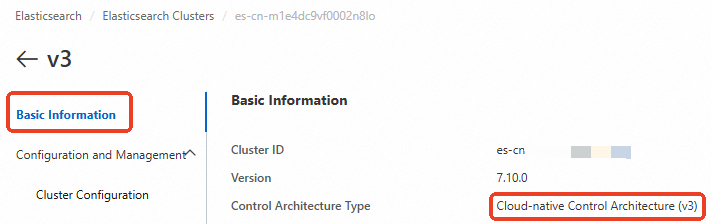
For clusters that use the cloud-native new management (v3) architecture, cross-cluster reindexing requires a PrivateLink-based private network connection. Select a solution from the following table based on your scenario.
|
Scenario |
ES cluster network architecture |
Solutions |
|
Data migration between Alibaba Cloud ES clusters |
Both ES clusters are created with the basic management (v2) architecture. |
reindex API. For more information, see Use the reindex API to migrate data between Alibaba Cloud ES clusters. |
|
One of the ES clusters is created with the cloud-native new management (v3) architecture. Note
The other ES cluster can be created with the cloud-native new management (v3) architecture or the basic management (v2) architecture. |
||
|
Migrate data from a self-managed ES cluster on an ECS instance to an Alibaba Cloud ES cluster |
The Alibaba Cloud ES cluster is created with the basic management (v2) architecture. |
reindex API. For more information, see Migrate data from a self-managed Elasticsearch cluster to Alibaba Cloud Elasticsearch using reindex. |
|
The Alibaba Cloud ES cluster is created with the cloud-native new management (v3) architecture. |
reindex API. For more information, see Migrate self-managed Elasticsearch data via a private connection. |
Workflow
-
Prepare Alibaba Cloud Elasticsearch and Logstash instances. Ensure that they are in the same Virtual Private Cloud (VPC).
-
Alibaba Cloud Elasticsearch instance: Stores index data.
-
Alibaba Cloud Logstash instance: Migrates the processed data through a pipeline.
-
-
Use the reindex API to convert multi-type indices in an Alibaba Cloud Elasticsearch 5.x instance into single-type indices. Two methods are available:
-
Merge types: Merge data from a multi-type index in an Elasticsearch 5.x instance into a new single-type index by using a reindex script.
-
Split types: Split data from a multi-type index in an Elasticsearch 5.x instance into multiple single-type indices based on the original type by using the reindex API.
-
-
Step 2: Migrate data using Logstash
Migrate the processed index data to an Elasticsearch 6.x instance by using Alibaba Cloud Logstash.
-
Step 3: Verify the data migration
View the migrated indices in Kibana.
Prerequisites
-
Prepare earlier-version (5.5.3) and later-version (6.7.0) Alibaba Cloud Elasticsearch instances, and the multi-type data to be migrated.
For more information about how to create an instance, see Create an Alibaba Cloud Elasticsearch instance.
-
Create an Alibaba Cloud Logstash instance in the same Virtual Private Cloud as your Alibaba Cloud Elasticsearch instances.
For more information, see Step 2: Create an Alibaba Cloud Logstash instance.
Step 1: Convert index types
The following steps demonstrate how to merge types, consolidating data from a multi-type index into a single-type index.
-
Enable automatic index creation for your Elasticsearch instance.
-
Log on to the Alibaba Cloud Elasticsearch console.
-
In the left-side navigation pane, click Elasticsearch Clusters.
-
In the top navigation bar, select a resource group and a region.
-
In the instance list, click the ID of the earlier-version instance.
-
In the left-side navigation pane, click Cluster Configuration.
-
Click YML File Configuration next to Modify Configuration.
-
On the YML File Configuration page, set Auto Indexing to Enable.
WarningChanging the setting for Auto Indexing restarts the instance. Make sure that this action does not adversely affect your services before you proceed.
-
Select the This operation restarts the instance. Confirm to proceed. checkbox, and then click OK.
-
-
Log on to the Kibana console of the earlier-version Elasticsearch instance.
For more information, see Log on to the Kibana console.
-
In the left-side navigation pane, click Dev Tools.
If the earlier-version instance does not contain multi-type index data, run the following commands in the Console to create test data:
PUT twitter/tweet/1 {"user": "kimchy", "message": "trying out Elasticsearch"} PUT twitter/tweet/2 {"user": "kimchy", "message": "another tweet"} PUT twitter/user/1 {"name": "kimchy", "email": "kimchy@elastic.co"} PUT twitter/user/2 {"name": "elastic", "email": "info@elastic.co"} -
In the Console, run the following command to merge data from a multi-type index into a single-type index.
POST _reindex
{
  "source": {
    "index": "twitter"
  },
  "dest": {
    "index": "new1"
  },
  "script": {
    "inline": """
    ctx._id = ctx._type + "-" + ctx._id;
    ctx._source.type = ctx._type;
    ctx._type = "doc";
    """,
    "lang": "painless"
  }
}
In this example, ctx._source.type adds a type field to the new1 index and sets its value to the original _type. The _id of the new1 index is constructed as _type-_id to prevent ID conflicts between documents of different types.
-
Run the
GET new1/_mappingcommand to view the merged Mapping structure. -
Run the following command to view the data in the merged index.
GET new1/_search
{
   "query":{
     "match_all":{
      }
  }
}
The following steps demonstrate how to split types, reindexing a multi-type index into multiple single-type indices.
-
In the Console, run the following commands to split a multi-type index into single-type indices.
POST _reindex
{
  "source": {
    "index": "twitter",
    "type": "tweet",
    "size": 10000
  },
  "dest": {
    "index": "twitter_tweet"
  }
}
POST _reindex
{
  "source": {
    "index": "twitter",
    "type": "user",
    "size": 10000
  },
  "dest": {
    "index": "twitter_user"
  }
}
This example splits the twitter index into the twitter_tweet and twitter_user indices based on different types.
-
Run the following commands to view the data in the split indices.
GET twitter_tweet/_search
{
   "query":{
     "match_all":{

      }
  }
}
GET twitter_user/_search { "query":{ "match_all":{ } } }
Step 2: Migrate data using Logstash
Go to the Logstash Clusters page.
Navigate to the target cluster.
In the top navigation bar, select the region where the cluster resides.
On the Logstash Clusters page, find the cluster and click its ID.
-
In the left-side navigation pane, click Pipelines.
-
Click Create Pipeline.
-
On the Create page, enter a Pipeline ID and configure the pipeline.
Sample pipeline configuration:
input {
    elasticsearch {
    hosts => ["http://es-cn-0pp1f1y5g000h****.elasticsearch.aliyuncs.com:9200"]
    user => "elastic"
    index => "*"
    password => "your_password"
    docinfo => true
  }
}
filter {
}
output {
  elasticsearch {
    hosts => ["http://es-cn-mp91cbxsm000c****.elasticsearch.aliyuncs.com:9200"]
    user => "elastic"
    password => "your_password"
    index => "test"
  }
}
In this example, the index parameter in the output section is set to test. Replace it with your actual target index name.
For more information about pipeline configuration parameters, see Logstash configuration file reference.
-
Click Next step and configure the pipeline parameters.
Parameter
Description
Pipeline Workers
Number of worker threads for the filter and output stages. Increase this value if events are backlogged or CPU is underutilized. Default: the number of CPU cores.
Pipeline Batch Size
Maximum events a worker collects before executing filters and outputs. Larger batches increase memory usage and may require a larger JVM heap size (LS_HEAP_SIZE). Default: 125.
Pipeline Batch Delay
Wait time in milliseconds before dispatching an undersized batch to a worker thread. Default: 50 ms.
Queue Type
Internal queuing model for event buffering between stages. Valid values:
-
MEMORY: Default. Uses an in-memory queue.
-
PERSISTED: A disk-based persistent queue.
Queue Max Bytes
The maximum amount of data the queue can store, in
MB. The value must be an integer from1to253-1. Default value:1024.NoteMake sure that this value is less than your total disk capacity.
Queue Checkpoint Writes
Maximum events written before a checkpoint is forced (persistent queue only). 0 means no limit. Default: 1024.
WarningSaving and deploying the configuration triggers an instance restart. Proceed only when this will not affect your business.
-
-
Click Save or Save and Deploy.
-
Save: Saves the pipeline configuration but does not apply it. After saving, you are returned to the Pipelines page. In the Pipelines section, you can click Deploy Now in the Actions column to restart the instance and apply the configuration.
-
Save and Deploy: Saves and deploys the configuration, restarting the instance to apply the changes.
-
Step 3: Verify data migration
-
Log on to the Kibana console of the later-version Elasticsearch instance.
For more information, see Log on to the Kibana console.
-
In the left-side navigation pane, click Dev Tools.
-
In the Console, run the following command to view the migrated indices.
GET _cat/indices?v