Protect ECS instances with host security, vulnerability management, network firewalls, and traffic security for web applications.
-
Hosts serve as hubs where cloud services such as web applications, databases, and Object Storage Service (OSS) converge. Effective host security services provide antivirus and threat detection capabilities to defend against viruses and hacker attacks.
-
Use Security Center to discover and remediate vulnerabilities on ECS instances. You can also use the patch management feature of Operation Orchestration Service (OOS) to batch-patch and automatically install missing patches on ECS instances.
-
Network security protection for web applications
Configure Cloud Firewall or security groups to confine attacks to a limited scope during virus intrusions without affecting overall business.
-
Traffic security protection for web applications
Web application attacks remain a major source of Internet security threats, targeting not only traditional webpages but also APIs and miniapps. Use Web Application Firewall (WAF) and Anti-DDoS services to defend against traffic and vulnerability attacks and prevent business interruptions.
-
Use ActionTrail events to perform risk, exception, and behavior analysis and trace back application security operation chains to identify defects.
Host security protection
-
Feature introduction
Security Center Basic protects ECS instances with vulnerability detection, unusual logon detection, AccessKey pair leak detection, and compliance check. See Security Center Basic.
NoteFor additional features such as vulnerability fixing, anti-ransomware, and website tamper-proofing, see Purchase Security Center.
-
Configuration methods
-
ECS console: When you create ECS instances, select Free Security Hardening to enable Security Center features such as vulnerability detection and compliance check.
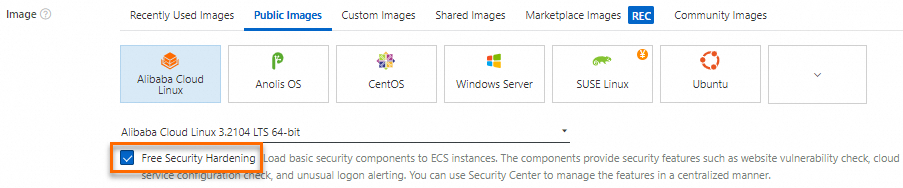 Note
NoteYou can also call the RunInstances operation with
SecurityEnhancementStrategyset to Active to enable security hardening. -
Security Center console: Install the Security Center agent on existing ECS instances. See Install the agent.
-
-
Check the security status of ECS instances
-
ECS console: On the Instance page, hover over the
 icon in the Monitoring column to check the security status. Click Process Now to view alert details. Handle high-severity risks promptly to prevent business impact.
-
Security Center console: In the left-side navigation pane, choose to view the security details of an ECS instance. See Manage servers.
-
Vulnerability management
Scan for and handle vulnerabilities
-
Feature introduction
Security Center detects security vulnerabilities in operating systems, web content management systems, and applications, assesses severity, and prioritizes remediation. You can fix vulnerabilities with a few clicks to reduce the attack surface.
Security Center Basic automatically scans for Linux software, Windows system, and Web-CMS vulnerabilities every two days. You can also trigger manual scans. Paid editions additionally update vulnerability information automatically and fix vulnerabilities. See Overview.
-
Configuration methods
Scan for vulnerabilities regularly and fix detected issues. See Vulnerability scanning and Manage vulnerabilities.
Use patch baseline to automatically update security patches
-
Feature introduction
OOS patch management automatically installs security and other patches on ECS instances. You can install service packs on Windows instances, update minor versions on Linux instances, and batch-patch multiple instances that run the same operating system. The feature also scans for missing patches and installs them automatically. See Patch Management Overview.
-
Configuration methods
Use patch management to automatically scan, download, and install required system patches on ECS instances.
-
OOS console: See Patch baseline and Apply patches on demand.
-
Network security protection for web applications
Configure Cloud Firewall
-
Feature introduction
Cloud Firewall is a SaaS service that provides centralized security isolation and traffic management for cloud assets at the Internet, Virtual Private Cloud (VPC), and host boundaries. See What is Cloud Firewall?
-
Configuration methods
Configure firewalls based on network boundaries for logical layering and maintenance.
-
To protect only Internet traffic, configure inbound or outbound access control policies for the Internet firewall.
-
To manage outbound traffic from VPC resources, such as ECS instances or elastic container instances, to the Internet over a NAT gateway, enable a NAT firewall and configure access control policies for the Internet firewall.
-
To protect Internet traffic and traffic between ECS instances, use the Internet firewall with internal firewalls.
-
To protect Internet traffic, inter-VPC traffic, and VPC-to-data-center traffic, use the Internet firewall with VPC firewalls.
-
Configure security groups
-
Feature introduction
A security group is a virtual firewall that controls inbound and outbound traffic of ECS instances. Configure inbound rules to control traffic to instances and outbound rules to control traffic from instances. See Overview.
-
Configuration methods
Specify one or more security groups when you create an ECS instance, or add an existing instance to security groups.
Traffic security protection for web applications
Configure WAF
-
Feature introduction
WAF filters malicious traffic destined for websites and applications and forwards clean traffic to web servers, protecting against intrusion. See What is WAF?
-
Configuration methods
Add the ports of an ECS instance to WAF to forward web traffic through WAF for inspection. WAF filters malicious traffic and forwards clean traffic to the instance. See Enable WAF protection for ECS instances.
Anti-DDoS Basic
-
Feature introduction
Anti-DDoS Basic provides free DDoS mitigation ranging from 500 Mbit/s to 5 Gbit/s for ECS instances. See What is Anti-DDoS Basic?
NoteAdvanced editions such as Anti-DDoS Origin and Anti-DDoS Proxy provide additional protection. See What is Anti-DDoS Origin and What is Anti-DDoS Proxy?
Anti-DDoS Basic monitors inbound traffic to ECS instances in real time. When traffic to an instance with a public IP address exceeds the scrubbing threshold, Anti-DDoS Basic automatically scrubs the traffic.
-
Configuration methods
Anti-DDoS Basic is activated by default and cannot be deactivated. No manual configuration is required.
Regular operation audit
-
Feature introduction
ActionTrail monitors and records the operations of your Alibaba Cloud account for security analysis, resource change tracking, and compliance audits. ActionTrail delivers management events to Simple Log Service (SLS) Logstores or OSS buckets for real-time auditing. See What is ActionTrail?
Query management events for ECS resources in the ActionTrail console. See Audit events of ECS. If an error occurs, query event details to obtain the time, region, and involved instances.
-
Configuration methods
ECS is integrated with ActionTrail by default. No manual configuration is required.