DataWorks provides the Data Analysis platform to seamlessly process, analyze, transform, and visualize your data. In Data Analysis, you can not only gain insights from your data online but also edit and share it. This topic describes the benefits, features, and required permissions for Data Analysis.
Benefits
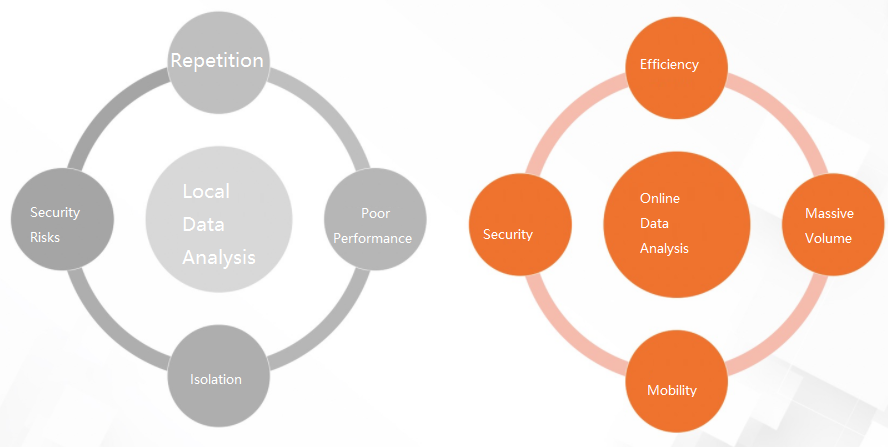
Compared to on-premises analysis, online data analysis offers the following benefits:
Scale: Leverage the compute engine to efficiently analyze massive datasets.
Collaboration: Pull data from various data sources for querying and analysis, and share the results with specific members.
Security: Analyze data online without downloading it to a local device. You can also control permissions for data analysis and sharing.
Go to data analysis
Log on to the DataWorks console. After you switch to the target region, in the left-side navigation pane, choose Data Analysis and Service > Data Analysis, and then click Enter Data Analysis.
The Data Analysis homepage includes the following sections:
Shortcuts: In the Shortcuts section, click an icon, such as SQL Query, Spreadsheet, or Upload, to open the corresponding module and begin your data analysis.
Recently Edited: The Recently Edited section lists your recently modified files. Click a file name to open it. From the All Files dropdown list, you can filter files by type: Spreadsheet, dimension table, or SQLNotes.
NoteSQLNotes is available only in the China (Hangzhou) and China (Shanghai) regions.
Data Analysis is supported only on desktop computers that run Google Chrome 69 or later.
Features
SQL Query
SQL query allows you to use standard SQL statements to query and analyze big data stored in MaxCompute. For more information, see SQL Query (Legacy).
You can write SQL statements to quickly query and analyze data from any data source for which you have query permissions. For more information, see SQL Query (Legacy).
DataWorks SQL query provides extended flexibility and convenience. You can use data sources in your workspace as datasets for data analysis. These data sources include default sources from compute engines supported by DataWorks and data sources that you create. In SQL query, you can preview data in a dataset and quickly generate a SQL query for the table. For more information, see SQL Query (Legacy).
Spreadsheet
Spreadsheet is a core feature of Data Analysis that provides a personal space for you to obtain, explore, and analyze data. For more information, see Spreadsheet.
Built around an online spreadsheet interface, the spreadsheet feature provides common spreadsheet functions to help you get started quickly. For more information, see Spreadsheet operations.
Spreadsheet supports importing data from data sources and local files. For more information, see Import data.
Spreadsheet also supports data profiling, and you can share a spreadsheet with specific members to view data. For more information, see Data profiling and Share a spreadsheet.
Dimension Table
The dimension table feature allows you to upload local data to a MaxCompute table. After the data is uploaded, you can use the table for online joint analysis with other tables. For more information, see Dimension table.
For example, a data analyst or operations staff needs to manually maintain a MaxCompute table in the production environment. Without the dimension table feature, the following process must be performed each time data changes:
The operations staff describes the requirements to a data analyst.
The data analyst submits the requirements to a developer.
The developer writes SQL statements in DataWorks, creates an Excel file, synchronizes the data, and delivers it to the operations staff.
With the dimension table feature, the operations staff only needs to create a dimension table in Data Analysis, visually modify and save the data, and the data is automatically synchronized to the MaxCompute production table, significantly improving efficiency.
Permissions
Starting from June 1, 2022, only users who have been assigned the data analyst role can use the Data Analysis feature in DataWorks. If a user needs to use this feature, ask the workspace administrator to grant the data analyst role to the user. For more information, see Manage members and roles.
If the data analyst role was not granted before June 1, 2022, users who had only the guest or custom role will no longer be able to use the Data Analysis feature.
Roles other than guest and custom role have the Data Analysis permissions by default. Users with these roles can continue to use the Data Analysis feature as usual.
For more information about role permissions, see Role permissions.
Next step
After you learn about the benefits, features, and permissions of Data Analysis, you can go to the console to explore the Data Analysis module. For more information, see Get started with Data Analysis.