ApsaraDB for ClickHouse comes in two editions: Enterprise Edition and Community-compatible Edition. This page compares their architectures, enhanced features, and kernel version support to help you choose the right edition.
Architecture comparison
Enterprise Edition
ApsaraDB for ClickHouse Enterprise Edition uses a cloud-native architecture with compute-storage separation. Both computing and storage resources operate in serverless mode and scale elastically.
-
Computing resources: Scale automatically within a configured range based on workload, preventing resource waste and reducing O&M costs.
-
Storage resources: Use Object Storage Service (OSS) as a shared storage layer. OSS data redundancy ensures high availability and lowers per-unit storage cost compared to the Community-compatible Edition.
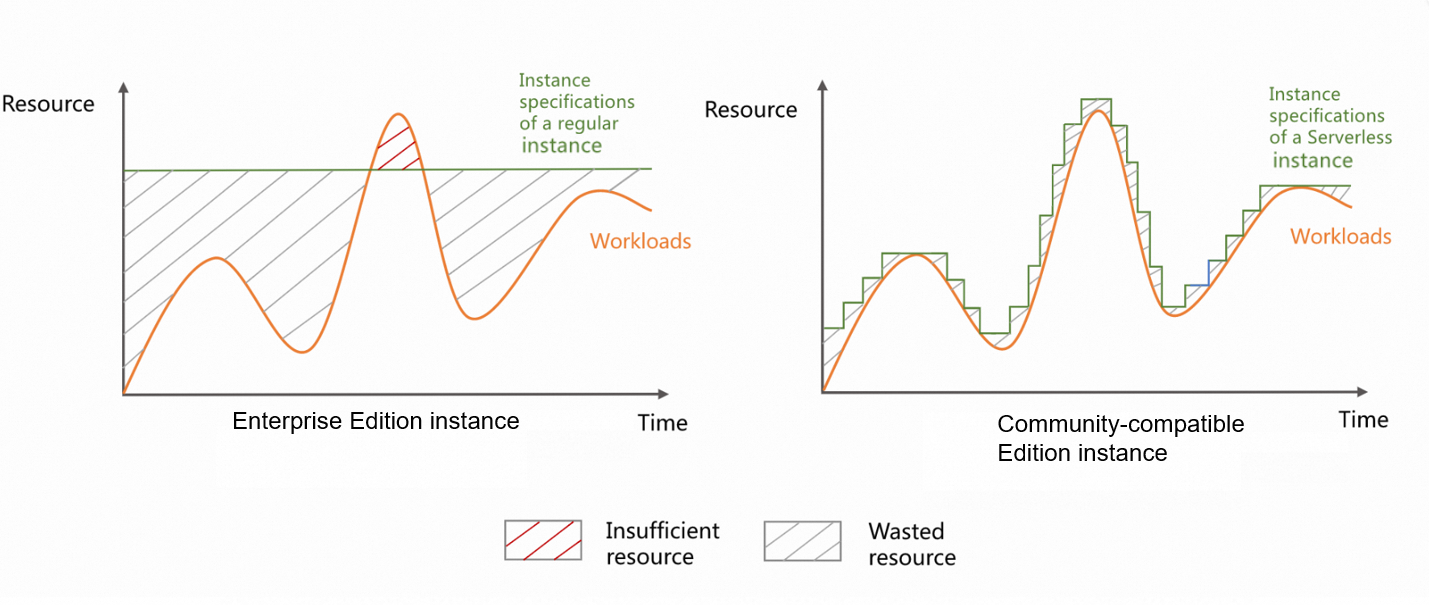
| Feature | Description | Benefit |
|---|---|---|
| Compute-storage separation | Storage and computing resources are managed independently. | Flexible resource allocation; scale compute without affecting stored data. |
| Scalability | Both storage and computing resources run in serverless mode. Compute nodes are stateless, enabling horizontal scaling without data migration. The SharedMergeTree table engine supports horizontal scaling in seconds and is compatible with the MergeTree engine family. For more information, see SharedMergeTree table engine. | On-demand, elastic resource usage with no data migration overhead. |
| High availability | Enabled by default. A single cluster has two or more compute nodes, with data shared across multiple compute nodes. | No manual configuration required; your cluster is resilient from the start. |
| Compatibility | Remains compatible with previous versions while introducing new features. For more information, see Compatibility guide for ApsaraDB for ClickHouse Enterprise Edition. | Upgrade without breaking existing workloads. |
| Performance optimization | Parallel Replica linearly improves concurrent processing. Lightweight Update/Delete delivers real-time results with improved efficiency. ClickHouse Keeper replaces ZooKeeper for higher performance and lower memory usage. | Faster queries, real-time mutations, and reduced infrastructure overhead. |
| Enterprise-grade O&M | Supports user management, whitelist configuration, version upgrade, failover, and visualized O&M. | Full operational control with enterprise-grade tooling. |
| Data ecosystem | Integrates with various cloud data sources to simplify data synchronization and migration. | Simplify integration with cloud-native data sources to streamline data synchronization and migration. |
Community-compatible Edition
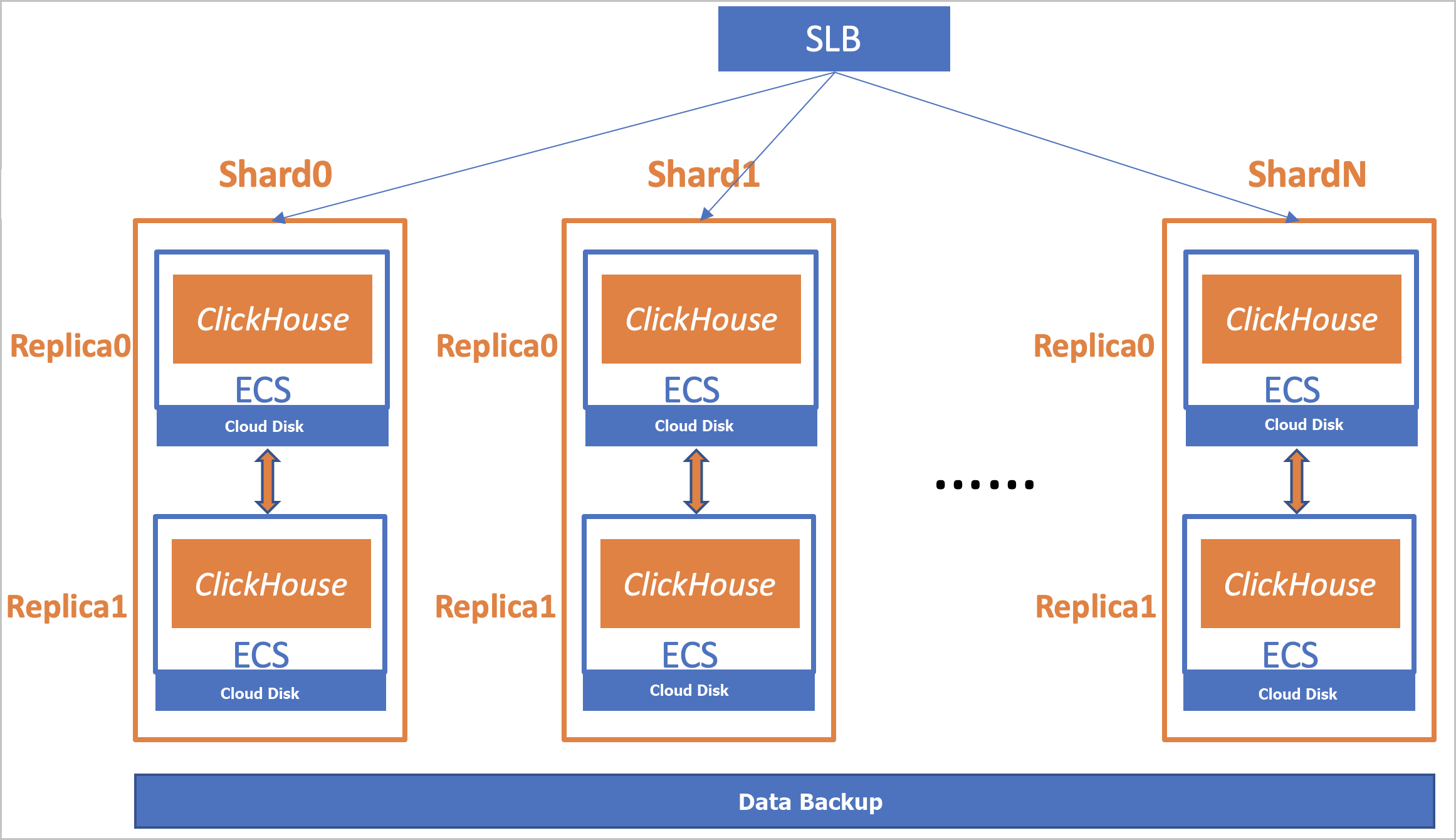
ApsaraDB for ClickHouse Community-compatible Edition uses a coupled architecture where computing and storage are tightly integrated.
-
All nodes are peers. Each node handles query requests, write requests, and background data computation.
-
Each cluster contains one or more shards, and each shard contains one or more replicas.
-
All nodes are deployed on ECS instances and use highly reliable cloud disks for persistent storage.
| Feature | Description |
|---|---|
| Scalability | Supports multiple specifications and elastic scaling. |
| Security | Provides user management and whitelist configuration. |
| Visualized O&M | Supports version upgrade and failover. |
| Data ecosystem | Integrates with various cloud data sources to simplify data synchronization and migration. |
Kernel version comparison
The Enterprise Edition runs kernel version 23.8. The Community-compatible Edition supports versions 22.8, 21.8, 20.8, 20.3, and 19.15.
Kernel features
| Feature | Enterprise Edition (23.8) | 22.8 | 21.8 | 20.8 | 20.3 | 19.15 |
|---|---|---|---|---|---|---|
| MaxCompute external table engine | No | Yes | Yes | Yes | Yes | Yes |
| OSS external table engine | Yes | Yes | Yes | Yes | Yes | Yes |
| Lightweight Update | Yes | No | No | No | No | No |
| Lightweight Delete | Yes | Yes | Yes | No | No | No |
Management features
| Feature | Enterprise Edition (23.8) | 22.8 | 21.8 | 20.8 | 20.3 | 19.15 |
|---|---|---|---|---|---|---|
| Cluster start and stop | Yes | No | No | No | No | No |
| Scaling range modification for Enterprise Edition | Yes | No | No | No | No | No |
| Parameter settings | Yes | Yes | Yes | Yes | Yes | Yes |
| Monitoring and management of slow SQL queries and running SQL queries | Yes | Yes | Yes | Yes | Yes | Yes |
| Account management | Yes | Yes | Yes | Yes | Yes | Yes |
| Cluster restart | Yes | Yes | Yes | Yes | Yes | Yes |
| Horizontal scaling
Note
The Enterprise Edition uses auto scaling for horizontal scaling. No manual operation is required. |
Yes | Yes | Yes | Yes | Yes | Yes |
| Vertical scaling
Note
The Enterprise Edition uses auto scaling for vertical scaling. No manual operation is required. |
Yes | Yes | Yes | Yes | Yes | Yes |
| Backup and restore | Yes | Yes | Yes | Yes | No | No |
| Monitoring and alerting | Yes | Yes | Yes | Yes | Yes | Yes |
| Minor engine version updates | Yes | Yes | Yes | Yes | No | No |
| Tiered storage of hot and cold data
Note
The Enterprise Edition automatically tiers data between cache and shared storage. The Community-compatible Edition relies on rules to manage hot and cold data. |
Yes | Yes | Yes | Yes | Yes | No |
| Data migration between ApsaraDB for ClickHouse Community-compatible Edition clusters
Note
The version requirement applies only to the destination cluster. |
No | Yes | Yes | Yes | Yes | No |
| Data security | Yes | Yes | Yes | Yes | Yes | Yes |
| Use zero-ETL to synchronize data from an RDS for MySQL instance to an ApsaraDB for ClickHouse cluster | Yes | Yes | Yes | Yes | No | No |
What's next
-
To create a cluster, see Create a cluster.
-
To migrate a self-managed ClickHouse cluster or a Community-compatible Edition cluster to the Enterprise Edition, see Migrate a self-managed ClickHouse cluster to ApsaraDB for ClickHouse Enterprise Edition.