After installing a probe for your application, ARMS begins monitoring it. On the Provided Services page, you can view detailed information about the services your application provides, including API calls, message subscriptions, and scheduled tasks.
Prerequisites
ARMS Application Monitoring provides a new monitoring details page for users who have enabled the new billing model. For details about the new billing model, see Product Billing (New).
If you haven’t enabled the new billing model but want to access the new monitoring details page, click Switch to New Version on the Application List page.
You have installed a probe for your application. For instructions, see Overview of Application Monitoring Integration.
View services provided by an application
Log on to the ARMS console. In the left-side navigation pane, choose .
On the Application List page, select the region in the top navigation bar and then click the name of the application.
NoteIcons in the Language column have the following meanings:
 : a Java application connected to Application Monitoring.
 : a Golang application connected to Application Monitoring.
 : a Python application connected to Application Monitoring.
-: an application connected to Managed Service for OpenTelemetry.
-
In the top navigation bar, click Provided Services.
-
In the quick filter area, filter charts and the service list by Request Type, Interface Name, or Host.
-
In the trend chart area, view time series curves for request count, error count, and average response time of services.
Click the
 icon to open a dialog box where you can view statistics for a specific time period or compare statistics across different dates for the same time period. Click the
  icon to switch between column charts and trend charts.
 -
In the service list area, view information such as interface name, request type, and RED metrics (request count, error count, and average response time).
In the service list, you can perform the following operations:
-
Click an interface name or Details, SQL Analysis, or NoSQL Analysis in the Actions column to view detailed information about the corresponding service. For more information, see Interface Details.
-
Click Trace in the Actions column to view trace details for the call. For more information, see Trace Analysis.
-
-
Supported frameworks
Interface details
API calls
Overview
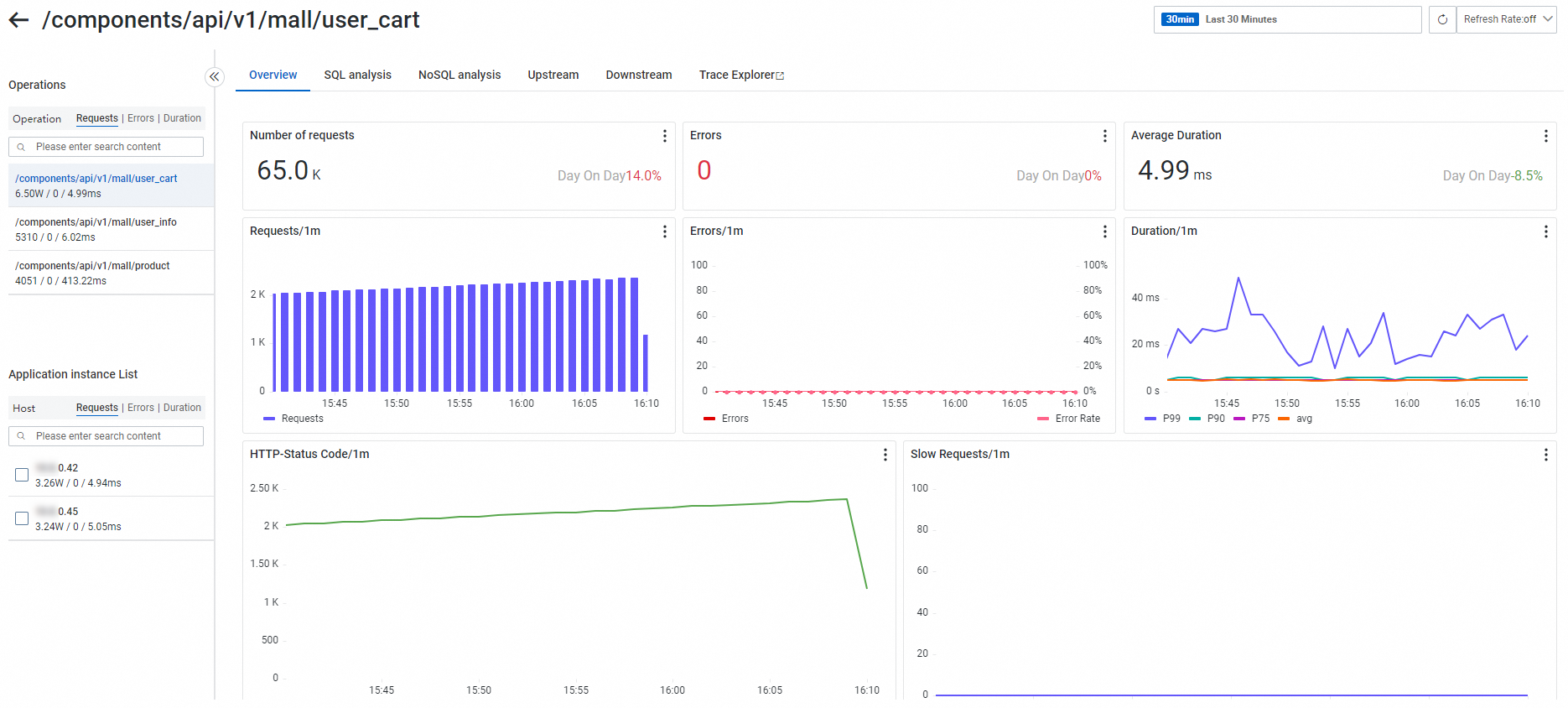
On the Overview tab, view the request count, error count, average response time, HTTP status code statistics, and time series curves for slow calls of the target interface.
SQL and NoSQL analysis
On the SQL Analysis and NoSQL Analysis tabs, view lists of SQL and NoSQL requests initiated by the selected interface on the left. You can also filter by host using the host list. Use these tabs to identify which SQL or NoSQL query is causing a service to run slowly.
Click a Database Name to view database details. Click Trace next to a SQL or NoSQL entry to view the complete code trace containing the execution logic. For more information, see Trace Analysis.
The SQL Analysis tab displays a Request Trend chart showing request count, slow SQL count, and average response time. Below the chart is an SQL analysis table listing fields such as Database Name, Database Type, Operation Type, SQL Statement, Request Count, Average Response Time, Slow SQL Count, and Response Size. Click Actions to initiate a trace query.
Upstream and downstream interface calls in traces
The Trace Upstream and Trace Downstream tabs list interfaces and their performance metrics—such as request count, error count, and response time—for upstream callers (those calling your application) and downstream callees (those called by your application), respectively.
Trace analysis
The trace analysis feature performs real-time analysis based on stored full-trace detail data by freely combining filters and aggregation dimensions, supporting custom diagnostics for various scenarios. For more information, see Trace Analysis. On the Trace Analysis page in the Tracing Analysis console, enter serviceName : "mall-gateway" in the search bar to filter results. The quick filter panel on the left supports filtering by status, response time (0 ns–5 s), interface name (such as GET, MallController.userCart, LLEN, SET), and host address. At the top of the page, view column charts for call count and error count, and a line chart for average response time. The central data table includes columns such as TraceId, Interface Name, Application Name, Response Time, Status, Start Time, and Host Address, with tabs for List, Scatter Chart, Full Trace Aggregation, Full Trace Topology, and Error/Slow Trace Analysis. The Slow Trace Analysis panel on the right shows a ranking of top spanName contributions.
Message subscriptions
Python applications do not currently support viewing message subscriptions.
Overview
On the Overview tab, view the request count, error count, average response time, and consumption latency (currently supported only for RocketMQ 4.8.0+) for the target interface.
SQL and NoSQL analysis
On the SQL Analysis and NoSQL Analysis tabs, view lists of SQL and NoSQL requests initiated by the selected interface on the left. You can also filter by host using the host list. Use these tabs to identify which SQL or NoSQL query is causing a service to run slowly.
Click a Database Name to view database details. Click Trace next to a SQL or NoSQL entry to view the complete code trace containing the execution logic. For more information, see Trace Analysis.
The right side of the SQL Analysis page displays a time series Request Trend chart (showing request count, slow SQL count, and average response time) and an SQL Details table. The table includes columns such as Database Name, Database Type, Operation Type, SQL Statement, Request Count, Average Response Time, Slow SQL Count, Response Size, and Actions.
Consumption statistics
The Consumption Statistics tab shows topic consumption from the consumer perspective, including request count, error count, and response time.
The left side of the page contains two filter areas: Interface List and Application Instance List. At the top of the main content area, view three time series line charts: Received Count/1m, Error Count/1m, and Response Time/1m. Below them is a summary data table by instance, with columns for IP, Received Count, Error Count, and Average Response Time.
Trace analysis
The trace analysis feature performs real-time analysis based on stored full-trace detail data by freely combining filters and aggregation dimensions, supporting custom diagnostics for various scenarios. For more information, see Trace Analysis.
Scheduled tasks
Currently, only Java applications support viewing scheduled tasks.
Overview
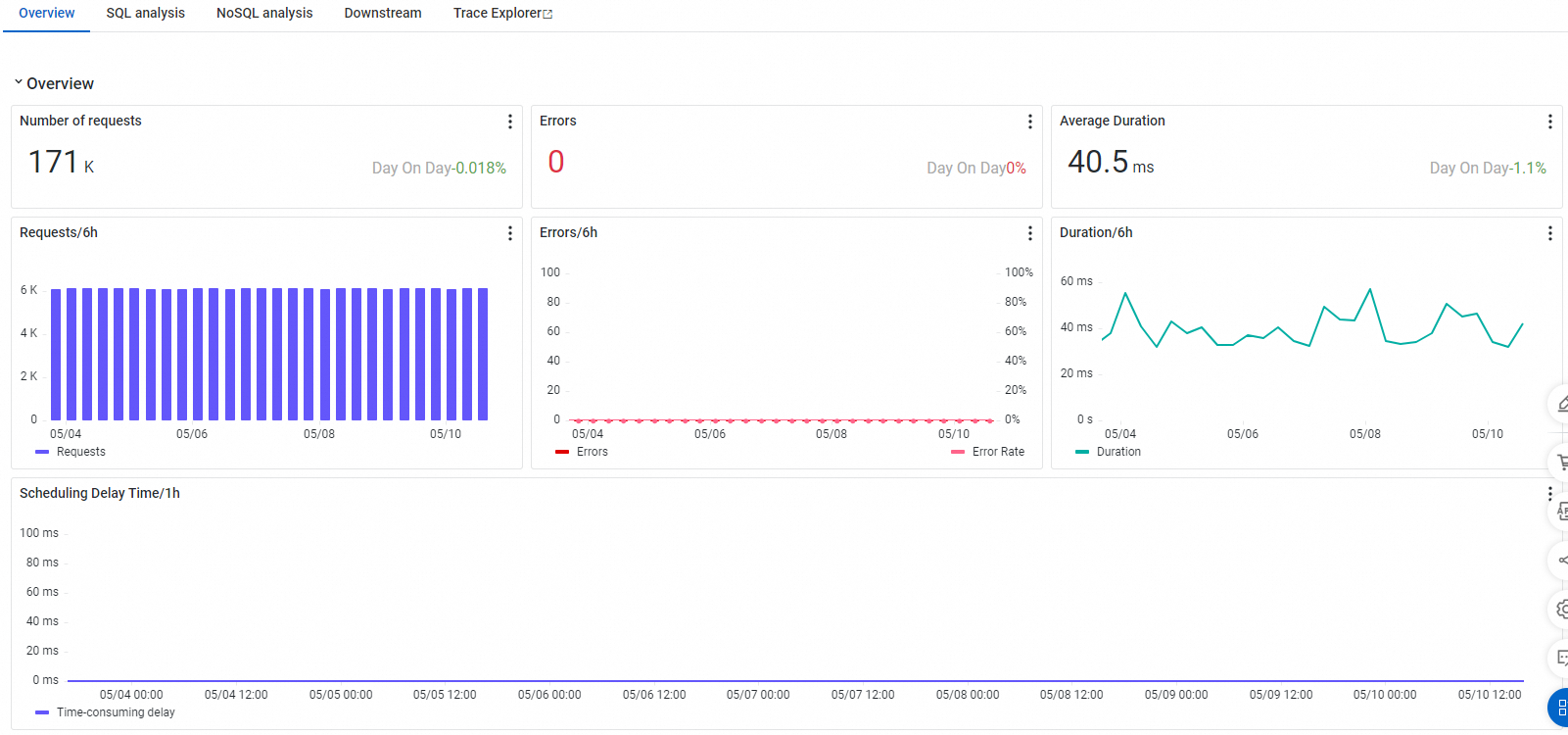
On the Overview tab, view the request count, error count, average response time, and a time series curve for scheduling delay of the target interface.
SQL and NoSQL analysis
On the SQL Analysis and NoSQL Analysis tabs, view lists of SQL and NoSQL requests initiated by the selected interface on the left. You can also filter by host using the host list. Use these tabs to identify which SQL or NoSQL query is causing a service to run slowly.
Click a Database Name to view database details. Click Trace next to a SQL or NoSQL entry to view the complete code trace containing the execution logic. For more information, see Trace Analysis.
The SQL Analysis tab displays a request trend chart (calls per minute, slow SQL count, and average response time) at the top, and an SQL list below showing fields such as SQL Statement, Call Count, Average Response Time, Slow SQL Count, and Response Size. Each row provides access points for Details and Trace.
Downstream interface calls in traces
The Trace Downstream tab lists interfaces and their performance metrics—such as request count, error count, and response time—for downstream callees (those called by your application).
The left side of the page shows an interface list with request count, error count, and average response time for each interface. The lower-left corner displays a host list. In the main content area, use the Downstream Application and Interface dropdowns to filter results. Below them are trend panels for request count, error count, and response time.
Trace analysis
The trace analysis feature performs real-time analysis based on stored full-trace detail data by freely combining filters and aggregation dimensions, supporting custom diagnostics for various scenarios. For more information, see Trace Analysis.
FAQ
API call related
What is trace upstream for an API call?
It refers to how many times upstream applications call this application. Records appear only if the upstream application has an ARMS probe installed. If the upstream application lacks a probe, no record appears. Self-calls by the application also appear as upstream.
Some APIs missing upstream ingest endpoint
If an interface truly has upstream calls but those upstream applications lack ARMS probes, the upstream calls will not appear.
Link upstream and downstream mixed up
If your trace uses SkyWalking components, the entire trace defaults to the SkyWalking protocol. ARMS had issues supporting SkyWalking protocol before version 4.2.x, causing upstream/downstream identification failures. Upgrade to version 4.2.x or later, or on the Custom Configuration page, under Trace Context Propagation Protocol Settings, force the use of a non-SkyWalking protocol for trace context propagation. For instructions, see Trace Context Propagation Protocol Settings.
Dubbo interface error count is not zero, but no trace is found
In probe versions earlier than 3.2.x, Dubbo traces did not correctly record status codes, preventing error traces from appearing. This issue is fixed in version 3.2.x and later.
Exception count is not zero in API calls, but no exception traces appear in trace search
Before version 4.1.x, probes recorded only error and slow traces, so exceptions without errors or slowness might not be sampled. Starting with version 4.1.x, probes sample error, slow, and exception traces, so exceptions now trigger sampling.
Why did interface traffic drop?
First, confirm whether traffic actually dropped by checking CPU usage, network I/O, and other metrics around the drop time:
-
If so, it is usually a drop in actual traffic.
-
If not, ARMS server-side issues may exist. In this case, submit a ticket for assistance.
Spring Cloud Gateway monitoring traffic is inaccurate
Probe versions before 4.x had bugs in Spring Cloud Gateway instrumentation, causing traffic loss in some scenarios. Upgrade to probe version 4.x or later.
Can I view slow SQL statements for an interface?
New console
On the monitoring details page, click the target interface name, then go to the SQL Analysis page.
This page shows a request trend chart and an SQL analysis table. The table includes columns such as Database Name, Database Type, Operation Type, SQL Statement, Request Count, Average Response Time, Slow SQL Count, and Response Size. Use this to locate slow SQL and click Trace for further troubleshooting.
Legacy Console
Go to for the target application. This page shows SQL call statistics related to the interface.
What do the yellow dots before interfaces mean in the Legacy Console?
Hover your mouse over a dot to see its meaning.
-
A yellow dot indicates a slow call. By default, requests taking longer than 500 ms are marked as slow. Adjust this threshold in the Interface Call Configuration section of the Custom Configuration page.
-
A red dot indicates an error.
Why are some 5xx status codes not collected?
Per RFC7231, status codes like 502 and 504 are generated by gateways, not necessarily reflecting the actual response from the called service. If the gateway lacks ARMS monitoring but the backend service has it, these 5xx responses won’t be counted.
What is NetWork And Dubbo Response Decode?
It is a span that measures the time spent deserializing Dubbo transport-layer data.
Why do interface names contain * or ARMS keywords?
This occurs when interface names are highly variable. ARMS converges similar interfaces by replacing differing parts. For details, see ARMS Convergence Mechanism.
Why does external call duration differ from actual downstream service duration?
Server-side duration measures only the time the interface processes the request. Client-side duration includes connection setup and network time. The ARMS console shows both durations separately, but network-related time cannot be precisely determined.
Interface returns normally, but single-call exception count is not zero
This is expected. Some frameworks (like OkHttp3) internally throw exceptions that are caught externally, so business logic remains normal. Because ARMS instruments these frameworks, it records these exceptions—but they don’t indicate real business issues. You can decide whether to address them. These statistics ignore exception message details. To see the actual exception message, click a trace for the exception, then click the  icon next to the interface to view the exception in the method stack.
HTTP interface names like /error, /404, /*, /**
These usually result from unexpected requests that ARMS cannot match to a route. Common causes include the following:
-
Requesting a non-existent URL.
-
Invalid request headers causing validation failures, such as headers containing invalid characters.
-
Using HTTP servers without routing mechanisms, such as raw Netty.
Why do request counts in interface calls differ from those in trace analysis?
Trace analysis is based on trace data and is affected by the sample rate.
Why do quantile response times differ between interface details and trace analysis?
Interface details calculate quantiles per instance using bucketing algorithms. Trace analysis calculates quantiles from sampled spans for the interface. Hence, values differ. For details, see ARMS Quantile Metric Calculation Principles.
API call volume roughly doubled
This usually happens if both 3.x and 4.x probes were accidentally attached during an upgrade. Go to , select any probe, and click View Details to check JVM parameters.
Two -javaagent parameters indicate both 3.x and 4.x probes are attached.
For example, the 3.x probe uses -javaagent:/home/admin/.opt/ArmsAgent/arms-bootstrap-1.7.0-SNAPSHOT.jar, while the 4.x probe uses -javaagent:/srv/ArmsAgent/aliyun-java-agent.jar.
Why does ARMS console call volume differ from other sources?
Discrepancies can arise in multiple ways. Two common scenarios:
-
ARMS shows 500 calls/minute for an application interface, while Nginx shows 200/minute. This often means some traffic bypasses Nginx and accesses the application directly.
-
ARMS shows 400 DB accesses/minute from an application, while DB server monitoring shows 1,000 executions/minute. This usually means multiple applications access the same DB; ARMS shows only the specified application’s traffic.
What is ARMS support for WebFlux scenarios?
Probes before version 4.x support only native Spring WebFlux and spring-cloud-gateway. Custom WebHandler modifications (such as Apache Shenyu) are not supported.
Why do I see upstream applications that aren’t mine, and why can’t I view their details?
If those applications provide public services, this is normal. The upstream application belongs to another user, creating a cross-user call relationship. ARMS records the upstream application name and call count, but due to user isolation, you cannot view the other user’s application details.
Why don’t I see expected upstream/downstream data despite clear call relationships?
ARMS randomly inspects user traces and checks the trace.protocol.type field in the LocalRootSpan. If the value is Jager, case conversion issues cause upstream/downstream identification failures. To fix this, switch to another protocol or submit a ticket.
On the Trace Details page, select LocalRootSpan and check the trace.protocol.type field under Additional Information on the right. A normal value example is EagleEye.
Message subscription related
Data difference between client and server views
The Message Subscription and Message Publishing pages display client-side performance metrics for the selected application acting as a consumer or producer, whereas the monitoring dashboard for an MQ instance shows server-side, topic-related performance metrics.
Span name formats for messages
|
Message type |
Agent versions before 4.x |
Agent 4.x and later |
|
RocketMQ/Ons message sending |
No span is created. Only method stacks are recorded. |
|
|
RocketMQ/Ons message receiving |
|
|
|
Kafka message sending |
No span is created. Only method stacks are recorded. |
|
|
Kafka message receiving |
|
|
|
RabbitMQ message sending |
No span is created. Only method stacks are recorded. |
|
|
RabbitMQ message receiving |
|
|
Support for Spring Cloud Alibaba RocketMQ
This framework is supported in agent versions 4.x and later. If your agent version is earlier than 4.x, upgrade the ARMS agent.
Message Delay metric
Message delay refers to the total time from message production to consumption. The unit for this metric is milliseconds (ms). This metric is currently collected only for RocketMQ Client and Ons Client.
Missing consumer traces or metrics
This may happen if the agent version is earlier than 4.x and you use lambda expressions to define the consumption logic in the message listener.
Because class enhancement for lambda expressions fails in agent versions 2.x and 3.x, you can upgrade the agent to version 4.x to resolve this issue.
Kafka 'Magic v1' header error
The Java agent uses the Header field of Kafka messages to propagate trace context. In Kafka versions earlier than 0.11.0.0 (for both clients and brokers), the message format does not support headers. If you are using an older Kafka version for your broker or client, migrate to version 0.11.0.0 or later. If you cannot migrate immediately, for Java agent versions earlier than 4.x, you can disable Kafka component enhancement (the kafka-plugin switch) on the Agent Switch Settings section of the application's Custom Configurations page. For Java agent versions 4.x and later, add the -Dotel.instrumentation.kafka.producer-propagation.enabled=false JVM parameter when starting the service as a workaround.
Missing message spans in traces
-
Check whether the message queue client SDKs used by your producer and consumer applications are supported by ARMS. For supported components, see Supported Java components and frameworks for ARMS Application Monitoring.
-
Check whether both your producer and consumer applications are connected to Application Monitoring or Managed Service for OpenTelemetry, have their agent and plugin switches enabled, and are reporting to the same region. Spans for sending messages are generated in the producer, and spans for receiving messages are generated in the consumer. If either application is not configured correctly, its spans will be missing.
-
If you cannot see spans for sending messages, check if the producer application's agent version is 4.x or later. In agent versions earlier than 4.x, sending a message is not recorded as a separate span but is instead included in the parent span's method stack. You can click the
 icon next to the parent span to view the method call stack.
 -
If you cannot see spans for receiving messages, check whether you have configured an Invalid API Filter in the Interface Call Configuration section on the Custom Configurations page of the consumer application. This filter is used to exclude unwanted spans from being collected.
Kafka response time difference across agent versions
Symptom: The response time drops from several seconds to 0.x milliseconds.
Cause:
In agent versions 3.x and earlier, when processing a BatchMessageListener, a batch of messages is treated as a single call, and their durations are aggregated into one value.
Agent versions 4.x and later separate this logic, counting each message as an individual call. Therefore, after upgrading from a 3.x to a 4.x agent, the response time per call will decrease significantly while the number of calls will increase significantly.
The statistical method used in version 3.x was less precise and has been improved in version 4.x.
In message subscriptions, why does Kafka consumption appear duplicated in traces?
If you use spring-kafka’s batchMessageListener, each message in the batch is recorded within the same Kafka consumption logic. spring-kafka implements batchMessageListener in these ways:
-
Add the
@KafkaListener(topics = "my-topic", batch = true)annotation to your consumption method. -
Implement the
BatchMessageListenerinterface in your consumption method class. -
Enable batch consumption mode in Kafka Message Listener Container properties:
containerProperties.setBatchListener(true).
Scheduled task related
Why doesn’t invalid interface filtering work for scheduled task interfaces?
Check your probe version. For probes below 3.2.0 or between 4.0.0 and 4.2.0, invalid interface filtering may not take effect. We recommend upgrading to probe version 3.2.10 or higher than 4.2.0.
Why are external calls missing from traces despite existing in scheduled tasks?
Troubleshooting steps:
-
If scheduled task traces themselves are missing, first check Supported Java Components and Frameworks for ARMS Application Monitoring and verify Probe Switch Settings.
-
If only external calls are missing and your probe version is below 4.0.0, trace context propagation may fail in asynchronous scenarios. Upgrade to probe version 4.0.0 or later, or use the Advanced Settings feature to configure automatic context propagation.
Why is xxl-job framework data missing?
-
Probes below version 3.1.0 don’t support xxl-job. Upgrade to a newer probe version.
-
If you customized xxl-job code—for example, by renaming key classes (including class and package names)—probe instrumentation won’t work. In this case, add custom instrumentation to traces using the OpenTelemetry Java SDK.