The Application Real-Time Monitoring Service (ARMS) agent collects metric data such as request counts, error counts, and response times. To improve data diversity and accuracy, metrics include dimensions such as IP addresses, SQL statements, and URLs.
Some dimensions can produce a large number of unique values, known as high cardinality. For example, a RESTful API with the URL template /api/v1/users/{ID}/info generates a distinct URL for every user ID. High cardinality strains storage, causes write loss and slow queries, and increases costs.
To address this, ARMS applies convergence policies that replace high-cardinality dimension values with normalized placeholders.
Quick reference: convergence formats
The following table summarizes the placeholder formats and when each appears.
| Format | Scenario |
|---|---|
{ARMS_IP}:port | The number of IP addresses accessing the same port exceeds the threshold (default: 50). |
{ARMS_STATIC_REQ} or {ARMS_S_XXX} | The URL points to a static resource. |
{ARMS_ATTACK_REQ} | The URL contains strings that can be exploited for cyberattacks. |
{ARMS_PARAMED_REQ} | The URL contains query parameters. |
{ARMS_OTHERS} | The number of dimension values recorded within a time period exceeds the cardinality space threshold. For default thresholds, see Cardinality space convergence. |
{ARMS_NUMBER} | URL path segments (split by /) are all digits and are excessively long or highly varied. |
{ARMS_WORD} | URL path segments (split by /) are all words and are excessively long or highly varied. |
{ARMS_ANY} | URL path segments (split by /) are mixed strings of letters and digits and are excessively long or highly varied. |
{XXX} | The URL uses Spring Controller annotations. |
String containing * | Memory statistics-based convergence (ARMS agent earlier than V4.x only). |
Convergence policies
All convergence policies are enabled by default. Every policy except cardinality space convergence can be manually disabled.
Spring annotation-based convergence
For RESTful APIs with path variables, using raw request URLs as dimension values leads to divergence. ARMS reads the path information from Spring routing annotations (such as @RequestMapping) and uses the annotation-defined path as the dimension value instead.
| Property | Details |
|---|---|
| Logic | Reads path information from the routing annotations of Spring URLs. |
| Format | The value configured in the routing annotations. |
| Supported data type | URL (inbound service URLs only; outbound URLs are not supported). |
| Location | ARMS agent |
| Supported agent versions | 2.9.1.2 and later |
Example
The following APIController defines a RESTful endpoint that retrieves user information by using a path variable. The @RequestMapping("/api/v1/user/{userId}/info") annotation specifies the URL pattern.
@RestController
@RequestMapping("/api/v1")
public class APIController {

    @RequestMapping("/user/{userId}/info")
    public String getUserInfo(@PathVariable("userId") String userId) {
        return "hello " + userId;
    }
}
Result: /api/v1/user/1234/info is converged to /api/v1/user/{userId}/info.
Memory statistics-based convergence
For applications that do not use the Spring Web framework, or when annotation-based convergence fails, ARMS falls back to memory statistics-based convergence.
| Property | Details |
|---|---|
| Logic | 1. Splits each input by predefined delimiters (such as / or =) to identify a set of terms. 2. Counts the number of distinct values at each position (cardinality). If the cardinality exceeds a predefined threshold, the term at that position is replaced with *. |
| Format | String containing *. |
| Supported data types | All |
| Location | ARMS agent |
| Supported agent versions | 2.x, and versions later than 2.x but earlier than 4.x |
Example
An application provides the URL template /api/v1/user/${userId}/info. The memory statistics module detects divergence in user IDs and converges the URL to /api/v1/user/*/info.
Custom convergence
Define custom convergence rules to match URLs against regular expressions and replace them with a specified target.
| Property | Details |
|---|---|
| Logic | Matches custom convergence rules sequentially. The first matched rule is applied. |
| Format | Determined by your configuration. |
| Supported data type | URL |
| Location | ARMS agent V4.x and later: agent. ARMS agent earlier than V4.x: server. |
| Supported agent versions | All |
Example
Custom rule: converge all URLs that match /api/v1/user/[\d]+/info to /api/v1/getUserInfo.
Result: all URLs matching the /api/v1/user/[\d]+/info regular expression are converged to /api/v1/getUserInfo.
Static resource convergence
Some older versions of the ARMS agent monitor metrics for static resources. Because static resource URLs change frequently, convergence is enabled for these metrics by default.
| Property | Details |
|---|---|
| Logic | Checks whether the URL suffix matches the default list of static resource extensions. If so, the URL is converged. |
| Format | Default: {ARMS_STATIC_REQ}. If you submit a ticket to enable advanced configuration, the format includes the resource suffix (for example, {ARMS_S_JPG}). |
| Supported data type | URL |
| Location | ARMS agent V4.x and later: agent. ARMS agent earlier than V4.x: server. |
| Supported agent versions | All |
Default static resource extensions:
.log .7z .tgz .jpg .jpeg .png .gif .css .js .ico .woff2 .xml .svg .pdf .txt .text .ppt .word .xlsx .tar.gz .tar.bz2 .sh .yml .yaml .zip .gz .ttf .woff .eot .rar .properties
Example
By default, /api/v1/hello.jpg is converged to {ARMS_STATIC_REQ}. With advanced configuration enabled, it is converged to {ARMS_S_JPG}.
Cyberattack request convergence
Services may receive cyberattack requests (such as attempts to read the /etc/passwd file). These requests are crafted by attackers and change frequently. Recording all of them strains storage resources.
| Property | Details |
|---|---|
| Logic | Checks whether a URL contains characters commonly exploited for cyberattacks. If so, the URL is converged. |
| Format | {ARMS_ATTACK_REQ} |
| Supported data type | URL |
| Location | ARMS agent V4.x and later: agent. ARMS agent earlier than V4.x: server. |
| Supported agent versions | All |
Default characters: ' $ \ ' !
Example
/app/v1/user/info?cmd='more /etc/passwd' is converged to {ARMS_ATTACK_REQ}.
Query parameter convergence
By default, the ARMS agent does not capture query parameters when collecting URLs. However, some URLs contain query parameters that can lead to divergence.
| Property | Details |
|---|---|
| Logic | Checks whether a URL contains query parameters. If so, the URL is converged. |
| Format | Default: {ARMS_PARAMED_REQ}. If you submit a ticket to enable advanced configuration, the convergence result retains the URL path and replaces the parameters with {ARMS_REQ_PARAMS}. |
| Supported data type | URL |
| Location | ARMS agent V4.x and later: agent. ARMS agent earlier than V4.x: server. |
| Supported agent versions | All |
Default query parameter delimiters: ; ? &
Example
By default, /api/v1/user/info?userId=12345 is converged to {ARMS_PARAMED_REQ}. With advanced configuration enabled, it is converged to /api/v1/user/info?{ARMS_REQ_PARAMS}.
Meaningless word convergence
URLs with excessively long words or digit strings are likely to diverge. ARMS replaces path segments that exceed specified length thresholds.
| Property | Details |
|---|---|
| Logic | Splits a URL into an array of terms by slash (/) and checks each term against the following length thresholds: maximum word length (64 characters), maximum digit length (10 characters), and maximum digit length within a word (10 characters). |
| Format | Excessively long digits: {ARMS_NUMBER}. Excessively long words: {ARMS_WORD}. Excessively long mixed alphanumeric strings: {ARMS_ANY}. |
| Supported data type | URL |
| Location | ARMS agent V4.x and later: agent. ARMS agent earlier than V4.x: server. |
| Supported agent versions | All |
Example
/api/2024040710/hello2024040710 is converged to /api/{ARMS_NUMBER}/{ARMS_ANY}.
Intelligent convergence
After the preceding policies are applied, some divergent URLs may remain. ARMS periodically generates convergence rules by using algorithms to handle these URLs.
| Property | Details |
|---|---|
| Logic | 1. Groups sample URLs by using algorithms. 2. Identifies the URL pattern of each group and generates convergence rules. 3. Merges convergence rules across groups. |
| Format | Divergent digit segments: {ARMS_NUMBER}. Divergent letter segments: {ARMS_WORD}. Divergent mixed alphanumeric segments: {ARMS_ANY}. |
| Supported data type | URL |
| Location | ARMS agent V4.x and later: agent. ARMS agent earlier than V4.x: server. |
| Supported agent versions | All |
Example
/api/product/1/info
/api/product/2/info
....
/api/product/N/info
The server matches these URLs by using the /api/product/[\d]+/info regular expression and converges them to /api/product/{ARMS_NUMBER}/info.
SQL normalization
The ARMS agent may collect a large number of SQL statements due to sharding, annotations, or inline literals. ARMS normalizes each SQL statement by replacing divergent values.
| Property | Details |
|---|---|
| Logic | 1. Removes annotations. 2. Replaces plain text. 3. Replaces sharded database and table names. |
| Format | Divergent digits or letters are replaced. |
| Supported data type | SQL |
| Location | ARMS agent |
| Supported agent versions | 4.x and later |
Example
select * from cache_0 where ckey='23'Result:
select * from cache_{NUM} where ckey=?IP address convergence
If your application depends on many external services accessed through IP addresses, the ARMS agent may collect a large number of unique IP addresses, leading to divergence.
| Property | Details |
|---|---|
| Logic | 1. Groups IP addresses by port. 2. Applies convergence if the number of IP addresses in a group exceeds the threshold (default: 50). |
| Format | {ARMS_IP}:port |
| Supported data type | IP |
| Location | ARMS agent V4.x and later: agent. ARMS agent earlier than V4.x: server. |
| Supported agent versions | All |
Example
1.1.1.1:8080
...
1.1.1.255:8080
These IP addresses are converged to {ARMS_IP}:8080.
Cardinality space convergence
The preceding policies resolve most high-cardinality issues in URLs. However, for SQL statements and other data types, a large number of dimension values may still be recorded. To prevent this, ARMS limits the number of dimension values recorded within each time period.
| Property | Details |
|---|---|
| Logic | 1. Periodically generates a cardinality space of a fixed size. 2. For each dimension value, checks whether it exists in the cardinality space. If yes, the value is returned as-is. If no, the value is added to the cardinality space. If the space is full, {ARMS_OTHERS} is returned. |
| Format | {ARMS_OTHERS} |
| Supported data types | All |
| Location | ARMS agent V4.x and later: agent. ARMS agent earlier than V4.x: server. |
| Supported agent versions | All |
Default hourly thresholds
| Item | Hourly threshold |
|---|---|
| URL interface | 500 |
| Scheduling task | 1,000 |
| RPC interface | 1,000 |
| Upstream interface | 200 |
| Normal SQL call | 100 |
| Slow SQL call | 100 |
| External request URL | 200 |
| External request address | 100 |
Example
Assume the cardinality space size is set to 100 records per hour. External service addresses:
www.a1.com
www.a2.com
....
www.a1000.com
Only the first 100 addresses are recorded per hour. Subsequent addresses are converged to {ARMS_OTHERS}.
Execution order
Convergence policies run sequentially in the order listed below. Once a dimension value matches a policy, the remaining policies are skipped.
ARMS agent earlier than V4.x
Agent-side:
URL: Spring annotation-based convergence > Memory statistics-based convergence
SQL: Memory statistics-based convergence
IP and others: Memory statistics-based convergence
Server-side:
URL: Custom convergence > Cyberattack request convergence > Query parameter convergence > Static resource convergence > Meaningless word convergence > Intelligent convergence > Cardinality space convergence
SQL: Custom convergence > Cardinality space convergence
IP and others: Custom convergence > IP address convergence > Cardinality space convergence
ARMS agent V4.x and later
Agent-side:
URL: Spring annotation-based convergence > Custom convergence > Cyberattack request convergence > Query parameter convergence > Static resource convergence > Meaningless word convergence > Intelligent convergence > Cardinality space convergence
SQL: Custom convergence > SQL normalization > Cardinality space convergence
IP and others: Custom convergence > IP address convergence > Cardinality space convergence
Server-side: N/A (all convergence runs on the agent).
FAQ
How do I view the original values before convergence?
ARMS agent V4.x and later: Both the original and converged values are recorded in trace data. Use Trace Explorer to view the original values.
ARMS agent earlier than V4.x: Original values are not available because convergence occurs on the server.
How do I customize convergence rules?
Define custom convergence rules in the ARMS console. On the application details page, choose Configuration > Convergence in the top navigation bar.
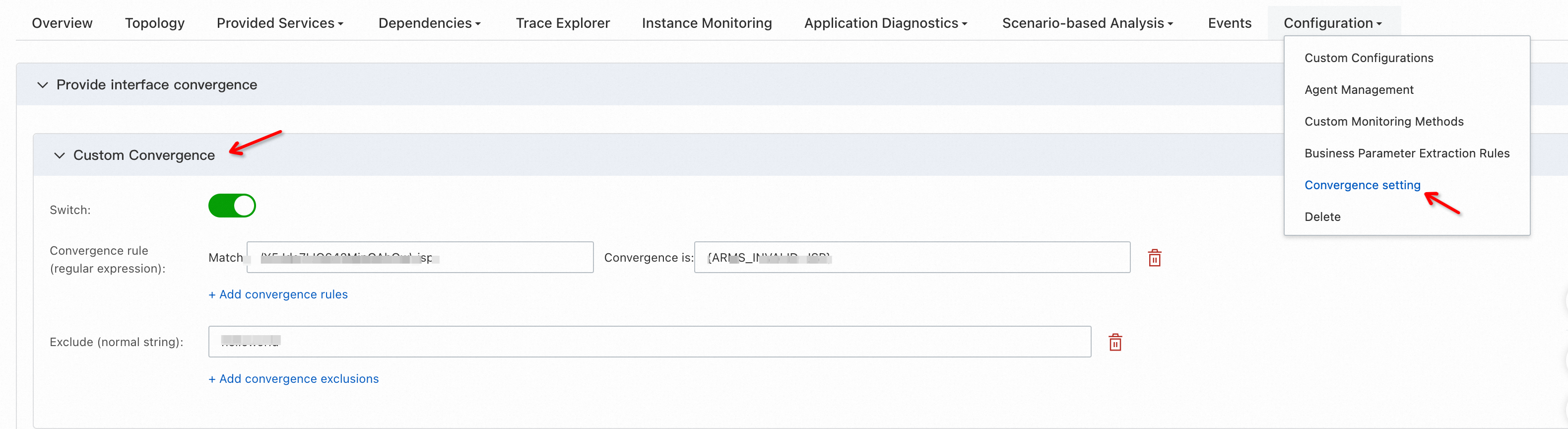
For example, specify the /api/v1/user/\d+/info regular expression to converge all matched URLs to /api/v1/user/userId/info. The URL /api/v1/user/124343543/info is then converged to /api/v1/user/userId/info.
How do I exclude specific URLs from convergence?
Specify the URLs to exclude from convergence in the ARMS console. Navigate to the same Configuration > Convergence page described in the previous question.
For example, if you exclude /api/v1/user/9999/info from convergence, this URL is not converged to /api/v1/user/userId/info.
What is the difference between agent-side and server-side convergence?
Agent-side convergence processes data on the ARMS agent before reporting it to the server. This reduces server processing pressure and provides 100% data accuracy.
Server-side convergence applies when the agent version does not support certain policies. Without agent-side convergence, the agent sends unconverged data packets to the server. Large packets create two risks:
Data loss: Excessively large packets may be rejected.
Reduced accuracy: Server-side processing limitations may affect the accuracy of converged data.
Upgrade to the latest ARMS agent version to run all convergence policies on the agent.