Use Data Transmission Service (DTS) to continuously synchronize data from ApsaraDB RDS for MySQL to AnalyticDB for PostgreSQL. DTS supports an initial full load followed by ongoing incremental change capture (CDC), making it suitable for building real-time analytics pipelines on live OLTP data.
How it works
The synchronization runs in two sequential phases:
Schema and full data synchronizationDefine constraintsDefine table distribution — DTS copies the table schemas and all existing rows from MySQL to AnalyticDB for PostgreSQL. This phase is free of charge.
Incremental data synchronization — DTS reads the MySQL binlog and continuously applies INSERT, UPDATE, DELETE, and ADD COLUMN operations to the destination. This phase is billed.
Prerequisites
Before you begin, make sure that:
All source tables have primary keys. DTS requires primary keys to perform incremental synchronization reliably.
The destination AnalyticDB for PostgreSQL instance is created. For more information, see Create an AnalyticDB for PostgreSQL instance.
Create an AnalyticDB for PostgreSQL instance
Limits
| Constraint | Details |
|---|---|
| Synchronization objects | Only tables can be selected. Databases and schemas cannot be selected directly. |
| Unsupported data types | BIT, VARBIT, GEOMETRY, ARRAY, UUID, TSQUERY, TSVECTOR, TXID_SNAPSHOT, POINT |
| Prefix indexes | Not synchronized. If source tables have prefix indexes, synchronization may fail. |
| DDL tools | Do not use gh-ost or pt-online-schema-change for DDL operations while a synchronization task is running. |
| CREATE TABLE | Not supported. To include a new table, add it to the selected objects manually. For more information, see Add an object to a data synchronization task. |
Supported synchronization topologies
One-way one-to-one synchronization
One-way one-to-many synchronization
One-way many-to-one synchronization
Term mappings
| MySQL | AnalyticDB for PostgreSQL |
|---|---|
| Database | Schema |
| Table | Table |
Set up a synchronization task
Step 1: Purchase a DTS instance
Purchase a DTS instance. On the buy page, set the following:
Source Instance: MySQL
Target Instance: AnalyticDB for PostgreSQL
Synchronization Topology: One-Way Synchronization
Step 2: Configure the synchronization channel
Log on to the DTS console.
DTS consoleIn the left-side navigation pane, click Data Synchronization.
At the top of the Synchronization Tasks page, select the region where the destination instance resides.
Find the instance, then click Configure Synchronization Channel in the Actions column.
Configure the source and destination instances.
Source instance details
Parameter Description Synchronization task name Auto-generated by DTS. Specify a descriptive name to identify the task. The name does not need to be unique. Instance type Select RDS Instance. Instance region Pre-filled from the buy page. Cannot be changed. RDS instance ID The ID of the source ApsaraDB RDS for MySQL instance. Database account The database account of the source instance. ImportantNot required for MySQL 5.5 or MySQL 5.6.
Database password The password of the database account. Encryption Select Non-encryptedConfigure SSL encryption on an ApsaraDB RDS for MySQL instance or SSL-encrypted. To use SSL-encrypted, enable SSL encryption on the RDS instance first. For more information, see Configure SSL encryption on an ApsaraDB RDS for MySQL instance.Note The Encryption parameter is available only within regions in the Chinese mainland and the China (Hong Kong) region.NoteThe Encryption parameter is available only in the Chinese mainland and the China (Hong Kong) region.
Destination instance details
Parameter Description Instance type Set to AnalyticDB for PostgreSQL. Cannot be changed. Instance region Pre-filled from the buy page. Cannot be changed. Instance ID The ID of the destination AnalyticDB for PostgreSQL instance. Database name The name of the destination database. Database account The initial account of the AnalyticDB for PostgreSQL instance, or an account with the RDS_SUPERUSER permission. For more information, see Create a database account and Manage users and permissions. Database password The password of the database account. 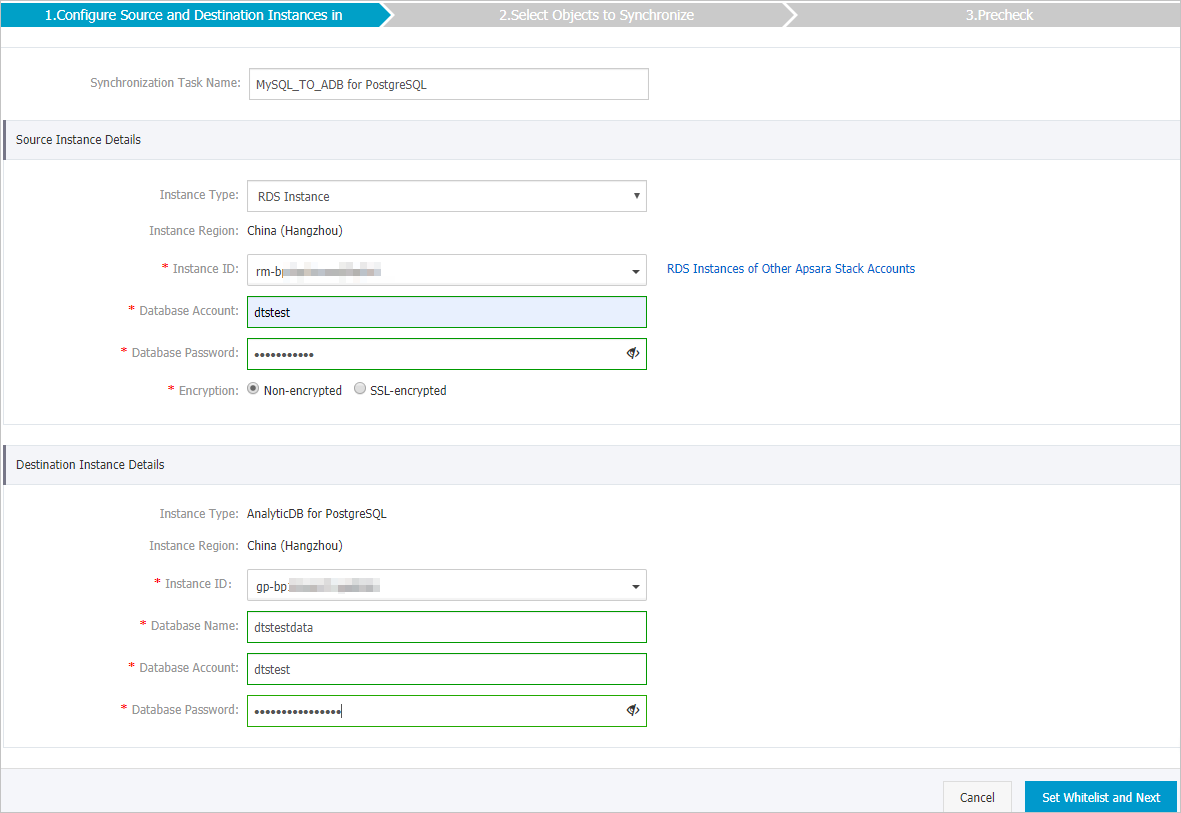
In the lower-right corner, click Set Whitelist and Next. DTS automatically adds its server IP addresses to the whitelist of Alibaba Cloud database instances (such as ApsaraDB RDS or ApsaraDB for MongoDB). For self-managed databases on Elastic Compute Service (ECS) instances, DTS automatically adds its IP addresses to the ECS security group rules — make sure the ECS instance can access the database. If the self-managed database is hosted on multiple ECS instances, you must manually add the CIDR blocks of DTS servers to the security group rules of each ECS instance. For self-managed databases in a data center or hosted by a third-party cloud provider, manually add the DTS server CIDR blocks to the database IP address whitelist. For more information, see Add the CIDR blocks of DTS servers.
WarningAdding DTS CIDR blocks to your whitelist or security group rules introduces potential security risks. Before proceeding, take preventive measures such as using strong credentials, restricting exposed ports, authenticating API calls, reviewing whitelist rules regularly, and connecting through Express Connect, VPN Gateway, or Smart Access Gateway where possible.
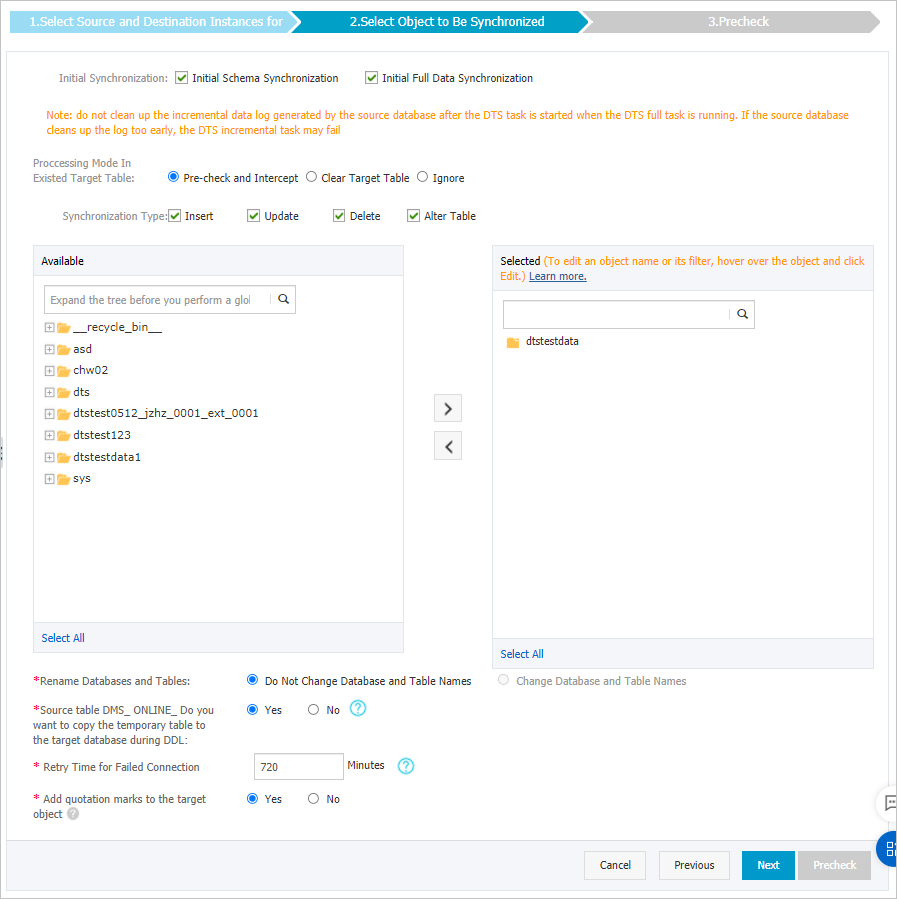
Select the synchronization policy and objects.
Parameter Description Initial synchronization Select both Initial Schema Synchronization and Initial Full Data Synchronization. DTS synchronizes schemas and data from the source before incremental synchronization begins. Processing mode of conflicting tables Clear target table: Skips the Schema Name Conflict item during the precheck. Clears destination table data before the full sync. Use this to start with a clean slate, such as after testing. Ignore: Skips the Schema Name Conflict item during the precheck. Appends incoming data to existing destination data. Use this to merge data from multiple source tables into one destination table. Synchronization type Select the operation types to synchronize: Insert, Update, Delete, AlterTable. Select objects to synchronize In the Available section, select one or more tables, then click the arrow icon to move them to the Selected section. Use the object name mapping feature to rename synchronized columns. For more information, see Rename an object to be synchronized. Rename databases and tables Use the object name mapping feature to rename synchronized objects in the destination instance. For more information, see Object name mapping. Replicate temporary tables when DMS performs DDL operations If you use Data Management (DMS) for online DDL operations on the source, choose whether to synchronize the temporary tables DMS generates. Yes: Synchronizes temporary table data. Large DDL operations may cause synchronization delays. No: Synchronizes only the original DDL changes, not the temporary tables. Destination tables may be locked temporarily. Retry time for failed connections Default: 720 minutes (12 hours). If DTS reconnects within this window, the task resumes automatically. Otherwise, the task fails. Adjust this value based on your needs. NoteYou are charged for the DTS instance during retry periods. Release the instance promptly if the source or destination is no longer available.
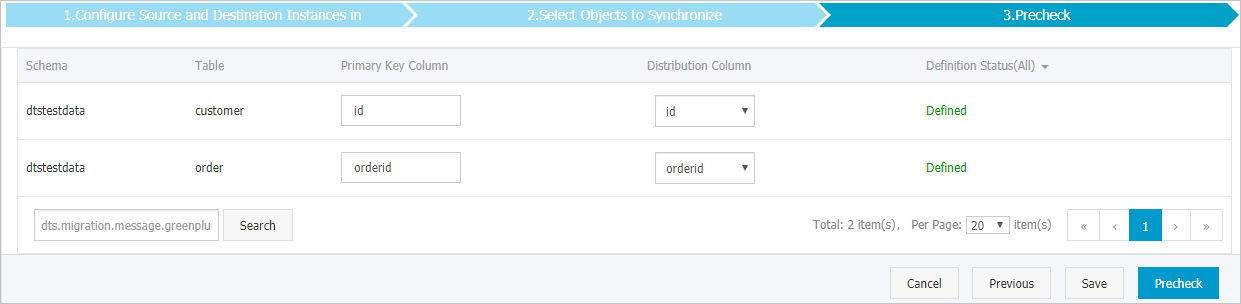
If you selected Initial Schema Synchronization, specify the primary key column and distribution column for the tables to be synchronized to AnalyticDB for PostgreSQL. For more information, see Define constraints and Define table distribution.
In the lower-right corner, click Precheck. DTS runs a precheck before starting the task. If any items fail, click the icon next to each failed item to view details. Fix the issues and run the precheck again, or ignore the failed items and recheck.
After the precheck passes and The precheck is passed. is displayed, close the Precheck dialog box. The task starts automatically.
Wait until the initial synchronization completes and the task enters the Synchronizing state. Monitor the task status on the Synchronization Tasks page.

Performance considerations
DTS reads from and writes to both the source and destination databases during initial full data synchronization, which increases database load. Load increases significantly if the source database has many slow SQL queries, tables without primary keys, or if deadlocks occur in the destination database — and may cause database services to become unavailable.
Run the synchronization task during off-peak hours — when CPU utilization on both the source and destination databases is below 30%.
Billing
| Synchronization type | Fee |
|---|---|
| Schema synchronization and full data synchronization | Free of charge |
| Incremental data synchronization | Charged. For more information, see Billing overview. |