AnalyticDB for PostgreSQL distributes table data across compute nodes based on a distribution scheme you choose at table creation time. The scheme and distribution key you select directly affect query performance, data balance, and join efficiency across your cluster.
Distribution schemes
AnalyticDB for PostgreSQL supports three distribution schemes:
CREATE TABLE <table_name> (...)
[ DISTRIBUTED BY (<column> [,..] ) | DISTRIBUTED RANDOMLY | DISTRIBUTED REPLICATED ]V4.3 supports hash distribution and random distribution only. Replicated distribution was introduced in V6.0.
| Scheme | Syntax | How it works | When to use |
|---|---|---|---|
| Hash distribution (default) | DISTRIBUTED BY (column, [...]) | Assigns each row to a compute node based on the hash value of the distribution column. Rows with the same hash value go to the same node. If no DISTRIBUTED clause is specified, the table uses its primary key as the distribution key. If no suitable key exists, it falls back to random distribution. | Use for most tables. Enables collocated joins and compute node filtering when queries use the distribution key. |
| Random distribution | DISTRIBUTED RANDOMLY | Distributes rows evenly across all compute nodes using a round-robin algorithm. Rows with the same hash value may land on different nodes. | Use only when no column is suitable for hash distribution. Does not support collocated joins or compute node filtering. |
| Replicated distribution | DISTRIBUTED REPLICATED | Stores a full copy of the table on every compute node. | Use for small lookup tables that are frequently joined with large tables. Increases join performance. |
Examples:
-- Hash distribution
CREATE TABLE products (
    name        varchar(40),
    prod_id     integer,
    supplier_id integer
) DISTRIBUTED BY (prod_id);

-- Random distribution
CREATE TABLE random_stuff (
    things  text,
    doodads text,
    etc     text
) DISTRIBUTED RANDOMLY;

-- Replicated distribution
CREATE TABLE replicated_stuff (
    things  text,
    doodads text,
    etc     text
) DISTRIBUTED REPLICATED;
How hash distribution affects query routing
When a query filters on the distribution key, AnalyticDB for PostgreSQL routes the query only to the compute nodes that hold the matching rows. For example, the following query is sent only to the node containing prod_id = 101, rather than scanning all nodes:
SELECT * FROM products WHERE prod_id = 101;Choose a distribution key
Follow these steps in order to select an effective distribution key for hash distribution:
Step 1: Choose a column with evenly distributed data.
Uneven data distribution causes data skew — some compute nodes end up with far more rows than others, increasing their load and slowing queries. Avoid Boolean, time, and date columns, which typically have low cardinality and produce skewed distributions.
Step 2: Choose a column frequently used in join conditions.
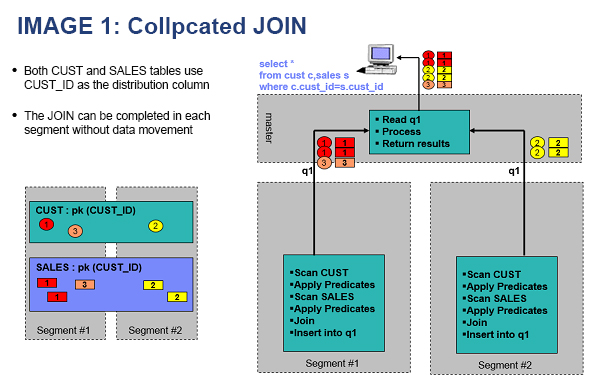
When the join key matches the distribution key, AnalyticDB for PostgreSQL performs a collocated join: each compute node joins only its local data, with no data movement between nodes.
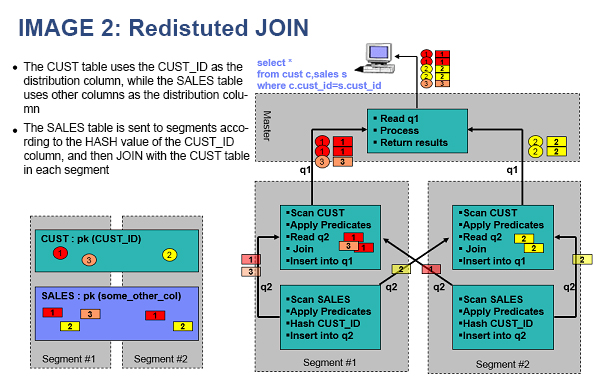
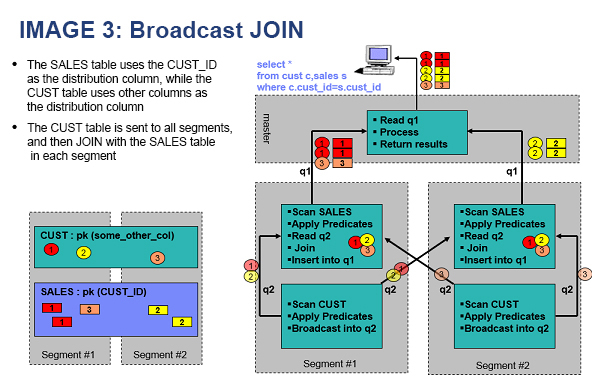
When the join key differs from the distribution key, the query engine must perform a redistribute motion or broadcast motion before joining — both incur heavier network overhead than a collocated join.
Step 3: Choose a column frequently used as a query filter.
Filtering on the distribution key lets AnalyticDB for PostgreSQL skip compute nodes that don't hold the relevant rows, reducing the amount of data scanned per query.
Step 4: Prefer a unique key.
A unique key — such as the primary key — maximizes cardinality and ensures rows spread evenly across nodes. If your table has a primary key, use it as a starting point.
Step 5: Consider a composite distribution key.
If no single column satisfies the criteria above, combine two or more columns as the distribution key:
CREATE TABLE t1 (c1 int, c2 int) DISTRIBUTED BY (c1, c2);Limits on distribution keys
Distribution key columns cannot be updated. To reassign distribution, use
ALTER TABLE ... SET DISTRIBUTED BY.The distribution key must be part of the primary key or a unique key. The following example fails because
c2(the distribution key) is not included in the primary keyc1:CREATE TABLE t1 (c1 int, c2 int, PRIMARY KEY (c1)) DISTRIBUTED BY (c2); -- ERROR: PRIMARY KEY and DISTRIBUTED BY definitions incompatibleGeometry and custom data type columns cannot be used as distribution keys.
Troubleshoot data skew
Data skew occurs when one or more compute nodes store significantly more rows than the others. A common cause is choosing a low-cardinality column — such as a status flag or date column where many rows share the same value. All rows with that value hash to the same node, overloading it while the others remain underutilized.
To detect data skew, query the row count per compute node:
SELECT gp_segment_id, count(1)
FROM t1
GROUP BY 1
ORDER BY 2 DESC;

 gp_segment_id | count
---------------+--------
             2 | 131191
             0 |     72
             1 |     68
(3 rows)
The output above shows severe skew: node 2 holds nearly all the data.
To fix data skew, change the distribution key to a column with more evenly distributed values:
ALTER TABLE t1 SET DISTRIBUTED BY (c2);After redistribution, the data spreads evenly across all compute nodes.