Server Migration Center (SMC) enables you to securely and efficiently migrate servers to ECS from on-premises data centers, on-premises virtual machines (VMware, VirtualBox, Xen, KVM, Hyper-V, and more), and other cloud providers such as Amazon Web Services (AWS), Microsoft Azure, and Google Cloud Platform (GCP). SMC simplifies the migration process, significantly reducing technical barriers and risks.
Migration scenarios
Due to a change in its underlying technology, Server Migration Center (SMC) will no longer support migrating Windows servers to destination instances in Alibaba Cloud regions outside the Chinese mainland after 11:59 PM (UTC+8) on November 30, 2025. Before this date, you can still use SMC client 2.8.5 and earlier versions. For more information about the change and its impact, see Notice on SMC Discontinuing Support for Migrating Windows Servers to Destination Instances in Regions Outside the Chinese mainland.
(Recommended) Migrate a server to an Alibaba Cloud ECS custom image.
If you do not already have an ECS instance, you can migrate your server to a custom image. You can then use this image to create an ECS instance.
Migrate a server to an existing Alibaba Cloud ECS instance.
If you already have an Alibaba Cloud ECS instance with a configuration (including storage and operating system) compatible with the source server, you can migrate the source server to that instance.
WarningThe migration erases all existing data on the destination ECS instance. The data on the source server is not affected. Therefore, do not use this method if the destination instance contains important data.
Migration impacts
Review the following impacts before migration.
Impact | Description |
Migrated data directories | During the migration, SMC automatically generates a disk partition structure on the destination that closely matches the source server's structure. You can adjust the partition structure of the destination disk, including its partition size, order, transfer method, and LVM configurations. By default, all disks are migrated:
|
Intermediate instance | Do not interfere with the intermediate instance. Do not stop, start, restart, or release the intermediate instance, or change its billing method during migration. The intermediate instance is automatically released after migration. Note
|
IP address | The IP address changes after the migration, potentially causing service interruptions. Perform the migration during off-peak hours. If your services involve IP address configurations, you must update the domain name resolution and ICP filing after the migration.
|
Underlying hardware | The underlying hardware changes after the migration. This may invalidate certain application licenses that are bound to specific hardware. Review your license agreements. |
Performance impact | The migration process consumes server resources, including CPU, memory, disk I/O, and network bandwidth. |
Data consistency |
Prerequisites
Complete the pre-migration preparations for the server.
Read the migration guide to learn about the SMC client, how migration works, billing, the migration process, and feedback channels.
To prevent data loss, back up important data to an image, a snapshot, or an external storage device before migration.
If you need to migrate a server across international regions, migration can be slow due to unstable public networks. Estimate the migration time and test the transfer speed. We recommend that you connect the source server to an Alibaba Cloud VPC by using a service such as VPN Gateway, Express Connect, a leased line, or Smart Access Gateway to migrate over a private network.
If you can directly access a VPC in an Alibaba Cloud region from your on-premises data center, VM environment, or cloud host, we recommend using the SMC private network migration method. This method is faster and more stable than migrating over the public network.
If you need to migrate a source server to an existing Alibaba Cloud ECS instance, ensure the following:
If the source server runs Linux, the destination instance must also run a Linux distribution. If the source server runs Windows, the destination instance must also run Windows.
The number of data disks attached to the destination instance must be greater than or equal to that on the source server. If the destination instance does not have enough data disks, you must attach data disks.
The capacities of the system disk and data disks on the destination instance must be greater than or equal to those of the corresponding disks on the source server. If you plan to reduce the disk size of the source server, the capacity of the system disk and data disks on the destination instance must be greater than or equal to the used disk space on the source server. If a cloud disk on the destination instance has insufficient capacity, you must resize the cloud disks.
Migration steps
Step 1: Import a migration source
A migration source is a physical server, VM, or cloud host from another platform that you want to migrate.
Command line (recommended)
The source server must have public network access. If the source server is behind a firewall, see What are the SMC service domains? to obtain the SMC endpoints and ports, and then add them to your firewall allowlist.
If your source server cannot access the public network or you want to use a private network for a faster migration, see private network migration.
-
Go to the Server Migration page in the SMC console.
On the Server Migration page, click Import Source Servers.
Configure the parameters as prompted and copy the activation code command. The following table describes the parameters.
Parameter
Description
Workgroup (Optional)
This parameter applies only to batch migrations for creating cloud server images. If you are migrating a single server, skip this parameter.
You can add multiple migration sources to the same workgroup for easier management. For migration sources in a workgroup, you must enable automatic incremental synchronization during migration. Batch server migration.
If you have not created a workgroup, click Create a New Workgroup.
Migration Source Type
Physical servers/VMs/Cloud servers of other cloud platforms
Import Method
Select Use CLI to Import Server.
This method generates a script command with an activation code. Run this command on the source server to import it.
Migration Source Quota
The number of migration sources that can be activated by the activation code. Valid values: 1 to 1,000. Default value: 200.
Validity Period
The validity period of the activation code, in days. Valid values: 1 to 90. Default value: 90.
Activation Code
Generate the activation code and copy the command.
Click Generate.
Based on the operating system of the source server, click the Linux Shell or Windows PowerShell tab.
Click Copy to copy the activation code command.
Log on to the source server and run the copied command with administrator privileges to import it.
Linux source server
Log on to the Linux source server.
Paste and run the copied command with administrator privileges to import the migration source.

If a message similar to
Import Source Server [s-bp18x8751kgz2oyh****] Successfully!is displayed, it indicates a successful import.
Windows source server
Log on to the Windows source server.
Open Windows PowerShell with administrator privileges.
Paste and run the copied command to import the migration source.

If a message similar to
Import Source Server [s-bp19rlidl3mwuptc****] Successfully!is displayed, it indicates a successful import.If the command fails to run, see What do I do if a command fails to run when I import a Windows migration source by using the command line?.
On the Server Migration page of the SMC console, check the status of the migration source in the Real-time Migration Status column.
If the status is Migration SourceOnline, the import was successful.
If the status is anything else, the import failed. Troubleshoot the issue using the following methods and then import the migration source again.
Troubleshoot the issue based on the error message in the console or by checking the SMC client log file. The default installation directories of the SMC client are:
Windows source server: C:\smc.
Linux source server: /smc.
For information about common issues and solutions, see SMC FAQ and Troubleshooting.
SMC client
The SMC client must run on the source server. By default, public network access is enabled. If the source server is behind a firewall, see What are the SMC service domains? to obtain the SMC endpoints and ports, and then add them to your firewall allowlist.
If your source server cannot access the public network or you want to use a private network for a faster migration, see private network migration.
-
Go to the Server Migration page in the SMC console.
On the Server Migration page, click Import Source Servers.
On the Import Source Servers page, configure the parameters as described in the following table.
Parameter
Description
Migration Source Type
Physical servers/VMs/Cloud servers of other cloud platforms.
Import Method
Select Use Client to Import Server.
You must manually download and install the SMC client on the source server.
Description
In the Description section, follow the prompts to download, install, and activate the SMC client that matches the operating system (Linux or Windows) and architecture (32-bit or 64-bit) of your source server.
Click Generate and copy the activation code.
You must enter the activation code when you install the client.
Import the migration source.
ImportantDo not close the SMC client during the migration. Otherwise, the migration source will lose its connection to the SMC console and the migration will fail.
Windows source server
Use a remote connection tool that supports file transfer, such as WinSCP, to upload the SMC client to the Windows source server.
On the Windows source server, use the system's built-in decompression tool or a third-party tool to decompress the SMC client package.
In the folder for the SMC client version that matches your server's system, double-click the go2aliyun_client.exe application.
When prompted for administrator privileges, click OK.
Obtain an activation code or an AccessKey pair.
(Recommended) Obtain an activation code: In the Description section of the SMC console, click Generate and copy the activation code.
Obtain an AccessKey pair: An AccessKey pair consists of an AccessKey ID and an AccessKey secret. If you have not created one, see Create an AccessKey pair.
Follow the prompt and enter the values for the activation code,
access_access_token_idandaccess_token_code, and pressEnter.If a message similar to
Import Source Server [s-bp18x8751kgz2oyh****] Successfully!is displayed, it indicates a successful import.
Linux source server
Use a remote connection tool that supports file transfer, such as WinSCP, to upload the SMC client to the Linux source server, or run the command provided in the import instructions to download the SMC client directly on the source server.
Remotely connect to the Linux source server and decompress the SMC client package.
The following command uses the
Linux 64-bit General-purpose Editionas an example. If you use a different version of the SMC client, replace the package name in the command with the name of the file you downloaded.tar -zxvf go2aliyun_client.tar.gzNoteThe Linux 64-bit ARM Edition supports the g6r general-purpose instance family and the c6r compute-optimized instance family. Enterprise-level Arm-based compute instance families.
(Optional) Exclude files or directories from the migration.
ImportantIf you enable block replication for the migration, you cannot exclude files or directories.
Obtain an activation code or an AccessKey pair.
(Recommended) Obtain an activation code: In the Description section of the SMC console, click Generate and copy the activation code.
Obtain an AccessKey pair: An AccessKey pair consists of an AccessKey ID and an AccessKey secret. If you have not created one, see Create an AccessKey pair.
In the SMC client directory, run the following commands to start the SMC client.
The go2aliyun_client2.6.5_linux_x86_64 directory is used as an example. The directory name varies based on the client version. Make sure to replace it with the name of the directory created after you download and decompress the package.
cd go2aliyun_client2.6.5_linux_x86_64
sudo chmod +x go2aliyun_client
sudo ./go2aliyun_client
Enter the activation code or AccessKey pair as prompted. The following example shows how to enter an activation code:

After you enter the activation code or AccessKey pair, the following prompts may appear:
If a snapshot driver is not installed on the source system, the SMC client prompts you to install one. You can choose whether to install it based on your migration plan.
If you plan to enable block replication when you create the migration task, enter
yesto automatically install the snapshot driver.If you do not plan to enable block replication, enter
no.
ImportantIf the snapshot driver fails to install, do not enable block replication when you create the migration task. Otherwise, the migration will fail.

Most mainstream source systems have rsync installed by default. If rsync is not installed, the SMC client prompts you to install it. Enter
yesto automatically install rsync, as shown in the following figure.
If SELinux is enabled on the source system, the SMC client prompts you to disable it. Enter
yesto automatically disable SELinux, as shown in the following figure.
If a message similar to
Import Source Server [s-bp11npxndknsycqj****] Successfully!is displayed, it indicates a successful import.NoteIf the import fails, troubleshoot the issue based on the displayed message. Then, run the following commands in sequence to exit the background process and import the migration source again. For information about common issues and solutions, see SMC FAQ and Troubleshooting.
sudo ./go2aliyun_client --abort
sudo ./go2aliyun_client
On the Server Migration page of the SMC console, check the status of the migration source in the Real-time Migration Status column.
If the status is Migration SourceOnline, the import was successful.
If the status is anything else, the import failed. Troubleshoot the issue using the following methods and then import the migration source again.
Troubleshoot the issue based on the error message in the console or by checking the SMC client log file. The default installation directories of the SMC client are:
Windows source server: C:\smc.
Linux source server: /smc.
For information about common issues and solutions, see SMC FAQ and Troubleshooting.
Step 2: Configure the migration job
-
In the Actions column of the migration source that you want to manage, click Start Migration.
Configure the parameters and click Start Migration.
Configure basic parameters.
Parameter
Description
Destination Type (Required)
Select a destination type based on your migration scenario:
ECS Image
Converts the source server into a custom image. You can then use this custom image to create an ECS instance and complete the migration.
The following parameters are available:
Destination Region: The Alibaba Cloud region where the custom image will be created. This parameter is required. Regions and zones.
Image name prefix: The prefix of the custom image name that SMC generates for the migration source.
ECS Instance
Migrates the source server to an existing ECS instance. The source server's storage, operating system, and other configurations must be compatible with the destination instance.
ImportantWhen you migrate to a destination instance, SMC first replaces the operating system of the destination instance. Automatic snapshots of the system disk are deleted and cannot be restored. To retain automatic snapshots, disable their release with the disk before migration. Configure automatic snapshots to be released with disks.
The following parameters are available:
Destination Region: The Alibaba Cloud region where the destination ECS instance is located. This parameter is required. Regions and zones.
Destination Instance: Select an ECS instance to be the destination.
Migration Test
The migration drill feature assesses the job's feasibility and risks before you start. It provides data volume, migration speed, and total time estimates, and suggests fixes to reduce potential migration issues. You are charged for pay-as-you-go resources used during the migration drill. By default, Migration Test is enabled.
WarningIf the target type is an ECS Instance, a migration drill creates snapshots of all disks on the target ECS instance. The snapshots are automatically rolled back after the drill is complete if an exception occurs during the drill or if the execution mode is set to Test Only. The target ECS instance is unavailable during the migration drill, and its data will be lost. Ensure that the target ECS instance does not contain important data.
Execution Method
Select an execution method based on whether Migration Test is enabled:
With migration test
Test Only: Creates only a migration drill job. After the drill is complete, you must manually start the server migration job if you want to migrate the server.
Test and Migrate: After the migration drill is complete, the system automatically starts the server migration job if no drill items have a status of Critical. By default, Test and Migrate is selected.
Without migration test
Migrate Now: Starts the migration immediately after you create the migration job. By default, Migrate Now is selected.
Migrate Later: Schedules the migration job to start automatically at a specified time.
NoteThe earliest you can schedule the job is 10 minutes from the current time.
Create Only: Creates the migration job but does not start it. You must manually start it later by clicking Start Migration Job in the Actions column.
Automatic Incremental Synchronization
Enables automatic, incremental data synchronization from the source server to Alibaba Cloud. By default, this feature is disabled.
If you enable this switch, you must configure the following parameters:
Synchronization Interval: The interval at which the incremental migration job automatically runs.
Maximum Reserved Images: The maximum number of images that the incremental migration job retains.
The migration job runs periodically to synchronize incremental data to Alibaba Cloud. Incremental server migration.
If you disable this switch, the migration job runs only once.
Enable a migration template
This parameter appears only when Destination Type is set to ECS Image.
A migration template presets parameters for a migration job. When you start the migration, the template parameters are automatically filled in. Set up a migration template.
Network Type
Select the network for transferring migration data to the intermediate instance. By default, data is transferred over the public network. The intermediate instance is created in the selected Virtual Private Cloud (VPC) and vSwitch and is assigned a public IP address.
Public Network (Default)
Migration data is transferred to the intermediate instance over the public network. This mode requires the source server to have public internet access. You can choose whether to specify a Virtual Private Cloud (VPC) and vSwitch.
Specify a VPC and vSwitch: The migration job creates an intermediate instance in the VPC and vSwitch that you specify.
Do not specify a VPC and vSwitch: The migration job creates an intermediate instance in a new VPC and vSwitch that are automatically created by the system.
VPC
Migration data is transferred to the intermediate instance over a private connection within a VPC. This mode requires you to connect the source server to the Alibaba Cloud VPC and specify a VPC and vSwitch.
NoteIf you can directly access a VPC in an Alibaba Cloud region from an on-premises data center (IDC), virtual machine (VM) environment, or cloud host, we recommend that you use this method. Private network transfer is faster and more stable than public network transfer, improving migration efficiency. You can connect the source server to the cloud VPC by using a VPN gateway, an Express Connect circuit, or a Smart Access Gateway. For more information, see Connect a VPC to a data center or another cloud.
The private IPv4 address of the destination instance
If you need to change the private IP address of the destination instance, you can manually specify a private IP address. This parameter appears only when Destination Type is set to ECS Instance.
Remain unchanged.: The private IP address of the Destination Instance remains unchanged.
Manual: Allows you to enter an IP address from the available CIDR block of the vSwitch to which the Destination Instance belongs. If the source IP address is within the vSwitch's CIDR block, you can change the destination instance's IP address to match the source IP address.
If the destination instance and the migration source are in the same CIDR block, enter the private IP address of the migration source.
If the destination instance and the migration source are in different CIDR blocks, you must first change the VPC of the destination instance to match the CIDR block of the migration source, and then enter the private IP address of the migration source.
You can also adjust the disk partition structure. Parameters are described in the following table.
Parameter
Description
Modify Disk Partition
Select whether to adjust the disk partition structure based on your requirements. Only SMC client versions 2.8.0 and later support this feature. SMC Client User Guide.
Disabled: The disk information of the source instance is not shown. SMC automatically reads the source disk information and generates a disk layout. After migration, the destination disk partition structure matches the automatically generated layout by default.
Enabled: The disk information of the source instance is displayed. SMC automatically reads the source disk information to generate a disk layout. You can adjust the destination disk partition structure, including the partition size and order, transfer method, and whether to enable LVM.
Configure disks
System Disk: The size of the destination system disk, in GiB. Valid values: 20 to 2,048.
The destination system disk size must exceed the used space on the source system disk. For example, if the source system disk is 400 GiB and 100 GiB of space is used, the destination system disk size must be greater than 100 GiB.
NoteThe default value is the size of the source system disk. Unless you need to reduce the system disk size, we recommend that you do not specify a value smaller than the default.
Data Disk<N>: The size of the destination data disk after migration, in GiB. Valid values: 1 to 32,768.
The
<N>variable represents the data disk number. If you are migrating to a destination instance, N is the data disk ID.The destination data disk size must exceed the used space on the source data disk. For example, if the source data disk is 500 GiB and 100 GiB of space is used, the destination data disk size must be greater than 100 GiB.
If a Data Disk has no mount target, or if all its mount targets are set to not be migrated, the data disk is not migrated.
LVM: Logical Volume Manager (LVM) is a disk partition management system for Linux. LVM offers more flexibility than standard disk partitions and allows for dynamic resizing of disk space.
You can enable LVM based on your requirements. If enabled, the destination disk is automatically rebuilt with an LVM structure.
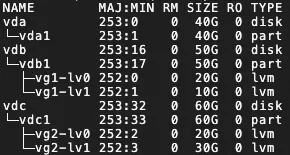
For each destination disk with LVM enabled, the system creates one physical volume (PV) and its corresponding volume group (VG). Within this VG, it creates one logical volume (LV) for each mount target. The VG is named vgX by default (where X is the disk sequence number), and the LVs are named lvX by default (where X is the LV sequence number), as shown in the following example:
 Important
LVM cannot be enabled in the following cases:
The source server runs Windows.
The system disk does not have a boot partition.
If you enable LVM, the feature does not take effect in the following scenarios:
The source server does not support lvm2, or the lvm2 package is not installed.
The source server runs a Debian system with a kernel version of 3.x or earlier and has a disk with an XFS file system mounted.
Configure mount targets
Migrate: Specifies whether to migrate the mount target based on your business requirements.
Enable Block Replication: This option is visible only for SMC client versions before 3.2.0. Block replication improves the stability of the transfer speed and ensures that the destination partition structure is identical to the source, but you cannot modify the partition size. SMC determines whether to support block replication based on the status of the source disk partitions.
If the source partition does not support Block Replication, this option cannot be enabled. File-level replication is used by default, which allows the partition size to be modified.
If the source partition supports Block Replication, this option is enabled by default to perform a partition-level disk migration.
NoteIf the source server runs a Windows operating system, block replication is enabled by default and cannot be disabled.
If LVM is enabled for the disk and the partition size is not a multiple of 4 MiB, block replication does not take effect. File-level replication is used instead.
Set Partition Size: If block replication is disabled, you can set the partition size. The sum of partition sizes cannot exceed the total size of the disk.
Windows operating systems: You cannot adjust the partition size.
Linux operating systems: You can set the partition size based on your requirements, but the sum of partition sizes cannot exceed the disk size.
For SMC client versions earlier than 3.2.0, ensure that block replication is disabled.
NoteIf the disk sizes of the destination instance do not match the source disks, you cannot create the job. In this case, the system automatically adjusts the mount target locations to meet the disk size requirements. If the requirements are still not met after the adjustment, resolve the issue as prompted on the UI.
You can also manually drag and drop mount targets to meet the disk size requirements. However, you cannot move boot or system partitions. To do this, perform the following steps:
Hover the pointer over the
 icon next to the mount target.
Drag the mount target to another disk.
(Optional) To configure parameters such as network mode, private IP address, or transfer throttling, click Advanced Settings. Parameters are described in the following table.
Parameter
Description
Migration Job Name
The name of the migration task.
Job Description
Enter a description for the migration task.
Transmission Speed Limit
Limits the data transfer speed, in Mbit/s. If Compression Ratio is set to a value greater than 0, the actual network transfer speed for the compressed data is lower than the speed displayed in Real-time Migration Status.
Compression Ratio
Sets the data compression level for migration.
In environments with limited bandwidth, a higher compression ratio can increase data transfer speed.
In environments with high bandwidth, we recommend that you do not compress data to reduce CPU usage on the source server.
Valid values: 0 to 10. The default value is 7. A value of 0 indicates that data is not compressed.
Checksum Verification
This feature is disabled by default. Enabling it enhances data consistency checks but may decrease transfer speed.
SSL Encrypted Transmission
The default value is Auto-Select. SSL encryption for data transfer improves security and data integrity.
License Type
Select a license type.
Alibaba Cloud (Default): Only Microsoft Windows Server licenses are supported. After migration, you are charged a license fee when you create an ECS instance from the image in the China (Hong Kong) region or other regions outside the Chinese mainland. The instance is automatically activated. The actual fee is displayed when you create the instance.
BYOL: BYOL is supported for operating systems such as Microsoft Windows, Red Hat Enterprise Linux, and SUSE Linux Enterprise Server. After migration, no license fee is charged when you create an ECS instance from the image. You must activate the instance by using your own license.
NoteIf you have an existing ECS instance, you can purchase software licenses, such as for Red Hat Enterprise Linux and SUSE Linux Enterprise Server, for the instance. Purchase software licenses for an ECS instance.
Image Check
The image check feature verifies whether an image is valid and can be used to create a fully functional ECS instance. You can use this feature when you create server migration and agentless VMware migration jobs.
The image check feature helps you quickly identify potential issues with the image or instance after migration and provides solutions to ensure compliance with Alibaba Cloud standards, which increases the instance startup success rate.
Tag
Add tags (key-value pairs) to the migration job for easier searching and management. Use tags to manage migration sources and jobs. Implement fine-grained permission management by using tags.
NoteYou can add a maximum of 20 tags to a single migration job.
Intermediate Instance Type
Select an instance type for the intermediate instance based on your requirements. This parameter appears only when Destination Type is set to ECS Image.
If you specify this parameter, the system uses the selected instance type to create the intermediate instance. If the specified instance type is out of stock, the migration job fails to be created.
If you do not specify an instance type, the system attempts to create the intermediate instance by using a default sequence of instance types.
ImportantTo prevent migration errors, do not stop, start, restart, or release the intermediate instance during the migration. After the migration is complete, the instance is automatically released.
Report diagnostic logs
Automatically uploads SMC client logs to the SMC server for diagnostic analysis. This helps troubleshoot issues if a migration error occurs. This feature is enabled by default.
SMC client logs are typically stored in the
/smc/go2aliyun_client*/Logsdirectory within the installation path.
-
In the dialog box that appears, read the notes and click Got It.
On the Server Migration page, view the real-time status of the migration.
If you enabled the migration drill, SMC performs the drill first. The transfer time is affected by factors such as data volume and network bandwidth. Wait for the migration job to complete.
 Note
NoteSpeed: The amount of uncompressed migration data transferred per second. If the Compression Ratio for the migration job is greater than 0, the displayed speed is higher than the actual network transfer speed of the compressed data.
Time Remaining for Synchronization: Calculated as (Total Data Volume - Transferred Data Volume) / Speed.
If the transfer speed is too slow, consider temporarily increasing the fixed bandwidth of the source and destination servers. Estimate migration time and test transfer speed.
(Optional) View migration details.
To view details, click a migration source ID in the Migration Source ID/Name column.
Verify the migration result
If you set Destination Type to ECS Image:
After a successful migration, Alibaba Cloud creates a custom image. You can scroll to the right and click View Report in the Migration Deliverables column to view image detection results. View image detection results.

Manual verification (Recommended)
In the Actions column, click Create Instance. You are redirected to the instance creation page in the ECS console, where the custom image is preselected. For more information about how to create an ECS instance, see Create an instance from a custom image or shared image.

Automatic verification
NoteTo use this feature, the instance must have Cloud Assistant installed, and its operating system must support the agent. For more information, see Install Cloud Assistant Agent.
This feature uses the OOS template
ACS-SMC-CreateAndVerifyInstanceprovided by Alibaba Cloud to automatically verify that the image generated by the migration job can be used to successfully create and start an ECS instance.In the Actions column, click Verify Migration Result.

In the dialog box that appears, review the verification process and click Verify Now.
You can also click Customize Verification Parameters to manually configure verification parameters.
In the Verify Migration Result column, view the verification result.
Verified: The migration was successful. You can click View Report to view the verification results.
Not Verified: The verification failed. You can click View Cause to view the error details and troubleshoot the issue.
You can also click the
 icon in the Actions column and then click View Verification Records in OOS Console to view the execution history of the OOS template.
If you set Destination Type to ECS Instance, you can click View Destination Instance in the Actions column to view the destination ECS instance.
After the server is migrated, perform the following steps to ensure that your services run correctly:
Verify the data to ensure its integrity and correctness. How do I check the system after migrating a Linux server or How do I check the system after migrating a Windows server.
If applications and services on the source server are not configured to automatically start, you must manually start them after the migration.
The IP address changes after the migration. If your services depend on IP address configurations, you must modify settings such as domain name resolution and ICP filing after the migration.
If a domain name is mapped to the source server, remap it to the new public IP address. Add a website resolution.
To retain the original private IP address, you can modify the private IP address of the destination instance.
If the destination is an ECS Image: When you create an ECS instance, specify a private IP address. For more information, see Specify the primary private IPv4 address for the primary ENI when you create an ECS instance.
If the destination is an ECS Instance: If you did not modify the private IPv4 address in the advanced configuration of the migration settings step, you can modify it. For more information, see Modify the primary private IPv4 address of the primary ENI for an existing instance.
If the migration drill status is
 , the migration drill failed.
Clean up resources
Migrate to an image
During the migration, SMC creates a temporary pay-as-you-go intermediate instance named No_Delete_SMC_Transition_Instance in your destination Alibaba Cloud account to facilitate the migration. The migration result determines whether you need to manually release the instance:
Successful migration: SMC automatically releases the intermediate instance. No manual cleanup is required.
Migration error: The intermediate instance is not released and continues to incur charges. To avoid unnecessary charges, you can release the instance in one of the following ways:
If you no longer need the migration task, click the migration source ID. In the Actions column for the migration task, click Cancel Migration Job to delete the migration task and automatically clean up the intermediate instance.
Manually release the intermediate instance.
Migrate to a destination instance
During the migration, SMC creates a temporary pay-as-you-go intermediate disk named SMC_Temp_Disk and attaches it to the destination instance to facilitate the migration. The migration result determines whether you need to manually release the intermediate disk:
Successful migration: SMC automatically releases the intermediate disk. No manual cleanup is required.
Migration error: The intermediate disk is not released and continues to incur charges. To avoid unnecessary charges, you can release the disk in one of the following ways:
If you no longer need the migration task, click the migration source ID. In the Actions column for the migration task, click Cancel Migration Job to delete the migration task and automatically clean up the intermediate disk.
Manually release the intermediate disk.
References
To migrate incremental data repeatedly, run incremental migrations at custom intervals after the initial full migration is complete. This process synchronizes incremental data from the source server to Alibaba Cloud, reducing business downtime and the final cutover time. For more information, see Incremental server migration.