A logstore is a storage unit in Simple Log Service (SLS) that collects, stores, and queries log data.
Core concepts
What is a logstore
A logstore is a data container in Simple Log Service. You can create multiple logstores in a project to isolate and manage logs from different services or sources.
Some cloud products and SLS features automatically create dedicated logstores for specific purposes. You cannot write other data to these logstores. For example:
-
internal-operation_log: Stores the detailed operation logs for Simple Log Service. -
oss-log-store: Automatically created when you configure the storage of OSS access logs.
Logstore specifications
Simple Log Service (SLS) offers two logstore specifications: Standard and Query. They differ in features and cost.
|
Type |
Cost (index traffic fee comparison) |
Scenarios |
|
Standard |
USD 0.0875/GB |
Suitable for scenarios that require data analytics, real-time monitoring, and visualization capabilities, such as interactive analysis, real-time monitoring, or building observability systems. |
|
Query Type (Query Specification) |
USD 0.0146/GB |
Does not support analytics. Suitable for archival scenarios such as log archiving, audit log storage, and troubleshooting that require fast retrieval of log content without analysis. Typical applications include long-term storage of large-scale logs with low access frequency. |
Scope and permissions
Create a basic logstore
Console
-
Log on to the Simple Log Service console. In the Projects section, click the project that you want to manage.
-
On the tab, click the + icon.
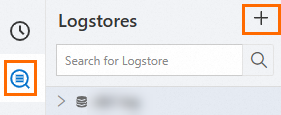
-
On the Create Logstore page, configure the parameters and click OK.
-
Logstore Type: The default value is Standard.
-
Billing Mode:
-
Pay-by-feature (cannot be changed): You are billed for each resource that you use, such as storage, indexing, and read/write operations. A monthly free quota is provided to help you control costs in small-scale use cases.
-
Pay-by-ingested-data: You pay only for the raw data that you write. Storage and mainstream features are free for 30 days. This billing mode has a simpler and more cost-effective structure.
The pay-by-ingested-data mode is ideal when your data retention period is close to 30 days and you require indexing comparable to a full-text index.
-
-
Logstore Name: The name must be unique within the project. It serves as the unique identifier for the logstore and cannot be changed after the logstore is created.
-
Data Retention Period: The default value is 30 days.
-
Keep the default values for the other parameters. For a full list of parameters, see the following table.
-
API
Modify logstore configuration
You can configure the following parameters when you create a logstore. This section describes how to modify them for an existing logstore.
-
Click
 Log Storage. In the Logstores list, hover over the target LogStore and choose .
 -
In the Logstore Attributes panel, modify the parameters.
Set the data retention period and delete logs
Console
In the Basic Information section, click Modify, change the data retention period, and then click Save.
Simple Log Service does not support deleting specific log entries. You can delete logs based on time by modifying the log retention period. Alternatively, you can delete all logs by stopping billing or deleting the Logstore.
-
Specified Days: Specify an integer from 1 to 3,650. A value of 3,650 indicates permanent retention. When the retention period expires, the logs are deleted.
-
Permanent Storage: Permanently retains all logs in this Logstore.
The change takes effect immediately, but the deletion of expired data requires some time to complete.
API
UpdateLogStore operation, set the value of ttl to adjust the log retention period.
Use tiered storage to optimize storage costs
Console
-
In the Basic Information section, click Modify and enable Intelligent Tiered Storage.
-
Configure the Storage Policy. The total retention period across all three storage tiers must match the Data Retention Period.
-
Hot storage: at least 7 days.
-
The minimum storage duration for the IA storage class is 30 days.
-
Archive storage: at least 60 days.
-
-
Click Save. For more information, see Intelligent tiered storage.
API
In the UpdateLogStore operation, set the values of ttl, hot_ttl, and infrequentAccessTTL to dynamically adjust the retention policy for tiered storage.
Collect client-side logs
SLS provides the web tracking feature to collect logs from various clients, such as miniapps, mobile applications (iOS and Android), and web browsers.
Use this feature in one of the following two ways:
-
Transmit data by using STS for authentication. This method is suitable for production scenarios. You do not need to modify the LogStore configuration.
-
Transmit data anonymously using OpenAPI. This method is suitable only for test scenarios. You must enable the switch in the Logstore. For configuration instructions, see the following content.
Console
In the Basic Information section, click Modify, enable WebTracking, and then click Save.
API
UpdateLogStore operation, set the enable_tracking parameter to true to enable the web tracking feature.
Automatically add the public IP address and arrival time to logs
After you enable this feature, the following information is automatically added to logs during data collection:
-
__tag__:__client_ip__: the public IP address of the device from which logs are sent.
-
__tag__:__receive_time__: the time when logs arrive at the SLS server. The time is a UNIX timestamp that indicates the number of seconds that have elapsed since 00:00:00 UTC on January 1, 1970.
Console
In the Basic Properties section, click Modify, enable the Log Public IP switch, and then click Save.
API
In the UpdateLogStore operation, use the appendMeta parameter to enable public IP address logging.
Adjust collection performance using shards
Each shard supports a write throughput of 5 MB/s or 500 writes/s and a read throughput of 10 MB/s or 100 reads/s. These are soft limits. If the limits are exceeded, the system makes the best effort to provide service but does not guarantee service quality. If the read/write traffic exceeds the read/write capacity of a shard, split the shard to increase the number of shards and thereby increase the read/write capacity.
Console
In the Basic Information section, click Modify, enable Automatic Sharding, set the Maximum Shards, and then click Save.
SLS lets you split and merge a specific shard.
API
Stop billing or delete a logstore
After a logstore is deleted, its stored log data is permanently deleted and cannot be recovered. Proceed with caution.
Console
-
Perform cleanup before deletion.
-
Before you delete a logstore, delete all its associated Logtail configurations.
-
If data shipping is enabled for the logstore, stop writing new data to the logstore and make sure that all existing data in the logstore is shipped before you delete the logstore.
-
-
Deletion procedure.
-
On the tab, hover over the target logstore and choose .
-
In the Warning dialog box, click Confirm Deletion.
-
-
After deletion.
-
Storage fees are incurred on the day you delete the logstore. No fees are generated from the following day onward.
-
After you delete a logstore, the export tasks, data transformation jobs, and Scheduled SQL tasks that use the logstore as a data source and the import tasks that use the logstore as a destination are also deleted.
-
API
Example configurations for common scenarios
Real-time monitoring and analysis for high-volume services
An online application generates a large volume of business logs in real time. When a failure occurs, quickly locate error logs and monitor key metrics, such as queries per second (QPS) and response latency, with real-time alerts.
Recommended configuration: Standard logstore + Pay-by-ingested-data + Automatic shard splitting.
Reasoning: A Standard logstore supports analysis, real-time monitoring, and visualization. For high-volume log ingestion and analysis that may require extensive indexing, pay-by-ingested-data is recommended. Automatic shard splitting ensures sufficient performance for data ingestion and analysis.
Compliance, auditing, and security
Industry regulations require you to store user activity logs and security logs for six months or longer for auditing purposes. However, these logs are queried and analyzed infrequently.
Recommended configuration: Query logstore + Intelligent tiered storage.
Reasoning: A Query logstore supports queries only but has lower index traffic costs than a Standard logstore. Intelligent tiered storage classifies log data based on its age, reducing long-term storage costs.
References
LogStore Comparison in Feature-Based Billing Mode
The Query logstore supports only the pay-by-feature billing mode. The following table compares the Standard and Query logstores in this mode.
|
Item |
Standard specification |
Query Type (Query Specification) |
|
|
Cost |
USD 0.0875/GB |
USD 0.0146/GB |
|
|
Feature |
Data collection (only for business system log scenarios) |
Supported |
Does not support collecting cloud product logs. |
|
Supported |
Supported |
||
|
Supported |
Supported |
||
|
Analysis (SQL statement) |
Supported |
Unsupported |
|
|
Supported |
Supported |
||
|
Supported |
Supported |
||
|
Supported |
Unsupported |
||
|
Supported |
Supported |
||
|
Supported |
Unsupported |
||
|
Supported |
Only supports alerts based on query statements. |
||
|
Supported |
Unsupported |
||
|
Supported |
Supported |
||
|
Supported |
Supported |
||
|
Supported |
Supported |
||
Limitations
The pay-by-ingested-data mode supports the complete feature set of SLS. Value-added features such as query and analysis, data transformation, intelligent alerting, and data shipping and consumption do not incur additional fees, but are subject to quotas. The following table provides details.
|
quota limit |
Note |
|
Data transformation |
A single logstore supports a maximum data transformation volume of 100 TB per month. |
|
Data volume for scheduled SQL |
A single logstore supports a maximum Scheduled SQL data volume of 20 TB per month. |
|
Delivered data volume |
A single logstore supports a maximum data shipping volume of 100 TB per month. |
|
Data consumption |
A single logstore supports a maximum data consumption volume of 100 TB per month. |
|
Calculating data volume for alerting jobs |
A single logstore supports a maximum alerting job computation volume of 100 TB per month. |
Billing
The cost of a logstore is mainly determined by the selected billing mode.
-
Pay-by-feature: You are billed for each resource that you use, such as storage capacity, index traffic, read/write operations, and the number of shards.
-
Pay-by-ingested-data: You are charged only for the amount of raw data that you write. This mode includes 30 days of free storage and multiple free features.
Key billing item prices:
-
Standard index traffic: USD 0.0875/GB.
-
Query index traffic: USD 0.0146/GB.
Cost optimization recommendations:
-
If your log retention period is close to or exceeds 30 days, the pay-by-ingested-data mode is typically more cost-effective.
-
For scenarios that require only archiving and retrieval, use the Query specification to reduce indexing costs.
-
Configure intelligent tiered storage to move infrequently accessed data to lower-cost storage tiers.
FAQ
Cannot create LogStore
You can create up to 200 logstores per project by default. To create more, either delete unused logstores or request a quota increase.
-
Log on to the Simple Log Service console. In the Projects section, click the project that you want to manage.
-
On the Project Overview page, find Resource Quota in the Basic Information section and click Manage. In the Resource Quotas panel, adjust the Logstore quota limit and click Save to submit your request. The request takes about one hour to complete.
Why are my logs in SLS missing?
-
Project and LogStore not found
If you manually delete a project or logstore, the logs cannot be recovered. Use ActionTrail to query for project or logstore deletion events within the last 90 days.
-
Your account has an overdue payment. If your payment is more than 7 days overdue, your SLS projects are reclaimed. All data is erased and cannot be recovered. For more information, see Overdue payments.
How can I optimize log storage costs?
-
To check your Simple Log Service costs, see View the storage capacity and consumption records of Simple Log Service.
-
Download historical logs to your local machine or deliver them to OSS for storage.