Based on OpenClaw and Alibaba Cloud Simple Log Service (SLS), you can ingest logs and OpenTelemetry (OTEL) telemetry into SLS to build an AI Agent observability system. This system helps achieve a closed loop of behavior audit, O&M observability, real-time alerting, and security audit.
"Under control" involves at least four aspects: who triggers the invocation, what the costs are, what operations are performed (especially high-risk tools), and whether the behavior is traceable and auditable. If you cannot answer these questions, you cannot claim that the Agent is running under control.
This article focuses on "how to use Alibaba Cloud SLS to answer the above questions." Session logs answer "what was done and how much it cost." Application logs answer "Identify system abnormalities." OTEL Metrics and traces answer "current Status and Duration." Multiple Data pipelines collaborate to provide a well-documented answer to "Is the Agent really running under control?"
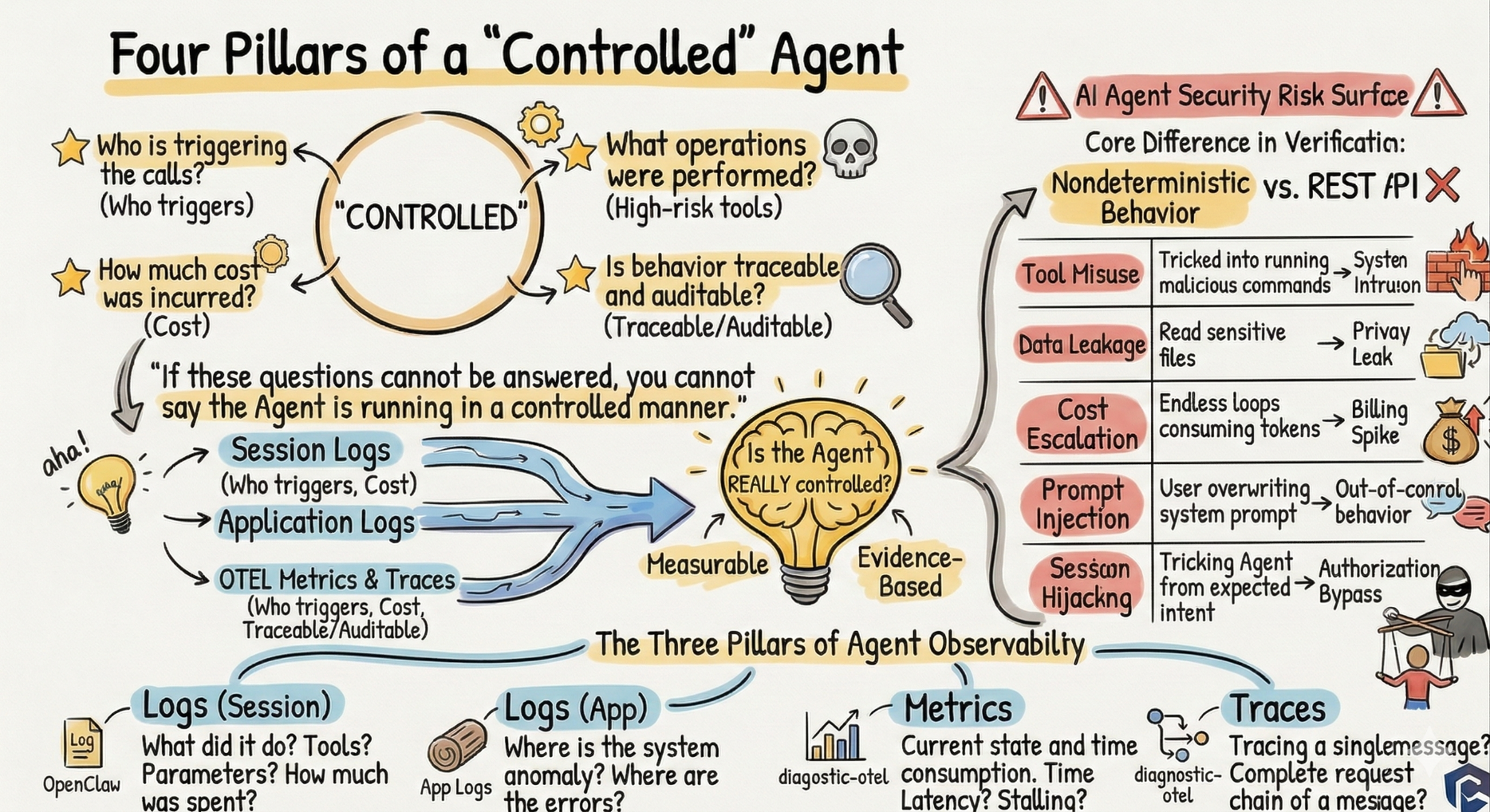
There is a fundamental difference between AI Agents and traditional backend services: The behavior of an Agent is non-deterministic. For the same User input, the model may generate completely different tool calling sequences. This means you cannot predict all behavior paths through Code review, unlike when you audit a REST API.
If observability is not implemented, you cannot answer "who is invoking your model, how much it costs, or whether malicious instructions have been injected." Therefore, you cannot claim that the Agent is running under control. Specific attack surfaces include:
| Risk Category | Typical Scenario | Consequence |
|---|---|---|
| Skills/Tool Abuse | Agent is induced to execute exec to run malicious commands | System compromise |
| Data Leakage | Agent reads sensitive files via tools and outputs them to the conversation | Privacy leakage |
| Cost Out of Control | Agent falls into a loop and continuously consumes Tokens | Bill skyrockets |
| Prompt Injection | User embeds instructions in the message to overwrite the System Prompt | Behavior out of control |
| Session Hijacking | Gradually guide the Agent to deviate from expected behavior through multi-turn conversation | Authorization bypass |
These risks cannot be addressed solely by runtime protection in the Code (such as the tool policies and loop detectors built into OpenClaw). Runtime protection is the "city wall," while observability is the "sentry post." Only by continuously observing what the Agent is doing, who is invoking it, and how much it costs can you discover what the city wall failed to block.
Traditional observability is built on the three pillars of Logs, Metrics, and Traces. For AI Agents, these three assume different observability functions. Understanding what questions each can answer is the foundation for building the entire system later:
| Pillar | OpenClaw Corresponding Data Source | Core Questions Answered |
|---|---|---|
| Logs (Session Logs) | ~/.openclaw/agents/<id>/sessions/*.jsonl |
What did the Agent do? Which tools were invoked? What parameters were passed? How much did it cost? |
| Logs (Application Logs) | /tmp/openclaw/openclaw-YYYY-MM-DD.log |
Where did the system go wrong? Did the Webhook fail? Is the message queue clogged? |
| Metrics | diagnostics-otel plugin OTLP output |
How much does it cost now? Is the latency normal? Are there any stuck sessions? |
| Traces | diagnostics-otel plugin OTLP output |
What happened to a message from request to response? How is the trace linked? |
Alibaba Cloud Simple Log Service (SLS) is naturally suitable for this scenario:
● Native OTLP support: LoongCollector natively supports the OTLP protocol. It seamlessly integrates with the diagnostics-otel plugin of OpenClaw and is out-of-the-box.
● Rich operators and flexible query: Built-in processing and analysis operators make it convenient to parse, filter, and aggregate JSON nested fields (such as message.content and message.usage.cost) in Session logs. You can perform tool calling Statistics, cost Attribution, and sensitive pattern matching by writing a few lines of Structured Process Language (SPL).
● Security and compliance capabilities: It supports log access audit, RAM permission control, sensitive data masking, and encrypted storage to meet audit trail and compliance requirements. Alerting can be integrated with DingTalk, text messages, and Emails to facilitate timely response to security management events.
● Comprehensive Log Analysis: It provides a one-stop service of "Collection → Index → Query → Dashboard → Alerting." For small-Size Agents, log volume is low, and the cost of the pay-as-you-go billing method is low. When traffic increases, it can also automatically support Auto-scaling.
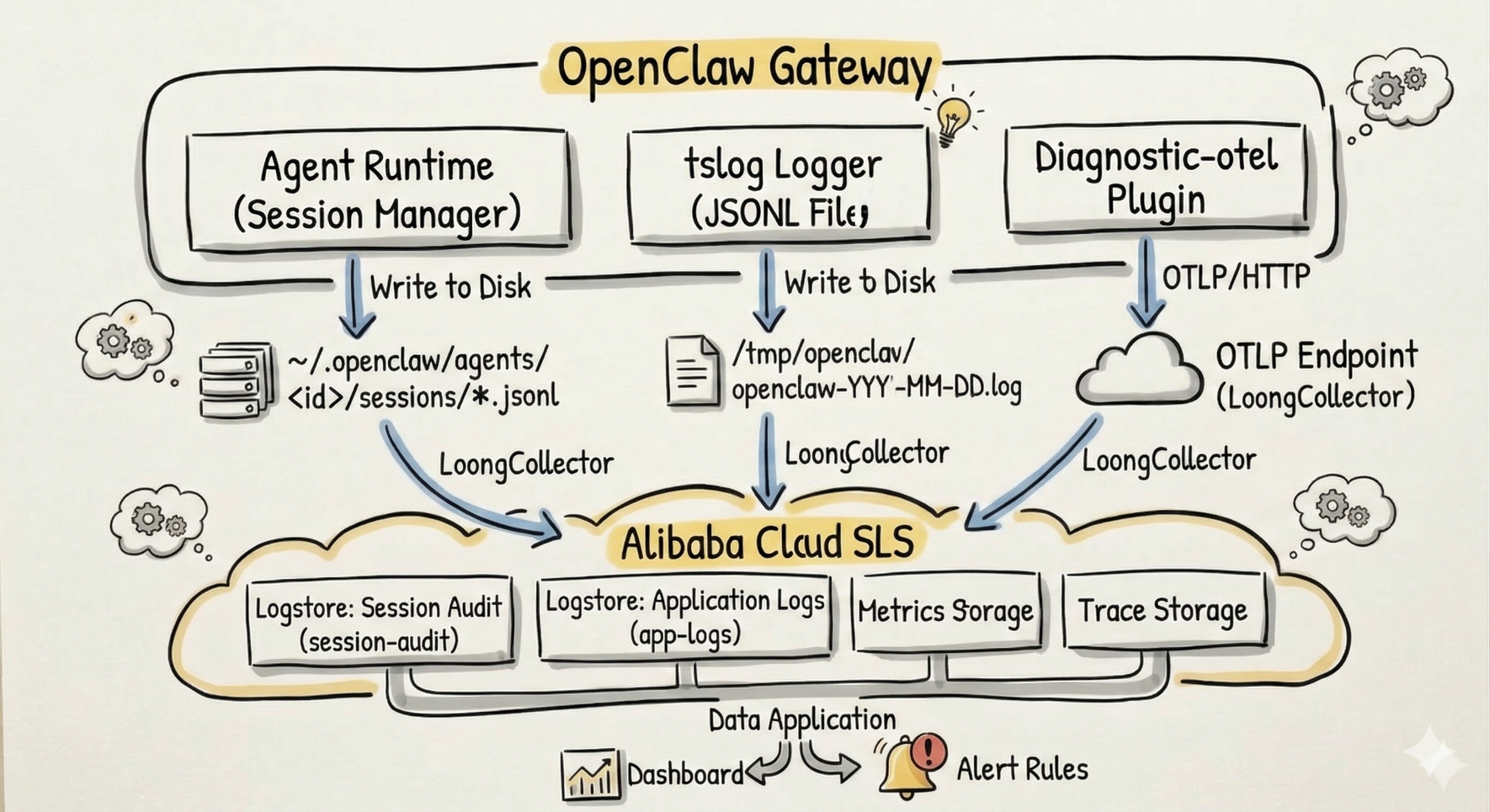
| Dimension | Session Audit Log | Application Log | Metric | Trace |
|---|---|---|---|---|
| Path | ~/.openclaw/agents/<id>/sessions/*.jsonl |
/tmp/openclaw/openclaw-YYYY-MM-DD.log |
Simple Log Service (SLS) Metric Store (OTLP Direct Push) | SLS Trace Store (OTLP Direct Push) |
| format | JSONL (One session entry per line) | JSONL (One structured log per line) | Metric (Counter/Histogram, etc.) | Span (Call Chain) |
| Collection Method | LoongCollector File Collection | LoongCollector File Collection | LoongCollector OTLP Forwarding | LoongCollector OTLP Forwarding |
| Analysis Value | Behavior audit: Restore the complete behavior chain of the Agent | O&M Observability: System health and fault troubleshooting | Real-time Monitoring: Metric dashboard, Trend, and alerting | Tracing Analysis: Message/Model invocation chain and Duration |
| data volume | High (Proportional to conversation frequency) | Medium (Proportional to Request volume) | Low (Aggregated Metric) | Low (Sampled Span) |
Next, we will expand on the data sources one by one: Ingest Data → view scenario.
Session logs are the core data source for AI Agent security audits. They record every round of conversation, every tool calling, and every token consumption—completely reconstructing "What the Agent actually performed."
Each session corresponds to a .jsonl file. Each line is a JSON object, and the entry type is distinguished by the type field. The following is a log sequence generated in a typical conversation (taking a user request to read a system file as an example):
{
  "type": "message",
  "id": "70f4d0c5",
  "parentId": "b5690259",
  "message": {
    "role": "user",
    "content": [{ "type": "text", "text": " Help me read the /etc/passwd file " }]
  }
}{
"type": "message",
"id": "3878c644",
"parentId": "70f4d0c5",
"message": {
"role": "assistant",
"content": [
{
"type": "toolCall", "id": "call_d46c7e2b...", "name": "read",
"arguments": { "path": "/etc/passwd" }
}],
"provider": "anthropic",
"model": "claude-4-sonnet",
"usage": { "totalTokens": 2350 },
"stopReason": "toolUse"
}
}{
"type": "message",
"id": "81fd9eca",
"parentId": "3878c644",
"message": {
"role": "toolResult",
"toolCallId": "call_d46c7e2b...",
"toolName": "read",
"content": [{ "type": "text", "text": "root:x:0:0:root:/root:/bin/bash\n..." }],
"isError": false
}
}{
"type": "message",
"id": "a025ab9e",
"parentId": "81fd9eca",
"message": {
"role": "assistant",
"content": [{ "type": "text", "text": "The content of the file `/etc/passwd` is as follows (excerpt): root:x:0:0:..." }],
"usage": { "totalTokens": 12741, "cost": { "total": 0.0401 } },
"stopReason": "stop"
}
}From an audit perspective, the above sample (a round of user → assistant toolCall → toolResult → assistant stop) can already answer several key questions: Who (user) asked the Agent to do what (the read tool reads /etc/passwd), which model the Agent used (claude-4-sonnet), how much it cost ($0.0401), and what the result was (successfully read the content of /etc/passwd).
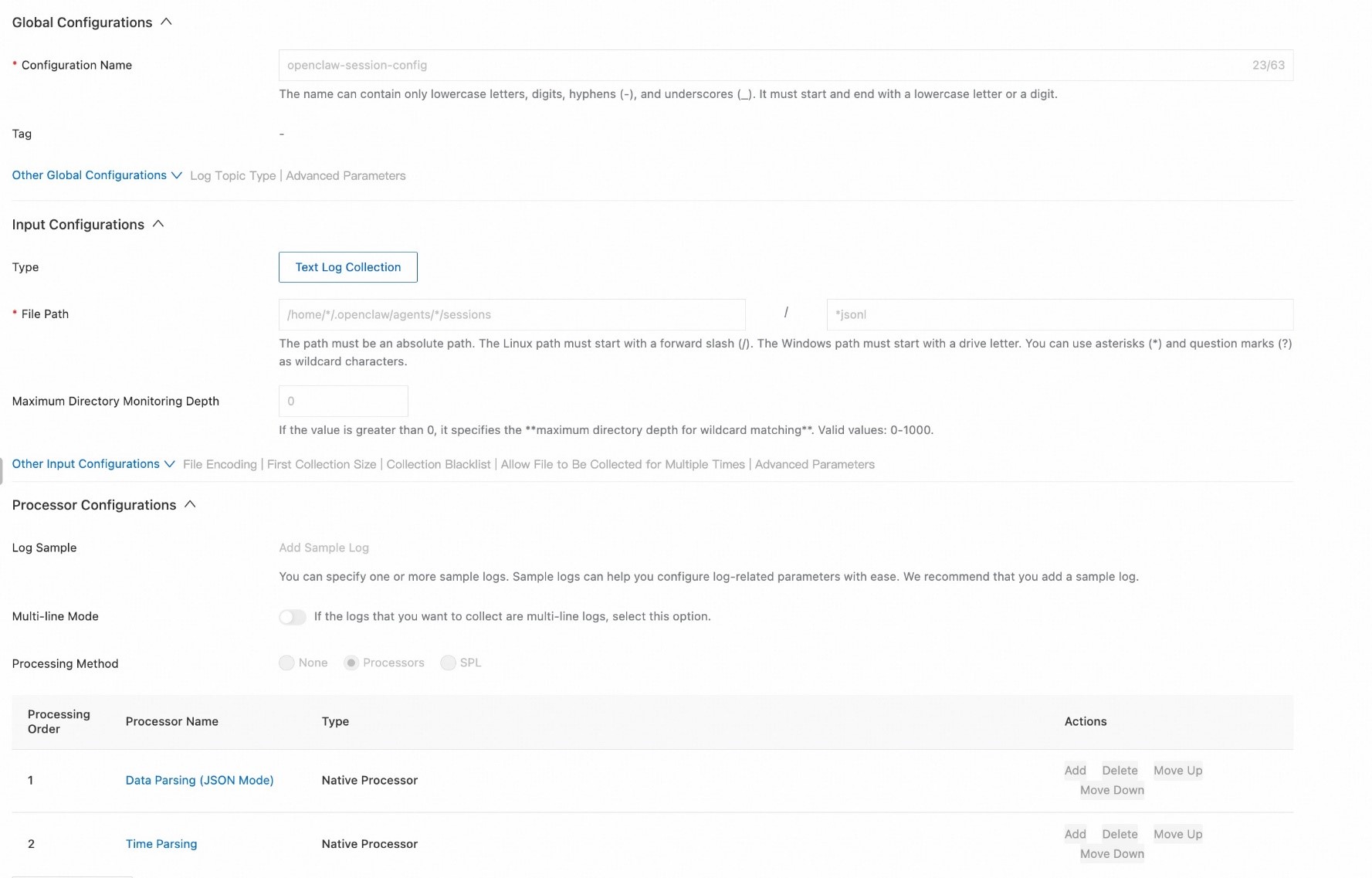
Configure the following field indexes for the session-audit Logstore in the SLS console:
| Field Path | Type | Security Audit Usage |
|---|---|---|
type |
text | Distinguish session / message / compaction to filter out auditable conversations and compression summaries |
message.role |
text | Distinguish user / assistant / toolResult to identify who said what, who invoked tools, and tool return Content |
message.content |
text (token) | Full text of User input and tool parameter/return to support injection Detection and sensitive data Data Matching |
message.provider, message.model
|
text | Model identity, cost and behavior Attribution, and Statistics by model |
message.usage.totalTokens, message.usage.cost.total
|
long / double | Usage and cost, abnormal consumption and session cost sorting |
message.stopReason |
text | Values: stop=Normal End; toolUse=paused to execute tool calling, and the next item is usually toolResult; error/aborted/timeout=abnormal End; filter out toolUse to coordinate with tool calling audit |
message.toolName, message.content, message.isError
|
text / bool | Dedicated to toolResult: tool Name, return Content (sensitive Detection), and whether it is a fault |
id, parentId
|
text | Entry and parent ID to Build conversation tree and restore order by session; the id of the session entry is the sessionId, used for aggregation by session |
timestamp |
text | Time window and sorting, and alerting Time Range |
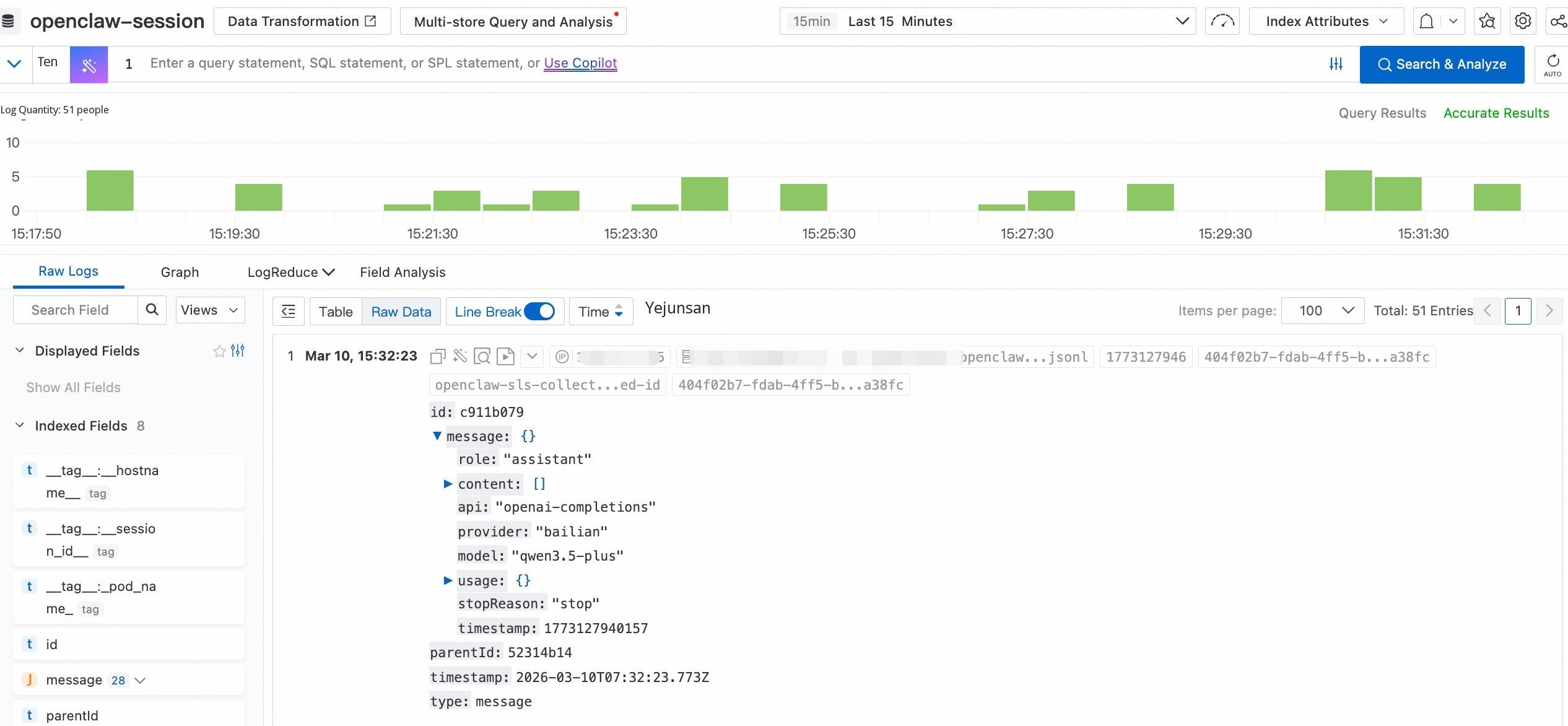
After the Agent reads files or executes commands via tools, the returned content is recorded in the toolResult entry. If the returned content contains sensitive data such as API keys, AKs, private keys, or passwords, it means that this data has entered the Agent's context—it may be "remembered" by the model and leaked in subsequent conversations.
type: message and message.role : toolResult
  | extend content = cast(json_extract(message, '$.content')  as array<json>)
  | project content | unnest
  | extend content_type = json_extract_scalar(content, '$.type'), content_text = json_extract_scalar(content, '$.text')
  | where content_type = 'text' | project content_text
| where content_text like '%BEGIN RSA PRIVATE KEY%' or content_text like '%password%' or content_text like '%ACCESS_KEY%' or regexp_like(content_text, 'LTAI[a-zA-Z0-9]{12,20}')When a skill file (such as SKILL.md) is read by the read tool, it is recorded in the content of the Assistant message with type: "toolCall", name: "read", and arguments.path. You can calculate statistics on which skills are called, the number of calls, and the most recent call time based on the path for compliance and usage analysis.
type: message and message.role : assistant and message.stopReason : toolUse
  | extend content = cast(json_extract(message, '$.content')  as array<json>)
  | project content, timestamp | unnest
  | extend content_type = json_extract_scalar(content, '$.type'), content_name = json_extract_scalar(content, '$.name'), skill_path = json_extract_scalar(content, '$.arguments.path')
  | project-away content
  | where content_type = 'toolCall' and content_name = 'read' and skill_path like '%SKILL.md'
| stats cnt = count(*), latest_time = max(timestamp) by skill_path | sort cnt desc 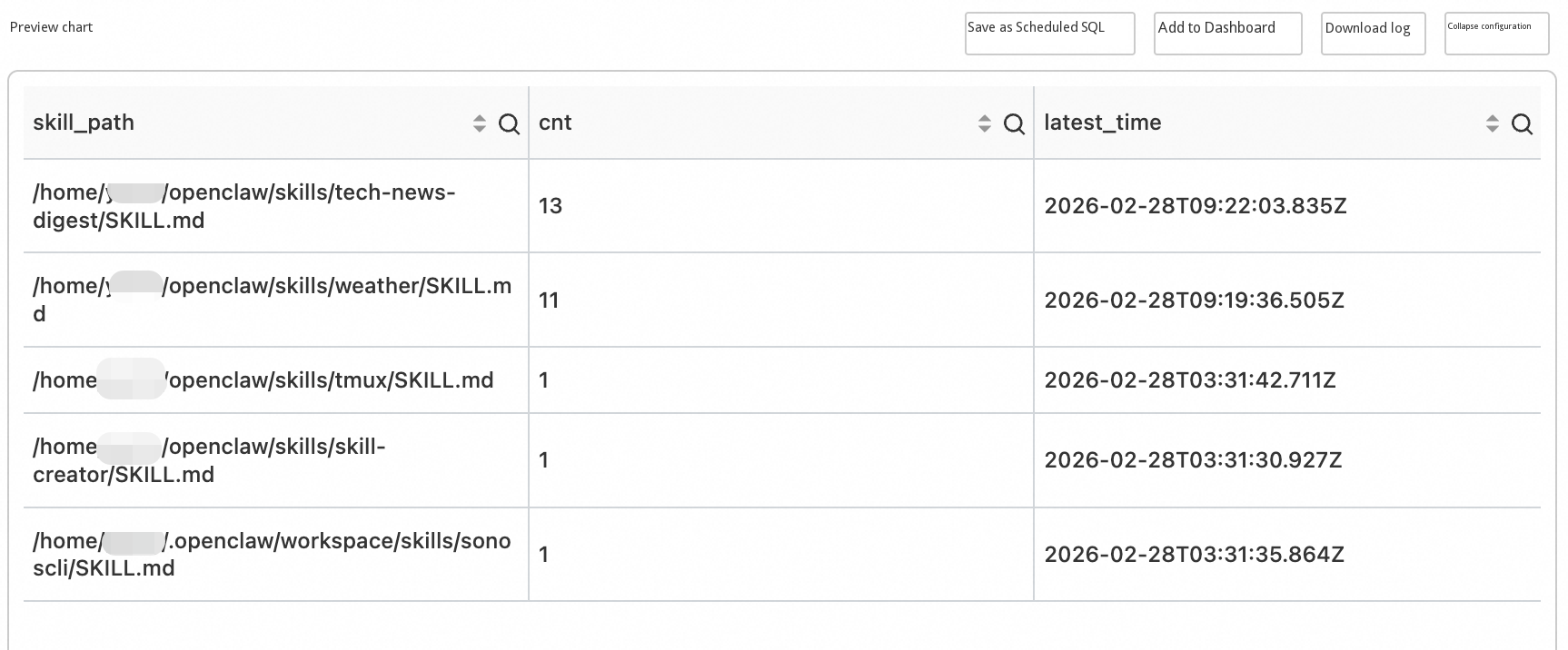
OpenClaw's tool permission system (Tool Policy Pipeline + Owner-only encapsulation) has already implemented control at runtime, but the observability layer should monitor independently of runtime protection—in case the policy configuration is incorrect, the observability layer is the last chance for Search. The definition of important tools is divided into two categories based on Scenarios.
Scenario 1: Tools prohibited by default in Gateway HTTP
When invoked via the gateway POST /tools/invoke, the following tools are denied by default, because their threat is too high or they cannot complete normally on the non-interactive HTTP interface:
| Tool Name | Reason for Prohibition |
|---|---|
sessions_spawn |
Session orchestration: Remotely launching an Agent is equivalent to Remote Code Execution (RCE) |
sessions_send |
Cross-session injection: Send messages to other sessions, which can be abused for lateral movement |
cron |
Persistence automation control plane: Can create, modify, or delete scheduled tasks; not suitable for HTTP exposure |
gateway |
Gateway control plane: Prevents reconfiguration of the gateway via HTTP |
whatsapp_login |
Interactive flow: Requires terminal QR code scanning, etc., and will suspend without response on HTTP |
Scenario 2: Tools that require explicit approval from ACP
ACP (Automation Control Plane) is the automation entry point. The following tools are not allowed to Pass silently; they must be explicitly approved by the User before they are executed:
| Tool Name | Description |
|---|---|
exec, spawn, shell
|
Execute command / derive process, directly Impact the host and security border |
sessions_spawn, sessions_send
|
Same as above, session orchestration and cross-session messages |
gateway |
Gateway Configuration Change |
fs_write, fs_delete, fs_move
|
Write file, delete file, or move file (may appear as write/edit or other Names in the log) |
apply_patch |
Application patch modifies files |
Monitoring the invocation of the above tools (and their equivalent Names in the log) in Session logs can detect abnormal or unauthorized behaviors. If a tool is still successfully invoked in the Gateway HTTP scenario, configuration bypass may exist, which you need to troubleshoot.
type: message and message.role : assistant and message.stopReason : toolUse
  | extend content = cast(json_extract(message, '$.content')  as array<json>)
  | project content, timestamp | unnest | extend content_type = json_extract_scalar(content, '$.type'), content_name = json_extract_scalar(content, '$.name'), content_arguments = json_extract(content, '$.arguments')
  | project-away content
| where content_type = 'toolCall' and content_name in ('exec', 'write', 'edit', 'gateway', 'whatsapp_login', 'cron', 'sessions_spawn', 'sessions_send', 'spawn', 'shell', 'apply_patch')Each Assistant message carries usage (containing totalTokens, input, output, cacheRead, and cacheWrite) as well as provider and model. Aggregating totalTokens by provider and model can answer "where the usage is spent." If the upstream provides usage.cost.total, you can also use the same method to aggregate by provider and model for cost Attribution.
type: message and message.role : assistant
| stats totalTokens= sum(cast("message.usage.totalTokens" as BIGINT)), inputTokens= sum(cast("message.usage.input" as BIGINT)), outputTokens= sum(cast("message.usage.output" as BIGINT)), cacheReadTokens= sum(cast("message.usage.cacheRead" as BIGINT)), cacheWriteTokens= sum(cast("message.usage.cacheWrite" as BIGINT)) by "message.provider", "message.model"The role of application logs is different from Session logs. Session logs record Agent actions (audit-oriented), while application logs record the System running Status (O&M-oriented)—Is the Gateway Started Normally? Did the Webhook report errors? Is the MSMQ stacked?
OpenClaw Gateway uses the tslog library to write structured JSONL logs:
{
  "0": "{\"subsystem\":\"gateway/channels/telegram\"}",
  "1": "webhook processed chatId=123456 duration=2340ms",
  "_meta": {
    "logLevelName": "INFO",
    "date": "2026-02-27T10:00:05.123Z",
    "name": "openclaw",
    "path": {
      "filePath": "src/telegram/webhook.ts",
      "fileLine": "142"
    }
  },
  "time": "2026-02-27T10:00:05.123Z"
}
Key fields:
● _meta.logLevelName: log level (TRACE / DEBUG / INFO / WARN / ERROR / FATAL)
● _meta.path: source code File Path and line number, used for precise positioning
● Numeric key "0": bindings in JSON format, usually containing subsystem (such as gateway/channels/telegram)
● Numeric key "1" and subsequent: log message text
Log files scroll by Day (openclaw-YYYY-MM-DD.log), are automatically cleaned up every 24 hours, and have a single file limit of 500 MB.
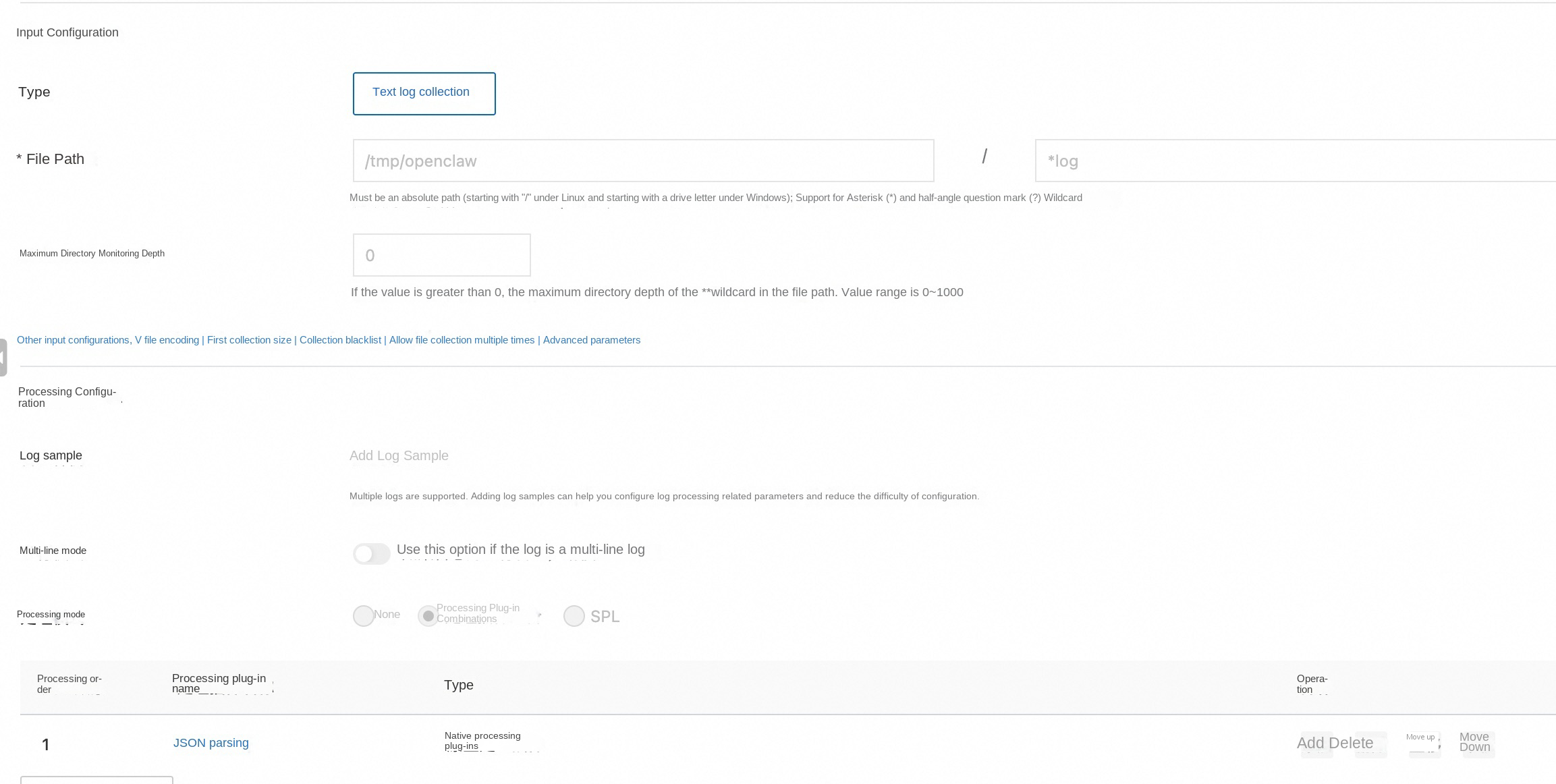
For indexes, it is recommended to establish field indexes for _meta.logLevelName, _meta.date, _meta.path.filePath, "0" (subsystem bindings), and "1" (message text).
Application logs are aggregated by abnormal levels (WARN, ERROR, FATAL) and subsystems as dimensions, which makes it easy to see which type of abnormal concentrates in which widget.
_meta.logLevelName: ERROR or _meta.logLevelName: WARN or _meta.logLevelName: FATAL
  | project subsystem = "0.subsystem", loglevel = "_meta.logLevelName"
  | stats cnt = count(1) by loglevel, subsystem
  | sort loglevel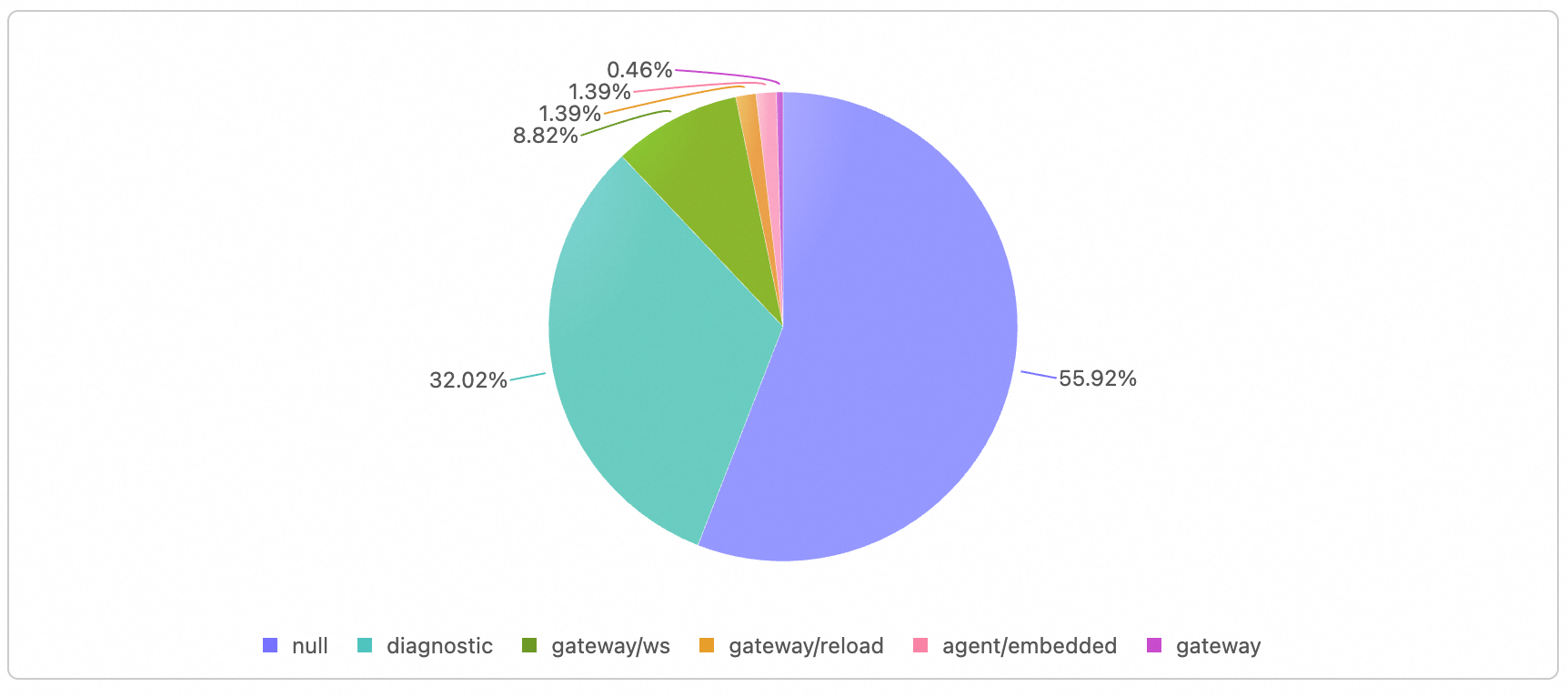
Scenario 1: WebSocket unauthorized connection (unauthorized)
Security audit value: When a WebSocket connection is denied during the authentication phase, a WARN log is generated, which facilitates the discovery of unauthorized access caused by token errors, expiration, or forgery. During auditing, follow these points: subsystem: gateway/ws indicates that the log comes from the WS layer. In the message content, conn= indicates the connection ID, remote= indicates the client IP, client= indicates the client ID (such as openclaw-control-ui or webchat), and reason=token_mismatch indicates a token mismatch (expired, incorrect, or forged). If the same remote triggers a large number of unauthorized attempts with reason as token_mismatch within a short period, it may be a dictionary attack or misappropriation attempt. If the client is a known legitimate client but still fails frequently, the issue is likely a configuration or token rotation issue, and you need to troubleshoot from the O&M side.
{
  "0": "{\"subsystem\":\"gateway/ws\"}",
  "1": "unauthorized conn=e32bf86b-c365-4669-a496-5a0be1b91694 remote=127.0.0.1 client=openclaw-control-ui webchat vdev reason=token_mismatch",
  "_meta": { "logLevelName": "WARN", "date": "2026-02-27T07:46:20.727Z" },
  "time": "2026-02-27T07:46:20.728Z"
}
Scenario 2: HTTP tool calling denied or execution failed
Security audit value: Failed or alert logs for POST /tools/invoke can reveal who is attempting to execute prohibited important tools or triggering permission or sandbox exceptions during execution. During auditing, follow these points: subsystem: tools-invoke allows you to quickly filter such events. The exception type (such as EACCES, ENOENT, or path) in the message content can distinguish between "unauthorized access to sensitive paths" and "configuration or path errors". For example, "open '/etc/shadow'" in the following example clearly points to an attempt to read a sensitive file. You need to combine this with Session logs to locate the caller.
{
  "0": "{\"subsystem\":\"tools-invoke\"}",
  "1": "tool execution failed: Error: EACCES: permission denied, open '/etc/shadow'",
  "_meta": { "logLevelName": "WARN", "date": "2026-02-27T10:00:07.000Z" },
  "time": "2026-02-27T10:00:07.000Z"
}
Scenario 3: Connection or Request processing failed
Security audit value: Connection resets and parsing errors can expose abnormal client behavior, malformed requests, or man-in-the-middle interference. During auditing, follow these points: subsystem: gateway indicates that the log comes from the gateway core (WS or request processing). The message content distinguishes between two categories. "request handler failed: Connection reset by peer" is mostly caused by peer disconnection or network interruption. You can check whether the errors occur in bursts based on time or conn (suspected scan or DoS attacks). "parse/handle error: Invalid JSON" indicates that the request body is invalid, which may be a maliciously constructed malformed package or a compatibility issue. When a large number of such errors appear from the same source within a short period, you should prioritize troubleshooting attacks or abnormal clients.
{
  "0": "{\"subsystem\":\"gateway\"}",
  "1": "request handler failed: Connection reset by peer",
  "_meta": { "logLevelName": "ERROR", "date": "2026-02-27T10:00:08.000Z" },
  "time": "2026-02-27T10:00:08.000Z"
}

{
  "0": "{\"subsystem\":\"gateway\"}",
  "1": "parse/handle error: Invalid JSON",
  "_meta": { "logLevelName": "ERROR", "date": "2026-02-27T10:00:08.100Z" },
  "time": "2026-02-27T10:00:08.100Z"
}
Scenario 4: Security audit category (device access upgrade, etc.)
Security audit value: Device pairing and permission upgrades leave an audit trail of "who, from what role or permission, upgraded to what role or permission, from which IP, and what authentication type". During auditing, focus on the structured fields in the message content: reason=role-upgrade indicates that the event is triggered by role promotion. device= indicates the device ID. ip= indicates the client IP, which can be used for comparison with known management IPs. roleFrom=[] roleTo=owner indicates an upgrade from no role to owner, which is a highly sensitive operation. auth=token indicates the Authentication Type used. If the same IP or device upgrades frequently during non-working hours, or if the number of entries with roleTo as owner increases abnormally, you should prioritize troubleshooting whether unauthorized access or account compromise has occurred.
{
  "0": "{\"subsystem\":\"gateway\"}",

  "1": "security audit: device access upgrade requested reason=role-upgrade device=abc-123 ip=192.168.1.1 auth=token roleFrom=[ ] roleTo=owner scopesFrom=[ ] scopesTo=[...] client=control conn=conn-1",

  "_meta": { "logLevelName": "WARN", "date": "2026-02-27T10:00:09.000Z" },
  "time": "2026-02-27T10:00:09.000Z"
}
Scenario 5: FATAL and core exceptions
Security audit value: FATAL indicates that core features are unavailable, which may be caused by tampered configurations, dependency failures, or critical runtime errors. You need to immediately troubleshoot whether the issue is related to intrusion or misconfiguration. During auditing: Filter _meta.logLevelName = 'FATAL' in the error dashboard. Combine subsystem and the message content of "1" to locate the specific component and the cause of the error. If FATAL is accompanied by keywords such as "bind", "config", or "listen", you need to prioritize troubleshooting the exposed surface and configuration consistency. It is recommended that you configure real-time alerting (such as every minute, cnt > 0, push to DingTalk or text messages) to ensure an immediate response.
Session logs and application logs rely mainly on management events and audit trails, which are suitable for conditional retrieval and post-event attribution. From the perspective of the observability system, if you want to master aggregation metrics, trends, and request traces (such as cost/usage trends, session health degree, and duration and dependency of a single request), you need to use OpenTelemetry (OTEL) Metrics (counter, histogram, gauge) and Traces (distributed traces, latency, and invocation relationships). Together with logs, they form the complete observability capability of "logs + metrics + traces."
OpenClaw has a built-in diagnostics-otel plugin (version 26.2.19 or later). It supports exporting Metrics, Traces, and Logs via the OpenTelemetry Protocol (OTLP)/HTTP (Protobuf) protocol.
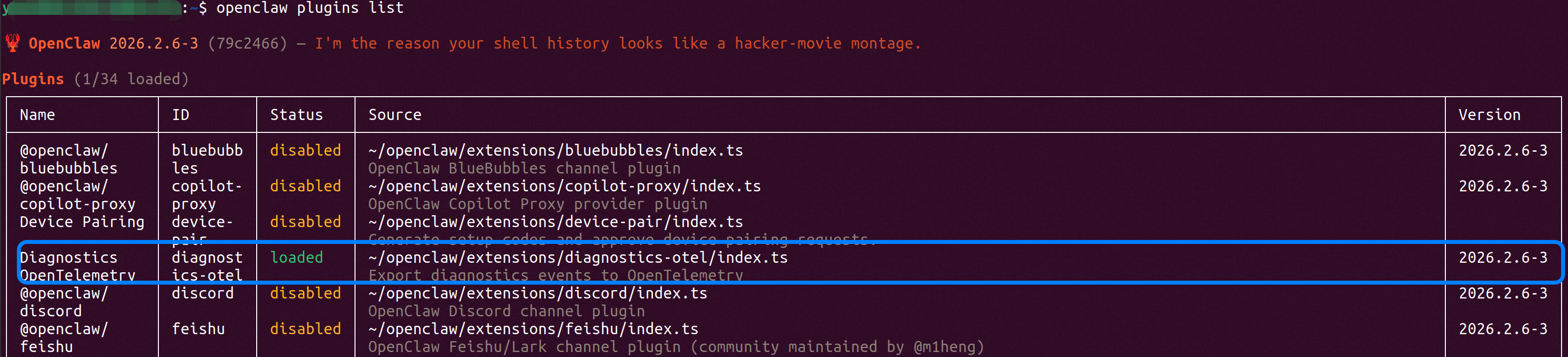
Execute the command openclaw plugins enable diagnostics-otel to start the plugin. View the plugin status using the openclaw plugins list command. The expected status is loaded.
{
  "plugins": {
    "allow": ["diagnostics-otel"],
    "entries": {
      "diagnostics-otel": { "enabled": true }
    }
  },
  "diagnostics": {
    "enabled": true,
    "otel": {
      "enabled": true,
      "endpoint": "https://127.0.0.1:4318",
      "protocol": "http/protobuf",
      "serviceName": "openclaw-gateway",
      "traces": true,
      "metrics": true,
      "logs": true,
      "sampleRate": 1,
      "flushIntervalMs": 60000
    }
  }
}In the SLS console, create logstores: otlp-logs and otlp-traces. Create metricstore: otlp-metrics, and the corresponding collection configuration.
{
    "aggregators": [
        {
            "detail": {},
            "type": "aggregator_opentelemetry"
        }
    ],
    "inputs": [
        {
            "detail": {
                "Protocals": {
                    "HTTP": {
                        "Endpoint": "127.0.0.1:4318",
                        "ReadTimeoutSec": 10,
                        "ShutdownTimeoutSec": 5,
                        "MaxRecvMsgSizeMiB": 64
                    },
                    "GRPC": {
                        "MaxConcurrentStreams": 100,
                        "Endpoint": "127.0.0.1:4317",
                        "ReadBufferSize": 1024,
                        "MaxRecvMsgSizeMiB": 64,
                        "WriteBufferSize": 1024
                    }
                }
            },
            "type": "service_otlp"
        }
    ]
}To answer observability requirements such as "usage and cost," "entry stability," and "queue and session health," OpenClaw exports Metrics and Traces via OTEL. The following provides an overall description and details table (metric name, type, and function) categorized by requirements.
It is directly related to Large Language Model (LLM) invocation costs and is the core of fee control. By monitoring token consumption, estimated fees, run duration, and context usage, you can master the cost of each model invocation and discover waste caused by improper configuration or inefficient use.
| Metric Name | Type | Description |
|---|---|---|
openclaw.tokens |
Counter | The Quantity of tokens consumed when the model is processed, distinguished by input/output |
openclaw.cost.usd |
Counter | The Fee estimated based on token usage (in USD), allowing you to monitor expenses in real-time |
openclaw.run.duration_ms |
Histogram | The Duration of a single Job from start to End, reflecting the overall response speed |
openclaw.context.tokens |
Histogram | The Quantity of context tokens occupied by the current conversation or Job |
openclaw.cost.usd generates data only when the upstream model.usage management event provides costUsd.
Webhook is an important entry point for OpenClaw to interact with external systems. By monitoring the quantity of received requests, fault counts, and processing duration, you can discover external invocation abnormalities in time and ensure integration stability.
| Metric Name | Type | Description |
|---|---|---|
openclaw.webhook.received |
Counter | The total volume of received Webhook Requests, reflecting request pressure |
openclaw.webhook.error |
Counter | The Count of errors that occurred when the Webhook was processed |
openclaw.webhook.duration_ms |
Histogram | The Duration for processing a single Webhook Request (in milliseconds) |
The message queue is a transit station for job processing. By following the enqueue/dequeue quantity, queue depth, and wait time, you can determine whether the system is congested or whether jobs are backlogged. This facilitates adjusting resources or troubleshooting bottlenecks.
| Metric Name | Type | Description |
|---|---|---|
openclaw.message.queued |
Counter | The total volume of messages entering the Pending queue, reflecting request pressure |
openclaw.message.processed |
Counter | The Count of completed message processing, categorized by Results such as Succeeded or failed |
openclaw.message.duration_ms |
Histogram | The Duration for processing a single message (in milliseconds) |
openclaw.queue.depth |
Histogram | The Quantity of stacked messages in the queue when messages are enqueued or dequeued |
openclaw.queue.wait_ms |
Histogram | The queue wait Time before the message is executed |
openclaw.queue.lane.enqueue |
Counter | The enqueue Count of the command queue channel |
openclaw.queue.lane.dequeue |
Counter | The dequeue Count of the command queue channel |
Changes in session status and the quantity of stuck sessions reflect interaction health. Monitoring metrics such as stuck sessions and retries allows you to quickly discover conversations trapped in infinite loops or abnormal statuses, improving observability and troubleshooting efficiency.
| Metric Name | Type | Description |
|---|---|---|
openclaw.session.state |
Counter | Session Status transform |
openclaw.session.stuck |
Counter | The Quantity of sessions that are stuck or show no progress during the procedure |
openclaw.session.stuck_age_ms |
Histogram | The duration for which the stuck sessions have persisted (in milliseconds) |
openclaw.run.attempt |
Counter | The task execution retry Count, helping identify unstable links |
| Metric Name | Type | Description |
|---|---|---|
openclaw.model.usage |
Span | Each model invocation, including provider/model/sessionKey/tokens |
openclaw.webhook.processed |
Span | Webhook processing completed, including channel/chatId |
openclaw.message.processed |
Span | Message processing completed, including channel/outcome/sessionKey |
openclaw.session.stuck |
Span | Stuck session Detection, including state/ageMs/queueDepth |
Answer: Which models and Providers are the usage and money mainly spent on? Is the recent Token consumption trend normal, or is there a sudden surge? How is the cumulative usage ranked by model or Provider? When the Token growth rate is abnormal, you can perform further analysis combined with Session logs.
# Token consumption growth rate (alerts can be set: such as exceeding N tokens/min)sum(rate(openclaw_tokens[10m]))

# Token consumption trend (by model)
sum(rate(openclaw_tokens[5m])) by (openclaw_model)

# Cumulative Tokens (by Provider)
sum(openclaw_tokens) by (openclaw_provider)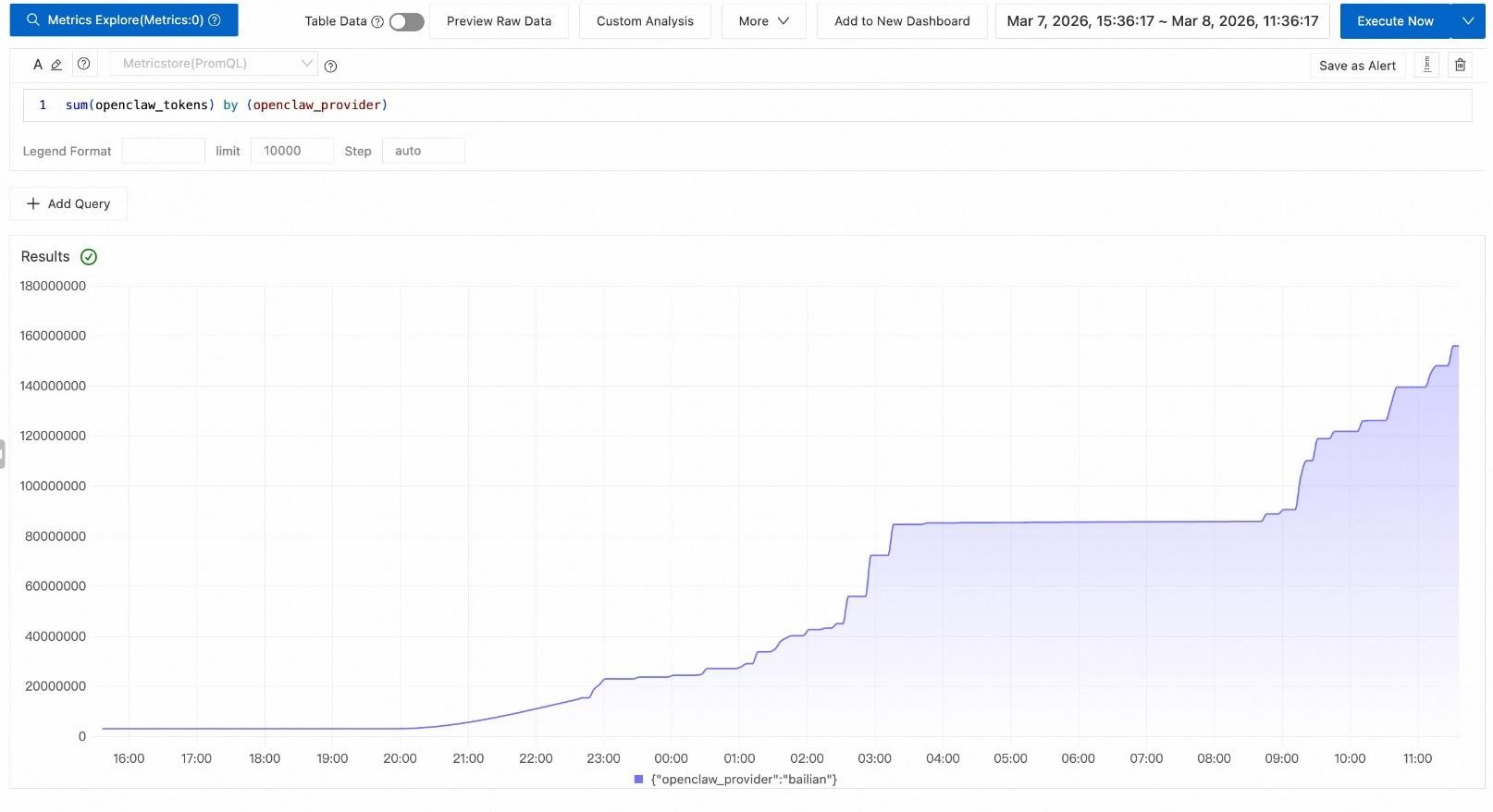
Answer: Are there currently stuck sessions or sessions with no progress? What are the frequency and time periods of stuck occurrences? Does the single Agent execution duration (P95/P99) exceed expectations, or are there long tails?
# Stuck sessions (Alert: > 0)sum(rate(openclaw_session_stuck[5m]))

# Execution duration P95 (Alert: such as > 5 minutes)
histogram_quantile(0.95, sum(rate(openclaw_run_duration_ms_bucket[5m])) by (le))Answer: What are the Request volume and fault counts of Webhooks for each channel, and is the Error Rate within an acceptable range? Have the quantiles (P95/P99) of single Webhook processing duration and Agent execution duration deteriorated? What are the differences in latency distribution by channel or by model? When the Error Rate or latency is abnormal, you can combine application logs to search for specific faults by Webhook subsystem.
# Webhook Error Rate (Alert: such as > 5%)sum(rate(openclaw_webhook_error[5m])) / sum(rate(openclaw_webhook_received[5m]))

# Execution duration P99 (by model)histogram_quantile(0.99, sum(rate(openclaw_run_duration_ms_bucket[5m])) by (le, openclaw_model))

# Webhook processing duration P95 (by channel)histogram_quantile(0.95, sum(rate(openclaw_webhook_duration_ms_bucket[5m])) by (le, openclaw_channel))Answer: Are the depth and enqueue/dequeue rates of each queue lane healthy? Is the wait time (P95/P99) of Jobs in the queue lengthening, or is there a backlog Trend? Which lanes are most prone to congestion? This facilitates detecting bottlenecks and adjusting resources before User experience deteriorates.
# Queue depth (by lane)histogram_quantile(0.95, sum(rate(openclaw_queue_depth_bucket[5m])) by (le, openclaw_lane))

# Queue wait time P95 (by lane)
histogram_quantile(0.95, sum(rate(openclaw_queue_wait_ms_bucket[5m])) by (le, openclaw_lane))The previous sections demonstrated the independent value of each Data Pipeline. However, what truly embodies "keeping the Agent running under control" is the ability of multiple observable data Pipelines to work collaboratively.
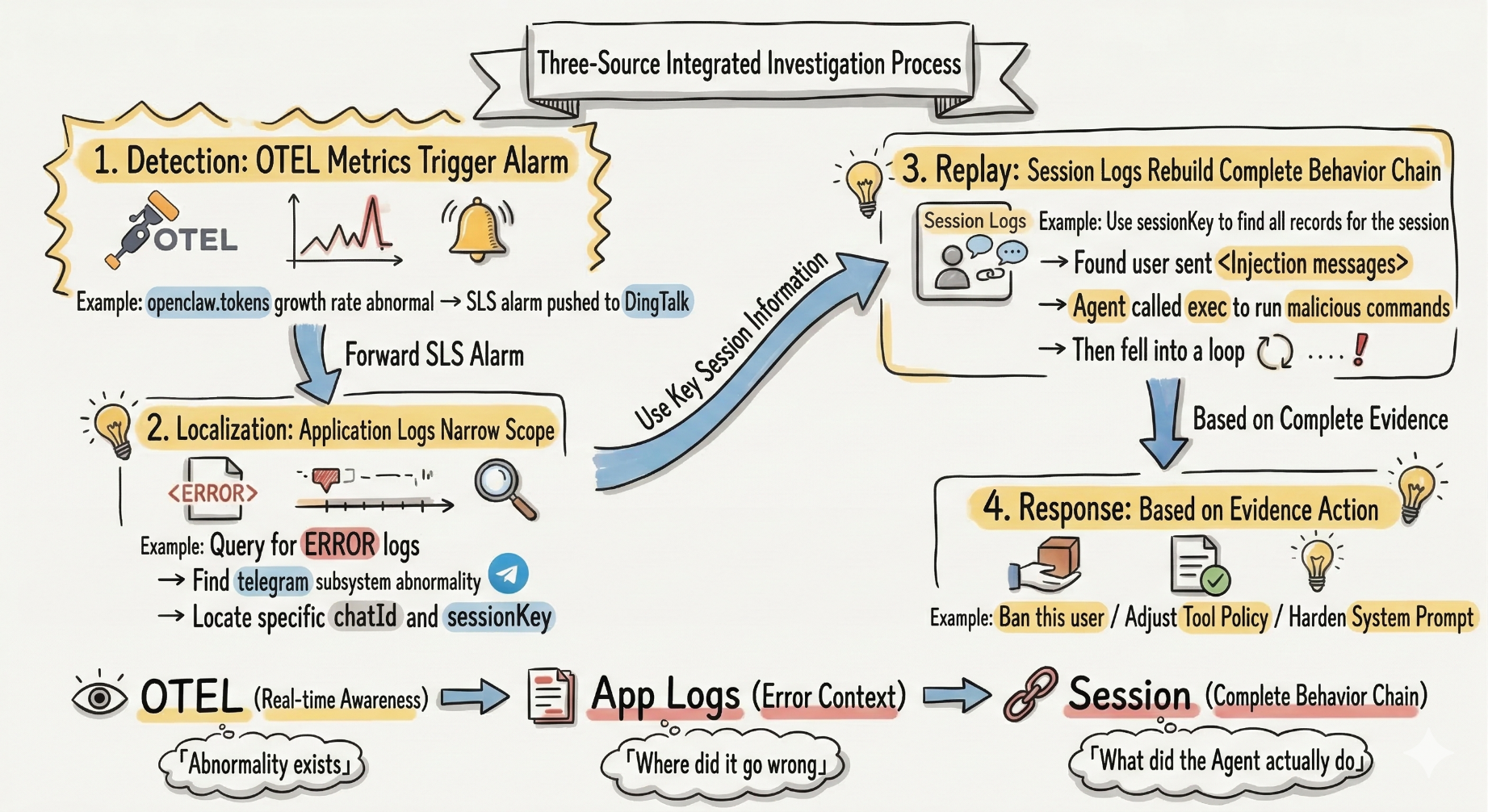
The key to this flow lies in each Data Pipeline answering questions at different layers, and none is dispensable:
● Only OTEL without Session logs: You know the cost is soaring, but you do not know who, or what was done.
● Only Session logs without OTEL: You can audit behaviors but cannot perceive the Status from a holistic view.
● Only application logs: You can see System Errors but do not know the business behavior of the Agent.
To answer "Is your OpenClaw truly running under control?", you need to answer four questions simultaneously: who is triggering the invocation, how much it costs, what operations were performed (especially high-risk tools), and whether the behavior is traceable and auditable. Relying solely on runtime protection (tool policies, loop detection, and so on) is insufficient to claim control. You must establish a continuous observability system and use data to answer the above questions.
Based on Alibaba Cloud Simple Log Service (SLS), this topic unifies OpenClaw's three types of observable data—Session audit logs, application logs, and OTEL metrics and traces—into SLS to form a complete "logs + metrics + traces" capability. Session logs answer "What did the Agent do and how much did it cost." Application logs answer "Where is the system abnormal." OTEL answers "Current status and duration." By using LoongCollector file collection and OTLP direct ingestion, the system achieves a one-stop closed loop of collection, indexing, query, dashboard, and alerting. It also utilizes the audit, permission, and masking capabilities of SLS to meet compliance requirements.
In practice, the three data pipelines should be used collaboratively. OTEL alerting detects anomalies. Application logs are used to narrow down the scope and locate the subsystem and session. Then, Session logs are used to reconstruct the complete behavior chain and take response measures. Only through the interaction of the three sources can a verifiable audit and O&M closed loop be formed—from "there is an anomaly" to "where the problem is" and then to "what exactly the Agent did"—truly allowing the Agent to run under control.

774 posts | 60 followers
FollowAlibaba Cloud Native Community - May 18, 2026
CloudSecurity - April 20, 2026
Alibaba Cloud Native Community - May 25, 2026
Alibaba Cloud Native Community - April 16, 2026
Alibaba Cloud Native Community - May 20, 2026
Alibaba Cloud Native Community - May 8, 2026
774 posts | 60 followers
Follow QwenWork
QwenWork is dedicated to helping employees strengthen their professional competitiveness in the AI era and to enabling enterprises to improve organizational effectiveness.
Learn More Token Plan
Build more, spend less. One plan, every modality.
Learn More
Alibaba Cloud Model Studio
A one-stop generative AI platform to build intelligent applications that understand your business, based on Qwen model series such as Qwen-Max and other popular models
Learn More Qwen
Qwen
Full-range, open-source, multimodal, and multi-functional
Learn MoreMore Posts by Alibaba Cloud Native Community

