
By Tao Zou
Sudden system crashes in Linux are a common challenge faced by operations personnel and developers. Traditional analysis methods often require significant time and effort, as well as deep kernel knowledge, when dealing with complex kernel logs and memory dump files. This article introduces the intelligent crash diagnosis feature of Alibaba Cloud's Operating System (OS) Console and demonstrates how it simplifies the crash analysis process using AI technology.
After a server crash, operations personnel first need to check the dmesg logs. However, kernel logs often contain a large amount of difficult-to-understand information:
[ 69518574.393036] Code: e8 38 ac e8 88 0b ff ff 0f 0b 48 c7 c7 d0 e8 38 ac e8 7a 0b ff ff 0f 0b 48 89 f2 48 89 fe 48 c7 c7 90 e8 38 ac e8 66 0b ff ff <0f> 0b 48 89 fe 48 c7 c7 58 e8 38 ac e8 55 0b ff ff 0f 0b 48 89 ee
[ 69518574.393070] RSP: 0018:ffffb0d3c0a3bb98 EFLAGS: 00010282
[ 69518574.393085] RAX: 0000000000000054 RBX: ffff9fbe07b158c0 RCX: 0000000000000000
[ 69518574.394079] RDX: ffff9fbeddf703e0 RSI: ffff9fbeddf5fb40 RDI: ffff9fbeddf5fb40
Kernel panic - not syncing: Fatal exception
This information is hard for regular operations personnel to understand, and the real issues are often hidden among thousands of log lines, requiring a lot of time to investigate.
Traditional log analysis not only requires a strong technical background but also an in-depth understanding of various kernel subsystems. For example, hardlockup errors require knowledge of CPU scheduling, interrupt handling, and spinlocks; hungtask issues demand familiarity with process state transitions, wait queues, and resource contention concepts.
For complex issues, it is often necessary to obtain the VMCORE file for in-depth analysis. The complete VMCORE analysis process includes:
The entire process can take hours or even days and requires a high level of kernel knowledge from the analyst. VMCORE analysis involves a wide range of technical aspects, including memory layout analysis, process state reconstruction, and kernel data structure parsing. For example, analyzing memory errors requires checking page allocation status and analyzing memory corruption issues; diagnosing deadlocks involves reconstructing lock dependencies and analyzing call stack behavior.
After identifying the issue, it is still necessary to find the corresponding fix patch. The Linux kernel's Git repository contains over thirty years of evolution history, with more than a million commits involving tens of thousands of developers. Finding fixes related to specific problems in such a vast codebase requires a deep understanding of the kernel's evolutionary history. Manual screening is not only inefficient but also prone to missing critical information.
These three challenges make traditional crash analysis processes complex and time-consuming. The intelligent crash diagnosis feature of Alibaba Cloud's OS Console aims to address these issues.
Alibaba Cloud OS Console (referred to as the OS Console) is a one-stop OS operation and maintenance management platform that provides powerful system diagnostic capabilities for memory, I/O, networking, kernel crashes, etc. SysOM is the operation and maintenance component of the OS Console. However, these features typically require users to log in to the console and possess certain operation and maintenance experience to use them effectively.
Intelligent Crash Diagnosis is a system scenario diagnostic function provided by Alibaba Cloud's OS Console. Based on large model technology and integrating kernel debugging techniques with a wealth of fault cases, it can automatically complete the entire process from log analysis to problem identification and patch recommendation, making the originally complex crash analysis simple and efficient.
Alibaba Cloud OS Console address: https://alinux.console.aliyun.com/
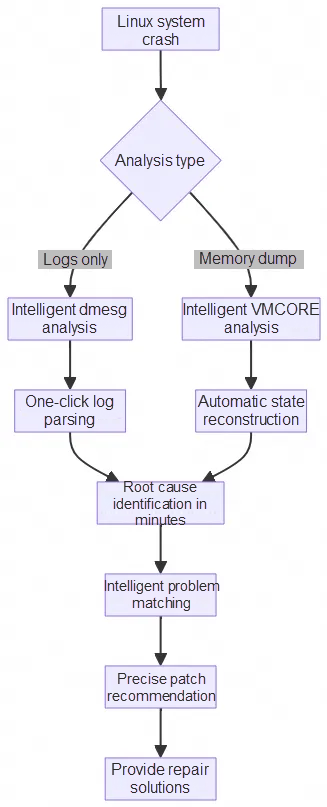
No more worries about dealing with complex kernel logs! The log parsing feature of Intelligent Crash Diagnosis can automatically extract key information, providing structured data for subsequent AI analysis.
Core capabilities:
• Structured information extraction: Automatically extracts key fields such as version number, crash title, process name, function name, RIP register value, CPU number, loaded modules, etc., from logs.
• Call stack layered analysis: Identifies and separates three layers of call relationships—NMI stack, IRQ stack, and task stack—filters out invalid functions, and extracts the top-3 critical function call chains.
• Fault type identification: Supports quick determination of mainstream kernel fault types such as hardlockup, hungtask, memory_error, softlockup, hardware_error, and more.
• Error log aggregation: Automatically sorts error logs by timestamp, filters redundant call stack information, and retains key diagnostic clues.
Actual effect: Traditional methods require manually searching through thousands of lines of logs line by line to find key information, while the system can complete log parsing and structured extraction in seconds, converting unstructured dmesg logs into structured feature sets, providing clear data input for subsequent AI diagnosis.
The system has designed specialized diagnostic capabilities for different types of kernel issues, deeply integrating the drgn kernel debugger, which can directly access kernel data structures in VMCORE, combined with AI inference for intelligent analysis:
• Hardlockup diagnosis: Uses graph traversal algorithms to construct lock dependency graphs, automatically detecting circular waits and deadlock scenarios, outputting clear lock wait paths (e.g., CPU1→lockA→CPU2→lockB→CPU3→lockC→CPU1 forming a deadlock loop).
• Hungtask diagnosis: Implements chain tracing algorithms, starting from D-state processes to analyze waiting chains level by level, identifying terminal blocking points (Terminal Holder), and providing a complete resource wait path.
• Memory error diagnosis: Identifies typical memory error types such as use-after-free, null pointer dereference, wild pointers, etc., tracking memory allocation and release paths.
• Softlockup diagnosis: Analyzes scheduling delays, CPU usage patterns, and detects soft locks and response timeout issues.
Each type of diagnosis follows the pattern of 'algorithm extracting data skeleton + AI completing reasoning logic,' ensuring both accuracy of analysis and intelligence of diagnostics.
The intelligent diagnosis of system crashes adopts a hybrid vector retrieval technology for patch search. The system first uses the text-embedding-v4 model to convert problem descriptions into 1536-dimensional dense and sparse vectors, performing semantic similarity retrieval in a vector database built from historical commits of the Linux kernel.
The retrieval process is divided into two stages:
• Stage one - vector retrieval: Quickly recall the top-k most relevant candidate patches from a massive number of commits using the vector database.
• Stage two - intelligent ranking: Use large model technology to conduct an in-depth analysis of each candidate patch, evaluating its relevance to the current issue (on a scale of 1-10), and provide detailed reasons for the relevance score.
The system supports filtering by kernel version (e.g., selecting patches for versions v5.10 and above), helping users more accurately retrieve fixes applicable to specific versions. Ultimately, multiple most relevant patches are returned, each containing the commit ID, summary, relevance score, and recommendation rationale.
Taking a real-world production environment Hardlockup fault as an example, the server suddenly became unresponsive and crashed. After the operations personnel initiated diagnostics via the console, the system generated a complete diagnostic report within 5 minutes.
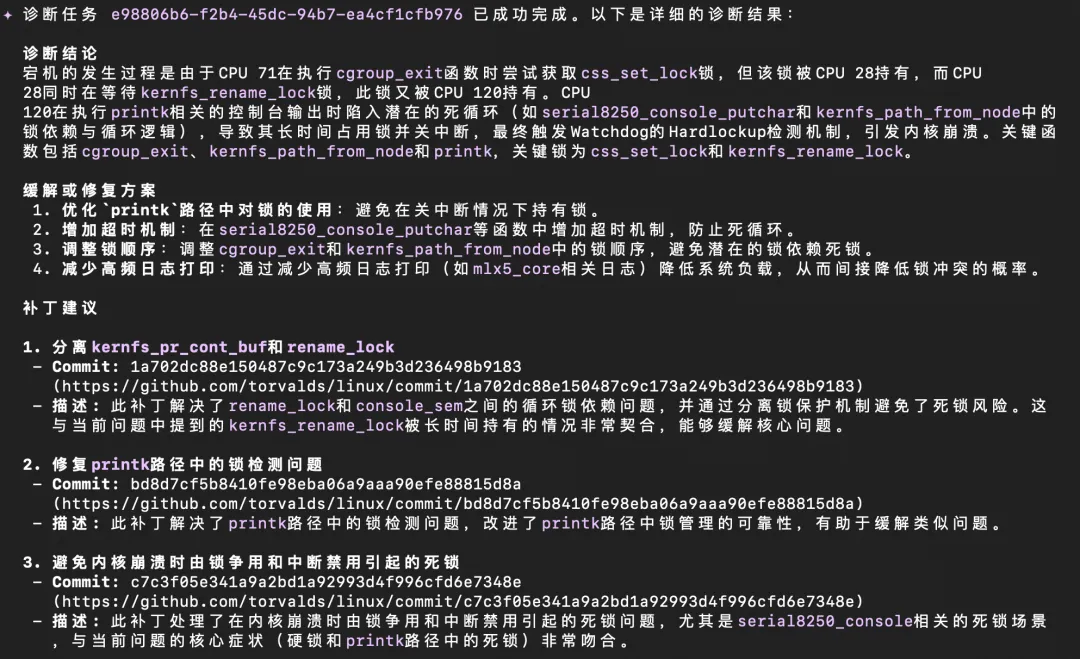
The report contains the following key information:
• Fault type identification: Automatically determined to be a Hardlockup deadlock issue.
• Deadlock chain analysis: Identified cyclic waiting relationships among three CPUs, including the locks held and waited on by each CPU.
• Root cause localization: Pinpointed the critical code paths and function calls that led to the deadlock.
• Repair recommendations: Provided four targeted mitigation measures.
• Patch recommendations: Retrieved three related patches from millions of Linux kernel commits, ranked them by relevance, and explained the recommendation rationale.
In this diagnostic session, the system's top-recommended patch was precisely the one that fixed the issue, with the other two recommended patches also highly matching the fault symptoms. For such complex multi-party deadlock scenarios, traditional manual analysis typically takes hours or even days, whereas the intelligent crash diagnosis completed the entire process from issue analysis to patch recommendation in just a few minutes, significantly lowering the barrier to fault handling and reducing operational costs.
The intelligent crash diagnosis feature supports mainstream Linux distributions in .rpm package format, including Alibaba Cloud Linux, CentOS, Anolis OS, Rocky Linux, AlmaLinux, etc. For distributions like Alibaba Cloud Linux, CentOS, and Anolis OS, the system automatically retrieves debuginfo, reducing usage costs.
SysOM MCP ali an open-source system diagnosis tool set based on the Model Context Protocol protocol. It encapsulates the downtime intelligent diagnosis capability into a standardized MCP tool that can be used by the AI assistant.(such as qwen-code) direct downtime diagnosis using natural language.
🔗 Project address: https://github.com/alibaba/sysom_mcp
Please refer to the project documentation to complete installation and configuration. After configuration is complete, initiate diagnostics directly in the AI assistant using natural language.
Example 1: Invoke intelligent crash diagnosis
Please help me analyze a crash issue. vmcore download link: https://path/to/your/vmcoreInstructions:
· The API accepts HTTP/HTTPS download links. Ensure the download link has appropriate access permissions to allow the diagnostic service to download and analyze.
· For other distributions such as Rocky Linux and AlmaLinux, debuginfo and debuginfo-common download links need to be provided additionally. Distributions using .deb package formats (e.g., Ubuntu, Debian, etc.) are not yet supported. This feature is under development.
Example 2: Query historical diagnostic tasks
View my crash diagnostic records from the last 7 days and return the result of the previous diagnosis.The AI assistant will automatically invoke the corresponding MCP tools and present the diagnostic results in an easy-to-read format.
For scenarios requiring integration into automated operations systems or custom workflows, the OpenAPI interface can be directly invoked. For detailed usage, please refer to the OpenAPI documentation in the OS console.
OS Console OpenAPI documentation link: https://next.api.alibabacloud.com/api/SysOM/2023-12-30/CreateVmcoreDiagnosisTask
Linux crash analysis is no longer the exclusive domain of a few experts! Alibaba Cloud OS Console’s intelligent crash diagnosis function, through the deep integration of AI technology and professional kernel debugging tools, allows every operations and development personnel to easily handle complex system issues.
In this era of pursuing efficient operations, having an intelligent crash diagnosis function like this will undoubtedly make your work twice as effective with half the effort. Whether it's troubleshooting in the middle of the night or daily maintenance, you can handle it with ease and never worry about complex kernel issues again.
If you also want to get rid of the troubles of Linux crash analysis, try Alibaba Cloud OS Console’s intelligent crash diagnosis function and let AI become your capable assistant!
If you want to use more comprehensive SysOM functions, please log in to the Alibaba Cloud OS Console for an experience.
Address: https://alinux.console.aliyun.com/
Building a Production-Grade Cloud-Native Large Model Inference Platform with SGlang RBG + Mooncake

120 posts | 6 followers
FollowOpenAnolis - March 5, 2026
roura356a - December 5, 2019
Alibaba Cloud Serverless - November 25, 2020
OpenAnolis - August 4, 2026
OpenAnolis - May 27, 2026
hyj1991 - July 22, 2019
120 posts | 6 followers
Follow QwenWork
QwenWork is dedicated to helping employees strengthen their professional competitiveness in the AI era and to enabling enterprises to improve organizational effectiveness.
Learn More Token Plan
Build more, spend less. One plan, every modality.
Learn More
Alibaba Cloud Model Studio
A one-stop generative AI platform to build intelligent applications that understand your business, based on Qwen model series such as Qwen-Max and other popular models
Learn More DevOps Solution
Accelerate software development and delivery by integrating DevOps with the cloud
Learn MoreMore Posts by OpenAnolis

