By Xiao Jietao
Recently, we received a surge of feedback from users reporting that their systems were experiencing sudden spikes in CPU utilization and system load during operation, sometimes leading to brief system stutters lasting several seconds to tens of seconds. For their business applications, the impact ranged from minor jitters lasting a few hundred milliseconds to severe cases where they couldn't even SSH into the server. Our analysis revealed a common thread: These incidents consistently occurred when system memory usage was approaching its threshold, roughly from 90% to 95%. This left users asking some hard questions:
"When memory usage is that high, why doesn't the kernel trigger OOM to kill some processes and free up memory?"
"I'd rather have the kernel trigger OOM to kill my business processes than let application stutters and system hangs affect my other services!"
The core reason behind this symptom is simple: The kernel wants to be absolutely sure that an application has truly run out of memory before it pulls the OOM trigger.
This philosophy is generally correct, but applying one principle to every scenario is a tall order.
"Memory usage is sky-high. Why doesn't the kernel trigger OOM?" This is mainly because the system has entered a near-OOM state. To understand this, let's revisit Linux's memory reclamation mechanism, as shown in the following figure.
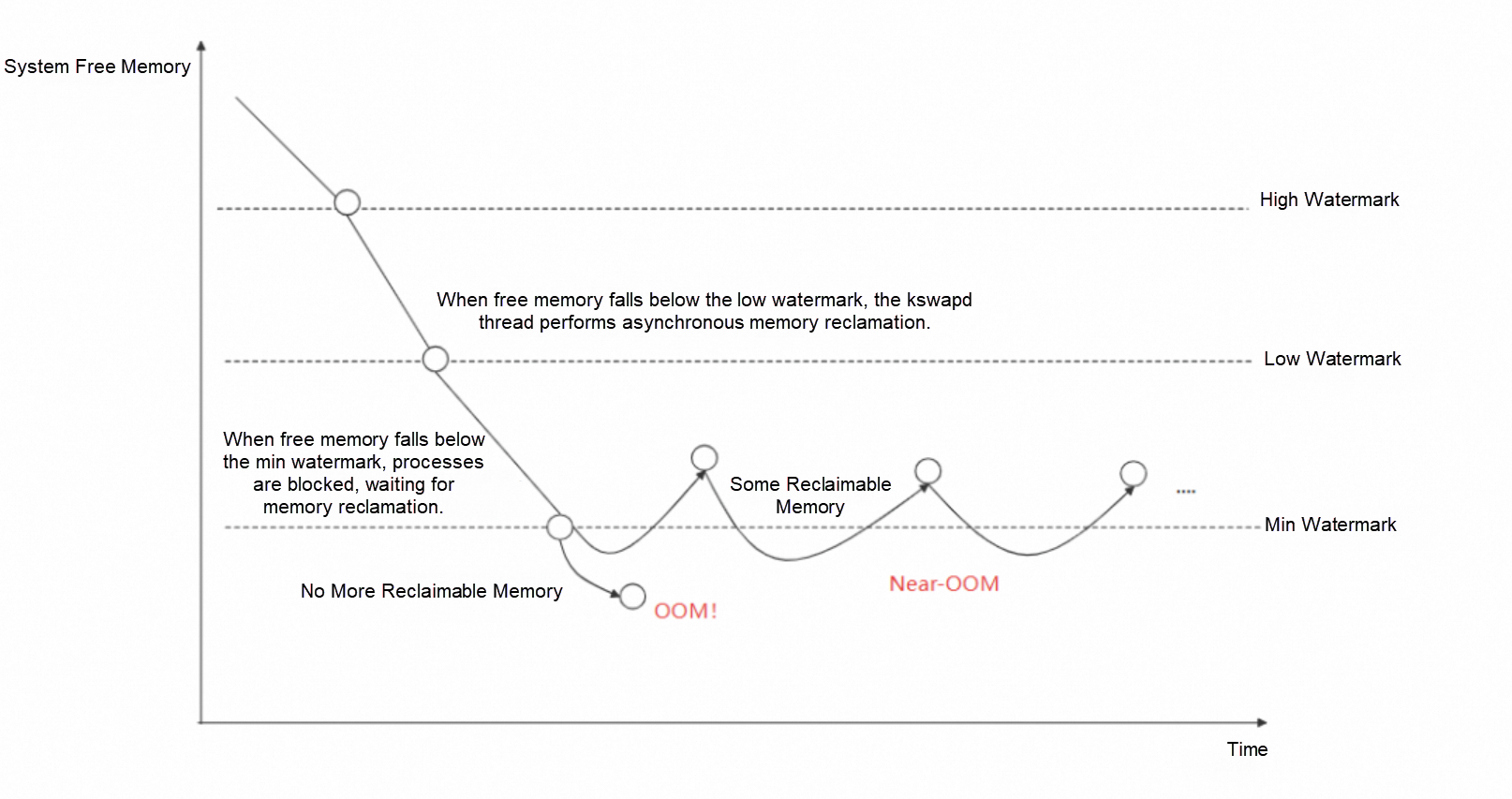
Figure: Thresholds of Linux memory usage
Linux defines three thresholds, or watermarks, for memory usage: high, low, and min. When free system memory dips below the low watermark, the kernel wakes up the kswapd process to begin asynchronous memory reclamation, which typically doesn't impact the system noticeably. The real trouble starts when free memory falls below the min watermark. Here, the kernel blocks the process requesting memory and tries its best to reclaim all reclaimable memory (primarily file cache and some kernel struct caches). This reclamation process can involve writing file cache to disk or traversing some kernel structs, which causes system load to skyrocket and applications to be blocked. If the kernel successfully reclaims enough memory to satisfy the request, it does not trigger OOM.
Worse yet, the system may enter a near-OOM livelock state. In this state, the kernel is frantically trying to reclaim file cache, whereas applications are constantly generating new file cache by, for example, loading code segments from disk. This tug-of-war can cause system load to remain persistently high, and may even lead to a complete system hang.
So, the kernel's OOM strategy is often too conservative for latency-sensitive operations.
This leads us back to the user's plea: If we'd prefer an OOM kill over application stutters and system hangs, what can we do?
The core strategy to counter the near-OOM symptom is "fast" OOM: making the decision for the kernel when it hesitates. Existing industry solutions, like Meta's widely adopted oomd, work by killing processes in user mode to preemptively free memory. oomd is now integrated into systemd as systemd-oomd, and has been integrated into Ubuntu 22.04 and later. However, the oomd approach has limitations:
• It is deeply tied to cgroup v2 and the Linux kernel's Pressure Stall Information (PSI) feature. Yet, cgroup v1 remains the mainstream version in cloud computing, and PSI is often disabled by default in most cloud scenarios due to its performance overhead.
• It only supports killing processes at the cgroup granularity, with kill strategies configured per cgroup.
This leaves room for improvement in adaptability and flexibility.
To address these gaps, we have introduced the FastOOM feature in the Alibaba Cloud OS Console. It supports user-mode OOM configuration at both the node and pod levels, proactively intervening to kill processes and prevent the jitters and hangs caused by near-OOM.
FastOOM also operates by killing processes in user mode to prevent the system from reaching the near-OOM state. It mainly consists of a collection and prediction module, and a kill module. The collection and prediction module reads memory insufficiency metrics from Alibaba Cloud's self-developed OS. It uses statistical methods to predict the probability of an OOM event in real time and determines whether the current node or pod has reached significant memory insufficiency or is about to enter a near-OOM state. The kill module selects and terminates processes based on user-configured strategies.
All kill operations performed by FastOOM are reported to the OS Console's center end for display. With this transparency mechanism, you always know what happened, and you don't need to worry about FastOOM secretly killing other processes.
| Supported cgroup version | Memory insufficiency detection method | Supported granularity | Kill granularity | |
|---|---|---|---|---|
| FastOOM | cgroup v1 | Memory usage, iowait, sys, and other metrics | Node, cgroup, and pod | Single process or process group |
| systemd-oomd | cgroup v2 | Primarily based on kernel PSI and memory usage | cgroup | Entire cgroup |
(Table: FastOOM and systemd-oomd comparison)
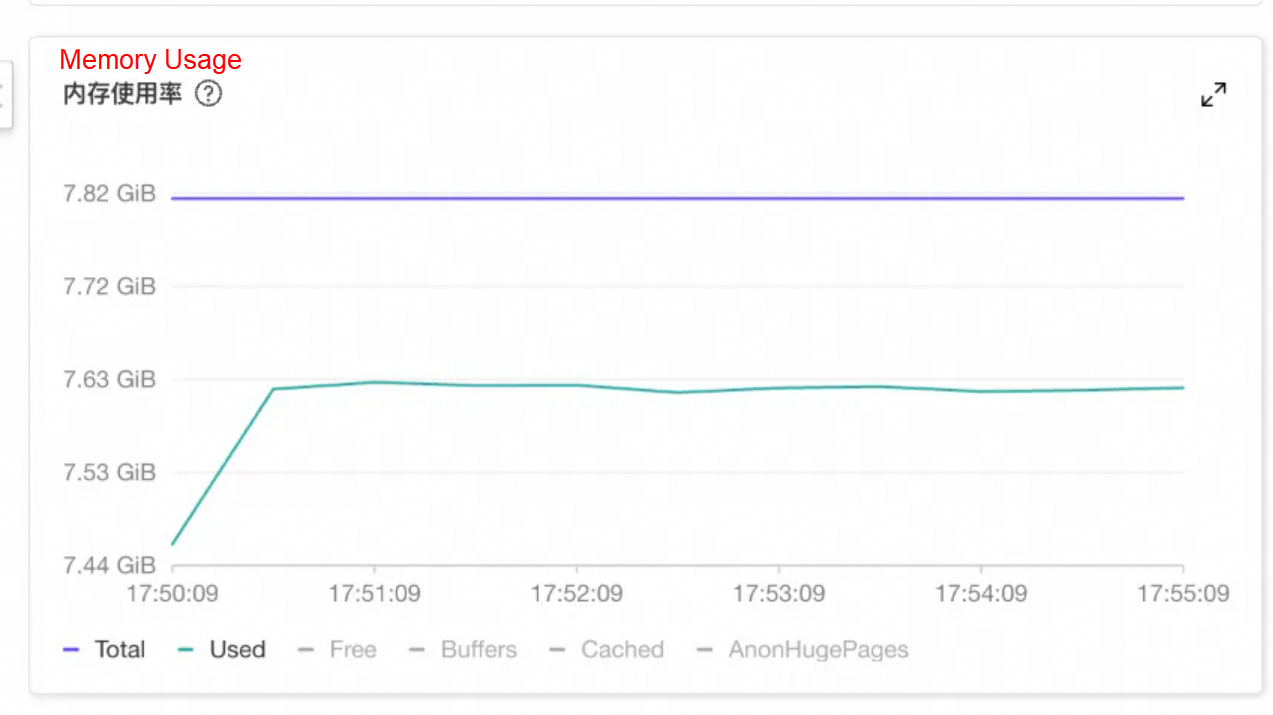
A customer from the automotive industry found that services on an instance were unresponsive for long periods, and logging on to the instance was also very sluggish. Monitoring showed that the instance's memory usage began to soar at a certain point in time, nearing the system's total memory but not exceeding it, leaving very limited available memory.
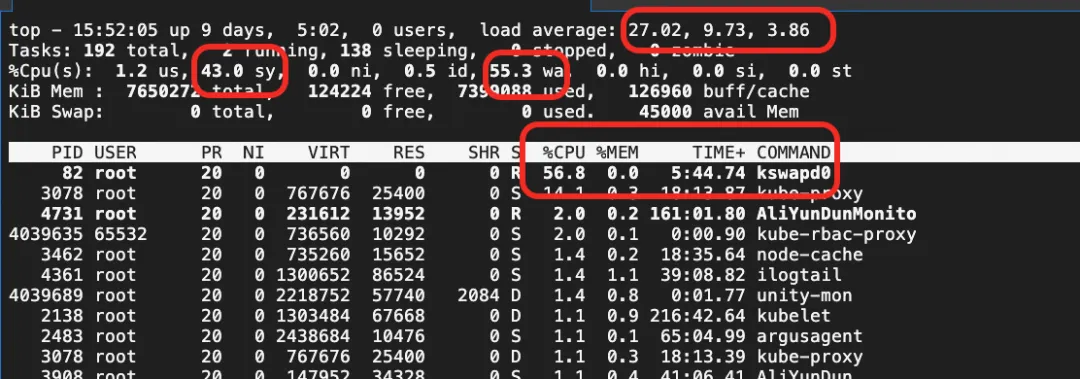
Using the top command, they observed that the system's CPU sys utilization, iowait, and system load were all persistently high. The kswapd0 thread was consuming significant CPU for memory reclamation.
Through the OS Console's system overview, they could see that during the OOM-like hang (in the near-OOM state), user-mode packet reception delays also occurred, causing business jitters.

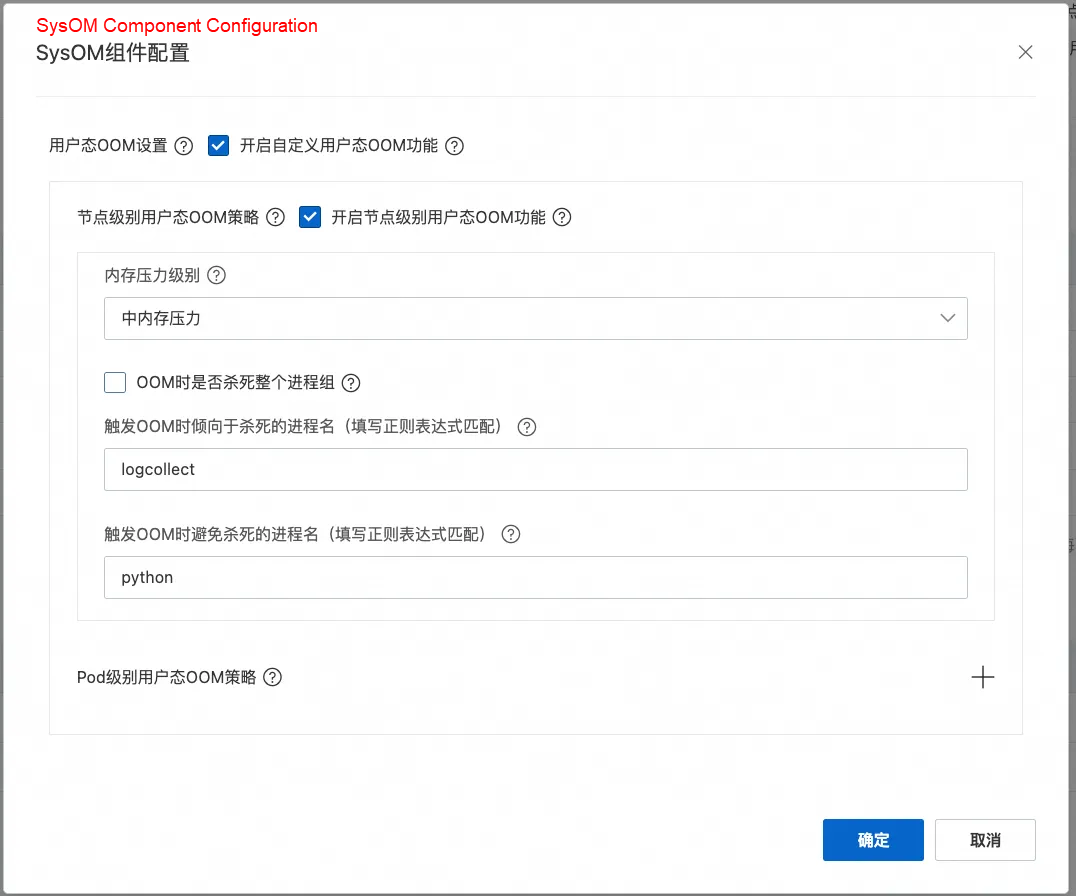
They enabled the FastOOM feature, and specified the node-level strategy. Since the business was highly latency-sensitive, they set the memory consumption level to medium. They configured their business application (started with Python, with the process name containing the substring python) to be excluded from OOM kills, and set unrelated logging programs to be killed first.
After activation, FastOOM intervened when the node's memory usage entered the near-OOM state. Based on the configuration, it killed the following processes, releasing some memory and preventing the system from entering a hung state. The FastOOM intervention was recorded on the system overview page in the OS Console.
As shown in the following figure, processes like kube-rbac-proxy and node_exporter had their oom_score_adj set close to 999, so FastOOM killed them first in line with the strategy. However, since killing these freed little memory and the system remained near-OOM, FastOOM proceeded to kill the configured priority objective: the logcollect process.

Thanks to the timely intervention, the system was spared from entering the jittery near-OOM state.
In a Kubernetes cluster, we can configure memory limits for containers in a pod. Similar to node-level OOM, when a pod's memory usage approaches its limit, the kernel will also attempt to reclaim all reclaimable memory within the pod before triggering OOM, leading to latency and blocking of the pod's business processes.
A customer involving big data services deployed some latency-sensitive pods that run multiple business processes. The business occasionally experienced long-tail latency in responses, but all network-related metrics were normal.
When we investigated, using Alibaba Cloud Linux's proprietary metrics (which reflect how long a container is blocked due to memory reclamation), we discovered very high memory reclamation latency that matched the timing of the jitters.
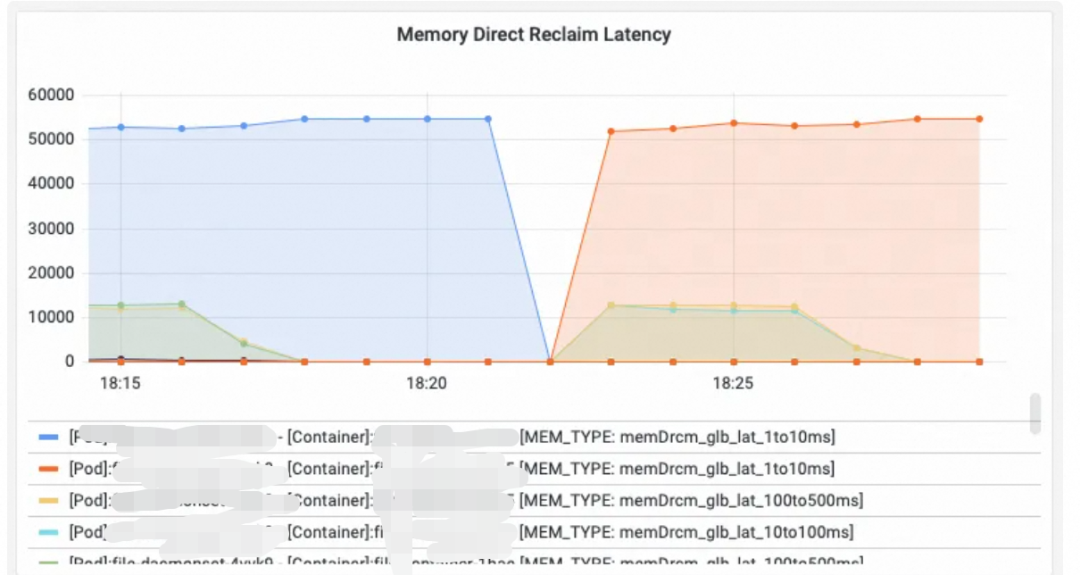
After we recommended configuring pod-level FastOOM, by preemptively killing high-memory-usage processes within the pod, the memory reclamation latency was resolved, and the jitters disappeared.
The OS Console supports flexible pod-level OOM kill strategies, allowing granular control over which processes to avoid or prioritize for killing when an OOM occurs within a pod's container.
In the following example, a DaemonSet named test-alinux deployed a corresponding pod on each node in the cluster.
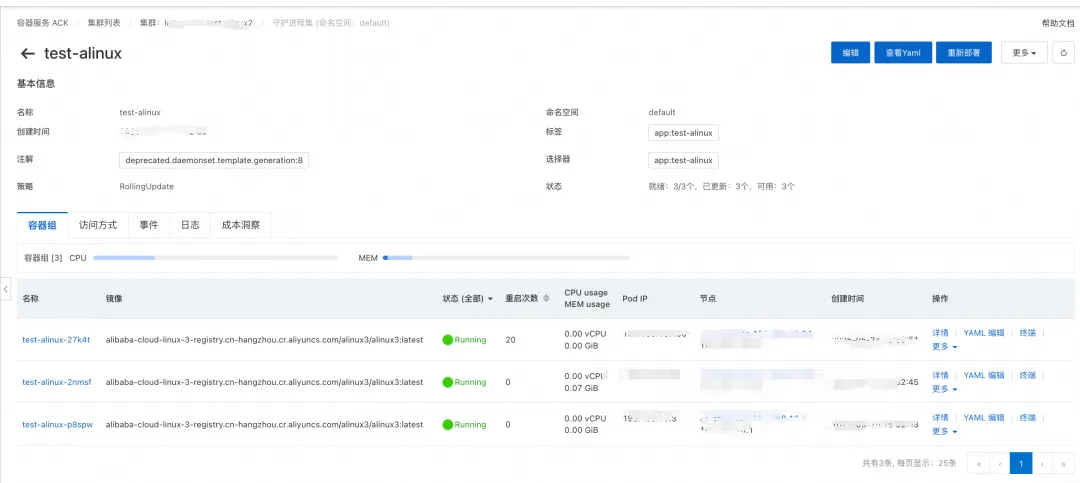
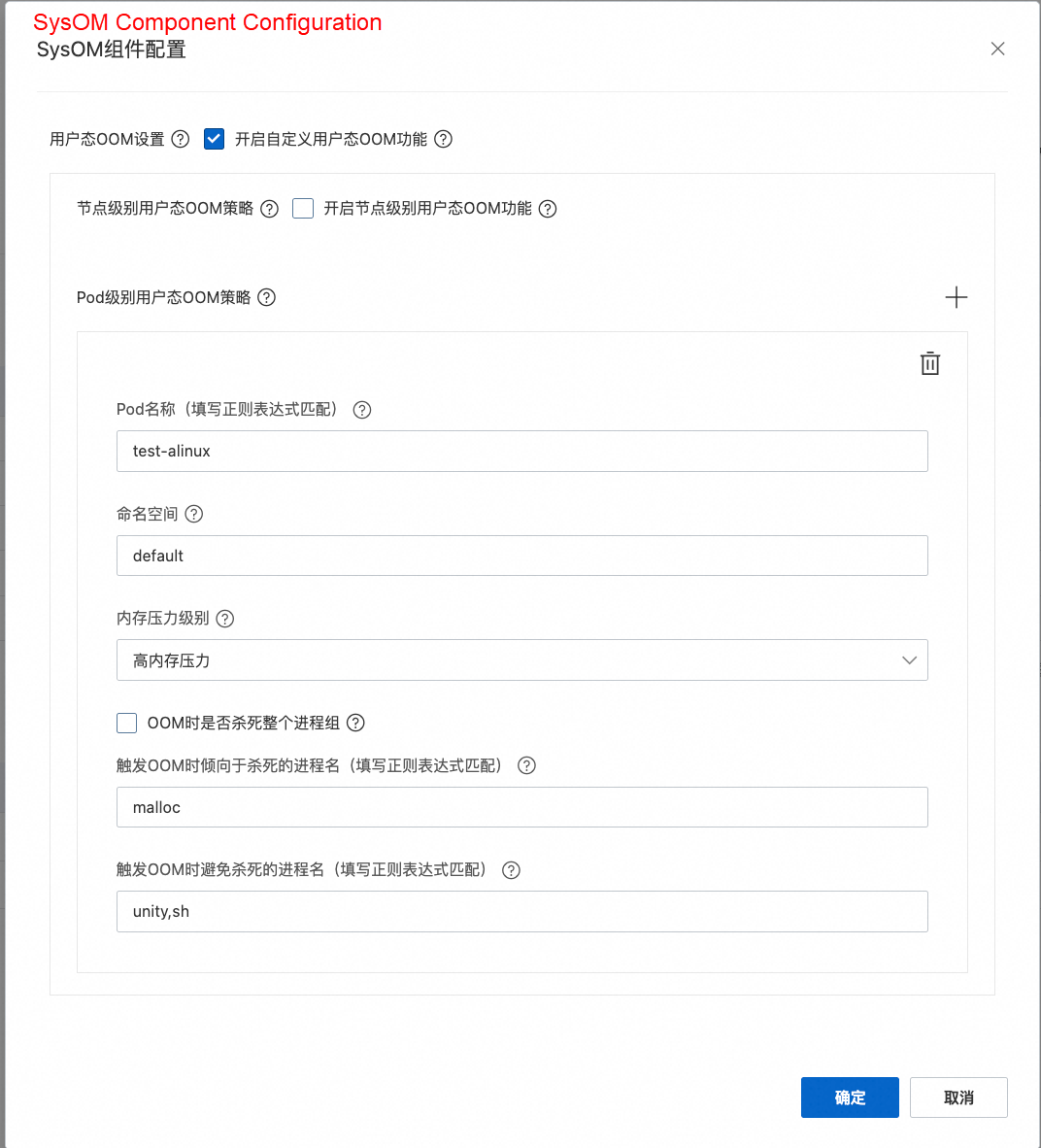
The pod-level FastOOM strategy is configured in the OS Console with the following settings:
• To match the corresponding pods, the pod name was set to test-alinux, and the namespace to default. This way, the regex would match test-alinux-xxx pods on different nodes.
• Since the goal was only to control the kill strategy during OOM, the memory usage level was set to high, making the trigger timing for user-space OOM approximate the kernel's OOM timing.
• For the kill strategy, they configured it to prioritize killing specific processes and avoid killing business processes and the pod's PID 1 process, thereby preventing pod restarts or business impact. After setup, the strategy was deployed to the specific nodes.
Once the configuration was applied to the nodes and a pod's container memory usage exceeded its limit, an OOM occurred. The FastOOM event was recorded on the system overview page of the OS Console, indicating that FastOOM killed the specified processes according to the strategy while successfully sparing the protected ones.

Nobody's perfect, and the kernel's OOM mechanism isn't omnipotent either. In its effort to reclaim as much memory as possible, the kernel blocks memory-requesting processes and attempts reclamation before triggering OOM. This can have a significant impact on latency-sensitive services. If memory usage remains persistently near the OOM threshold, the system can even enter a near-OOM livelock state, causing a complete machine hang. The FastOOM feature of the Alibaba Cloud OS Console supports node-, container-, and pod-level strategies based on relevant metrics. It can accurately kill specified processes and effectively mitigate latency issues caused by kernel OOM.
From "Firefighting" to "Foreseeing": Intelligent OS O&M Solutions for the Automotive Industry

120 posts | 6 followers
FollowAmber Wang - August 8, 2018
Alibaba System Software - August 8, 2018
OpenAnolis - March 4, 2026
ApsaraDB - April 2, 2024
Alibaba Clouder - March 13, 2019
Alibaba Developer - November 10, 2021
120 posts | 6 followers
Follow Alibaba Cloud Linux
Alibaba Cloud Linux is a free-to-use, native operating system that provides a stable, reliable, and high-performance environment for your applications.
Learn More Microservices Engine (MSE)
MSE provides a fully managed registration and configuration center, and gateway and microservices governance capabilities.
Learn More Cloud Migration Hub
Cloud Migration Hub (CMH) provides automatic and intelligent system surveys, cloud adoption planning, and migration management for you to perform migration to Alibaba Cloud.
Learn More 1688 Cloud Hub Solution
Alibaba Cloud 1688 Cloud Hub is a cloud-based solution that allows you to easily interconnect your 1688.com store with your backend IT systems across different geographic regions in a secure, data-driven, and automated approach.
Learn MoreMore Posts by OpenAnolis

