
A real production case: Periodic CPU spikes without any high-CPU process.
At 2 AM, Mr. Wang was awakened by monitoring alerts.
The company's core business server experienced mysterious CPU "jitter" — spiking to 80% every few seconds, then dropping back to 20%, repeatedly.
%Cpu(s):  2.5 us, 45.0 sy,  0.0 ni, 52.5 id...  <- Sudden spike
%Cpu(s):  3.0 us, 12.0 sy,  0.0 ni, 85.0 id...  <- Dropped back
%Cpu(s):  2.0 us, 55.0 sy,  0.0 ni, 43.0 id...  <- Spiked again
Strangely:
• top shows no high CPU process.
• sys is high, but user is low.
• Business logs show no abnormalities.
"Who on earth is causing this?" Mr. Wang stared at the screen, looking bewildered.
Following the conventional approach, Mr. Wang started a lengthy investigation:
# Check processes? No abnormalities
top -c

# Check system calls? Too many to review
strace -p xxx

# Check kernel logs? Everything is normal
dmesg
Two hours passed, and there was still no clue about the issue.
If you have encountered similar scenarios, you can definitely understand the frustration of "knowing there's a problem but unable to find the cause".
The next day, Mr. Wang decided to try SysOM Agent.
SysOM Agent console is a one-stop operating system operations management platform that provides powerful system diagnostics capabilities for memory, I/O, network, kernel crash, and more. SysOM is the O&M widget of the operating system console. SysOM Agent is the intelligent assistant of SysOM, integrated with SysOM MCP's diagnostics capabilities. Click the icon in the upper right corner to chat with SysOM Agent.
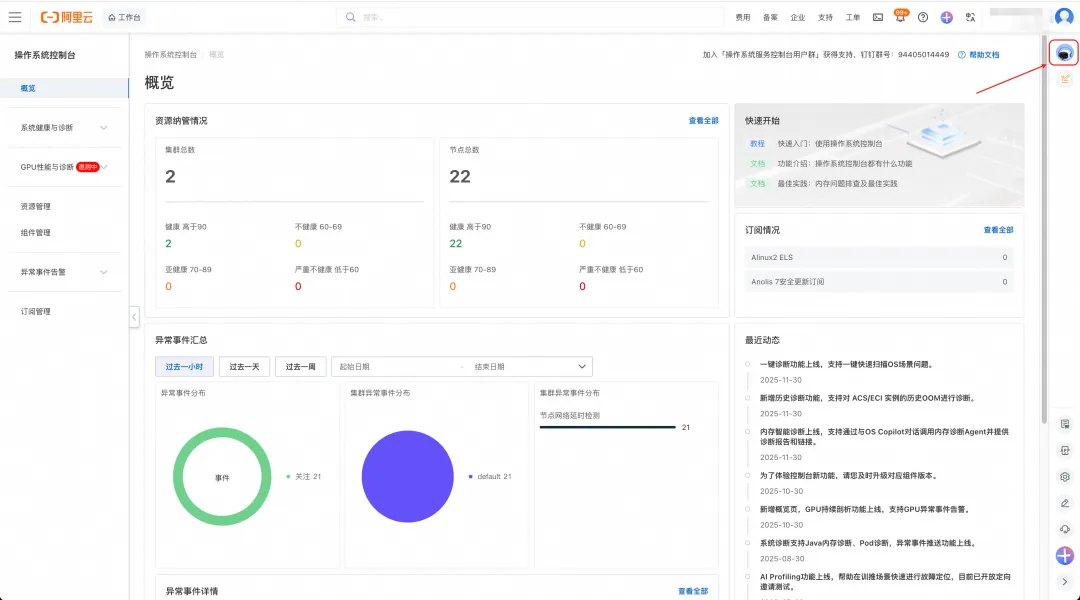
Mr. Wang only entered one sentence:
"My instance i-12345 has periodic CPU usage jitter with high sys"
What happened next amazed him:
SysOM Agent automatically invoked CPU Profiling and collected flame graphs during the jitter period.
The result is clear:
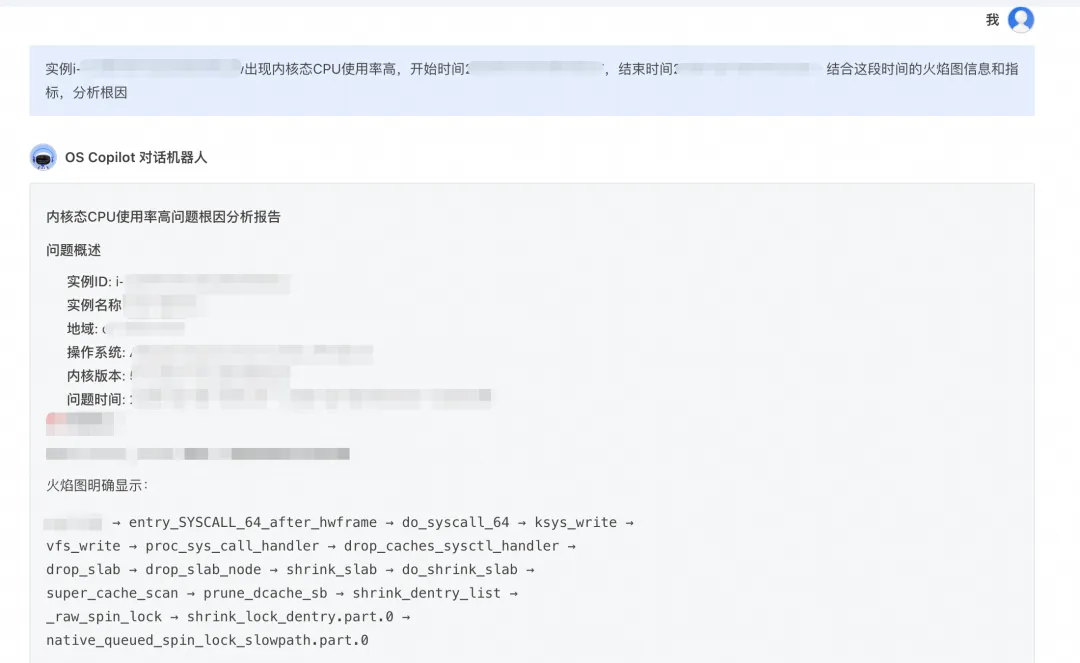
native_queued_spin_lock_slowpath   <- Consumes 40%+ CPU!
  _raw_spin_lock
    lockref_get_not_dead
      legitimize_path
        try_to_unlazy_next
          walk_component
            lookup_fast
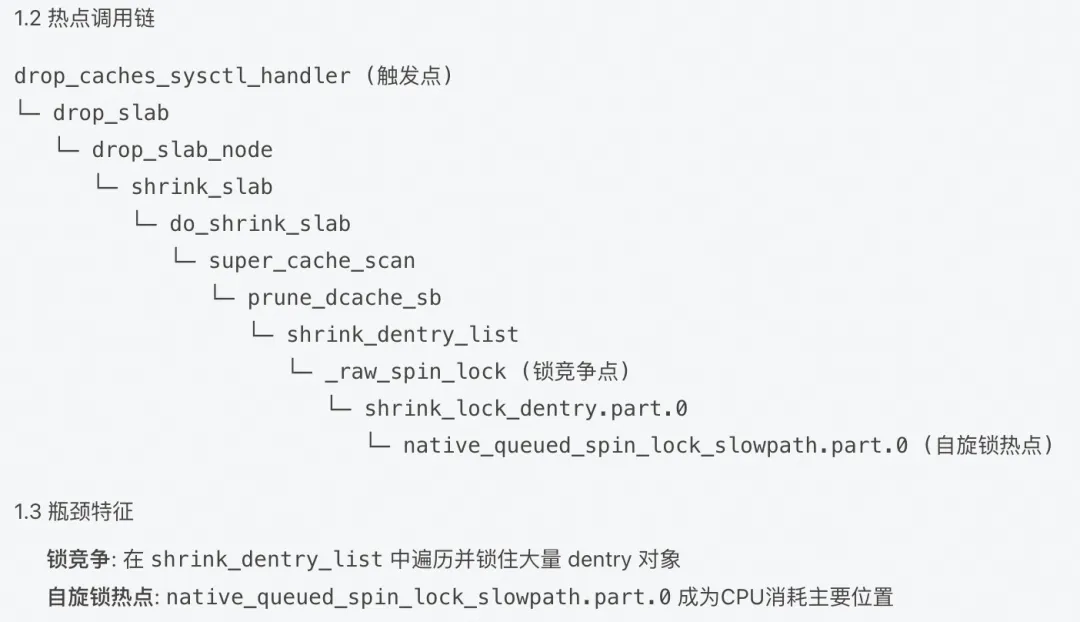
Agent diagnosis: Significant CPU time is consumed in native_queued_spin_lock_slowpath — the slow path of kernel spinlock.
Agent further analyzes the call stack:
lookup_fast → try_to_unlazy_next → __legitimize_path
This path indicates: During VFS path resolution, the RCU fast path failed, forcing the process to the slow path that requires lock acquisition.
But why does this happen?
Agent further analyzes the call stack: Agent uses flame graph for in-depth analysis, confirming that the root cause of CPU jitter is the VFS lock contention storm triggered by Negative Dentry stacking.
• Trigger: High-frequency access to non-existent files in the business logic causes massive Negative Dentry stacking in the kernel Dentry Cache.
• Activation: When the system triggers memory reclaim or the Dentry cache reaches the threshold, the kernel reclaim process invokes shrink_dentry_list to destroy these entries, which frequently modifies the parent directory's sequence counter (d_seq) and holds the dentry's spinlock (d_lock).
• Conflict: At this point, high-frequency path parsing (RCU Path Walk) in business processes causes RCU mode failure due to detected dentry status changes or sequence number inconsistencies.
• Escalation: A large number of concurrent threads are forced to switch from RCU mode to Refcount mode (Unlazy flow) and collectively attempt to invoke legitimize_path to acquire dentry references. This process requires frequent competition for the d_lock spinlock, ultimately triggering critical lock contention at lockref_get_not_dead.
• Symptom: This high-density lock contention drags the CPU into prolonged spinning in native_queued_spin_lock_slowpath, manifesting as severe jitter in system load and kernel mode CPU usage.
For the complete diagnostic report, see Appendix 1 at the end of this document.
CPU jitter caused by negative dentry is a very obscure issue:
| Feature | Description |
|---|---|
| Hard to detect | High CPU process not visible in top/ps |
| Difficult to locate | Requires flame graph and kernel knowledge |
| Easy to overlook | Jitter may be mistaken for normal fluctuation |
| High impact | Causes unstable business response latency |
SysOM Agent has helped multiple enterprises locate similar issues, reducing average diagnosis time from 4 hours to 5 minutes.
Not just viewing top/vmstat, but:
• Flame graph: Precisely locates kernel hot spots.
• Call stack: Understands code execution paths.
• bpftrace: Dynamically traces kernel behavior.
The agent incorporates diagnostic approaches from senior SREs:
• Seeing native_queued_spin_lock_slowpath → associates with lock contention.
• Seeing lookup_fast degradation → understands VFS caching mechanism.
• Seeing dentry-related issues → checks file system access patterns.
No need to memorize complex commands. Simply describe the issue:
❌ Traditional approach: perf record -ag -- sleep 20 && perf report && bpftrace ...
✅ SysOM Agent: "My machine CPU sys is very high, with periodic jitter"
Try SysOM Agent now
If your system has similar CPU jitter issues, try SysOM Agent to access expert-level diagnostics capabilities:
Related documents:
How to manage edge zones: https://help.aliyun.com/zh/alinux/component-management
Process hot spot tracking: https://help.aliyun.com/zh/alinux/process-hotspot-tracking
If you have your own Agent, you can also try access SysOM MCP, SysOM MCP was born out of the Aliyun operating system console, transforming complex O&M operations into standard tools that AI can directly call, allowing AI Agents to "hands-on" diagnose system problems like professional engineers-users do not need to understand commands, but only need to ask questions in natural language to obtain accurate system level analysis.
SysOM MCP supports --stdio (local embed) and --sse (HTTP service) modes, enabling easy integration with various AI clients.
To use SysOM MCP in AI Agent platforms that support the MCP protocol (such as Qwen Code), first clone the project code to your local environment:
git clone https://github.com/alibaba/sysom_mcp.git
cd sysom_mcp
Add the following configuration to the configuration file to enable the AI assistant to drive operating system and O&M operations using natural language.
{
  "mcpServers": {
    "sysom_mcp": {
      "command": "uv",
      "args": ["run", "python", "sysom_main_mcp.py", "--stdio"],
      "env": {
        "ACCESS_KEY_ID": "your_access_key_id",
        "ACCESS_KEY_SECRET": "your_access_key_secret",
        "DASHSCOPE_API_KEY": "your_dashscope_api_key"
      },
      "cwd": "<sysom mcp project directory>",
      "timeout": 30000,
      "trust": false
    }
  }
}┌─────────────────────────────────────────────────────────┐
│ SysOM Agent Diagnostic report │
├─────────────────────────────────────────────────────────┤
│ Issue: CPU sys periodically spikes, load jitter │
│ │
│ Root cause analysis: │
│ 1. User process frequently accesses non-existent paths │
│ 2. Generates large amounts of negative dentry and is periodically reclaimed │
│ 3. VFS path parsing degrades from RCU-walk to REF-walk │
│ 4. dentry spinlock contention causes CPU jitter │
│ │
│ Solutions: │
│ 1. Emergency: sync && echo 2 > /proc/sys/vm/drop_caches │
│ 2. Fix: Check application code to avoid accessing non-existent paths │
│ 3. Optimization: Cache file existence check results │
└─────────────────────────────────────────────────────────┘When you access a file that does not exist:
ls /path/to/nonexistent_file
# ls: cannot access '/path/to/nonexistent_file': No such file or directory
The kernel does not search the disk every time. Instead, it creates a negative dentry to cache the info that "this file does not exist". This is originally an optimization mechanism, but when:
• A large number of processes access non-existent paths at high frequency
• While the system is reclaiming dentry cache
It triggers lock contention at the VFS layer, causing CPU jitter.
# View dentry cache status
cat /proc/sys/fs/dentry-state
# Outputs: nr_dentry nr_unused age_limit want_pages dummy dummy
# If the nr_dentry value is very large (hundreds of thousands or more), there may be an issue
SysOM Agent - Making complex problems simple
To use more comprehensive SysOM features, log on to the Alibaba Cloud operating system console at https://alinux.console.aliyun.com/

108 posts | 6 followers
FollowOpenAnolis - April 7, 2023
OpenAnolis - May 8, 2023
OpenAnolis - May 27, 2026
OpenAnolis - June 25, 2025
OpenAnolis - March 5, 2026
OpenAnolis - March 25, 2026
108 posts | 6 followers
Follow Alibaba Cloud Linux
Alibaba Cloud Linux is a free-to-use, native operating system that provides a stable, reliable, and high-performance environment for your applications.
Learn More Log Management for AIOps Solution
Log into an artificial intelligence for IT operations (AIOps) environment with an intelligent, all-in-one, and out-of-the-box log management solution
Learn More AgentBay
Multimodal cloud-based operating environment and expert agent platform, supporting automation and remote control across browsers, desktops, mobile devices, and code.
Learn More CloudMonitor
Automate performance monitoring of all your web resources and applications in real-time
Learn MoreMore Posts by OpenAnolis

