For a long time, we assumed that the primary output format of an Agent was text inside a chat window: Markdown, code blocks, command results, diff summaries, and long analyses. Once a task becomes complex, text quickly turns into a burden. You have to search through long responses for risks, files, and next steps, then copy the context back into Chat to continue asking follow-up questions.
So a very natural trend has emerged recently: Agents are starting to generate complex results as HTML. Instead of giving you only a written response, they organize dashboards, PR reviews, architecture diagrams, test reports, and research findings into pages that can be read, filtered, and clicked.
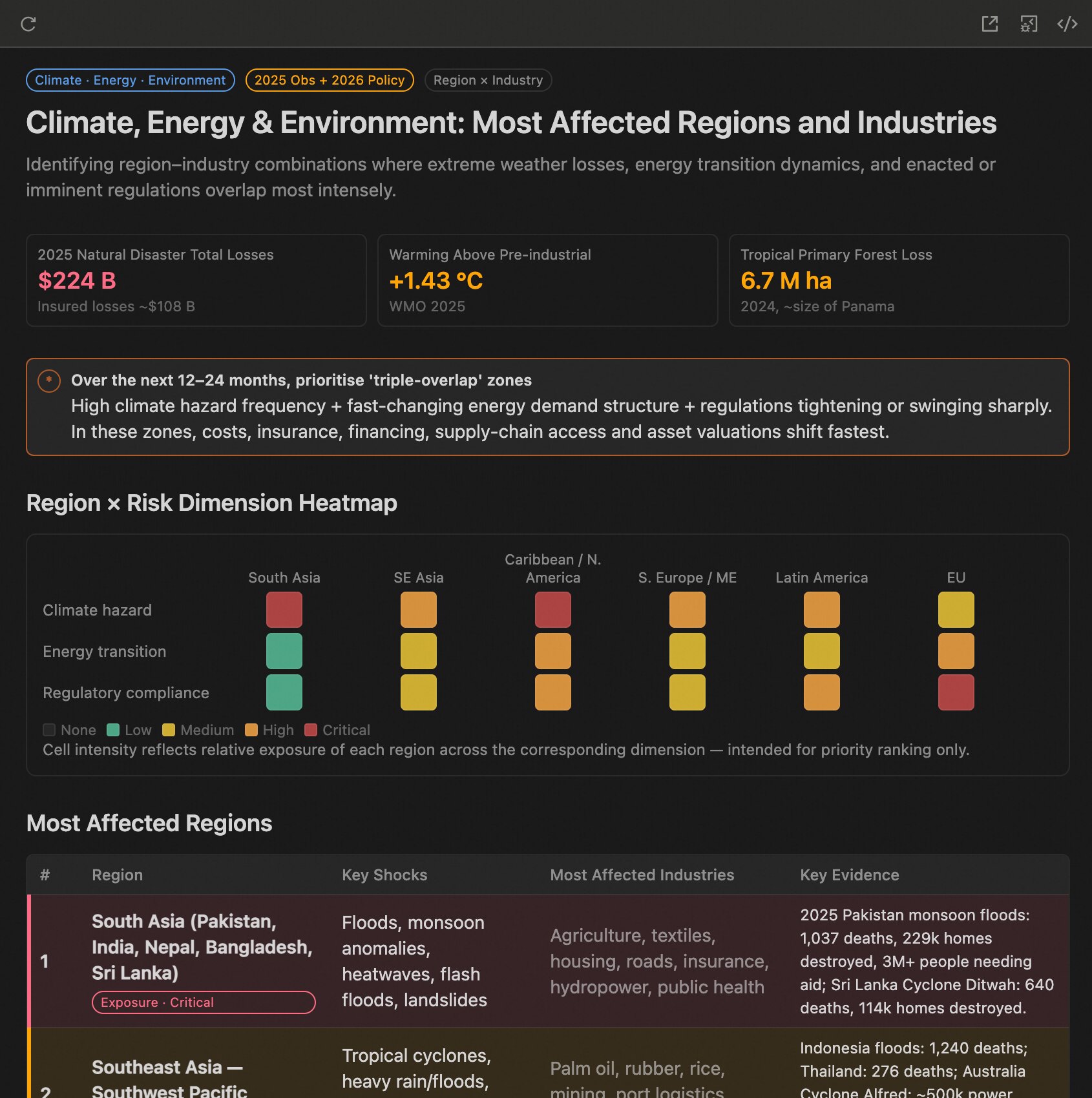
HTML proves one thing: an Agent's output does not have to be limited to text. It can also become an interactive artifact. But HTML is also too free-form. An Agent can casually invent colors, layouts, and components, and every generation may become a beautiful but isolated one-off page.
For Qoder, what we really want is for it to generate Canvas based on the codebase, component system, Design Tokens, and task context. Canvas is not just an output format; it is a Design System for Coding Agents.
Traditional Design Systems are designed for humans.
Designers look at Figma. Frontend engineers read component documentation. Teams maintain consistency through Storybook, component APIs, design guidelines, and review processes. When people use components, they naturally bring a lot of implicit judgment: which component fits which scenario, which props are the main path, which combinations are more common, and which visual patterns have already been accepted by the team.
But Agents do not have this default experience.
An Agent understands components mainly through what it can read from the codebase: type declarations, export relationships, comments, examples, usage frequency, file structure, and recent modification traces. In other words, what affects the quality of an Agent's output is not just the component library itself, but how that component library is expressed inside the current codebase.
For example, if a component is exposed only as a type declaration, the Agent can only know that it "can be used." But if the declaration clearly explains its use cases, boundaries, counterexamples, and examples, the Agent may understand how it "should be used."
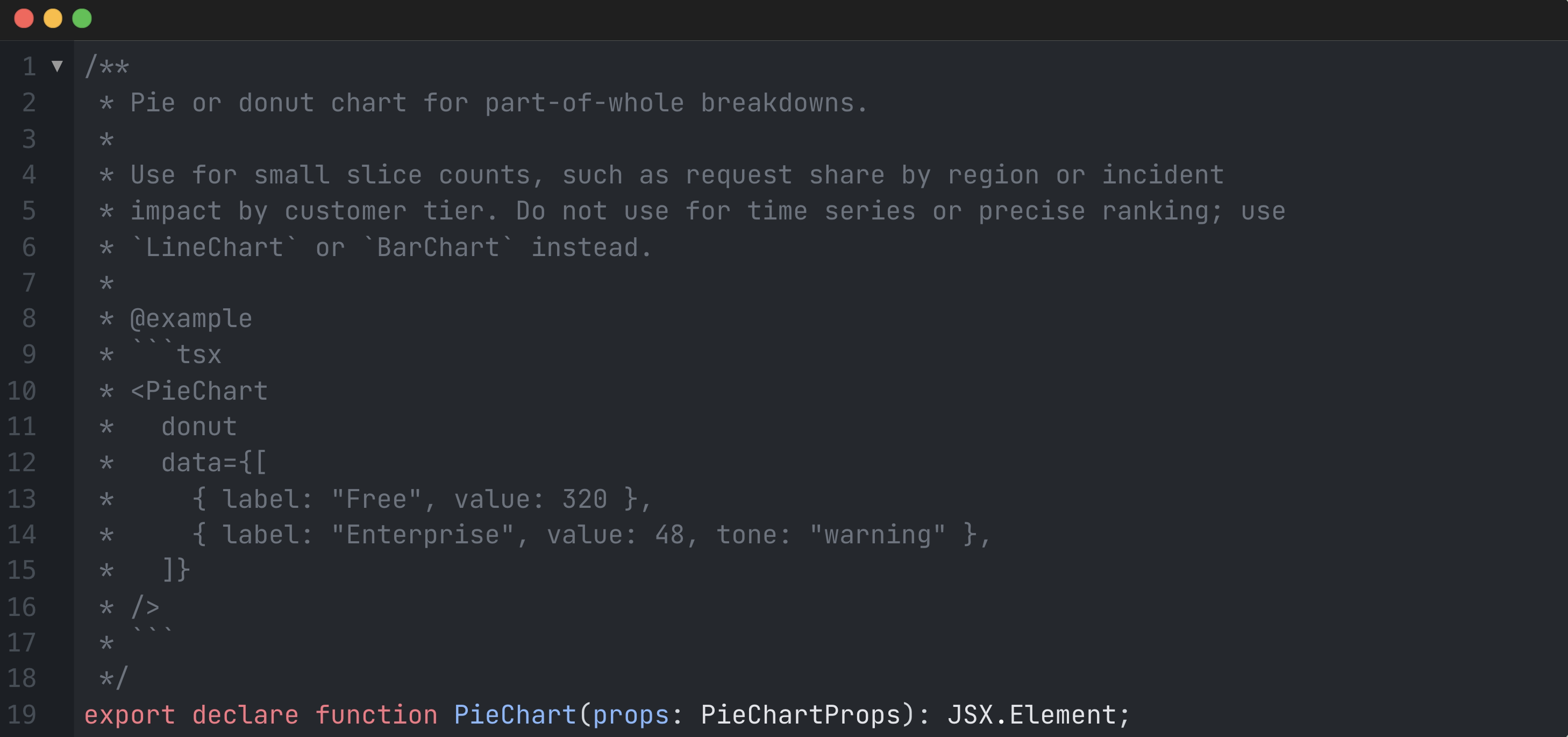
For an Agent, this comment is part of the Design System. It does not merely say that PieChart exists. It also explains that it is suitable for expressing proportions, but not suitable for trends or ranking. In those latter cases, the Agent should switch to LineChart or BarChart.
So an Agent-oriented Design System cannot simply expose a component library. It needs to turn the team's design experience into machine-readable context: component usage boundaries, recommended combinations, design tokens, layout patterns, and the real product decisions that have already happened in the code.
This is also the starting point of Qoder Canvas. We are not just giving the Agent a canvas capable of rendering React. We want it, when generating interfaces, to understand from Qoder's current codebase, SDK types, Design Tokens, and recipes how interfaces should be designed inside this product.
If we treat Qoder Canvas as a Design System for Agents, it also needs layers similar to Atomic Design.
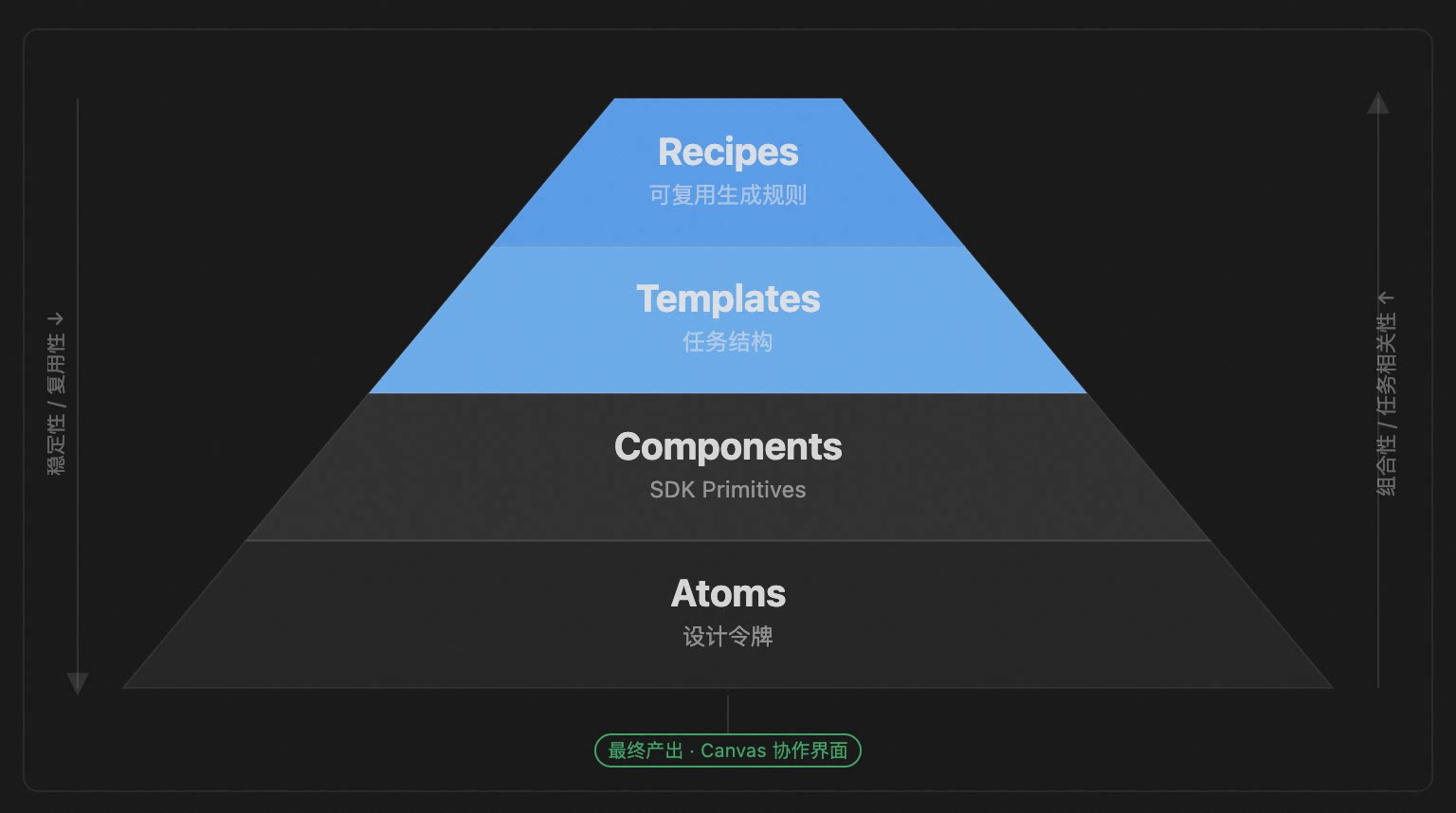
At the bottom are Atoms: Design Tokens, colors, typography, spacing, border radius, shadows, and state semantics. They do not express business meaning. They provide stable visual primitives. When an Agent generates an interface, it should not reinvent colors and layouts every time. It should retrieve values from semantic tokens such as useHostTheme().tokens.
Above that are base components: Button, Tag, Card, Table, Input, PieChart, LineChart, FileReview, and DiffGroup. These components are like Molecules. They already carry clearer expressive capabilities: tags express state, charts express data relationships, diffs express code changes, and file reviews express review context.
But the tasks Agents actually face are usually not "draw a component." They are more like "generate a Code Review," "organize a QA Report," "explain a failed test," or "produce an architecture explanation." This is where a higher layer of Template / Recipe is needed.
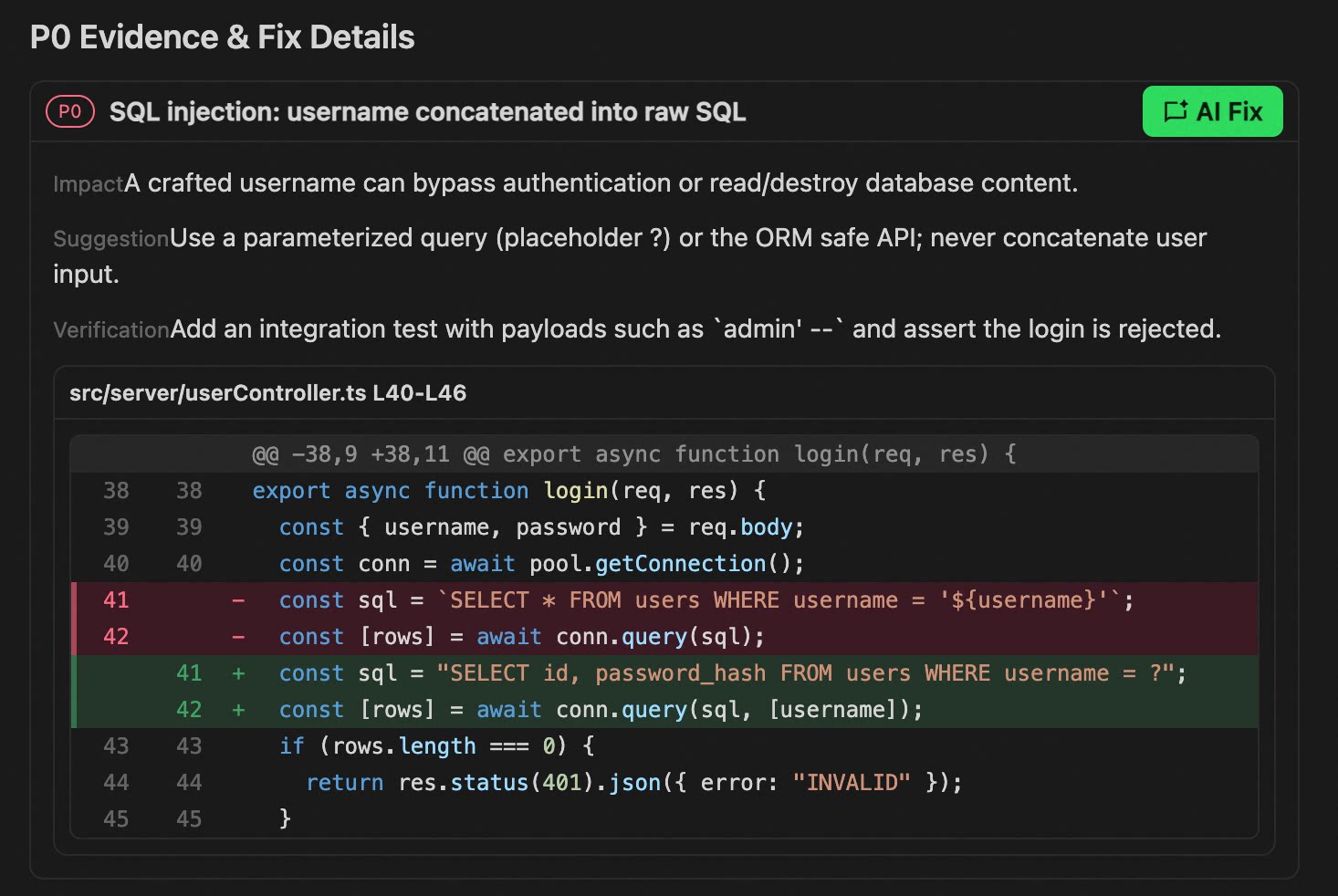
recipe.md belongs to this layer. It does not merely tell the Agent which components exist. It tells the Agent how information should be organized for a certain type of task, where evidence should be placed, which actions should be exposed, and which visual forms should be avoided. For example, a Code Review recipe should require the Agent to first explain the change, then rank issues by risk, show diff evidence for key findings, and provide AI Fix next to issues that can be repaired.
So the structure of Qoder Canvas is roughly:
The final generated Canvas is the collaborative interface shown to the user.
If Canvas only organizes results more clearly, it still remains at the level of "output." After reading it, the user still has to return to Chat: describe the problem again, paste the file name again, explain why this diff matters again, and tell the Agent whether they want a fix or an explanation.
The real interaction shift should happen here.
Every structured node in Canvas should not merely display results. It should become an entry point for the next action. For example, in Code Review, an issue is no longer just a risk description. It should also carry priority, related files, diff evidence, impact scope, recommended fix strategy, and the recipe it came from. When the user sees this issue, they no longer need to copy context back into Chat. They can continue directly from that node.
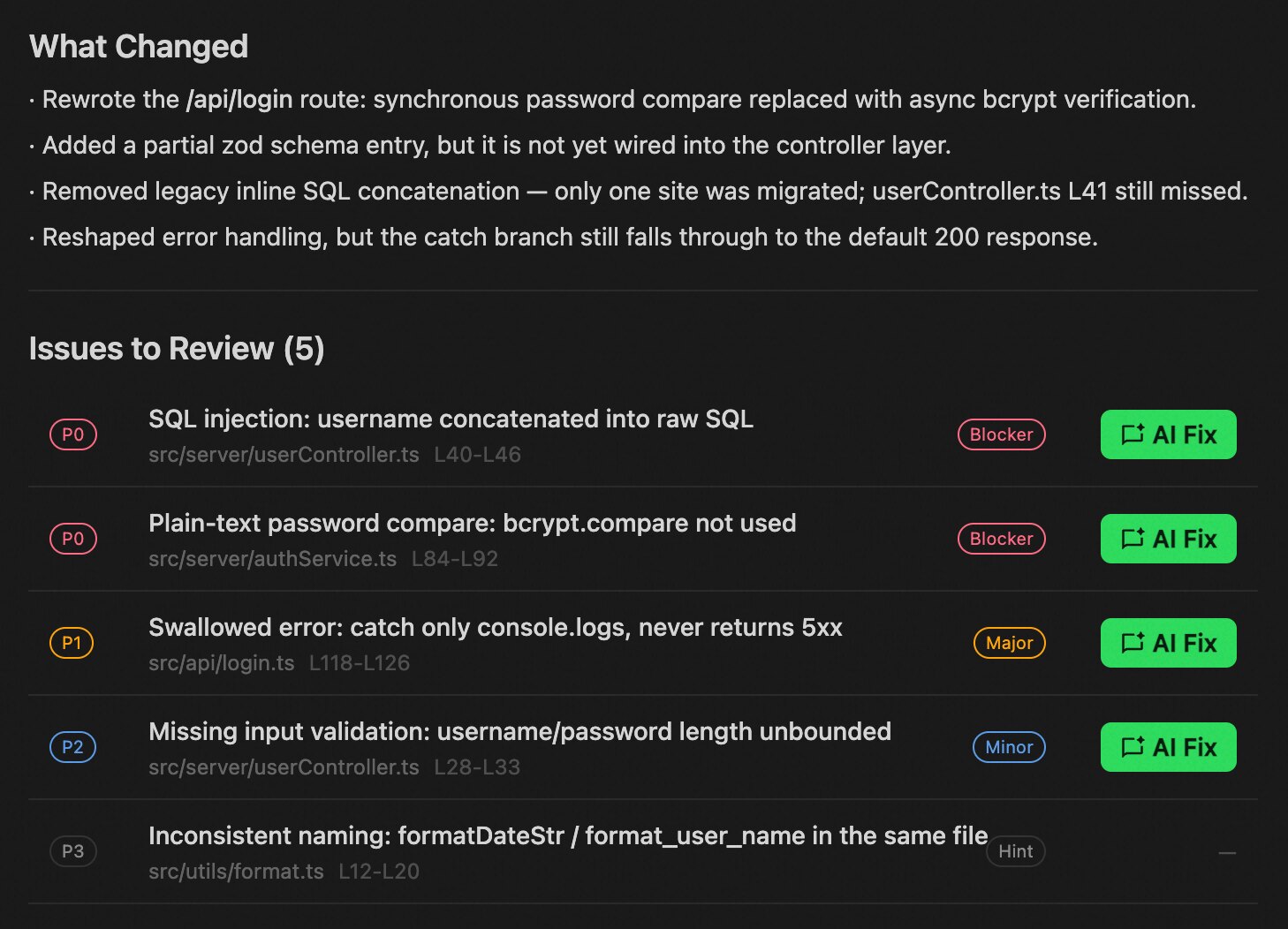
Clicking AI Fix should not mean sending a plain sentence like "help me fix this." It should bring the current finding, related files, diff evidence, Design System constraints, and validation requirements back into Chat together. Clicking Generate Test should not simply mean saying "add tests" in a generic way. It should carry the missing coverage logic, risk paths, and boundary conditions into test generation.
This is the difference between Canvas and ordinary HTML.
Ordinary HTML is mostly about organizing results. Canvas should place results, context, and next actions inside the same structure. Without that context, a button is just a button. With a Design System and recipe.md, a button becomes an executable collaboration entry point.
So Canvas is not a replacement for Chat. Its role is to organize Chat, code, diffs, tests, and workflows into a workbench that can continue moving the task forward. The previous layers (Atoms, Components, Templates, and Recipes) teach the Agent how to generate the interface. This interaction layer allows the user to keep advancing the task through that interface.
Canvas is only an early form of Agentic UI.
In the past, interfaces assumed that humans were the ones operating the system. In the Agent era, there is now another actor inside the interface: one that can read context, make suggestions, call tools, and modify files.
So the questions UI must answer have changed: What is the Agent doing? Why is it doing this? What context will be carried into the next step? Which actions require human confirmation? If something goes wrong, can it be paused, modified, and rolled back?
What Qoder Canvas wants to do is not "let AI generate a few more pages." It is closer to making the page itself capable of receiving and supporting the Agent. Chat is still there. Code, diffs, and tests are still there. Canvas simply brings them into an interface where action can continue.
Looking ahead, this is probably where Agentic UI will gradually emerge.
AI Coding Enters the "Agent Teamwork" Era: Introducing Qoder Experts Mode

1,592 posts | 525 followers
FollowRupal_Click2Cloud - September 27, 2023
Alibaba Cloud Community - August 13, 2026
Alibaba Cloud Community - September 22, 2026
Alibaba Cloud Community - June 16, 2026
Alibaba F(x) Team - September 3, 2021
Kalpesh Parmar - May 11, 2026
1,592 posts | 525 followers
Follow QwenWork
QwenWork is dedicated to helping employees strengthen their professional competitiveness in the AI era and to enabling enterprises to improve organizational effectiveness.
Learn More Token Plan
Build more, spend less. One plan, every modality.
Learn More Qoder
Qoder
From Assisted to Autonomous — Adapting to Every Programming Need
Learn More
Alibaba Cloud Model Studio
A one-stop generative AI platform to build intelligent applications that understand your business, based on Qwen model series such as Qwen-Max and other popular models
Learn MoreMore Posts by Alibaba Cloud Community

