VPN Gateway integrates with Network Intelligence Service (NIS), which provides the Reachability Analyzer feature. Use this feature to diagnose connectivity issues for SSL-VPN connections.
Background
When you use Reachability Analyzer, you specify a source and a destination. The system builds a network configuration model for the path between the two endpoints and analyzes their connectivity. If the path is unreachable, the system returns a cause to help you troubleshoot the issue. The analysis does not send live data packets or affect your services.
For example, specify an ECS instance as the source and another ECS instance in the same Alibaba Cloud account as the destination. By setting the protocol to TCP and the destination port to 22, you can verify SSH connectivity to the destination ECS instance. See Use Reachability Analyzer.
The following examples demonstrate how to use Reachability Analyzer to diagnose SSL-VPN connectivity issues.
Prerequisites
Before you use Reachability Analyzer to diagnose SSL-VPN connectivity, ensure that the client is connected to the VPN Gateway instance. If the client cannot connect, troubleshoot the issue first by using the client logs and the SSL-VPN connection logs in the VPN Gateway console. See Troubleshoot SSL-VPN connection issues and Diagnose a VPN Gateway instance.
Example: Client-to-VPC connectivity
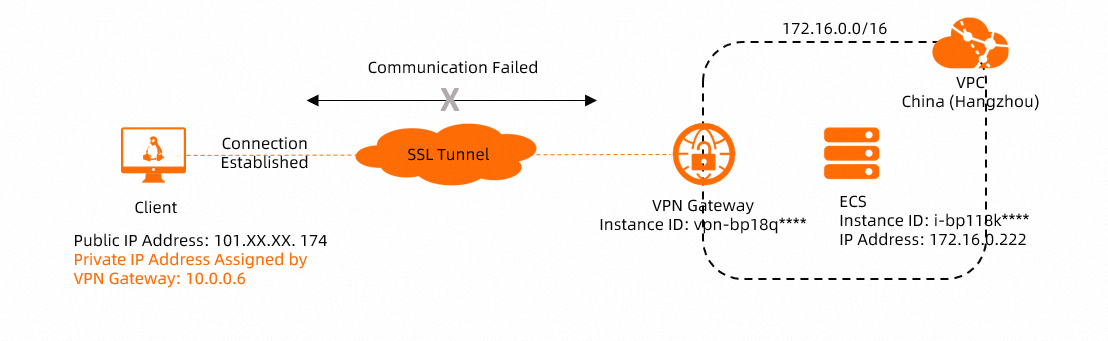
In the preceding figure, an SSL-VPN connection enables communication between a client and a VPC. If the client is connected to the VPN Gateway instance but cannot access resources in the VPC, use Reachability Analyzer to diagnose the connectivity issue.
When you create a Reachability Analyzer task for an SSL-VPN connection, you must use the private IP address that the VPN Gateway instance assigns to the client. Ensure that the client is connected to the VPN Gateway instance and has obtained a private IP address. You can view the private IP address assigned to the client in the VPN Gateway console. See View SSL client connections.
Log on to the VPN Gateway console.
-
In the top navigation bar, select the region of your VPN Gateway instance.
-
On the VPN Gateways page, find the target VPN Gateway instance, and in the Diagnose column, select .
-
In the Reachability Analyzer panel, configure the following parameters and click Start Analyzing.
Traffic from client to VPC
Parameter
Description
Source
Select the Source Type.
In this example, select VPN Gateway, select the VPN Gateway instance vpn-bp18q**** for the SSL-VPN connection, and enter the private IP address assigned to the client: 10.0.0.6.
Destination
Select the Destination Type.
In this example, select ECS Instance ID and select the ECS instance in the VPC.
Protocol
This example uses the default value TCP.
NoteYou can select a protocol and a destination port based on your network environment.
Destination Port
This example uses the default value 80.
Name
Enter a name for the path.
The path is automatically saved after the analysis starts, and you can run it again later. You can view saved paths in the Network Intelligence Service console.
Traffic from VPC to client
Parameter
Description
Source
Select the Source Type.
In this example, select ECS Instance ID and select the ECS instance in the VPC.
Destination
Select the Destination Type.
In this example, select VPN Gateway, select the VPN Gateway instance vpn-bp18q**** for the SSL-VPN connection, and enter the private IP address 10.0.0.6 assigned to the client.
Protocol
Select the protocol to test.
This example uses the default value TCP.
NoteYou can select a protocol and a destination port based on your network environment.
Destination Port
Enter the destination port number.
This example uses the default value 80.
Name
Enter a name for the path.
The path is automatically saved after the analysis starts, and you can run it again later. You can view saved paths in the Network Intelligence Service console.
-
View the analysis result in the Reachability Analyzer panel.
Use the analysis result to troubleshoot the issue and run the analysis again to verify that the path is reachable.
-
If the path is reachable, the client and the VPC can typically communicate. Try accessing the VPC from the client.
If communication still fails, see the SSL-VPN connection FAQ for further troubleshooting.