FAQ about billing
This topic answers common questions about billing for ApsaraVideo VOD, such as charges and resource package deductions.
Resource plans
Unexpected charges with a resource plan
To identify the cause, check the following:
-
Confirm the effective period of your resource plan. Billing may be delayed. For example, a bill issued at 10:00 may correspond to usage at 07:00, 08:00, or even earlier. If you recently purchased a resource plan, check for any charges incurred after it became effective.
-
If your usage exceeds the resource plan's quota or occurs after the plan expires, you are billed for the excess.
-
You may be charged for items not covered by your resource plan. Different types of resource plans cannot offset each other's usage. For example, a transcoding resource plan cannot be used to offset storage usage. For more information about the types of resource plans that ApsaraVideo VOD supports and their usage instructions, see Resource plans.
-
If you do not configure an accelerated domain name, OSS outbound traffic is generated. ApsaraVideo VOD data transfer plans do not cover OSS outbound traffic.
Unexpected data transfer charges
An ApsaraVideo VOD data transfer plan takes effect only if you have configured an accelerated domain name and selected the pay-by-data-transfer metering method for the acceleration service. After a data transfer plan takes effect, it offsets only accelerated data transfer and does not cover OSS outbound traffic. Excess usage is billed on a pay-as-you-go basis. If you incur data transfer charges, check for the following situations:
-
An accelerated domain name is configured
-
Incomplete domain name configuration can prevent the resource plan from being applied correctly. For example, you added the domain name but did not configure the CNAME record. Make sure the domain name is in the Running state. For more information about domain name configuration, see ApsaraVideo VOD Quick Start.
-
An accelerated domain name is configured, but you are accessing resources in ApsaraVideo VOD by using the direct OSS address instead of the accelerated domain name. This generates OSS outbound traffic charges. For more information about billing, see Billing for OSS outbound traffic.
-
If your accelerated data transfer exceeds your data transfer plan's quota, you will incur additional charges. You can renew your resource plan. For more information, see Renew a resource plan.
-
-
No accelerated domain name is configured
If no accelerated domain name is configured for ApsaraVideo VOD, the service returns the OSS origin address by default. Playing or downloading resources using this address generates OSS outbound traffic charges.
Using VOD resource plans for CDN or OSS
No. ApsaraVideo VOD is an independent service. When you use ApsaraVideo VOD, you are charged for storage, transcoding, traffic, or bandwidth resources consumed. An ApsaraVideo VOD package contains resource plans such as data transfer plans, storage plans, and transcoding plans. You can use the resource plans to pay only for the resources that are consumed in ApsaraVideo VOD.
Transcoding duration discrepancy
Check the following possible causes:
-
Understand the transcoding billing rules of ApsaraVideo VOD.
-
Charges are based on the duration and specifications of the output video files.
-
Each transcoding job is billed separately, even for the same video.
-
Each output specification is billed separately.
-
-
The resolution set in the transcoding template determines the billing specification, so the template's specification name may differ from the actual billing specification. For detailed rules, see Media transcoding billing.
For example, if you set the output specification in a transcoding template to Encoding Format: H.264, Definition: LD, and Resolution: 960×540, the transcoding job is billed based on the H.264 "SD (1280 x 720) and below" tier. In the ApsaraVideo VOD console, this usage is recorded as SD (SD) transcoding on the Consumption Trend or Usage page.
-
Different transcoding specifications have different deduction ratios when using a transcoding resource plan. For details about the deduction ratios, see Standard transcoding packages.
-
The transcoding duration displayed on the Overview or Usage page of the ApsaraVideo VOD console does not factor in the resource plan's deduction ratio. Therefore, do not use this duration for billing calculations. For accurate data, refer to your bills in Billing Management.
Billing
Investigating unexpected charges
Follow these steps to investigate the charge:
-
Review your bill details to identify the specific billing item and the charge date.
-
To view your bills, see View Bills.
-
For a description of each billing item, see Billing items.
-
-
Analyze the potential causes of the charge.
Unexpected acceleration traffic
-
Use the analytics dashboard to find the source of the unexpected traffic.
Check the Popular URLs or Top Rankings dashboard for the relevant period to identify access patterns or videos that generated high traffic. For details, see Playback Analytics.
-
Analyze your operation logs to identify suspicious users or access patterns.
Review logs for the relevant time period or URL. For details, see Log Download. If you find suspicious activity, such as unusual access from specific IPs (the IP address field in the logs), you can use features like Referer blocklists/allowlists or the IP blocklist/allowlist to restrict certain requests.
Unexpected transcoding charges
-
Understand the billing rules for ApsaraVideo VOD transcoding.
ApsaraVideo VOD bills for transcoding based on the specifications and duration of the output file. You are charged for each successful transcoding job. This means that if you transcode a single video into multiple specifications, you are billed for each specification. If you transcode the same video multiple times, you are billed for each attempt. To avoid unnecessary costs, initiate transcoding jobs on demand and delete transcoding templates that are no longer needed.
-
After identifying the transcoding specifications and times on your bill, determine if those jobs and specifications were necessary.
To confirm and manage your transcoding template groups, see Template Management.
Other unexpected charges
-
Understand the billing rules for each billing item.
For details, see Billing items.
-
Verify whether the recorded usage matches your actual usage.
For details, see Query Resource Usage.
-
Disable VOD service or stop billing
VOD does not provide a one-click disable feature because it could disrupt your services.
You can use the following methods to disable the VOD service or stop billing.
-
If you want to stop using VOD, follow these steps to prevent new charges in the next billing cycle.
-
Delete all media files from the storage bucket.
ImportantDeleted resources cannot be recovered. Back up any critical resources before deleting them.
-
To manually delete media files, see Delete media files.
-
To manage storage buckets, see Manage storage buckets.
-
-
Delete your accelerated domain names.
ImportantTo prevent service interruptions, migrate traffic away from an accelerated domain name before you disable or delete it. The following are common migration methods:
-
Add a new accelerated domain name and direct your users to it. This will gradually reduce traffic on the old domain to zero.
-
Update the DNS record for the accelerated domain name to point to the origin server's address instead of the CNAME address.
-
Log on to the VOD console.
In the left-side navigation pane, choose Configuration Management > CDN Configuration > Domain Names.
-
On the Domain Names page, find the domain name to delete. First, disable it, and then delete it. Follow the on-screen instructions to complete the required identity verification.
-
-
-
If you wish to retain media files that have been unused for over 30 days, you can reduce storage costs by 30% to 80% by changing their media asset storage class from Standard to Infrequent Access, Archive, or Cold Archive. For more information, see Modify the media asset storage class.
Player SDK billing FAQ
Impact on existing licenses
The Player SDK will be a paid service starting February 14, 2025. For more information, see Player SDK billing. If you have an existing license, see the table below for the impact on your SDK edition and our recommended actions.
|
Edition |
Impact |
Upgrade strategy |
|
Standard Edition |
In the ApsaraVideo VOD console, go to SDK Management > My Authorizations to check your SDK edition and expiration date.
If your Standard Edition license is valid, you can continue to use its features. For a list of features, see Player SDK Features. |
If your Standard Edition license is valid, you can continue using its features. After the license expires, you must purchase a renewal to continue using the service. |
|
Professional Edition |
Before this billing change, we granted a one-year complimentary Professional Edition license to users who had used its features. You can verify this in the ApsaraVideo VOD console by navigating to SDK Management > My Authorizations. If your Professional Edition license is valid, you can continue to use Professional Edition features. If the license expires, your access will be downgraded to the Standard Edition. To continue using Professional Edition features, you must renew your license. For a list of features, see Player SDK Features. |
Users who used Professional Edition features prior to the billing change will receive a one-year complimentary license. After this period, you must purchase a renewal to continue using the Professional Edition. Otherwise, your access will be downgraded to the Standard Edition. The Professional Edition license check applies only to SDK versions 7.0.0 and later. |
|
Value-added features |
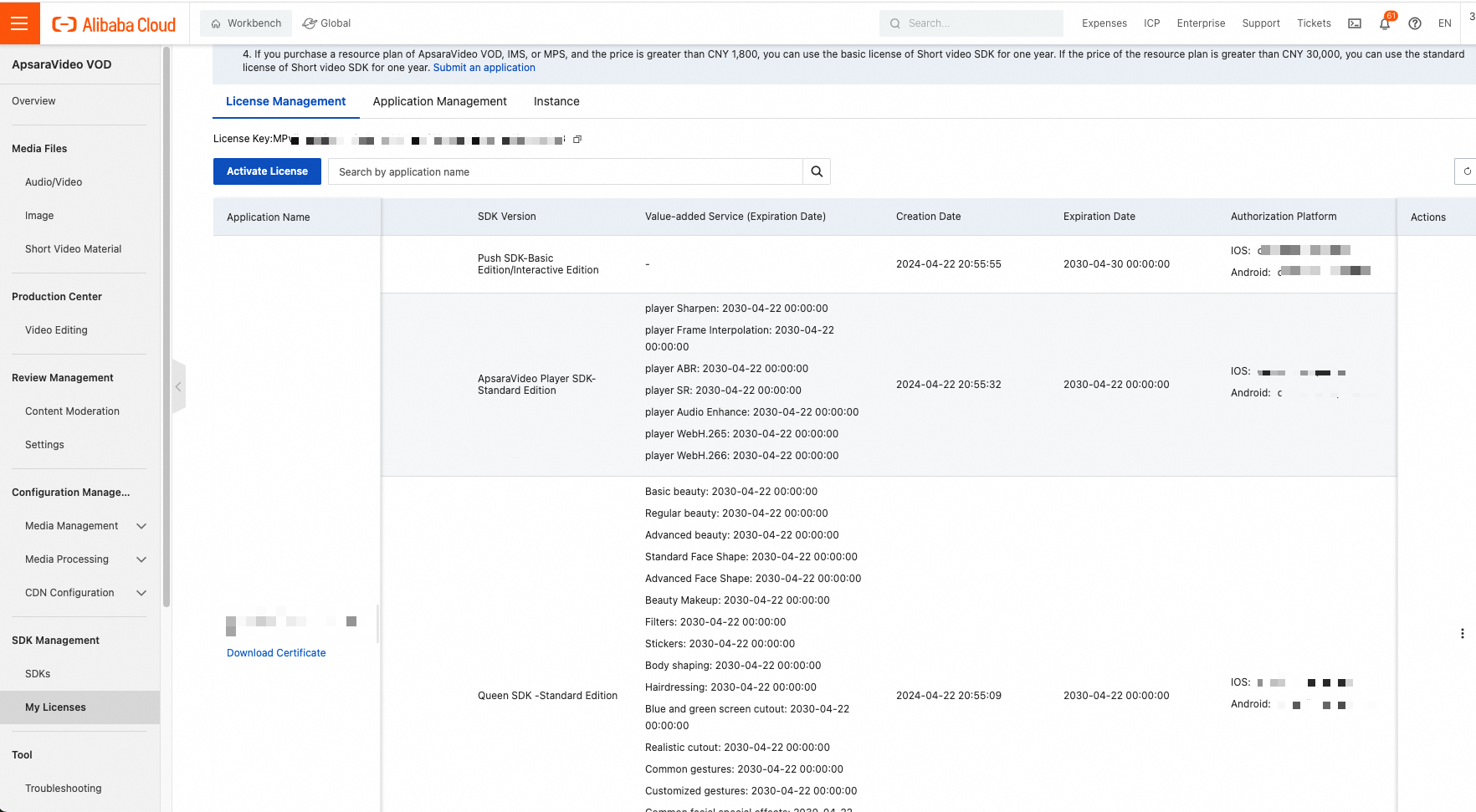
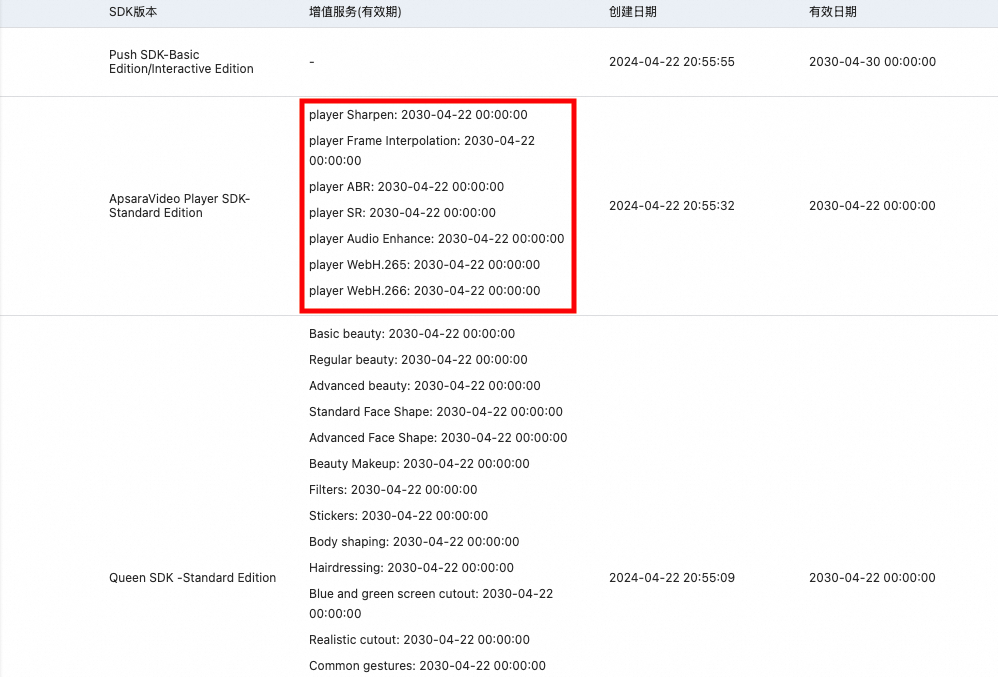
You can purchase value-added features for both the Standard and Professional editions. Each feature has its own validity period. In the SDK Management list, you can view the value-added features associated with each SDK version and their expiration dates. These features include client-side sharpening, client-side frame interpolation, Advanced ABR, client-side super-resolution, audio enhancement, and H.265 playback for web. You can use purchased value-added features as long as they have not expired.
|
Your access to value-added features is not affected. After they expire, you must purchase a renewal to continue using them. |
Impact on valid Standard Edition licenses
If you only use the features of the Standard Edition, your service will not be affected as long as your license is valid. However, if you upgrade to version 7.0.0 or later and want to use Professional Edition features, you must purchase a Professional Edition license.
Is upgrading the SDK required?
You do not have to upgrade the Player SDK. However, new versions include the latest features and bug fixes, making them more stable than older versions. For the best support experience, please note that our technical support team supports only SDK versions released within the last six months. We recommend upgrading to the latest version to ensure feature compatibility and avoid potential issues.
Resolving the "pricing plan not found" error
This error can occur after we update the pricing for the Player SDK. Follow these steps to resolve the issue:
-
Go to the ApsaraVideo VOD console and navigate to SDK Management > My Authorizations. On the order instance tab, click Purchase License.
-
You will be redirected to the SDK purchase page to purchase a new license.
On the purchase page, select the SDK type (Player, publishing, short video, beauty effect, or Video AI) and the platform (mobile or web). The Player SDK is available in Mobile Standard Edition and Mobile Professional Edition. Ensure you select the correct platform and edition. You can also select value-added features such as client-side super-resolution, client-side sharpening, client-side frame interpolation, and audio enhancement as needed. After confirming your configuration, click Buy Now to place the order.
-
After placing the order, return to the order instance tab and click Apply License.
Important-
Refresh the console after your purchase.
-
Do not change the application information during the license application process. Otherwise, the application will fail.
On the license application page, in the Bind Authorization section, enter the SDK License Order and select the Feature Module. Confirm the order number and authorization details (for example, "Player (Standard Edition) | 365-day validity"). In the Bind Application section, select the target application and verify its basic information, such as the application name, application ID, creation time, platform, and HarmonyOS Bundle ID.
After confirming that the application information is correct, click **OK**. This renews your existing license.
-
-
Binding the license successfully extends its validity period. You can check the new expiration date.
On the license management page in the console, search for your application and check the expiration date column in the license list to confirm it has been extended.
Important-
The console may still show the old license instance's expiration date. You can ignore this. Refer only to the new expiration date as shown in the screenshot.
-
This process does not affect your application's license certificate. However, we recommend updating the certificate in your next release.
-
Discounts and free access programs
Yes. You can obtain free Player SDK licenses for different editions through our spend-and-get program. For more information, see spend-and-get program.