This topic answers common questions about CDN for ApsaraVideo VOD.
Question categories
Purchase and billing
Why does traffic data differ across monitoring, usage reports, and logs?
After I purchase an ApsaraVideo VOD package, can the included resource plans be used for CDN or OSS?
I purchased an ApsaraVideo VOD data transfer plan. Why am I still being charged for traffic?
Am I charged for traffic and requests that result from attacks or malicious activities?
Access issues and exceptions
A 404 error is returned when I use a configured domain name to access ApsaraVideo VOD resources
How to determine if a CDN access issue is caused by a CDN POP or the origin server
How do I troubleshoot playback stuttering and 4008/4009 errors?
Global Accelerator does not improve access speed for users outside the Chinese mainland
Do I need to allow network access to play ApsaraVideo VOD videos from an internal network?
Add and resolve a domain name
Does ApsaraVideo VOD support wildcard domain names for acceleration?
What to do about the error "The root name of your domain is reserved by other account"?
What to do about the error "This domain name already exists"?
How do I test whether a CNAME record is configured correctly?
Can an ApsaraVideo VOD accelerated domain name be the same as the website primary domain?
Cache
Origin fetch and origin server
HTTPS
Can an ApsaraVideo VOD accelerated domain name use the SSL certificate for the primary domain?
What do I do if HTTPS certificate configuration fails because I entered a CSR file?
What do I do if SSL certificate deployment reports InsufficientQuota?
Can HTTP requests still access resources after HTTPS is enabled?
Why is the transcoding callback URL not HTTPS after a domain name is bound in ApsaraVideo VOD?
Refresh and prefetch
Security
View your new data transfer plan
You can query the usage details of only resource plans that are currently active or have expired within the last year.
Log in to Expenses and Costs.
In the left-side navigation pane, select Manage Reserved Instances.
On the Manage Reserved Instances page, set Resource Type to Resource Plans to view resource plan usage details.
You can set Product Name to ApsaraVideo VOD or use other filter conditions such as effective time and status to query for resource plans.
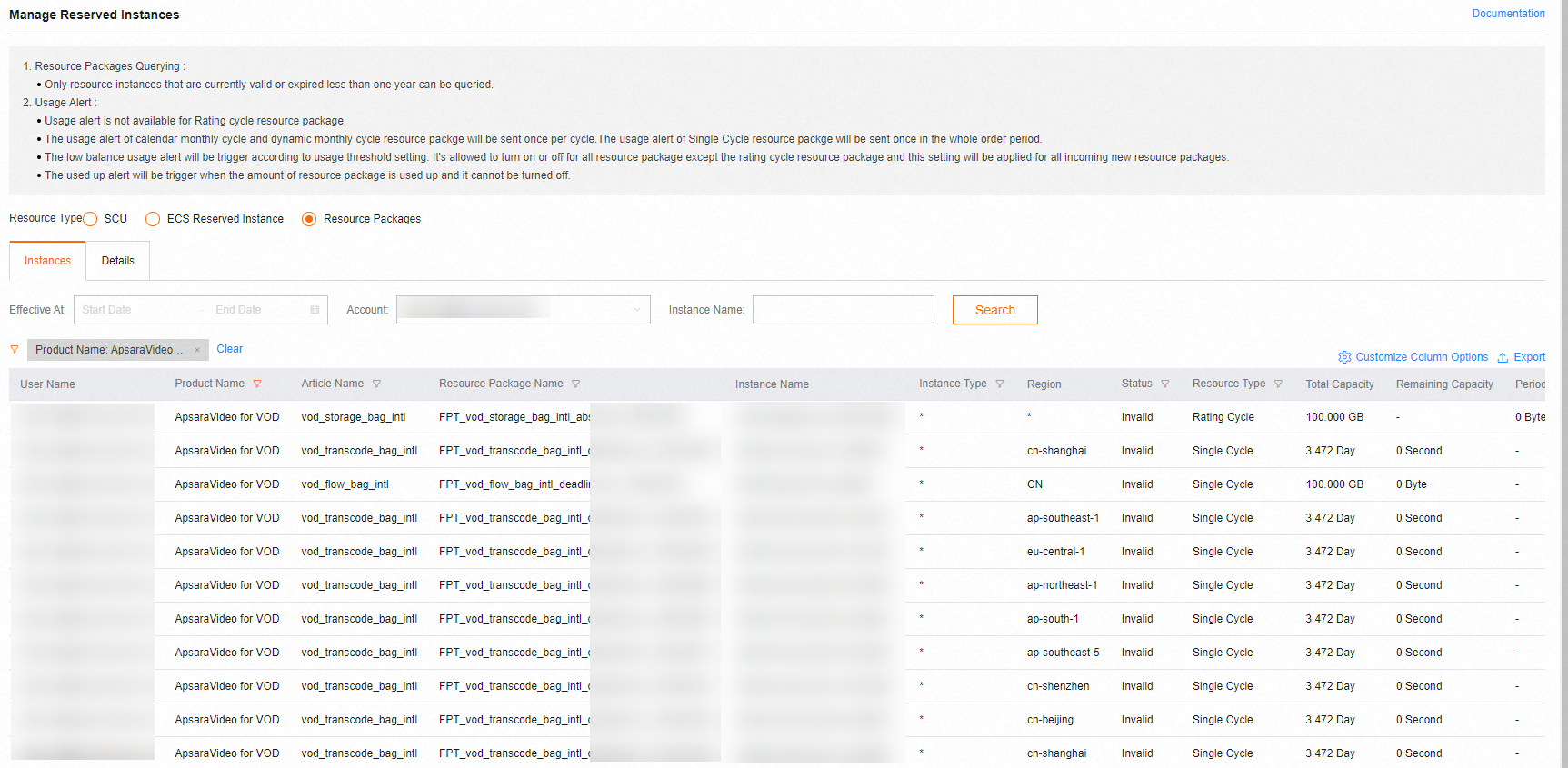
Traffic data discrepancies
Issue
The traffic data for an accelerated domain name that is obtained from the data monitoring or resource usage features in the ApsaraVideo VOD console or API is different from the traffic data calculated from logs. The traffic data from logs is usually lower.
Cause
Traffic calculated from logs is based on the response_size field and measures only application-layer traffic. The actual network-layer traffic is typically 7% to 15% higher than the application-layer traffic. This difference is mainly due to two main types of network overhead:
TCP/IP packet headers: Before network transmission, application-layer data is encapsulated into TCP packets at the transport layer and then into IP packets at the network layer. An IP packet has a maximum size of 1,500 bytes, which includes a 20-byte TCP header and a 20-byte IP header. These headers also consume network traffic but are not recorded in application-layer logs. This header overhead accounts for at least 2.74% of the traffic recorded in logs (40 bytes of headers for every 1,460 bytes of application data). The smaller the application data, the larger the percentage of header overhead. The overhead is typically around 3%.
TCP retransmission: In complex network environments, packet loss can occur due to network congestion or device failures. Typically, 3% to 10% of data packets are dropped and must be retransmitted. The operating system kernel handles these retransmissions at the protocol stack layer, and they are not recorded in application-layer logs. This process consumes additional network resources.
Due to this overhead, a common industry practice is to add a 7% to 15% margin to the application-layer traffic to calculate the final billable traffic. CDN for ApsaraVideo VOD applies an average overhead of 10%. Therefore, the actual billable traffic, which is also the traffic shown in monitoring queries, is 1.1 times the traffic recorded in logs. This is known as the TCP coefficient of 1.1.
Billing for acceleration in the Chinese mainland
If your origin server is in Hong Kong (China), Macao (China), Taiwan (China), or other regions outside the Chinese mainland, and you use CDN POPs in the Chinese mainland for acceleration, you are charged based on the standard rates for CDN acceleration in the Chinese mainland.
CDN is billed based on the outbound traffic from CDN POPs. Therefore, you are charged based on the rates for the Chinese mainland. However, this setup may affect performance because latency can occur when CDN POPs in the Chinese mainland perform an origin fetch from a server outside the Chinese mainland. If both your origin server and users are outside the Chinese mainland, we recommend that you enable Global Accelerator.
Resource plan usage across services
No. ApsaraVideo VOD is an independent service. When you use ApsaraVideo VOD, you are charged for storage, transcoding, traffic, or bandwidth resources consumed. An ApsaraVideo VOD package contains resource plans such as data transfer plans, storage plans, and transcoding plans. You can use the resource plans to pay only for the resources that are consumed in ApsaraVideo VOD.
Unexpected traffic charges
An ApsaraVideo VOD data transfer plan takes effect only if you have configured an accelerated domain name and selected the pay-by-data-transfer metering method for the acceleration service. After a data transfer plan takes effect, it offsets only accelerated data transfer and does not cover OSS outbound traffic. Excess usage is billed on a pay-as-you-go basis. If you incur data transfer charges, check for the following situations:
An accelerated domain name is configured
If an accelerated domain name is not fully configured, resource plans cannot offset fees. For example, you may have added the domain name but not configured a CNAME record. Ensure the domain name is in the Running state. ApsaraVideo VOD Quick Start.
If you use the direct OSS address instead of the accelerated domain name to access resources, storage outbound traffic fees are incurred. Billing of storage outbound traffic.
Check whether your usage exceeds the plan capacity. If so, renew the resource plan. Renew a resource plan.
No accelerated domain name is configured
If you do not configure an accelerated domain name in ApsaraVideo VOD, the service returns an OSS origin URL by default. Playing or downloading resources from ApsaraVideo VOD using this type of URL generates storage outbound traffic fees.
Billing for attack traffic
You are charged for bandwidth that is consumed by attacks or maliciously inflated traffic. These charges apply because ApsaraVideo VOD bandwidth resources are consumed.
To handle maliciously inflated traffic or attacks, you can improve video security or configure peak bandwidth alerts.
Enable video security features
If your business is at risk of attacks, we recommend that you enhance your video security to make attacks more difficult. ApsaraVideo VOD provides a comprehensive content security mechanism to protect your video content from hotlinking, and illegal downloads and distribution. This mechanism helps you meet security requirements in different business scenarios. For more information, see Media security.
Enable peak bandwidth monitoring
You can set a bandwidth threshold for your domain name. When the threshold is reached, you will receive an SMS notification. For more information, see Peak bandwidth monitoring.
Billing for 4xx status codes
Yes. To protect your accelerated domain names from attacks and fraudulent traffic, you can configure access control features such as hotlink protection, URL signing, remote authentication, IP blacklists and whitelists, and user-agent (UA) blacklists and whitelists. When a malicious request matches an access control rule, the CDN POP returns a 4xx status code to block access to your resources. In this case, the CDN POP consumes CPU resources to process the malicious request and consumes traffic and bandwidth resources to return the 4xx status code. Therefore, you are still charged for the traffic and bandwidth consumed. For more information about the billing of traffic in ApsaraVideo VOD, see Billing of basic services.
404 errors when accessing resources
When a web server returns an HTTP 404 status code, it indicates that the requested resource does not exist on the server. This can happen if the URL generation rules have changed, a web file was renamed or moved, or an imported link contains a spelling error.
Make sure that the storage location of the resource matches the domain name. If multiple storage locations exist in the same region but only one domain name is configured, the ApsaraVideo VOD console prioritizes returning the CDN URL for that region. If you access a resource in a storage location that is not bound to the domain name, a 404 error is returned.
Isolating CDN or origin server issues
Go to the Alikunlun User Diagnostic Tool and confirm that your local network is working correctly.
Add an entry that maps the origin server's IP address to its domain name in your local
hostsfile to test site access directly. If an error occurs when you access the origin server, the issue is with your origin server. Contact your site administrator to fix it.# Copyright (c) 1993-2009 Microsoft Corp. # # This is a sample HOSTS file used by Microsoft TCP/IP for Windows. # # This file contains the mappings of IP addresses to host names. Each # entry should be kept on an individual line. The IP address should # be placed in the first column followed by the corresponding host name. # The IP address and the host name should be separated by at least one # space. # # Additionally, comments (such as these) may be inserted on individual # lines or following the machine name denoted by a '#' symbol. # # For example: # # 102.54.94.97 rhino.acme.com # source server # 38.25.63.10 x.acme.com # x client host # localhost name resolution is handled within DNS itself. # 127.0.0.1 localhost # ::1 localhost 10.10.10.10 www.example.comComment out the entry that you added to the
hostsfile in the previous step. Then, run thepingcommand to test the accelerated domain name. If the command returns a successful response, the CDN POP is working correctly.C:\Users\admin>ping www.example.com Pinging www.example.com [101.x.x.x] with 32 bytes of data: Reply from 101.x.x.x: bytes=32 time=3ms TTL=54 Reply from 101.x.x.x: bytes=32 time=3ms TTL=54 Reply from 101.x.x.x: bytes=32 time=3ms TTL=54 Reply from 101.x.x.x: bytes=32 time=4ms TTL=54 Ping statistics for 101.x.x.x: Packets: Sent = 4, Received = 4, Lost = 0 (0% loss), Approximate round trip times in milli-seconds: Minimum = 3ms, Maximum = 4ms, Average = 3ms
How do I troubleshoot playback stuttering and 4008/4009 errors?
If playback stutters or a 4008 or 4009 error occurs during video playback, troubleshoot the issue as follows:
Use the playback link diagnostic tool to run a self-service diagnosis of the video playback link.
Check that the client's network environment (for example, a 4G network) is stable and that the downstream bandwidth is not lower than the video bitrate. We recommend that you switch networks to test the playback.
Check that the playback URL or the TS segment addresses are accessible, to rule out an abnormal response from a CDN POP.
If you are using encrypted HLS playback, check whether the
loadDataTimeoutparameter in the player configuration is set too low.Use your browser's developer tools to inspect the request details and check whether a specific segment times out while loading (corresponding to error
4008) or returns 0 bytes (corresponding to error4009).
Global Accelerator does not improve access speed
Check the following items to troubleshoot the issue:
When a user outside the Chinese mainland tries to access a resource, check the IP address to which the domain name resolves. This helps you determine whether the configurations for the POPs outside the Chinese mainland have taken effect.
The performance of POPs outside the Chinese mainland also depends on the request volume. Access speed improves only when the request volume is high. If the number of requests is low, fewer requests hit the cache. In this case, adding POPs outside the Chinese mainland does not significantly improve access speed for users in those regions.
MP4 video previews not working
The preview feature in ApsaraVideo VOD supports the MP4 and HLS file formats. For MP4 videos, the metadata must be located at the beginning of the file. Videos with metadata at the end of the file cannot be previewed. When you use ApsaraVideo VOD to transcode a video into the MP4 format, the service places the metadata at the beginning of the file. To resolve this issue, you can transcode the MP4 video. For more information about transcoding, see Audio and video transcoding.
Do I need to allow network access to play ApsaraVideo VOD videos from an internal network?
CDN for ApsaraVideo VOD does not support access from an internal network (VPC). To play ApsaraVideo VOD resources from an internal network, use one of the following methods:
Allow the domain names: Enable outbound internet access, and allow access to the API domain name
vod.<RegionId>.aliyuncs.com:443and to your CDN accelerated domain name. This method does not require you to maintain dynamic IP addresses.Obtain CDN node IP addresses: Call the
DescribeUserVipsByDomainAPI operation to obtain the IP addresses of Level 1 (L1) CDN nodes, and add the IP addresses to your firewall whitelist. Because CDN node IP addresses are dynamically allocated, refresh the whitelist periodically.Use an OSS internal domain name: Replace the accelerated domain name with an OSS internal domain name in the format
outin-<bucket_id>.oss-<RegionId>-internal.aliyuncs.comto bypass CDN and directly access the origin server.
Wildcard domain names
ApsaraVideo VOD supports adding wildcard domain names by using the AddVodDomain API operation. A wildcard domain name must start with a period (.), for example, .aliyundoc.com.
"Root domain reserved" error
If you fail to add a domain name in the ApsaraVideo VOD console and receive the error The root name of your domain is reserved by other account with the message The root name of your domain is reserved by other account, please contact our Business Advisors, this means the root domain has already been added to Alibaba Cloud CDN, DCDN, or ApsaraVideo VOD under a different Alibaba Cloud account.
If you cannot resolve the issue, submit a ticket. For more information about how to submit a ticket, see Contact us.
"Domain name already exists" error
If you fail to add a domain name in the ApsaraVideo VOD console and receive the error This domain name already exists, this means the domain name has already been added to another Alibaba Cloud product.
An accelerated domain name cannot be added more than once. If you receive this error, check whether your domain name has been added to other cloud products, such as ApsaraVideo Live, DCDN, and SCDN.
If you cannot resolve the issue, submit a ticket. For more information about how to submit a ticket, see Contact us.
Verify a CNAME record
Do not use the ping command for verification. The ping command can return inaccurate resolution information. Instead, use query tools such as nslookup or dig.
Windows
In the Command Prompt (CMD) or PowerShell on a Windows system, run the following command to query the CNAME record:
nslookup -type=CNAME <accelerated_domain_name>If the returned result matches the CNAME value provided by the CDN service, the CNAME record has taken effect.
PS C:\Users\admin> nslookup -type=cname cdn.example.com
Server:  UnKnown
Address: 100.100.x.x

Non-authoritative answer:
cdn.example.com       canonical name = cdn.example.com.w.alikunlun.com
Linux/macOS
In the terminal on a Linux or Mac OS system, use the
digcommand to verify:Query only the CNAME target address (Recommended):
dig +short <accelerated_domain_name> CNAMEIf the returned result matches the CNAME value provided by the CDN service, the CNAME record has taken effect. The following is a sample result:
dig +short cdn.example.com CNAME
cdn.example.com.w.alikunlun.com.
Query detailed domain name information:
dig <accelerated_domain_name> CNAMEIf the CNAME value in the
ANSWER SECTIONis the same as the CNAME value provided by CDN, it indicates that the CNAME resolution has taken effect.; <<>> DiG 9.10.6 <<>> cdn.example.com CNAME ;; global options: +cmd ;; Got answer: ;; ->>HEADER<<- opcode: QUERY, status: NOERROR, id: 62811 ;; flags: qr rd ra; QUERY: 1, ANSWER: 1, AUTHORITY: 0, ADDITIONAL: 1 ;; OPT PSEUDOSECTION: ; EDNS: version: 0, flags:; udp: 4000 ;; QUESTION SECTION: ;cdn.example.com. IN CNAME ;; ANSWER SECTION: cdn.example.com. 600 IN CNAME cdn.example.com.w.alikunlun.com. ;; Query time: 67 msec ;; SERVER: 30.30.x.x#53(30.30.x.x) ;; WHEN: Wed Sep 24 19:05:30 CST 2025 ;; MSG SIZE rcvd: 92
Accelerated domain name fails review
All domain names that are added to ApsaraVideo VOD must undergo a content review. If your domain name fails to be added, it may not meet the access rules. For more information about the standards and limitations for adding domain names, see Domain name requirements.
If your domain name fails the review, log on to the ApsaraVideo VOD console. Go to the Configuration Management > CDN Configuration > Domain Names page to view the reason for the failure. Delete the domain name that failed the review, adjust your website content based on the reason, and then add the domain name again to await review.
Can an ApsaraVideo VOD accelerated domain name be the same as the website primary domain?
No. Do not use the same domain name for the website primary domain and the ApsaraVideo VOD accelerated domain name. Resolve the primary domain, such as www.example.com, to your own web server. Add a separate subdomain, such as vod.example.com, to ApsaraVideo VOD as the accelerated domain name, and use that subdomain for video playback.
Improving a low cache hit ratio
A low cache hit ratio means that user requests are frequently redirected to the origin server, which can degrade the acceleration performance due to unstable public network links. You can improve the cache hit ratio by prefetching URLs, configuring cache expiration rules, and filtering variable parameters in URLs.
The following table describes the solutions.
Policy | Factors and scenarios | Configuration method |
Prefetch popular resources before peak hours | Factor: If resources are not prefetched to CDN POPs before a major operational event or a new version release, a large number of resources must be fetched from the origin server. This results in a low cache hit ratio. Scenarios:
| |
Configure an appropriate time-to-live (TTL) | Factors:
Scenario: Static resources are published on the origin server but are not cached on CDN POPs, or the resources cached on POPs expire quickly. Configuration recommendations:
| |
Ignore parameters in URLs | Factor: When a request URL contains a Scenario: You want to serve the same resource from different URLs that vary only by their parameters. | |
Configure a Range origin fetch policy for large files | Factor: A user might stop a download midway or watch only part of a video. In these cases, the user needs to access only a specific range of the file. However, the CDN POP requests the entire file from the origin server. As a result, the CDN POP downloads more data from the origin server than it serves to the user, which lowers the cache hit ratio. Scenario: Users download application installation packages or watch video resources. |
Slow resource access after acceleration
An accelerated domain name adds a layer of CDN POPs to the network, distributing resources from your origin server to POPs closer to your users. This allows clients to request and retrieve resources from a nearby CDN POP, reducing origin fetches and improving access speed. Therefore, slow access can be caused by the following issues:
Client-side local network issues, such as insufficient downstream bandwidth or incorrect configuration.
Poor network connection and high latency between the client and the CDN POP.
A CDN POP that is not working correctly or has a slow response time.
The resource content is large, resulting in a long download time.
Poor network connection during the origin fetch from the CDN POP to the origin server.
The origin server itself has a slow response time.
Cross-origin "Access-Control-Allow-Origin" error
A request for an accelerated resource fails with the error The 'Access-Control-Allow-Origin' header has a value 'xxx' that is not equal to the supplied origin. The Console panel of the browser's developer tools shows a CORS cross-origin error because the request origin (https://vr-mc01.xxx) does not match the value of the Access-Control-Allow-Origin response header (https://vr-web01.xxx). This mismatch causes the resource to fail to load (net::ERR_FAILED) and triggers subsequent JS runtime errors. This error indicates that the value of the Access-Control-Allow-Origin cross-origin header in the CDN response does not match the Origin cross-origin header of the client request, which causes the browser to block the response. For example, the request's cross-origin header is "Origin:http://Domain-A", but the response's cross-origin header is "Access-Control-Allow-Origin:http://Domain-B".
This issue can occur for one of the following reasons:
The cross-origin header configured on the CDN does not match the
Originheader from the client request.The cross-origin header from the origin server is cached by the CDN.
The browser cache is stale.
Can an ApsaraVideo VOD accelerated domain name use the SSL certificate for the primary domain?
No. You cannot directly use the certificate for the primary domain as the certificate for an accelerated domain name. Configure a certificate that matches the accelerated domain name, such as a certificate for the subdomain, a wildcard certificate, or a single-domain certificate.
What do I do if HTTPS certificate configuration fails because I entered a CSR file?
The configuration fails when you enter a certificate signing request (CSR) as the certificate content. A CSR is a certificate request file that begins with -----BEGIN CERTIFICATE REQUEST-----; it is not an issued certificate.
To correct the configuration:
Open the certificate instance details in Certificate Management Service.
Find the complete issued certificate content, which begins with
-----BEGIN CERTIFICATE-----, and its matching private key.Log on to the ApsaraVideo VOD console. Go to Configuration Management > CDN Configuration > Domain Names.
Select the accelerated domain name, open HTTPS Settings, paste the complete issued certificate and the matching private key, and save the configuration.
What do I do if SSL certificate deployment reports InsufficientQuota?
InsufficientQuota indicates that the available certificate deployment quota is insufficient. Use either of the following methods:
Purchase the required deployment quota in the Certificate Management Service console, and then retry the deployment.
Update the certificate manually at no charge. Log on to the ApsaraVideo VOD console. Go to Configuration Management > CDN Configuration > Domain Names. Select the domain name, open HTTPS Settings, and update the certificate.
If the error persists, retry with a custom certificate name that contains no Chinese characters.
Can HTTP requests still access resources after HTTPS is enabled?
Yes. After you configure an SSL certificate for the domain name and enable HTTPS secure acceleration, both HTTP requests and HTTPS requests can access the resources. This dual-protocol access keeps existing video resource paths valid and maintains uninterrupted access.
Transcoding callback URL is not HTTPS
ApsaraVideo VOD callbacks do not currently support HTTPS. If you have correctly configured an HTTPS certificate in ApsaraVideo VOD, you can manually replace http:// with https:// in the resource URL after you receive the callback message.
Callbacks for snapshots and thumbnails include HTTPS URLs, but callbacks for transcoding return HTTP URLs.
Update files with the same name
You can submit refresh requests from the console or by using an API. For more information about how to refresh resources, see Purge and prefetch. You can submit up to 2,000 refresh requests per day for each Alibaba Cloud account. Each request can contain up to 1,000 URLs. You can also refresh content in up to 100 directories per day. For information about the related API operations, see Refresh and Prefetch API.
Resources not updated after a refresh or prefetch
Perform the following steps to troubleshoot and resolve the issue:
Clear your browser cache, then refresh the page to see if the resource is updated.
Bind the site's domain name directly to the origin server by modifying the local
hostsfile. Then, access the origin server directly to check if its resources are updated. If they are not updated, update the resources on the origin server, and then use the CDN service for acceleration.Log on to the ApsaraVideo VOD console and check if the refresh or prefetch task is complete. If it is not, we recommend that you run the task again.
Block malicious IP addresses
You can configure an IP blacklist to block and deny access from specific IP addresses. For more information, see Configure an IP blacklist or whitelist.
IP on blacklist can still access resources
Check whether the IP address configured in the ApsaraVideo VOD console is correct. To accurately restrict client IP addresses, you must add the IP addresses from the X-Forwarded-For header to the blacklist. For more information about how to obtain the client IP address, see Retrieve the originating IP addresses of clients.
The CDN service, acting as a server, cannot control client access attempts. After you configure an IP blacklist, requests from a blacklisted IP address that are sent to the CDN receive a 403 error code. You can view the logs for these requests. For more information about how to view logs, see Download logs.
When a 403 error code is returned, you are charged for the traffic generated. Since no actual resource content is delivered, only the response header generates traffic, and the cost is minimal. For more information, see Am I charged if a CDN POP returns a 4xx status code?.
Hotlink protection causes 403 error
Issue
After you configure hotlink protection, accessing accelerated resources in ApsaraVideo VOD returns a 403 error.
Cause
The hotlink protection settings are incorrect, or the Referer header in the request is empty.
Solution
Identify the cause of the issue.
Run the
curlcommand to test access to the accelerated domain name.curl -voa -e "http://demo.aliyundoc.com" http://example.aliyundoc.comA 403 error with the message
denied by Referer ACL, as shown in the following sample output, indicates that the hotlink protection settings are incorrect. In this example, the request's HTTP header contains aRefererfield with the value demo.aliyundoc.com.* Rebuilt URL to: http://example.aliyundoc.com/ * Trying 101.x.x.144... * TCP_NODELAY set * Connected to example.aliyundoc.com (101.x.x.144) port 80 (#0) > GET / HTTP/1.1 > Host: example.aliyundoc.com > User-Agent: curl/7.54.0 > Accept: */* > Referer: http://demo.aliyundoc.com > < HTTP/1.1 403 Forbidden < Server: Tengine < Date: Sat, 08 Dec 2023 12:36:17 GMT < Content-Type: text/html < Content-Length: 254 < Connection: keep-alive < X-Tengine-Error: denied by Referer ACL ... * Connection #0 to host example.aliyundoc.com left intactRun the
curlcommand to test access to the accelerated domain name without a Referer header.curl -voa http://example.aliyundoc.comIf the system returns a 403 error and the message
denied by Referer ACL, as shown in the following sample output, it indicates that hotlink protection is configured to block requests with an empty Referer header. In this example, the request's HTTP header has noRefererfield.* Rebuilt URL to: http://example.aliyundoc.com/ * Trying 101.x.x.148... * TCP_NODELAY set * Connected to example.aliyundoc.com (101.x.x.148) port 80 (#0) > GET / HTTP/1.1 > Host: example.aliyundoc.com > User-Agent: curl/7.54.0 > Accept: */* > < HTTP/1.1 403 Forbidden < Server: Tengine < Date: Sat, 08 Dec 2023 12:48:50 GMT < Content-Type: text/html < Content-Length: 254 < Connection: keep-alive < X-Tengine-Error: denied by Referer ACL ... * Connection #0 to host example.aliyundoc.com left intactOpen a URL accelerated by the domain name in a Chrome browser and open the developer tools. If the request headers do not contain a
Refererfield and a 403 error occurs, as shown in the following sample output, it indicates that hotlink protection is configured to block requests with an empty Referer header.403 Forbidden You don't have permission to access the URL on this server. Powered by Tengine Response Headers: Server: Tengine X-Tengine-Error: denied by Referer ACL ... Request Headers: Accept: text/html,application/xhtml+xml,application/xml;q=0.9,image/webp,image/apng,*/*;q=0.8 Host: example.aliyundoc.com User-Agent: Mozilla/5.0 (Macintosh; Intel Mac OS X 10_14_0) AppleWebKit/537.36 (KHTML, like Gecko) Chrome/70.0.3538.102 Safari/537.36 ...
Resolve the issue based on its cause.
Solution for incorrect hotlink protection settings
Check whether the Referer value demo.aliyundoc.com is allowed by the hotlink protection rules configured for the accelerated domain name example.aliyundoc.com.
Log on to the ApsaraVideo VOD console. In the left-side navigation pane, choose Configuration Management > CDN Configuration > Domain Names. Find the target domain name and click Configure in the Actions column. Then, choose Resource Access Control > Referer-based Hotlink Protection > Modify. If the Referer type is set to Whitelist and the requested Referer does not match the whitelist, add the domain name demo.aliyundoc.com to the list. For example, if the Referer-based Hotlink Protection is configured as a Whitelist with the rule
*.example.com, and the options to Allow Access to Resource URL from Browser Address Bar and Allow Empty Referer Field to Access CDN Resources are not selected, a request fromdemo.aliyundoc.comwould be blocked.Solution for an empty Referer header
Log on to the ApsaraVideo VOD console. In the left-side navigation pane, choose Configuration Management > CDN Configuration > Domain Names. Find the target domain name and click Configure in the Actions column. Then, choose Resource Access Control > Referer-based Hotlink Protection > Modify. Select the Allow Access to Resource URL from Browser Address Bar checkbox.
NoteAllowing requests with an empty Referer header increases the risk of hotlinking.
Can I configure traffic throttling and hotlink protection without an accelerated domain name?
No. Traffic throttling and Resource Access Control features in ApsaraVideo VOD, including hotlink protection, depend on an accelerated domain name. If you have not added an accelerated domain name, you cannot configure these security policies, and the policies cannot take effect.
The developer tools cannot be used because the Web Player SDK triggers anti-debugging (debugger) after it is loaded
The production build of aliplayer-min.js includes a built-in anti-debugging protection mechanism. In an unauthorized environment, or when the browser developer tools are open, it automatically inserts a debugger statement to prevent unauthorized use or code tampering. This mechanism cannot be disabled through configuration.
If you suspect that your local environment differs from the official version, you can visit the official player settings page to compare and test.
Keywords: anti-debugging, debugger, aliplayer-min.js, developer tools, browser debugging.
How do I synchronize subtitles and lyrics with playback in the Web Player SDK?
By default, the Web Player SDK displays VTT subtitles below the video, using the same style as video subtitles.
The SDK does not natively support music-player-style scrolling or centered highlighted lyrics. To synchronize lyrics with an MP3 audio file, convert the lyrics to VTT format and use them as external subtitles. Make sure the VTT timestamps precisely match the audio playback progress. Then listen for the player's playback time update event, parse the VTT content yourself, and develop a custom UI component to render the lyrics.
Keywords: VTT subtitles, lyrics synchronization, scrolling lyrics, MP3 lyrics, external subtitles, custom UI.
The Web Player reports an error or shows Loading for a long time after resuming from the background
Cause: When a browser reclaims resources in the background, the player becomes inactive. Alternatively, the PlayAuth credential may have expired (the maximum validity period is 3000 seconds).
Solution: Listen for the visibilitychange event. When the page moves to the background, call player.pause() and store currentTime in sessionStorage. When the page returns to the foreground, obtain a new PlayAuth and call replayByVid(vid, newPlayAuth) to reset playback. Listen for the ready or canplay event, and in the callback read the time from sessionStorage and call player.seek() to resume playback progress.
Optimization suggestions: Set vodRetry to 0 and waitingTimeout to 10 seconds to shorten the wait time, or proactively refresh the token 5 minutes before the credential expires.
How do I use and clear the ListPlayer local cache (enableLocalCache)?
Conditions for the cache to take effect: The video format must be MP4 and played by URL. If the URL contains authentication parameters, remove the authentication parameters when computing the cache key.
Offline playback: After you set enableLocalCache to YES, playback can continue offline without interruption and without consuming additional traffic.
Clearing the cache: Call [AliPlayerGlobalSettings clearCaches] to clear all video caches. This applies to scenarios such as during playback, after logging out, or manual cleanup.
The original setCacheConfig method is deprecated. Use the enableLocalCache API instead.
How does the Web Player SDK License verification mechanism work, and how do I handle special scenarios (VPN/iframe)?
Verification mechanism: The Web Player SDK verifies the License based on the current domain name in the browser's address bar or the Referer. This domain name must match the domain name that was bound when you applied for the License.
VPN proxy scenario: Accessing the page through a VPN can cause a domain name mismatch error. We recommend that you use a unified 302 redirect to a page on the authorized domain name, or embed the playback page in an iframe on the VPN page (make sure the page loaded inside the iframe is on the authorized domain name).
iframe embedding limitation: If the parent page is on an unauthorized domain name and the child page (iframe) is on the authorized domain name, License verification can pass normally. However, note that the WeChat built-in browser may restrict cross-domain iframes, and communication between the parent and child pages requires postMessage to be configured.
Keywords: License domain binding, VPN proxy, iframe embedding, cross-domain restrictions, postMessage.
After the Web Player refreshes an expired PlayAuth, how do I resume playback from a specific position?
Current limitation: When you use the replayByVidAndPlayAuth method to refresh the PlayAuth, playback restarts from the beginning. Automatically resuming from a specific position is not yet supported.
Recommended solution: When the pause event fires, record the current playback time (store it in localStorage or a memory variable). When you catch the PlayAuth expiration error code 4002, first refresh the PlayAuth, then manually call seek to the previously recorded time to resume playback.
Fallback strategy: In the error event, save the last known valid time as a fallback, to avoid inaccurate positioning caused by buffering errors.
Keywords: PlayAuth expiration, resume playback, replayByVidAndPlayAuth, error code 4002, seek recovery, getCurrentTime failure.
The Web Player in an Android WebView has audio but no video
Troubleshoot the issue as follows:
Check whether hardware acceleration is enabled. Set
android:hardwareAccelerated="true"inAndroidManifest.xml, or setwebView.setLayerType(View.LAYER_TYPE_SOFTWARE, null)in your code to try software rendering.Check the compatibility of the video encoding format. Older WebViews may not support High Profile H.265/H.264. We recommend that you transcode the video to a compatible format.
Upgrade the Web Player SDK to the latest version (for example,
2.37.6or later) to fix known compatibility issues.Print the WebView version to check whether the kernel is outdated.
The Web Player shows a black screen or keeps loading when autoplay is false and there is no cover image
Cause: If the poster attribute is not set, the player has no default content to display.
Solution: Set the poster attribute to specify a cover image, or listen for events such as ready to manage the player state and customize the UI display.
Why can videos play in the 360 Browser but not in Chrome or Edge, and how do I fix it?
Cause: The 360 Browser has more built-in decoders or uses a compatibility kernel (such as IE mode), while Chrome and Edge enforce stricter requirements on video format, protocol, and security policy.
Solution: Apply for a free Alibaba Cloud Player SDK License and integrate the website player code to improve compatibility.
The player does not respond when pulling a live stream with setDataSource, and reports "Connect didn't get any data from stream"
Call the playback start method in the player's prepared callback, to make sure that stream pulling and playback start only after the player is ready.
How do I close or hide the diagnostic tool interface that the Web Player pops up automatically?
The diagnostic tool does not run persistently. Closing the tab or returning to the playback page exits it. If you need to hide it during operation to avoid exposing information, rewrite the code by using the Web Player's H5 custom error UI feature to redefine the style (for example, keep only a refresh button).
Videos cannot play in certain iOS browsers, such as UC Browser
Troubleshooting suggestions:
Switch network environments to rule out a network issue.
Add the
vconsoletool on the web page to view the specific error logs and locate the cause.We recommend using the Alibaba Cloud Web Player for better compatibility support.
After configuring hlsOption.abrEwmaDefaultEstimate, do I need any additional scripts?
abrEwmaDefaultEstimate is the player's initial estimate of the current network environment, used to compare against the BANDWIDTH value in the m3u8 file when selecting a bitrate. During playback, the player updates the bandwidth estimate based on the actual download speed and replaces the initial setting. No additional scripts are required.
After upgrading the ApsaraVideo Player SDK, some videos still fail to play or keep showing Loading on iOS
We recommend upgrading the Player SDK to the latest version to resolve native HLS compatibility issues. If the issue persists after the upgrade, check your backend configuration and domain name certificate configuration.