Assign cloud resource costs to cost centers such as project teams or departments by using tags. Tag-based cost allocation helps you understand your cloud cost structure and manage costs across a complex organization.
Key considerations
Before allocating costs:
-
Your organization needs a resource and cost management strategy with senior management support.
-
Established procedures must ensure all resources carry cost allocation tags.
The following services support cost allocation:
-
Tags
A tag is a key-value pair attached to a resource. Tags let you categorize, search, and aggregate resources across dimensions.
-
Cloud Config
Cloud Config audits resource configurations and compliance. Use it to find resources that do not comply with your tagging standards.
Cost allocation requirements
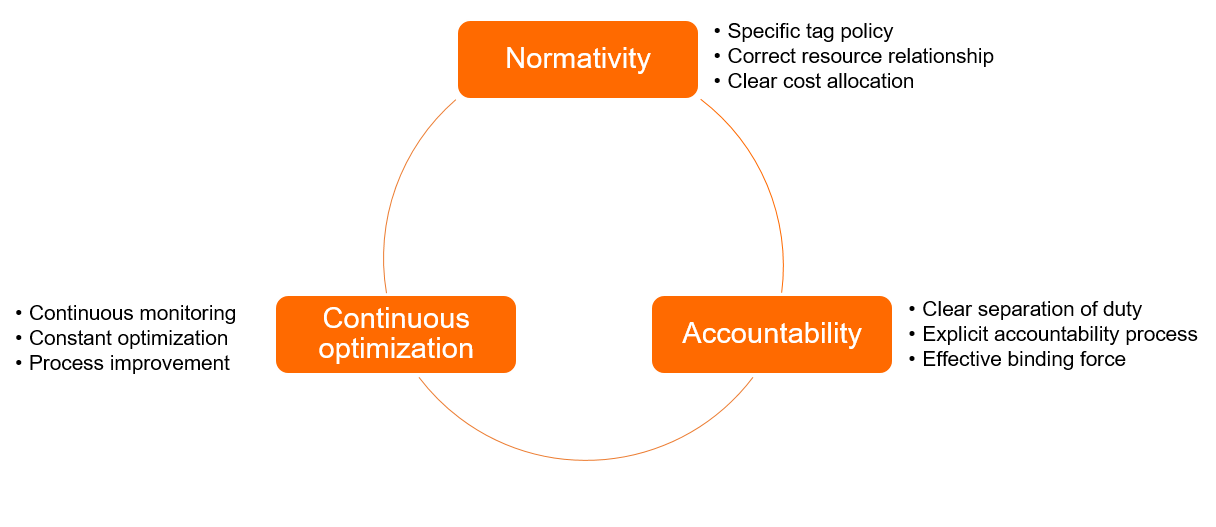
Effective cost allocation depends on three pillars:
-
Standardization
Cost visibility requires reports for business, finance, and O&M teams that meet these requirements:
-
Consistent reporting dimensions.
-
Accurate resource relationships, such as resource groups and tags.
-
A clear tagging policy based on Best practices for tag design.
-
Appropriate access control policies. Overview of access policies.
-
-
Accountability
Integrate tag ownership with your internal management standards to ensure reliable and accurate tag data.
-
Continuous optimization
Cost allocation is an ongoing process. Every resource must carry accurate tags throughout its lifecycle, which requires sustained effort from all teams.
How to allocate costs by tag
-
Plan tags for resources based on organizational or business dimensions.
Common tag dimensions include:
-
Project
-
Cost center
-
Environment
-
Application
-
Department
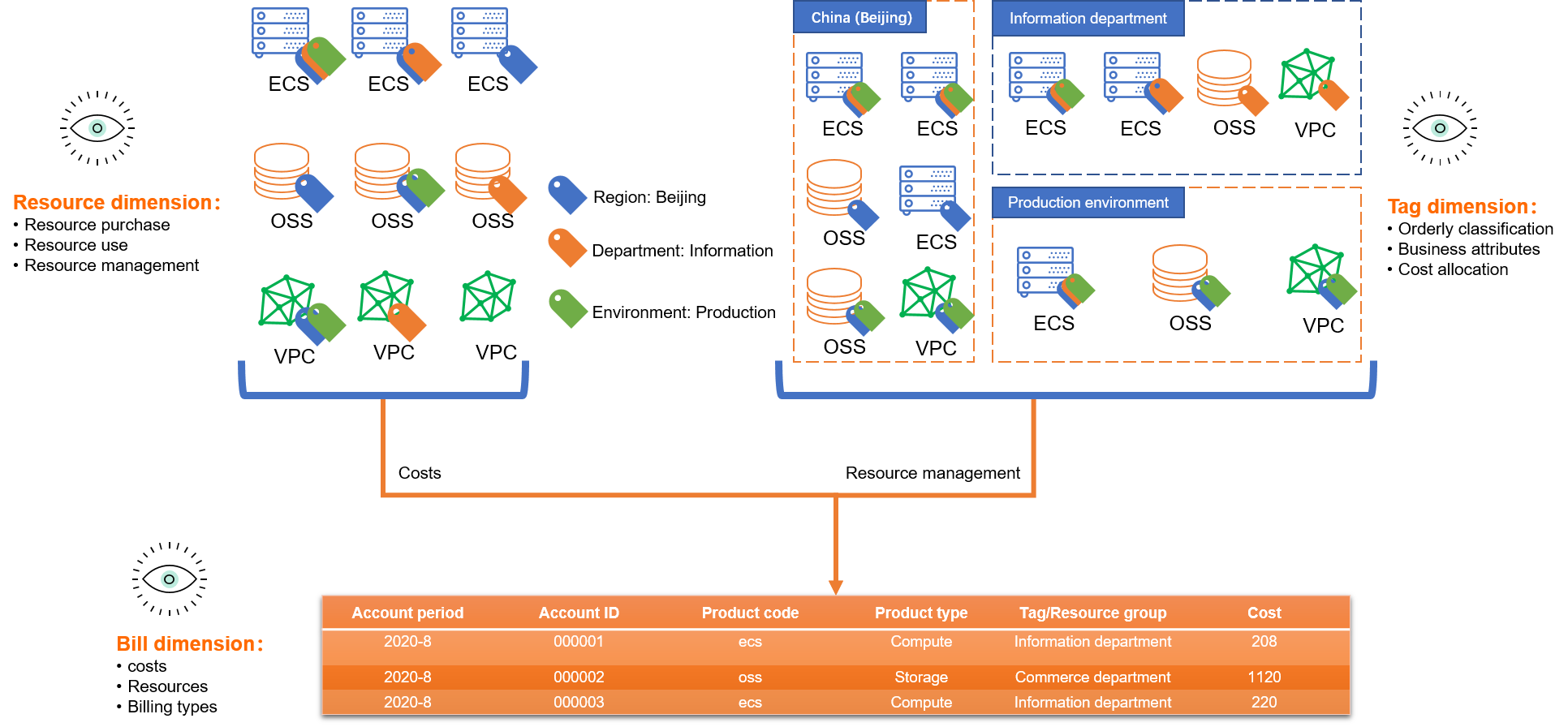
For tag planning principles, see Best practices for tag design.
-
-
Create and attach tags.
Create and attach tags through the Tag console, an API, or a service console:
-
Attach tags at resource creation (recommended)
Not all services support this method. Check the documentation for each service.
-
Attach tags to existing resources
Create a tag and Attach tags.
-
-
Enable cost allocation tags.
Enable Cost Allocation Tags and designate specific tags as cost allocation tags. These tags then appear on Cost Analysis and Billing Details pages in Expenses and Costs. If no cost allocation tags are specified, no tags appear on billing pages in Expenses and Costs. Cost allocation tags.
-
View split bills.
View split bills by tag in the Expenses and Costs console. View a split bill by tag.
-
(Optional) Check resource tag compliance.
Use Cloud Config to find resources that are not attached with specified tags. Use Cloud Config to find resources that are not attached with specified tags.
Best practices
-
Use tags to manage cost allocation for Object Storage Service (OSS) buckets
-
Use tags for cost allocation of instance-based Alibaba Cloud services
-
Use tags for cost allocation of billable-component-based Alibaba Cloud services
-
Use tags for cost allocation of cluster-based Alibaba Cloud services
-
View and export split bills for instance-based Alibaba Cloud services
-
View and export split bills for billable-component-based Alibaba Cloud services
-
View and export split bills for cluster-based Alibaba Cloud services
Limits
|
Product |
Limitations |
Specification |
|
Tag |
Max tags per resource |
20 |
|
Tag key limits |
A tag key can be up to 128 characters in length. It cannot start with |
|
|
Tag value limits |
A tag value can be up to 128 characters in length. It cannot contain |
|
|
Tag key uniqueness |
Each tag key on a resource can have only one value. A new value for an existing key overwrites the previous one. For example, if a resource is attached with the tag |
|
|
Cost center |
Scope of automatic allocation rules |
Applies only to unallocated resources. |
|
Max automatic allocation rules |
1 per cost center |
|
|
Tag or cost center reflection delay |
Billing details update on T+1. Tags appear within 1 hour. Cost center data syncs with billing details. |
|
|
Automatic allocation rule processing delay |
Rules run daily at 23:00. Results are available the next day. |
|
|
Split bill |
Split bill update cycle |
T+1 Note
OSS split bills update on T+2. |
|
Tag update cycle in split bills |
1 hour |
|
|
New tag attachment reflection delay |
T+1 |