This topic describes the background, principles, best practices, and examples of tag design.
Background
When an enterprise has only a few cloud resources, you can classify them from memory or using manual records. However, as the number of cloud resources grows, sometimes into the thousands for large enterprises, manual classification becomes unreliable, and a platform-based solution is required.
At Alibaba Cloud, you can use tags to mark and classify your resources. When you create a resource, you can tag it with properties, such as its business and financial ownership. For example, you can tag resources by creator, region, or project. If you do not tag resources during creation, organizing their properties later becomes much more difficult.
Principles of tag design
-
Mutual exclusivity principle
The mutual exclusivity principle prevents the use of multiple tag keys for the same resource attribute. For example, if you use the tag key owner to identify a resource's owner, do not use similar keys such as own, belonger, or owner_cn.
-
Collectively Exhaustive Principle
The principle of collective exhaustion requires that all resources have planned tag keys and their corresponding tag values attached. For example, if a company has three game project departments and uses the tag key project, there must be at least three tag values to represent these departments.
A comprehensive and exhaustive tagging principle is a prerequisite for operations based on tag dimensions, such as resource retrieval, cost allocation, automated O&M, and access control.
-
Limited values principle
The limited values principle is to retain only core tag values for a resource and delete redundant ones. For example, if a company has five departments, there should be only five corresponding tag values for the department tag key. This simplifies management.
The limited values principle simplifies resource retrieval, cost allocation, automated O&M, and access control.
-
Principle of considering future changes
When you design tags, plan for future changes by considering the impact of adding or removing tag values. Clearly defining business boundaries makes your tags more flexible and easier to modify. For example, an enterprise that is new to the cloud may have centralized business operations and use a single tag, such as department, to manage resource ownership, financial ownership, and automated O&M. As the enterprise grows, this single tag can become overloaded with business logic, making it costly and difficult to separate later. Therefore, you should evaluate your business requirements for tags during the initial cloud adoption phase. In this example, it is better to use the department, costcenter, and ops tags from the start.
Modifying tags can affect tag-based access control, automated O&M, or related bill reports. For both corporate and personal use cases, you should create business-related tags to manage resources from technical, business, and security dimensions. When you use automated O&M to manage resources and services, you should design additional, dedicated tags to help with automation tasks.
-
Simplified design principle
The principle of simplified design is to use a fixed set of tags with simple keys and values that meet your business needs. For example, when you design tags for project environments, use a consistent tag key for test environments, such as test-environment. Do not maintain multiple similar keys, such as pre-test-environment or formal-test-environment.
This principle can reduce operational errors caused by having too many tag keys.
-
Standardized naming principle
The standardized naming principle is to use a standard naming format for tags to ensure compatibility with different open source tools and simplify future API integration. For example, if tag names include English words, use only lowercase letters.
Best practices for tag design
An internet company has three departments: Business, Marketing, and O&M. Each department manages one or more projects. Each project has production, development, and test environments for different lifecycle stages. The O&M team must monitor the company's resources in real time, periodically allocate costs for each project, control resource access, and implement automated O&M.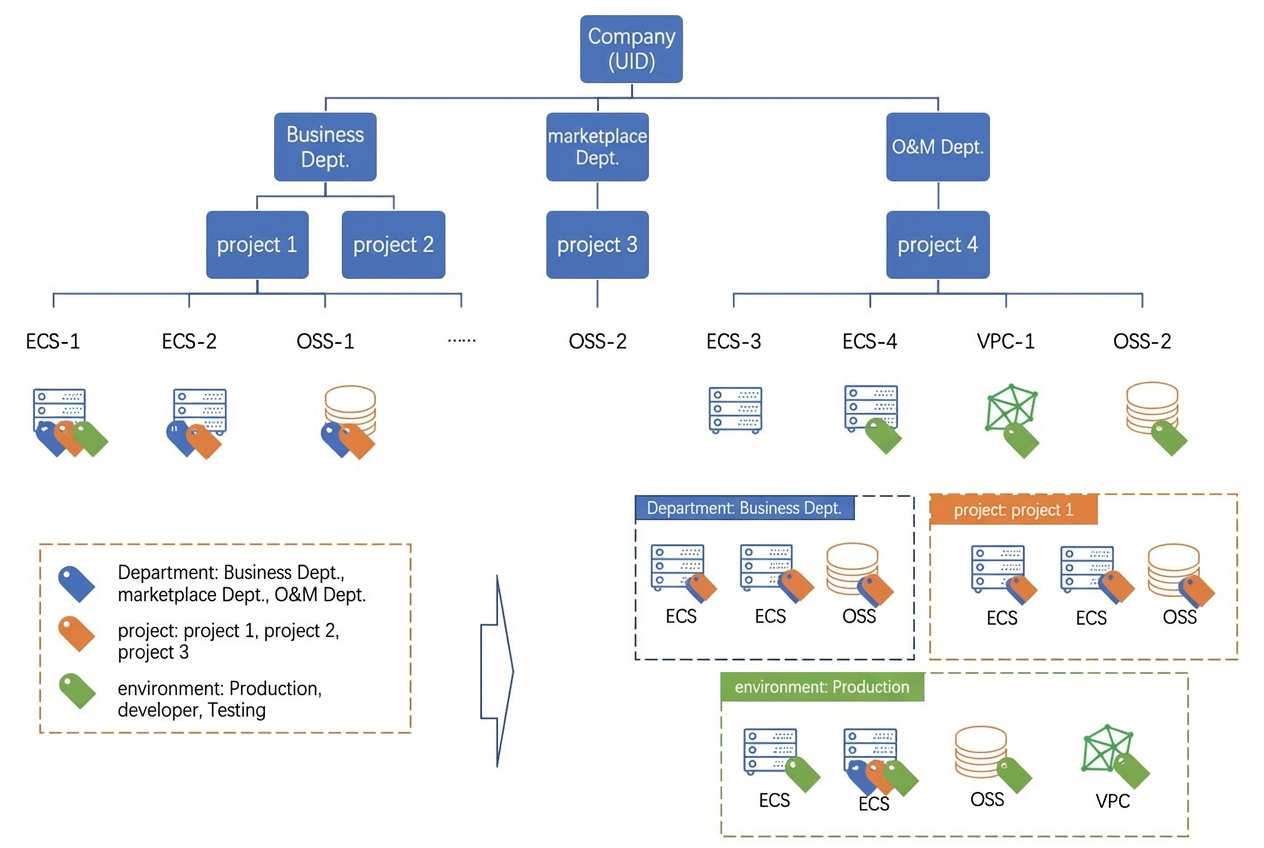
To meet these requirements, the company designed its tags as follows.
|
Requirement |
Tag design |
Description |
|
Retrieve and manage resources |
Create and attach the following three levels of tags to all resources:
|
If your enterprise has a deep organizational hierarchy, consider adding higher-level tags, such as a tag for the branch office (company). |
|
Manage costs and cost allocation |
Create and attach a cost center tag to all resources:
|
None |
|
Resource access control |
Restrict non-project members from accessing project resources, such as ECS instances. |
For more information, see Use tags to restrict RAM users from managing specified ECS instances. |
|
Automated O&M |
Create a purpose tag with the key purpose for daily resource inspections. Set the value to autocheck-8am to indicate an automatic inspection at 8:00 AM every day. If an inspection finds an abnormality, use the resource owner tag owner to notify the responsible person to handle it. |
None |
Tag design examples
The following table lists examples of tag designs for common dimensions.
|
Classification dimension |
Tag key |
Tag value |
|
Organizational structure |
|
Relevant names |
|
Business architecture |
|
Relevant names |
|
Role architecture |
|
|
|
Purpose |
|
Purpose value |
|
Project |
|
Ensure that you provide accurate information. |
|
Business department (for cost allocation and business tracking) |
|
Actual values |
|
Financial dimension owner (to identify the resource owner) |
owner |
Name or email address |
|
Financial dimension customer (to identify the customer of the resource service) |
Custom or actual value |
Customer name |
|
Financial dimension project (to identify the project supported by the resource) |
project |
Project name |
|
Financial dimension order |
order |
Order category ID |