Tair (Redis® OSS-Compatible):Troubleshoot high instance traffic usage
Last Updated:Jun 20, 2026
As a data layer close to your application services, a Tair (Redis OSS-compatible) instance frequently handles data access and consumes network bandwidth. Different instance types have different bandwidth limits. Exceeding an instance's bandwidth limit can degrade the data access performance of your applications.
Step 1: Check traffic usage
Check the traffic usage for a specific time period. If you have already identified when the traffic spiked, you can skip this step and proceed to Step 2: Quick troubleshooting.
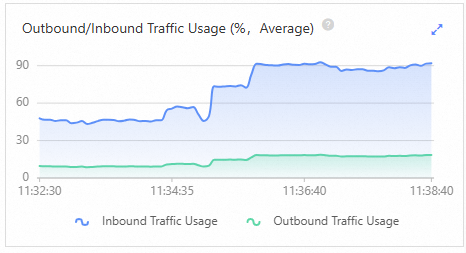
In this example, both inbound and outbound traffic usage quickly rises to and remains at 90%.
Note
Typically, if the average traffic usage consistently stays at 80% or higher, it may indicate that your bandwidth is insufficient.
The key metrics to monitor are inbound traffic usage (Intranet In Ratio) and outbound traffic usage (Intranet Out Ratio).
Figure 1. Traffic usage example
Step 2: Quick troubleshooting
Several issues can cause a sudden increase in instance traffic. Investigate the following potential causes one by one.
Note
Before you begin, if the issue is critical, you can temporarily adjust the instance bandwidth. This helps reduce the impact on your services and gives you more time to investigate the root cause.
Large keys and hotkeys
First, use the offline key analysis feature to check for large keys or hotkeys. If any are found, the console displays the specific keys.
Note
Impact: Large keys can cause sudden traffic spikes, while hotkeys can lead to a sustained increase in traffic.
The console displays two tables: Top 100 Hotkeys (by QPS) (default threshold: 5,000 QPS), with columns for Key, Instance/Node Name, Data Type, DB, and Access Frequency; and Top 100 Large Keys (by element count), with columns for Key, Instance/Node Name, Data Type, DB, and Number of Elements.
If hotkeys are found: For a long-term solution, we recommend splitting the hotkeys based on your business logic, such as by user ID or time range. You can also use the following features to mitigate the impact:
Enable QPS throttling: This feature allows you to set custom read/write types and QPS thresholds. When enabled, it limits the number of client requests to improve system stability.
If large keys are found: We recommend splitting them based on your business logic, reducing access to them, or deleting unnecessary ones. For more information, see Large keys and hotkeys.
Slow queries
Check the slow query log to see if any slow queries were recently executed. If any are found, the console displays the specific commands.
Note
Impact: Slow queries can block subsequent commands and cause sudden spikes in bandwidth usage.
If slow queries are found, consider disabling high-risk commands such as KEYS and HGETALL in your production environment.
Business traffic growth
If traffic usage remains high after these optimizations, it may be due to organic business growth. Consider upgrading to an instance type with more memory or changing the instance architecture, such as upgrading to a cluster architecture or a read/write splitting architecture, to handle higher network traffic.
Note
Before you upgrade your instance, you can purchase a pay-as-you-go instance to test whether the target instance type meets your workload requirements. You can release the instance after the test is complete.