TairVector is an extended data structure from Tair for high-performance, real-time vector storage and retrieval.
TairVector
TairVector uses a multi-layer hash data structure.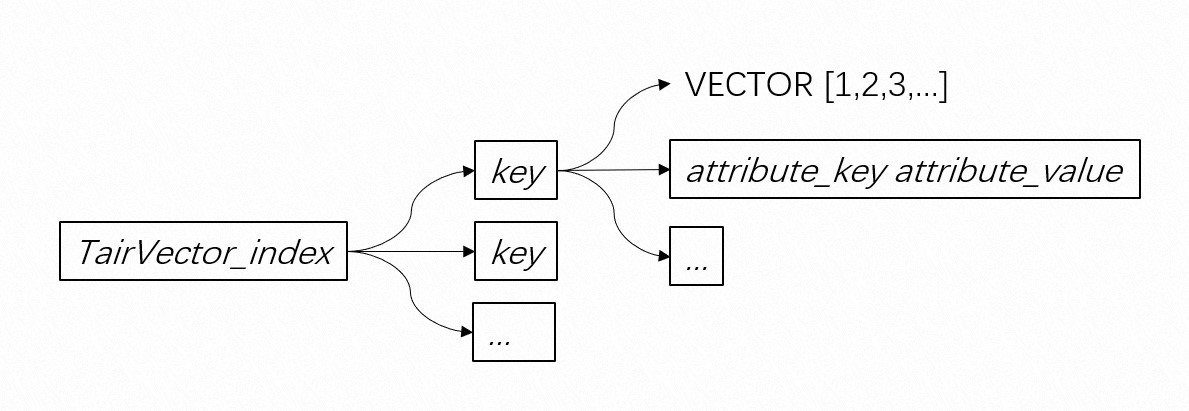 TairVector provides two indexing algorithms: Hierarchical Navigable Small World (HNSW) and flat search:
-
HNSW: Creates graph-based indexes for vector search and supports asynchronous space reclamation. This approach ensures high query accuracy while balancing performance with real-time updates.
-
flat search: Provides 100% query accuracy and fast data insertion, making it ideal for small datasets.
TairVector also supports multiple distance metrics, such as Euclidean distance, inner product, cosine distance, and Jaccard distance. Compared with traditional vector search services, TairVector offers the following advantages:
-
Stores all data in memory and supports real-time index updates to achieve lower read and write latency.
-
Uses an optimized in-memory data structure to reduce memory usage.
-
Provides an out-of-the-box cloud service with a simple and efficient architecture without complex component dependencies.
-
Supports hybrid search, which combines vector search with full-text search.
-
Supports creating an inverted index on scalars, such as tag attributes. This enables a k-nearest neighbor (KNN) search to first filter by scalars and then perform a vector search on the filtered results.
Release notes
-
October 13, 2022: TairVector was released on Tair DRAM-based instances compatible with Redis 6.0.
-
November 22, 2022 (Version 6.2.2.0): Added support for the Jaccard distance metric. Enhanced the TVS.GETINDEX command to return memory usage statistics for each index in the
index_data_sizeandattribute_data_sizefields. -
December 26, 2022 (Version 6.2.3.0): Added support for proxy mode in clusters, the FLOAT16 vector data type, and the TVS.MINDEXKNNSEARCH and TVS.MINDEXMKNNSEARCH commands.
-
July 4, 2023 (Version 6.2.8.2): Added support for the cosine distance metric and automatic garbage collection for HNSW indexes.
-
August 3, 2023 (Version 23.8.0.0): Added support for setting a time-to-live (TTL) at the key level with commands like TVS.HEXPIREAT and TVS.HPEXPIREAT, and for vector nearest neighbor searches on specified key lists with the TVS.GETDISTANCE command. This version also introduced full-text search by updating commands such as TVS.CREATEINDEX and TVS.KNNSEARCH, which enables hybrid search.
-
June 6, 2024 (Version 24.5.1.0): Added the TVS.KNNSEARCHFIELD and TVS.MINDEXKNNSEARCHFIELD commands to return tag attribute information during nearest neighbor searches.
-
July 22, 2024 (Version 24.7.0.0): Enabled HNSW indexes for sparse vectors.
Best practices
Prerequisites
The instance must be a DRAM-based instance compatible with Redis 6.0 or later.
A DRAM-based instance running Redis 5.0 cannot be upgraded to Redis 6.0. To use Redis 6.0, you must create a new DRAM-based instance.
Notes
-
These operations apply to TairVector data in a Tair instance.
-
TairVector does not support the Redis hashtags feature on fields such as index_name and Key.
-
TairVector does not support commands such as MOVE.
-
For high data persistence requirements, enable the semi-synchronous replication mode.
Command reference
Table 1. TairVector commands
|
Type |
Command |
Syntax |
Description |
|
Index operations |
|
Creates a vector index, specifying the algorithm for building and querying the index, and the distance function. The index can be deleted only with the |
|
|
|
Retrieves the metadata of a specified vector index. |
||
|
|
Deletes a specified vector index and all the data it contains. |
||
|
|
Incrementally scans for vector indexes in a Tair instance that match the specified criteria. |
||
|
Vector data operations |
|
Inserts a data record into a vector index. If a data record with the specified key already exists, the existing record is overwritten. |
|
|
|
Retrieves all attributes and values of the data record for the specified key in a vector index. |
||
|
|
Returns the values of the specified attribute keys for a given key in a vector index. |
||
|
|
Deletes the specified data record (key) from the specified vector index. |
||
|
|
Deletes one or more attribute_keys and their values from a record (key) in a vector index. |
||
|
|
Scans for data records (identified by key) that meet specified conditions within a given vector index. |
||
|
|
Increments the integer value of |
||
|
|
Increments the value of |
||
|
|
Sets the absolute expiration time in milliseconds for a data record, identified by its key, within a specified vector index. |
||
|
|
Sets a relative expiration time in milliseconds for a specified key in a vector index. |
||
|
|
Sets an absolute expiration time for a specified key in a vector index, accurate to the second. |
||
|
|
Sets a relative expiration time in seconds for a specified vector (key) in a vector index. |
||
|
|
Returns the TTL, in milliseconds, for a specified data record (key) in a vector index. |
||
|
|
Retrieves the TTL in seconds for a specified data record (key) in a specified vector index. |
||
|
|
Returns the absolute expiration time of a specified data record (key) in a vector index, as a Unix timestamp in milliseconds. |
||
|
|
Returns the absolute expiration time of a specified data record (key) in a vector index as a Unix timestamp in seconds. |
||
|
Vector nearest-neighbor queries |
|
Performs a nearest-neighbor query for a specified vector in a vector index and returns up to topN results. |
|
|
|
Searches a vector index for the nearest neighbors of a specified vector. The search logic is identical to TVS.KNNSEARCH, but this command also returns tag attributes. |
||
|
|
Finds the nearest neighbors of a query vector from a specified list of keys within a vector index. |
||
|
|
Performs a batch nearest neighbor search for multiple vectors in a specified vector index. |
||
|
|
Searches for the nearest neighbors of a specified vector across multiple vector indexes. |
||
|
|
Performs a nearest neighbor query for a specified vector across multiple vector indexes and optionally returns tags. |
||
|
|
Searches multiple vector indexes for the nearest neighbors of multiple vectors. |
||
|
General |
|
Deletes one or more TairVector indexes using the native Redis DEL command. |
The following list describes the conventions for the command syntax used in this topic:
Uppercase keyword: indicates the command keyword.Italic text: indicates variables.[options]: indicates that the enclosed parameters are optional. Parameters that are not enclosed by brackets must be specified.A|B: indicates that the parameters separated by the vertical bars (|) are mutually exclusive. Only one of the parameters can be specified....: indicates that the parameter preceding this symbol can be repeatedly specified.
TVS.CREATEINDEX
|
Item |
Description |
|
Syntax |
|
|
Time complexity |
O(1) |
|
Command description |
Creates a vector index, specifying the algorithm for building and querying the index, and the distance function. The index can be deleted only with the |
|
Parameters |
|
|
Return value |
|
|
Example |
Sample commands: Sample output: |
TVS.GETINDEX
|
Item |
Description |
|
Syntax |
|
|
Time complexity |
O(1) |
|
Command description |
Retrieves the metadata of a specified vector index. |
|
Parameter |
|
|
Output |
|
|
Example |
Run the following commands first: Sample command for an HNSW index: Sample output: |
TVS.DELINDEX
|
Item |
Description |
|
syntax |
|
|
time complexity |
O(N), where N is the number of keys in the vector index. |
|
description |
Deletes a specified vector index and all the data it contains. |
|
parameter |
|
|
return value |
|
|
example |
Command: Output: |
TVS.SCANINDEX
|
Item |
Description |
|
Syntax |
|
|
Time complexity |
O(N), where N is the number of vector indexes in the Tair instance. |
|
Command description |
Incrementally scans for vector indexes in a Tair instance that match the specified criteria. |
|
Options |
|
|
Output |
|
|
Example |
Sample command: Sample output: Sample command with a pattern: Sample output: |
TVS.HSET
|
Item |
Description |
|
Syntax |
|
|
Time complexity |
The time complexity is O(1) if no vector data is created or updated; otherwise, it is O(log(N)), where N is the number of keys in the vector index. |
|
Command description |
Inserts a data record into a vector index. If a data record with the specified key already exists, the existing record is overwritten. |
|
Parameters |
|
|
Return value |
|
|
Example |
Sample command: Sample output: |
TVS.HGETALL
|
Item |
Description |
|
Syntax |
|
|
Time complexity |
O(1) |
|
Command description |
Retrieves all attributes and values of the data record for the specified key in a vector index. |
|
Parameter |
|
|
Return value |
|
|
Example |
Command example: Return example: |
TVS.HMGET
|
Item |
Description |
|
Syntax |
|
|
Time complexity |
O(1) |
|
Command description |
Returns the values of the specified attribute keys for a given key in a vector index. |
|
Parameters |
|
|
Returns |
|
|
Example |
Sample command: Sample output: |
TVS.DEL
|
Item |
Description |
|
Syntax |
|
|
Time complexity |
O(1) |
|
Command description |
Deletes the specified data record (key) from the specified vector index. |
|
Parameter |
|
|
Return value |
|
|
Example |
Sample command: Sample output: |
TVS.HDEL
|
Item |
Description |
|
Syntax |
|
|
Time complexity |
O(1) |
|
Command description |
Deletes one or more attribute_keys and their values from a record (key) in a vector index. |
|
Parameters |
|
|
Return value |
|
|
Example |
Sample command: Sample output: |
TVS.SCAN
|
Category |
Description |
|
Syntax |
|
|
Time complexity |
O(N), where N is the number of keys in the vector index. |
|
Command description |
Scans for data records (identified by key) that meet specified conditions within a given vector index. |
|
Parameters |
|
|
Return value |
|
|
Example |
Example command: Example return value: |
TVS.HINCRBY
|
Category |
Description |
|
Syntax |
|
|
Time complexity |
O(1) |
|
Command description |
Increments the integer value of If |
|
Parameters |
|
|
Return value |
|
|
Example |
Sample command: Sample output: |
TVS.HINCRBYFLOAT
|
Category |
Description |
|
Syntax |
|
|
Time complexity |
O(1) |
|
Command description |
Increments the value of If the specified |
|
Parameters |
|
|
Return value |
|
|
Example |
Example command: Example output: |
TVS.HPEXPIREAT
|
Category |
Description |
|
Syntax |
|
|
Time complexity |
O(1) |
|
Command description |
Sets the absolute expiration time in milliseconds for a data record, identified by its key, within a specified vector index. |
|
Parameters |
|
|
Return value |
|
|
Example |
Sample command: Sample output: |
TVS.HPEXPIRE
|
Item |
Description |
|
Syntax |
|
|
Time complexity |
O(1) |
|
Command description |
Sets a relative expiration time in milliseconds for a specified key in a vector index. |
|
Parameters |
|
|
Return value |
|
|
Example |
Sample command: Sample output: |
TVS.HEXPIREAT
|
Category |
Description |
|
Syntax |
|
|
Time complexity |
O(1) |
|
Command description |
Sets an absolute expiration time for a specified key in a vector index, accurate to the second. |
|
Options |
|
|
Return value |
|
|
Example |
Command example: Return example: |
TVS.HEXPIRE
|
Category |
Description |
|
Syntax |
|
|
Time complexity |
O(1) |
|
Command description |
Sets a relative expiration time in seconds for a specified vector (key) in a vector index. |
|
Parameters |
|
|
Output |
|
|
Example |
Sample command: Sample output: |
TVS.HPTTL
|
Category |
Description |
|
Syntax |
|
|
Time complexity |
O(1) |
|
Command description |
Returns the TTL, in milliseconds, for a specified data record (key) in a vector index. |
|
Parameters |
|
|
Return value |
|
|
Example |
Sample command: Sample output: |
TVS.HTTL
|
Category |
Description |
|
Syntax |
|
|
Time complexity |
O(1) |
|
Command description |
Retrieves the TTL in seconds for a specified data record (key) in a specified vector index. |
|
Parameters |
|
|
Return value |
|
|
Example |
Command example: Return example: |
TVS.HPEXPIRETIME
|
Category |
Description |
|
Syntax |
|
|
Time complexity |
O(1) |
|
Command description |
Returns the absolute expiration time of a specified data record (key) in a vector index, as a Unix timestamp in milliseconds. |
|
Parameter |
|
|
Return value |
|
|
Example |
Sample command: Sample output: |
TVS.HEXPIRETIME
|
Item |
Description |
|
Syntax |
|
|
Time complexity |
O(1) |
|
Command description |
Returns the absolute expiration time of a specified data record (key) in a vector index as a Unix timestamp in seconds. |
|
Parameters |
|
|
Output |
|
|
Example |
Sample command: Sample output: |
TVS.KNNSEARCH
|
Item |
Description |
|
Syntax |
|
|
Time complexity |
N is the number of keys in the vector index. |
|
Command description |
Performs a nearest-neighbor query for a specified vector in a vector index and returns up to topN results. |
|
Parameters |
|
|
Return value |
|
|
Examples |
Run the following commands in advance: Example 1: Response 1: Example 2: Response 2: |
TVS.KNNSEARCHFIELD
|
Item |
Description |
|
Syntax |
|
|
Time complexity |
N is the number of keys in the vector index. |
|
Command description |
Searches a vector index for the nearest neighbors of a specified vector. The search logic is identical to TVS.KNNSEARCH, but this command also returns tag attributes. |
|
Parameter |
|
|
Return value |
|
|
Example |
Run the following commands first: Sample command: Sample output: |
TVS.GETDISTANCE
|
Item |
Description |
|
Syntax |
|
|
Time complexity |
N is the number of keys in the vector index. |
|
Command description |
Finds the nearest neighbors of a query vector from a specified list of keys within a vector index. |
|
Parameter |
|
|
Output |
|
|
Example |
Run the following commands first: Sample command: Sample output: |
TVS.MKNNSEARCH
|
Item |
Description |
|
Syntax |
|
|
Time complexity |
N is the number of keys in the vector index. |
|
Command description |
Performs a batch nearest neighbor search for multiple vectors in a specified vector index. |
|
Parameters |
|
|
Return value |
|
|
Example |
Run the following commands in advance: Sample command: Sample output: |
TVS.MINDEXKNNSEARCH
|
Item |
Description |
|
Syntax |
|
|
Time complexity |
N is the number of keys in the vector index. |
|
Command description |
Searches for the nearest neighbors of a specified vector across multiple vector indexes. |
|
Parameter |
|
|
Output |
|
|
Example |
Run these commands first: Sample command: Sample output: |
TVS.MINDEXKNNSEARCHFIELD
|
Category |
Description |
|
Syntax |
|
|
Time complexity |
N is the number of keys in the vector index. |
|
Command description |
Performs a nearest neighbor query for a specified vector across multiple vector indexes and optionally returns tags. |
|
Parameters |
|
|
Output |
|
|
Example |
Execute the following commands first: Sample command: Sample output: |
TVS.MINDEXMKNNSEARCH
|
Item |
Description |
|
Syntax |
|
|
Time complexity |
N represents the number of keys in the vector index. |
|
Command description |
Searches multiple vector indexes for the nearest neighbors of multiple vectors. |
|
Parameters |
|
|
Return value |
|
|
Example |
Run these commands first: Sample command: Sample output: |