This tutorial shows how to build a cross-modal search system using TairVector and Chinese-CLIP. After completing this tutorial, your system can accept a text query and return matching images, or accept an image and return matching text descriptions.
How it works
Cross-modal search works because CLIP encodes both images and text into the same vector space. Because the embeddings share a common coordinate system, you can measure the distance between a text query and any image directly—without translating one modality into the other. A query like "a running dog" lands near images of running dogs, even if those images were never labeled with that exact phrase.
Chinese-CLIP is an open-source CLIP model from DAMO Academy built on Text Transformer and ResNet architectures. This tutorial uses the RN50 variant, which produces 1,024-dimensional embeddings.
TairVector stores those embeddings and retrieves the nearest neighbors using an approximate nearest neighbor (ANN) algorithm backed by HNSW indexing. For more information about TairVector, see Vector.
Prerequisites
Before you begin, make sure you have:
A running Tair instance with its endpoint and password
Python 3.8 or later
A CUDA-enabled GPU
The following Python packages installed:
Chinese-CLIP installs from GitHub rather than PyPI. Run both commands above.
Package Purpose tairTair Python client for TairVector operations torchPyTorch runtime required by Chinese-CLIP PillowImage loading and processing matplotlibDisplaying result images Chinese-CLIP Embedding model for images and text pip3 install tair torch Pillow matplotlib pip3 install git+https://github.com/OFA-Sys/Chinese-CLIP.gitSample data:
Images: over 7,000 pet images from the Extreme Mart dataset, downloaded to a local directory (for example,
/home/CLIP_Demo)Text: three sample descriptions — "a dog", "a white dog", and "a running white dog"
Step 1: Connect to Tair
Import all dependencies and define a connection function. Replace host and password with your Tair instance values. For custom accounts, set password to username:password.
# -*- coding: utf-8 -*-
from tair import Tair
from tair.tairvector import DistanceMetric
from tair import ResponseError

from typing import List
import torch
from PIL import Image
import pylab
from matplotlib import pyplot as plt
import os
import cn_clip.clip as clip
from cn_clip.clip import available_models


def get_tair() -> Tair:
    """Connect to a Tair instance.
    * host: the endpoint of your Tair instance.
    * port: the port number. Default: 6379.
    * password: the password. For custom accounts, use the username:password format.
    """
    tair: Tair = Tair(
        host="r-8vbehg90y9rlk9****pd.redis.rds.aliyuncs.com",
        port=6379,
        db=0,
        password="D******3",
        decode_responses=True
    )
    return tair
Step 2: Create vector indexes
Create two HNSW indexes—one for image embeddings and one for text embeddings. Both use inner product (IP) as the distance metric and a dimension of 1,024 to match the Chinese-CLIP RN50 output.
def create_index():
    """Create vector indexes for image and text embeddings.
    * Index names: index_images, index_texts
    * Vector dimension: 1024 (matches Chinese-CLIP RN50 output)
    * Distance metric: IP (inner product)
    * Index algorithm: HNSW
    """
    ret = tair.tvs_get_index("index_images")
    if ret is None:
        tair.tvs_create_index("index_images", 1024, distance_type="IP",
                              index_type="HNSW")
    ret = tair.tvs_get_index("index_texts")
    if ret is None:
        tair.tvs_create_index("index_texts", 1024, distance_type="IP",
                              index_type="HNSW")
Step 3: Generate and store embeddings
Use Chinese-CLIP to encode images and text, then store each embedding in TairVector using TVS.HSET.
Image embeddings — each image file path becomes the key, and its 1,024-dimensional vector becomes the value:
def insert_images(image_dir):
    """Generate image embeddings with CLIP and store them in TairVector.
    Each image is stored as:
    * Index: index_images
    * Key: image file path (e.g., test/images/boxer_18.jpg)
    * Value: 1024-dimensional embedding vector
    """
    file_names = [f for f in os.listdir(image_dir) if (f.endswith('.jpg') or f.endswith('.jpeg'))]
    for file_name in file_names:
        image_feature = extract_image_features(image_dir + "/" + file_name)
        tair.tvs_hset("index_images", image_dir + "/" + file_name, image_feature)


def extract_image_features(img_name):
    """Extract a 1024-dimensional embedding from an image using CLIP."""
    image_data = Image.open(img_name).convert("RGB")
    infer_data = preprocess(image_data)
    infer_data = infer_data.unsqueeze(0).to("cuda")
    with torch.no_grad():
        image_features = model.encode_image(infer_data)
    image_features /= image_features.norm(dim=-1, keepdim=True)
    return image_features.cpu().numpy()[0]  # [1, 1024]
Text embeddings — each text string becomes the key:
def upsert_text(text):
    """Generate a text embedding with CLIP and store it in TairVector.
    Each text is stored as:
    * Index: index_texts
    * Key: the text content (e.g., "a running dog")
    * Value: 1024-dimensional embedding vector
    """
    text_features = extract_text_features(text)
    tair.tvs_hset("index_texts", text, text_features)


def extract_text_features(text):
    """Extract a 1024-dimensional embedding from a text string using CLIP."""
    text_data = clip.tokenize([text]).to("cuda")
    with torch.no_grad():
        text_features = model.encode_text(text_data)
    text_features /= text_features.norm(dim=-1, keepdim=True)
    return text_features.cpu().numpy()[0]  # [1, 1024]
The query text or image does not need to be stored in TairVector. Only the indexed embeddings need to be stored in advance.
Step 4: Run cross-modal search
Use topK to control how many results to return. A lower distance value indicates higher similarity.
Text-to-image search — converts a text query into an embedding, then searches the image index:
def query_images_by_text(text, topK):
    """Text-to-image search: find images that match a text description.
    Returns image keys and distance scores. Lower distance = higher similarity.
    """
    text_feature = extract_text_features(text)
    result = tair.tvs_knnsearch("index_images", topK, text_feature)
    for k, s in result:
        print(f'key : {k}, distance : {s}')
        img = Image.open(k.decode('utf-8'))
        plt.imshow(img)
        pylab.show()
Image-to-text search — converts a query image into an embedding, then searches the text index:
def query_texts_by_image(image_path, topK=3):
    """Image-to-text search: find text descriptions that match an image.
    Returns text keys and distance scores. Lower distance = higher similarity.
    """
    image_feature = extract_image_features(image_path)
    result = tair.tvs_knnsearch("index_texts", topK, image_feature)
    for k, s in result:
        print(f'text : {k}, distance : {s}')
Run the full workflow
if __name__ == "__main__":
    # Connect to Tair and create vector indexes for images and texts.
    tair = get_tair()
    create_index()
    # Load the Chinese-CLIP model (RN50 variant).
    model, preprocess = clip.load_from_name("RN50", device="cuda", download_root="./")
    model.eval()

    # Store image embeddings. Replace the path with your dataset directory.
    insert_images("/home/CLIP_Demo")
    # Store text embeddings.
    upsert_text("a dog")
    upsert_text("a white dog")
    upsert_text("a running white dog")

    # Text-to-image search: find the top 3 images matching "a running dog".
    query_images_by_text("a running dog", 3)
    # Image-to-text search: find text descriptions matching the specified image.
    query_texts_by_image("/home/CLIP_Demo/boxer_18.jpg", 3)
Results
Text-to-image search — query "a running dog", top 3 results:
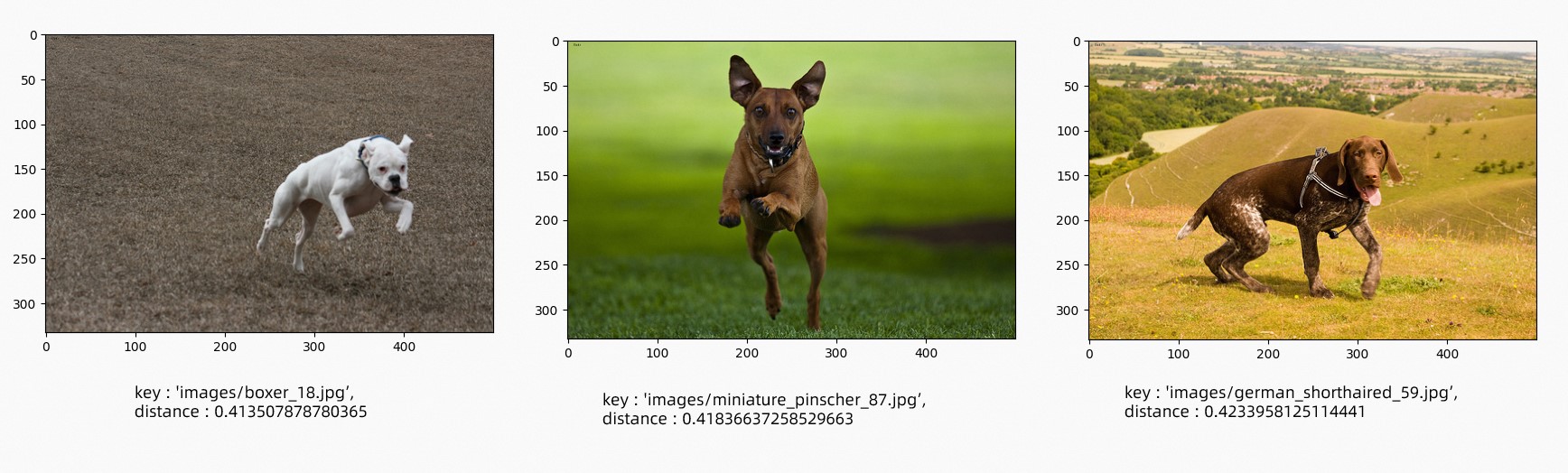
Image-to-text search — input image:
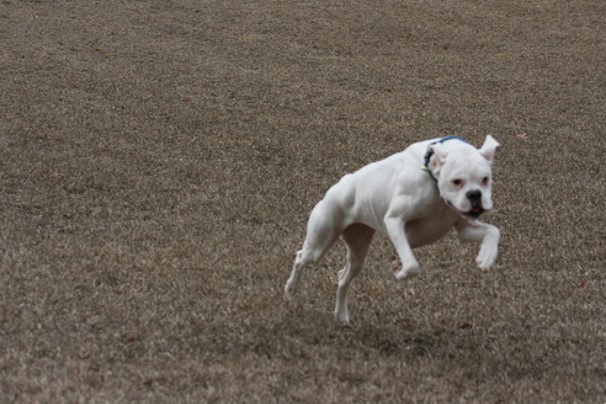
Results ranked by similarity (lowest distance = highest similarity):
{
  "results": [
    {
      "text": "a running white dog",
      "distance": "0.4052203893661499"
    },
    {
      "text": "a white dog",
      "distance": "0.44666868448257446"
    },
    {
      "text": "a dog",
      "distance": "0.4553511142730713"
    }
  ]
}
What's next
Tair is an in-memory database with built-in HNSW indexing, making it well suited for real-time retrieval. Apply this pattern to use cases such as:
Product recommendation: accept a text description and return matching product images
Image captioning: accept a product image and return candidate descriptions
Extended modalities: swap Chinese-CLIP for another embedding model to support video-text or audio-text retrieval